Plug Sample #9 - Get Notified on Cliq When Your Premium Customers Interact with SalesIQ's Zobot

Plug Sample #9 - Get Notified on Cliq When Your Premium Customers Interact with SalesIQ's Zobot

Hi everyone! 

We're here with another simple yet effective plug for your chatbot to integrate with Zoho Cliq to make your job easier. Just imagine whenever a potential lead or your premium customers are on your website, and they engage with your chatbot, you'll receive instant notifications on Cliq, complete with their details and a chat URL.

Sounds helpful, right? 

Now get all this information on your cliq as a message. If a prospect or a premium customer is conversing with the bot, then on a click you will be redirected to SalesIQ. You will get the complete information of the chat and can also take over the chat from the bot, thus providing your best assistance. 



Are you new to SalesIQ? Wondering what these plugs and bots are?

Zoho SalesIQ is a customer engagement and live chat platform for your website. To automate customer engagement, SalesIQ offers chatbots. With the Codeless bot builder, you can build chatbots by dragging and dropping cards. This bot builder has almost all essential cards needed to build your bot. However, at times, businesses would require unique actions from the bot and for those instances, we have Plugs. With plugs, you can create a unique action and bring it as a card inside the codeless bot builder like the rest of the cards. In this post, we will take a look at how to create a plug integrating your bot with Zoho Cliq and the possible benefits. 

How can this Plug help your business?
  • Get notified in Cliq when a specific type of visitor engages with chatbot. These visitors can be who you think are important for your business like premium customers, potential leads, visitor with a good lead score, visitors from a specific URL or source, visitor with CRM deal closing date period, etc. as per your requirement.
  • Cliq bot will notify on the personal chat (subscribers of the bot) or on a group channel based on the preference.
  • Get your visitor details like name, chat URL, and other information, in the message notification. 
  • Clicking on the chat URL, you will get redirected to the SalesIQ's bot conversation, where you can look at the bot chat. If required, you can take over the chat. 

Plug overview
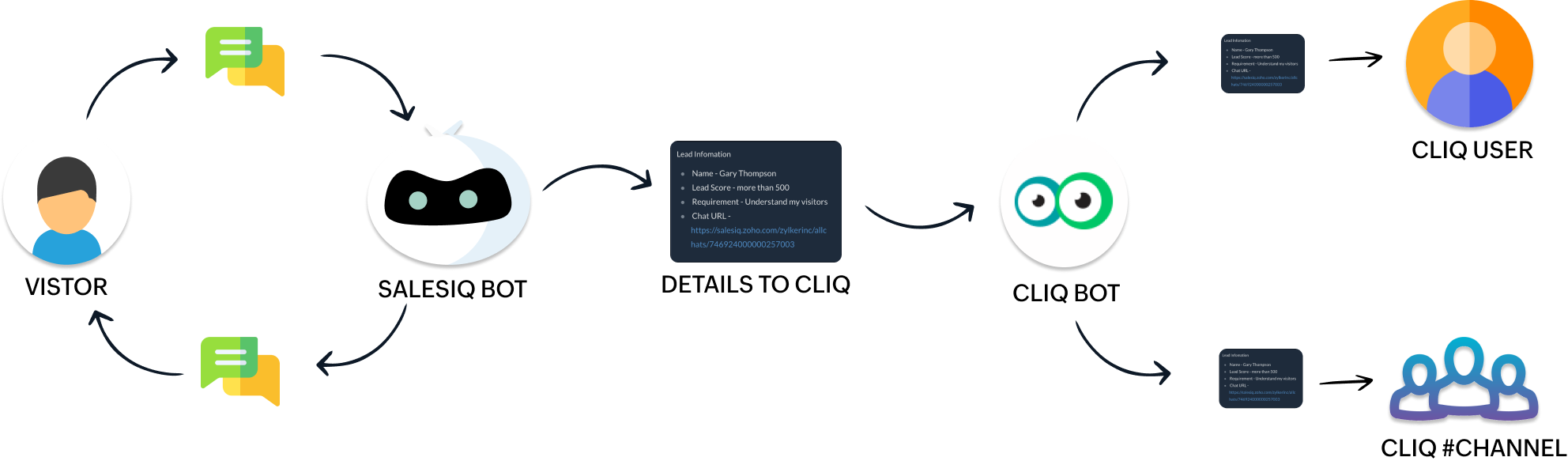


  • The SalesIQ bot will collect the required information and send it to the Cliq bot while the conversation is ongoing. 
  • Next, the Cliq bot will send this information to personal chat or a group channel in Cliq as per your business needs.

How to build this Plug (promising lead engages with your bot) ?

Step 1 - Create a connection between SalesIQ and Zoho Cliq
  • In your SalesIQ Dashboard, navigate to Settings > Developers > Plugs > Click on Add .
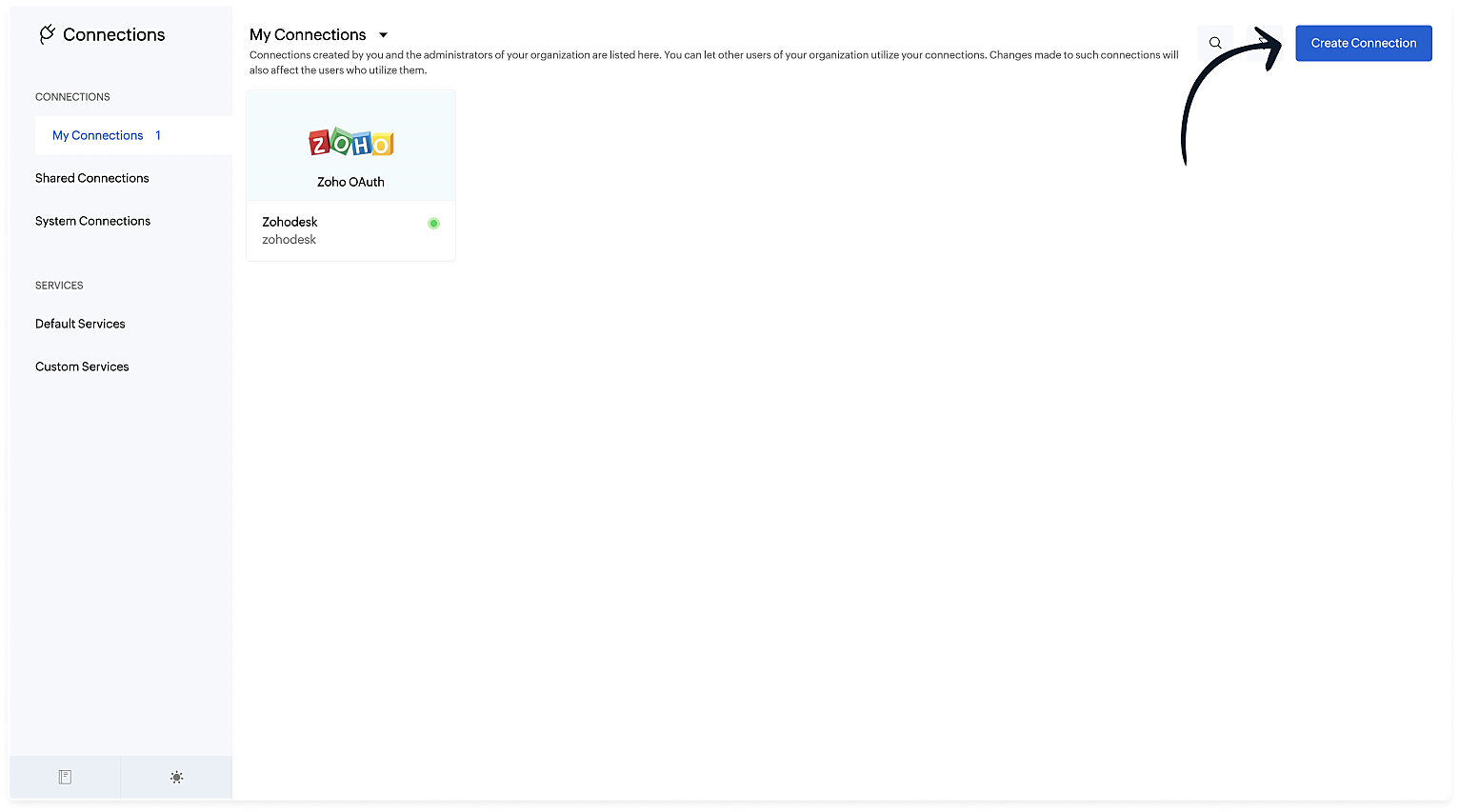
  • Provide your plug a name, and description, select the Platform as SalesIQ Scripts , and finally, click on Connection to your left bottom. You will be redirected to the connection interface.
  • Click on Create connection at the top right corner. 
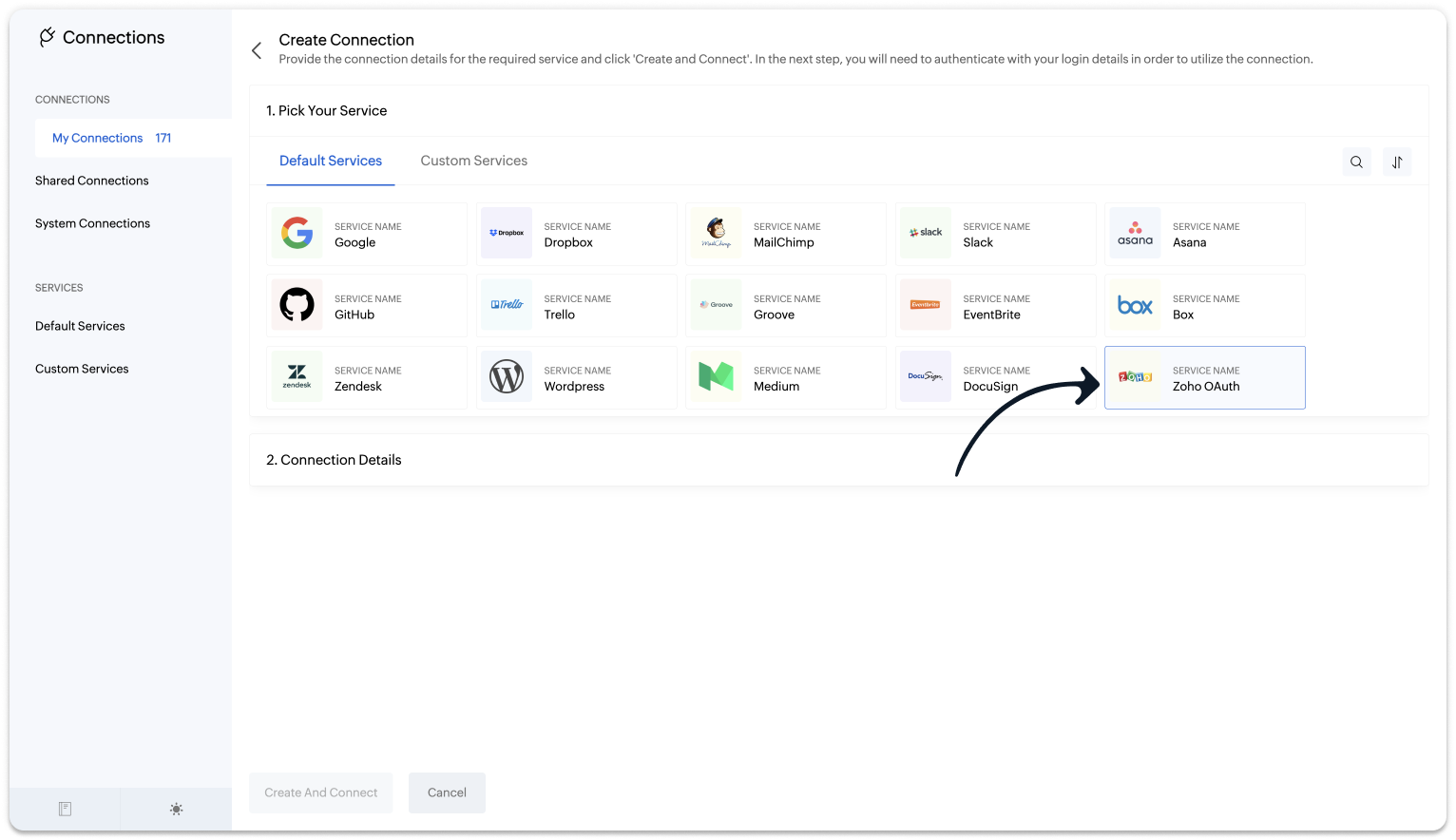
  • Under Default connection, select Zoho OAuth service. 
  • Provide your connection name, connection link name, and choose the scopes below.
    • ZohoCliq.Webhooks.CREATE
    • ZohoCliq.Messages.ALL
  • Click on Create And Connect to connect Zoho SalesIQ and Zoho Cliq.
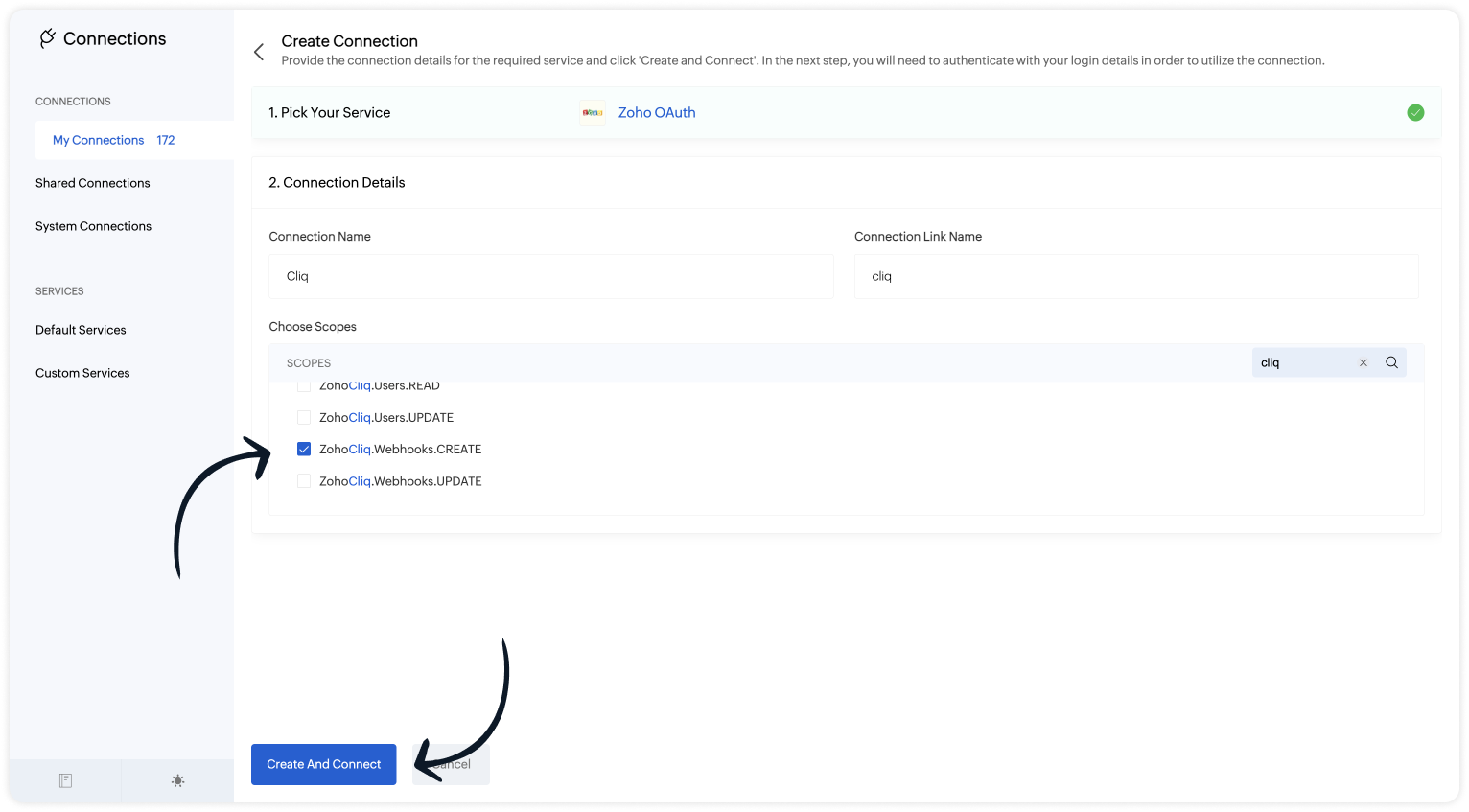

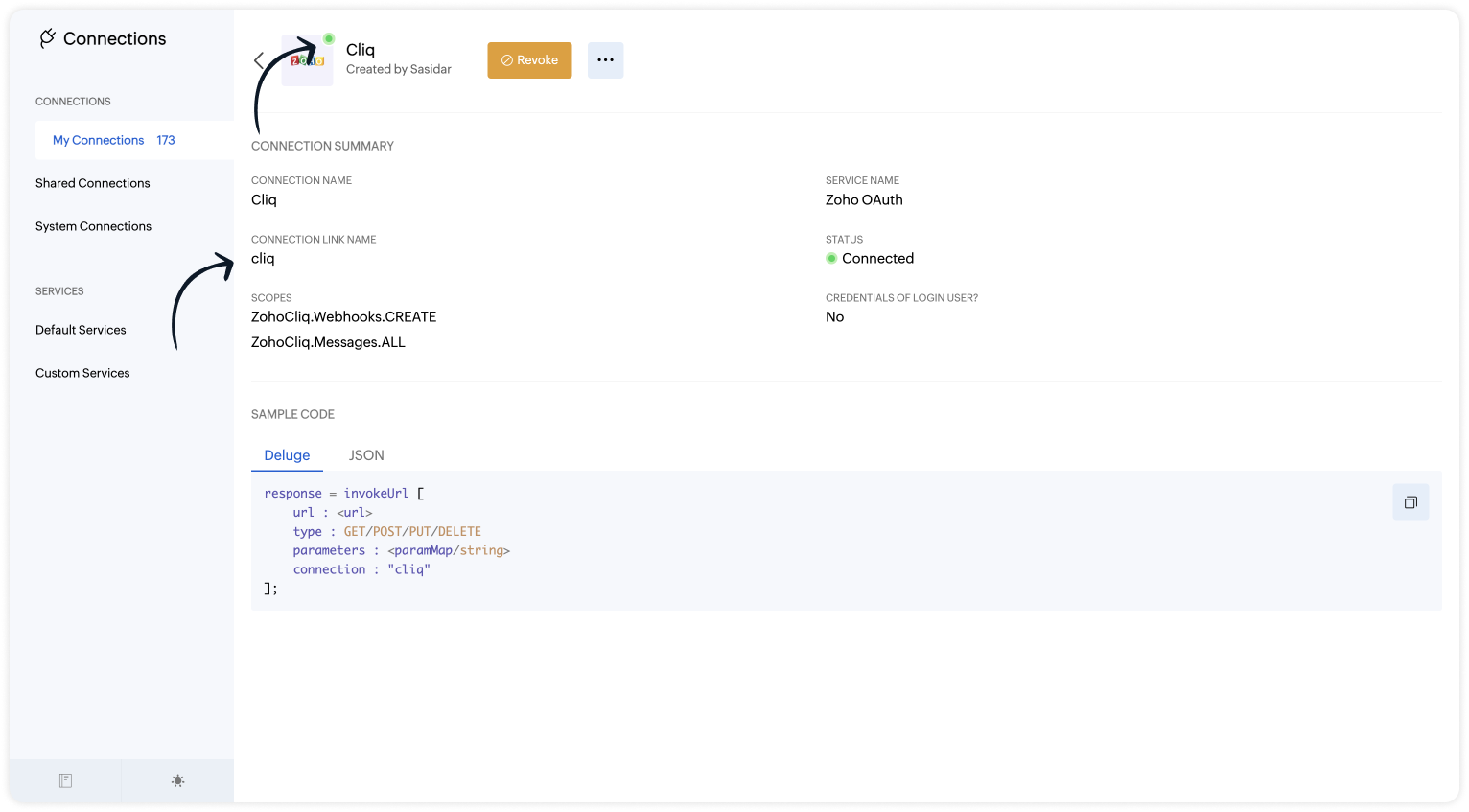
Note: The Connection Link Name will be used in the scripts to invoke URL tasks.

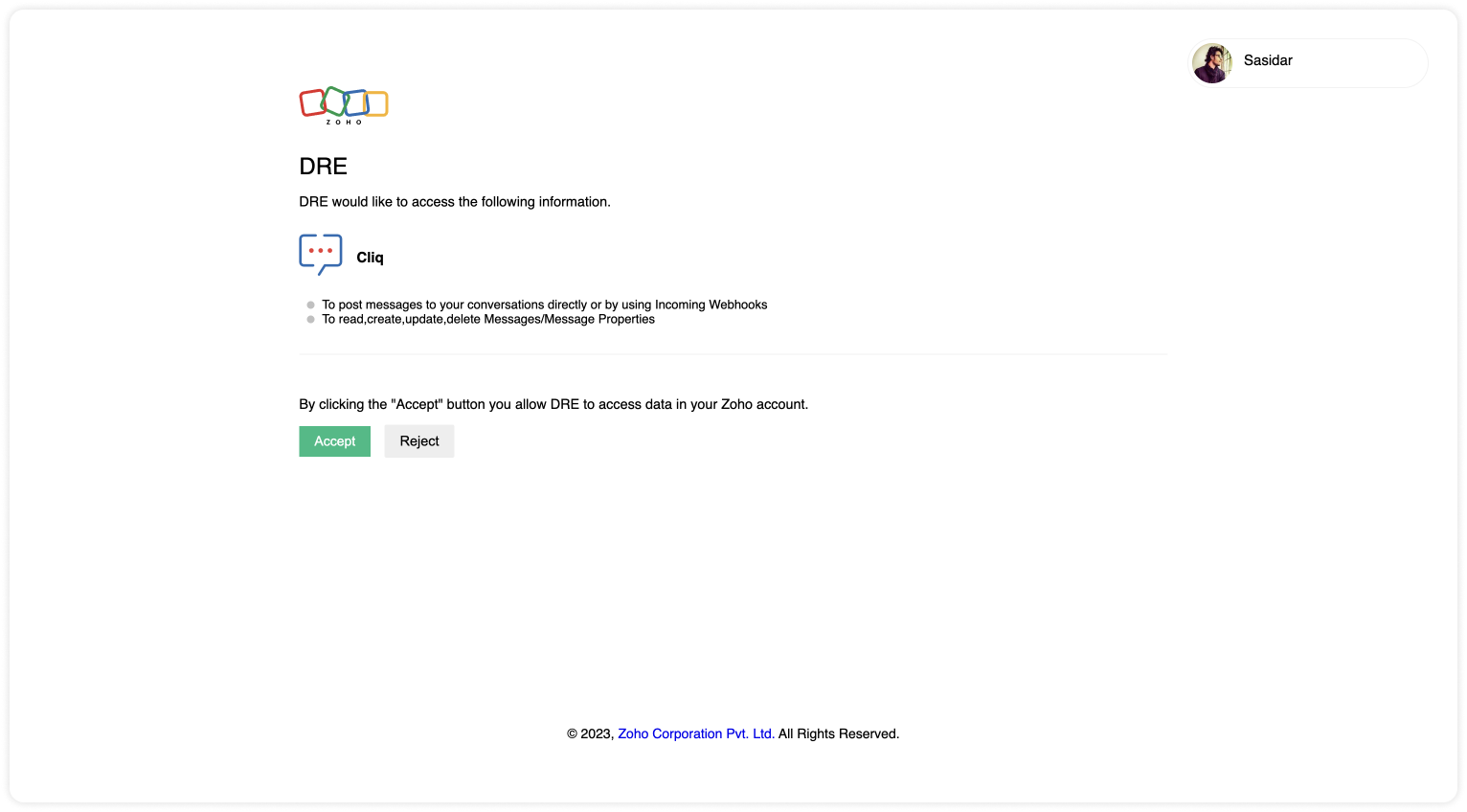
Upon successful authentication,  Zoho SalesIQ will be connected with Zoho Cliq. 

  • The connection is successfully established. 

Step 2 - Build the Plug

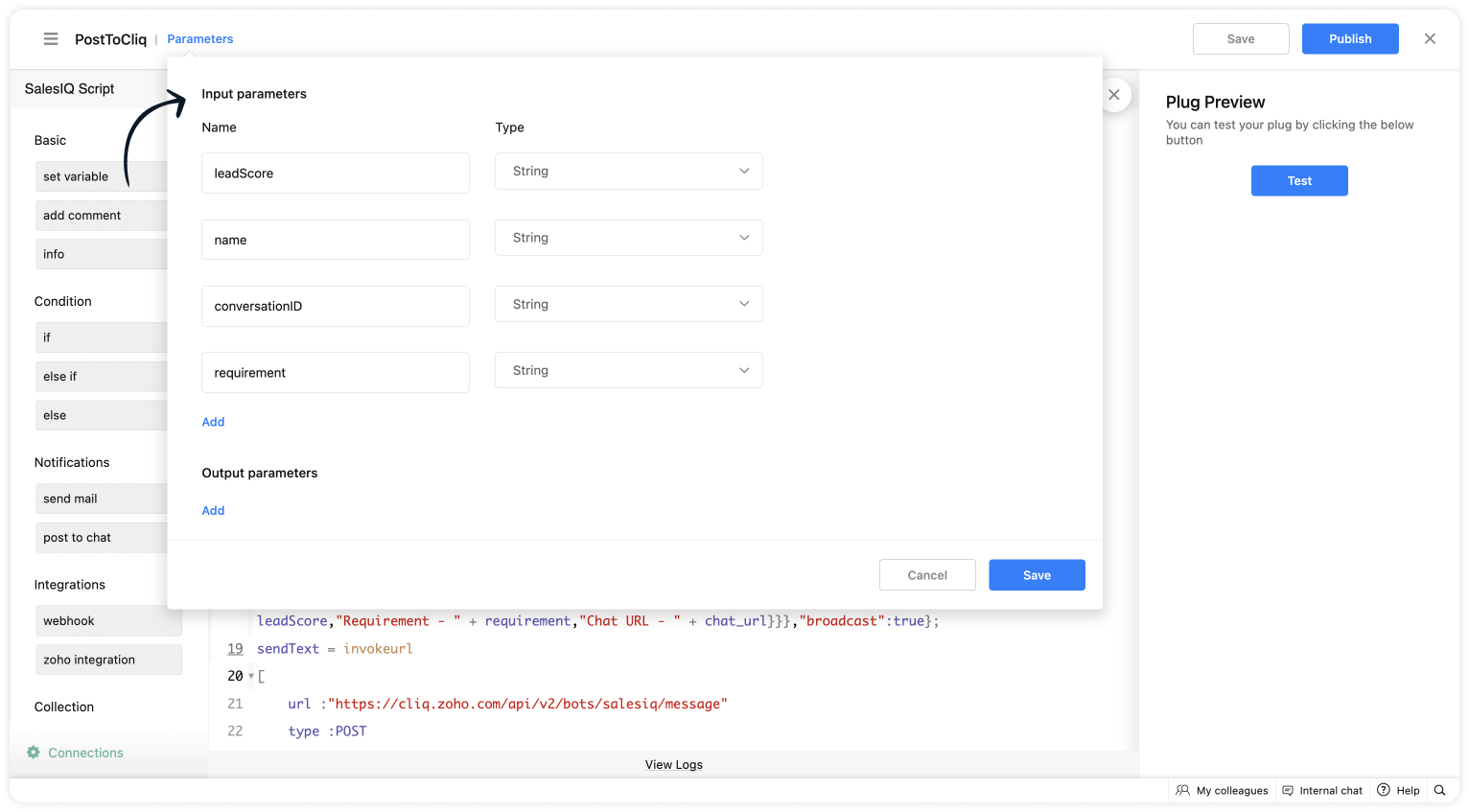
As we have created a connection between SalesIQ and Cliq successfully. It's time to build the plug.  The first step in building the plug is defining the parameters. You can enter the metrics (information) which you want the SalesIQ bot to send to Cliq bot. I've taken the name, lead score, requirement (lead's interest) and conversation ID to create the chat URL.  

Input Parameters
  • Name : name | Type : String
  • Name : leadScore | Type : String
  • Name : requirement | Type : String
  • Name : conversationID | Type : String


Script to notify a specific user via Cliq bot

If you want to notify (post information) to specific users in Cliq, copy the code below and paste it into your plug builder. Then, make the following changes. 
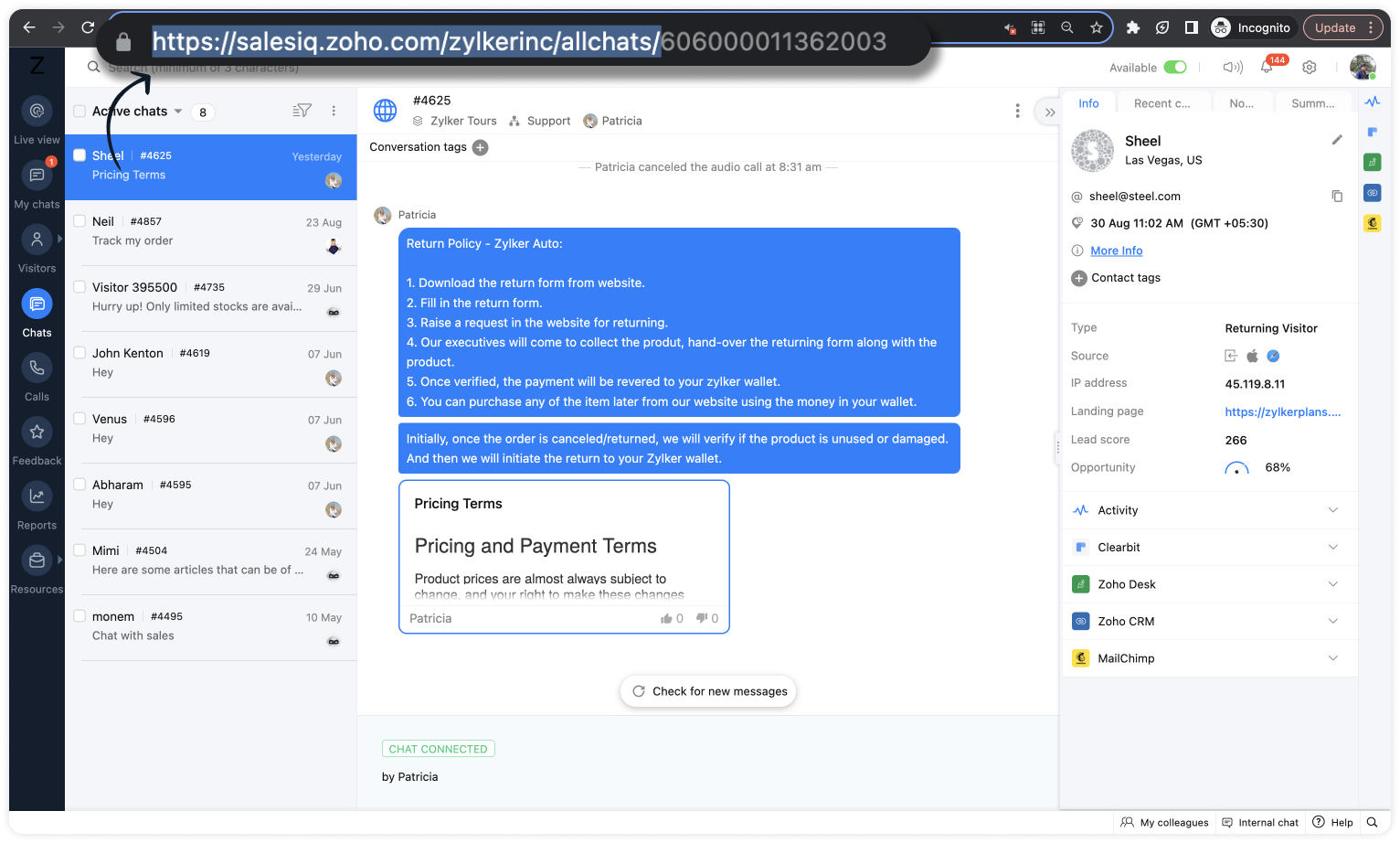
  • In line #16, get your portal's chat URL. For that, navigate to SalesIQ > Chats > Copy the URL except the conversation ID.
  • In line #22, replace the cliq bot name in the URL. To get the bot name from your Cliq dashboard, click on your profile in the top right corner > Bots & Tools. Then, create a new bot or click on any existing bot. (All subscribers of this bot will get notified.)
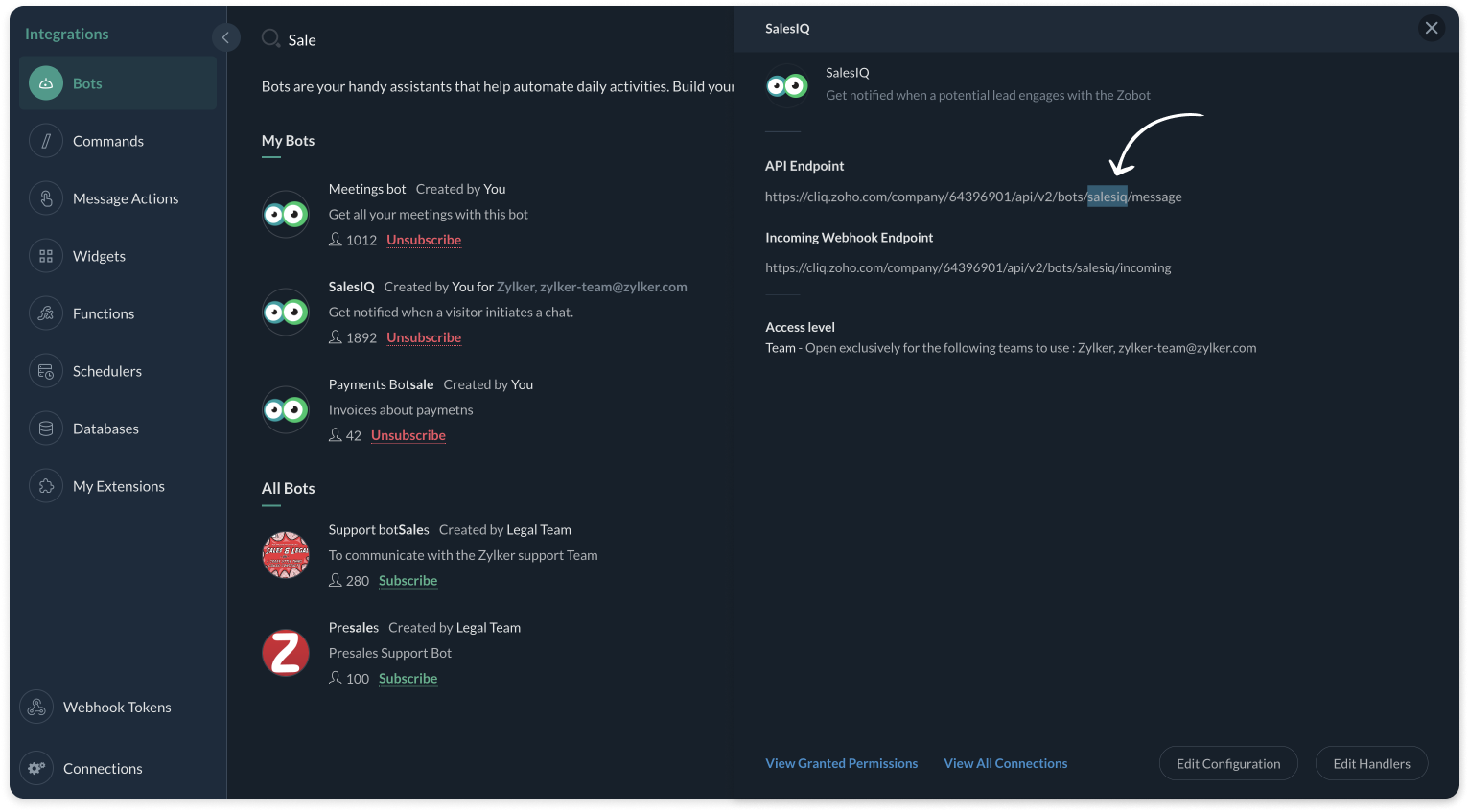
  • And, make sure, the connnection line name in line #25 is same as created during creating the connection between SalesIQ and Cliq (Step 1).
Plug Script/Code
  1. if(session.containsKey("name"))
  2. {
  3. name = session.get("name").get("value");
  4. }
  5. if(session.containsKey("leadScore"))
  6. {
  7. leadScore = session.get("leadScore").get("value");
  8. }
  9. if(session.containsKey("requirement"))
  10. {
  11. requirement = session.get("requirement").get("value");
  12. }
  13. if(session.containsKey("conversationID"))
  14. {
  15. id = session.get("conversationID").get("value");
  16. chat_url = "https://salesiq.zoho.com/zylkerinc/allchats/" + id;
  17. }
  18. list_data = {"text":"Lead Infomation","slides":{{"type":"list","data":{"Name - " + name,"Lead Score - " + leadScore,"Requirement - " + requirement,"Chat URL - " + chat_url}}},"broadcast":true};
  19. //replace your cliq bot name (salesiq)  in line #22
  20. sendText = invokeurl
  21. [
  22. url :"https://cliq.zoho.com/api/v2/bots/salesiq/message"
  23. type :POST
  24. parameters:list_data + ""
  25. connection:"cliq"
  26. ];
  27. response = Map();
  28. return response;
  • Then, click Save, preview the plug and Publish it. 
Note: API invoked in the plug is Post message to a bot

Script to notify a specific channel via Cliq bot

If you want to notify (post information) to a specific channel in Cliq, copy the code below and paste it in your plug builder. Then, make the following changes. 
  • In line #16, get your portal's chat URL. For that, navigate to SalesIQ > Chats > Copy the URL except the conversation ID.
  • In line #22, replace the Cliq bot and channel name in the URL. To get the bot name, click on your profile in the top right corner > Bots & Tools. Then, create a new bot or click on any existing bot. To get the channel name, click on the channel properties and get the channel's Unique Name. 
  • And, make sure, the connnection line name in line #25 is same as created during creating the connection between SalesIQ and Cliq (Step 1).
Plug Script/Code
  1. if(session.containsKey("name"))
  2. {
  3. name = session.get("name").get("value");
  4. }
  5. if(session.containsKey("leadScore"))
  6. {
  7. leadScore = session.get("leadScore").get("value");
  8. }
  9. if(session.containsKey("requirement"))
  10. {
  11. requirement = session.get("requirement").get("value");
  12. }
  13. if(session.containsKey("conversationID"))
  14. {
  15. id = session.get("conversationID").get("value");
  16. chat_url = "https://salesiq.zoho.com/zylkerinc/allchats/" + id;
  17. }
  18. list_data = {"text":"Lead Infomation","slides":{{"type":"list","data":{"Name - " + name,"Lead Score - " + leadScore,"Requirement - " + requirement,"Chat URL - " + chat_url}}}};
  19. //replace your cliq channel (leadsfromzobot) and bot name (salesiq) in line #22
  20. sendText = invokeurl
  21. [
  22. url :"https://cliq.zoho.com/api/v2/channelsbyname/leadsfromzobot/message?bot_unique_name=salesiq"
  23. type :POST
  24. parameters:list_data + ""
  25. connection:"cliq"
  26. ];
  27. response = Map();
  28. return response;
  • Then, click Save, preview the plug and Publish it. 
Note: API invoked in the plug is Post message in a channel

Step 3 - Adding the plug to the Codeless bot builder
  • Navigate to Settings > Bot > Add, provide the necessary information, and select Codeless Bot Builder as a bot platform or open an existing bot.
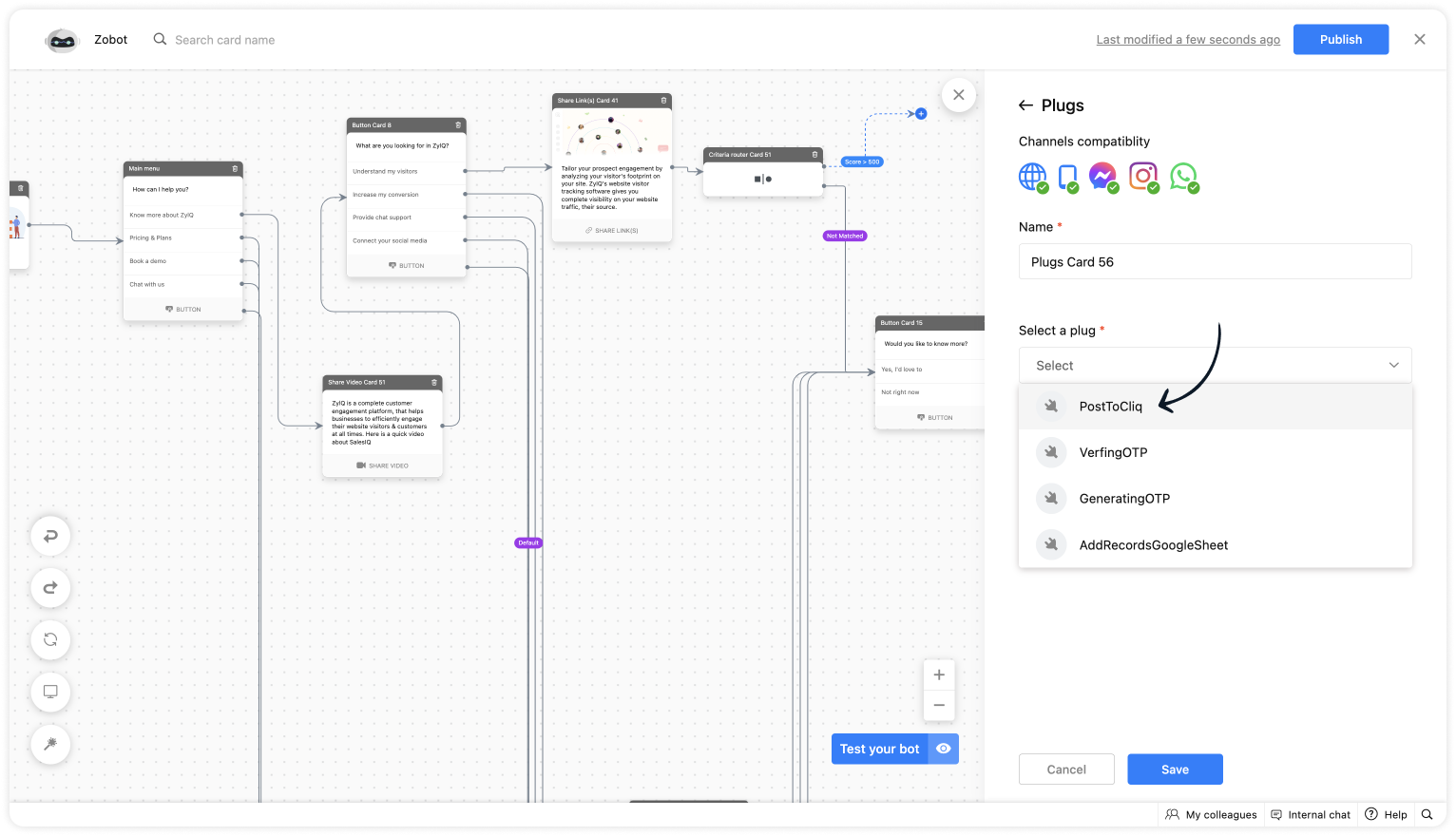
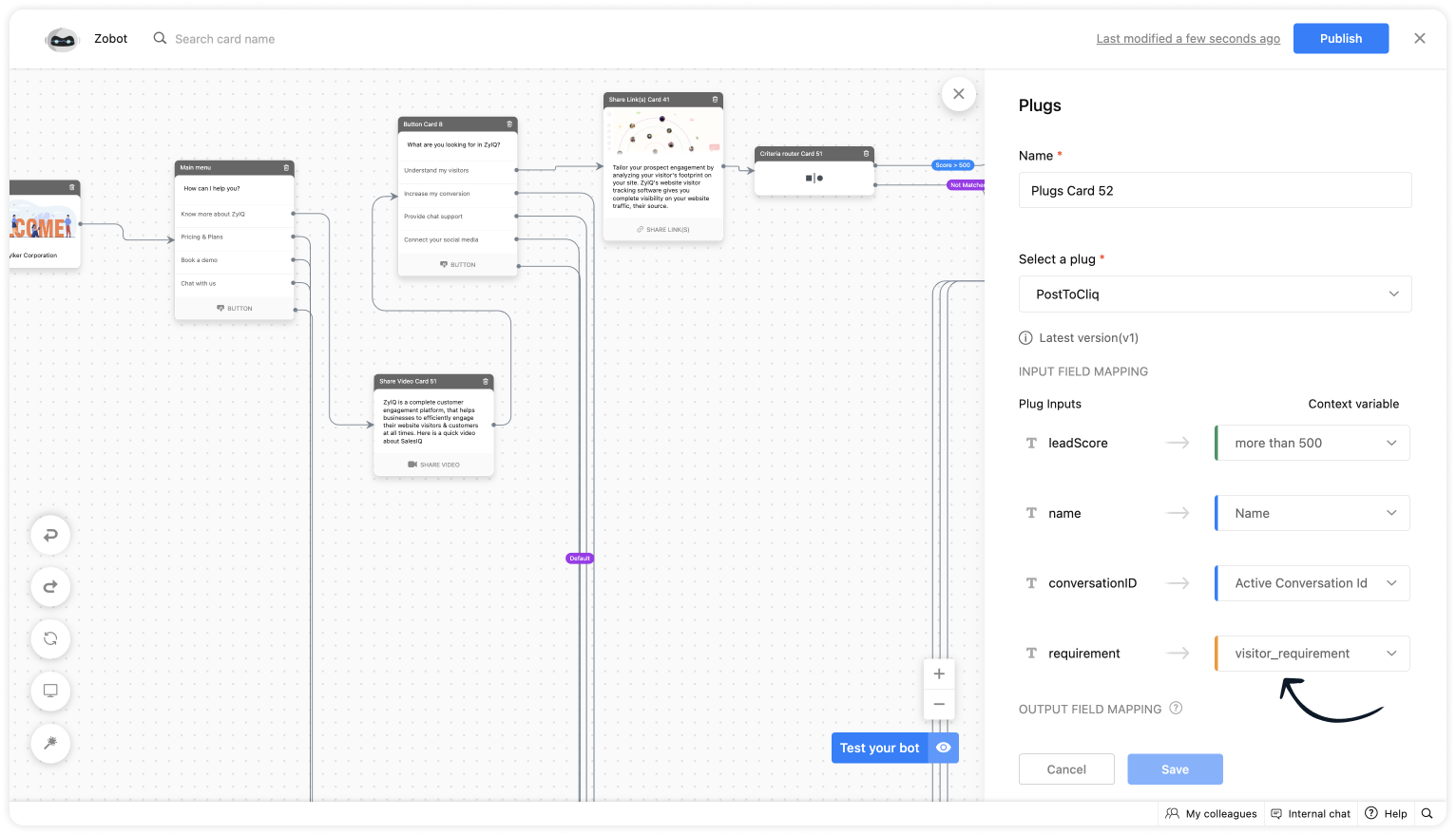
  • To notify in Cliq, click on Plugs under Action cards, select the plug you have created and provide the input values for the parameters defined in the plug builder.
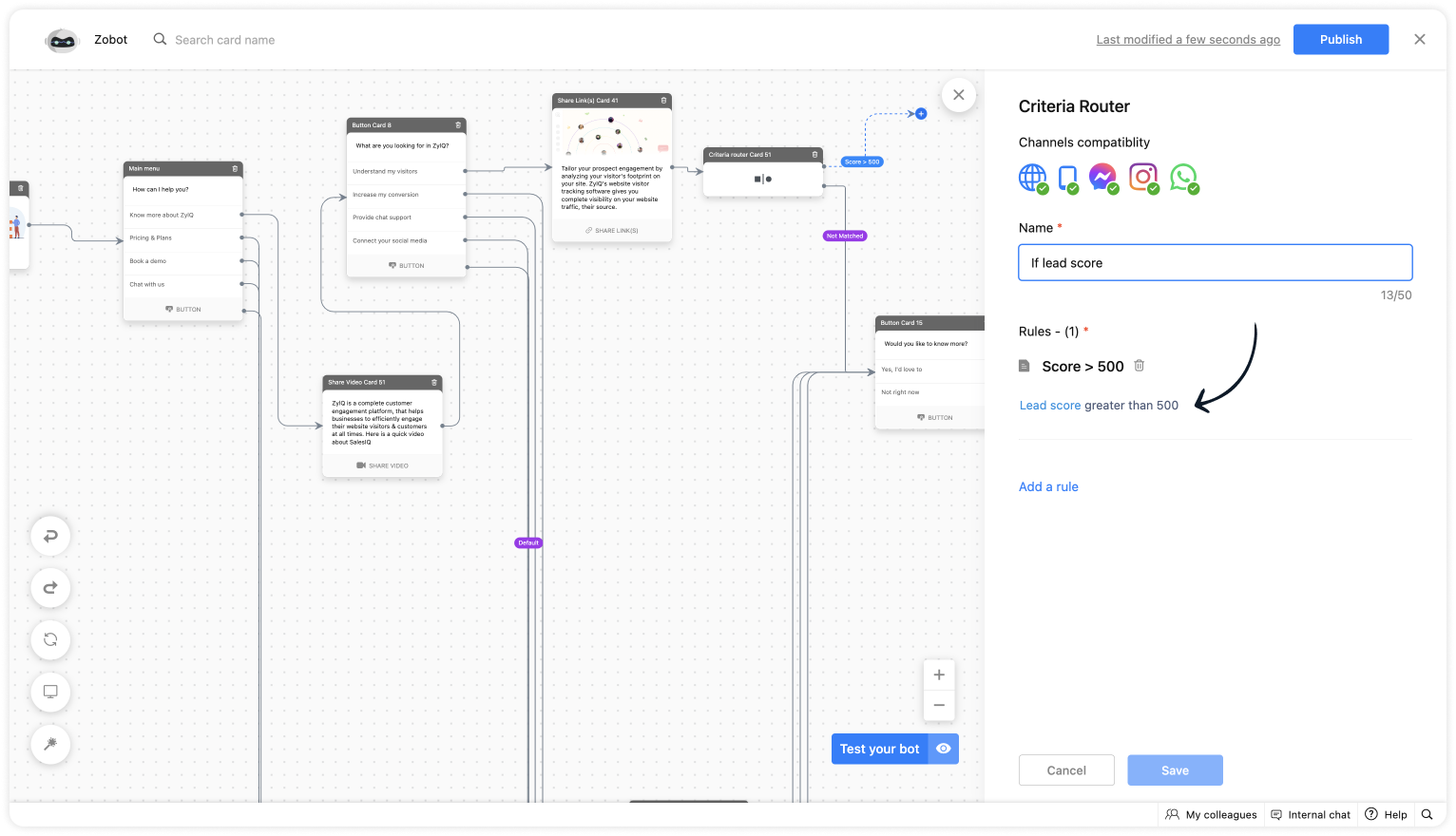
  • As we want to notify only the visitors whose lead score is more than 500. Use the Criteria router card and set up a rule. 
  • For lead score, provide the value "more than 500".
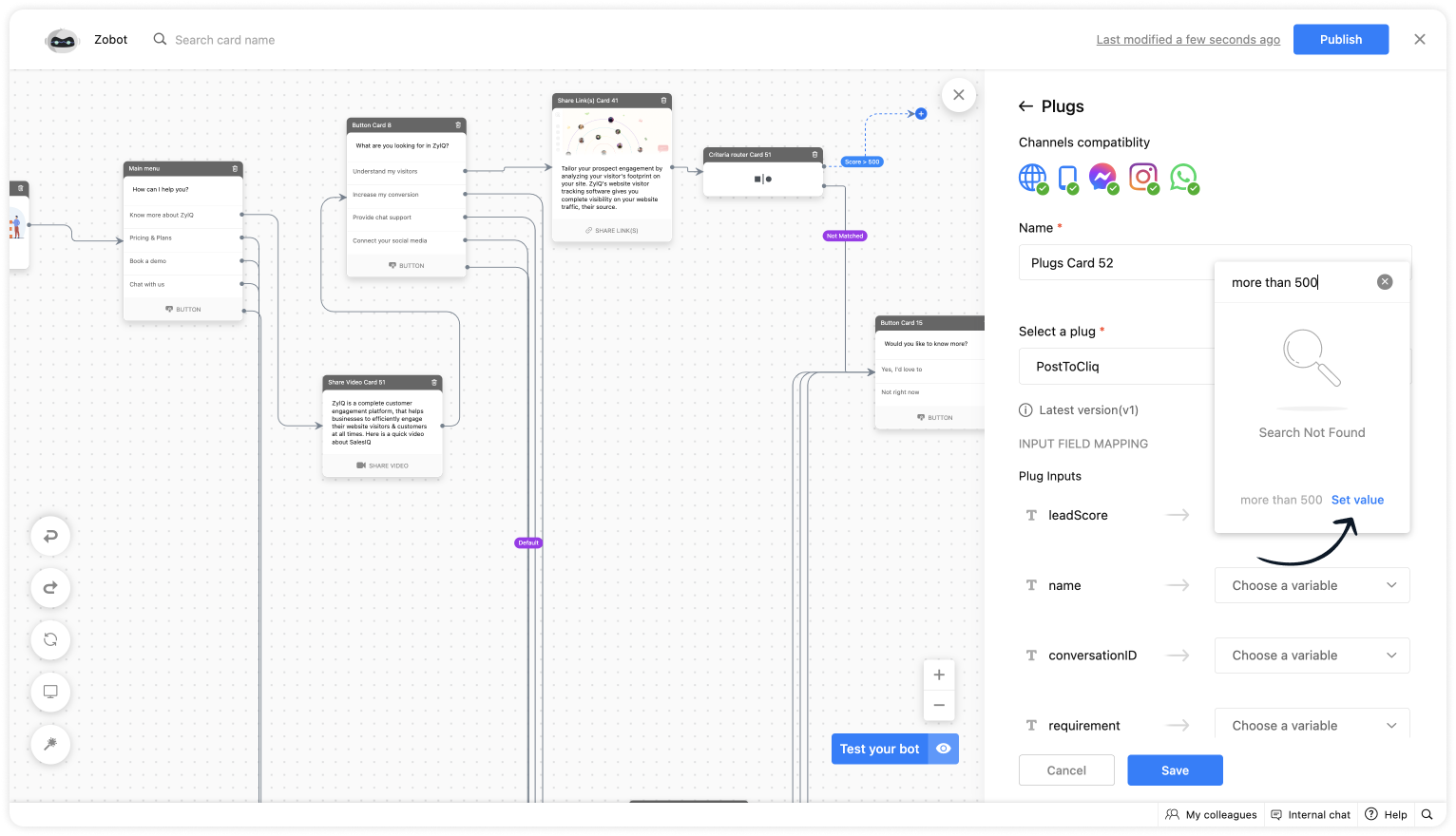
  • Choose the %visitor.name% variable for the name.
  • Select the %Active conversation id% to get the conversation ID for the chat URL. 
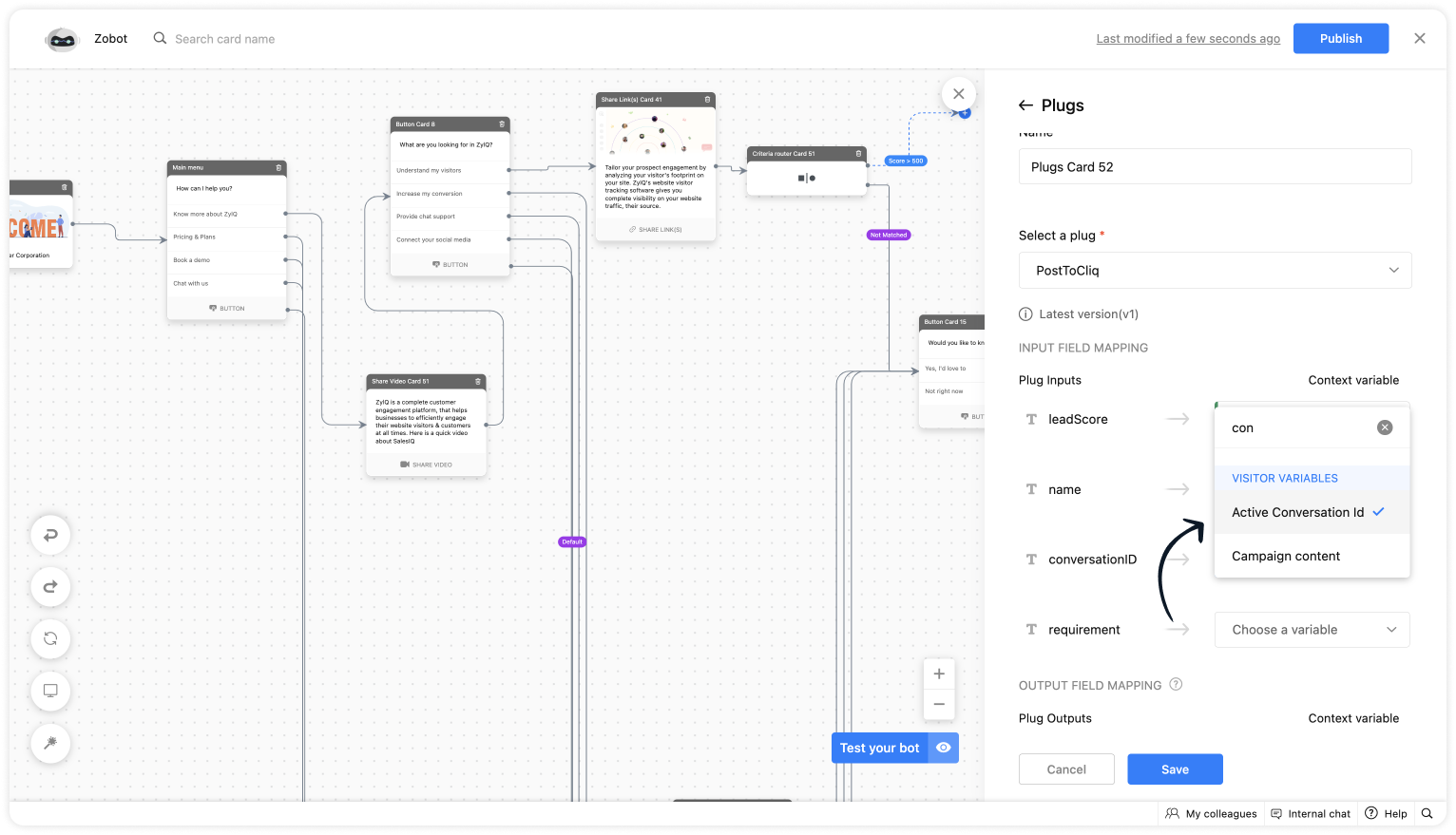
  • Get the requirement before using any input card, save it in the context variable and select the variable here. 

Plug Output

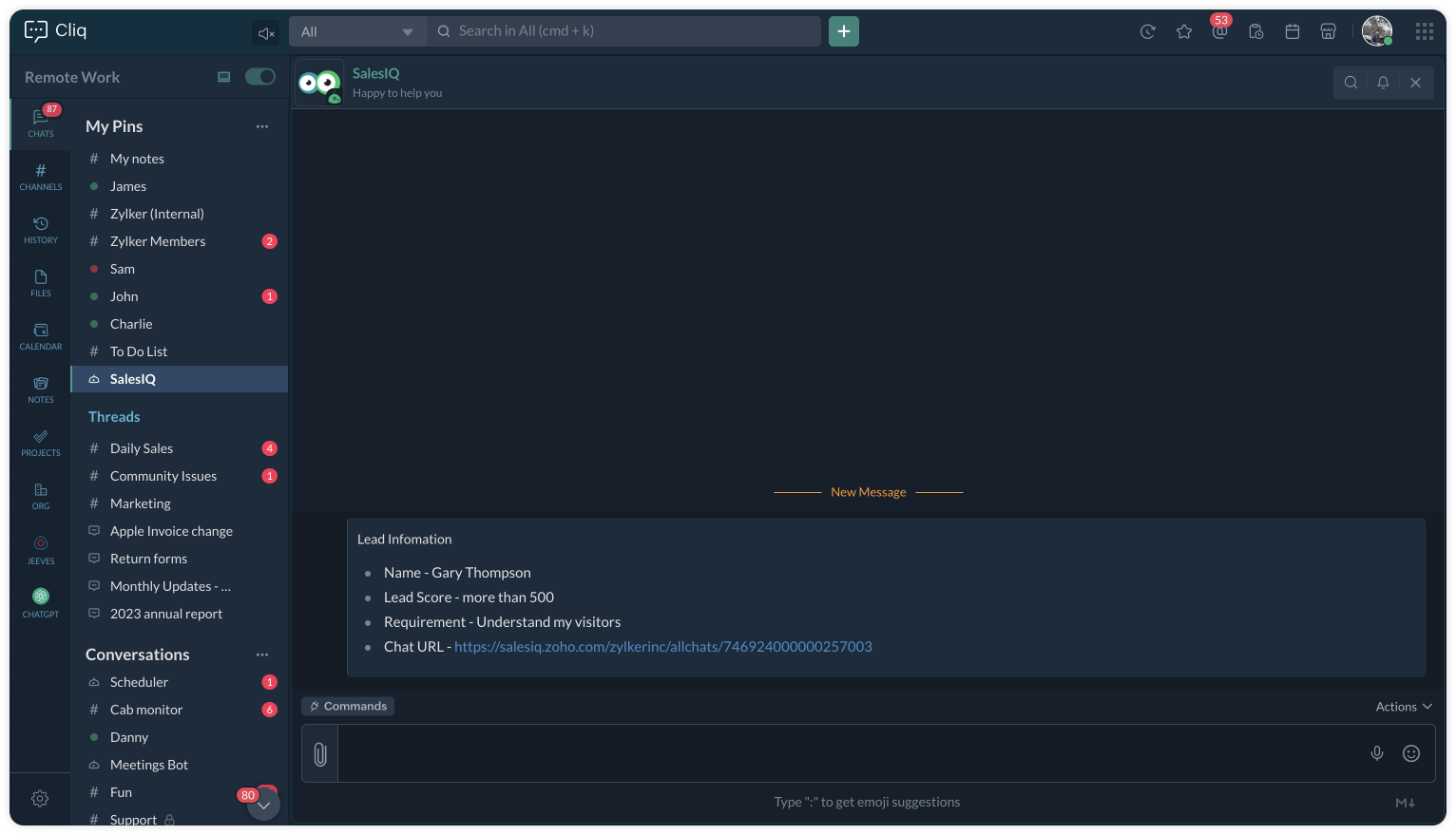
This is how the Cliq users will be notified. 

To a specific user


To a specific channel
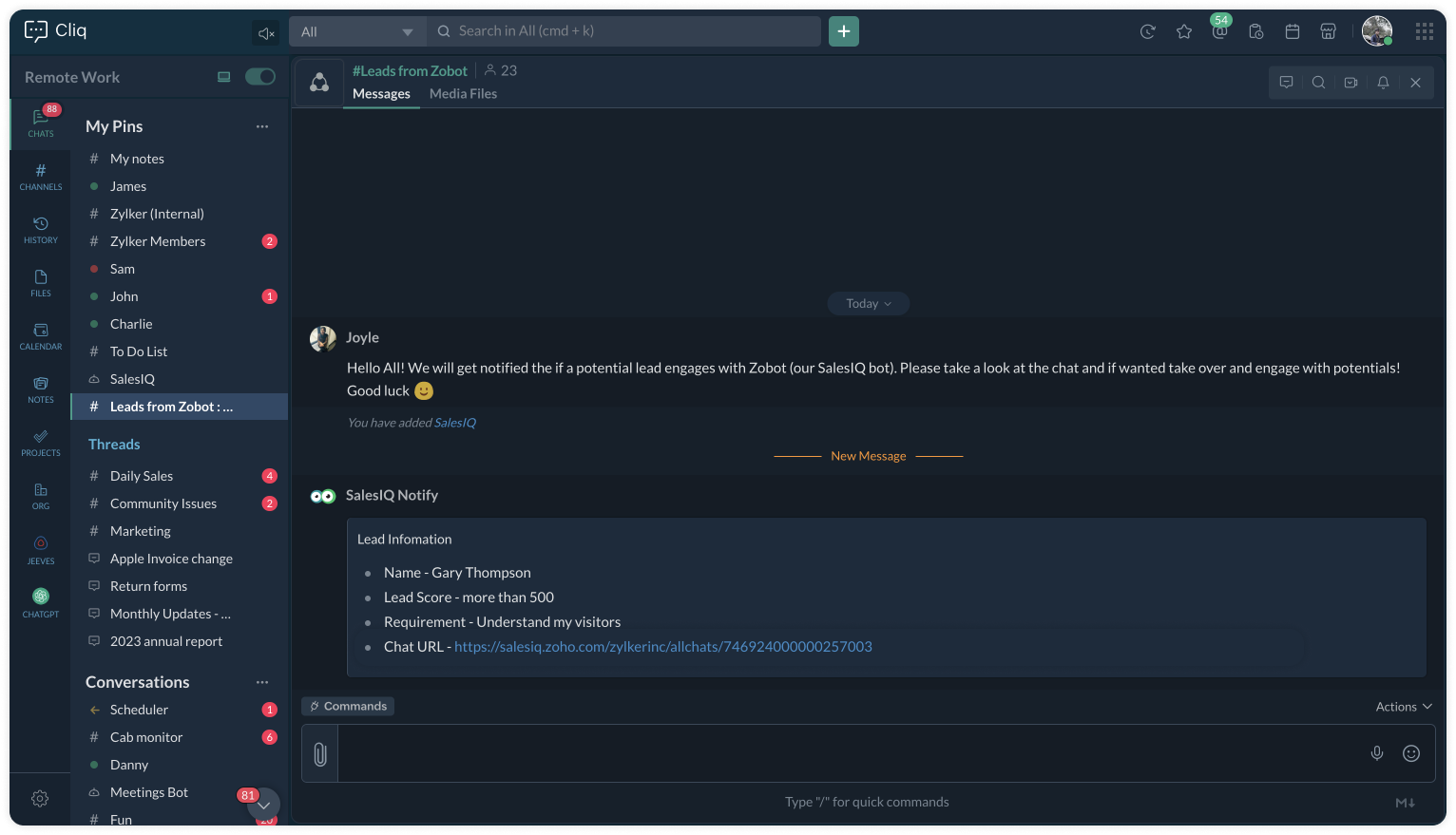


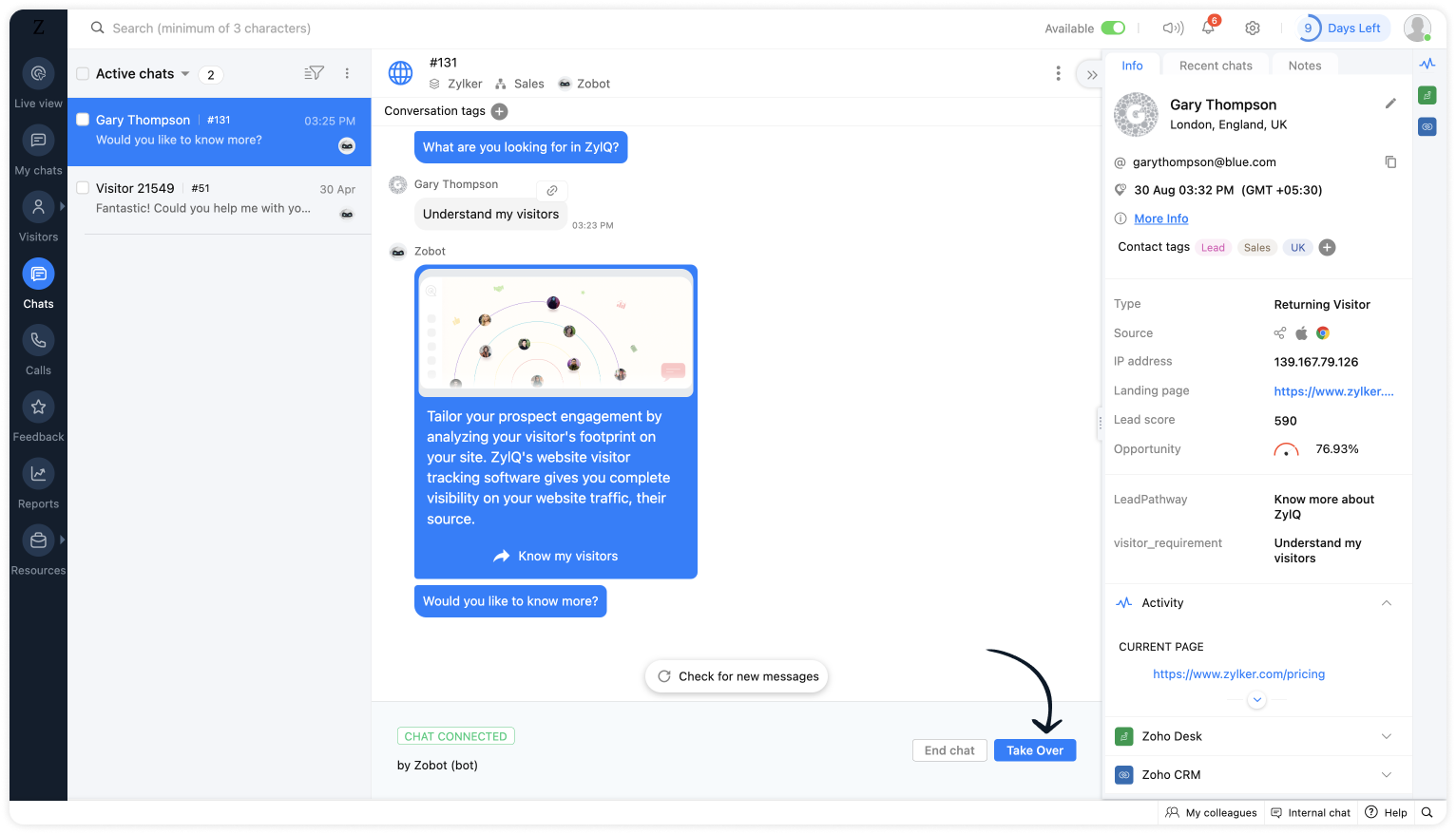
Upon clicking the chat URL, you will be redirected to the ongoing bot chat, where you can monitor and take the chat if required. 


See you again with another efficient plug sample :)

Best regards
Sasidar Thandapani

    • Recent Topics

    • Automating CRM backup storage?

      Hi there, We've recently set up automatic backups for our Zoho CRM account. We were hoping that the backup functionality would not require any manual work on our end, but it seems that we are always required to download the backups ourselves, store them,
    • Cross-application Deluge calls fail when application link name starts with a number

      I encountered an issue when calling a custom function in another Zoho Creator application within the same account. The target application’s URL/application link name began with a number, similar to: 27_example_application The following cross-application
    • Bank charges

      Hello, team zoho I have a difficulty, in the form to register the payment of the customer has a field "bank charges" more when registering an expense or payment to the supplier that field does not appear. And I think that's a mistake because in my account
    • Bank Feeds - Multiple Orgs / Multiple LLCs

      Hi, We are migrating our books over from another service, and trying to connect our bank feeds. We have 3 separate LLCs, and 3 separate orgs in Zoho Books. We want to connect the bank feeds for each entity to each org. However, when we connect the 2nd
    • Go Multilingual with Instant Bot Auto-Translation

      Imagine you run a travel company with customers across different regions. Your website chatbot helps visitors discover travel packages, answers questions, and makes bookings. As your business expands into new markets, you want to offer the same experience
    • WhatsApp Coexistence

      Hello, please implement WhatsApp Coexistence, we need to track staff whatsapp chats on their PC and they need to be able to use WhatsApp on their mobile in around the office and warehouse, as we video call customers and send them product pictures. Thank
    • WORK DRIVE CUSTOMIZATION

      WORK DRIVE CUSTOMIZATION Create folder for every Case by “Contact Name “in Work Drive under Associate Deals Folder Directory: User Work Drive Accounts: Route Directory Associate Cases Case Name, Case Number Client Upload- Shared with contact (for collaboration)
    • All new Address Field in Zoho CRM: maintain structured and accurate address inputs

      Availability Update: 29 September 2025: It's currently available for all new sign-ups and for existing Zoho CRM orgs which are in the Professional edition exclusively for IN DC users. 2 March 2026: Available to users in all DCs except US and EU DC. 24
    • Vendor payment unexpectedly routed through Prepaid Expenses instead of Accounts Payable

      Hello, We are investigating an unexpected accounting behavior in Zoho Books. We created vendor bills and vendor payments for two suppliers using what appears to be the same workflow, but the journal entries are different. Vendor 1 – UZ Store (works correctly)
    • CRM wants to access other apps and services on this device (Documents area)

      Did anyone else see this today? It only seemed to popup in the Documents area. Blocking it did not stop the ability to upload files there... Why is this coming up and what apps/services is it requesting in the background? Also, is it applicable elsewhere
    • BANK CHARGES

      When paying a supplier via credit card we are charged a fee. I process the payment through payments made and then enter the fees in bank charge. However i get this message :  Bank charges are applied. Please select a bank account. And it will not let
    • Programmatic Itemized Expenses?

      It does not appear that it is possible to create itemized expenses programmatically (via the API)? Is this correct, or am I misunderstanding the situation?
    • JOIN with Select and TOP not returning data to results

      hi when I add TOP to yellow it does not return cl."Id", cl."Date",cl."Outcome", cl."Membership" from the join. Remove it and they appear. The TOP and the ON seem to work as in the number of rows returned. Doing the classic join log table and return only
    • Zoho CRM Multi-select values not translated

      Hello! I have some issue with translate custom multi-select fields in zoho CRM in other language. I download export file, but it has all my custom fields and picklist values exept multi-select fields picklist values.  Please, help me to undestand, is
    • [Free webinar] Blueprint as a business process engine - Creator Tech Connect

      Hello everyone, We are excited to invite you to another edition of the Creator Tech Connect webinar. About Creator Tech Connect The Creator Tech Connect series is a free monthly webinar comprised of pure technical sessions, where we dive deep into the
    • Allow Email Attachments to Be Opened Directly in Zoho CRM

      Hi all, It would be very helpful if attachments linked to an email in Zoho CRM could be clicked and opened directly from the email preview. Currently, the attachment names are displayed, but the experience of viewing them is unnecessarily limited. Users
    • Dashboard Metric Drill-Down Shows Stale Data

      Summary: When clicking between different metric components on a custom dashboard, the drill-down list shows data from the previously opened metric instead of the one just clicked. Steps to Reproduce: Create a custom dashboard with multiple pre-defined/templatized
    • Zoho email suddenly stopped working - any ideas to fix this ?

      Zoho email suddenly stopped working. although got this sent to me Reporting-MTA: dns; mx.zohomail.eu Arrival-Date: Wed, 26 Aug 2026 12:48:05 +0100 Original-Recipient: rfc822; Final-Recipient: rfc822; Status: 421 Action: delayed Last-Attempt-Date: 26 Aug
    • GCLID and Zoho Bookings

      Is there anyway to embed a Zoho Bookings signup on a landing page and pass the GCLID information? More specifically, can this be done using auto-tagging and not manual tagging the GCLID? I know Zappier has an integration to do this but is there a better
    • Calendar Booking - Rescheduled and cancelled appointments not deleting in G Suite calendar

      We started using the built in calendar booking feature and are really liking it! However, we are having one issue.  If a client reschedules an appointment using the reschedule feature the original appointment doesn't get deleted out of our g suite calendar
    • Automate pushing Zoho CRM backups into Zoho WorkDrive

      Through our Zoho One subscription we have both Zoho CRM and Zoho WorkDrive. We have regular backups setup in Zoho CRM. Once the backup is created, we are notified. Since we want to keep these backups for more than 7 days, we manually download them. They
    • Backup to external location (Dropbox etc)

      Dear Zoho Team, I've set the CRM Backup schedule to once a month, which when complete sends me an email. Of course I then need to manually login and download the file. Nice but VERY 20th century and relies on us humans not to fail. Can you please provide
    • Cloud backup for CRM

      This is an idea / feature request for ability to periodically export CRM backup to an external cloud provider, similar to Zoho Vault: https://www.zoho.com/vault/data-backup.html Alternatively I would help being able to access manual data backup programatically
    • Introducing throw statements in Deluge

      Hello everyone, We're introducing a powerful addition to Deluge that gives you more precise control over error handling in your scripts. Whether you're calling an external API, validating user input, or enforcing a business rule, there are moments when
    • Introducing throw statements in Deluge

      Hello everyone, We're introducing a powerful addition to Deluge that gives you more precise control over error handling in your scripts. Whether you're calling an external API, validating user input, or enforcing a business rule, there are moments when
    • Zoho Creator to Zoho Writer for prefilled documents...

      In response to the question about connecting Zoho Creator to Zoho Writer for prefilled documents, I wanted to share a working implementation that demonstrates how to use the record_id parameter with the Zoho Writer Merge API. This allows Writer to automatically
    • Upload a video to embed into an article

      How can we upload a video to embed into the article...? We can upload images but this only seems to support image files. And the video option seems to just support YouTube, Vimeo and DailyMotion which is no good, we need to create our own videos and upload
    • PAN - Aadhar Link Status

      Can Zohobooks also get latest PAN-Aadhar Linking Status from Income Tax Portal ?
    • LinkedIn RSC is now live in Zoho Recruit

      LinkedIn Recruiter System Connect (RSC) is here. Your Zoho Recruit data (candidates, jobs, notes, stage updates, resume attachments, and more) now syncs with LinkedIn in real time. Note: LinkedIn RSC is included with your LinkedIn Recruiter Corporate
    • Zoho Writer for Android - Headings

      Hello Zoho team, I have created structured doc with headings in writer web version on pc. Then I have opened it in my phone. Write is crashing while used function: menu "three dots", Document Navigation, Headings. Zoho Writer for Android 6.1.4 Samsung
    • The in between line spacing management

      In the Microsoft Word, when we write something there is a tool from where we can manage the line spacing. Here in writer app in mobile it is by default 1.5. I request Zoho Team to give the option from where I can control Line Spacing, Remove space between
    • Zoho Books | Product updates | September 2026

      Hello Partners, We've rolled out new updates to Zoho Books. From a brand-new Nigeria edition expanding our presence on the African continent to the new Super Admin privilege, here's everything that's new this month. Nigeria Edition Now Live [Nigeria Edition]
    • Pulling data from lookup fields

      If I try to pull in CRM data from a lookup field, it only shows a number and not the actual name. Is there a way to get around this? It impossible to do reports using lookup field data.
    • CRM x WorkDrive: We're rolling out the WorkDrive-powered file storage experience for existing users

      Release plan: Gradual rollout to customers without file storage add-ons, in this order: 1. Standalone CRM 2. CRM Plus and Zoho One DCs: All | Editions: All Available now for: - Standalone CRM accounts in Free and Standard editions without file storage
    • Marketing Tip #49: Set up Meta Pixel and turn store visitors into repeat buyers

      Most of your store visitors don't buy on their first visit. They browse, get distracted, and leave. Without a way to reach them again, that traffic is gone forever. Meta Pixel changes that. What is Meta Pixel? Meta Pixel (previously called Facebook Pixel)
    • unable to join meeting due to speaker issue

      unable to join meeting due to speaker issue
    • Unlock smarter scheduling with AI in Zoho Bookings

      Hello everyone! Scheduling touches more parts of a business than we often realize. Teams need to coordinate. Workflows need to move. Business apps need to connect. And with AI, the way we interact with scheduling is changing too. Join our upcoming live
    • Zoho CRM Layout Rules: Nine New Actions, Profile-Based Execution, and Interactive Preview

      Hello everyone, Availability: This feature is now available for all users. We’re excited to announce powerful new enhancements to Layout Rules in Zoho CRM - a feature built to guide our teams through form-filling by showing the right information to the
    • I want to delete payment detail of my cards from the system.

      I want to delete payment detail of my cards from the system.
    • Urgent: Outgoing Emails Delayed Across All Zoho Desk Departments

      Dear Zoho Support, We have started receiving delivery delay notifications across all our Zoho Desk departments. Error details: Error: 451 4.7.500 Server busy Action: Delayed Receiving system: Microsoft 365 / Exchange Online Affected Zoho sending IPs identified
    • Next Page