Spreading Love, One Ticket at a Time
At Zylker Techfix, customer service wasn't just about solving issues, it was about creating meaningful human connections. The team believed that every interaction was an opportunity to understand their customers better and offer solutions that truly made a difference.
Understanding the Customer
Customer service is about showing love for customers and loving what you do. Every ticket is an opportunity to connect, solve problems, and make customers feel valued. Zoho Desk became the heart of Zylker Techfix operations to help them do just that.
The Ticket Module: A Treasure Trove of Insights
The Tickets Module records every interaction with the customer. This place helped establish relationships with customers.
The team discovered the Ticket tabs as a wealth of features to understand their customers better:
- Conversation Module held records of the ticket conversations and private comments, helping them keep an eye on interactions with the customer, ensuring no detail was missed.
- Under the Resolution Tab, they mandated recording resolution to track customer actions, ensuring every issue was resolved with care.
- The Parent-Child ticket feature linked related tickets, making it easier to see the bigger picture and provide consistent support.
- Time Entry Module kept them in track with billable hours and time spent on tickets, ensuring efficiency and transparency.
- The History Tab offered insights into past interactions, allowing agents to filter by incoming responses, outgoing replies, comments, and attachments. This was crucial for tracking ticket progress and ensuring timely resolutions.
- The Geo-Location Module is another powerful tool that works well with the Zoho Desk App. This enables to track the location of field service representatives, ensuring real-time updates and better service coordination.
- The Activity Tab helped filter activities based on specific criteria, providing a detailed view of customer interactions.
- Approval Tab facilitated streamlined approval processes, ensuring that responses requiring managerial review were promptly addressed.
- The Attachment Module helped in organizing and accessing customer-related documents easily.
 Note: For early access to the Parent-child ticket feature, request here. This applies to Professional and Enterprise users only.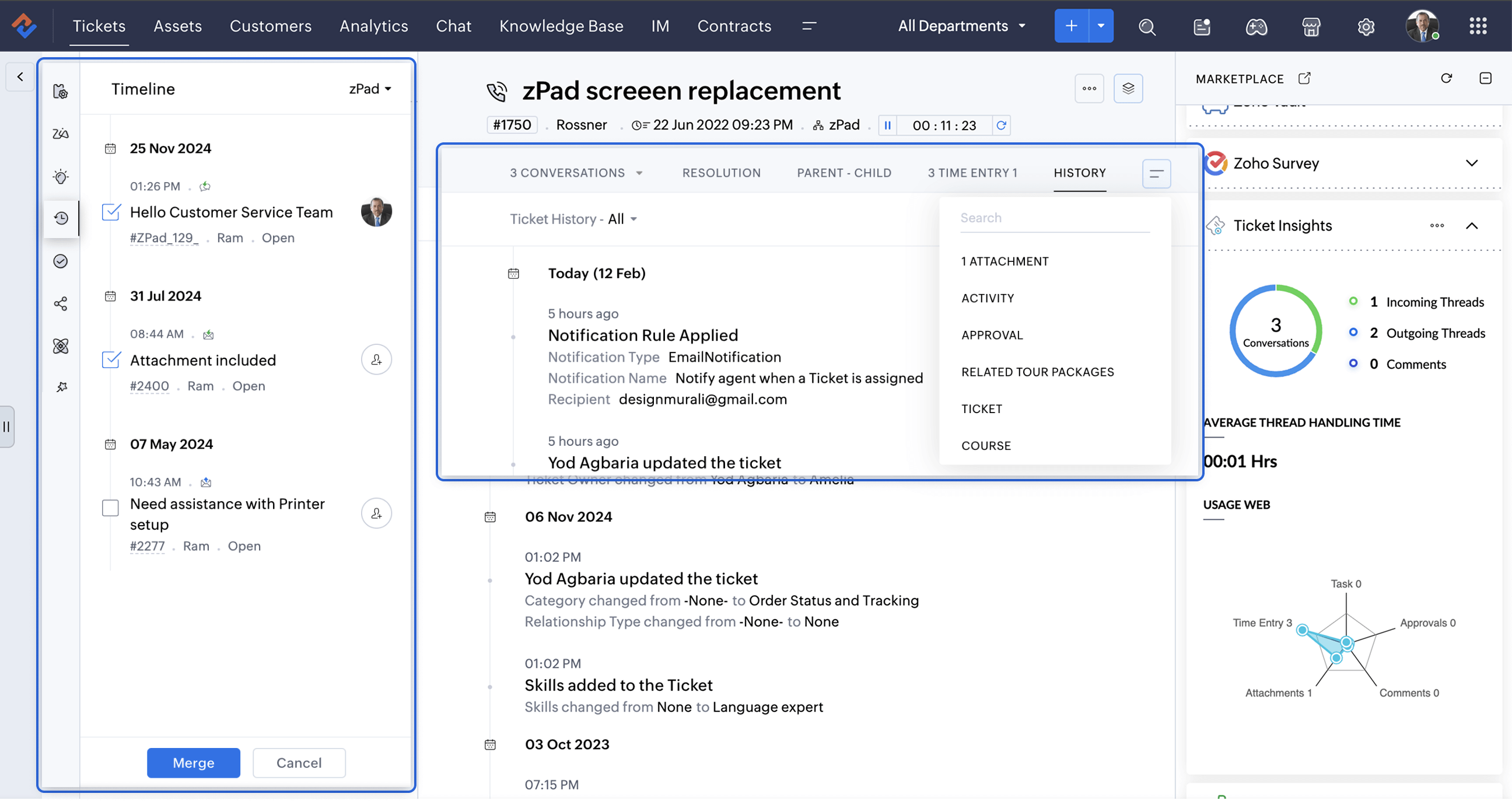
A Smarter Approach to Ticket Management
At times, when Zylker Techfix experienced a surge in tickets, the Ticket Detail banner on the left provided the following details on the ready-to-use extensions:
- Ticket Properties showed the customer and ticket information
- Field Predictions auto-filled customer details, saving time.
- Zoho's AI, Zia leveraged the Answer Bot to provide solutions based on the knowledge base created by the user within Zoho Desk.
- The Ticket Follower option let them keep a track of the tickets handled by them or other agents.
- The Ticket Timeline let them keep an eye on the previous cases handled for the client in the specific Department or All Department. Within a specific department, agents could also merge tickets for efficient handling.
- To ensure visibility across departments, the Share Ticket Option allowed teams to share tickets with different departments while maintaining appropriate access controls such as Full Access, Restricted Access, or Read-Only Access.
Presenting three essential extensions to stay on the go with customer service:
1. Customer Insights for Zoho Desk: Know Your Customers Better
The value of customer service grows as you gain deeper insights into your customers by understanding their experiences, emotions, and the journeys they have taken with your brand.
How well do you know your customers?
How well do you know your customers?
With Customer Insights for Zoho Desk located on the Ticket Detail panel on the left, you can access key interaction details, including response times, resolutions, the number of tickets handled, and happiness ratings. These insights help build stronger relationships and enhance service quality.
In customer service, care is more than just providing solutions.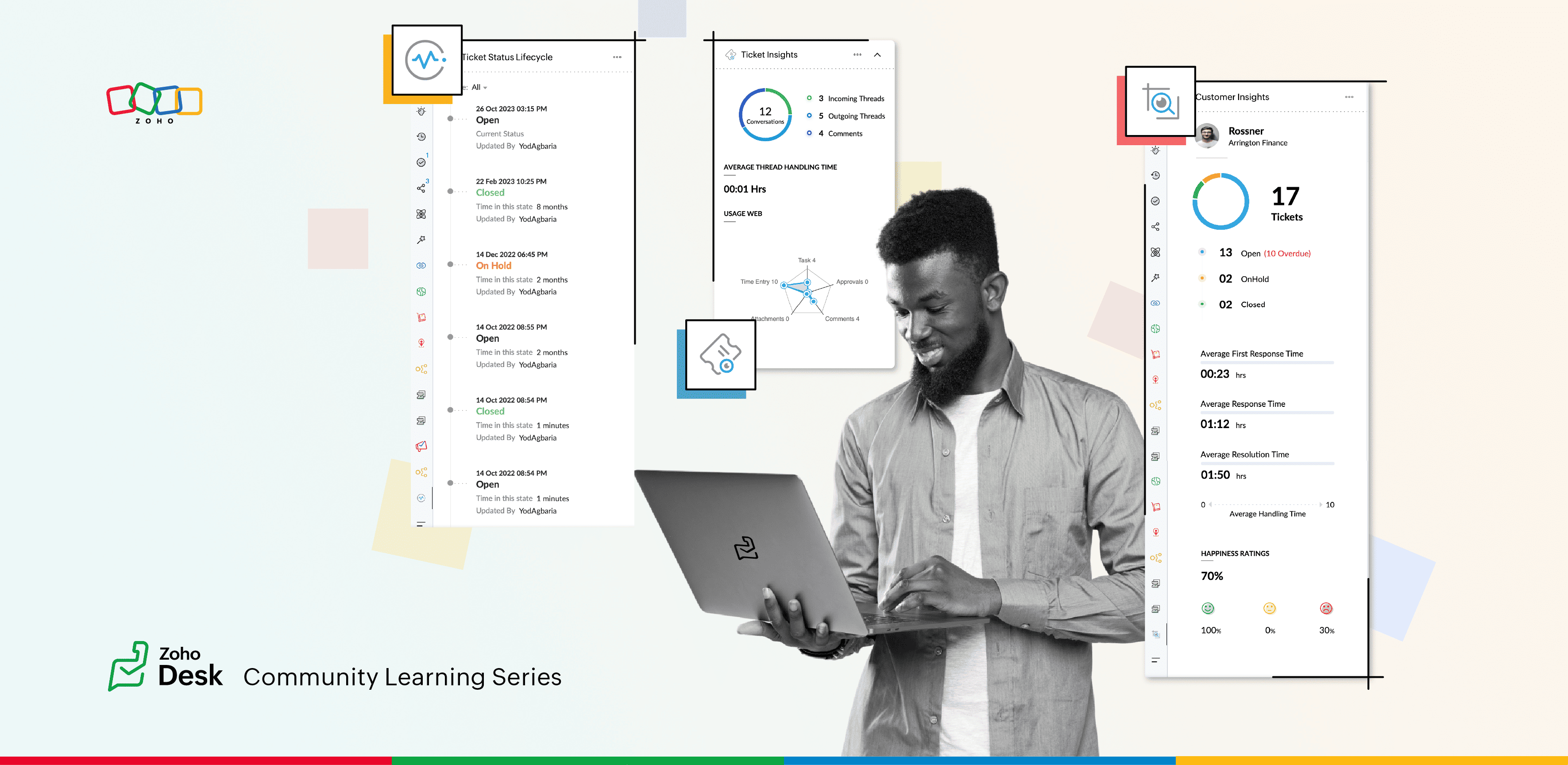
2. Ticket Insights for Zoho Desk: A One-Shot View
Install Ticket Insights for Zoho Desk from the Marketplace Extensions to enhance your ticketing experience.
Where can you view the insights?
- Open a ticket in Zoho Desk.
- Click on the Marketplace
 icon next to the Ticket Subject.
 - Maximize Ticket Insights for a detailed overview.
This tool gave them a one-shot view of:
- Threads: The number of incoming and outgoing threads within a ticket.
- Average Thread Handling Time: How quickly they were resolving issues.
- Ticket Module Usage: A detailed web of how each module was being utilized.
3. Ticket Status Lifecycle for Zoho Desk : At a Glance
Install this extension from Marketplace  icon on the top right. You can view the Ticket Status Lifecycle on the Ticket Detail panel on the left.
icon on the top right. You can view the Ticket Status Lifecycle on the Ticket Detail panel on the left.The Ticket Status Lifecycle provides detailed insights into ticket status changes, including the exact time of each update and the agent responsible for the modification. These insights help identify bottlenecks and assess the efficiency of support processes.
For example, tracking the duration a ticket remaining in a particular status can highlight areas that need improvement. Additionally, the extension allows users to filter the timeline to focus on specific statuses, such as "Open", "On hold", or "Waiting on Customer", or "Pending Approval."
This level of detail ensures that support teams gain a clear and chronological understanding of each ticket’s progression, enabling more informed decision-making and process optimization.
Wrap Up
This helped Zylker Techfix capture critical information in a short time, enabling them to stay on top of their game and offer proactive support.
Zylker Techfix realized that customer service is an act of love. With Zoho Desk and its extensions like Customer Insights, Ticket Insights, and Ticket Status Lifecycle, they understood their customers better, engaged with them meaningfully, and delivered solutions that brought joy.
And so, they continued to spread love, one ticket at a time.
Topic Participants
Lydia | Zoho Desk
Sticky Posts
Register for Zoho Desk Beta Community
With the start of the year, we have decided to take a small step in making the life of our customers a little easier. We now have easy access to all our upcoming features and a faster way to request for beta access. We open betas for some of our featuresShare your Zoho Desk story with us!
Tell us how you use Zoho Desk for your business and inspire others with your story. Be it a simple workflow rule that helps you navigate complex processes or a macro that saves your team a lot of time; share it here and help the community learn and grow with shared knowledge.Tip #1: Learn to pick the right channels
Mail, live chat, telephony, social media, web forms—there are so many support channels out there. Trying to pick the right channels to offer your customers can get pretty confusing. Emails are most useful when the customer wants to put things on record. However, escalated or complicated issues should not be resolved over email because it's slow and impersonal. When you need immediate responses, live chat is more suitable. It's also quick and convenient, so it's the go-to channel for small issues.Welcome to Zoho Desk Community - Say hello here!
Hello everyone! Though we have been here for a while, it’s time to formally establish the Zoho Desk Community; we’re really happy to have you all here! This can be the place where you take a moment to introduce yourself to the rest of the community. We’d love to hear all about you, what you do, what company or industry you work for, how you use Zoho Desk and anything else that you will like to share! Here’s a little about me. I am Chinmayee. I have been associated with Zoho since 2014. I joined hereWebinar 1: Blueprint for Customer Service
With the launch of a host of new features in Zoho Desk, we thought it’ll be great to have a few webinars to help our customers make the most of them. We’re starting off with our most talked about feature, Blueprint in Zoho Desk. You can register for the Blueprint webinar here: The webinar will be delivered by our in-house product experts. This is a good opportunity to ask questions to our experts and understand how Blueprint can help you automate your service processes. We look forward to seeing
Recent Topics
Zoho Campaigns: An Outstanding Email Marketing Tool
Introducing Zoho Campaigns! A product designed by Zoho, the Zoho Campaigns is made to create, deliver, and manage integrated email campaigns that can help in boosting the sales of a company and its customer base. Zoho Campaigns is actually an email marketingZoho Creator Developer Console | Improved Distribution and Lifecycle Management for apps
Hello everyone, We're excited to introduce new enhancements now in the Zoho Creator Developer Console. These updates strengthen private app distribution through licensing controls and extend environment support across all installed apps, helping teamsAnchor Links in Dashboards
Hello, Our dashboards frequently have multiple sections that would be more easily skipped between using anchor links. Please consider adding an anchor link feature to the text widget? This could be done by adding an anchor link option to the text widget next to the "remove" option (see screenshot). The option would assign an ID to the <div> containing the text widget in the live dashboard. Then, the chosen ID could be linked using a traditional <a href="#link_id"> in the html section of the textSync images with Shopify/Cart
Hello, sync images with shopify or other cart, it cuts out the double work of having to upload to shopify/cart and zoho. ThanksIs it Possible to Modify Standard Report Urls
Is there a way to permanently modify standard report Urls? Use case: Suppose I have a Products report. Showing list as timeline, calendar, or kanban doesn't make sense. Want to hide that from users by adding #Report:Products?zc_ShowAs=false&zc_Print=falseAssessment Answered - Automation (Related List)
Hello everyone, We have linked a candidate assessment to our job posting. When someone applies, they are required to answer all the assessment questions. However, some candidates submit their applications without completing the questions. In such cases,External User onboarding for zoho connect is not really intuitive.
So the external user is sent an invite, which has a button that directs them to login to zoho to view the invite, but if they don't have a zoho account, they cannot access that invite, which seems kinda silly, as there is not real way on for them to createHaving trouble fetching contents of Zoho Connect Feeds using the API, requesting alternative API documentation.
I'm trying to retrieve feed/post data from Zoho Connect using the API but facing challenges with the current documentation. What I've tried: OAuth authentication is working correctly (getting 200 OK responses) Tested multiple endpoints: /pulse/nativeapi/v2/feeds,How to upload file to Connect using API?
Hi there. I looked at the API documentation and nowhere did it mention how to use the API method to upload a file even though it is mentioned that it is possible to be done so. Please help.Select the task view on the board in the Zoho Connect iPhone app
Hello. How do I select the task view on the board in the Zoho Connect iPhone app? The Android app has this functionality.Auto tagging
Some of the articles I enter into Notebook get there when I enter them in Raindrop.io and IFTTT copies the articles in Notebook. When this happens the notes are tagged but instead of useful one word tags with topic the tag pertains to the specific articleZoho Sheet for Desktop
Does Zoho plans to develop a Desktop version of Sheet that installs on the computer like was done with Writer?WebDAV support
I need WebDAV support so that I can upload/download (and modify) documents from my local file system. Is anything planned in his direction?Constant refresh required in lots of Zoho tabs
"Hey Zoho, if you can sync my notification bell across 15 tabs using a BroadcastChannel, why can't you send a 'Data Refresh' signal the same way? We don't need a browser reload—we just need the data to sync without us clicking F5 like it's 1999." "PS:What's New in Zoho Billing | January 2026
Excited about the latest enhancements in Zoho Billing? Our January updates bring an intelligent AI assistant, smarter subscription management, and improved tax compliance, saving you time and reducing manual work. Dive into the details below to see howCliq iOS can't see shared screen
Hello, I had this morning a video call with a colleague. She is using Cliq Desktop MacOS and wanted to share her screen with me. I'm on iPad. I noticed, while she shared her screen, I could only see her video, but not the shared screen... Does Cliq iOS is able to display shared screen, or is it somewhere else to be found ? RegardsInserting images into Articles or Knowledgebase
Hi, Are there any plans in improving the Knowledgebase text editor so it would allow inserting images through Windows clipboard via copy-paste? Say for example I took a screenshot using the snipping tool in Windows and I'd like to insert that image toLinks not functioning in Zoho mail
Links that are included in emails I receive are not activating. Nothing at all happens when I click on them. I have researched FAQs and this forum to no avail. Any suggestions?Zoho Mail iOS app update: Manage folders and tags
Hello everyone! In the most recent version of the Zoho Mail iOS app, we have brought in support to manage(create, edit and delete) the folders and tags. Create folders Create Tags Edit/ Delete folder In addition to this, we have also brought in supportZoho Social API for generating draft posts from a third-party app ?
Hello everyone, I hope you are all well. I have a question regarding Zoho Social. I am developing an application that generates social media posts, and I would like to be able to incorporate a feature that allows saving these posts as drafts in Zoho Social.[Important announcement] Zoho Writer will mandate DKIM configuration for automation users
Hi all, Effective Dec. 31, 2024, configuring DKIM for From addresses will be mandatory to send emails via Zoho Writer. DKIM configuration allows recipient email servers to identify your emails as valid and not spam. Emails sent from domains without DKIMUI issue with Organize Tabs
When looking at the organize Tabs window (bellow) you can see that some tabs are grayed out. there is also a "Add Module/Web Tab" button. When looking at this screen it's clear that the grayed out tabs can not be removed from the portal user's screenZoho CRM Feature Requests - SMS and Emails to Custom Modules & Time Zone Form Field
TLDR: Add Date/Time/Timezone form field, and be able to turn off auto timezone feature. Allow for Zoho Voices CRM SMS Extension to be able to be added to custom modules, and cases. Create a feature that tracks emails by tracking the email chain, ratherOur Review Of Zoho CRM after 60 Days
The purpose of this is to just share with Zoho why I love their product, but ultimately why I could not choose Zoho CRM for our next CRM. About two months ago we begun a CRM exploration process for our financial planning firm, based in Texas. We alreadyLink Purchase Order to Deal
Zoho Books directly syncs with contacts, vendors and products in Zoho CRM including field mapping. Is there any way to associate vendor purchase orders with deals, so that we can calculate our profit margin for each deal with connected sales invoicesExtend the Image Choice Field
Hi, The New Yes/No field is great for what it does, and the Image Choice Field is good but could be better with some functions from the Yes/No field. Take an example, rather than just Yes/No you want Yes/No/Maybe (Or more than 3 choices), but unlike theCRM x WorkDrive: File storage for new CRM signups is now powered by WorkDrive
Availability Editions: All DCs: All Release plan: Released for new signups in all DCs. It will be enabled for existing users in a phased manner in the upcoming months. Help documentation: Documents in Zoho CRM Manage folders in Documents tab Manage filesNew 2026 Application Themes
Love the new themes - shame you can't get a little more granular with the colours, ie 3 different colours so one for the dropdown menu background. Also, I did have our logo above the application name but it appears you can't change logo placement positionZoho Desk: Macro to assign Ticket to self
Hello, We are using macros in Zoho Desk to set some fields and send a response. I would also like to assign the ticket to myself (or whoever applies the macro). I can only set a fixed agent in the macro, so I would have to create one for every agent.Turn off Knowlege Base Follow options and Follower lists
Is there a way to hide or turn off the option in the Knowledge Base for users to follow specific departments/categories/sections/articles? If not, is there a way to turn off the public list of followers for each of those things? Otherwise, customer namesEnterprise Data management solutions
I'm on the hunt for the perfect Data management solution for my organization. I've been doing a ton of research across different websites, but honestly, it's just left me more confused! A friend suggested I check here, so I'm hoping someone can pointNew Feature: Audit Log in Zoho Bookings
Greetings from the Zoho Bookings team! We’re excited to introduce Audit Log, a new feature designed to help you track all key actions related to your appointments. With Audit Log, you can maintain transparency, strengthen security, and ensure accountability.Automated Task reminder
First question: If a task does not have a reminder set, will it still send an email notification that the task is due today? If not, how can I set up an automated reminder to send the task owner an email that it is due on a certain date?Zoho Support - contract notifications
Hi, I have a few questions about using Zoho support. Is there a way to add custom contract notifications like (90 days before expiry send notification e-mail to agent and customer, then another 60 days before expiry and another 30 days.). And is it possibleKaizen #230 - Smart Discount-Based Quote Approvals Using CRM Functions and Approval Process
Hello everyone! Welcome back to the Kaizen series! Discount approvals are a standard part of sales governance. Most organizations need something like this: Discount % Required Action < 10% Auto-approve 10–19.99% Sales Manager approval ≥ 20% VP Sales approvalHow to create a new Batch and update Stock via Inventory?
Hi everyone, We are building an automation where a user enters batch details (Batch Number, Mfg Date, Expiry, and Quantity) into a Custom Module. I need this to trigger an API call to Zoho Inventory to: Create the new batch for the item. Increase theOAuth2 Scope Error - Incorrectly defaulting to CRM instead of Analytics.
Hello Zoho Team, I am trying to connect n8n to Zoho Analytics API V2 for a simple automation project. Despite using the correct Analytics-specific scopes, my OAuth handshake is failing with a CRM-related error. The Problem: The authorization screen shows:This user is not allowed to add in Zoho. Please contact support-as@zohocorp.com for further details
Hello, Just signed up to ZOHO on a friend's recommendation. Got the TXT part (verified my domain), but whenever I try to add ANY user, I get the error: This user is not allowed to add in Zoho. Please contact support-as@zohocorp.com for further details I have emailed as well and writing here as well because when I searched, I saw many people faced the same issue and instead of email, they got a faster response here. My domain is: raisingreaderspk . com Hope this can be resolved. Thank youArchive Option in Conversation View
Hello, I have a suggestion\request to add an "Archive Thread" button in conversation view of Zoho Mail. The best suggestion I have is to put an "Archive Thread" button next to the "Label Entire Thread" button in conversation view. Most users don't justIs it possible to create a meeting in Zoho Crm which automatically creates a Google Meet link?
We are using Google's own "Zoho CRM for Google" integration and also Zoho's "Google Apps Sync" tools, but none of them provide us with the ability to create a meeting in Zoho CRM that then adds a Google Meet link into the meeting. Is this something thatNext Page