Announcing DataPrep 2.0 Beta!

Being data-driven is an important end goal for all organizations, because when businesses can manage, analyze, and make actionable decisions based on data, they have a competitive advantage.
With that said, how confident are you in making business decisions based on your business data? How clean is your CRM data? Or how much time is spent on manual data cleansing and preparation?
To help you solve these problems, we're pleased to announce the release of the DataPrep 2.0 public beta! With this new version, it's now even easier to build an end-to-end pipeline and have complete control over the quality and movement of your data.
What's new in 2.0?

Visual pipeline builder
The all-new pipeline canvas lets you design a seamless end-to-end data flow. Earlier, you were limited to working with a single dataset at a time—but now data can be fetched from multiple sources, more than one dataset can be prepared and used simultaneously, and the data can be exported to multiple destinations. This helps businesses visualize data flows better, simplify complex workflows, and work with data with more confidence.
Unified scheduling of end-to-end pipelines
A massive upgrade has been made to our scheduling feature. In DataPrep 1.0, the sources and destinations had separate schedules which had to be manually managed by staggering the schedule timing, which was hard. But with 2.0, the scheduling can now be set up at the pipeline level. A single unified schedule can be used to manage imports, processing, and exports for all sources and destinations within the pipeline.
Monitor jobs with ease
With automated pipelines, data transfer happens around the clock. Sometimes, there can be issues with fetching data, and the data transfer can fail. But with jobs, you can easily monitor failed jobs with granular details and identify the points of failure. This ensures your organization doesn't miss out on any valuable data.
Comprehensive version history
Maintain a complete audit trail with version history. Working with data can be challenging; but with the help of this feature, you can easily track changes and run experiments to get more out of your data. Not happy with your experimental changes to data? Easily switch back to the previously published version with the click of a button.
Backfill your data effortlessly
There can be outages in the data pipeline, this can be due to source or destination failure, changes in the data or model requiring changes in the preparation steps, and can take a while to be restored. However there is no easy way to catch up on processing the data during the outage, to solve this we are now introducing the Backfill feature. The backfill feature can be used to fetch data and simulate a scheduled process for a selected period of time. For example, if there was an outage of 2 days on a pipeline that was setup to run every hour. With backfill, you can now create a configuration to process all that data by simulating the schedule process for the missed two days, this will create 48 new jobs that will run in sequence and process the missed data for two days.
Efficient row processing with incremental fetch
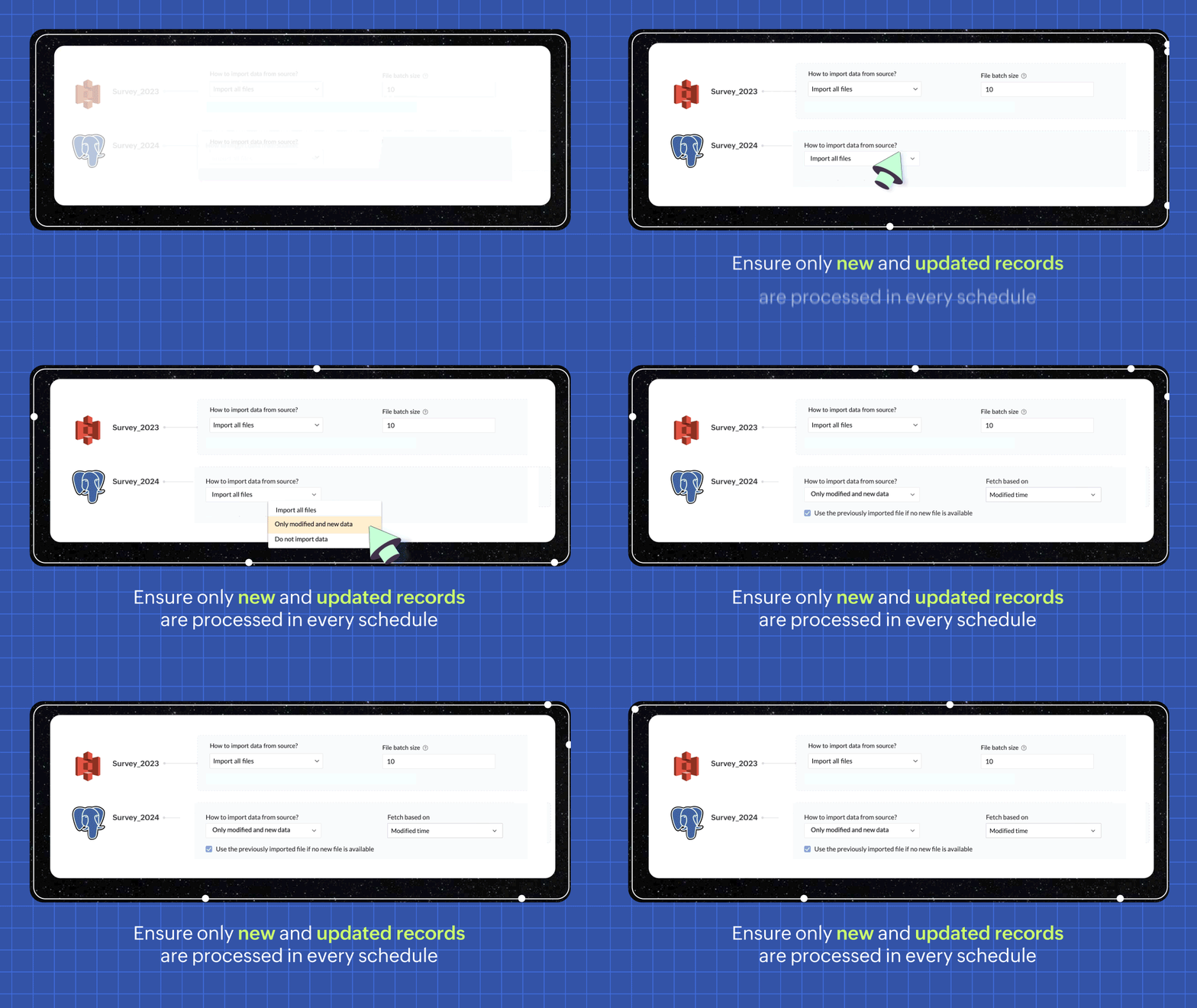
In every scheduled run, choosing the incremental fetch option fetches only the new and updated data from the source for processing. This was available for few sources in 1.0, but we're expanding the support to all data sources in 2.0. Incremental fetch job runs faster, compared to full fetch as only the newly added rows are processed, also making it more cost effective.
Transforms made simple with OpenAI
Our new transforms, powered by OpenAI, help generate complex formulas based on logic written in simple English or transform data based on the sample output given. This simplifies the data preparation process and makes Zoho DataPrep more accessible, even for organizations that don't have a dedicated data analyst team.

Create instant pipelines with templates
We built DataPrep with a vision of helping businesses, big or small, have better access to all their business data—but we understand that the data game can be tricky when you're starting out.
To keep our vision alive and to help everyone start using their business data better, we've built a template gallery based on various business use cases that can easily be used to create a pipeline architecture. Just click on the template to add the formula instantly and transforms needed for the data workflow.
You can also save your own data pipelines as templates to make recreating pipelines easier or to apply the data pipeline over a different set of data. You can also share the data pipelines with your organisation or export them as files to share across different organisations.

New dashboard showcasing your pipeline status
Our new and improved dashboard shows the status of all your pipelines instantly. Easily monitor your scheduled runs, identify failed jobs, and ensure your data is up-to-date in your system.

Make data movement easier with other business applications
We are expanding the list of data connectors supported in Zoho DataPrep and as a start we have released the Zoho Creator integration.

Migrating data into Zoho Creator, as well as seamlessly moving data between various modules within your custom Creator app, has been made easy with DataPrep.
As more organizations are adopting SaaS products in their tech stack, in order to make data more available, we're opening up integrations with HubSpot, Salesforce, and SurveyMonkey, as well as many more Zoho products, in the next couple of months. Stay tuned for more data connectors in Zoho DataPrep!
Can't wait to try DataPrep 2.0?
All our existing customers can access the Beta version right from within their DataPrep home page. The Beta is not available for Zoho One users yet, but if you want to try out the Beta on a standalone account, contact us at customersuccess@zohodataprep.com
Zoho DataPrep is designed to make data preparation and movement easy. With DataPrep 2.0, we have completely revamped our product with the new pipeline builder, unified schedules, pipeline templates and universal incremental fetch that lets you easily manage complex data preparation jobs and data movement. We've also included 50+ other updates to help you clean, prepare, and monitor your business data effortlessly.
Check out all updates in 2.0
Check out all updates in 2.0
Topic Participants
Viswanath Subramani SS
Ben Norman
SaaSguru
Sticky Posts
Announcement: Zoho DataPrep to Deprecate Password-Only Authentication for Snowflake Connections on July 31, 2025
As part of our ongoing commitment to security and in alignment with Snowflake's pledge to the Cybersecurity and Infrastructure Security Agency (CISA) Secure by Design initiative, Zoho DataPrep will no longer support single-factor password authentication.Announcement: Zoho DataPrep 1.0 will be deprecated on April 15, 2026
We'd like to inform you that the Zoho DataPrep 1.0 version will be officially deprecated as of April 15, 2026. This aligns with our efforts to streamline and improve your overall experience with Zoho DataPrep 2.0 which was released in Sep 2024 . To ensureAnnouncement: Migrate your workspaces to Zoho DataPrep 2.0
Zoho DataPrep 2.0 was recently launched with exciting new updates to the platform. You can read more about the new updates in the previous announcement. To take full advantage of the new data pipeline features, migrate your existing workspaces from theAnnouncing Zoho DataPrep 2.0: An AI-Powered Data Management Platform
Originally launched in 2021, Zoho DataPrep started as an efficient self-service data preparation solution. We are excited to launch our new version 2.0, with significant enhancements to our platform to help you manage your end-to-end data needs with theAnnouncing DataPrep 2.0 Beta!
Being data-driven is an important end goal for all organizations, because when businesses can manage, analyze, and make actionable decisions based on data, they have a competitive advantage. With that said, how confident are you in making business decisions
Recent Topics
MS Teams Flow Integration Question
Where can I find the chat ID for the "Post message to chat" target?Zoho Flow - Access denied to recover recording from call module - OpenAI
Hi, I am trying to build a Flow to recover recoding when a new call is saved in my CRM. I have integrated my CRM with ringcentral and the recordings are saved in the event. Trigger: When new module entry Step 2: Fetch module entry (Zoho CRM says "permissionUnable to send price in big commerce from zoho flow.
I am creating a flow from zoho flow to create a product in zoho inventory and sending this to big commerce. But the problem is like when ever i send the price its getting error. it require decimal format value if i am sending ${trigger.sales_rate} theNot sending mail to new lead in zoho flow
I have created a flow in zoho flow and triggered an action to send email notification when the new lead is created but even after user entering the mail id the email is not going to themAccess query string from incoming webhook URL in Zoho Flow
I have a fairly straightforward use case, but cannot find anything conclusive on this subject. How can I simply access the query string of the incoming webhook request in Zoho Flow? I am attaching the Deal ID to the end of the request like: https://flow.zoho.com/762439902/flow/webhook/incoming?zapikey=1001.0dec2d7dd15080c464a13925275f0129.448c23ee219c545c89f5a178456cfc8b&isdebug=false&dealID=${Deals.DealUnable to access my Zoho forms account
For some days now, I haven't had access to my Zoho Forms account. I keep getting an error that says, "You are an inactive user in your organization" via the mobile app and "You don't have permission to access this organization" via the web. I was removedIdentify Unused Deluge Functions in Zoho CRM
Hello Zoho Support Team, I would like to request a feature that helps administrators identify unused or rarely used Deluge functions in Zoho CRM. Currently, Deluge functions are distributed across different areas, and there is no centralized overviewUpdate on V2 API End-of-Life Timeline
Dear Users, Earlier this year, we shared the launch of the V3 APIs and requested users to migrate from the older V2 APIs by December 2025. We have received valuable feedback from our users and partners regarding their migration timelines. We are happyRun a workflow after record merge
Hello, We are wondering if there is a way to trigger a workflow after two records are merged? We have a sms service that use to text back and forth with Prospects and Contacts. To make it easy for our users, we automatically create them in this otherLive webinar | The Evolution of Zoho Show: 2025 Feature Recap
2025 has been a year of exciting updates and features for Zoho Show. From advanced design and formatting tools to smarter presentation delivery, enhanced collaboration, and AI-powered features—along with the launch of our desktop apps, Show has continuedBatch Tracking custom function
Hi fellow zoho users, We have our ecommerce site setup to shopify. I have some products I want to add batch tracking too, my only issue is that it breaks our shopify workflow (create sales order, invoice, payment, package) because it requires us to manuallyInclude Suggested Articles in New Ticket Email
When someone creates a new ticket, is there any way to include recommended knowledge base articles (like the ones Zia Suggests) in the email notification to the user? When they're waiting for a reply, it would be nice to have sent them some recommendedZoho Flow + QuickBooks Estimates – Line items not created from CRM subform
Hi everyone, I’m trying to create QuickBooks Estimates from Zoho CRM Quotes using Zoho Flow. I’m aware that Zoho Flow’s native “Create Estimate” action does not support multiple line items, so I followed the community guidance for Invoices using a customSAP S/4 HANA Integration via ZOHO Flow
Hi How do I change the SAP Client ID while creating a new connection ? MY client ID is 421. I believe the client id should be an input field for length 3 numbers rather then a drop down to select from a fixed set of values. ThanksVLOOKUP FUNCTION PROBLEM
Hello, i have a problem with the VLOOKUP function in my sheet http://public.sheet.zoho.com/public/tonimoreno/indicemasacorporal2 in cell D2. This function doesn't work correctly and always returns the last content of the range. Can you help me?Zoho Flow Completely Broken?
Since December 13th, 100% of our flows have stopped working completely. Nothing is working or triggering??? I called support & sat on the line with them for 2 HOURS until they finally concluded it was a back-end problem on their end?? Now i'm callingPrint / Export full Dashboard page
Hello Zoho team, It is currently only possible to print/export one component of a dashboard at a time. Requesting the option to print/export a full dashboard page with all components to a pdf or picture. Doing through the browser doesn't give good results.emails duplicated in my outlook client
Hello I am just new here and I have a litle problem that I do not find how to solve. I sumarise here after. Your help would be very appreciated. I have just recently contracted this zoho mail servicesservices as an initial evaluation yesterday night. I then: - opened a free account - created 1 initial email address ..........@domain.com - created a second email address ..........@domain.com - proceeded with the config instructions (checking the ownership of my domain, changing MX etc... ) asHow to check task starting time in zoho mobile app?
I am using the Zoho mobile app on my iPhone, and I am not able to see the task's starting and finishing times. When opening the Task information / Details, I can only see the Task start date and due date, but not the time. Is there any way to check aCreating an extension in Sigma: Zoho CRM isn't selectable as a service
I have 2 Zoho accounts which are part of 2 different workplaces. One workplace is able to select 'Zoho CRM' as a service option when creating a new extension, the other one is not. I'm not sure what the exact differences are between them. What do I needList of packaged components and if they are upgradable
Hello, In reference to the article Components and Packaging in Zoho Vertical Studio, can you provide an overview of what these are. Can you also please provide a list of of components that are considered Packaged and also whether they are Upgradable?RouteIQ for Zoho FSM
Beste, Zou wel top zijn dat we een RouteIQ hebben voor FSM aangezien we constant moeten zien wat de beste route is voor onze monteurs. Nu moeten we een speciale aparte programma hebben om de beste route te berrekenen voor onze monteurs aangezien de planningExport Tickets from the Help Center
Hello everyone! We are now allowing end users to export tickets directly from the help center. The ticket export allows users to: Filter tickets by Department, Priority, and Account before exporting. Download files from Export History (Setup > Data administrationIs it possible to remove filtering options?
My CRM has a lot of custom fields that should not be used in filters or views. Fields that are automated and exist only to store temporary values that get used in functions. These create a lot of noise in the list of fields to filter. Isn't there anyFunction #18: Associate invoice templates automatically based on customer language
For businesses dealing with a diverse linguistic clientele, it becomes crucial to send out invoices in the customer's preferred language to ensure effective communication. This requirement can be handled in Zoho Books by creating invoice templates inChanging field types
Question im a Zoho CRM user and curious, if I change a flied type from single or multi line text to a URL field type will i lose the data in the field or will it be converted to website link automatically. ThanksQuote PDF – Header image stopped rendering suddenly
Hello Zoho Support Team, We are facing an issue with Quote PDF templates in Zoho Books. Previously, images added inside the Quote header HTML were rendering correctly. However, recently the header image is no longer appearing, while header text stillChanging Default PDF Name
Is it possible to change the default name of a PDF? As of right now, all of my quotes are named 'QT_$QuoteNumber' (i,e: 'QT_19803471298374) - would it be possible to change this to: '$CompanyName - $AccountName - $QuoteNumber' for instance?Tip 2: Recursive functions in Deluge: How to dynamically run a function for a specified number of times.
Hi folks, As part of the Zoho Creator - Tips and Tricks series every fortnight, we are back today with a new tip on Recursive functions. Let us first quickly understand what Recursive functions are: A function that calls itself one or more times is known as a Recursive function. That is, you can execute a function to perform a particular action a specific number of times. And, at the end of each iteration, a new output is generated. Recursive functions are commonly used by programmers as it enablesFunction #48: Manage fixed installment payments using Zoho Books
Hello everyone, and welcome back to our series! Businesses offer installment payment options to their customers, particularly for expensive purchases, to ease the financial burden on them. By breaking down the total cost into smaller, more manageableSpotlight series #6: The Show app for Android TV has a new look!
Hello everyone! We are delighted to introduce our revamped and redesigned Show app for Android TV. Smart TVs are exploding in popularity. Android TV alone has over 110 million active monthly devices. Zoho Show, as part of a constant effort to improveCan’t create alias “Email alias already exists”
Hi, I’m trying to create the following alias for my domain email. contact@ personal@ private@ But I get a email alias already exists. I had a soho account previously which I deleted which I suspect is causing the issue. Can someone assist? Kind RegaAppraisals - Order of Previous Reviews Should Be Newest to Oldest
The new Zoho People layout generally does a decent job at providing the necessary information for performing appraisals of employee performance. One example of this is the Previous Reviews section: This information is helpful when conducting a review.Paging through API results. a major gap in your documentation.
There is no way for me. to get all of my data through a single API call. Typically REST APis have mechanisms for paging through API results. But the documentation for the API I am using: https://desk.zoho.com/DeskAPIDocument#Introduction Has no mentionRecurring invoices were generated with old template...
I have recurring invoices setup. Ones generated on 10.20.2025 used the modified template I had used. But for some reason, on the ones created on 11/20/2025, it seems the invoices created reverted to the previous version of the invoice template. Notably,Tip #54- Exploring the Files Icon in Zoho Assist- 'Insider Insights'
As we’re already in mid-December, it’s a good time to take a closer look at one of the most useful options in the Zoho Assist remote support dashboard—the Files icon. To get started, log in to Zoho Assist using your credentials. Once you’re in, navigateTip#47: Estimation planner
Sprint planning becomes easier, smoother, more collaborative and more accurate with the Estimation Planner extension. Most work items involve multiple users, and each user's role and effort vary. To provide an unbiased and fair estimation point to theTime Tracking on Iphone doesn't stop
When I start a time tracking session the timer starts as expected. However when I hit stop, the timer remains on that project. The only buttons available are discard and start. Start runs the timer more and discard says it will throw away the data fromZoho Sign - Zoho CRM extension upgrade
Hi everyone, We've updated Zoho Sign extension for Zoho CRM with significant internal changes. Impact on existing Zoho Sign extension users Users using the extension without customization If you are using the integration without implementing Zoho Sign'sGroup by Owner/ Owner Kanban /Group by Custom Field
Hi, We are missing the option of viewing Tasks grouped by their owner, as it is an essential function for us to manage our employees' working tasks. We find it hard to inspect what are the tasks that our employees are working on. We are seeking an optionNext Page