Creating a Gmail integration using custom connectors
Hello everyone!
Greetings from Deluge. Following up on our series aimed at exploring the capabilities of Deluge, today we'll take an in-depth look into the Deluge custom connections that can be created across Zoho services.
Deluge boasts an extensive range of over 260 built-in integrations spanning more than 35 Zoho services. These integrations streamline data access and modification with these services, from a single point in Zoho, without having to toggle between services. However, we understand that the needs of our users vary widely, and sometimes existing integrations may not cover every scenario.
That's where custom connections come in. Think of them as the Swiss Army Knife of integrations, enabling connections with hundreds of services—such as Gmail and Outlook—and seamlessly integrating them with your favorite Zoho services. With custom connections, you have the power to build your own integrations with virtually any third-party service and tailor them to meet your requirements. Moreover, since the custom connections use the OAuth 2.0 authentication mechanism, you're getting best-in-class security while integrating with third-party services.
What are connections?
Before we dive into the details of custom connectors, let's take a glimpse at what connections are in Deluge. Connections are a means to connect your Zoho account and any third-party accounts you wish to integrate with. Once a connection is created and connected, you can use it in Deluge integration tasks or invokeURL scripts to perform REST operations on the target service from the required Zoho service. For more information, visit our Connections help doc.
Use case
Assume the sales team of an organization uses Zoho CRM for managing leads, customer retention, and customer acquisition, and uses Gmail for communication purposes, like following up with potential clients via email. While the system works as is, it's time-consuming and prone to error, so an integration between Gmail and Zoho CRM is necessary to improve efficiency.
A custom connection to your Google account will enable you to sync your Zoho CRM and Google accounts, allowing you to perform actions related to your Google account from Zoho CRM. For example, you can invoke the connection using the invokeURL task in Zoho CRM and send an email to your leads from your Gmail address.
Steps to configure the Google custom connection
Configuration video
Configuration steps
Creating Google OAuth credentials
- Visit https://console.cloud.google.com/.
- Click the dropdown and choose the required project.

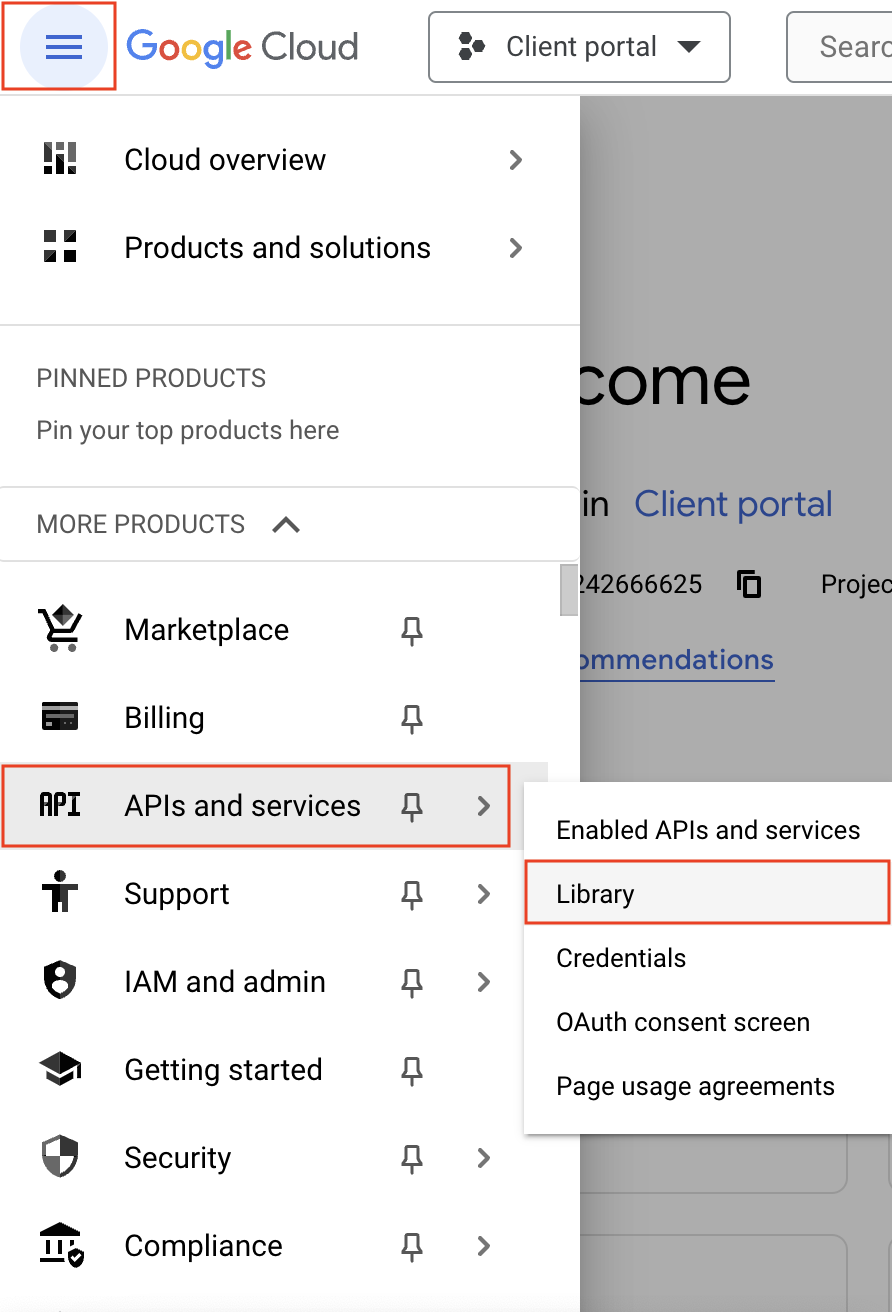
- Navigate to the hamburger menu on the left and click APIs and services -> Library.
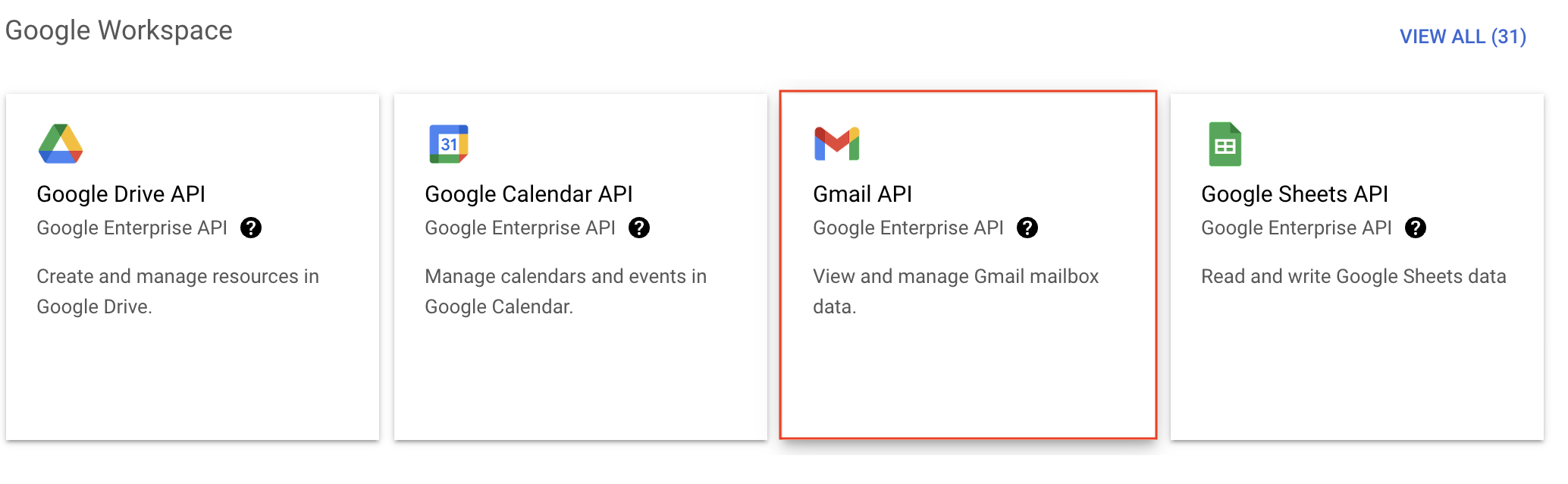
- You'll be taken to the API library page. Navigate to the Google Workspace section and click Gmail API.
- Next, click Enable on the Gmail API product details page.
- In order to use this API, you'll need to create credentials. Click CREATE CREDENTIALS.

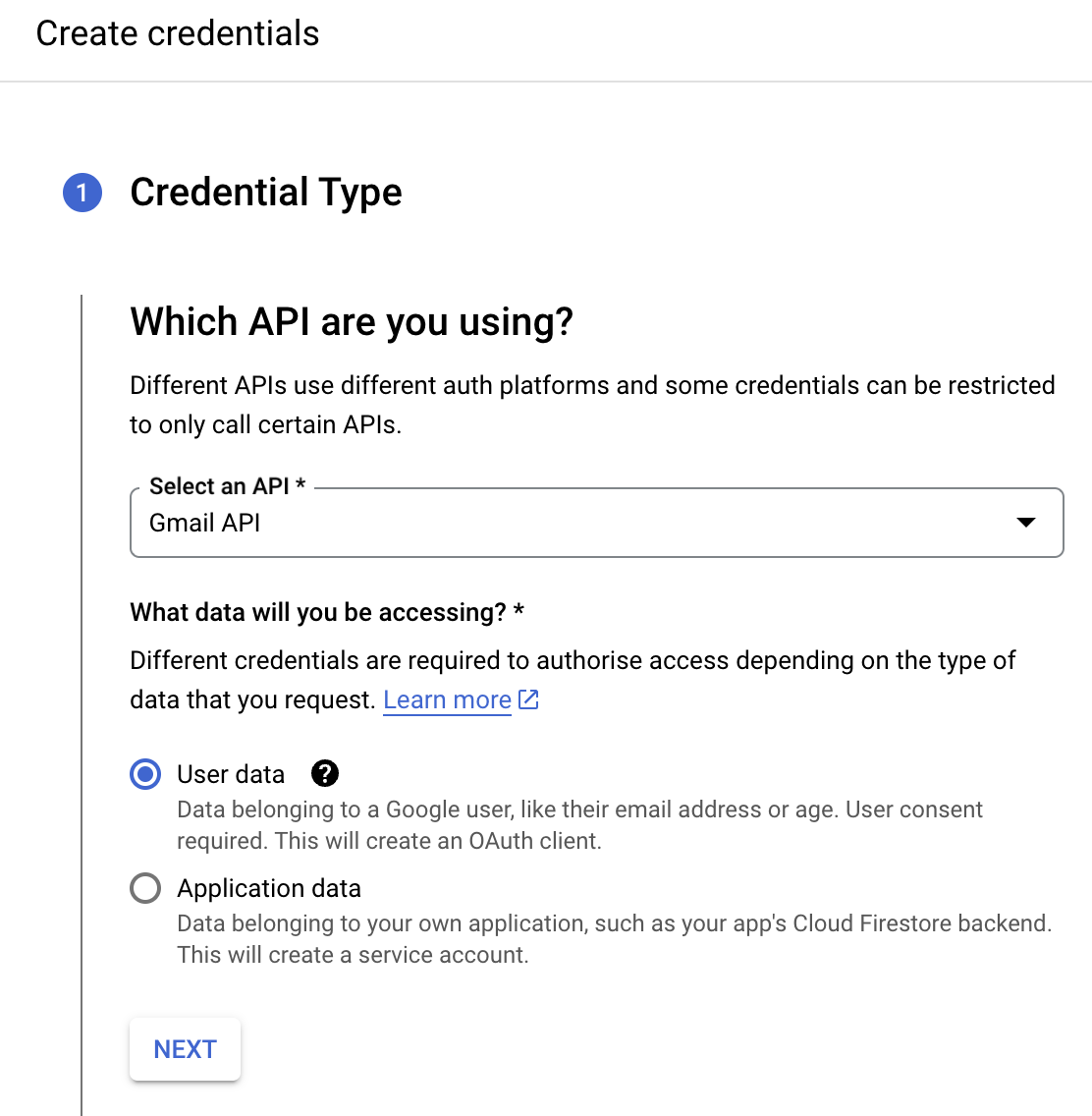
- On the Create credentials page, choose Gmail API in the Select an API dropdown and User Data under the What data will you be accessing? section. Click Next.
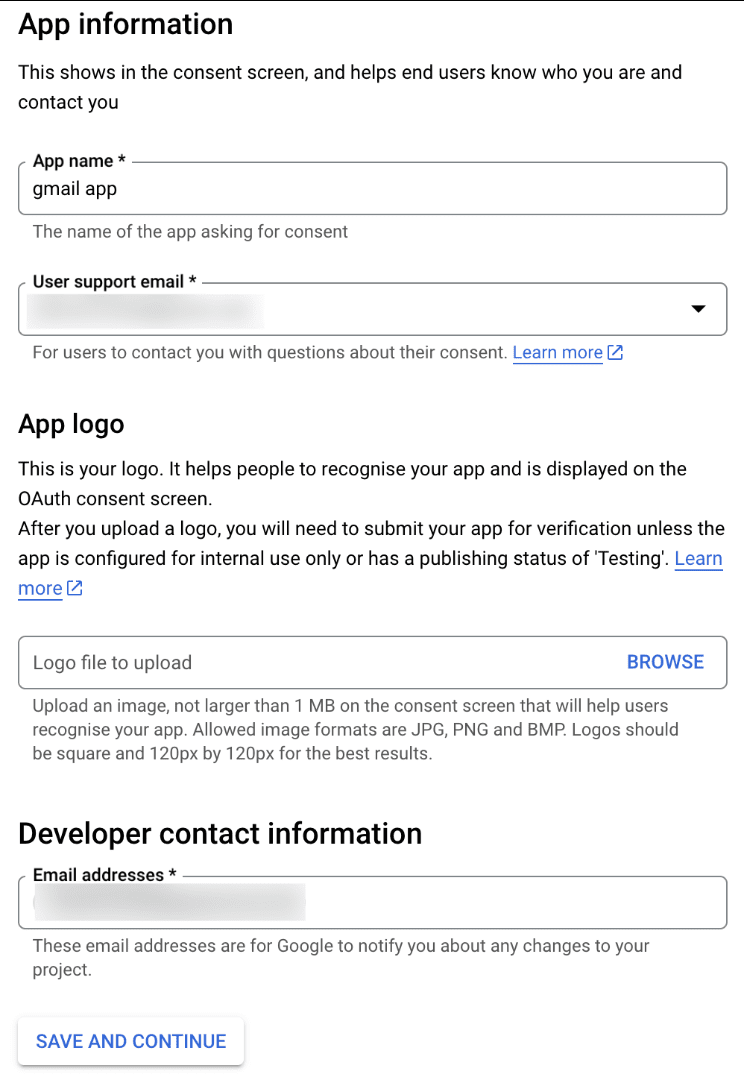
- Next, on the OAuth consent screen, enter the App name, User support email, and Developer contact email address. Then click Save and Continue.
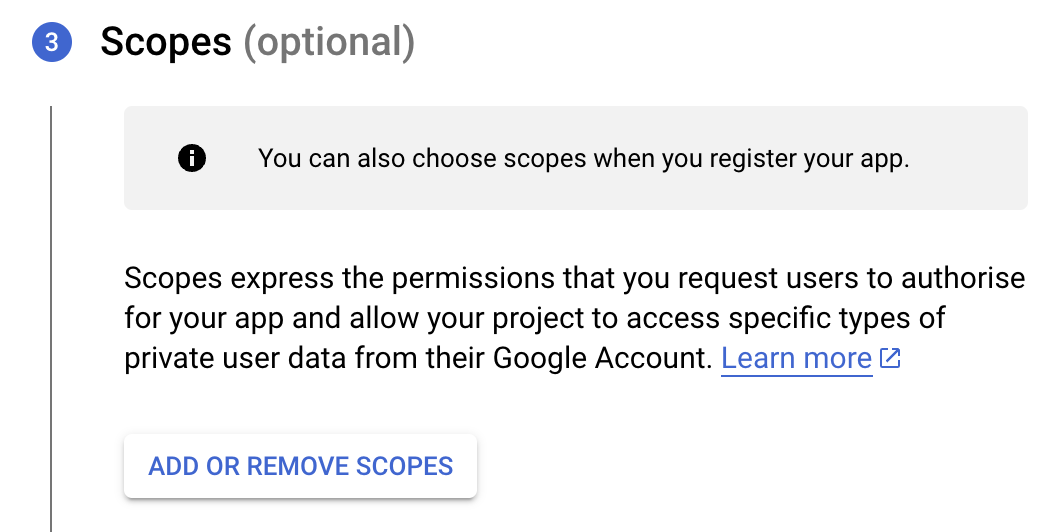
- Next, under the Scopes section, click the ADD OR REMOVE SCOPES button.
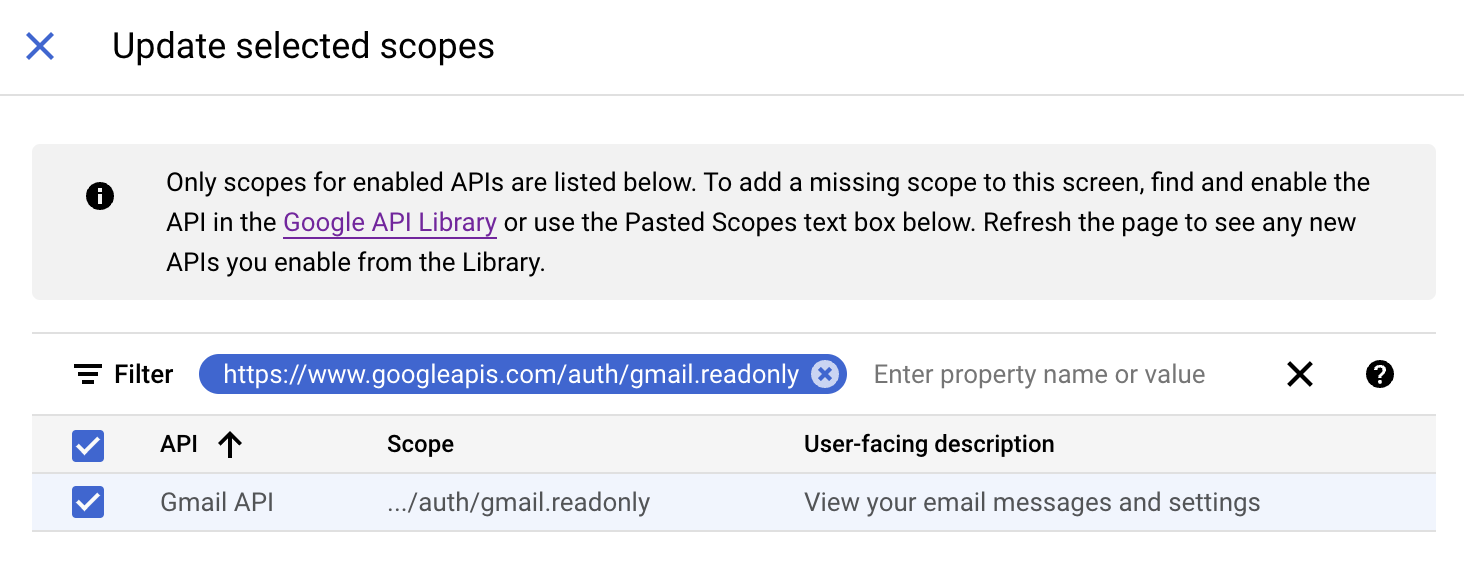
- In the Update selected scopes pane, search and select the gmail.readonly scope. Click Update, and then click Save and continue.
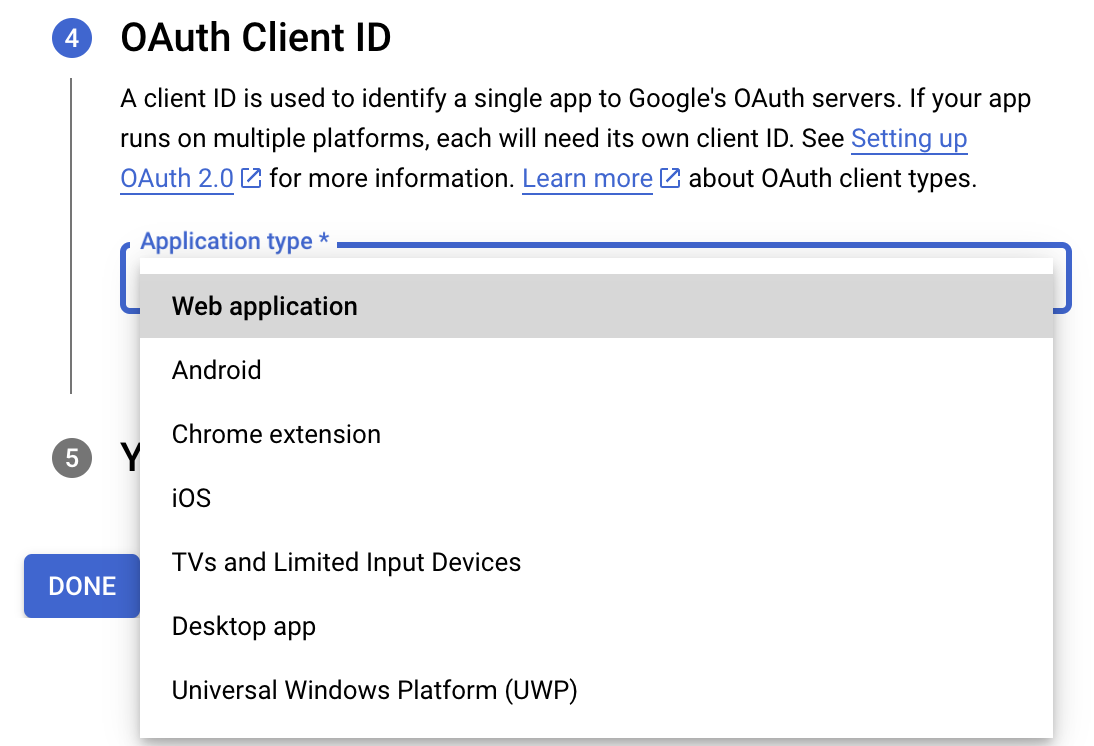
- Now, under the OAuth Client ID section, choose Web application in the Application type dropdown. Then name your app.
- Enter https://deluge.zoho.com/delugeauth/callback as the Authorized redirect URI.
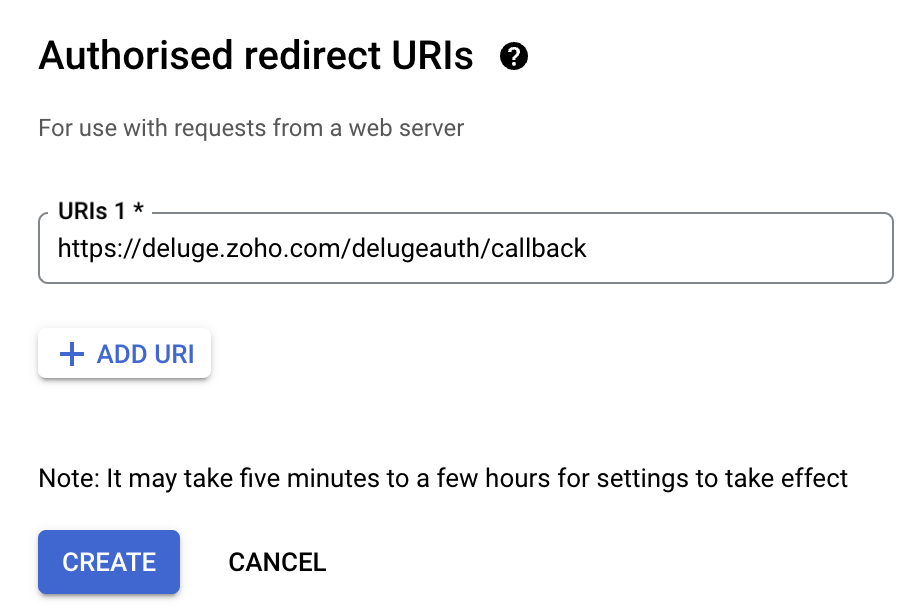
- Click Create and download your credentials. This Client ID and others will be required later, while creating a connection in Zoho CRM.
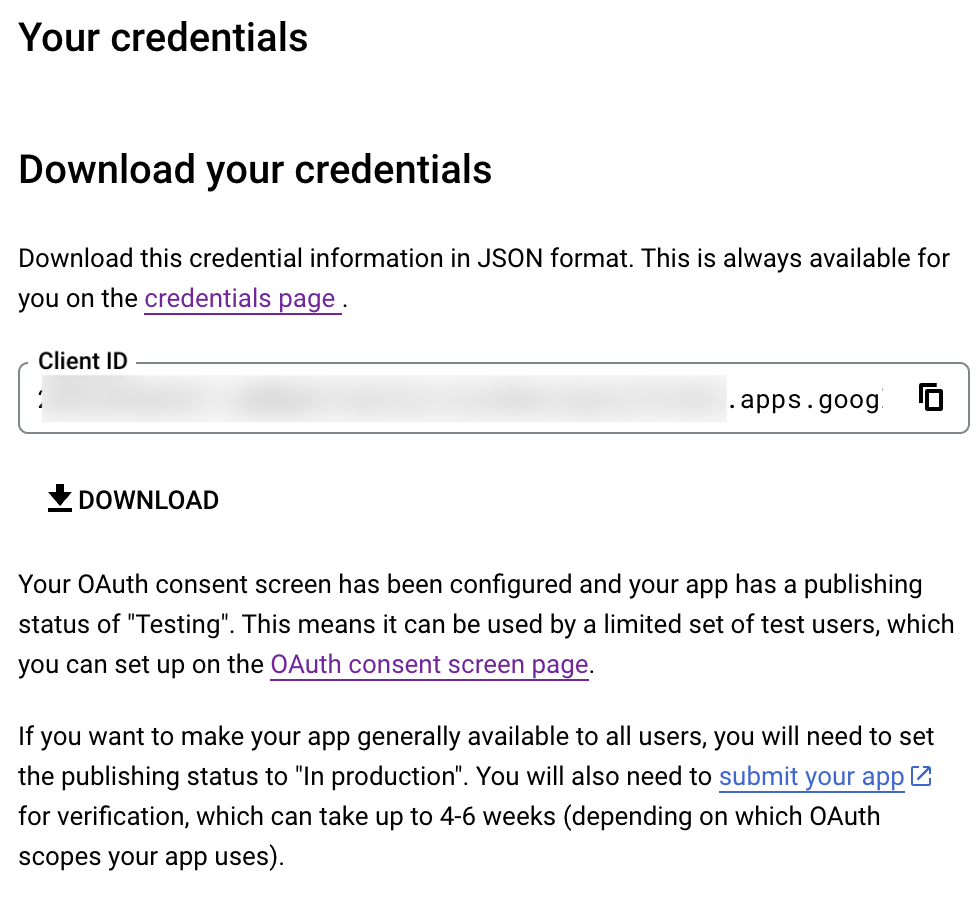
- Navigate to the OAuth consent screen and click Add users under Test users. Enter the user's email address and click Save.
Creating a custom connector for Gmail
- Now the action shifts to Zoho CRM. Navigate to crm.zoho.com -> Settings -> Connections.
- Choose Custom Services and click Create Service.
- On the Create Service screen, choose OAuth 2.0 as the Authentication type and Header as the Parameter.
- Enter the Client ID, Client Secret, and Authorize URL generated from Google as shown in step 12 above.
Tip: Having the Offline access type will allow your application to refresh tokens even when the user is not actively using the application. - Then enter https://oauth2.googleapis.com/token as the Access token URL and Refresh token URL.
- Specify the necessary scopes like read and create, etc. and then click Create Service.
- On the next page, click Create Connection. Give the connection name and choose the scopes. Then click Create and Connect.
- Finally, authenticate the connection on the Google accounts page. Your custom connection will be created, and the two services can be integrated!
Now that the connection between Zoho CRM and Gmail has been established, you can use the invokeURL task to access and modify data in Gmail using the different APIs.
Sample
You can use the below code in invokeURL task to get the latest emails from Gmail.

userId = "emailaddress@gmail.com";
get_gmail = invokeurl
[
url: "https://gmail.googleapis.com/gmail/v1/users/"+userId+"/messages"
type: GET
connection : "connectionname"
];
messageID = get_gmail.get("messages").get(0).get("id");
get_gmail_withID = invokeurl
[
url: "https://gmail.googleapis.com/gmail/v1/users/"+userId+"/messages/"+messageID
type: GET
connection : "connectionname"
];
Content_of_the_mail = get_gmail_withID.get("snippet");
info "Mail Content : " + Content_of_the_mail;
gmail_values = get_gmail_withID.get("payload").get("headers");
for each headers in gmail_values
{
if ( headers.get("name") == "Subject" )
{
info "Subject of the Mail : " + headers.get("value");
}
if ( headers.get("name") == "From" )
{
info "From Address : " + headers.get("value");
}
}
get_gmail = invokeurl
[
url: "https://gmail.googleapis.com/gmail/v1/users/"+userId+"/messages"
type: GET
connection : "connectionname"
];
messageID = get_gmail.get("messages").get(0).get("id");
get_gmail_withID = invokeurl
[
url: "https://gmail.googleapis.com/gmail/v1/users/"+userId+"/messages/"+messageID
type: GET
connection : "connectionname"
];
Content_of_the_mail = get_gmail_withID.get("snippet");
info "Mail Content : " + Content_of_the_mail;
gmail_values = get_gmail_withID.get("payload").get("headers");
for each headers in gmail_values
{
if ( headers.get("name") == "Subject" )
{
info "Subject of the Mail : " + headers.get("value");
}
if ( headers.get("name") == "From" )
{
info "From Address : " + headers.get("value");
}
}
References
----
And that's a wrap for today! We hope you found this post informative and start using custom connections to experience the full capabilities of Deluge and Zoho.
Kindly let us know if you have any questions, feedback, or suggestions in the comments, or write to us at support@zohodeluge.com!
Regards,
The Deluge Team
Topic Participants
Ashwin Vishal R
Kaushal
Anand M B
Recent Topics
Marketer's Space: Proven tips to improve open rates – Part II
Hello Marketers! Welcome back to another post in Marketer's Space! We're continuing from where we left off a fortnight ago. We ended the previous post discussing the subject line, and we'll continue from there. Let's dive right in. Pre-header Pre-headerSQL Table slowed to a crawl
Hi all - I seem to have noticed an update. Now whenever I am typing in the script field for the SQL tables there is a huge delay and it is all very slow. This has never been the case for me in over 5 years of using Analytics - I really hope it's fixedDeluge Events/search API works in user environment but not in sandbox – why?
I am creating an Extension for Zoho CRM using Zoho Sigma Platform I’m using the following Deluge code to search Events in Zoho CRM based on Start_DateTime: criteria = "(Start_DateTime:greater_than:2025-12-20T00:00:00+00:00)"; url = "crm/v8/Events/search?criteria="Ensure Consistent Service Delivery with Comprehensive Job Sheets
We are elated to announce that one of the most requested features is now live: Job Sheets. They are customizable, reusable forms that serve as a checklist for the services that technicians need to carry out and as a tool for data collection. While onWhat are Zoho Meeting capabilities included in Zoho Workplace Standard?
I am evaluating using Zoho Meeting for my organization, but it is not clear what Zoho Meeting capabilities are already included in Zoho Workplace Standard. - Are meeting recordings included in Workplace Standard? - Can we invite external meeting participantsHow can I get the participant list of a reoccurring meeting afterwards?
I'm trying to use the Meeting Participant Report from the API docs but when I call it on a reoccurring meeting it returns that there are no participants because it thinks I'm talking about the meeting in the future. Is there a way to use webhooks or someFunction #50: Send Mass emails to your customers
Hello everyone, and welcome back to our series! We have reached a milestone of 50 Functions, which means that we have automated 50 different tasks in Zoho Books. Every Friday, we have shared a nifty function aimed at either automating a task or streamliningFull Hebrew Language Support for Client-Side Zoho Assist Interface
Dear Zoho Assist Team, We would like to request an enhancement to Zoho Assist's client-side interface to support full Hebrew language customization, including all popups, notifications, and session-related messages. Current Limitation The Join page allowsAdd Hebrew & RTL Support to Feedback Widget
Hello Zoho Desk Team, How are you? We are using Zoho Desk and would like to utilize the Feedback Widget. While Zoho Desk itself supports Hebrew and RTL, the Feedback Widget unfortunately does not. We kindly request that Hebrew and full RTL support beMerge Tickets Directly from Contact Page in Zoho Desk
Dear Zoho Desk Support Team, We are writing to request a new feature that would allow users to easily merge tickets directly from the contact page in Zoho Desk. Currently, the only option to merge tickets is from the Tickets list view page, which canDifferent languages for users
Hello, Do you plan to enable individual users to select their languages for interface? Currently language can be changed for everyone - it looks like a settings for a whole portal, which is not good when you are working internationally. Best regards,Kaizen #222 - Client Script Support for Notes Related List
Hello everyone! Welcome to another week of Kaizen. The final Kaizen post of the year 2025 is here! With the new Client Script support for the Notes Related List, you can validate, enrich, and manage notes across modules. In this post, we’ll explore how2025年 Zoho コミュニティ 活動の振り返り 🎉
ユーザーの皆さん、こんにちは!コミュニティチームの中野です。 2025年も多くの学びと出会いがあったZoho コミュニティ。 本記事では今年の活動を振り返りながら、フォーラムの投稿・参加者の皆さん・イベントのハイライトをご紹介していきます。 目次 フォーラム:注目の投稿 フォーラム:多くの貢献をしてくださった方々 ユーザー交流会振り返り ワークアウト振り返り その他のトピックス 1. フォーラム:注目の投稿 本フォーラムでは様々な議論と知識の共有が行われました。 ユーザーの皆さんが日々の業務で直面する課題を投稿し、経験豊富なユーザーさん達が実践的な解決策を提供してくださいました。Customer Management: #3 Giving Customers Control & Privilege
Rio, the founder of RenoTech Solutions, a fast-growing digital service company, found itself juggling a dozen different services for its clients. They handled one-time setup fees, recurring monthly invoices, and custom milestone-based billing for projects.Can I use a Standalone CRM Function as the Callback URL For Async Export Data API?
I am creating an export job using this API https://www.zoho.com/analytics/api/v2/bulk-api/export-data-async/create-export/view-id.html There is a "callbackUrl" key in the CONFIG object. I tried copying the URL for a standalone function in CRM which canBooks Api: listing expenses created after certain dates
Is there any parameter I can add to the List Expenses endpoint that will let me look up expenses by when they were created?Add RTL (Right-to-Left) Text Direction Support Across All Zoho Learn Editing Interfaces
Hi Zoho Learn Team, Hope you're doing well. We would like to request an important enhancement to Zoho Learn regarding support for right-to-left (RTL) languages such as Hebrew and Arabic. 🔹 Current Issue While the Knowledge Base Article editor providesAdd Hebrew Support for Meeting Transcripts Provided by ZIA in Zoho Cliq
Hi Zoho Cliq Team, Hope you're doing well. We would like to request the addition of Hebrew language support for the Meeting Transcript and Summary feature in Zoho Cliq. Currently the transcript and summary feature is available for recorded meetings andRemote Control Functionality During Screen Sharing in Zoho Cliq
Hello Zoho Cliq Team, We would like to request the addition of remote control functionality during screen sharing sessions in Zoho Cliq. Currently, while screen sharing in Cliq is very useful, it lacks the ability for another participant to take controlReal-Time Screen Annotation During Zoho Cliq Screen Sharing
Hi Zoho Support Team, Hope you're doing well. We’d like to request the addition of real-time screen annotation tools during screen sharing sessions in Zoho Cliq video calls. 🔍 What We're Looking For: The ability for the presenter—and optionally, otherCentralized Organization Information Management in Zoho One
Dear Zoho One Support, I'm writing to propose a feature that would significantly improve the user experience and streamline data management within Zoho One. Current Challenge: Currently, managing organization information across various Zoho One apps requiresEnhance Zoho One Conditional Assignment to Fully Reassign App Settings When Changing Departments
Hi Zoho Team, We’d like to submit a feature request regarding the current behavior of Zoho One’s conditional assignment logic when moving a user between departments. 🔧 Current Limitation As it stands, Zoho One’s conditional assignment does not removeAbility to Filter Alias Mailboxes in Zoho Recruit
Dear Zoho Recruit Team, I hope you are doing well. We would like to request a feature enhancement regarding the handling of alias mailboxes in Zoho Recruit. Currently, when we connect an alias mailbox (e.g., jobs@domain.com) from our Zoho One accountAutomatic Department and Employee Sync Between Zoho One and Zoho People
Dear Zoho Support, I'm writing to propose a valuable feature request that would streamline data management and improve user experience within the Zoho ecosystem: automatic synchronization between departments and employees in Zoho One and Zoho People.Prefered Bin Missing in android APP
Andoroid app dosent show preferred bin in the picklist. The workaround support reccomend is to use the computre to create the picklist. it shuld be information to be shown aas basic for the pciker.Open Sans Font in Zoho Books is not Open Sans.
Font choice in customising PDF Templates is very limited, we cannot upload custom fonts, and to make things worse, the font names are not accurate. I selected Open Sans, and thought the system was bugging, but no, Open Sans is not Open Sans. The realFunction #1: Convert an accepted Estimate to Sales Order automatically in Zoho Books
As you’re aware, Zoho Books provides a default option to have the estimates automatically converted to invoices once your customer accepts them. Many of you wanted a similar option for sales orders, so here’s a workflow that converts accepted estimatesWrite-Off multiple invoices and tax calculation
Good evening, I have many invoices which are long overdue and I do not expect them to be paid. I believe I should write them off. I did some tests and I have some questions: - I cannot find a way to write off several invoices together. How can I do that,Reusable Jira Connection for Multiple Zoho Projects Imports
Hello Zoho Projects Team, We would like to raise a concern and submit a feature request regarding the Jira → Zoho Projects migration process, specifically around how Jira connections are handled. Current Behavior: When setting up a Jira connection forZoho invoice doesn't support Arabic language
I added a clause in the terms & conditions section in Arabic but it doesn't appear when I sent or print it.Recurring Invoice Placeholder Not Updating Billing Period
Hi, I’m using Zoho Invoice Free and want the billing period to update automatically in recurring invoices. In Item Description I tried: Billing Period: %(m-6)% %(y)% to %(m-1)% %(y)% but even if the invoice date is in 2026, it still shows the period basedRelated list Mobile Device
Hello, We use an the Zoho creator application to make reports linked to Accounts. On the computer: it's easy to go the Account and see all the created reports in the related list below On iPad/Phone ZOHO CRM APP: we cannot see the reports on those accountsCan't update the company address in zoho invoice
Dear Sir/Madam, I want to update the company address in Zoho Invoice but failed. It popped out a sentence "Invalid value passed for Website". Please advice how to solve this problem. Thank you.Is there a plan to allow for the hierarchical organization of Customers / Companies in Zoho Billing?
We have a few customers who have organizational structures that we haven't quite found a way to deal with in Zoho Billing. In CRM, these sub-companies (or subsidiaries or whatever you want to call them) all have another CRM account as the parent account.【Zoho CRM】作業リスト機能リリースのお知らせ
ユーザーの皆さま、こんにちは。コミュニティチームの藤澤です。 今回は「Zoho CRM アップデート情報」の中から、作業リスト機能リリースのお知らせ情報をご紹介します。 目次 作業リスト機能 概要 機能① 自分の未完了の活動 機能② 処理待ち 機能③ 自分の作業リスト 作業リスト機能 概要 営業チームでは、CRM内に業務やデータが分散しているため、管理が煩雑になりがちです。この断片化は、機会の見逃しや生産性の低下につながります。 作業リスト機能は、タブを横断する業務項目をひとつのカスタマイズ可能なダッシュボードに集約し、業務を効率的に管理できるようにします。SalesIQとPageSenseの利用について
初めての投稿で場違いだったらすいません。 弊社ではSalesIQを運用しているのですが、追加でPageSenseの導入もしたいと現場からの声があります。 両サービスともクッキー同意バナーが必要なサービスなのですが 弊社では同意無しに情報はとりませんという方針なので 2つ入れると2つバナーを出す必要がでてきます・・・ 両サービスを運用されてる方があれば運用状況とか教えてほしいです。 PageSenseについては詳細まで機能を理解してないなかでの質問です。Parent-Child Tickets using API or Deluge
Hi Everyone, We are looking at the parent-child ticketing features in Zoho Desk. We want to be able to create a parent ticket at customer level and nest child tickets underneath. The issue we are facing is to be able to automate this. I'm checking theClosing connected ticket after closing WA conversation
Hi, At the moment, once someone sends a message to our WA number, a corresponding ticket is automatically created. After the question is answered, our support department closes the chat/conversation. However, after that, the connected ticket is stillNote sync turn off
Hi, Is it possible to turn off notes sync between task notes and the parent module? (Account/Deal)Basic Plan Active but Survey Creation Still Limited to 3 Surveys
I have an active Basic (Monthly) subscription (valid period: Dec 24, 2025 – Jan 24, 2026), but the system still limits survey creation to only 3 surveys, which matches Free plan behavior. The subscription appears active in Portal Information, howeverNext Page