Plug Sample #9 - Get Notified on Cliq When Your Premium Customers Interact with SalesIQ's Zobot
Hi everyone!
We're here with another simple yet effective plug for your chatbot to integrate with Zoho Cliq to make your job easier. Just imagine whenever a potential lead or your premium customers are on your website, and they engage with your chatbot, you'll receive instant notifications on Cliq, complete with their details and a chat URL.
Sounds helpful, right?
Now get all this information on your cliq as a message. If a prospect or a premium customer is conversing with the bot, then on a click you will be redirected to SalesIQ. You will get the complete information of the chat and can also take over the chat from the bot, thus providing your best assistance.

Are you new to SalesIQ? Wondering what these plugs and bots are?
Zoho SalesIQ is a customer engagement and live chat platform for your website. To automate customer engagement, SalesIQ offers chatbots. With the Codeless bot builder, you can build chatbots by dragging and dropping cards. This bot builder has almost all essential cards needed to build your bot. However, at times, businesses would require unique actions from the bot and for those instances, we have Plugs. With plugs, you can create a unique action and bring it as a card inside the codeless bot builder like the rest of the cards. In this post, we will take a look at how to create a plug integrating your bot with Zoho Cliq and the possible benefits.
How can this Plug help your business?
- Get notified in Cliq when a specific type of visitor engages with chatbot. These visitors can be who you think are important for your business like premium customers, potential leads, visitor with a good lead score, visitors from a specific URL or source, visitor with CRM deal closing date period, etc. as per your requirement.
- Cliq bot will notify on the personal chat (subscribers of the bot) or on a group channel based on the preference.
- Get your visitor details like name, chat URL, and other information, in the message notification.
- Clicking on the chat URL, you will get redirected to the SalesIQ's bot conversation, where you can look at the bot chat. If required, you can take over the chat.
Plug overview
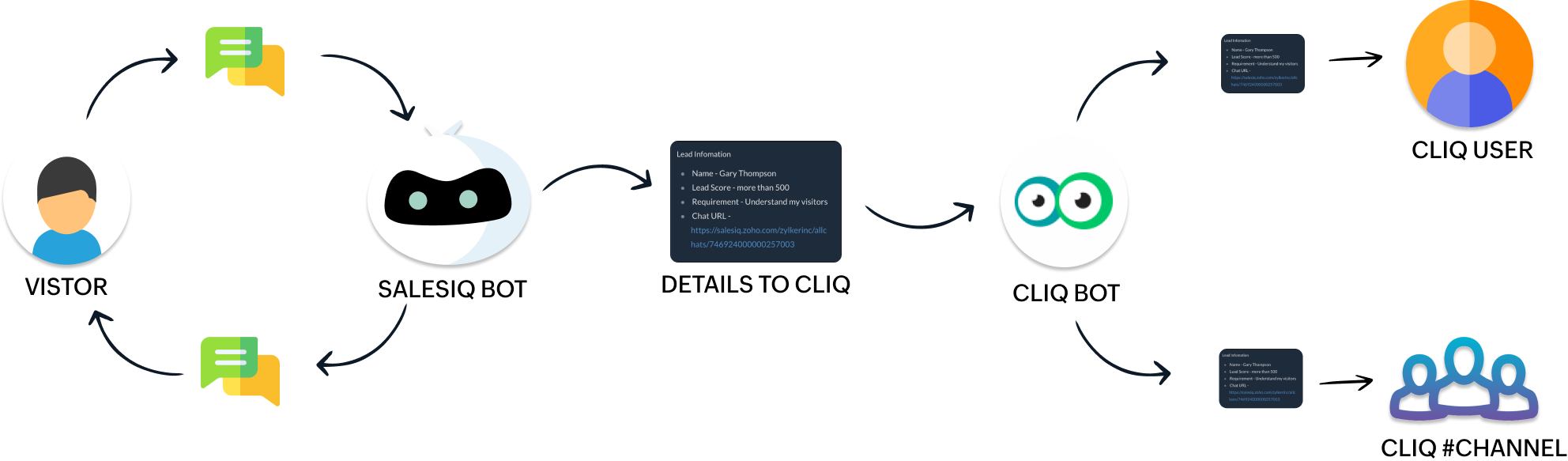
- The SalesIQ bot will collect the required information and send it to the Cliq bot while the conversation is ongoing.
- Next, the Cliq bot will send this information to personal chat or a group channel in Cliq as per your business needs.
How to build this Plug (promising lead engages with your bot) ?
Step 1 - Create a connection between SalesIQ and Zoho Cliq
- In your SalesIQ Dashboard, navigate to Settings > Developers > Plugs > Click on Add .
- Provide your plug a name, and description, select the Platform as SalesIQ Scripts , and finally, click on Connection to your left bottom. You will be redirected to the connection interface.
- Click on Create connection at the top right corner.
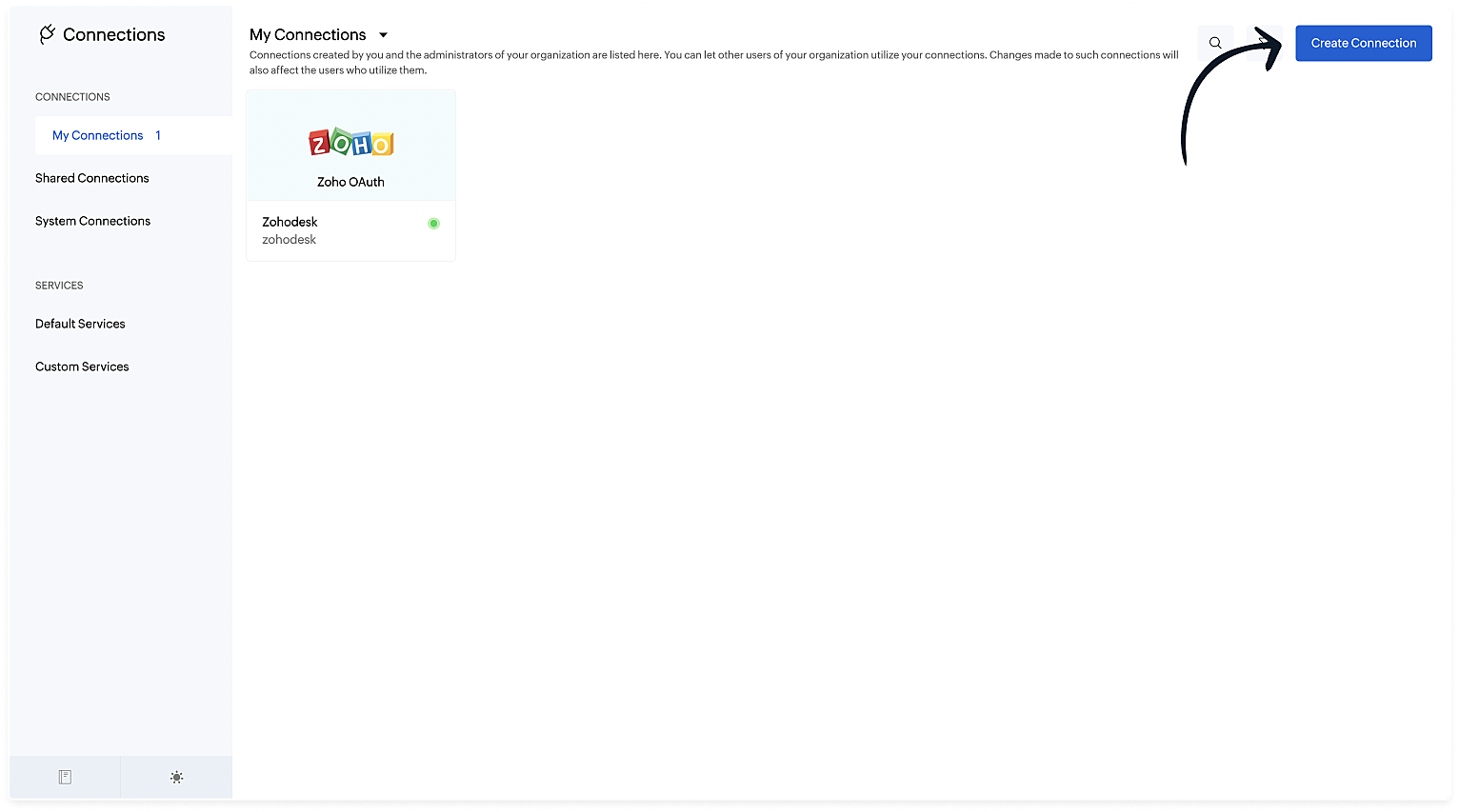
- Under Default connection, select Zoho OAuth service.
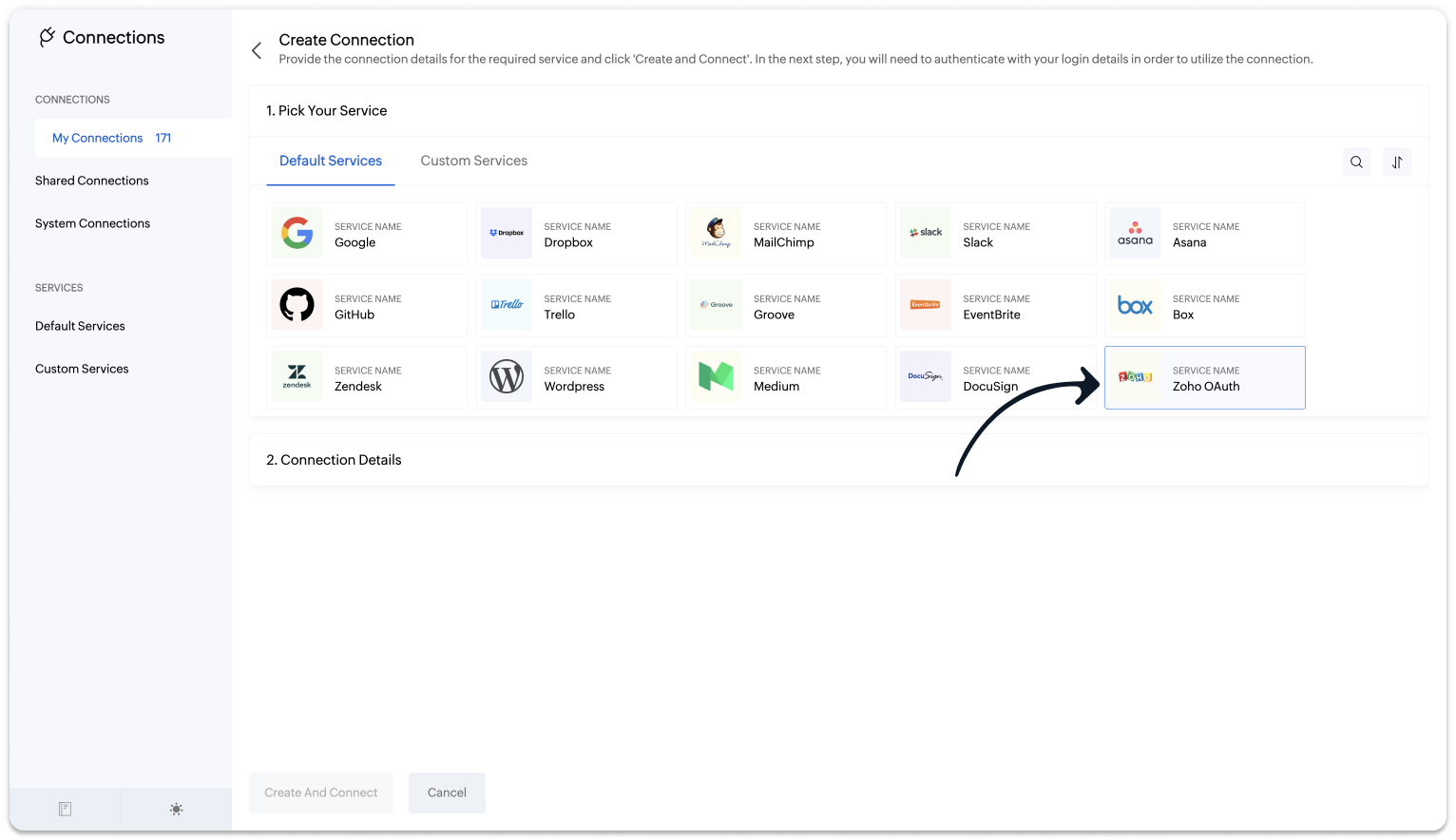
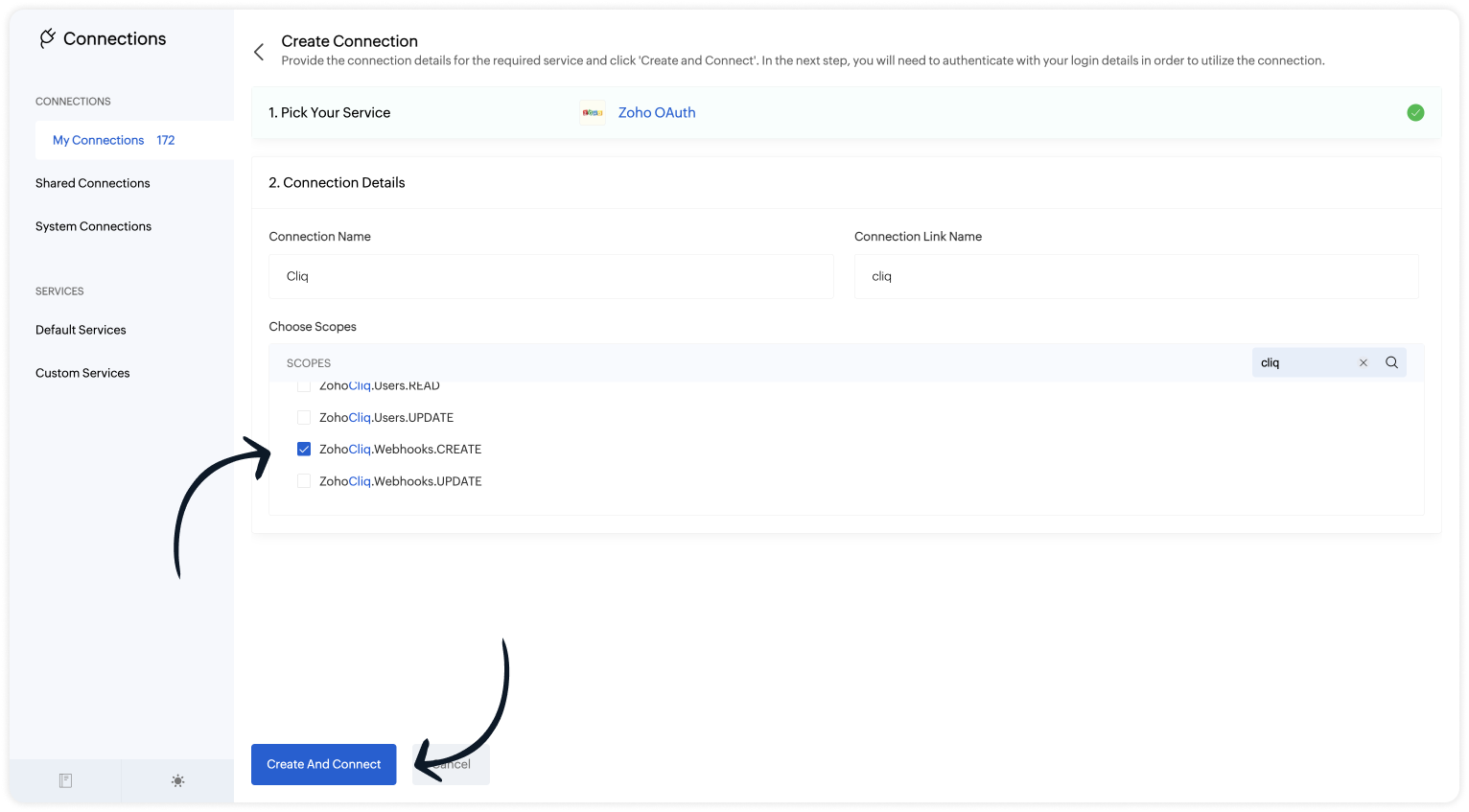
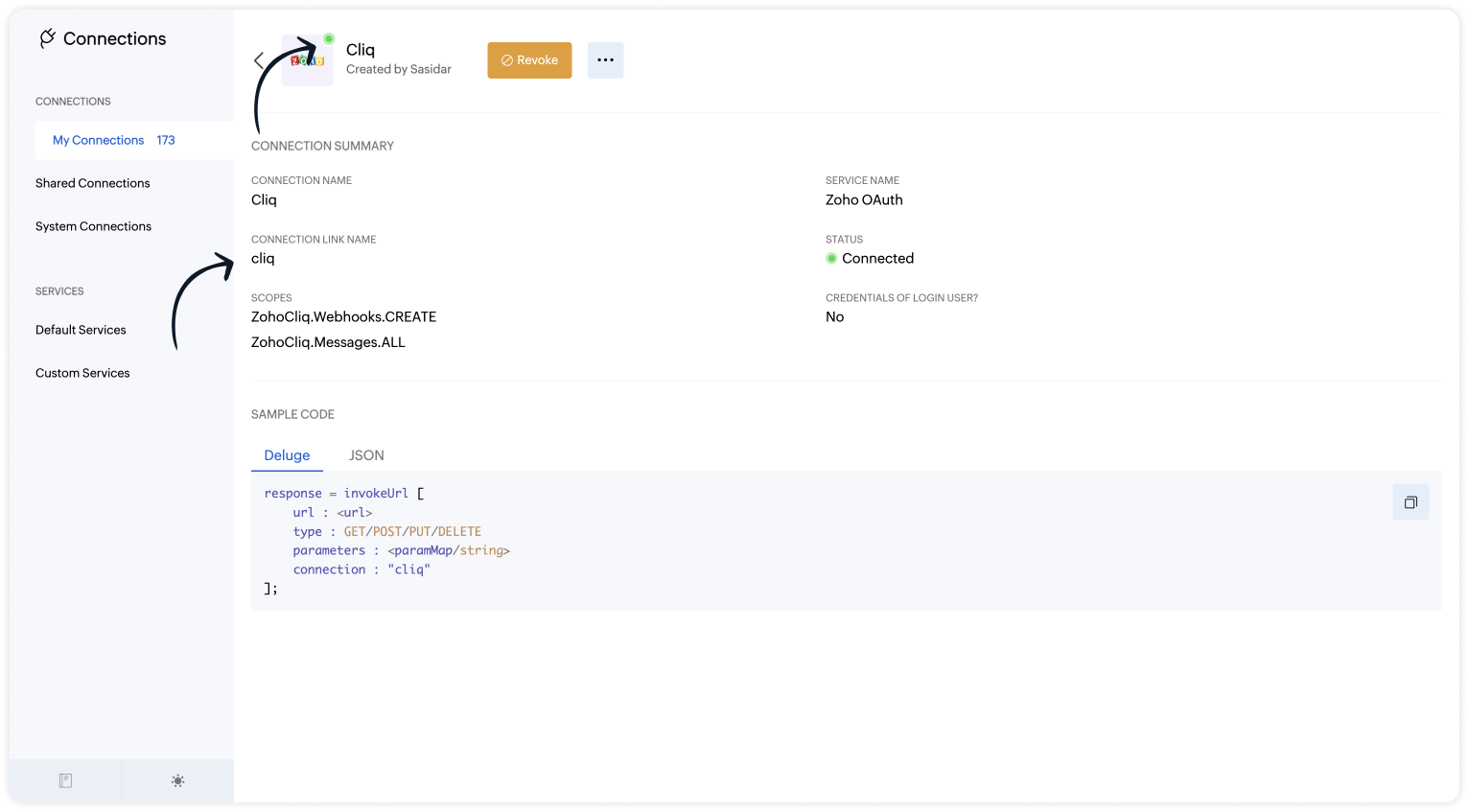
- Provide your connection name, connection link name, and choose the scopes below.
- ZohoCliq.Webhooks.CREATE
- ZohoCliq.Messages.ALL
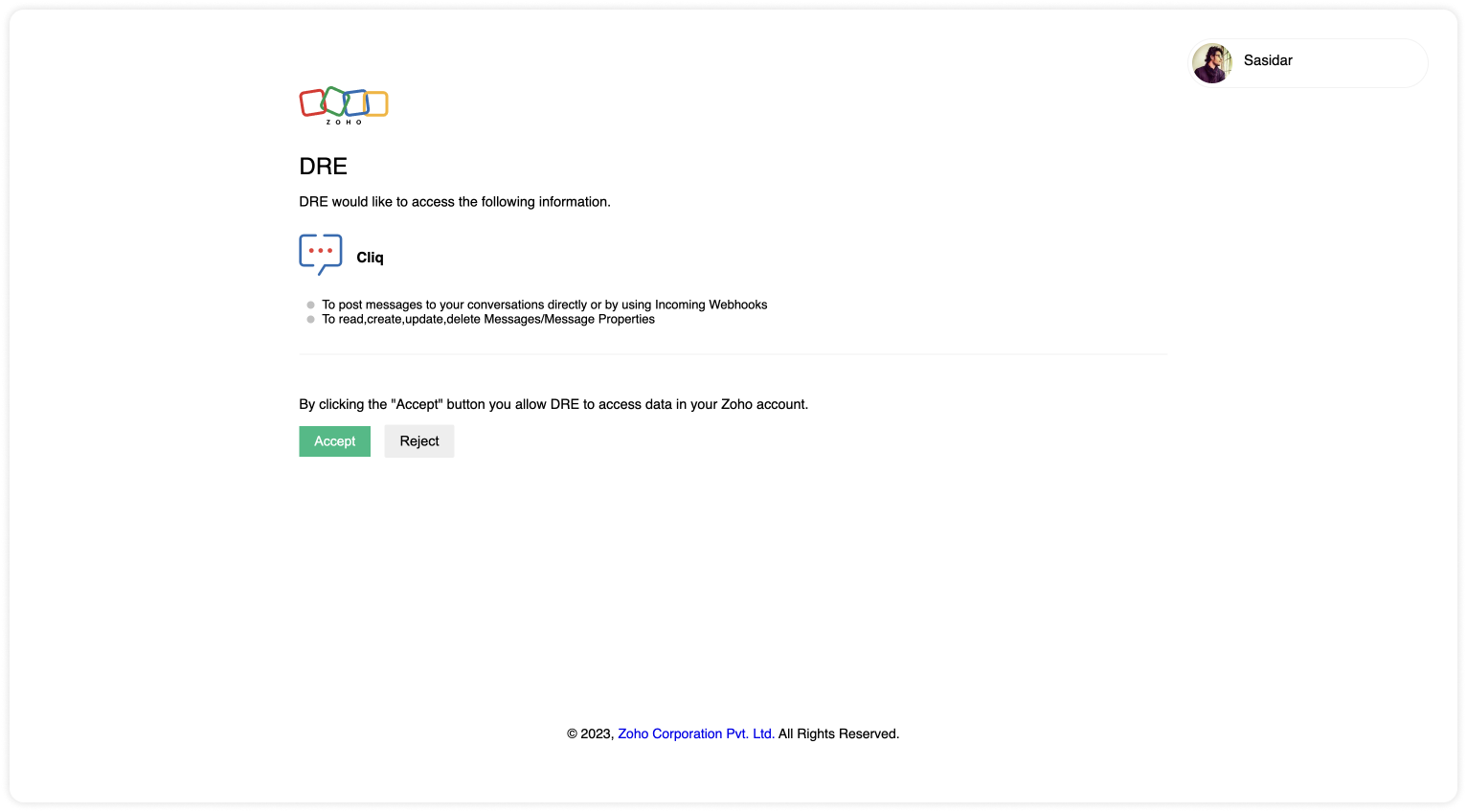
- Click on Create And Connect to connect Zoho SalesIQ and Zoho Cliq.

Note: The Connection Link Name will be used in the scripts to invoke URL tasks.
Upon successful authentication, Zoho SalesIQ will be connected with Zoho Cliq.
- The connection is successfully established.
Step 2 - Build the Plug
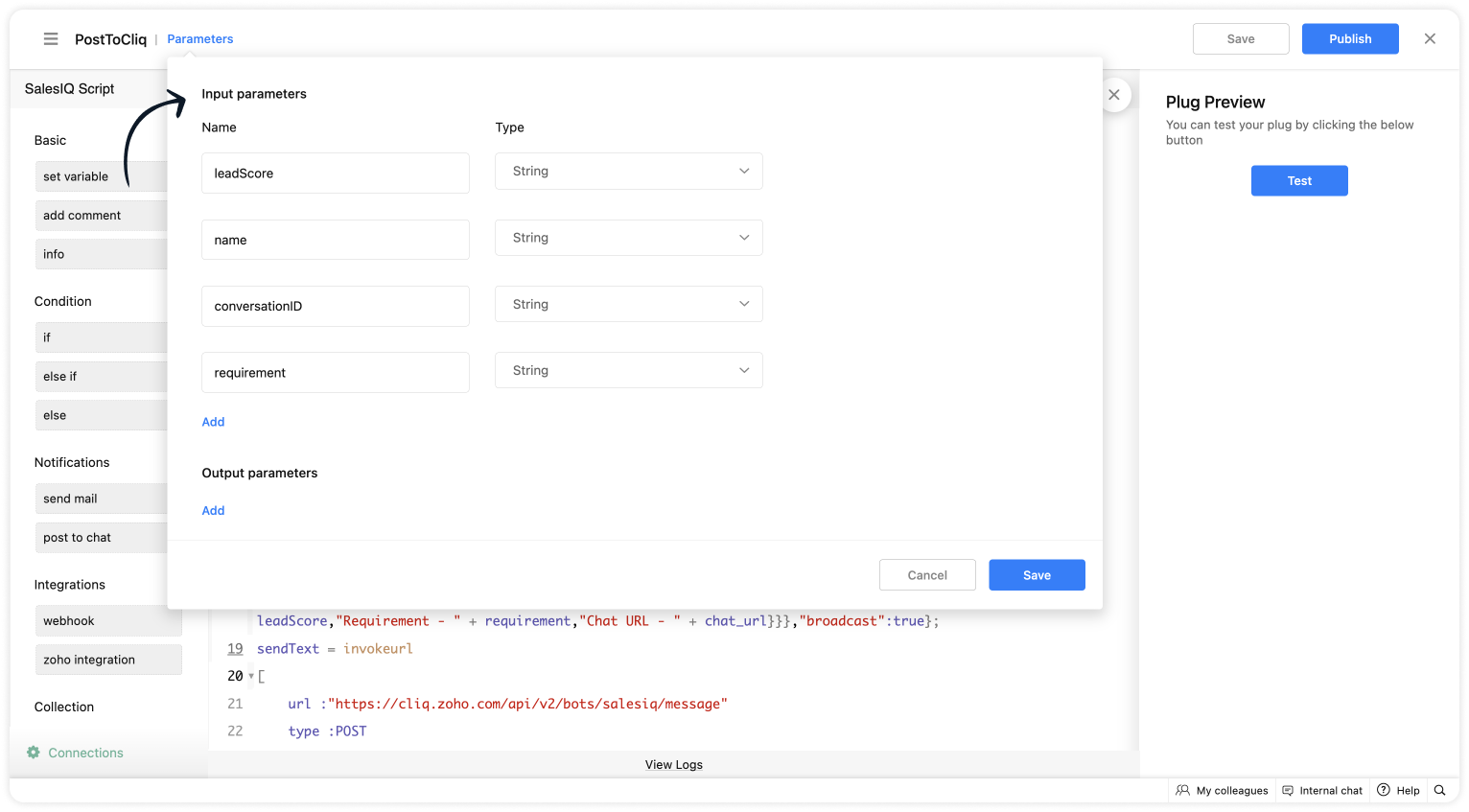
As we have created a connection between SalesIQ and Cliq successfully. It's time to build the plug. The first step in building the plug is defining the parameters. You can enter the metrics (information) which you want the SalesIQ bot to send to Cliq bot. I've taken the name, lead score, requirement (lead's interest) and conversation ID to create the chat URL.
Input Parameters
- Name : name | Type : String
- Name : leadScore | Type : String
- Name : requirement | Type : String
- Name : conversationID | Type : String
Script to notify a specific user via Cliq bot
If you want to notify (post information) to specific users in Cliq, copy the code below and paste it into your plug builder. Then, make the following changes.
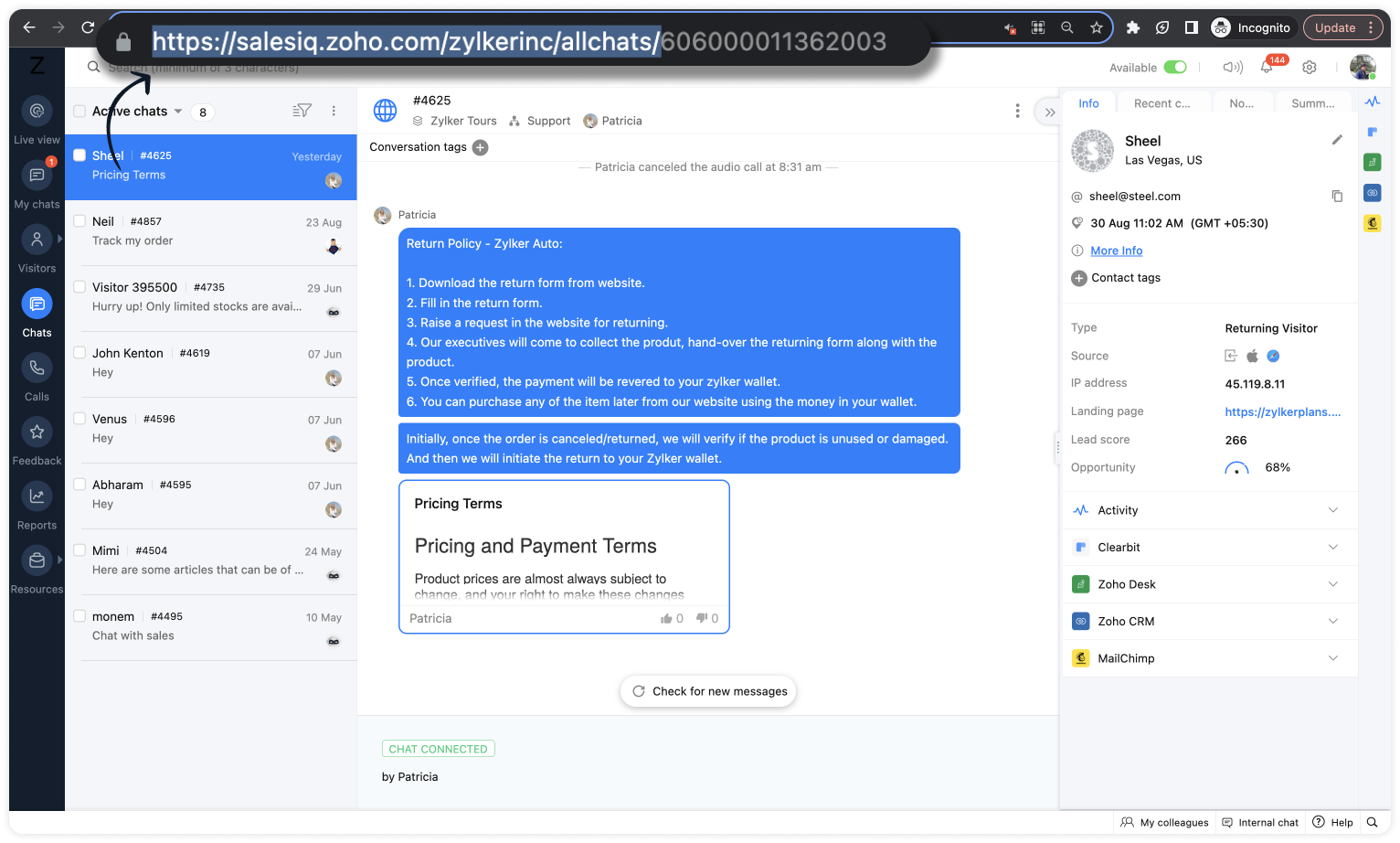
- In line #16, get your portal's chat URL. For that, navigate to SalesIQ > Chats > Copy the URL except the conversation ID.
- In line #22, replace the cliq bot name in the URL. To get the bot name from your Cliq dashboard, click on your profile in the top right corner > Bots & Tools. Then, create a new bot or click on any existing bot. (All subscribers of this bot will get notified.)
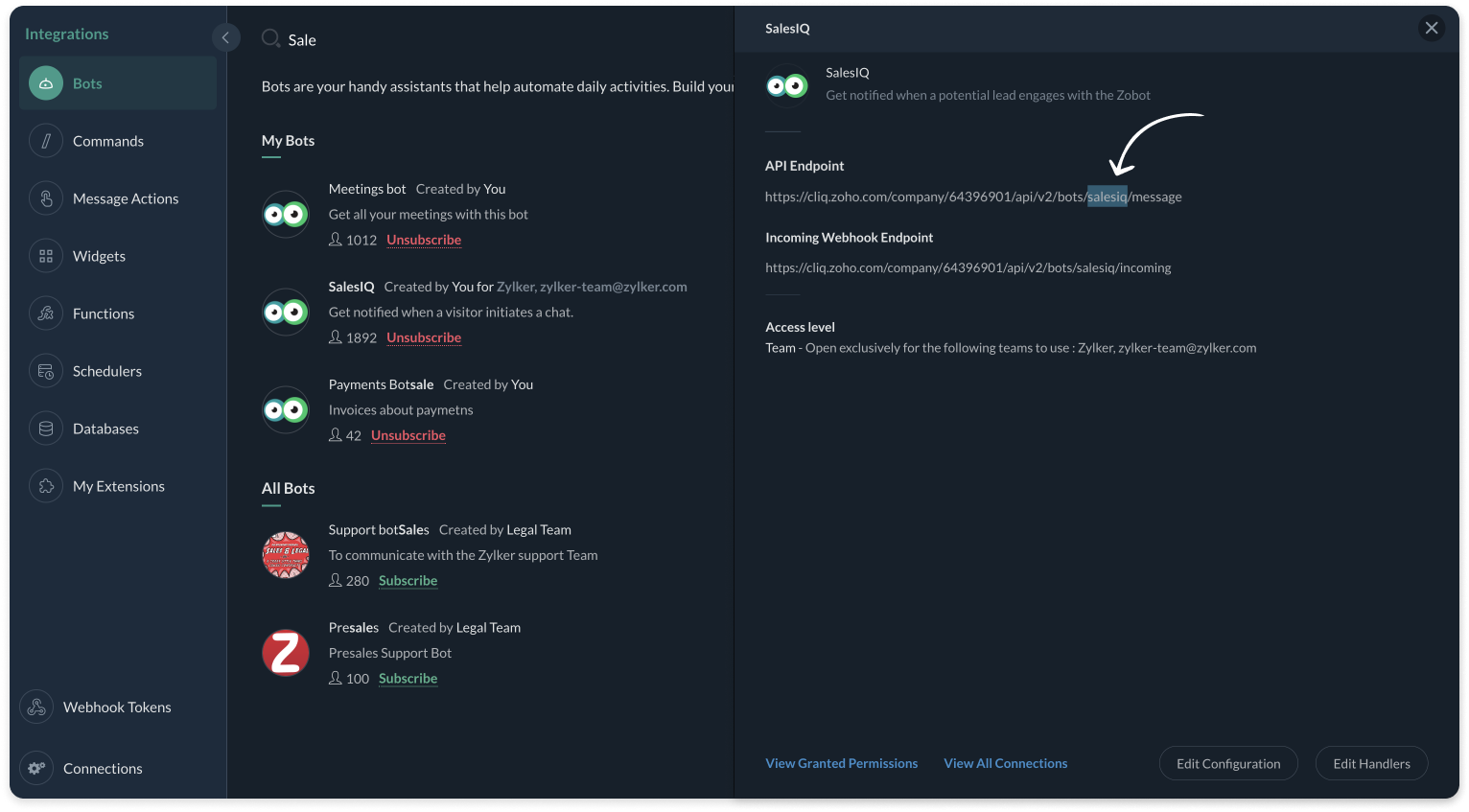
- And, make sure, the connnection line name in line #25 is same as created during creating the connection between SalesIQ and Cliq (Step 1).
Plug Script/Code
- if(session.containsKey("name"))
- {
- name = session.get("name").get("value");
- }
- if(session.containsKey("leadScore"))
- {
- leadScore = session.get("leadScore").get("value");
- }
- if(session.containsKey("requirement"))
- {
- requirement = session.get("requirement").get("value");
- }
- if(session.containsKey("conversationID"))
- {
- id = session.get("conversationID").get("value");
- chat_url = "https://salesiq.zoho.com/zylkerinc/allchats/" + id;
- }
- list_data = {"text":"Lead Infomation","slides":{{"type":"list","data":{"Name - " + name,"Lead Score - " + leadScore,"Requirement - " + requirement,"Chat URL - " + chat_url}}},"broadcast":true};
- //replace your cliq bot name (salesiq) in line #22
- sendText = invokeurl
- [
- url :"https://cliq.zoho.com/api/v2/bots/salesiq/message"
- type :POST
- parameters:list_data + ""
- connection:"cliq"
- ];
- response = Map();
- return response;
- Then, click Save, preview the plug and Publish it.

Note: API invoked in the plug is Post message to a bot
Script to notify a specific channel via Cliq bot
If you want to notify (post information) to a specific channel in Cliq, copy the code below and paste it in your plug builder. Then, make the following changes.
- In line #16, get your portal's chat URL. For that, navigate to SalesIQ > Chats > Copy the URL except the conversation ID.
- In line #22, replace the Cliq bot and channel name in the URL. To get the bot name, click on your profile in the top right corner > Bots & Tools. Then, create a new bot or click on any existing bot. To get the channel name, click on the channel properties and get the channel's Unique Name.
- And, make sure, the connnection line name in line #25 is same as created during creating the connection between SalesIQ and Cliq (Step 1).
Plug Script/Code
- if(session.containsKey("name"))
- {
- name = session.get("name").get("value");
- }
- if(session.containsKey("leadScore"))
- {
- leadScore = session.get("leadScore").get("value");
- }
- if(session.containsKey("requirement"))
- {
- requirement = session.get("requirement").get("value");
- }
- if(session.containsKey("conversationID"))
- {
- id = session.get("conversationID").get("value");
- chat_url = "https://salesiq.zoho.com/zylkerinc/allchats/" + id;
- }
- list_data = {"text":"Lead Infomation","slides":{{"type":"list","data":{"Name - " + name,"Lead Score - " + leadScore,"Requirement - " + requirement,"Chat URL - " + chat_url}}}};
- //replace your cliq channel (leadsfromzobot) and bot name (salesiq) in line #22
- sendText = invokeurl
- [
- url :"https://cliq.zoho.com/api/v2/channelsbyname/leadsfromzobot/message?bot_unique_name=salesiq"
- type :POST
- parameters:list_data + ""
- connection:"cliq"
- ];
- response = Map();
- return response;
- Then, click Save, preview the plug and Publish it.
Note: API invoked in the plug is Post message in a channel
Step 3 - Adding the plug to the Codeless bot builder
- Navigate to Settings > Bot > Add, provide the necessary information, and select Codeless Bot Builder as a bot platform or open an existing bot.
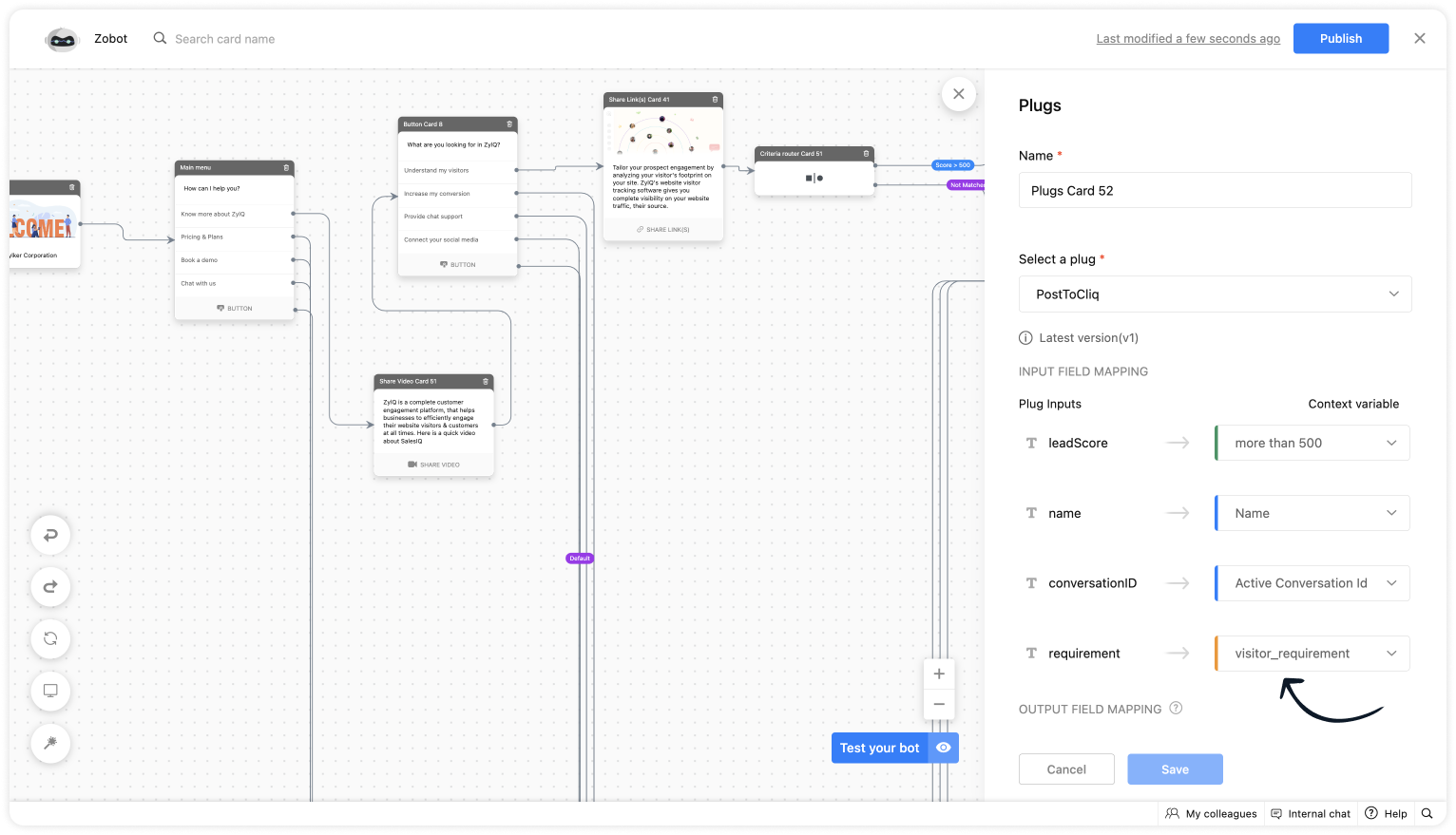
- To notify in Cliq, click on Plugs under Action cards, select the plug you have created and provide the input values for the parameters defined in the plug builder.
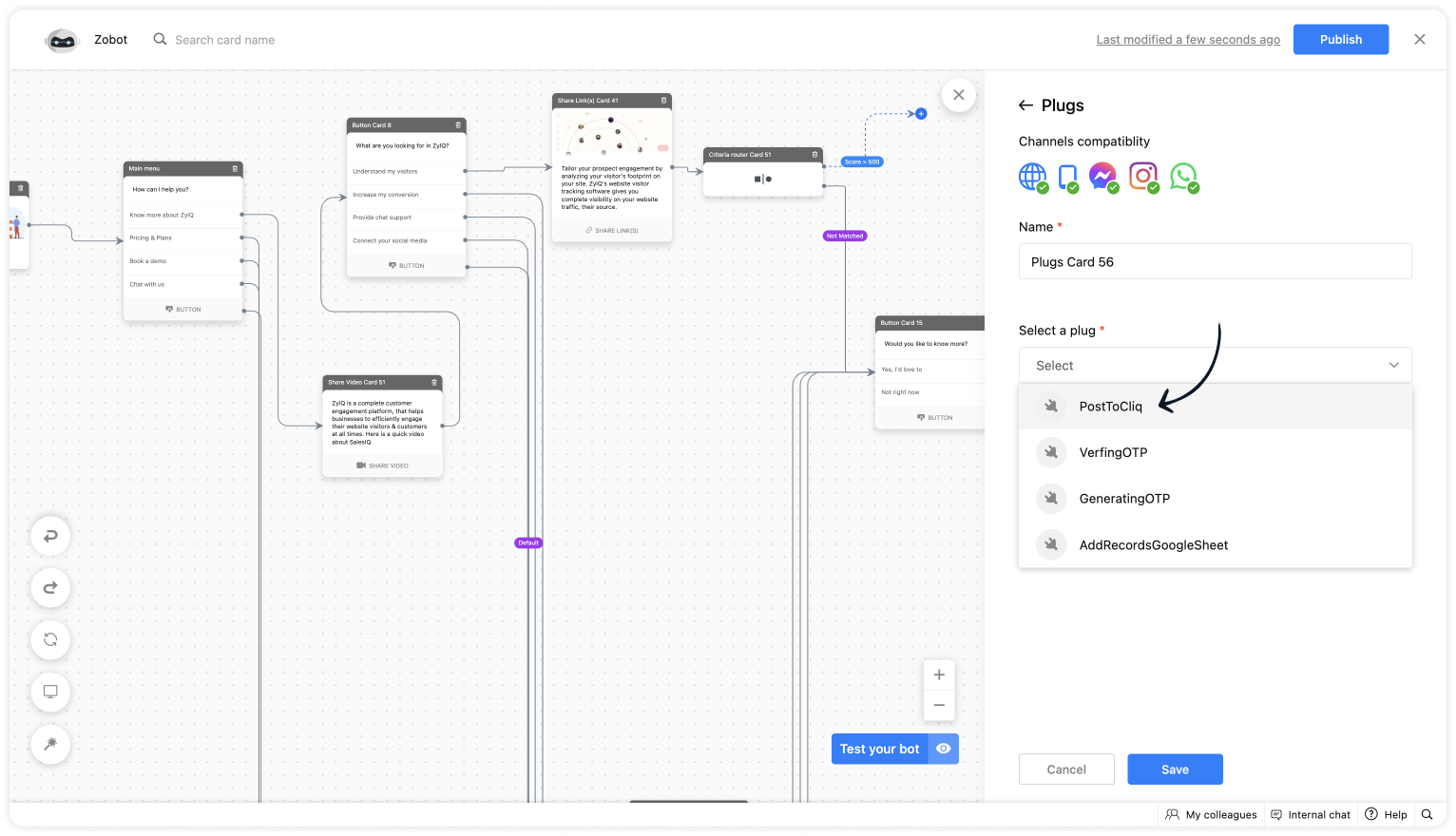
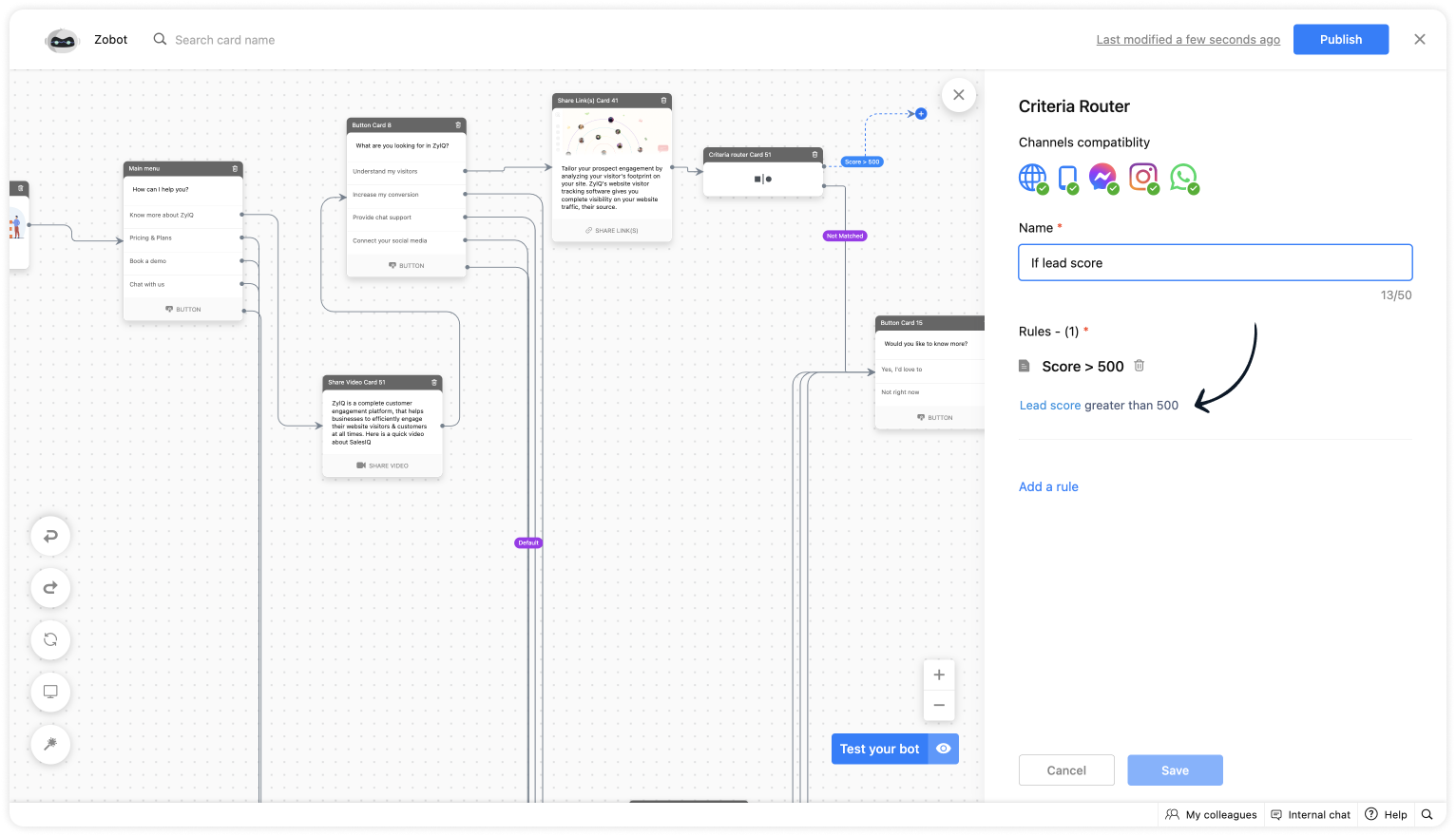
- As we want to notify only the visitors whose lead score is more than 500. Use the Criteria router card and set up a rule.
- For lead score, provide the value "more than 500".
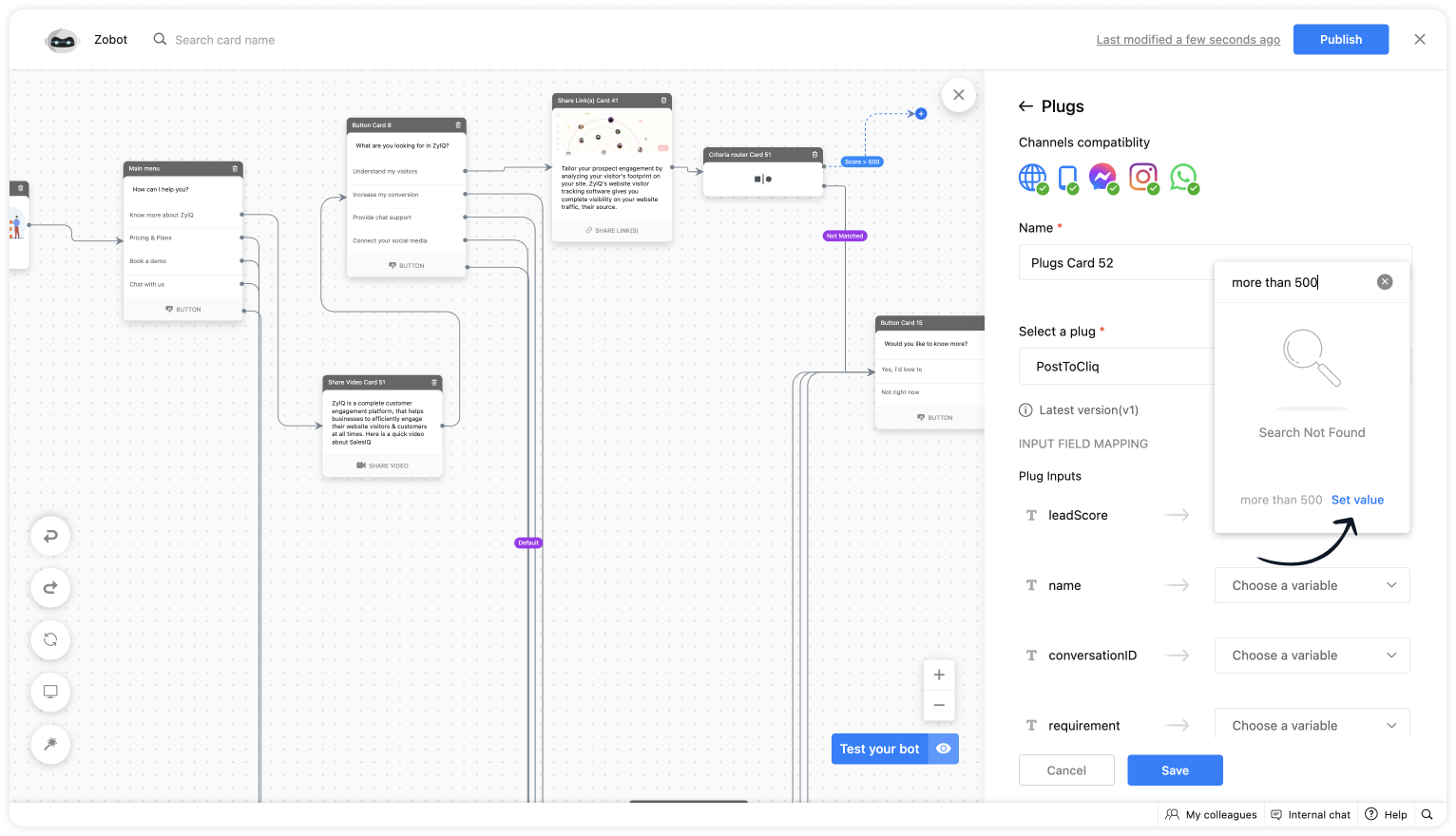
- Choose the %visitor.name% variable for the name.
- Select the %Active conversation id% to get the conversation ID for the chat URL.
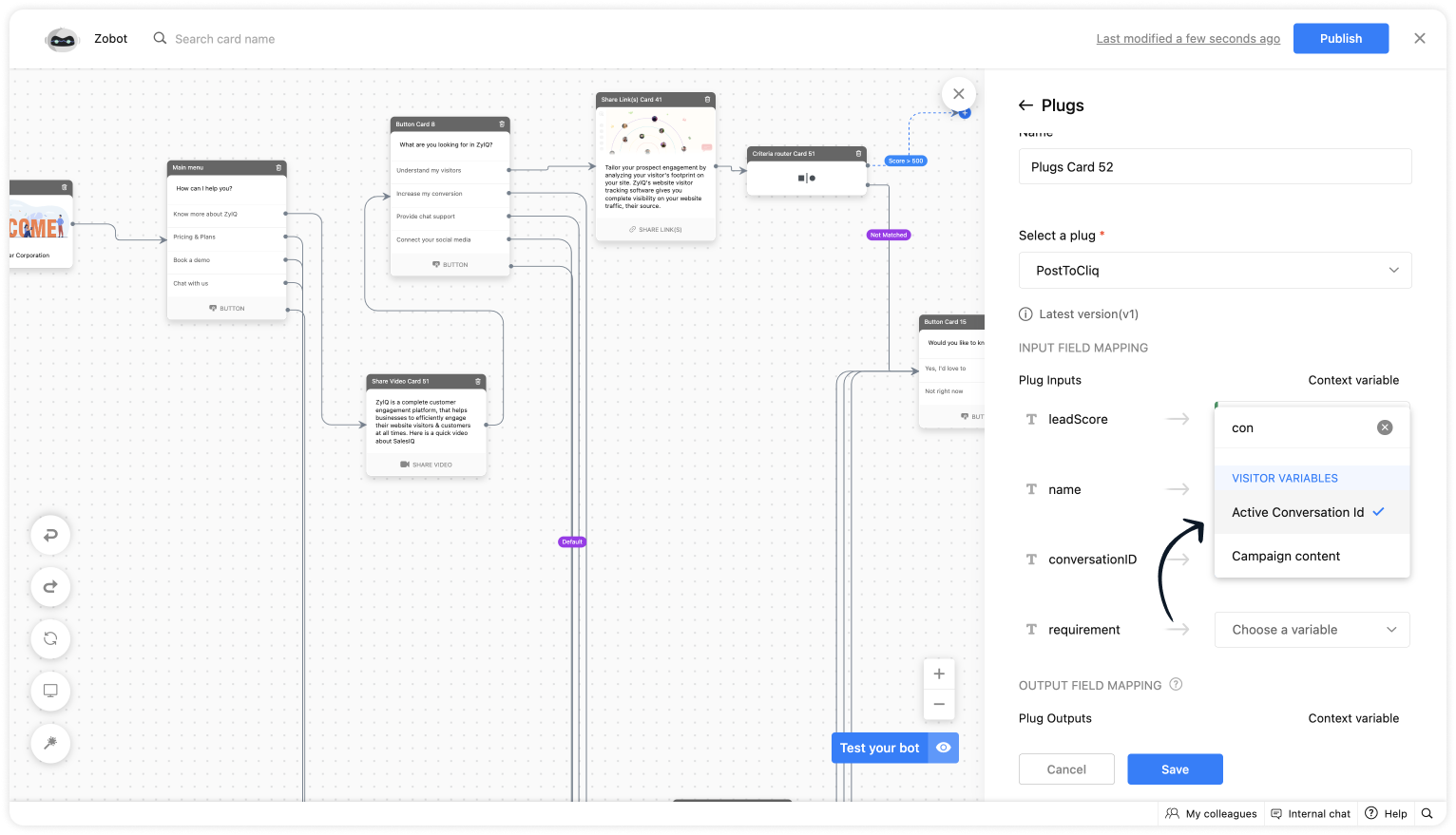
- Get the requirement before using any input card, save it in the context variable and select the variable here.
Plug Output
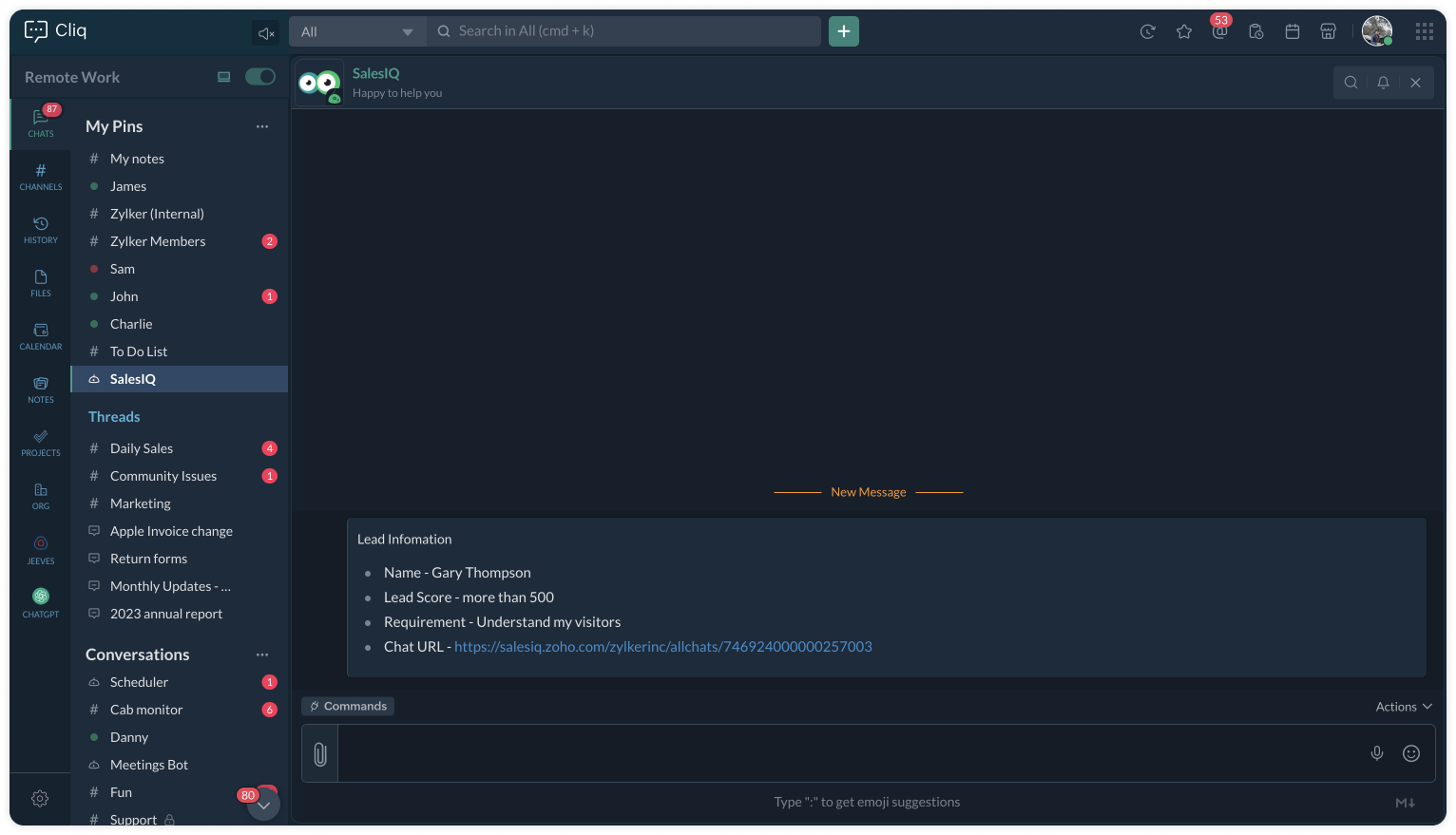
This is how the Cliq users will be notified.
To a specific user
To a specific channel
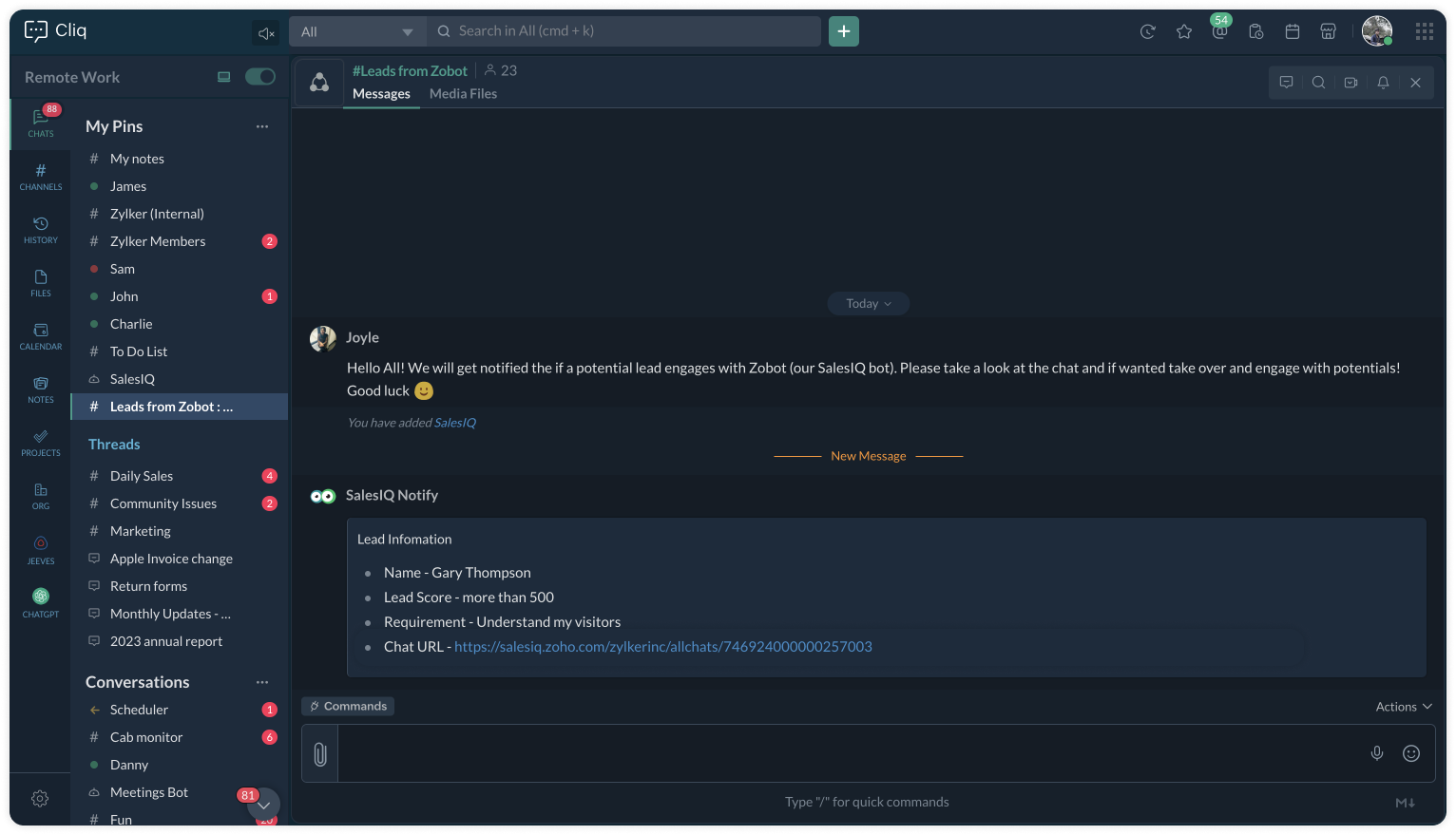
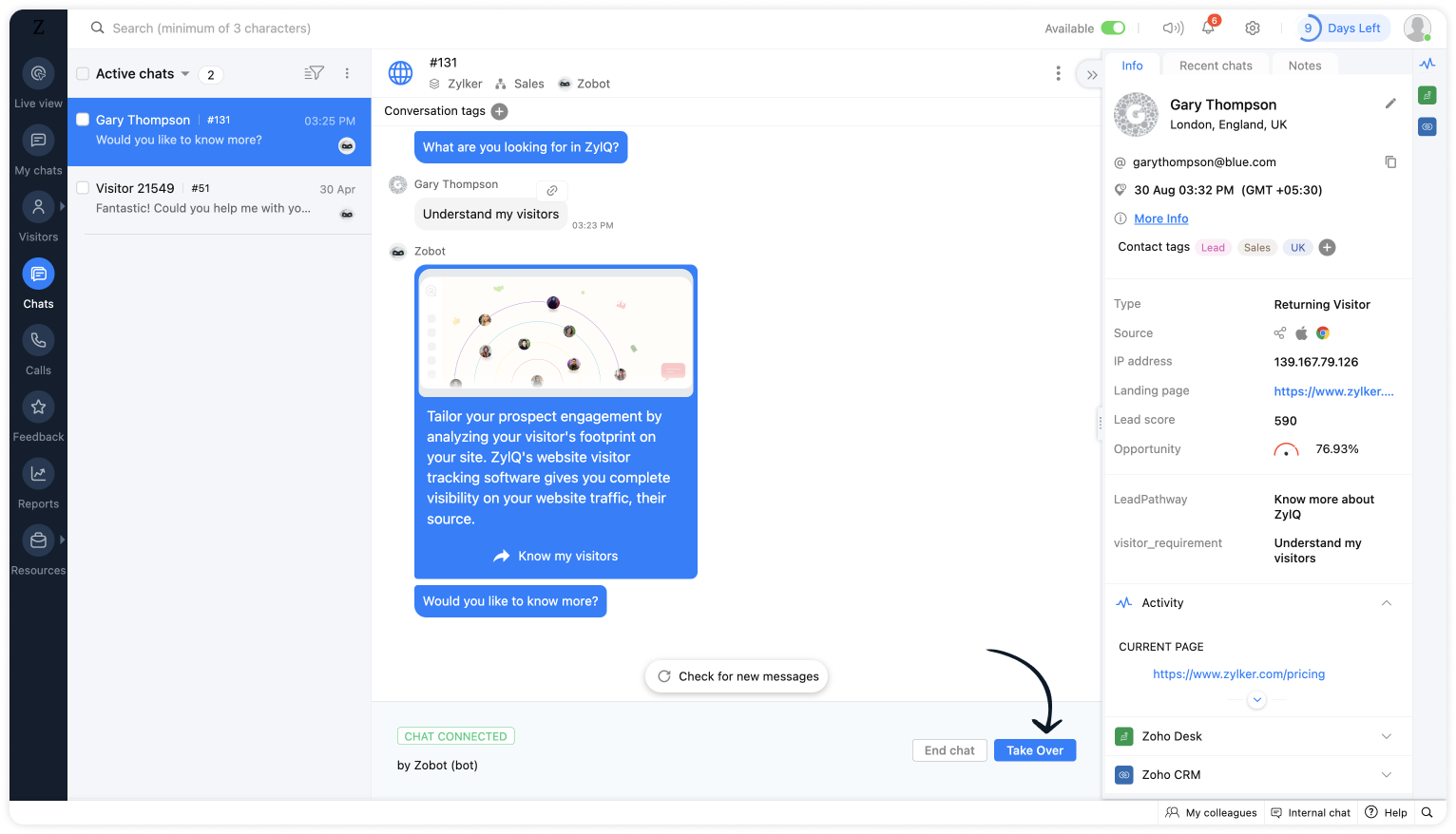
Upon clicking the chat URL, you will be redirected to the ongoing bot chat, where you can monitor and take the chat if required.
Related links:
- Plug guides
- Codeless bot guide
- Plugs for OTP verification.
- Plug to create a lead in Zoho CRM.
- Plug for getting the status of the ticket in Zoho Desk
- Plug to schedule appointments in Zoho Bookings
- Plug to read and write data in Google Sheet
- Plug to integrate bot with OpenAI
- Plug to track ecommerce orders from Zoho Commerce
- Zobot troubleshooting page
To know more about the features of Zobot, kindly visit our Resources Section. I hope this was helpful. Please feel free to comment if you have any questions. I'll be happy to help you.
See you again with another efficient plug sample :)
Best regards
Sasidar Thandapani
Topic Participants
Sasidar Thandapani
Vincent MAUREAU
Kevin Wooten
Theo
Sticky Posts
Important update: Migrate to the new SalesIQ live chat widget before November 30, 2026
The old SalesIQ live chat widget will be deprecated on November 30, 2026. This is a final reminder to migrate to the new SalesIQ live chat widget before this date. After November 30, 2026, the old widget will no longer be maintained, which can lead toPlug Sample #9 - Get Notified on Cliq When Your Premium Customers Interact with SalesIQ's Zobot
Hi everyone! We're here with another simple yet effective plug for your chatbot to integrate with Zoho Cliq to make your job easier. Just imagine whenever a potential lead or your premium customers are on your website, and they engage with your chatbot,Your bot just got smarter: AI-Powered routing that reads between the lines
What if your bot could tell the difference? Between a visitor who just needs a quick answer, someone actively comparing options, and a frustrated customer one click away from leaving? Most bots can't. They deliver the same response to everyone, missingRight Moment, Right Message, Right Operator: Never Miss a High-Intent Lead
Ever been on a website or app, thinking “Should I buy this or not?” and suddenly a friendly message “Hi! How can I help you?” pops up at the perfect moment? That’s not luck. That’s timing done right. Engaging right visitors at the right moment, with theSpeak Your Customers' Language: SalesIQ's chatbots now support 30 languages 🤖
We're unveiling some major upgrades to our chatbot that are set to revolutionize your experience! Now SalesIQ support 30 languages for both Zobot and Answer bot. By speaking your customers' language, you can enhance engagement, improve customer satisfaction,
Recent Topics
【開催報告】 福岡 ユーザー交流会 NEXUS 2026/10/30 | CRM×AIの実践事例とZia Agents活用を紹介
Zoho ユーザーの皆さん、こんにちは。 コミュニティグループの中野です。 10月30日(金)、福岡にてZoho ユーザー交流会 NEXUSを開催しました。 今回は、Zoho CRM × AIをテーマに、ユーザーさんによる実践事例、 Zia Agentsのデモ、参加者同士のグループワークなどを実施しました。 ご参加いただいた皆さん、ありがとうございました! 本投稿では、当日の様子を一部ご紹介します。 ユーザー活用事例 :Zoho CRM × AIを、実際の営業業務でどう使う? 登壇者:株式会社etikaKB Articles from Zoho Learn - Import as .md
I love the concept of being able to use articles from Zoho Learn as knowledge base articles for Zia Agents. This will absolutely help with proper documentation and organization of company processes and SOPs. This was a great concept. However, even whenService Account Admin for API Calls and System Actions
Hello, I would like to request the addition of a Service Account Admin option in Zoho product. This feature would allow API calls and system actions to be performed on behalf of the system, rather than an active user. Current Issue: At present, API callsTrigger workflows from SLA escalations in Zoho Desk?
Hey everyone, I’m currently working with SLA escalation rules in Zoho Desk and ran into a limitation that I’m hoping someone here has solved more elegantly. As far as I can tell, SLA escalations only support fairly limited actions (like changing the ticketZoho One - Can I add a Custom View to All Departments
We have been using Desk for several years but are just making the leapt to using multiple departments. I have a custom view that is our default view. I'd like to apply that to All Departments. When I try to add a view when viewing All Departments I getA way to create kits (groups of items) that do not require bundling and are added to an order as the individual items
We are evaluating moving off of Sage BusinessWorks (which handles accounting, order entry, inventory control, accounts receivable, etc) to Zoho Books/Inventory. One of the things we heavily use is a feature called Kits, which allows creating a group ofIssue While Rescheduling Interviews in Zoho Recruit
Dear Zoho Support Team, We are facing an issue with the Interview Rescheduling functionality in Zoho Recruit integrated with Microsoft Teams. Problem Description When an interview is rescheduled through Zoho Recruit: The new interview is created successfullyZoho Campaigns 3.0 is here
Zoho CampaignsAnnouncements We're excited to introduce the all-new Zoho Campaigns, where we have introduced our biggest update yet. Marketing has evolved far beyond email. Today's campaigns span email, SMS, and WhatsApp, customers expect personalizedTip #95 – Collect support requests right from your website with Web Forms – 'Insider Insights'
Hello Zoho Assist Community! When a customer needs help, the first step often decides how smooth the rest goes. They email a vague description, a technician asks follow-up questions, and the real details only surface after several rounds of back and forth.Unable to integrate Whatsapp Messaging into Zoho CRM - Business Messaging
Hello, I want to set up Business Messaging in our Zoho CRM and am struggling to set it up. I have logged into the account and our facebook business page, our business shows in the dropdown for WhatsApp Business Account but does not for WhatsApp BusinessE-Invoicing Automation
Do you have an API endpoint for pushing the invoice through the e-tims for KenyaPhone system to integrate with Zoho CRM
I am looking for phone software that would allow my agency to do the following within Zoho CRM: Make calls from zoho Track calls and notes Leave pre-recorded messages after reaching voicemail of lead Only 2 members, so need company who will allow justAutomation Series: Automate Project File Uploads from Zoho WorkDrive
Project documents are often prepared before development begins. When files such as product requirements, design files, guidelines, or plans are stored in a shared folder in Zoho WorkDrive, teams can automate copying them to the corresponding project teamIs it possible to report on Task Duration in minutes/hours rather than by start and due date?
I'm currently evaluating the free version of CRM and I like lots of things about it, it will definitely help my business with sales automation and I will upgrade to a paid version once the evaluation is finished. However, I also want to use CRM for existing clients (accounts) where I can track how much time is being spent on tasks for these clients. I can see clearly that both calls and events for each account have time tracking in minutes / hours but tasks do not have this. Is it possible in oneWhy is it so hard to get a fiscal YTD P&L report in Zoho Books?
Yes I know that it could be done in Zoho Analytics, but I would have expected this default report view to be easily accessible in the list of Books accounting reports. Just like any other basic accounting system, I'm looking for monthly columns of the¡Nuevo Meetup en Barcelona! - Automatiza procesos con los agentes de Zia en Zoho
¡Hola a todos! Estamos encantados de anunciaros que el próximo 3 de diciembre estaremos en Barcelona con un nuevo Meetup de Español Zoho Community. Estos encuentros son una oportunidad fantástica para conectar con otros usuarios de Zoho, ampliar conocimientosStock count by bin location
Is there a configuration to make a stock count by bin or area and not by product. these is useful to manage count by area RegardsBank Feeds - Again
Bank feeds broken again for me. I don't see other recent posts on this, so maybe it's just us? Tried: refresh update cred/ deact./react. feeds chat support Nothing. On day 2 without zoho as a result, which is crippling for us. We've used zoho for a yearIntroducing Auto Check-out for Attendance
We are pleased to announce the release of the Auto Check-out feature in Zoho People. Auto Check-out is now available as a built-in setting under Shifts to automatically check out employees who have not recorded their check-out for the day. AdministratorsIssue with SalesIQ Chats Automatically Closing Due to the 24-Hour Idle Timeout?
Hello, I am experiencing a significant issue with SalesIQ automatically closing chats due to the Idle Timeout setting. I use SalesIQ through the integration between SalesIQ and Line App. To be honest, this issue has become extremely frustrating. ProblemsChatGPT Plugin / MCP Server auth error
Hi all I'm trying to connect the ChatGPT plugin for Zoho CRM but after username stage of the auth process, I get this error from the URL https://mcp.zoho.eu/mcp-client/ {"error_description":"Invalid request url, Request is not as per defined in oauthZoho Amount Cell Greyed Out
I noticed a few days ago that the 'amount' cell on my Zoho App software in my windows PC is greyed out and I can't click on it to add an amount figure when recording invoice or expenses. Wheareas on mobile I can do it easily申請メール、まだ一件ずつ確認していませんか?― Zoho Formsで申請業務を効率化
ユーザーの皆さま、こんにちは。ゾーホージャパンの友田です。 「備品を購入したいので申請します」 「イベントに参加したいです」 「経費の申請をお願いします」 このような社内申請を、メールやチャットで受け付けていませんか? メールでも申請はできますが、 「必要な情報が書かれていない」 「申請内容をあとから一覧にまとめている」 「誰がどこまで確認したのか分からない」 といった手間が発生することも。 そんな申請業務にも、Zoho Formsを活用できます。 必要な情報を、フォームでまとめて入力 例えば、備品購入の申請なら、URGENT: Zoho Wiki searches return garbled nonsense
For at least the past few days, the Search function in Zoho Wiki has been returning only strings of random characters. Example search result: The page name is readable, but the context body text is gibberish. So something is obviously broken with eitherIs it really true that I can't set the default 'deposit to' account in 2025?
I've been using Books for 7 years and the default account has never been a problem. I usually manually reconcile invoices and have never had a thought about which account. It has always been my account. However, I recently noticed that for the past 4Zoho CRM gets a new email compose and lot more
Dear Customers, [UPDATE October 21, 2021: We have started opening these features to some of the customers already. And, it will be available to all the customers before November 2nd Week, 2021. Sorry for the delay caused] [UPDATE February 21, 2022:#19 What about the money I spend on the job?
Meera buys props for a shoot, keeps the receipt in her bag, and expects to photograph it on the way back and never think about it again. The props get billed to the client at cost. The usual way to do this Covered in our published Expenses FAQ. The shortBNZ Bank Feeds No Longer Available
The BNZ (New Zealand) bank feeds are still failing and it's been months since they last worked! Uploading bank statements (CSV's) mean waiting to the end of the month when they become available. It is unacceptable to keep my clients waiting for paymentHow To Implement an Auto-Check-out Feature for Attendance?
If an employee forgets to check out, the system should automatically check out the employee at 6:30 PMWorkDrive Desktop Sync Is Being Deprecated: Move to WorkDrive TrueSync for a Smarter Experience
Hi everyone, We are excited to share a better, smarter way to access and manage your files directly from your computer! We’re transitioning from our legacy Desktop Sync app to WorkDrive TrueSync, designed to give you faster performance,greater flexibility,Bookings Notifications for Staff
Good afternoon. We are currently working on the trial version of Bookings as we review its usage for our client needs to schedule with specific team members. We set everything up and it appears to be working, with the exception of sending an email toIs COQL known to have read delays?
Hello, I'm experiencing stale data returned by COQL from time to time. Most of the time it returns up-to-date data right after I update a record, but sometimes the change only shows up after several seconds or even minutes. Neither the COQL documentation#18 Billing for the Hours, Not the Job
A consultant in the comments last month put it plainly: her client pays by the hour and wants to see every hour on the invoice, including the dates. She was maintaining a spreadsheet and manually copying the totals into her invoices. If you bill by theWhatsApp con bot en Make y derivación a una persona en Zoho CRM
Estamos implementando en Zoho CRM un flujo de atención por WhatsApp con un bot en Make y una derivación a una persona. Necesitamos que cada mensaje quede registrado, que me avise cuando requiere atención y poder seguir la misma charla con el cliente.Webhooks for Bigin
Hello everyone, Say hello to webhooks in Bigin—a way to send information to other applications automatically the moment something happens to a record. Whether it's a deal moving stage, a contact being created, or a field changing, Bigin can now send anGiving someone access to my FSM to develop + scope.
Good evening, I’m new to Zoho, and had a CRM/Creator customized and it was missing something and not working. I realized it’s the functions and process and FSM was the missing link. I am trying to get FSM setup and all I have to do connect to CRM, Books,Set Custom Icon for Custom Modules in new Zoho CRM UI
Reassign a team member's follow-up tasks without moving their customers | Kiosk Studio Session #13
Hello folks, It's almost year-end, and a lot of people on your team will take time off. Their customers will still need things while they're away. Say Amanda is out next week (on leave). She has a renewal purchase order to chase for Grace, a quote VikramWorkDrive and CRM not in sync
1/ There is a CRM file upload field with WorkDrive file set as the source: 2/ Then the file is renamed in WorkDrive (outside CRM): 3/ The File in CRM is not synced after the change in WorkDrive; the file name (reference) in CRM record is not updated (hereShort product videos on Zoho Commerce product pages: what works?
Short product videos are becoming a normal part of online store pages, and I have been thinking about how to use them well on a Zoho Commerce store. A few points that seem to matter: Keep them short. 6 to 15 seconds showing the product from a few anglesNext Page