Zoho Developer Community Monthly Digest - February 2024
Hello everyone!
We're thrilled to share the highlights from February, including our recent in-person Bootcamp and exciting news about our growing extension library. Don't miss out on upcoming events, insightful resources and community discussions. Let's get started!
February Highlights
Zoho Developer Community Bootcamp (In-Person)
We had a blast hosting our very first in-person Developer Community Bootcamp at Zoho Campus in Chennai! It was exciting to see everyone dive into hands-on learning sessions, building extensions for Zoho products. Our goal was to empower developers of any skill level, help them learn the ropes, and potentially earn by listing their extensions on the Zoho Marketplace.
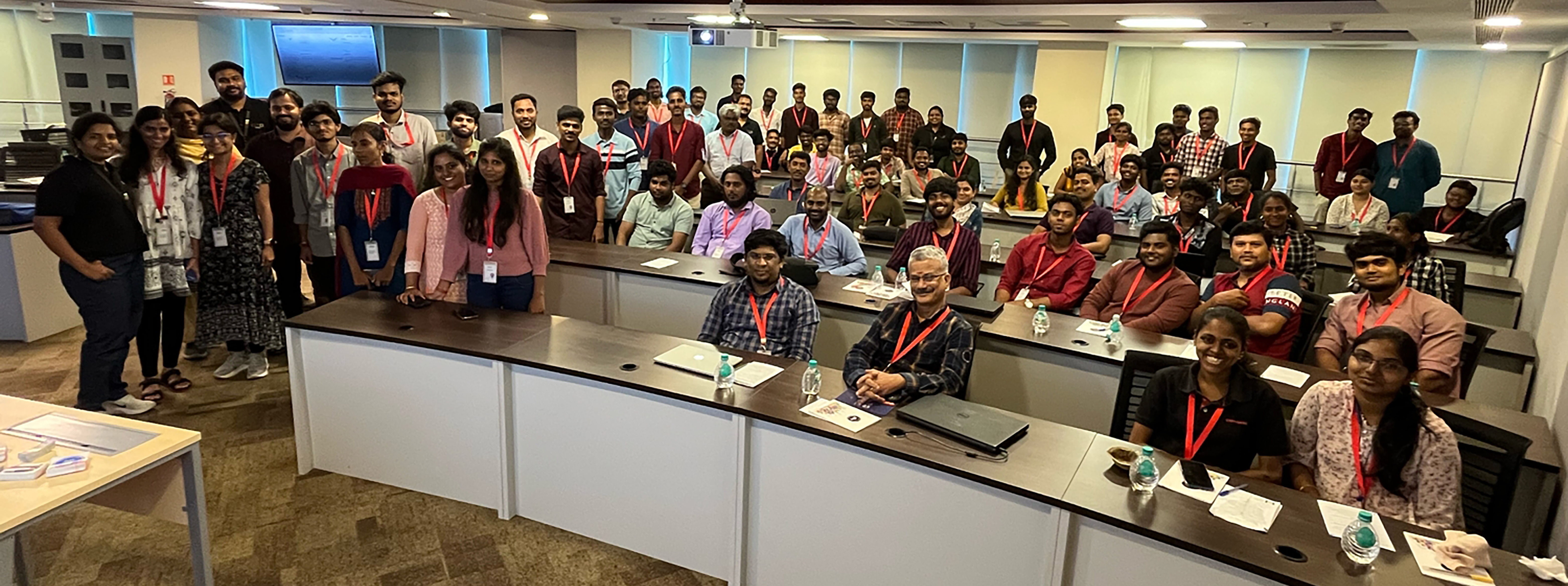 Zoho Extensions Chennai Bootcamp: A snapshot of radiant facesZoho Extensions
Zoho Extensions Chennai Bootcamp: A snapshot of radiant facesBig news! We're celebrating reaching 2000+ extensions in 40+ categories on Zoho Marketplace! 800,000+ Zoho users are using extensions to improve customer experiences, boost collaboration, break data silos, improve ROI, and much more. Learn more about this milestone here. If you're new to extensions and eager to explore, check out our Extensions 101 series.
Upcoming Events
- Zoho Developer Hangout 14: By serving as gateways for accessing and sharing functionalities and data across applications, APIs empower developers to tap into external resources and services that enrich their applications with enhanced features and solutions. Eric, a consistent top contributor in the Zoho Developer Community, says, "Zoho APIs can be fun to use. For core applications like CRM, Desk, and Books, there is an abundance of API endpoints to use and play with. Whether you are developing in or out of Zoho, there is a lot of commonality."In this episode, he will discuss the API documentation, limitations, and gotchas, using the API in Deluge, and then a demonstration of a use case outside of Zoho with a Ruby application. Registration and more details here.
- Zoho QEngine 101: We are happy to announce Zoho QEngine 101 series for the developer community consisting of five webinars in total. This webinar series aims to enable attendees to create test cases from scratch, manage them under modules, and execute them for three different platforms—web, mobile, and API—using Zoho QEngine. Registration and more details here.
- Zoho CRM APIs: In this series, you will learn about OAuth2.0 authorization used by Zoho CRM APIs, CRUD operations for retrieving, creating, updating, and deleting records, efficient search/query methods, data synchronization techniques for consistency across platforms, and working with SDKs for seamless integration of Zoho CRM functionality into applications. Registration and more details here.
- Creator Tech Connect: Creator's tech connect series would comprise of technical sessions that provide immersive training on the key essentials and technical nuances of building a solution in Zoho Creator. This is a great opportunity for our developer community to stay informed about Creator's new feature releases, product roadmap, best practices to follow while scripting in deluge, new deluge concepts, and cloud functions. We are conducting a three-month series on Custom widgets: Extension in Zoho Creator and its development process. The recent session of the series focused on widgets from Marketplace as Extensions in Zoho Creator, while the upcoming session will be about using Widget extension development for Zoho Creator.
Title: Widget extension development for Zoho Creator
Date: March 14, 2024
APAC & ANZ: 11 AM to 12 PM IST - Registration Link
EMEA: 4 PM to 5 PM IST - Registration Link
Americas: 9 PM to 10 PM IST - Registration Link - Application Development Bootcamp: Application Development Bootcamp is a three-day webinar on Zoho Creator features and the application-building process. During these sessions, users get to learn, how to turn their ideas into fully functional applications through live sessions and exercises. The webinars, each lasting an hour, cover sessions on ideating, structuring, developing, and managing solutions in Zoho Creator.
Title: Application Development Bootcamp 1.0
Date: March 19, 20 and 21, 2024
APAC & ANZ: 11 AM to 12 PM IST - Registration Link
EMEA: 4 PM to 5 PM IST - Registration Link
Americas: 9 PM to 10 PM IST - Registration Link - Streamline workflows with Zoho CRM Event Listeners in Catalyst: Join us for an exclusive deep dive into the revolutionary Zoho CRM Event Listener in Zoho Catalyst! As a tech enthusiast, you know the power of seamless integrations and real-time data updates. With Catalyst's Event Listeners, streamlining workflows and amplifying efficiency of your Zoho CRM events is a breeze. Uncover how Zoho Catalyst's Event Listeners empower your applications to scale effortlessly. Whether it's handling a surge in activity or adapting to changing business needs, Catalyst has you covered. Registration and more details here.
- Creator Learning Table Series: We designed this series to provide users with valuable insights and knowledge about Creator's capabilities in various business use cases and applications. This year, we have adopted the 12 Months 12 Industries concept. Every month, we will focus on a specific industry, illustrating its unique processes with real-time business scenarios and how to make best use of Creator for that industry. Our recent webinar on Creator for the Real Estate Industry was a success, and in the upcoming session we'll be exploring Creator for the Logistics Industry.
Title: Creator for the Logistics Industry
Date: Apr 4, 2024
APAC & ANZ: 11 AM to 12 PM IST - Registration Link
EMEA: 4 PM to 5 PM IST - Registration Link
Americas: 9 PM to 10 PM IST - Registration Link
Resource Spotlight
We've consolidated all the resources from the developer community learning series into a centralized hub for your convenient access. Consider bookmarking the Zoho Developer Community website to stay informed about the latest updates in the developer community.
- Zoho CRM Q1 2024 Update: We bring you a host of powerful features and interesting enhancements to help you get a head start in closing deals and offering great customer experiences. Here's the Q1 2024 update from Zoho CRM.
- Zoho Desk: We are thrilled to present Zoho Desk '24, with new and updated features that empower you to deliver customer service that never stops. Let's make 2024 the year you resolve faster, retain customers better, and make them happier. Here's everything that's new!
- Zoho Extensions: This post discusses the scope of Widgets in Zoho Projects extension development.
- Zoho Books: Zoho Books, as a platform, comes packed with powerful capabilities to help customize, automate, extend, and scale business processes for amazing efficiency. These powerful multi-functional platform features simplify complex financial processes, amplify productivity, and foster a more agile approach to financial management. This blog post and the next one will delve into Zoho Books's platform feature capabilities, starting with customizable functions.
- Zoho Catalyst: Check out our latest solution article on App Modernization that delves into why modernizing your legacy applications is important and how Catalyst can help with the same.
- Zoho Finance Applications: Until now, both the Zoho Finance apps and their APIs shared a common domain. We've recently introduced separate domains for APIs. You can now start using the new domains for API calls. The old domains will not work for API users starting April 1, 2024. More details here.
- Zoho Creator Webinar: Get access to the previous Zoho Creator Session Recordings below
- Previous Session Links (Youtube):
- Playlist Links (Youtube):
- Previous Session Links (Zoho Creator Studio):
- Playlist Links (Zoho Creator Studio):
- Zoho CRM Developer:
- Fetch the total number of users in your organization with the Users Count API, now available for versions 3 and above.
- You can now retrieve the count of purchased, active, and available user licenses in your organization using our User Licenses Count API, now available for v6.
- Upgraded CSharp SDK supporting v6 APIs to version 3.0.0.
- Upgraded JavaScript SDK to support v6 APIs and introduced support for the following new APIs: Unsubscribe Links, Find and Merge, Get Related, Records of Deleted Record, Features, Global Picklist, Unblock Email.
- Learn how to request specific resources, fields of the resources and relationships of the resources in a single query using GraphQL.
- Learn how to synchronize data from a third-party application to Zoho CRM using Bulk Write API and Insert/Upsert Records API through our Kaizen post.
- Check out our Kaizen post to learn how a subform works in Zoho CRM and how to manipulate it using Zoho CRM APIs.
Community Discussions
Zoho Developer Forum
- Here's a conversation that shows how to retrieve the contents of an uploaded file within a custom module in Zoho CRM. Check out the suggestion and code snippet shared by @Hugh Marshall.
- The hurdles encountered by developers often drive platform evolution. In this case, when one user sought a method to remove a relationship between a Contact and a Product in Zoho CRM via API, sparked a conversation that ultimately led to a solution. Here's another one with Client Script on the same premise. It's these interactions that keep us moving forward, shaping CRM to meet the evolving needs.
- Have you ever hit a snag while trying to add an item to a related list in Contacts module? Read through this discussion, where @Andres lays out the process in detail, offering valuable insights to navigate through the challenge.
- In this exchange, @Ken sought a Client Script code snippet with updating Picklist Field values during an onbeforeupdate event. @Haiku Technical Support lends a hand by providing concise code snippets along with clear explanations.
- Imagine the frustration of trying to join two names in Contacts module, only to hit a wall of bracket errors. Thankfully, @Sunderjan Siddharth swooped in with a fix using the Len function. Although successful, check out this discussion to find out the alternative and a much simpler solution shared by @Amanda.
Developers ZUG Cliq Channel
Note: These conversations are confined to the Developers ZUG Cliq channel members. If you're keen on becoming a part of this space, please fill in this onboarding form to receive your invitation to join the channel.
- Imagine you have set up a user portal with auto-populate using Client Script. However, it is taking time to load the data, and the end-user has already started to work around the application. That actually confuses the system, and the data is messed up. How do you address this? There may be many methods, but here is the suggestion by Jordan, a simple yet effective one. Read and share your approach too.
- This is the longest discussion and the highest community involvement yet! We had a great exchange of codes. Of course, we've taken in all the feedback and passed it along to our Zoho Books API documentation team. This thread is definitely worth checking out.
- There's no clear-cut solution to this situation, but it's definitely worth checking out the suggestions from the community's power users. Dealing with API limitations can be a nightmare for every developer. Take a peek at the suggestions, and if you've got an alternative solution in mind, feel free to jump in and continue the conversation or start a new discussion.
- Community is not just for exchanging code snippets but also for sharing the work opportunity.
- Here's a prime example of working smart with community support. There are a hundred ways to crack a problem, but bouncing your ideas off the community is a brilliant move. Zoho Developer Community has amazing developers who have been there and done that. In this case, Adam posted his query, and Mike promptly came through with a solution.
- Michel shared a use case about ways to hide a related list from certain users Zoho CRM without axing it entirely (since it's still needed for the RelatedRecords API). Dive into this discussion where our power users are brainstorming various options. If you have a better solution, post it in the Zoho Developer Forum along with your solution; we would love to feature it in our upcoming digest.
- Read through the detailed flow on writing a custom function to fetch details from CRM to Books. Our MVP @Bhoomi Joshi explained it very well by asking the right questions.
Community Spotlight
ZDH Speakers
The contributions of our ZDH presenters have been instrumental in the success of the this segment. We extend our heartfelt appreciation for their efforts.
As a continuation of featuring a ZDH presenter each month, this time, we would like to introduce our eighth presenter Jayesh Sonawane. Explore this post to discover the knowledge and insights he shared with the community.
Cliq Contributors
The Developers ZUG Cliq channel has consistently served as the primary hub for community members seeking technical assistance and engaging in savvy discussions. Here are our top contributors who have gone the extra mile to support and assist the Zoho Developer Community:

We want to express our sincere appreciation to all our community contributors. Your commitment, expertise, and the time you invest are invaluable to the community.
For those who are new to the Zoho Developer Community, check out this post to get started.
We appreciate you dedicating your time to peruse this month's digest. Make sure to follow the digest each month for the most recent updates and conversations. Stay connected and participate in the forums to be featured in the upcoming month's digest. Wishing you an amazing month ahead!
SEE ALSO
Topic Participants
Divya Krishnan
Sticky Posts
Zoho Developer Community Hackathon 2025 is LIVE!
Hey developers! It’s that time of the year again — the Zoho Developer Community Hackathon 2025 is officially open for registrations! If you’ve been waiting for a chance to stretch your skills, try something new, or finally bring that idea to life, thisExtensions 101 webinar series: Build, integrate, and monetize with extensions
Attention developers! Are you ready to take your extension development skills to the next level? We're excited to bring back the Extensions 101 webinar series with an expanded lineup of Zoho products and an introduction to more platform features. LastZoho Developer Community Monthly Digest – May 2025
Hello everyone, Welcome to this month’s Zoho Developer Community Digest! From fresh product insights to hands-on tech sessions and standout community threads, there's plenty here to keep your ideas flowing and your skills sharp. Be sure to explore ourZoho Developer Community Monthly Digest – April 2025
Hello everyone, Welcome to this month’s Zoho Developer Community Digest! We’ve lined up an exciting series of technical sessions, product deep-dives, and community conversations to keep you informed and inspired. Don’t forget to check out our resourceZoho Developer Hangout (ZDH) – Episode 18 | Zoho CRM Client Script for Efficient Sales Process
Hello everyone, A streamlined sales process isn’t just a nice-to-have—it’s the engine that powers lead generation, builds stronger customer relationships, and closes deals faster. But what if you could take your CRM beyond the basics to actually help
Recent Topics
Learner transcript Challenges.
Currently i am working on a Learner Transcript app for my employer using Zoho Creator. The app is expected to accept assessment inputs from tutors, go through an approval process and upon call up, displays all assessments associated with a learner inClient and Vendor Portal
Some clients like keeping tabs on the developments and hence would like to be notified of the progress. Continuous updates can be tedious and time-consuming. Zoho Sprints has now introduced a Client and Vendor Portal where you can add client users andWhat's new in Zoho Sheet: Simplify data entry and collaboration
Hello, Zoho Sheet community! Last year, our team was focused on research and development so we could deliver updates that enhance your spreadsheet experience. This year, we’re excited to deliver those enhancements—but we'll be rolling them out incrementally#7 Tip of the week: Delegating approvals in Zoho People
With Zoho People, absences need not keep employees waiting with their approval requests. When you are not available at work, you can delegate approvals that come your way to your fellow workmate and let them take care of your approvals temporarily. Learn more!Admin Tip: Manage sub-domain emails using sub-domain stripping
As an admin, you may need separate domains for different departments such as sales, support, and marketing. While this approach offers flexibility, creating and managing multiple domains can quickly become overwhelming, especially since each domain requiresBring Zoho Shifts Capabilities into Zoho People Shift Module
Hello Zoho People Product Team, After a deep review of the Zoho People Shift module and a direct comparison with Zoho Shifts, we would like to raise a feature request and serious concern regarding the current state of shift management in Zoho People.Quick Copy Column Name
Please add the ability to quickly copy the name of a column in a Table or Query View. When you right-click the column there should be an option to copy the name, or if you left-click the column and use the Ctrl+C keyboard shortcut it should copy theAbility to Edit YouTube Video Title, Description & Thumbnail After Publishing
Hi Zoho Social Team, How are you? We would like to request an enhancement to Zoho Social that enables users to edit YouTube video details after the video has already been published. Your team confirmed that while Zoho Social currently allows editing theHow do I remove a data source from Zoho Analytics?
I am unable to find a delte option on a datasource that i put in the system as an error. On teh web it refers to a setup icon but I do not see that on my interface?Add Employee Availability Functionality to Zoho People Shift Module
Hello Zoho People Product Team, Greetings and hope you are doing well. We would like to submit a feature request to enhance the Zoho People Shift module by adding employee availability management, similar to the functionality available in Zoho Shifts.Bigin, more powerful than ever on iOS 26, iPadOS 26, macOS Tahoe, and watchOS 26.
Hot on the heels of Apple’s latest OS updates, we’ve rolled out several enhancements and features designed to help you get the most from your Apple devices. Enjoy a refined user experience with smoother navigation and a more content-focused Liquid GlassReally want the field "Company" in the activities module!
Hi team! Something we are really missing is able to see the field Company when working in the activities module. We have a lot of tasks and need to see what company it's related to. It's really annoying to not be able to see it.🙈 Thx!Delay in rendering Zoho Recruit - Careers in the ZappyWorks
I click on the Careers link (https://zappyworks.zohorecruit.com/jobs/Careers) on the ZappyWorks website expecting to see the job openings. The site redirects me to Zoho Recruit, but after the redirect, the page just stays blank for several seconds. I'mIs Desk Down?
Across department - always an error. [Status Mode] - error [Table View and the rest] - workingWe Asked, Zoho Delivered: The New Early Access Program is Here
For years, the Zoho Creator community has requested a more transparent and participatory approach to beta testing and feature previews. Today, I'm thrilled to highlight that Zoho has delivered exactly what we asked for with the launch of the Early AccessCan the Product Image on the Quote Template be enlarged
Hello, I am editing the Quote Template and added ${Products.Product Image} to the line item and the image comes up but it is very tiny. Is there anyway that you can resize this to be larger? Any help would be great! ThanksHow do I change the wording of the tile of SignForm?
When my user opens a SignForm url, the title that is presented is always "SignForm signer Information" and a form is displayed asking for the username and email address. This can be confusing to the end user. How can I change the title at least (Or atHow to link tickets to a Vendor/Vendor Contact (not Customer) for Accounting Department?
Hi all, We’re configuring our Accounting department to handle tickets from both customers and vendors (our independent contractors). Right now, ticket association seems to be built around linking a ticket to a Customer / Customer Contact, but for vendor-originatedProblem with CRM Connection not Refreshing Token
I've setup a connection with Zoom in the CRM. I'm using this connection to automate some registrations, so my team doesn't have to manually create them in both the CRM and Zoom. Connection works great in my function until the token expires. It does not refresh and I have to manually revoke the connection and connect it again. I've chatted with Zoho about this and after emailing me that it couldn't be done I asked for specifics on why and they responded. "The connection is CRM is not a feature toAutomatic Matching from Bank Statements / Feeds
Is it possible to have transactions from a feed or bank statement automatically match when certain criteria are met? My use case, which is pretty broadly applicable, is e-commerce transactions for merchant services accounts (clearing accounts). In theseClone Recurring Expenses
Our bookkeeping practices make extensive use of the "clone" feature for bills, expenses, invoices, etc. This cuts down significantly on both the amount of typing that needs to be done manually and, more importantly, the mental overhead of choosing theUnify Overlapping Functionalities Across Zoho Products
Hi Zoho One Team, We would like to raise a concern about the current overlap of core functionalities across various Zoho applications. While Zoho offers a rich suite of tools, many applications include similar or identical features—such as shift management,Automation #7 - Auto-update Email Content to a Ticket
This is a monthly series where we pick some common use cases that have been either discussed or most asked about in our community and explain how they can be achieved using one of the automation capabilities in Zoho Desk. Email is one of the most commonlyTicket to article and Ticket to template
Hello! I would like to know if it is possible (and how) to do the following actions: 1. To generate an article from a ticket (reply + original message) 2. Easy convert an answer to an email templateIs there API Doc for Zoho Survey?
Hi everyone, Is there API doc for Zoho Survey? Currently evaluating a solution - use case to automate survey administration especially for internal use. But after a brief search, I couldn't find API doc for this. So I thought I should ask here. ThanWindows Desktop App - request to add minimization/startup options
Support Team, Can you submit the following request to your development team? Here is what would be optimal in my opinion from UX perspective: 1) In the "Application Menu", add a menu item to Exit the app, as well as an alt-key shortcut for these menusCreating Parent Child relationship in Accounts
We have customers with multiple locations, I setup the HQ as an account, then I setup the different sites marking the HQ as the parent to that location. If I then do a Deal for one of the locations, is there a way to show by looking at the parent accountKaizen #225 - Making Query-based Custom Related Lists Actionable with Lookups and Links
Hello everyone! Welcome back to another post in the Kaizen series! This week, we will discuss an exciting enhancement in Queries in Zoho CRM. In Kaizen #190, we discussed how Queries bridge gaps where native related lists fall short and power custom relatedWebDAV / FTP / SFTP protocols for syncing
I believe the Zoho for Desktop app is built using a proprietary protocol. For the growing number of people using services such as odrive to sync multiple accounts from various providers (Google, Dropbox, Box, OneDrive, etc.) it would be really helpfulCRM x WorkDrive: We're rolling out the WorkDrive-powered file storage experience for existing users
Release plan: Gradual rollout to customers without file storage add-ons, in this order: 1. Standalone CRM 2. CRM Plus and Zoho One DCs: All | Editions: All Available now for: - Standalone CRM accounts in Free and Standard editions without file storageNon-responsive views in Mobile Browser (iPad)
Has anyone noticed that the creator applications when viewed in a mobile browser (iPad) lost its responsiveness? It now appears very small font size and need to zoom into to read contents. Obviously this make use by field staff quite difficult. This is not at all a good move, as lots of my users are depending on accessing the app in mobile devices (iPads), and very challenging and frustrating.[Free Webinar] Learning Table Series - AI-Enhanced Logistics Management in Zoho Creator
Hello Everyone! We’re excited to invite you to another edition of Learning Table Series, where we showcase how Zoho Creator empowers industries with innovative and automated solutions. About Learning Table Series Learning Table Series is a free, 45-60Customizable UI components in pages | Theme builder
Anyone know when these roadmap items are scheduled for release? They were originally scheduled for Q4 2025. https://www.zoho.com/creator/product-roadmap.htmlFeature Request - Set Default Values for Meetings
Hi Zoho CRM Team, I would be very useful if we could set default values for meeting parameters. For example, if you always wanted Reminder 1 Day before. Currently you need to remember to choose it for every meeting. Also being able to use merge tags toAnalytics <-> Invoice Connection DELETED by Zoho
Hi All, I am reaching out today because of a big issue we have at the moment with Zoho Analytics and Zoho Invoice. Our organization relies on Zoho Analytics for most of our reporting (operationnal teams). A few days ago we observed a sync issue with theHow to use Rollup Summary in a Formula Field?
I created a Rollup Summary (Decimal) field in my module, and it shows values correctly. When I try to reference it in a Formula Field (e.g. ${Deals.Partners_Requested} - ${Deals.Partners_Paid}), I get the error that the field can’t be found. Is it possibleZoho Creator to Zoho CRM Images
Right now, I am trying to setup a Notes form within Zoho Creator. This Notes will note the Note section under Accounts > Selected Account. Right now, I use Zoho Flow to push the notes and it works just fine, with text only. Images do not get sent (thereCRM gets location smart with the all new Map View: visualize records, locate records within any radius, and more
Hello all, We've introduced a new way to work with location data in Zoho CRM: the Map View. Instead of scrolling through endless lists, your records now appear as pins on a map. Built on top of the all-new address field and powered by Mappls (MapMyIndia),Error Logs / Failure logs for Client Scripts Functions
Hi Team, While we are implementing client scripts for the automation, it is working fine in few accounts but not working for others. So, it would be great if we can have error Logs for client scripts also just like custom functions. Is there any way thatAutomate pushing Zoho CRM backups into Zoho WorkDrive
Through our Zoho One subscription we have both Zoho CRM and Zoho WorkDrive. We have regular backups setup in Zoho CRM. Once the backup is created, we are notified. Since we want to keep these backups for more than 7 days, we manually download them. TheyNext Page