Records from ATE 29: Knowledge Base, Community, and AI for smarter user education
Hi Everyone,
"Ask the Experts 29" was an engaging session, where we explored how to utilize the Knowledge Base for customers and internal teams, as well as emphasizing the importance of our Community. This post highlights the questions and use cases discussed, which we believe will be beneficial to our community.
"Ask the Experts 29" was an engaging session, where we explored how to utilize the Knowledge Base for customers and internal teams, as well as emphasizing the importance of our Community. This post highlights the questions and use cases discussed, which we believe will be beneficial to our community.
Here’s a summary of the insights shared by our experts.
The difference between the Knowledge Base and the Community
The Knowledge Base is where admins and support reps publish structured help articles, FAQs, and guides for internal teams and customers to self-serve without contacting support.
The Community is an open discussion platform where users across the globe initiate topics, share solutions, and help each other, and organize them into discussions, announcements, and questions.
Community in Zoho Desk
Forums in Zoho Desk can be public or private, allowing end users to read, engage, and participate in discussions by simply signing in.
Consider that you are a business offering insurance or addressing grievances. You can segment the posts sharing the new plans for the year and their benefits. End users can discuss their challenges and queries about their plans and even suggest ideas for creative solutions. This benefits both your business and end users.
To organize your conversations, segment posts by categories, groups, regions, or verticals, and tag them as announcements or discussions for easy filtering. You can also convert the community post to a ticket to bring actionable outcomes.
Making the most of KB and Community before contacting support
For some questions, users might resist the urge to write to the support team immediately. Before raising a support ticket, customers might start by checking the KB for documented answers or searching the Community to see if someone has already resolved a similar issue.
Chances are someone has had the issue, and they could up-vote the challenge or find a solution.
Most common questions are already answered in one of these two places, freeing up your time and reducing support requests. Such instances allow support teams to focus on deeper, meaningful conversations.
Knowledge Base and Help Center
1. Can Zia draft ticket responses from the existing Knowledge Base?
Yes, Zia's Reply assistance is available within Tickets to assist you in drafting ticket replies using your existing Knowledge Base content. Refer to Zia reply assistance.
Yes, Zia's Reply assistance is available within Tickets to assist you in drafting ticket replies using your existing Knowledge Base content. Refer to Zia reply assistance.
2. Is there a way to have one Knowledge Base where the articles is shared with support reps in other departments. For example, support reps in Department "B" should have access to the articles in Department "A".
The Knowledge Base lets you organize categories so agents can view articles published in other departments.
Go to Setup → Manager KB → Organize Categories. Click on the edit icon for the primary department (for eg: Department A) having the articles, and add the other departments (for eg: Department B) under the associated departments. Now agents in the associated departments can view the published articles in the primary department. Set the Visibility to 'Agents', if you require the articles for internal use only.
The Knowledge Base lets you organize categories so agents can view articles published in other departments.
Go to Setup → Manager KB → Organize Categories. Click on the edit icon for the primary department (for eg: Department A) having the articles, and add the other departments (for eg: Department B) under the associated departments. Now agents in the associated departments can view the published articles in the primary department. Set the Visibility to 'Agents', if you require the articles for internal use only.
3. How to utilize the Knowledge Base for internal support reps and customer-facing KBAs in Zoho Desk?
You can set the permissions for the categories in Zoho Desk based on your requirements.
Internal articles can be published in Agent-only mode.
Have internal articles in a separate category (department). Go to Setup → Manager KB → Organize Categories. Under Visibility, choose 'Agents' for the categories set for internal use and set the Visibility to 'Public' for the categories to be used by external users.
This will help you segregate articles for internal use and customer education.
You can set the permissions for the categories in Zoho Desk based on your requirements.
Internal articles can be published in Agent-only mode.
Have internal articles in a separate category (department). Go to Setup → Manager KB → Organize Categories. Under Visibility, choose 'Agents' for the categories set for internal use and set the Visibility to 'Public' for the categories to be used by external users.
This will help you segregate articles for internal use and customer education.
4. How do you add image descriptions?
When you insert an image into Zoho Desk's article editor, you can add a description for the image. You can also click on the image to edit the description with additional options on the right panel to add an alt tag, and the Img link back URL for the image.
5. Can customers be guided with a flow using the Knowledge Base articles?
If you have your Knowledge Base set up, use the Answer bot to assist your customers using Zia's capabilities in Zoho Desk.
You can create a flow within your Guided Conversations (GC) by configuring the frequently asked questions and answers within your GC. Associate the GC flows into your help center, or your website to provide support to your customer.
You can create a flow within your Guided Conversations (GC) by configuring the frequently asked questions and answers within your GC. Associate the GC flows into your help center, or your website to provide support to your customer.
6. Does Zia AI need tags, or does it pick up context from the article text?
Zia can pick up the context from the article's content itself. Tags are not mandatory, but adding relevant tags can help improve categorization and search relevance.
7. How can KB articles help you handle tickets more efficiently?
Knowledge Base (KB) articles help you save time by surfacing relevant information directly within the ticket view. This helps you save time as you don't need to manually search through the KB module while responding to customers.
8. Can support reps pull Knowledge Base content straight into a ticket reply instead of retyping the same explanations? Can Zia draft those replies automatically?
You can use the "Suggested Knowledge Base" option on the info bar placed on the left side of the ticket. Use the "Paste to tickets" option below the relevant ticket. The content will be pasted into the ticket automatically. Based on the email responses, the articles will be suggested on this tab.
You will find additional options to share the link to the Knowledge Base article via Tickets and open the link on a new tab to verify the Knowledge Base article suggested. Instead of navigating from the ticket to search the KB module manually, the Suggested Knowledge Base section brings relevant content to you in real time. This helps you respond faster, stay within the ticket view, and attach or paste accurate information before sending your reply.
You will find additional options to share the link to the Knowledge Base article via Tickets and open the link on a new tab to verify the Knowledge Base article suggested. Instead of navigating from the ticket to search the KB module manually, the Suggested Knowledge Base section brings relevant content to you in real time. This helps you respond faster, stay within the ticket view, and attach or paste accurate information before sending your reply.
9. Can we use Zia just like ChatGPT?
You can train your Answer Bot to respond to questions, giving a relatable experience like ChatGPT. Our Zia will refer to the KB articles available in your Zoho Desk portal and provide relevant answers via Answer Bot.
10. Are there points to consider beyond best practices when writing articles and connecting through ZIA to improve the chatbot's response accuracy?
Here are some points you can consider:
1. Use natural language and conversational phrases within the article body, since Zia also analyzes the article content and not only the title.
2. Adding relevant tags and keywords will help Zia pull content from the .
3. Avoid concise articles. Zia understands contextual content to respond better.
10. Are there points to consider beyond best practices when writing articles and connecting through ZIA to improve the chatbot's response accuracy?
Here are some points you can consider:
1. Use natural language and conversational phrases within the article body, since Zia also analyzes the article content and not only the title.
2. Adding relevant tags and keywords will help Zia pull content from the .
3. Avoid concise articles. Zia understands contextual content to respond better.
11. How can we structure a knowledge base so that our engineers team can quickly access project standards and past learnings?
You can have categories created for the agents and publish the articles in agents only mode.
We also set up the Employee Self Service Portal, which you can manage as the training module within Zoho Desk for your team.
12. Which is the best format to follow for the article?
The structure of your Knowledge Base articles varies based on the articles you create. The best format to follow for an article is to add the title, headings, subheadings, images, and how-tos.
You can have categories created for the agents and publish the articles in agents only mode.
We also set up the Employee Self Service Portal, which you can manage as the training module within Zoho Desk for your team.
12. Which is the best format to follow for the article?
The structure of your Knowledge Base articles varies based on the articles you create. The best format to follow for an article is to add the title, headings, subheadings, images, and how-tos.
13. Can we have validation-based workflow approvers integrated within the Knowledge Base?
Currently, we have an option for review, but it may not work as a detailed workflow. Only agents in the primary departments can be reviewers. Departments with associated departments cannot have a reviewer.
When an article is submitted for review, the reviewer will review the document. Articles can be published only by the reviewers after the review is completed.
The author can write the articles, and we have the option of reviewing the articles, so you can have reviews for every category.
Articles can be iterated as the reviewers can add comments for the particular article in the articles comments section.
14. We have multiple articles, and different teams refer to the same information. For any update, we need to modify all the articles manually. Is there a way we can maintain common content in one place so that updates are reflected across departments simultaneously?
Currently, we do not have an option to associate only one article with other departments. You can associate a category with other categories. Departments within Zoho Desk are called categories. When you update an article in one category, the update will propagate to the associated categories.
Currently, we have an option for review, but it may not work as a detailed workflow. Only agents in the primary departments can be reviewers. Departments with associated departments cannot have a reviewer.
When an article is submitted for review, the reviewer will review the document. Articles can be published only by the reviewers after the review is completed.
The author can write the articles, and we have the option of reviewing the articles, so you can have reviews for every category.
Articles can be iterated as the reviewers can add comments for the particular article in the articles comments section.
14. We have multiple articles, and different teams refer to the same information. For any update, we need to modify all the articles manually. Is there a way we can maintain common content in one place so that updates are reflected across departments simultaneously?
Currently, we do not have an option to associate only one article with other departments. You can associate a category with other categories. Departments within Zoho Desk are called categories. When you update an article in one category, the update will propagate to the associated categories.
15. What is the difference between Guided Conversations and an Answer bot?
Guided Conversations (GC) is an automated conversational assistant where customers click buttons and follow an intuitive path to reach the solution, i.e., GC will answer questions by providing a set of options. Answer Bot behaves like a generative AI: customers can type questions, and Zia searches your Knowledge Base articles to provide answers automatically.
Guided conversations will give you predefined answers, while the Answer bot gives you comprehensive responses through Zia.
16. We use an external KB, but have begun moving to Zoho Desk KB via the APIs. Is there a way to include an external URL to share with the customer?
We recommend using Zoho Desk's Help Center, where you can configure domain mapping and SEO to make your site dynamic and secure. The Help Center contains articles published from the Knowledge Base module. If you want to view the articles on your site, you can use the Help Center APIs to fetch them for customers' reference.
17. Can we pull data from older ticket responses by prompting ZIA/Answer Bot in Zoho Desk? How to automate responses in Sales IQ?
You can convert a ticket into an article in Zoho Desk and use the article for your reference. However, in SalesIQ, the bot responses are mainly driven by the configured KB articles, bot flows, and integrated knowledge base resources.
18. Can Zia auto-draft email replies from the Knowledge Base so my support rep can verify and send them more quickly?
Currently, Zoho Desk supports automated email replies through workflow rules. You can use the 'Generate Content' action under Zia Actions in the workflow rules to receive a summary of the ticket and draft responses in less time. Zia's generated responses are designed as reply suggestions for agents or as direct automated responses. You can also try the following Generative AI features in Zoho Desk: Reply assistance/Suggested Knowledge Base for content generation.
19. Can you import KBAs directly into Zoho Desk from an SQL Server data export file?
We have an option for importing Knowledge Base articles into Zoho Desk. For security reasons, the articles have to be in the following formats: docx, doc, docm, dot, dotm, dotx, rtf, odt, txt, html, htm, tex. You can import a document directly into the KB article while creating a new article.
Click on the + icon to create an article, click on the 'Import article' icon (near Publish) > Import from Computer/Import from Cloud. Select the document in the specified format. The article will be pasted into the KB article.
You can also use the Import option under Data administration.
20. Is there a way to export a list of all KB articles?
Yes, you can export your KB articles. Please navigate to Set up > Data administration > Export > New export KB > Select Articles under Module > Choose records and the required details based on your preferences > Export.
The data export will be in CSV file format.
21. Can we embed specific Knowledge Base articles in our mobile application so they are visible only to mobile users?
You can create a KB category for a specific department and add the relevant articles under that category. You can then create an ASAP Help Widget for that department. Using ASAP, you can display the department-specific articles to a specific set of users. Please refer to the help documents: Android | iOS
22. What are the best practices for training Answer Bot/Zia to use it as an assistant?
i. Zia/Answer Bot works best when the Knowledge Base articles are structured clearly.
ii. We recommend using simple language, clear titles, proper headings/subheadings, one topic per section, and FAQ-style question-and-answer content.
iii. Keep the articles up to date, add text descriptions near images/videos, avoid excessive spacing or line breaks, and set the right threshold based on the expected accuracy.
After making changes to the KB, retrain the Answer Bot and test with sample queries. For detailed best practices, please refer to self-service with Answer Bot and best practices.
23. We provide support to customers in different languages. Do we have to create the same article in every language separately?
You can write the master article in English and translate articles to other languages automatically or manually, depending on your preferences. Refer to Enabling multilingual support. Here is the list of languages we support for translations: article translations. You do not have to create a separate article for each language.
24. What kinds of Zia agents can be created, and is it possible to integrate Claude or ChatGPT into them?
Currently, Zoho Desk supports the Zia agents: Support Specialist and Resolution Expert. The AI agents are available for the Enterprise users in the USDC and INDC.
Navigate to Setup > User Management > Zia Agents to activate your Gen AI-powered agents.
Navigate to Setup > User Management > Zia Agents to activate your Gen AI-powered agents.
To activate these Zia agents, Zia Answer Bot must be enabled in the department where the Zia agent is deployed.
Create relevant Knowledge Base (KB) articles and ensure the answer bot trains on them.
The support specialist helps you draft responses and respond to tickets based on the training.
Resolution Expert helps you get a summary of the ticket or the conversation that happened on the specific ticket and add it to the resolution tab.
We also have Generative AI under Zia. You can choose the ChatGPT service, and Zia powered by ChatGPT, will generate responses. You can also connect to Claude or ChatGPT. Explore our prebuilt agents available in store.
25. We use the KB in a non-standard way. We create comprehensive documents for each topic rather than short articles. Will Zia's Answer bot work effectively?
Zia will not consider the length of the articles; they respond well irrespective of size. Following best practices and providing relevant technical information will enhance Zia's intelligence, helping your Answer Bot respond accurately.
26. I tried to create a Bot to respond to agents, but it gives incorrect responses. How can I ensure the Bot responds accurately?
The Answer Bot's accuracy depends on how the KB articles are structured and trained. Please ensure the articles have clear titles, headings/subheadings, simple language, and one topic per section so that the Bot can identify the right context. Also, review the Answer Bot's threshold settings. If you want the Bot to respond only when it is very confident, set the threshold to Exact or Confident instead of Possible. After making changes to the KB articles, retrain the Answer Bot and test again with a few sample queries. For more details, please refer to self-service with Answer Bot.
27. Is it possible to embed the KB and Community on our website?
Create a Help Center portal for your department. The Help Center lets users access the Knowledge Base and Community, and submit tickets. If you would like to embed the Help Center on your website, you can contact support to whitelist your website's domain.
The other option is to use our native feature: ASAP widget (Setup > Self Service >ASAP). It is a capsule module of your Help Center, and customers can refer to KB articles and Community directly from your website. After creating it, you can embed it into your website using the source code. Users can access the KB and the Community through the ASAP widget on the website.
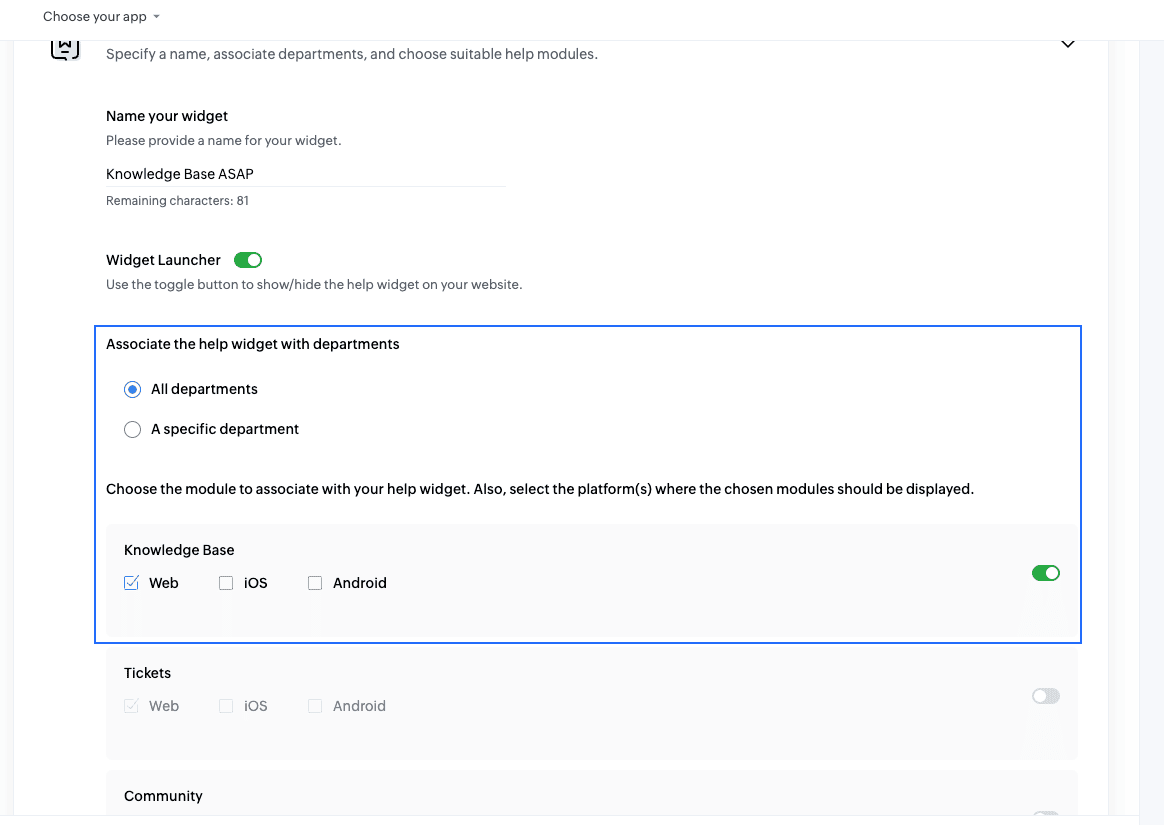
28. Do we need to train Zia on how to answer customer questions? If Zia doesn't know the answer, does it look for another article to learn and respond?
You need not train Zia for every article manually. Once your articles are created and published within the knowledge-based module, Zia will automatically train on the articles and assist your customers with their questions.
If no relevant information is available, Zia will display the message you set in "When the bot is unable to answer" when configuring the answer bot. (Setup > Zia > Answerbot)
29. Can Zia get information from MS Word documents in SharePoint (our Knowledgebase) to provide answers to customers?
The best way to do this is to import MS Word documents directly into your Zoho Desk KB article to use them for training and customer support.
30. We would like to have an option for people to sign up for our newsletter in the Help Center. Can we integrate this?
You can customize the Help Center using Help Centre customization to add a custom widget and ask your customers to sign up for your newsletters.
You can also add a web form for customers to sign up and receive your newsletters. Or, you can embed that form link using widgets or Help Center customization. We have a custom script option in Help Center. If you have any external link to host your form, you can embed the link in our widget. If you have a direct API, you can integrate it using the customization JavaScript feature.
You can customize the Help Center using Help Centre customization to add a custom widget and ask your customers to sign up for your newsletters.
You can also add a web form for customers to sign up and receive your newsletters. Or, you can embed that form link using widgets or Help Center customization. We have a custom script option in Help Center. If you have any external link to host your form, you can embed the link in our widget. If you have a direct API, you can integrate it using the customization JavaScript feature.
Community
31. Is there an easy way to communicate with all our users about our organization/products?
You can use Zoho Desk's Community module. You can post announcements or posts using the various topic types. Any posts made on the community will be accessible to your users. Users can sign in to the Help Center to participate in discussions and create discussions. When users follow your posts, they will be notified of new posts in the Community via email.
32. What are effective ways to build an internal community for different teams to share insights and resolve repetitive queries?
The community module in Zoho Desk is for you and your customers to write in, ask questions, and connect.
But if you're looking to keep just one tool for both internal and external, create private forums for the internal categories and have people on board to have conversations. While you can have private forums, we have other tools that will provide engaging experiences for your internal teams.
You can try Zoho Community spaces and Zoho Connect for internal communities in your organization. You can have a specific group called connect spaces or community spaces.
Session recordings
Before we close, here are the much-awaited links to the sessions' recordings.
ATE 29: Knowledge Base, Community, and AI for smarter user education, Session 1
ATE 29: Knowledge Base, Community, and AI for smarter user education, Session 2
Please follow the Zoho Desk community for discussions, ideas, and announcements. Follow the Ask the experts for upcoming sessions and key takeaways.
Stay tuned for the next session focusing on Automation in Zoho Desk on June 25, 2026!
Regards,
Lydia | Zoho Desk.