Kaizen #194 : Trigger Client Script via Custom buttons

Hello everyone!
Welcome back to another interesting and useful Kaizen post.
We know that Client Scripts can be triggered with Canvas buttons and we discussed this with a use case in Kaizen#180. Today, let us discuss how to trigger Client Script when a Custom Button is clicked. Using this, you can execute Client Script when a custom button is clicked.
In this post,
1. Event Details2. Supported Pages3. Use Case - Export Subform Rows to Zoho Sheet in a Single Click!4. Solution5. Summary6. Related Links
Client Script support for Custom Buttons opens up possibilities for automation, personalization, and enhanced user interactions in Zoho CRM when a custom button is clicked.
Here is a detailed walkthrough to help you understand it better.
1. Event Details
The Button event triggers the Client Script when a custom button is clicked. Each time this event is invoked, the context argument is passed to the Client Script. The context contains information about the page from which the button was clicked.
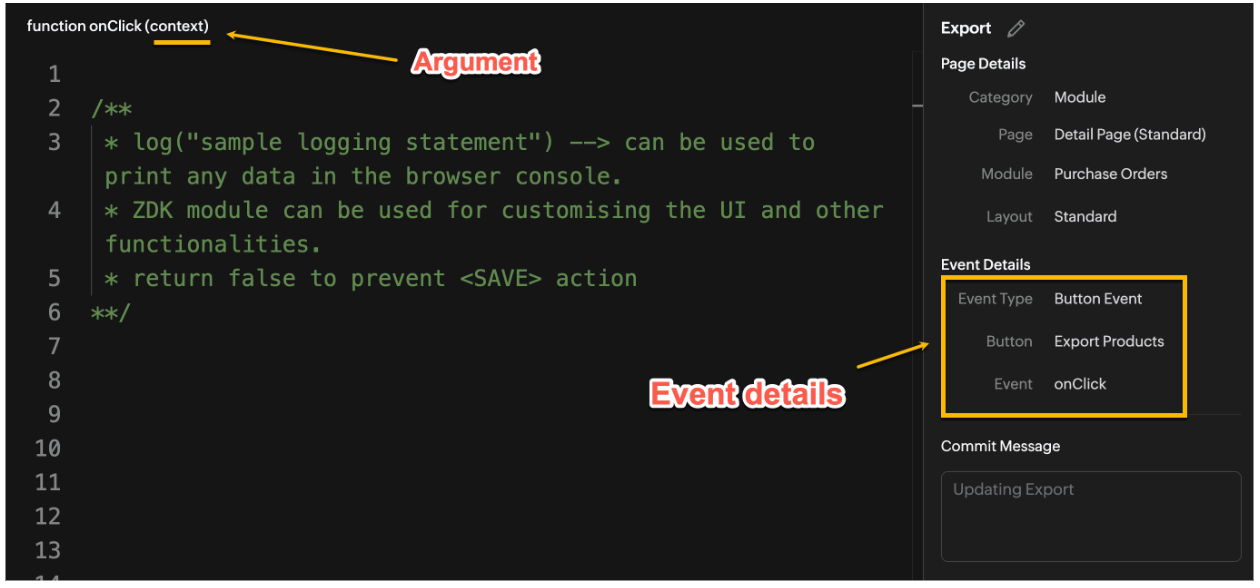
Click here to know more about Client Script Events.
2. Supported Pages
A Custom Button can be placed in different positions based on the Page.
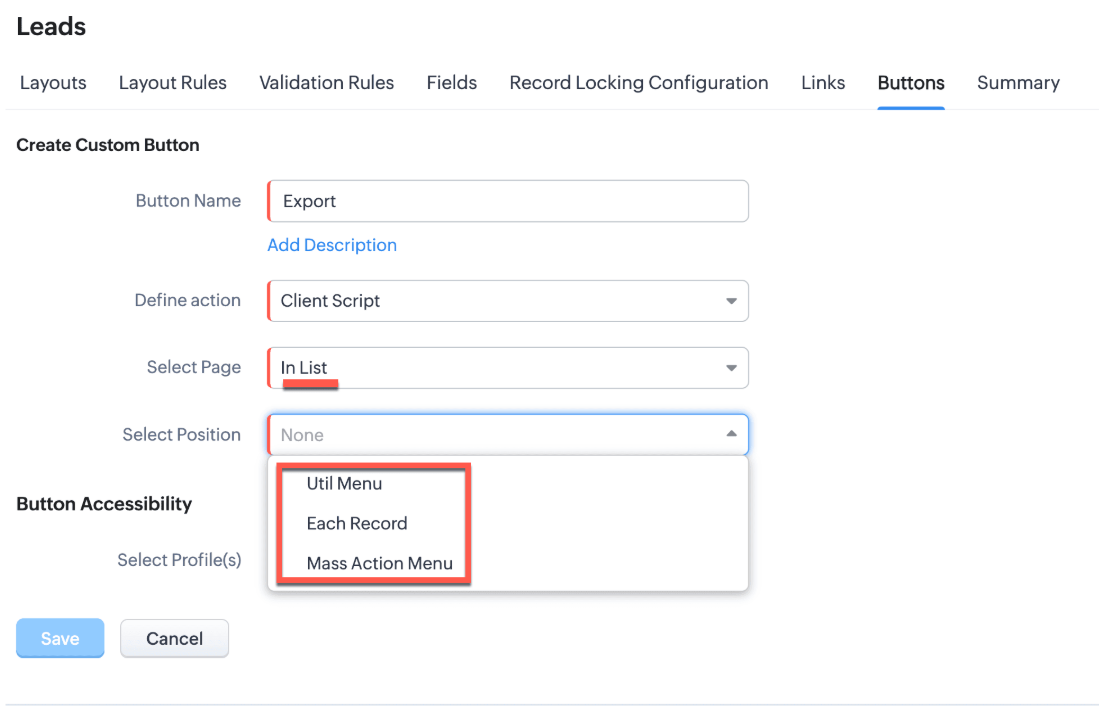
You can add a custom button in the Util Menu, in Each Record or in the Mass Action Menu of the List Page.
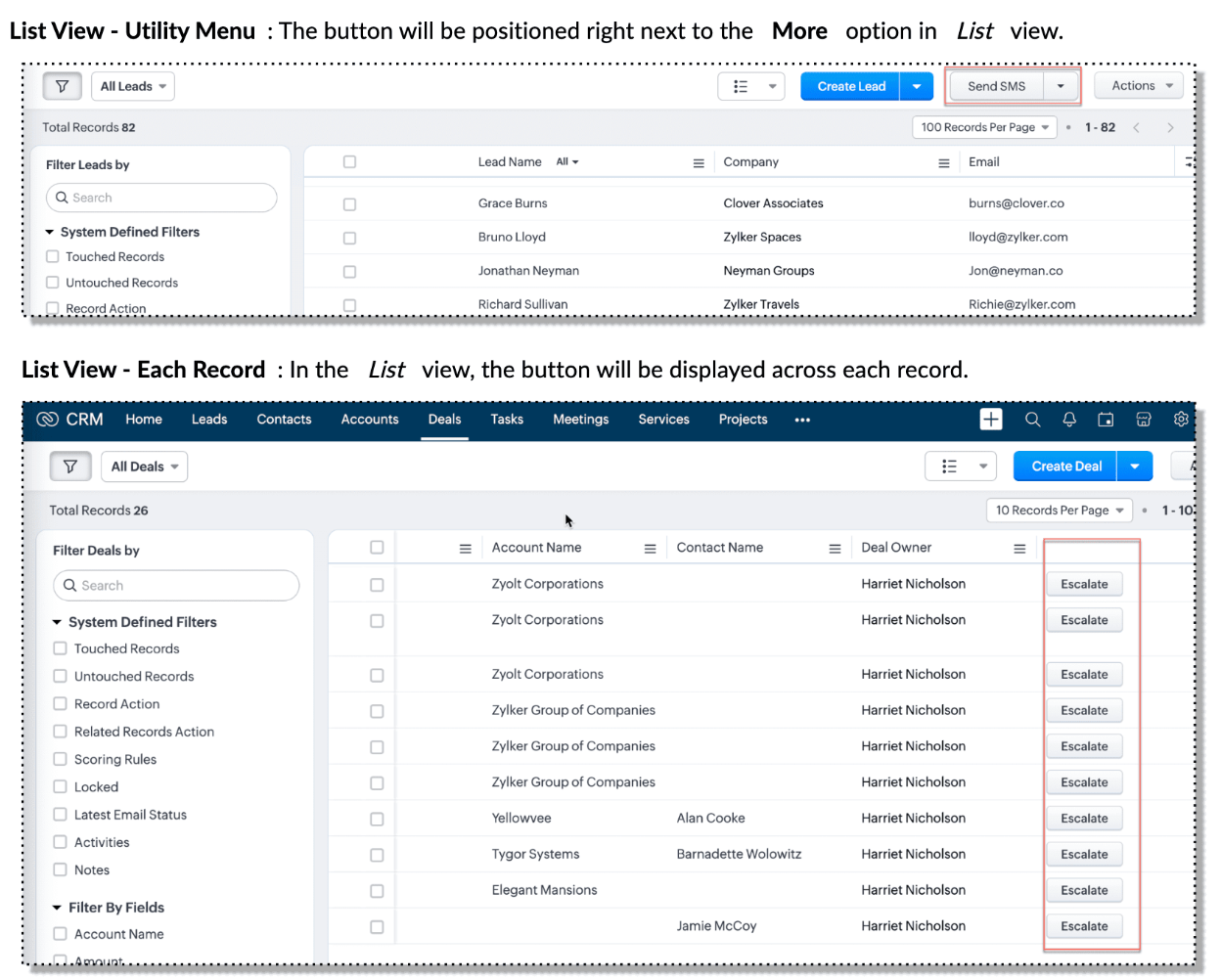

Also, a Detail Page can have a custom button either In Record or in the Related List. Click here for more details about the different possible positions of a custom button.
The following table lists the supported pages and the corresponding context argument, which provides different details based on the page type.

To create a Client Script and make it trigger when a custom button is clicked, first create a Custom button and associate it with a Client Script as shown in the following image.

Click here to view the steps to create a custom button and configure a Client Script.
Note:
You can configure the Client Script only from the Buttons page to trigger it when a user clicks a custom button, and not the usual way of Creating Client Script via setup page. Once a script is created, it can be edited and updated from the Client Script setup page
3. Use Case - Export Subform Rows to Zoho Sheet in a Single Click!
Zylker manufactures medical instruments, and its sales representatives frequently need to share bulk order details with distributors and hospital partners using Zoho Sheets. These details such as product names, quantities, and prices are captured in a Subform on the Purchase Order Detail(Standard) Page.
To simplify this, the admin wants to add a custom button called "Export Products" on the Purchase Order Detail Page. When clicked, it should export the Purchase Items from the Subform and move the content to the specified sheet.
4. Solution
To export subform rows to Zoho Sheet with a single click, you can add a custom button to the Detail Page of the record. When clicked, a Client Script will be triggered to fetch the subform data from the Detail Page and pass it to a Function that uses zoho.sheet.createRecords() to insert data into Zoho Sheet.
Here’s how to implement this:
- Add “Export Products” custom button on the Detail Page.
- Add the script to collect subform rows which invokes the Function.
- Write a Function to create entry in Zoho Sheets
A. Add “Export Products” custom button on the Detail Page.
- Go to Setup → Modules and Fields under Customization.
- Select a Module as Purchase Order.
- Click on Buttons → Then click + New Button.
- Enter Button Name and select Action Type as "Client Script"
- Choose Button Position and Layout details as shown in the following image.
- Click Create in Configured Client Script, enter the script, and click Add.
- Select the profiles for which these buttons should be visible.
- Click Save.

B. Add the Script to collect subform rows and invoke the Function
Use the following Client Script when you configure the custom button.
- var casesheetid = ZDK.Client.getInput([{ type: 'text', label: 'Enter the Sheet ID' }], 'Sheet details', 'OK', 'Cancel');
- if (casesheetid == null) {
- ZDK.Client.showAlert("Enter the *Case Sheet ID - Import* to import data");
- }
- var purchase_items = ZDK.Page.getField('Purchase_items).getValue();
- ZDK.Client.showLoader({type: 'page', template:'spinner', message: 'Export in progress, please wait'});
- var c=1;
- if (sheetid == null) {
- ZDK.Client.hideLoader();
- ZDK.Client.showAlert("Enter the *Case Sheet - Export* ID to export data");
- }
- purchase_items.forEach((r,i) => {
- try {
- resp = ZDK.Apps.CRM.Functions.execute("csvWrite", { "Product_Name": r.Product_Name.name, "List_Price": r.List_Price, "Discount": r.Discount, "Total": r.Total,"Sheetid":casesheetid }); }
- catch (error) {
- c = 0;
- ZDK.Client.hideLoader();
- ZDK.Client.showAlert("Unexpected issue occured while adding data in row number "); }
- });
- ZDK.Client.hideLoader();
- if (c) {
- ZDK.Client.showMessage("Export completed. Please check the Sheet");
- }
- else
- {
- ZDK.Client.showMessage("Unexpected error "); }}
In this code, several ZDKs are used for various purposes. Click on the ZDK hyperlinks to learn more.
- User Input: The code uses ZDK.Client.getInput() to fetch a "Sheet ID" from the user. This input is crucial for further operations.
- Input Validation: If the user cancels or doesn't enter a sheet ID, the code checks for null and prompts the user to enter the ID using ZDK.Client.showAlert().
- Function Invocation: The entries of Purchase Order subform are fetched using ZDK.Page.getField('Purchase_items).getValue() and written to Zoho Sheet using the Function csvWrite(), which internally calls zoho.sheet.createRecords().
- Loader Display: To indicate that a process is running, a loader is displayed using ZDK.Client.showLoader().
- Show Message: ZDK.Client.showMessage() displays that the Export is completed.
Note
The Client Script you intend to link with the button will be saved only after the custom button is saved.
C. Write a Function to create entry in Zoho Sheets
- Go to Setup > Developer Hub > Functions.
- In the Functions page, click + Create New Function.
- Choose the category as Button.
- Click Create.
- In the Create Function page, enter a name as csvWrite and description for your function.
- Enter the following function code and click Save.
- string standalone.csvWrite(String product,String qty,String up,String amt, String Sheetid){
- queryData = Map();
- writeData = Map();
- header = Map();
- writeData.put("Product",product);
- writeData.put("Quantity",qty);
- writeData.put("Unit_Price",up);
- writeData.put("Amount",amt);
- SheetData = zoho.sheet.createRecords("Sheetid","Sheet1",writeData,queryData,"sheetconnection");
- return SheetData;
- }
In the code above:
- sheetconnection refers to the name of the Zoho Sheet connection, which must have the scopes: ZohoSheet.dataAPI.UPDATE and ZohoSheet.dataAPI.READ.
- Click here to know how to create a Connection with the required scopes.
- sheetid is the unique identifier of the Zoho Sheet, available in the sheet’s URL.
- Sheet1 represents the name of the worksheet (i.e., the tab name shown at the bottom of the Zoho Sheet).
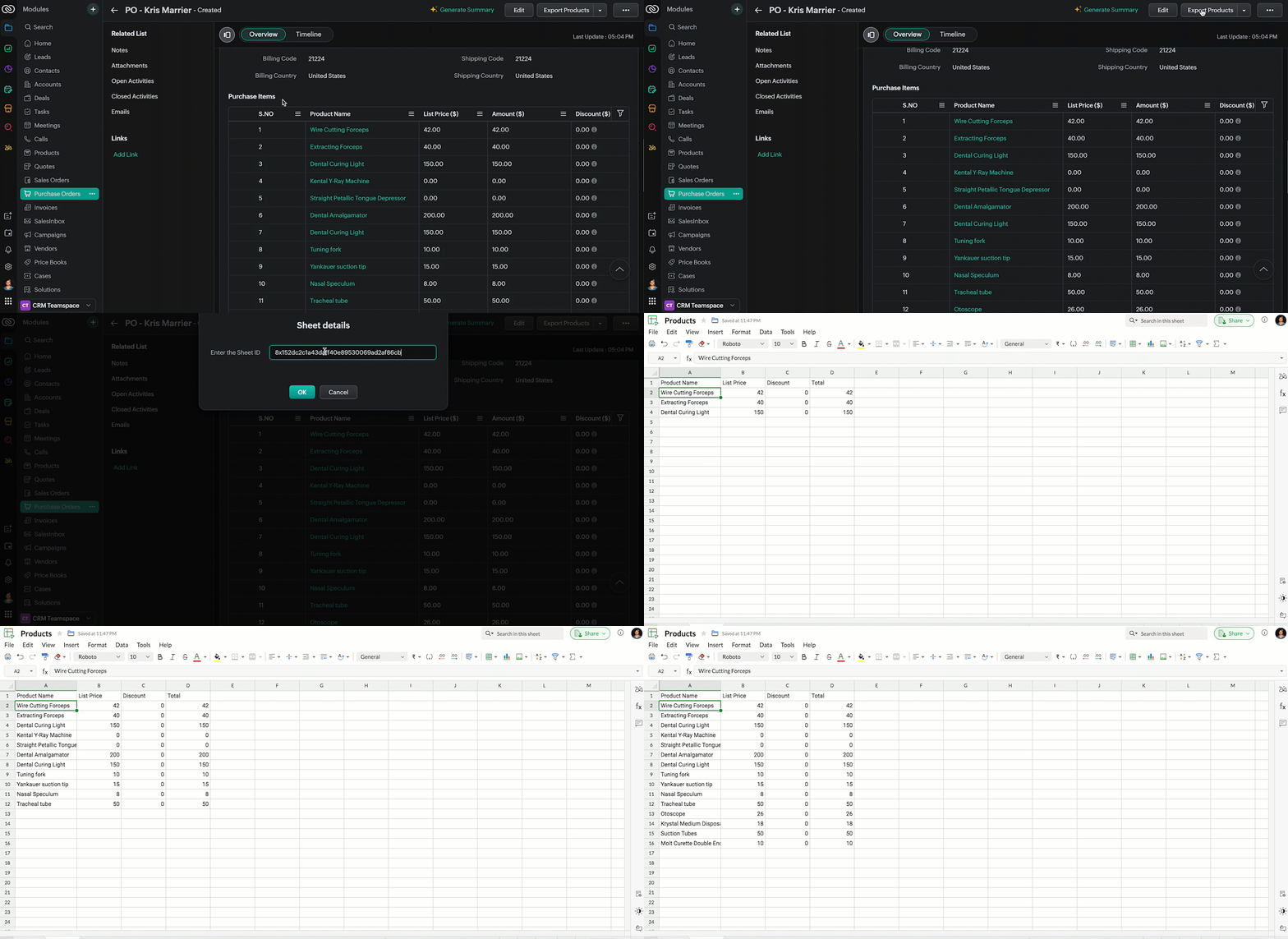
- Now, when the custom button is clicked, the Client Script is triggered. It prompts for the Sheet ID, fetches the contents of the Purchase Order subform, and invokes a function that writes the content to the Sheet.
Here's how the Client Script works.
5. Summary
In this post we have seen,
- What is a Button event?
- How to configure Client Script for a custom button
- How to write data into Zoho Sheets from Client Script
- How to create a Function and call it from Client Script
6. Related Links
- Customize Buttons using Client Script
- Automating Data Transfer from Zoho Sheets to Zoho CRM Subforms
- Update - Client Script Support For Custom Buttons
We are thrilled to be nearing the 200th post in our Kaizen series. As we approach this exciting milestone, we would love to hear from you. Do you have any questions, suggestions, or topics you would like us to cover in future posts? Your input helps us improve and shape the series to serve you better.
Previous Kaizen Post : Kaizen #193: Creating different fields in Zoho CRM through API | Kaizen Directory
We hope you found this post useful!
Happy Client Scripting! 😊
Topic Participants
Maadhari M
Rakesh Kumar
Gray
Ishwarya SG
Sticky Posts
Kaizen #198: Using Client Script for Custom Validation in Blueprint
Nearing 200th Kaizen Post – 1 More to the Big Two-Oh-Oh! Do you have any questions, suggestions, or topics you would like us to cover in future posts? Your insights and suggestions help us shape future content and make this series better for everyone.Kaizen #226: Using ZRC in Client Script
Hello everyone! Welcome to another week of Kaizen. In today's post, lets see what is ZRC (Zoho Request Client) and how we can use ZRC methods in Client Script to get inputs from a Salesperson and update the Lead status with a single button click. In thisKaizen #222 - Client Script Support for Notes Related List
Hello everyone! Welcome to another week of Kaizen. The final Kaizen post of the year 2025 is here! With the new Client Script support for the Notes Related List, you can validate, enrich, and manage notes across modules. In this post, we’ll explore howKaizen #217 - Actions APIs : Tasks
Welcome to another week of Kaizen! In last week's post we discussed Email Notifications APIs which act as the link between your Workflow automations and you. We have discussed how Zylker Cloud Services uses Email Notifications API in their custom dashboard.Kaizen #216 - Actions APIs : Email Notifications
Welcome to another week of Kaizen! For the last three weeks, we have been discussing Zylker's workflows. We successfully updated a dormant workflow, built a new one from the ground up and more. But our work is not finished—these automated processes are
Recent Topics
How to include total km for multiple trips in expense report.
Whenever I create a mileage report it only shows the total dollar amount to be reimbursed. The mileage for each individual trip is included but I also need to see the total distance for all trips in a report? How do I do this?I didn't receive my domain verification mail
I didn't receive my domain verification mailGet logged in user ID in Deluge script
Hello all, How do I get the id of the logged-in user in a deluge script? the "zoho.loginuserid" function actually returns the users email address or whatever the user id they use to login to zoho with and not the id of the user record, and given thatItem Details Field - New Barcode / Document option?
Is this a new feature??? its in both books and inventory.Shared Mailbox - Mark as read for all users
Hi all, Maybe someone can help me out. At the moment we have a shared mailbox without streams. When a users reads an mail or marks it as read other users will not see this. How can we resolve this? We now archive the mails when read and followed up. HoweverStaff rules
Hi! Do you people know what are the default staff rules when a new booking is created? We have two staff members in my team (me as the admin, and my employee). As we share the same services, I'm wondering how Zoho will pick the staff for new apointments.Add Image Upload Field to Zoho Bookings Registration Form
Hi, We would like to request the addition of an image upload field to the Zoho Bookings registration form. Currently, Zoho Bookings only supports text-based fields (e.g., Single Line, Multi-Line, Email, Checkbox, Dropdown, Radio Button, and Date), butMerge Tags Output Incorrect Placeholder Text After CRM Sync
Hi everyone, I’m experiencing an issue with merge tags in Zoho Campaigns after last sync of contacts and leads from Zoho CRM (days before everything worked perfectly). Here’s the situation (seems like a default configuration in Campaigns) : My leads haveWindows agent 2025_M02 release notes
Agent Version: 111.0.3.300 Release date: 24 February, 2025 Various Major enhancements to improve overall performance and optimize the user experience. Squashed a few bugs to improve overall product quality.Windows agent 2025_M01 release notes
Agent Version: 111.0.3.299 Release date: 05 February, 2025 Major Enhancement: Live Monitor feature compatibility released. Major Enhancement: Updated Scaling for multi technician cases with Android and Web based viewers. Various other bug fixes and performancehow to record deferred revenue?
Dear Zoho Team, We issue invoices relating to 12-month web hosting service. When we issue the invoice, we should record the entire amount of the invoice as DEFERRED REVENUE (ie. $10 x 12 mths = $120, balance sheet item). After the particular month of the hosting service, $10 of revenue has been earned and deferred revenue amount will be $110. We must keep adjusting the balance sheet and income statement over the course of the service until the company has fulfilled its obligation of services andNarrative 13: Importing your data
Behind the scenes of a successful ticketing system: BTS Series Narrative 13: Importing your data When importing data into an application, it is crucial to prevent data loss or duplication. These types of errors can hinder the development of a clean andBlueprint Not Triggering When Lead Status Is Updated by Workflow (IndiaMART Integration)
I have set up a blueprint that triggers when a lead’s status is “New Lead.” Our CRM is integrated with IndiaMART, and when leads are created from IndiaMART, their Lead Status is initially set to None. To handle this, I created a workflow that automaticallyUpdate Subform in specific field(Status) without affecting other fields in Zoho CRM using Deluge?
Scenario: PRODUCT Module(change name Plot) in any product status change From Available to Booked then on PROJECT Custom Module have Subform So, Subform name is Property Details now in that Subform 1 field is STATUS that update according to product statusYouTube Live #2: Agreement Intelligence with Zoho Sign's eSign AI assistant
Hi there, We're back again with our YouTube live series and this time, we'll take you through our holistic agreement intelligence powered signature workflows. Struggling to draft an agreement? Need help double-checking clauses and going through complicatedCan I Build a POS using ZOHO creator and integrate it with ZOHO Books?
Hello, I have a Zoho Books account and I was wondering if I can have a POS system that integrates with it. Primarily with Inventory, Customers and Payment and ofcourse Create invoices and credit notes. So, would Zoho creator provide me with this solution? Thank you,An important update for Zoho Cliq desktop users
The latest version of the Zoho Cliq desktop app (v1.8.0) will no longer be supported on macOS 10.15 Catalina and earlier versions. This is because the framework we use (Electron) no longer supports some older macOS versions. If you’re using macOS 10.15New Toolbar in Zoho Sheet
We have revamped our toolbar design in this new version of Zoho Sheet. Below are some screenshots to help you get accustomed to this new interface. Click on the picture below to view the animated image in its original size. Scroll down this post to learn about the changes. Highlight of Changes: The previous format tab is now split into 2 tabs - Home and Format. The Home tab contains the commonly used functions and the Format tab holds formatting related options. Under the Home tab towards the farZoho inbuilt Telephony made a lot of issues!
Hi there, I am a user that I am working with zoho inbuilt telephony around 1 month. Non of my colleagues are happy with this app! most of the time customer cannot hear my customer service team, customers say our voice is breaking. whenever Telephony supportSending workflow notifications using popular chat services
Hello everyone, We have introduced instant and scheduled notifications on some of the most popular chat platforms to facilitate easy collaboration, quick action, and wider reach. Workflow notifications can be sent to the following chat platforms: ZohoAdding Images to a Quote in Zoho CRM
We are currently preparing to use Quotes in Zoho CRM and we are building out our Quote templates. We came across an issue of not being to add Images of the products to the Quote - specifically in the body of the Quote templates. This is a problem,Applications built with Zoho Creator
Hi, I’m really interested in seeing how others have built their application using Zoho Creator, especially those designed for external users (clients, vendors, or the public). If you’ve developed something along those lines and don’t mind sharing, I’dIs it posssible to add Asap Widget on Wordpress?
I have tried to add the ASAP widget so users could iniciate chats and see the KB information but nothings seems to work. I have tried to add the script using a php snippet that adds the to the footers and also tried one for the header in the functioRequire ticket resolution
Hi Zoho team, Is there a way to require resolution even if an agent did not use a blueprint? for example, our blueprint has a "resolve" transition but what if agent revoked blueprint and manually set the status of ticket to closed? Is there a way whereTables from ZohoSheets remove images when updated from source
I have a few tables from a ZohoSheet in a ZohoWriter document that will remove the images in the cells when I refresh from the source. The source still has the images in the table when I go to refresh. After updating from the source, as you can see theAPI Pagination Error: 'from' Parameter Limit
Hello, I am encountering an error while paging through the Zoho Desk API results: Status code: 422 - {"errorCode":"UNPROCESSABLE_ENTITY","message":"The value passed for field 'from' exceeds the range of '0-4999'."} Is 5000 the maximum number of recordsHow to go to the next open ticket in the queue when agents closes ticket
Zoho Desk When agent closes a ticket - eg when they choose 'Send and Close" - where is the setting that automatically redirects them to the next open ticket in the queue?Custom templates for calendar report
What about being able to design custom templates for the calendar report, as well as for other types of reports? I think more users are waiting for this.Maximum tags possible in Contacts Records
I read in some documentation that Zoho allows a total of 200 tags across all records. Is this correct? So is it not possible to have one tag per record for 500 records?Any way to "Pay with Check" or "Refund with Check" for Credit Notes?
When we have a Bill in Zoho Books, we can select the "Pay with Check" option which then allows us to print/cut the check directly out of Zoho Books. When we created a Credit Note and want to refund the customer, is there any way to Refund with Check,CRM Mobile reports
When our engineers finish a job they like to email the customer a job report. This is best done todate as an email template but we can find no way to include an image field from that module. Is there any other options?¿How to integrate Zoho Inventory to Zoho SalesIQ?
Is it possible to integrate Zoho Inventory with SalesIQ? I want to integrate it because I have a bot in Zoobot that uses a ChatGPT assistant. I need it to check the inventory of our items so it can determine whether or not our items are available.When Zoho Tables Beta will be open to EU data center
Hello all, We in EU are looking at you all using and testing and are getting jealous :) When we will be able to get into the beta also? We don't mind testing and playing with beta software. Thank you!Start Form on a different page (i.e., hide form pages)?
I have a Zoho form that uses the `Field Alias - Prefill URL` feature. My goal is to have a pre-filled field that directs the user to a specific starting page in the form. For example: The URL will have a field alias that will auto-populate a field withHow can we disable "My Requests"?
We are not using this functionality in our system at all and our users get confused.PayPal payment received recording problem
Hi, A little while back one of our customers used the PayPal payment option to pay an invoice For some reason though the payment is showing up twice within the Payments section of the invoice! Instead of setting the invoice value to ZERO, it now shows a negative value Anyone else face this problem? I've checked PayPal and there is only 1 payment in reality... A bug? Actonia ps: for anyone from Zoho Customer Service or tech team, its Invoice 785 in our accountserver response: 451.4.7.1
Good day. Some email clients of our domain receive an error about sending and receiving letters. while for the rest everything works fine. access to the mail made by pop protocol. Bless the mistakes: "server response: 451.4.7.1 System error".string(87) "{"code":"INVALID_TOKEN","details":{},"message":"invalid oauth token","status":"error"} " grtting this error
Using access token i am trying to add sales orders through api but it is throwing errors like the above i have mentioned. Please help me for thatHow to mute chat notification sound by default in Zoho SalesIQ?
We’ve recently embedded the Zoho SalesIQ chatbot on our website, and we’ve noticed that notification sounds sometimes play even when the visitor hasn’t interacted with the chat widget yet. We’re trying to understand two things: Why do these sounds occurHow to Hide Article Links in SalesIQ Answer Bot Responses
I have published an article in SalesIQ, and the Answer Bot is fetching the data and responding correctly. However, it is also displaying the article link, which I don’t want. How can I remove the link so that only the message is shown?Next Page