Automate a CRM workflow with Zoho Cliq

Imagine having a virtual assistant that provides rapid updates to your team through Zoho Cliq, helping you stay on top of your sales processes. After returning from a client meeting filled with updates and action items, managing this information together can feel overwhelming, especially when juggling multiple roles and responsibilities.
Business benefits
- Notification of deal closures: Ensures the sales team is promptly informed when a deal is closed to celebrate wins, update forecasts, and maintain team morale.
- Product and development feedback: Quickly communicate client requests or demo glitches to the product and development teams to enhance product offerings and resolve issues.
- Managerial updates: Keep managers in the loop with meeting outcomes to strategize the next steps or escalate issues.
- Syncing with the team: Link CRM updates directly to team chat channels to ensure all team members are updated about lead statuses. This reduces the need for multiple app switches, enhances real-time collaboration, coordinates efforts, and aligns strategies.
Let's examine an example of Zoho CRM workflow automation for a new lead created with a Zoho Cliq bot.
Step 1 : Bot creation
- Navigate to the top right corner of your profile, click on it, and select "Bots and Tools".
- To create a new bot, click on "Create Bot" on the right under the "Bots" section.
- Provide a name and description for the bot, then enable channel configuration settings during setup.
Step 2 : Bot webhook URL retrieval
- Webhook tokens are listed under the Bots & Tools section along with all the other internal tools. When navigated to the webhook tokens module, you will be required to authenticate using 2FA, verify your identity, and click Continue.
- After authentication, you can create, edit, and manage your Webhook Tokens as needed.
- Generate a webhook token and retrieve the bot's webhook URL as specified below.
ⓘ Learn more about webhook tokens in Zoho Cliq
Step 3 : Configuration of CRM workflow rule
Workflow rules in Zoho CRM are actions (email notifications, tasks, and field updates) executed when certain specified conditions are met. These rules automate sending email notifications, assigning tasks, and updating specific fields of a record when a rule is triggered.
ⓘ Learn more about configuring workflow rules in Zoho CRM
Similarly, you can set up and configure new workflow rules for events like the update of a lead status or the assignment of a lead to any sales representative (Lead owner ).

Step 4 : Setting up bot incoming webhook handler
- Go back to Cliq and find the bot you created under the "Bots and Tools" section. Then, access the bot's incoming webhook handler.

- The incoming webhook handler is designed to allow third-party services, such as Zoho CRM, to post messages directly to your bot.
- Copy and paste the below code and click "Save".
Pre-requisites:
To post an alert to the channel, you need the unique names of both the channel and the bot, as we are using zoho.cliq.postToChannelAsBot deluge task in the code below. Follow the steps to retrieve these names.
How to obtain or locate the channel unique name in Cliq?
- Navigate to the top right corner of the preferred channel and locate the three dots. Click it.
- In the menu that appears, select "Channel info" and a pop-up will open, displaying detailed channel information. Hover over the "Connectors" section and click it.
- Under "API Parameters," you will find the channel unique name.
How to obtain or locate the bot unique name in Cliq?
- Navigate to "Bots & Tools", and under the bots section, select the bot you prefer.
- Copy the API endpoint URL. The bot's unique name is located after "bots/" and before the next slash "/".
- Example:
- URL: https://cliq.zoho.com/company/2345678/api/v2/bots/crmupdatesincliq/message
- The bot unique name in the above example is crmupdatesincliq
- info params;
- eventType = params.get("event-type");
- leadName = params.get("Lead Name");
- company = params.get("Company");
- leadStatus = params.get("Lead Status");
- title = params.get("Title");
- email = params.get("Email");
- phone = params.get("Phone");
- leadSource = params.get("Lead Source");
- industry = params.get("Industry");
- leadId = params.get("Lead ID");
- if(eventType.equalsIgnoreCase("Lead Created"))
- {
- response = {"text":"🎯Heads up! A new lead has been successfully added to your list. Prepare to engage and convert!","card":{"title":"🚀 New Lead Added!","thumbnail":"https://i.imgur.com/jDagRms.png","theme":"modern-inline"},"slides":{{"type":"text","title":"Lead Details :","data":"🏆 Lead Name : " + leadName + "\n💼 Company : " + company + "\n⏱️ Lead Status : *" + leadStatus + "*"},{"type":"label","title":"","data":{{"📧 *Email*":email},{"☎️ *Phone*":phone},{"🏢 *Industry*":industry},{"📣 *Lead Source*":leadSource}}}}};
- // Use zoho.cliq.postToChannelAsBot(${channel_unique_name}, ${bot_unique_name}, response);
- zoho.cliq.postToChannelAsBot("clientleadupdates","crmupdatesincliq",response);
- }
- if(eventType.equalsIgnoreCase("Lead Assigned"))
- {
- leadOwner = params.get("Lead Owner");
- response = {"text":"🚀📈Promising prospect assigned to " + leadOwner + ". Opportunity awaits!","card":{"title":"🎯 New lead generated","thumbnail":"https://i.imgur.com/UisAlKn.png","theme":"modern-inline"},"slides":{{"type":"text","title":"Lead Details :","data":"🏆 Lead Name : " + leadName + "\n💼 Company : " + company + "\n⏱️ Lead Status : *" + leadStatus + "*"}}};
- zoho.cliq.postToChannelAsBot("clientleadupdates","crmupdatesincliq",response);
- }
- if(eventType.equalsIgnoreCase("Lead Status Updated"))
- {
- response = {"text":"✅💼 Great news! Lead status is now Qualified. Ready to engage!","card":{"title":"✅ Lead qualified","thumbnail":"https://i.imgur.com/d2jhClm.png","theme":"modern-inline"},"slides":{{"type":"text","title":"Lead Details :","data":"🏆 Lead Name : " + leadName + "\n💼 Company : " + company + "\n⏱️ Lead Status : *" + leadStatus + "*"}}};
- zoho.cliq.postToChannelAsBot("clientleadupdates","crmupdatesincliq",response);
- }
- return Map();
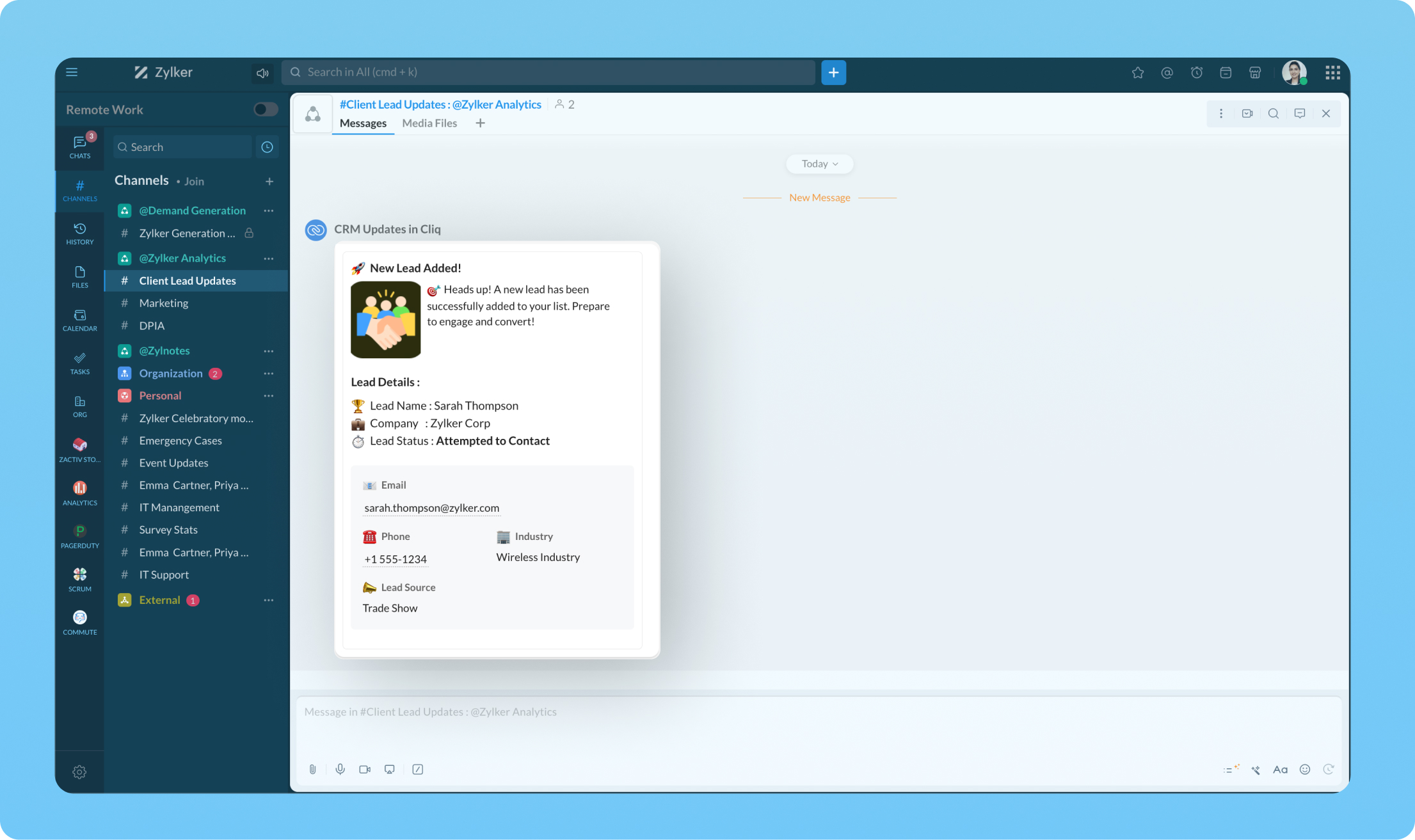
Transform your workflow experience with ease! Imagine having the ability to set up custom automation that sends instant messages to your team channels whenever a deal is sealed or a new lead steps on board.
We're here to help, so don't hesitate to reach out to support@zohocliq.com with any questions or if you need assistance in crafting even more tailored workflows.
Topic Participants
Harsha SS
Sticky Posts
Automate attendance tracking with Zoho Cliq Developer Platform
I wish remote work were permanently mandated so we could join work calls from a movie theatre or even while skydiving! But wait, it's time to wake up! The alarm has snoozed twice, and your team has already logged on for the day. Keeping tabs on attendanceAutomating Employee Birthday Notifications in Zoho Cliq
Have you ever missed a birthday and felt like the office Grinch? Fear not, the Cliq Developer Platform has got your back! With Zoho Cliq's Schedulers, you can be the office party-cipant who never forgets a single cake, balloon, or awkward rendition ofCustomer payment alerts in Zoho Cliq
For businesses that depend on cash flow, payment updates are essential for operational decision-making and go beyond simple accounting entries. The sales team needs to be notified when invoices are cleared so that upcoming orders can be released. In contrast,Accelerate Github code reviews with Zoho Cliq Platform's link handlers
Code reviews are critical, and they can get buried in conversations or lost when using multiple tools. With the Cliq Platform's link handlers, let's transform shared Github pull request links into interactive, real-time code reviews on channels. ShareApp Spotlight : PagerDuty for Zoho Cliq
App Spotlight brings you hand-picked apps to enhance the power of your Zoho apps and tools. Visit the Zoho Marketplace to explore all of our apps, integrations, and extensions. In today's fast-paced world, seizing every moment is essential for operational
Recent Topics
Optimising CRM-Projects workflows to manage requests, using Forms as an intermediary
Is it possible to create a workflow between three apps with traceability between them all? We send information from Zoho CRM Deals over to Zoho Projects for project management and execution. We have used a lookup of sorts to create tasks in the past,Conditional fields when converting a Lead and creating a Deal
Hi, On my Deal page I have a field which has a rule against it. Depending on the value entered, depends on which further fields are displayed. When I convert a Lead and select for a Deal to be created as well, all fields are shown, regardless of the valueATE Session on Payment Gateways: Our experts are live now. Post your questions now!
Hello everyone, Our experts are all excited to answer all your questions related to payment workflows. Please feel free to join this session and learn more about this topic. If you have a query at anytime, please post them here.Upload data deleted all Zoho form data that we manage
Good morning. Let me introduce myself, I'm Iky from Indonesia. I'm experiencing an error or problem using Zoho Forms. I manage Zoho Forms, but I previously encountered an error when I misclicked the delete button in the upload format. It apparently deletedZOHO FORMにURL表示ができない
初心者です。 ZOHO FORM で宿泊者名簿を作っています。 ゲストが、URLをクリックするとStripeで支払いができるようにURLを表示をしたいのですが、 上手くできません。 やり方が分かる方、ぜひ教えてください。Custom module - change from autonumber to name
I fear I know the answer to this already, but thought I'd ask the question. I created a custom module and instead of having a name as being the primary field, I changed it to an auto-number. I didn't realise that all searches would only show this reference.No Automatic Spacing on the Notebook App?
When I'm adding to notes on the app, I have to add spaces between words myself, rather than it automatically doing it. All my other apps add spacing, so it must be something with Zoho. Is there a setting I need to change, or something else I can do soHolidays - Cannot Enter Two Holidays on Same Day
I have a fairly common setup, where part-time employees receive 1/2 day's pay on a holiday and full-time employees receive a full day's pay. Historically, I've been able to accommodate this by entering two separate holidays, one that covers full-timeZoho Bookings and Survey Integration through Flow
I am trying to set up flows where once an appointment is marked as completed in Zoho Bookings, the applicable survey form would be sent to the customer. Problem is, I cannot customise flows wherein if Consultation A is completed, Survey Form A would beCampaigns set up and execution assistance
Hello Community, Can someone recommend a professional who can assist with the completion of my set up and deployment of Campaigns? Looking for a person or company that is not going to ask for big dollars up-front without a guarantee of performance toCard Location in Zobot
Hello, when using the “Location” card in a codeless builder Zobot, the behavior in WhatsApp is inconsistent. When asking the user to share their location, they can type a message, which will return the message “Sorry, the entered location is invalid.Zobot with Plugs
Hello, I am having a problem with Zobot using Plugs. Here is my current flow: When I run the flow, I should immediately see the messages from the initial cards (Send Message cards), then after running the plug, and finally, see the messages after theKaizen #223 - File Manager in CRM Widget Using ZRC Methods
Hello, CRM Wizards! Here is what we are improving this week with Kaizen. we will explore the new ZRC (Zoho Request Client) introduced in Widget SDK v1.5, and learn how to use it to build a Related List Widget that integrates with Zoho WorkDrive. It helpsRemove Powered by Zoho at the footer
Hi, I've read two past tickets regarding this but it seems that the instructions given are outdated. I assume the layout keeps on changing, which makes it frustrating for me to search high and low. Please let me know how exactly do I do this now? ThError AS101 when adding new email alias
Hi, I am trying to add apple@(mydomain).com The error AS101 is shown while I try to add the alias.No Need To Fix Something That Is Working
Zoho Books is a great financial tool which helps businesses to become more efficient and productive with day-to-day operations. As such, every change, upgrade, improvement needs to be carefully thought before implemented in the software and I'm sure ZohoCreating a task, i can not work out how to get ID for What_Id
hi From Module A function I map Module B record reference membershipid (ours). I need Module B Zoho ID to create the related to on task. All examples i've seen start with the Zoho ID. void automation.LTM_Assign_Dispute_Task(String membershipid) { tryUsing email "importance" as workflow-criteria
I'd like to set up a workflow that triggers if an incoming email has been flagged as "high importance" but I'm not seeing any way to do that. Hopefully I'm just missing something obvious...?This domain is not allowed to add. Please contact support-as@zohocorp.com for further details
I am trying to setup the free version of Zoho Mail. When I tried to add my domain, theselfreunion.com I got the error message that is the subject of this Topic. I've read your other community forum topics, and this is NOT a free domain. So what is theWhat is Resolution Time in Business Hours
HI, What is the formula used to find the total time spent by an agent on a particular ticket? How is Resolution Time in Business Hours calculated in Zohodesk? As we need to find out the time spent on the ticket's solution by an agent we seek your assistanceCheck & Unchecked Task Segregation in Export
It must have a feature to represent checked and unchecked tasks as [ ] and [✅] respectively when exporting it to Arratai or WhatsApp ; as Keep Notes by Google contains…WorkDrive Download Issue
My client has been sending me files via WorkDrive, which generally has worked fine. Recently files won't download at all. If you try and individually select and download a file, a popup will appear in the bottom right saying it's preparing and then itFeature Request: Add Tax ID Display on Event Tickets
Hello Backstage Team, I’ve had several clients bring up an issue regarding tax compliance when creating events. For tax purposes, they are required to show their Tax ID on the event tickets. Currently, this isn’t an option, so they have to manually generateResolution Time Report
From data to decisions: A deep dive into ticketing system reports What are time-based reports? Time-based reports are valuable tools that help us understand how well things are going by breaking down key metrics over specific periods. By tracking, measuring,Support Custom Background in Zoho Cliq Video Calls and Meetings
Hello Zoho Cliq Team, We hope you are doing well. We would like to request an enhancement to the video background capabilities in Zoho Cliq, specifically the ability to upload and use custom backgrounds. Current Limitation At present, Zoho Cliq allowsAdd RTL (Right-to-Left) Text Direction Button in Zoho Cliq
Greetings Zoho Team, We would like to request the addition of an RTL (Right-to-Left) text direction button in Zoho Cliq, similar to what is already available in other Zoho apps like Zoho Desk. Currently, while using Zoho Cliq with the English interface,Enable Backgrounds and Video Filters for 1:1 Cliq Calls Across All Zoho Entry
Hello Zoho Cliq Team, We hope you are doing well. We would like to request an enhancement related specifically to 1:1 video calls in Zoho Cliq. Current Behavior Zoho Cliq currently provides background and video filter options in the following scenarios:Proposal: Actionable API Error Messages to Reduce Support Ticket Volume
I've encountered a long-standing frustration with how Zoho Creator's API communicates errors to developers, and I'm hoping the Zoho team can address this in a future update. This issue has persisted for over 9 years based on community discussions, andZoho Flow: Stripe a Zoho Marketing Automation
Hola! Quiero hacer un flujo con Zoho Flow, para que cuando se haga un pago en Stripe, añada el lead en Zoho Marketing Automation. Lo he configurado, configurando el disparador como "Payment created" y mapeando el campo de Stripe "Receipt email address".Not able to delete a QC nor able to revert or create a cycle of manufacturing for QC failed Jobs
Not able to delete a QC nor able to revert or create a cycle of manufacturing for QC failed JobsNeed Customer Item Inward Module along with QC
Need Customer Item Inward Module along with QC 1. Using Transfer Orders hit the item balance sheet 2. Items without inventory it becomes difficult for tracking purpose. 3. Custom Modules become tedious to capture multiple items, item subforms are notLESS_THAN_MIN_OCCURANCE - code 2945
Hi I'm trying to post a customer record to creator API and getting this error message. So cryptic. Can someone please help? Thanks VarunZoho email
I need a list of email addresses of all contacts on my zohoShift-Centric View for Assigning and Managing Shifts in Zoho People
Hello Zoho People Product Team, Greetings and hope you are doing well. This feature request is related to Zoho People - please don't move it to zoho one! We would like to submit a feature request regarding the shift assignment and management view in ZohoZoho Sheet for Desktop
Does Zoho plans to develop a Desktop version of Sheet that installs on the computer like was done with Writer?Introducing parent-child ticketing in Zoho Desk [Early access]
Hello Zoho Desk users! We have introduced the parent-child ticketing system to help customer service teams ensure efficient resolution of issues involving multiple, related tickets. You can now combine repetitive and interconnected tickets into parent-childcant upload images in signature- urgent help needed. ta!
HI, I have been trying to insert the company logo in the signature. i have tried it several times since yesterday, the longest I waited was 1 hour and 12 minutes for the pop up window to upload a 180 KB .jpg file. what am i doing wrong.. an urgent replyAdd Ticket button in Home view
When I go to the My Tickets or the Knowledge Base view in our Help Centre, the Add Ticket button is available, but not in the Home view. I would really like for it to be displayed in the Home view as well. Is this possible? Thanks.Problem using Zoho Desk API
Goodmorning, I am trying to use the Zoho Desk API to create a dashboard in Grafana, but I am having a problem. Following the instructions in the API documentation, I created the API Console application (server-based application). Then I created the stringAdd zoho calendar to google calendar
Hi I keep seeing instructions on how to sync Zoho CRM calendar with google calendar but no instructions on how to view Zoho calendar in my google calendar.Next Page