Client Script | Update - Client Script Support For Custom Buttons

Client Script | Update - Client Script Support For Custom Buttons

Hello everyone!

We are excited to announce one of the most requested features - Client Script support for Custom Buttons. This enhancement lets you run custom logic on button actions, giving you greater flexibility and control over your user interactions. This support is now available across all DCs.

Custom Buttons enables you to extend your Zoho CRM and perform a predefined set of actions based on your requirements.

What you can do with this new capability?

With Client Script support for custom buttons, you unlock a whole new level of control, interactivity, and speed within Zoho CRM. Here is what this powerful enhancement enables:

  • Trigger record-specific logic instantly, based on where and what you're viewing.
  • Auto-fill fields and suggest values intelligently for faster input.
  • Cut down clicks and complete tasks faster with in-context buttons.
  • Run guided multi-step flows that adapt to user input.
  • Prompt users for confirmation before taking action - prevent mistakes and keep control in their hands
  • Dynamically control a field’s visibility and properties, such as mandatory status, read-only state, and more
  • Act in place - no tab-switching, no disruptions, just smooth execution and much more
How to configure this new capability?

You can now create a custom button and add Client Script for the created button by following these steps.

  • Go to Setup → Modules and Fields under Customization.
  • Select a Module (e.g., Leads, Deals).
  • Click on Buttons → Then click + New Button.
  • Enter Button Name and select Action Type as "Client Script"
  • Choose Button Position and Layout details.
  • Click Create in Configured Client Script, enter the script, and click Add.
  • Select the profiles for which these buttons should be visible.
  • Click Save.

Note

The Client Script you intend to link with the button will be saved only after the custom button is saved.


Details of Custom Button Configuration with Client Script

  • Event Type - Button
  • Event Name - onClick
  • Argument - context

    The context differs based on where the button is placed.
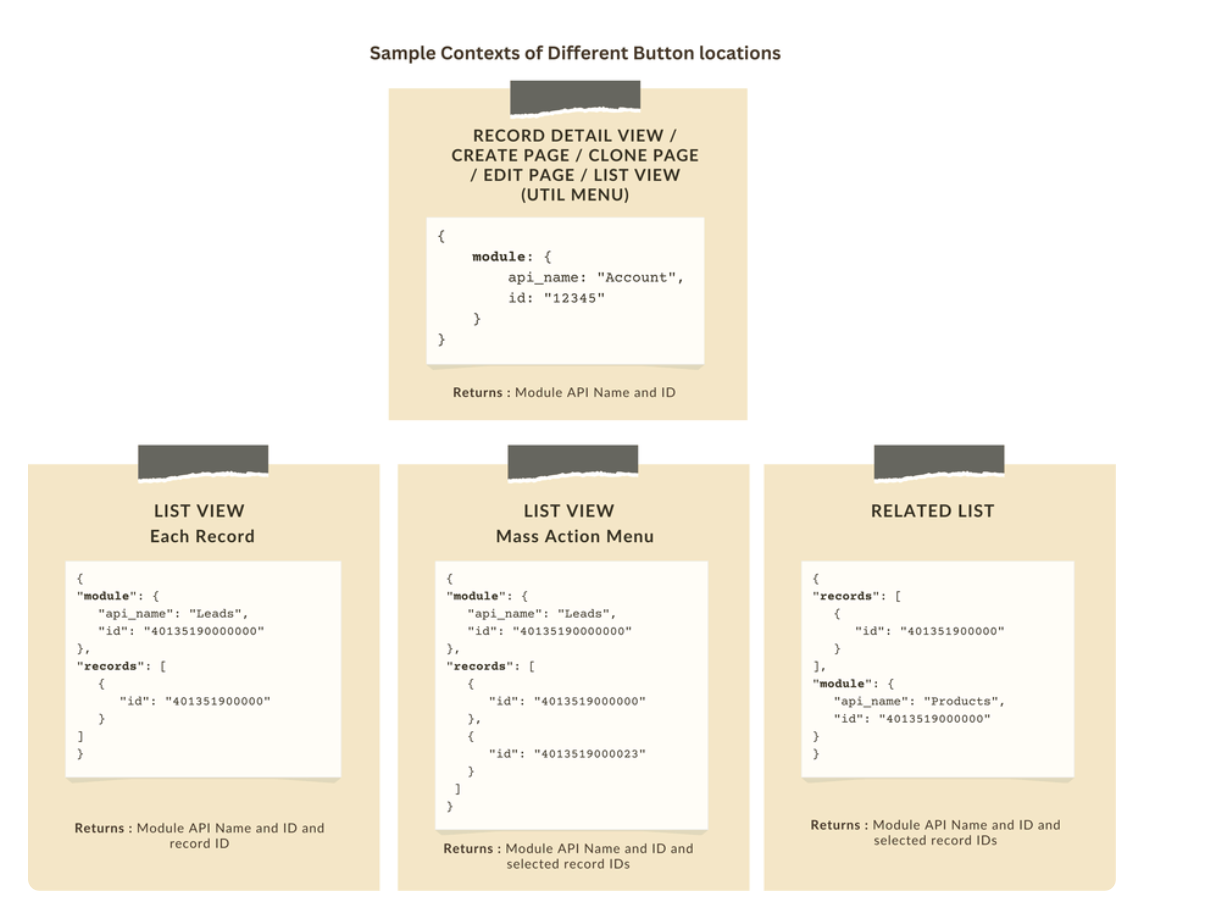


Let's explore how to implement this through the following use cases.

Use case 1: Add Notes instantly from List View or Bulk push notes to multiple records with a click!

Zylker’s sales team often needs to add notes while reviewing or after campaigns. Currently, they must open each record individually, making the process slow and inefficient. To streamline this, the admin wants to:

a. Include an "Add Notes" option directly from the List View for individual records, allowing sales reps to add notes without opening each record.

b. Add a "Add Bulk Notes" option, allowing users to select multiple records and add a common note to all selected records at once.

a) Here is the implementation of "Add Notes" in the List Page.


b) Here is the implementation of "Add Bulk Notes" in the List view page.


Use case 2 : Import product details effortlessly from Zoho Sheet and populate the Subform with a single click!

Zylker manufactures medical instruments, and its sales representatives manage bulk orders from distributors and hospitals. Product details are typically provided in a sheet, which the sales reps must manually enter into the subform on the Order Creation Page(Create Page). To streamline this time-consuming process, the admin wants to add a custom button named "Import Products" to the Order Creation Page. When clicked, it should
  • Prompt for the Sheet ID.
  • Fetch order details (product names, quantities, and prices) from the specified Zoho Sheet.
  • Populate the Product list Subform in Zoho CRM.


    Code Sample link
Use case 3 - Send bulk emails to selected students directly from the Course Module's Related List with ease!

Zylker’s managers often need to reach out to multiple students enrolled in a course - whether to share updates, newsletters, or important announcements. Currently, they have to open each student record individually to send an email, which is time-consuming.
To simplify this process, the admin wants to provide a "Send bulk mail" option in the Student Related List under the Course record, allowing managers to select multiple students and send a personalized email to all selected students in one go.


Note

  • Client Script can be configured only from the Buttons page. The setup page displays existing scripts. Once a script is created, it can be edited and updated from the Client Script setup page.

  • Mobile support will be available in Q3, 2025.

This support will be rolled out soon. We hope you find this incredibly beneficial!


Happy Client Scripting! 


      • Sticky Posts

      • Kaizen #222 - Client Script Support for Notes Related List

        Hello everyone! Welcome to another week of Kaizen. The final Kaizen post of the year 2025 is here! With the new Client Script support for the Notes Related List, you can validate, enrich, and manage notes across modules. In this post, we’ll explore how
      • Kaizen #217 - Actions APIs : Tasks

        Welcome to another week of Kaizen! In last week's post we discussed Email Notifications APIs which act as the link between your Workflow automations and you. We have discussed how Zylker Cloud Services uses Email Notifications API in their custom dashboard.
      • Kaizen #216 - Actions APIs : Email Notifications

        Welcome to another week of Kaizen! For the last three weeks, we have been discussing Zylker's workflows. We successfully updated a dormant workflow, built a new one from the ground up and more. But our work is not finished—these automated processes are
      • Kaizen #152 - Client Script Support for the new Canvas Record Forms

        Hello everyone! Have you ever wanted to trigger actions on click of a canvas button, icon, or text mandatory forms in Create/Edit and Clone Pages? Have you ever wanted to control how elements behave on the new Canvas Record Forms? This can be achieved
      • Kaizen #142: How to Navigate to Another Page in Zoho CRM using Client Script

        Hello everyone! Welcome back to another exciting Kaizen post. In this post, let us see how you can you navigate to different Pages using Client Script. In this Kaizen post, Need to Navigate to different Pages Client Script ZDKs related to navigation A.

        • Recent Topics

        • Cannot add my name to my domain name

          I want to have My name@mydomain.com and it says my name is linked to another account already. Please fix it since I do not have another account.
        • Invoice status on write-off is "Paid" - how do I change this to "Written off"

          HI guys, I want to write off a couple of outstanding invoices, but when I do this, the status of the invoices shows as "Paid". Clearly this is not the case and I need to be able to see that they are written off in the customer's history. Is there a way
        • Establishing new Zoho email account on laptop

          Good Morning: I am very long time Outlook business user and decided to try your email service last night and had established an account. I am trying to verify my account; how do I establish my Zoho email account on my laptop? I opened the account with
        • unable to send message reason 550 5.4.6 unusual sending activity

          My email account can't send message. It shows unable to send message reason 550 5.4.6 unusual sending activity detected
        • how to add email to existing organization i w

          I am already registered my organization and i have an email id. I need one more email id but i can't find anywhere .i want the cheapest email id . how to add ?
        • e-mail bloqueado

          Estou com meu e-mail lucas@peplus.me bloqueado, preciso desbloquear para retorno de usos em minhas atividades.
        • zoho labels api not working

          We're using n8n to automte email reply using zoho api. I'm facing issue with label api. I added the required scopes but its not working. i followed zoho api documentation but didn't work. also, where do i find/how do i create zoho oauth token mentioneeed
        • Desk DMARC forwarding failure for some senders

          I am not receiving important emails into Desk, because of DMARC errors. Here's what's happening: 1. email is sent from customer e.g. john@doe.com, to my email address, e.g info@acme.com 2. email is delivered successfully to info@acme.com (a shared inbox
        • Streams/Shared email doesn't show up in windows trident app. It works fine on MAC. Is there any difference between 2 install ?

          I can see streams/share email boxs on my MAC version of trident app but i can't see them in windows version of trident app. Is there any difference between 2 install? I try to find setting but not able to see any setting to add stream/share email boxes.
        • add zoho account

          How to add a zoho mail to previous zoho account? I have two
        • Zoho Desk Mobile App Year-End Roundup - 2025

          Dear Zoho Desk users, Greetings! As you gear up for the festive season, we are excited to share a quick journey into all that is released in 2025! Zia's generative AI capabilities Zia insights can be highly beneficial in helping agents manage daily support
        • Narrative 17: The role of Zia AI in customer support

          Behind the scenes of a successful ticketing system: BTS Series Narrative 17: The role of Zia AI in customer support Overview Zia in Zoho Desk is a layered AI assistant that combines generative AI, prediction, and automation to support agents, automate
        • Domain Transaction

          I have purchased a domain name called trainedworkforce.co.in I made the payment got the receipt but the domain is still not purchased after successful transaction .
        • Ability to Set a Unified Tab Order/View for All Users in Zoho Projects

          Hello Zoho Projects Team, We hope you are doing well. We would like to submit a feature request regarding tab/menu organization in Zoho Projects. Current Behavior: The tab (module) order in Zoho Projects is user-specific. Each user (internal or external)
        • Zohomail - The "All Messages" vs "In Box"

          Why do some new email message appear under the all messages view but not in my inbox? That's really annoying but to be fair I've experienced the same with gmail.
        • error while listing mails

          I can't access email in any of my folders: Oops, an error occurred - retry produces the second error response: error while listing mails (cannot parse null string). I've signed in and out of Zoho, restarted my iMac.
        • Zoho CRM for Gmail Extension Not Working in Brave Browser?

          Is anyone able to get the Zoho CRM Chrome Extension working in the Brave browser? They're both built on the Chromium platform and every other Chrome Extension works with the exception of Zoho CRM for Gmail so any ideas here?
        • Introducing the Zoho Projects Learning Space

          Every product has its learning curve, and sometimes having a guided path makes the learning experience smoother. With that goal, we introduce a dedicated learning space for Zoho Projects, a platform where you can explore lessons, learn at your own pace,
        • Where to show Customization Field ?

          Dear Sir, I have made some New Field in Item Field Customisation. Now I don't require that field in Estimate, Sales Orders etc. I just wants that field in Sales Invoice to Show/Hide... Is that possible ?
        • Zoho Desk 2025 round-up: Key highlights on feature releases

          Hello everyone, As we gear up for 2026, here is a detailed round-up of all feature releases in Zoho Desk web throughout the year. For consolidated information on releases check out the What’s New page You can also watch these webinars. Zia in web Zia
        • Print Sales Orders, Purchase Orders or Invoices from API

          Hello, Is it possible to use the print option that is available in Sales Orders Purchase Orders and Invoices with the API?. I don't see any information in the docs about this. Thanks
        • New in Smart Prompt: Record Assistant for contextual assistance, and support for new AI models

          Smart Prompt helps teams stay informed and move faster by providing relevant suggestions where work happens in CRM. With this update, Smart Prompt becomes more adaptable to your organization’s AI preferences. You can now choose which Large Language Model
        • Zoho Books - How to Invoke a Custom Function in Schedulers

          We have multiple schedulers that send emails to customers in batches. Currently, we are maintaining the same code across several schedulers. Is it possible to use a custom function inside a scheduler script? If yes, how can we invoke the custom function
        • How to show a hided report??

          in CRM Report , I clicked Hide incidently , how to show the floder again? Nowhere I can find the hided report floder...
        • To print Multiple delivery notes in batches

          In Zoho Books, we can print a Delivery Note from an Invoice using the Print Delivery Note option, but it is non-editable and always prints all line items from the invoice. Our requirement is to deliver invoiced items in batches and print delivery notes
        • Converting Customer Invoice to Purchase Bill

          Hi, In my service-based business, I sometimes create the customer invoice first, and later I receive the purchase bill from the vendor for the same job. Is there any option in Zoho Books to: Convert a customer invoice into a purchase bill, or Link/associate
        • Email tracking inquiry

          I am trying to track when my emails are opened and clicked like I previously did in HubSpot. HubSpot pretty much did the entire process automatically. After digging through, I finally found in settings --> emails --> BCC Dropbox there is an email I can
        • Mass Update of Lookup Fields not possible

          Hello List I've created a custom field for Leads and Contacts 'Current Campaign'. This is very Handy as I can filter leads and then related them to a campaign. Everything ready, but then I realized that mass update doesn't work for lookup fields... a
        • How to apply customized Zoho Crm Home Page to all users?

          I have tried to study manuals and play with Zoho CRM but haven't found a way how to apply customized Zoho CRM Home Page as a (default) home page for other CRM users.. How that can be done, if possible? - kipi Moderation Update: Currently, each user has
        • Blueprint transitions on locked records

          We use the ability to automatically lock records (quotes, sales orders, etc.) based on criteria, such as stage. For instance, if a quote has been sent to a client, the quote is then locked for further edits. Our ideal quote stage process is: Draft>Sent>Won.
        • Collapsible Sections & Section Navigation Needed

          The flexibility of Zoho CRM has expanded greatly in the last few years, to the point that a leads module is now permissible to contain up to 350 fields. We don't use that many, but we are using 168 fields which are broken apart into 18 different sections.
        • Quick Create needs Client Script support

          As per the title. We need client scripts to apply at a Quick Create level. We enforce logic on the form to ensure data quality, automate field values, etc. However, all this is lost when a user attempts a "Quick Create". It is disappointing because, from
        • Ticket layout based on field or contact

          Hi! I want to support the following use-case: we are delivering custom IT solutions to different accounts we have, thus our ticket layouts, fields and languages (priority, status field values should be Hungarian) will be different. How should I setup
        • No funcionan correctamente el calculo de las horas laborales para informe de tickets

          Hola, estoy intentando sacar estadísticas de tiempo de primera respuesta y resolución en horario laboral de mis tickets, pero el calculo de horas en horario laboral no funciona correctamente cree los horarios con los feriados : Ajusté los acuerdos de
        • Zoho Mail Android app update: Set out of office response exclusively for organization members and external users, response interval

          Hello everyone! We have now introduced an option to configure out of office messages exclusively for organization members and external users within the Zoho Mail app. Additionally, now you can also customize response intervals for the Out of office messages.
        • Feature Request: Detailed View - Related Block Links!

          Desperately need a view record link option on records displaying in the related blocks on a Detail View. For the love of god, please add this feature. Thank you!
        • Sub-Form Padding in CSV Export

          Hi, When you use the Sub-Form, and for example you have a Date Field on the Main Page, then Option 1 and Option 2 fields on the Subform, when you export this to CSV the Date column will only have the Date in 1 row, the first row, it would be nice to pad
        • Dependent / Dynamic DropDown in ZohoSheets

          Has anyone figured out a way to create a Dropdown, the values of which is dependent on Values entered in the other cell ?
        • How do I change the order of fields in the new Task screen?

          I have gone into the Task module layout, and moving the fields around does not seem to move them in the Create Task screen. Screenshot below. I have a field (Description) that we want to use frequently, but it is inconveniently placed within the More
        • Zoho → ShipStation Integration – Sales Order–Driven Fulfilment Workflow

          Hello All, I’m reaching out to explore the best way to integrate a shipping tool into our inventory which will speed our process up. We are looking to integrate ShipStation into our existing order-to-fulfilment workflow, as we’re keen to standardise on
        • Next Page