Commandes client
La commande client est un document commercial qui précise la vente de biens ou de services et détaille les spécificités de la vente, notamment le prix, la qualité des biens ou des services fournis ainsi que l'adresse, la date de livraison prévue, les conditions de paiement, de vente et de livraison. Elle vous permet de savoir si vos produits sont en stock ou en rupture , afin d'aider votre service achats à faire des prévisions.
Voici quelques-unes des façons dont votre entreprise peut bénéficier de l'optimisation du processus de commande client:
- Réduire le risque d'erreur humaine
- Gardez vos commandes en ordre
- Améliorer le suivi des stocks
Gestion de commandes client dans Zoho Inventory
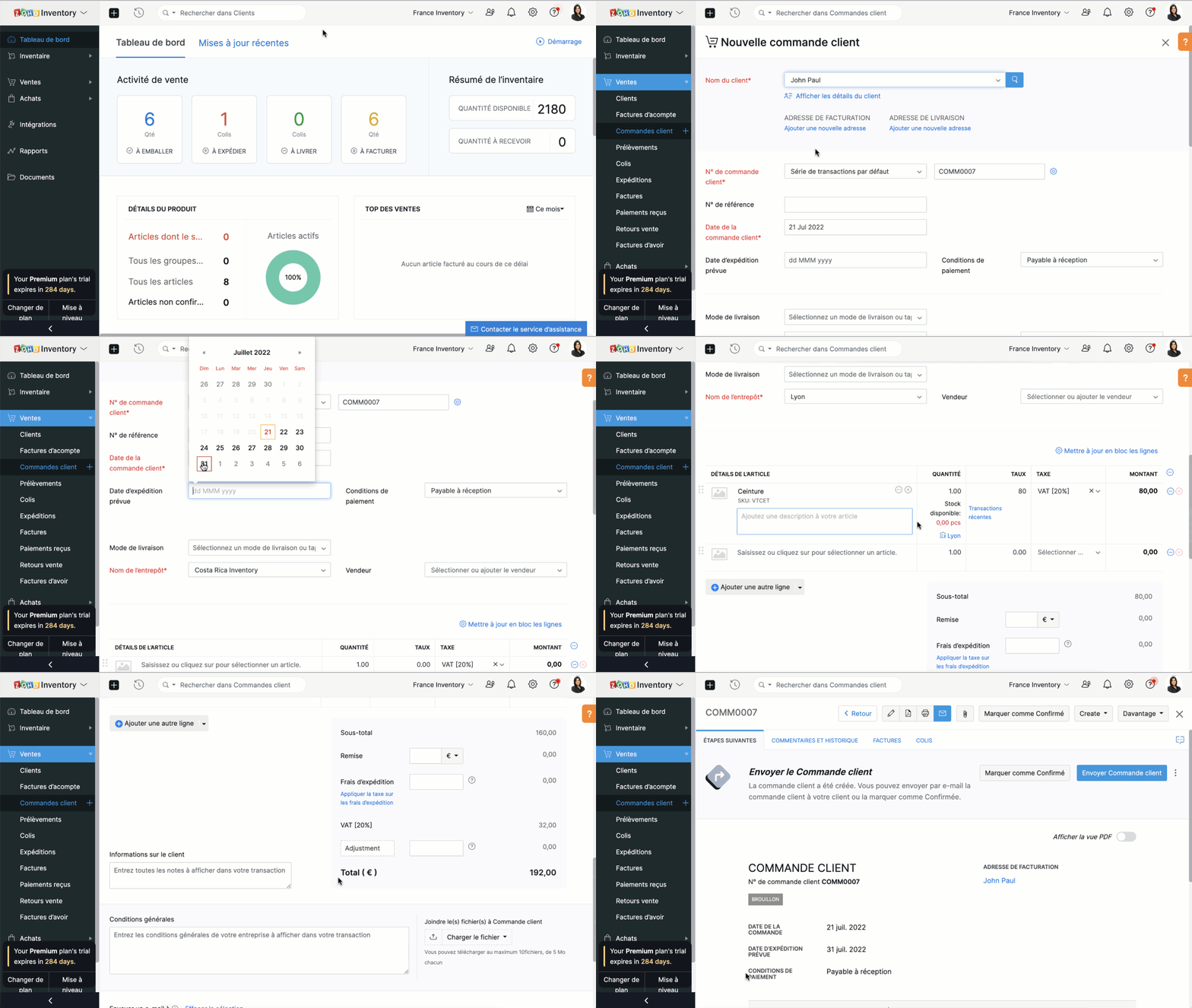
Créer une commande client
- Sélectionnez l'onglet "Commandes client" sous "ventes"
- Cliquez sur "+nouveau" et saisissez les détails du client. Dans le champs "Nom du client", vous pouvez soit sélectionner un client dans la liste déroulante, soit ajouter un nouveau client.
- Le N° de commande est généré par défaut. Si vous souhaitez le saisir manuellement , cliquez sur l'icône "Paramètres" à côté de l'onglet et une fenêtre s'affichera pour vous permettre de choisir entre la génération automatique et la saisie manuelle.
- Saisissez les autres informations comme la date d'expédition, le mode de livraison, les conditions de paiement, le nom de l’entrepôt. Ajoutez un produit ou un service à partir de votre inventaire. Vous pouvez également cliquer sur l'option "Ajouter des articles en vrac" pour ajouter plusieurs articles à la fois à votre commande client.
- Saisissez la quantité, le taux et la taxe applicable à partir de la liste déroulante. La liste déroulante des taxes affiche uniquement celles que vous avez créées dans l'onglet "Paramètres", sous la section "Taxes".
- Saisissez le taux de remise, les frais d'expédition et les modifications, si applicable.
- Vous pouvez ensuite choisir d' sur "Enregistrer comme brouillon" ou "Enregistrer et envoyer"
Créer une commande à partir du module "Clients"
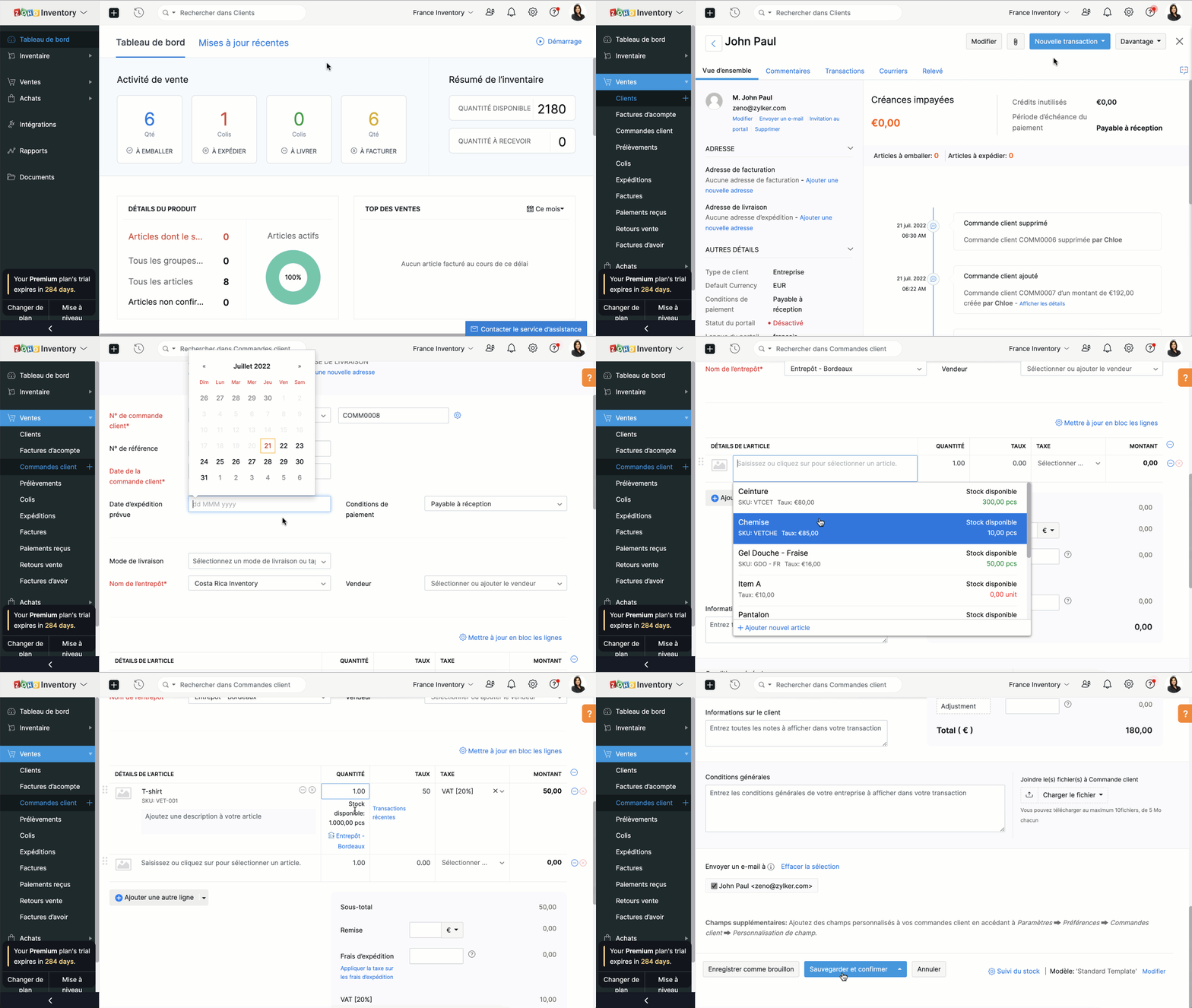
- Passez à l'onglet "Clients" et sélectionnez un client pour lequel vous souhaitez créer une commande.
- Cliquez sur le bouton "Nouvelle transaction" et sélectionnez "Commande client", une nouvelle fenêtre apparaît pour créer une nouvelle commande client.
- Vous pouvez maintenant suivre le parcours ci-dessus.
Fermer une commande client
En fonction de vos préférences, vous pouvez choisir que le statut de votre commande client soit automatiquement défini comme clôturé. Les critères sont les suivants:
- Lorsqu'une facture est créée
- Lorsqu’une expédition est effectuée
- Lorsque l’expédition est traitée et que la facture est créée
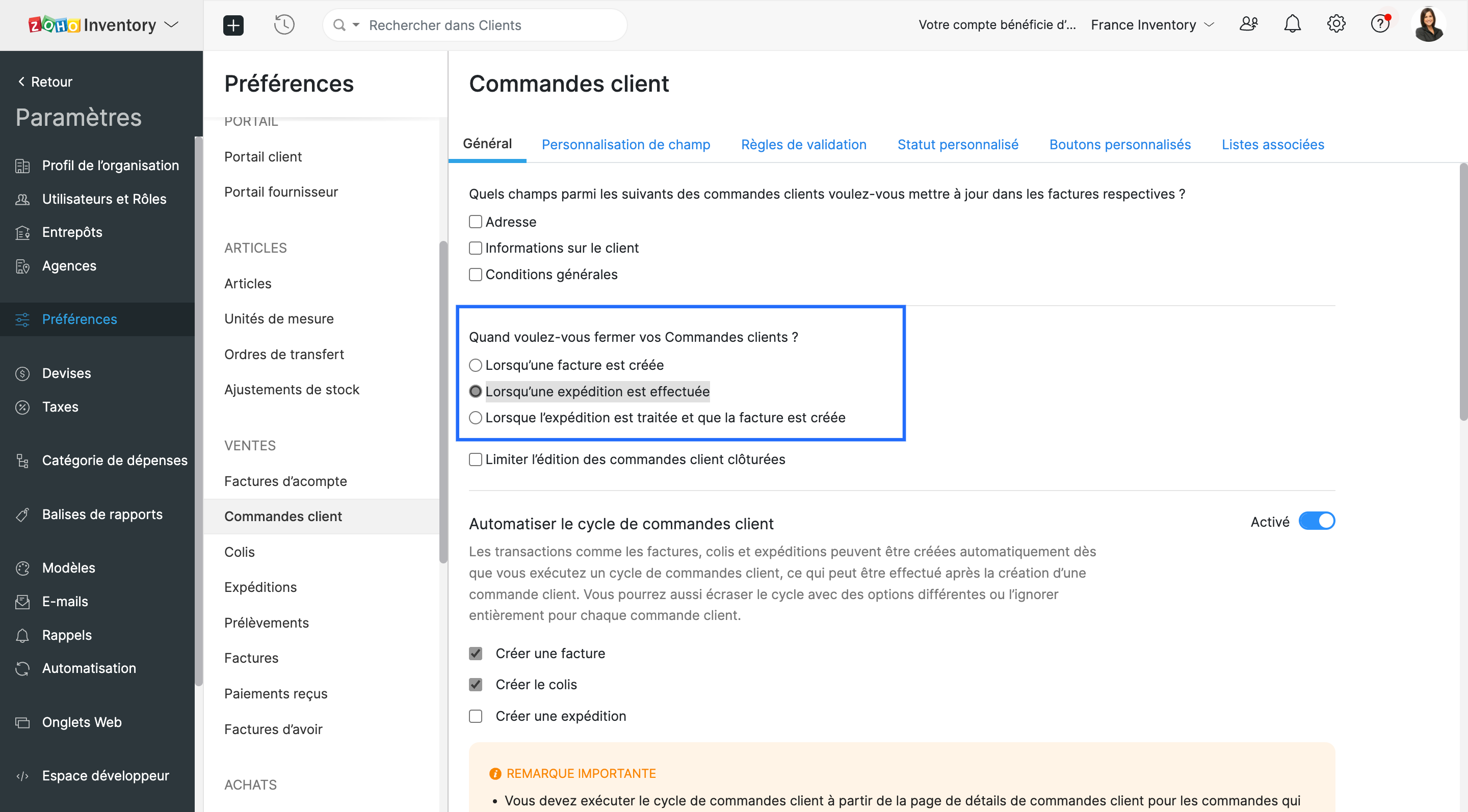
- Vous pouvez choisir l'un ou l'autre. Lorsque les critères sont satisfaits, le statut de la commande client est défini comme fermé.
Envoyer une commande à votre client
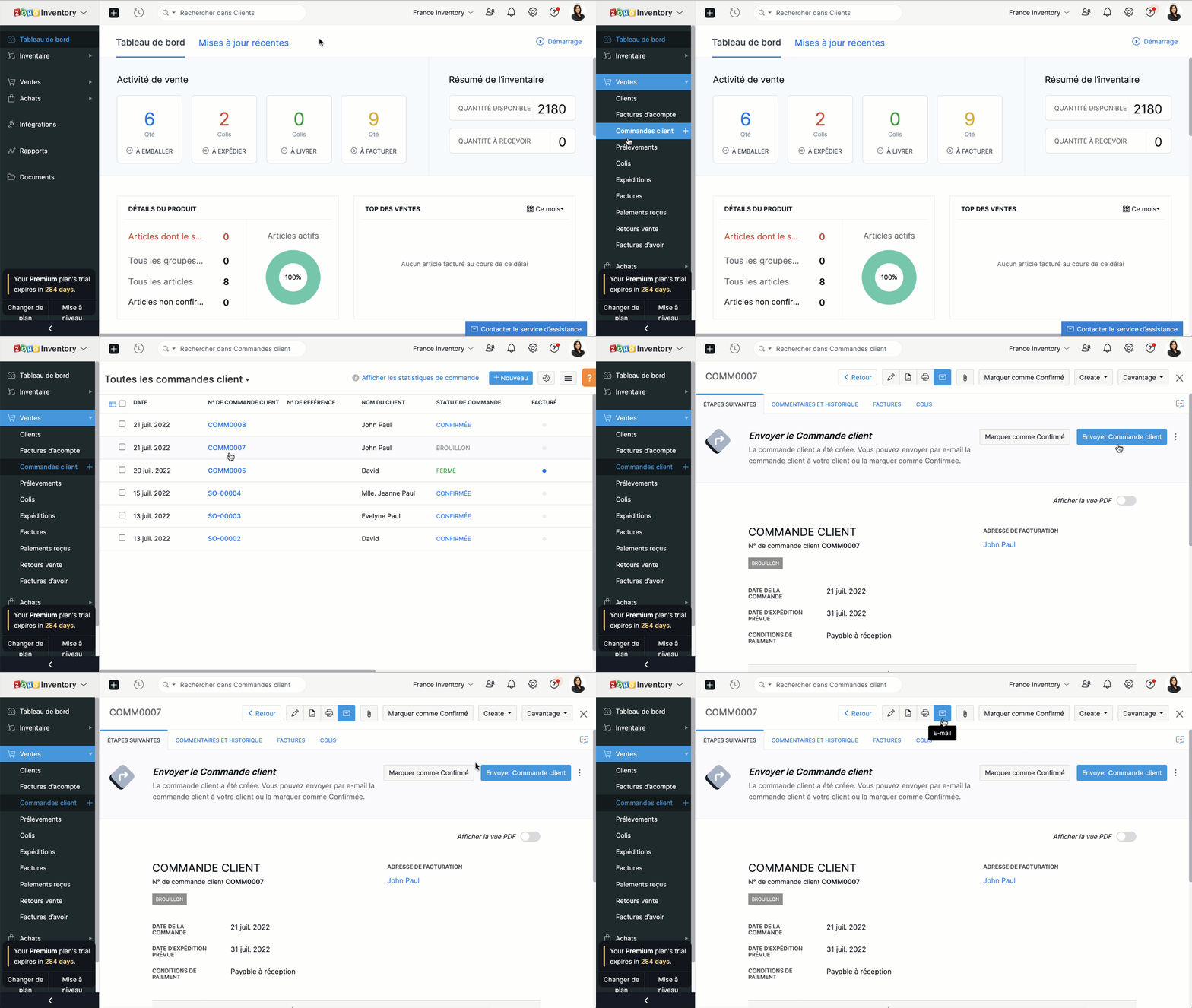
Vous pouvez soit envoyer la commande client au moment où vous la créez en cliquant sur "Enregistrer et envoyer", soit l'envoyer plus tard depuis le bouton "E-mail" situé en haut de la fenêtre.
Fusionner les commandes client.
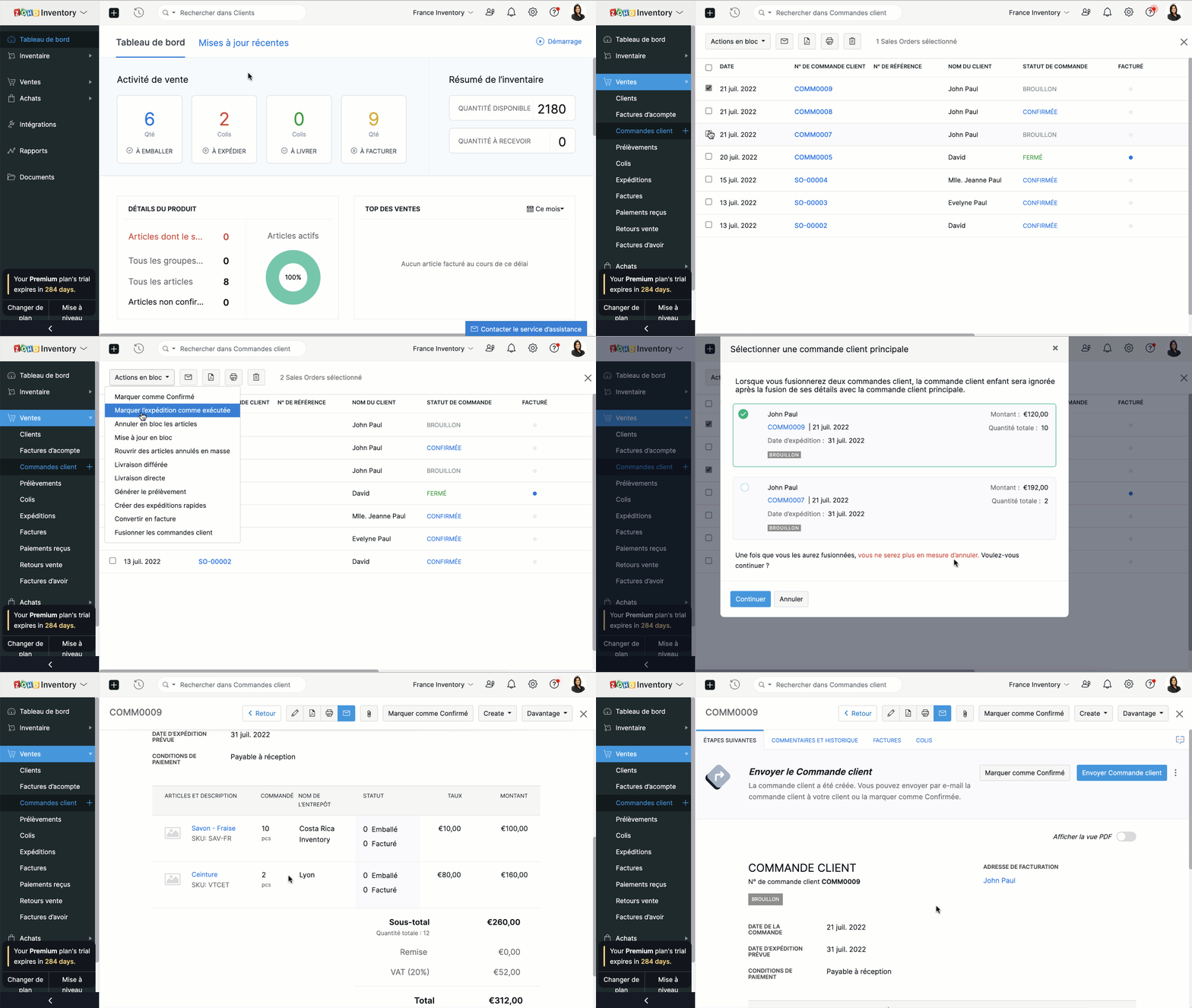
Si vous recevez deux commandes d'un même client, vous pouvez en regrouper les détails dans un seul document. Ainsi, vous pourrez préparer, expédier et facturer une seule commande au lieu de deux.
- Accédez au module "Commandes clients" depuis le panneau à gauche.
- Sélectionnez deux commandes clients à fusionner.
- Cliquez sur "Actions en bloc" et sélectionnez "Fusionner les commandes client".
Conditions préalables :
- Vous ne pouvez fusionner que deux commandes clients à la fois.
- Les deux commandes clients doivent être adressées au même client avec la même adresse de facturation et de livraison.
- Les deux commandes clients doivent avoir le même statut (statut Brouillon ou Confirmé uniquement) sans forfaits ou factures associés.
- Vous ne pouvez pas fusionner de commandes client de marketplace.
Créer des factures à partir de commandes clients
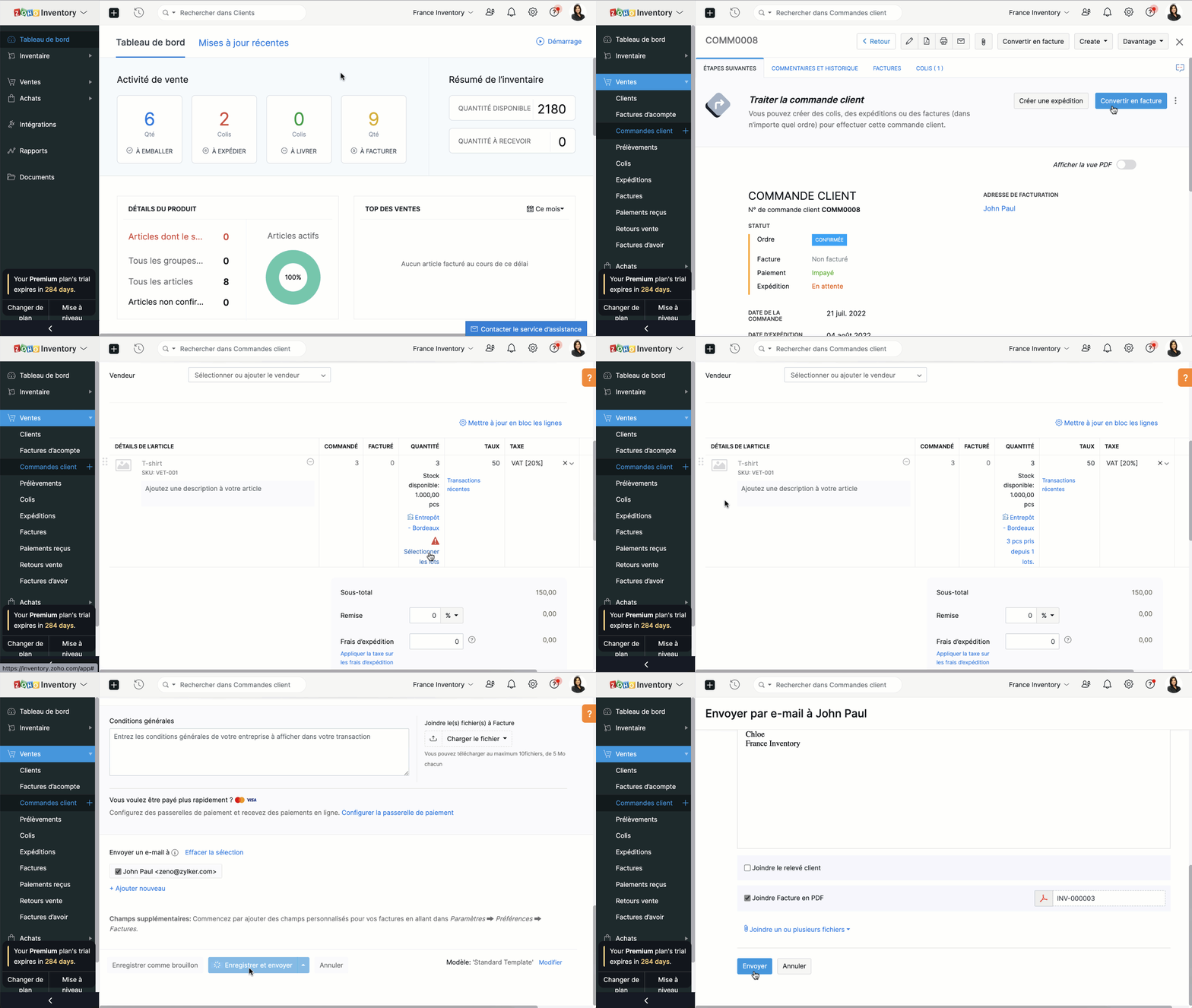
- Depuis le panneau à gauche, sélectionnez une commande client que vous voulez convertir en facture.
- Vous pouvez directement convertir en facture depuis l'onglet "Convertir en facture" soit depuis l'onglet "Facture".
- Vous serez dirigé vers la page de création de la facture. Par défaut, tous les détails fournis dans la commande client seront remplis automatiquement.
- En fonction des besoins, vous pouvez soit choisir de facturer partiellement la commande client et cliquer sur "Enregistrer", soit envoyer la facture immédiatement à vos clients en cliquant sur "Enregistrer et envoyer".
Merci
L'équipe Zoho France
Topic Participants
Kinjal Lodaya
renaud.laurent
Sticky Posts
Collaboration sans faille avec Zoho One
Bonjour à tous, Dans cet article nous allons voir comment Zoho One permet une collaboration à différents niveaux . La façon dont nous travaillons évolue. À mesure que les entreprises se mondialisent, la plupart des activités sont menées en équipe.
Recent Topics
Zoho Projects - Visual improvement to parent and sub-task relationship
Hi Projects Team, My feature request is to improve sub-task visibility. Please see screenshot below. I really think parent child relationships could be visually improved. Even if the first letter of the parent task was inline with other same level tasksAPI method to get activity feed in Recruit
Hi community, I'm trying to figure out - is there any API method tto get information about datetime when Recruit/Candidates record tag where added?Printing Mailing labels
Is there any way to adjust the size of the printing labels? or product would I use to print labels from Zoho? Thanks, Josef Krieger Moderation Update (14th April 2025): We have another post discussing the same topic with votes and feedback from users.Default to Current Date
I'm importing data from a excel spread sheet that does not have date column and I'd like the date column in the Zoho Database to default to the current date. Any way I can do this?Different Company Name for billing & shipping address
We are using Zoho Books & Inventory for our Logistics and started to realize soon, that Zoho is not offering a dedicated field for a shipping address company name .. when we are creating carrier shipping labels, the Billing Address company name gets alwaysMake Packages from multiple sales order of a single customer
Our customers sends orders to us very frequently, some times what customer wants is to ship items from 5 to 6 sales orders in a single shipment. it will be very nice if, zoho can implement this function, in which we can select items from other sales orders of the customer.Show Custom Button in Portal Listview Canvas
I have created a custom button that shows in a list view of deals (internally I can see it). I have permissions to allow this button on the portal. But it is not displaying in the canvas list? Before I do too much leg work, is this function allowed?Zoho Sites "pages" management page
I have 80 plus pages on zoho sites. When I go to the "pages" link to view and edit pages, They are not in any kind of order, so I spend lots of time searching for pages when I need to edit or create new. How can I change the view order of all my pagesAI feature in Zoho Desk suggesting answers based on past ticket threads
Hi I would like to suggest something that would be very useful : instead of suggesting answers based on the Knowledge Base, I think it would be great if Zia could analyze the history of all customer and agents threads, to suggest answers in new tickets.Advanced Customization of the Help Center using JavaScript
Hello everyone, The Help Center in Zoho Desk can be customized by using HTML and CSS to provide structure and enhance the page's appearance—but what if you want to add interactive and dynamic elements? You can add these effects with JavaScript, a programmingIntroducing Zoho POS for the Kingdom of Saudi Arabia
Hey everyone, We are excited to kick-start December with a completely personalized edition of POS for retail businesses in Saudi Arabia to help run your operations with ease. It offers four different subscription plans—Free, Standard, Professional, andUnveiling Zoho Sites 2.0 - A new dimension in website building
Dear Zoho Sites Users, We are thrilled to announce the launch of Zoho Sites 2.0 today! This refresh represents a significant step forward in the capabilities of Zoho Sites and is crucial for creating a lasting and positive impact on our customers' businesses.Script Editor not an option
I am trying to apply a script to a sheet and Script Editor is not an option. I don't want to go outside Sheets to do this (like Creator) if it can be done inside Sheets.Not able to link email text.
Kindly check Zoho Sites. I am unable to turn a text into a email link. The save button does not work. Kindly try yourself to see it not responding to save.Migrate data from old to new account
Hy, Have one Old Zoho Notebook Account with Data , want to migrate that whole Data to New Zoho Notebook Account which is in Zoho One . Is that possible ? If Yes then how?Zoho Analytics Regex Support
When can we expect full regex support in Zoho Analytics SQL such as REGEXP_REPLACE? Sometimes I need to clean the data and using regex functions is the easiest way to achieve this.Add Custom Reports To Dashboard or Home Tab
Hi there, I think it would be great to be able to add our custom reports to the Home Tab or Dashboards. Thanks! Chadlanded cost-need help with different currency under the same bill
I’m having trouble recording landed costs in Zoho Inventory/Books. My purchase order is in CNY, but the landed cost (freight) I pay is in USD. Zoho forces everything under the same bill to use one currency, so I can’t enter the landed cost in its actualPricing Strategies: #1 Nuances in Pricing
When Clara first opened her digital printing shop, pricing was simple. She sold handmade greeting cards, planners, business cards, and other physical items at fixed label prices, individually and in bulk. One SKU, one price, one bill, and that's all it[Free Webinar] Learning Table Series – Education Management in Zoho Creator
Hello Everyone! We’re excited to invite you to another edition of Learning Table Series, where we showcase how Zoho Creator empowers industries with innovative and automated solutions. About the Learning Table Series The Learning Table Series is a free,Move attachments from one module to another with Deluge
I have created a button that works just like the convert button for my custom modules. I would like this custom function to move any attachments in this record to the new module. I can't seem to find any documentation on how this can be accomplished.Help in function code
Hi, could someone look at the code below and tell me what 's wrong with it? After a deal creation or edition the code should find the related Account, than all open Deals for that Account and copy the field Total_Open_Deals from the Account record toAutomation Series: Auto-update Phase Status
Hello Folks! You can auto-update your phase's status based on status of underlying tasks using custom functions. In this series, we will showcase how to create and run custom functions, using Deluge, with ease. Follow the steps below and automate yourhow to add subform over sigma in the CRM
my new module don't have any subform available any way to add this from sigma or from the crmZoho Projects - Project Details on the Project Menu
Hi Project's team, I've helped may businesses setup and use Zoho Project and one thing I see time and time again is confusion on where to find the Project Details information. I would be much more intuitive if Project Details was on the menu before Dashboard.Zoho Projects - Add Feed to Project Tabs
Hi Projects Team, I'm working on a lightweight communications requirement for one of my customers in relation to communicating with their client users via Zoho Projects. I noticed that the Feed is only available in the Collaboration section, but you canFlow - Fetch info from drop down in another module
I am running into a road block which I thought would be a simple task. My goal - The account is assigned to a "route" which can be selected from a drop down menu and adds a tag to the account accordingly (easy enough). Now when I create a task for thisShow unsubscribed contacts ?
Hello, I would like to display the unsubscribed contacts. Unfortunately, I do not have this subscription type as described in the documentation (https://help.zoho.com/portal/en/kb/marketing-automation-2-0/user-guide/contacts/contact-management/articles/subscription-type-24-1-2024#Subscription_Type_field.)Zoho Developer Community Hackathon 2025 is LIVE!
Hey developers! It’s that time of the year again — the Zoho Developer Community Hackathon 2025 is officially open for registrations! If you’ve been waiting for a chance to stretch your skills, try something new, or finally bring that idea to life, thisConverted Leads Not Showing in Lead Reports
Converted leads are not showing in the Lead reports. How can I make converted leads visible in the report,Text widgets in dashboards
Having a text widget in a dashboard would help immensely. It would allow adding links to related documents, relevant CRM views, etc. It would allow adding explanations of the data displayed in the other widgets, about how to interpret them or about filtering.[Webinar] Zoho Writer for content creators and publishing houses
Managing multiple drafts, edits, and client reviews doesn't have to slow you down. Join our upcoming webinar to see how Zoho Writer helps content creators and publishing houses create, edit, and publish seamlessly—all in one place. You'll learn how to:Adding Reports to Portals
Is there a way to add Reports to portals so only the user can see report templates relevant to them?How to assign one Manual to multiple Spaces?
Hello, I have two spaces, one called tech knowledge and the other one called HR knowledge. I have a manual that is called HR tech. I want to assign this manual to HR knowledge and tech knowledge. How should I do that?Introducing VeriFactu Support in Zoho Books
Hello users, Spain has introduced the VeriFactu system under Real Decreto 1007/2023 to ensure integrity, traceability, and anti-fraud compliance in e-invoicing. Starting January 1, 2026, all B2B invoices must be reported to Agencia Estatal de AdministraciónHow can I assign courses to Spaces?
How can I make courses show up here in this space?:When will Zoho Learn be able to support SCORM files on the mobile app?
When I click the SCORM content, I just get a message saying it's not possible yet. Yet implies that it will be coming soon. All I'm asking for is a realistic timeline so I know whether or not to invest my time in using it. If it will be soon, then I willAnnouncing new features in Trident for Windows (v.1.35.6.0)
Hello Community! Trident for Windows just got better with an update that makes working with your emails even more efficient. Let’s dive into what’s new! Work with PST files more efficiently. You can now do more than just view mounted PST files. You canMarketing Tip #9: Track your traffic sources
Not all marketing channels work equally well. Knowing whether your visitors come from Google, Instagram, or email helps you focus on what actually drives sales. Try this today: Check your Zoho Commerce reports or connect Zoho PageSense to see your topGoogle Analytics import data inaccurate (as of October 11, 2025)
We have Zoho Analytics connected to GA4 to import daily event data. This has been running without issue for a couple of years. However, a month ago we started noticing discrepancies. All data until October 10 lines up perfectly - October 11 onward isNext Page