Enhancements to finance suite integrations

Update on the migration (October 28, 2025):
Starting this week (October 29 tentatively), we’ll begin migrating Zoho CRM users to Zoho Books as integration users. This means actions will now run under each user’s own Zoho Books access, instead of the admin’s.
As an admin, you can also choose to migrate users early from the Integration Settings page in Zoho CRM.

(Refer to the announcement for details).

Update:
Based on your feedback, we’ve updated the capabilities for integration users. In addition to the Estimates module, they can now create, view, and edit records in all the finance modules including Sales Order, Invoices, Purchase Order.
We're also running a migration and all existing users who have migrated already will receive an email once this change goes live.
Last modified on: May 15, 2025
Last modified on: May 15, 2025

Please note that Zoho Subscriptions is now Zoho Billing.
Hello everyone!
We're delighted to announce some enhancements we've recently made to the finance suite integration with Zoho CRM. These improvements focus primarily on two major integrations:
- Zoho Books
- Zoho Subscriptions
We've implemented these updates carefully based on the valuable feedback we've received to ensure that the user experience is smoother. So without further ado, let's dive into the details!
Enhancements to the Zoho Books integration
We've refined some of the integrated features between Zoho CRM and Zoho Books to address previous challenges and enhance user interactions.
What were the challenges?
- Users were unable to send emails using their email addresses.
- Zoho Books sometimes generated inaccurate reports during audits because records created from Zoho CRM weren't being updated with the correct user names in Zoho Books.
- User-level permissions, field-level permissions and processes such as the Approval process in Zoho Books weren't being properly handled in Zoho CRM.
- Users who did not have proper authorization to use Zoho Books were able to create transactions from CRM by using admin's permissions.
All of these challenges arose because the integration operated exclusively via the integration owner/admin's authentication (only the admin-level permissions in Zoho Books are handled, while other user-level permissions are not accounted for), which meant that any actions performed in CRM were recorded under the name of the admin in Books.
What have we enhanced?
1. Introducing Integration users
Sales personnel typically manage tasks up to the estimates stage in a sales process. Therefore, CRM users who have primarily worked on estimates modules and have not engaged in subsequent activities like invoices can now be added as Integration Users from CRM to Zoho Books without the need for new licenses in Books. In other words, integration users in Zoho CRM are standard CRM users whose admins can grant specific permissions to carry out certain tasks within the Estimates module, as required.
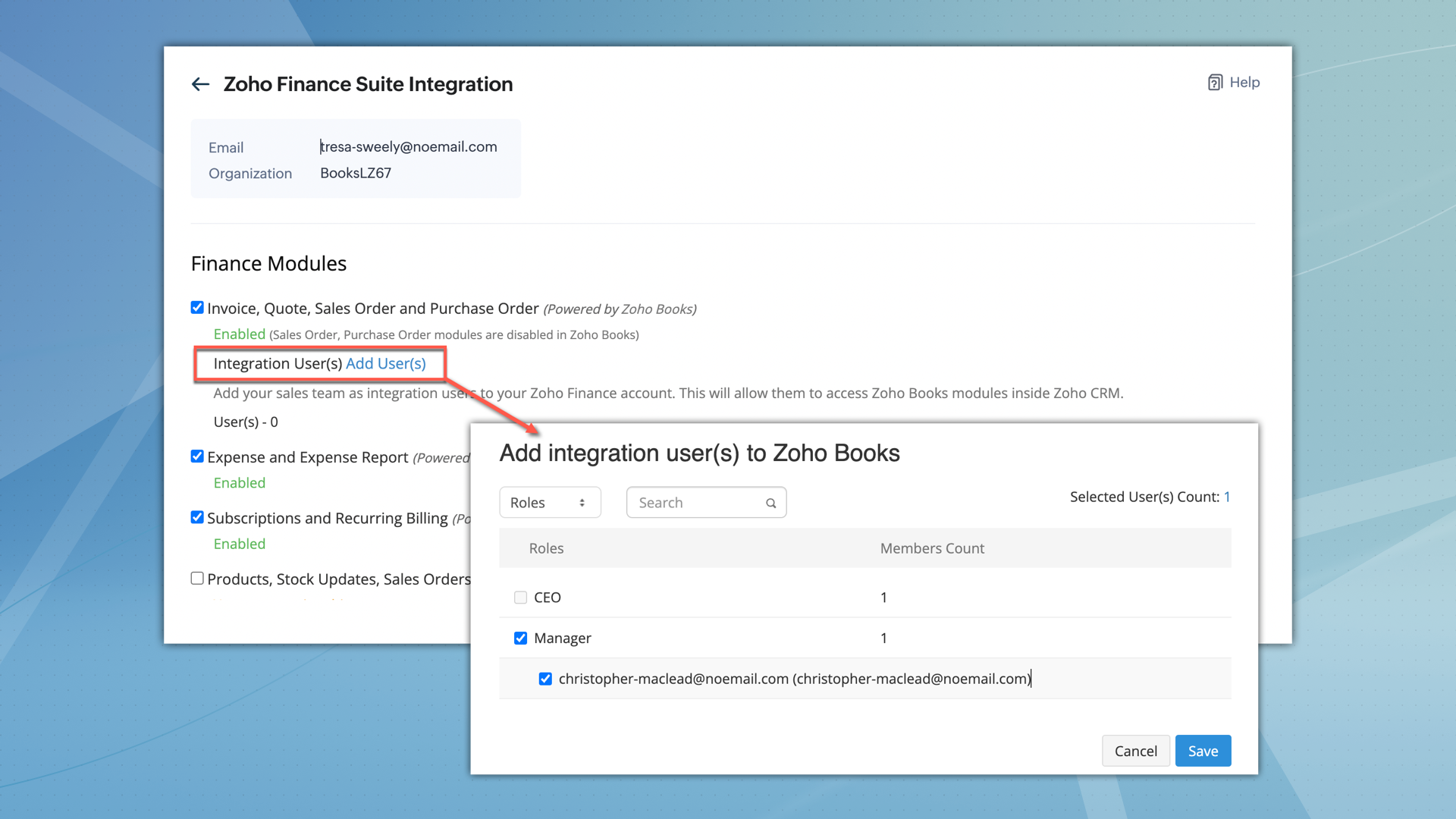

What permissions do integration users have?
- After being added, integration users can perform all operations, including creating, viewing, and editing records within the Estimates module.
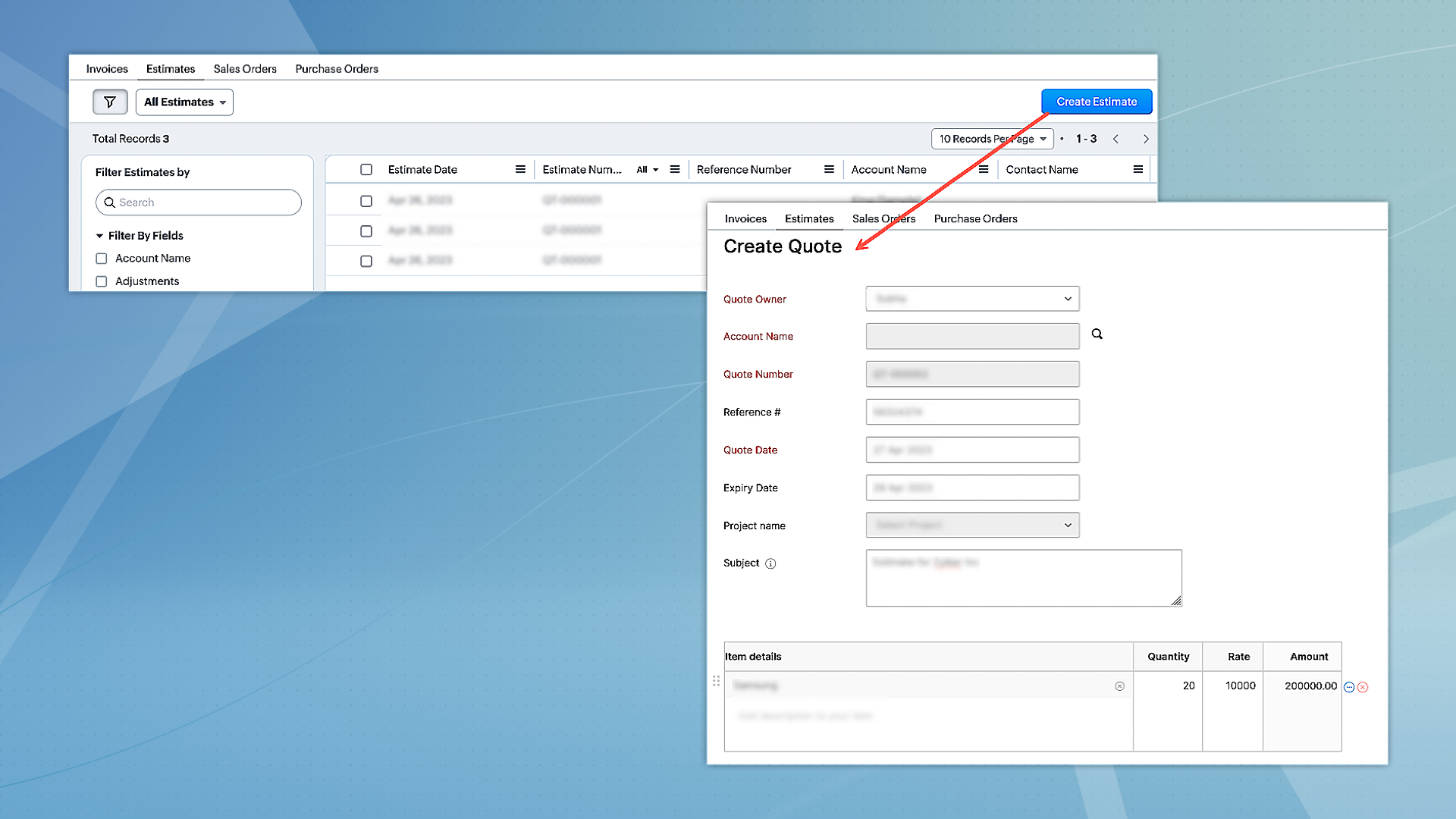
- However, they can only access other modules, such as Invoices, Sales Orders, and Purchase Orders in view mode.
- Integration users will not have direct access to Zoho Books.
- When integration users are part of multiple finance suite products, their permissions are collectively applied within CRM.
2. Unified permissions between Zoho CRM and Zoho Books
For users with access to both Zoho CRM and Books, the integration will now ensure proper management of permissions, covering all aspects. This means if a user is restricted from certain actions or features in Zoho Books, these restrictions will be consistently applied in CRM as well. Previously, users could access and interact with features in CRM that they were not authorized for in Zoho Books, leading to discrepancies. This enhancement will eliminate such inconsistencies, ensuring uniform permission management and preventing unauthorized access or actions across both platforms.
Migration for existing users
- For the integration between Zoho CRM and Zoho Books to function seamlessly, and to maintain uniform user permissions,existing users have the option to migrate immediately.
- Alternatively, they have a three-month window to complete the migration. After this period, users will be automatically added as 'Integration Users' based on their utilization of the finance module.
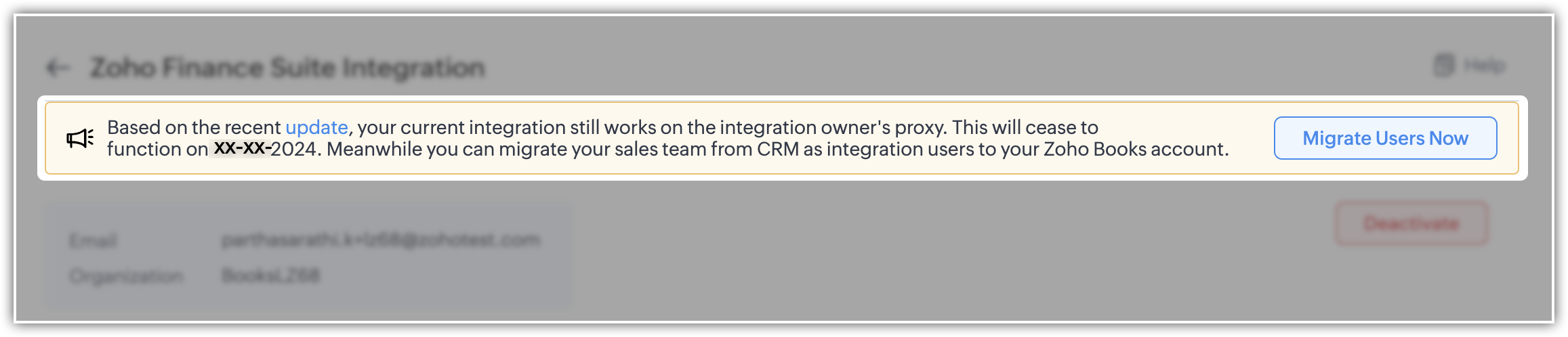
- To facilitate this, select the "Migrate Users" option to view and manage users common to both systems. Upon clicking "Save," the backend migration initiates. Following this, the integration adheres to each user's designated scope and permissions.
- Users can migrate up to 1,000 integration users initially. If they need to migrate more, they can contact the support team for additional help.
- Users who are already part of Zoho Books can't be added as integration users.
Please note that for new sign-ups, 'Integration users' will be available by default and they can set it up during the initial integration setup process.
Enhancement to the Zoho Subscription integration
Currently, when Zoho Subscription is integrated with CRM, it automatically adds Zoho Subscription as a related list in the Contacts and Accounts modules. You can view subscription details in a pop-up (iframe). Although users can create new subscriptions, there is a limitation on creating subscription-based reports and dashboards.
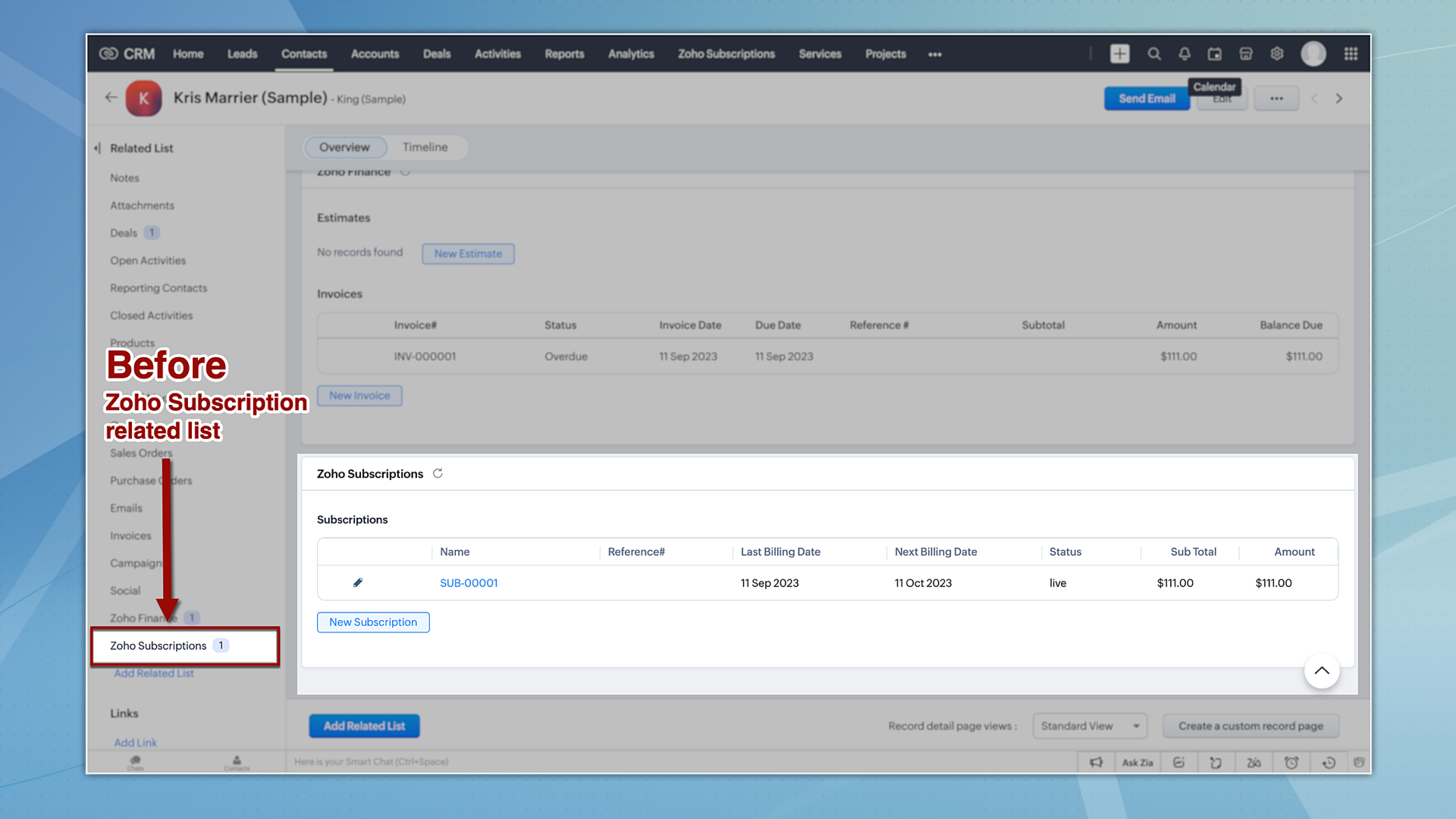
Now let's take a quick look at the enhancements made to the Zoho Subscription integration.
1. Introducing the Zoho Subscription Module
Zoho Subscriptions will now be available as a module in CRM, accessible to users with appropriate permissions. With this update, users now can generate reports based on Zoho Subscriptions data.
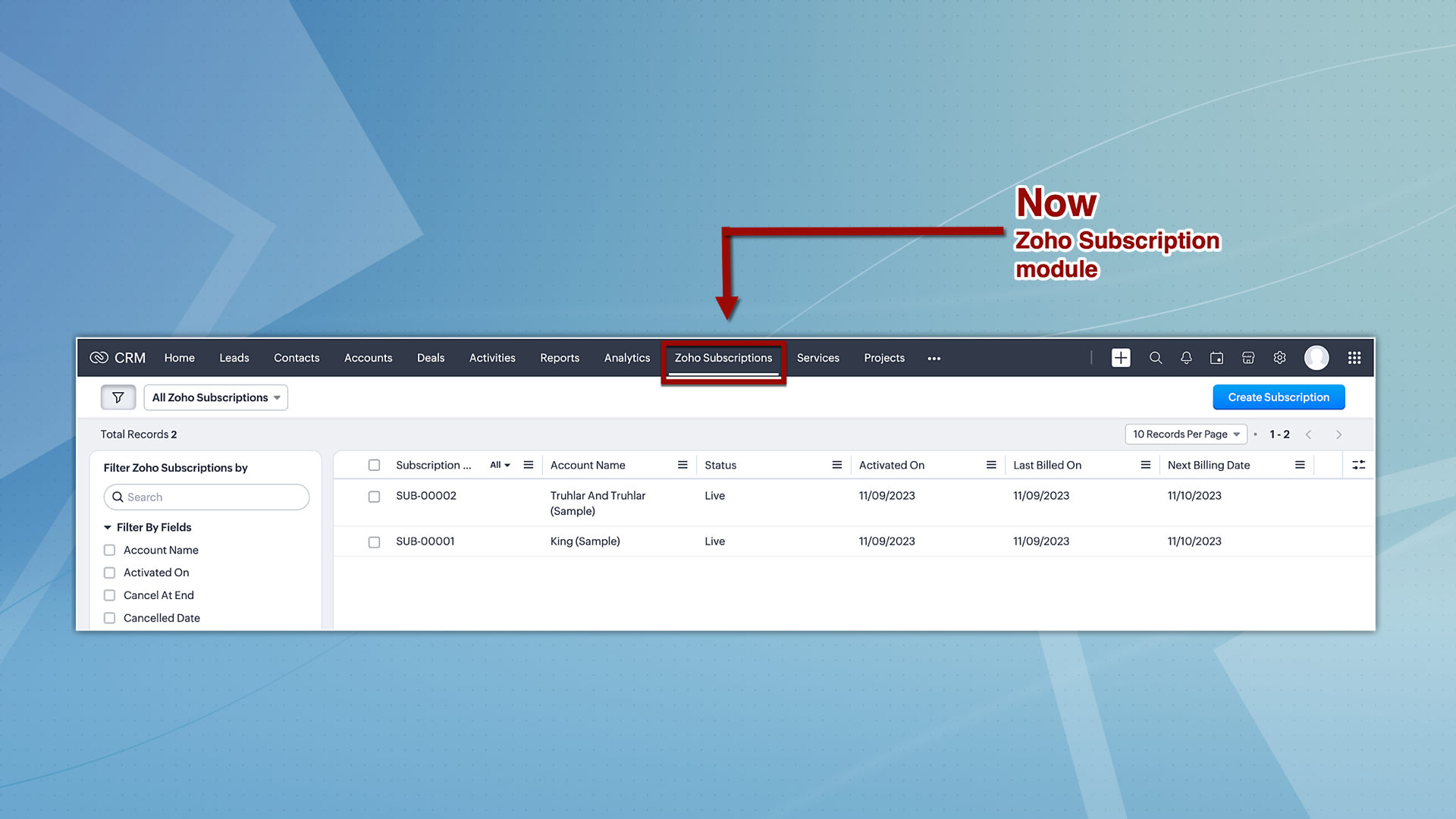
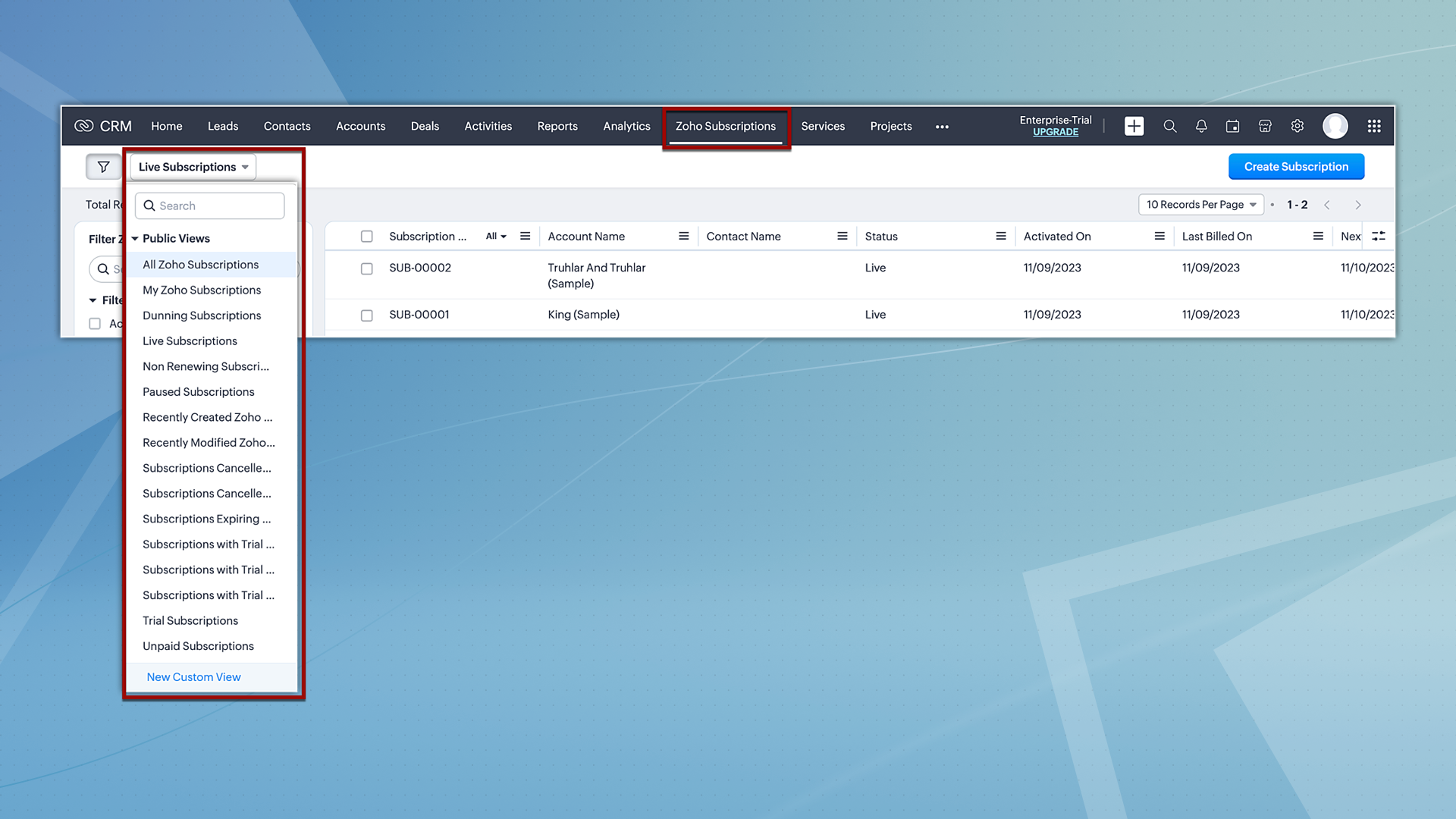
Hereafter, Zoho Subscriptions will be displayed both as a related list and as a module. Users with subscription permissions can currently create and view records in related lists; however, moving forward, they will be able to view and create records from the subscription module as well. Additionally, users will also have the option to view subscription records based on the pre-defined custom views.
2. Reports and analytics for subscriptions
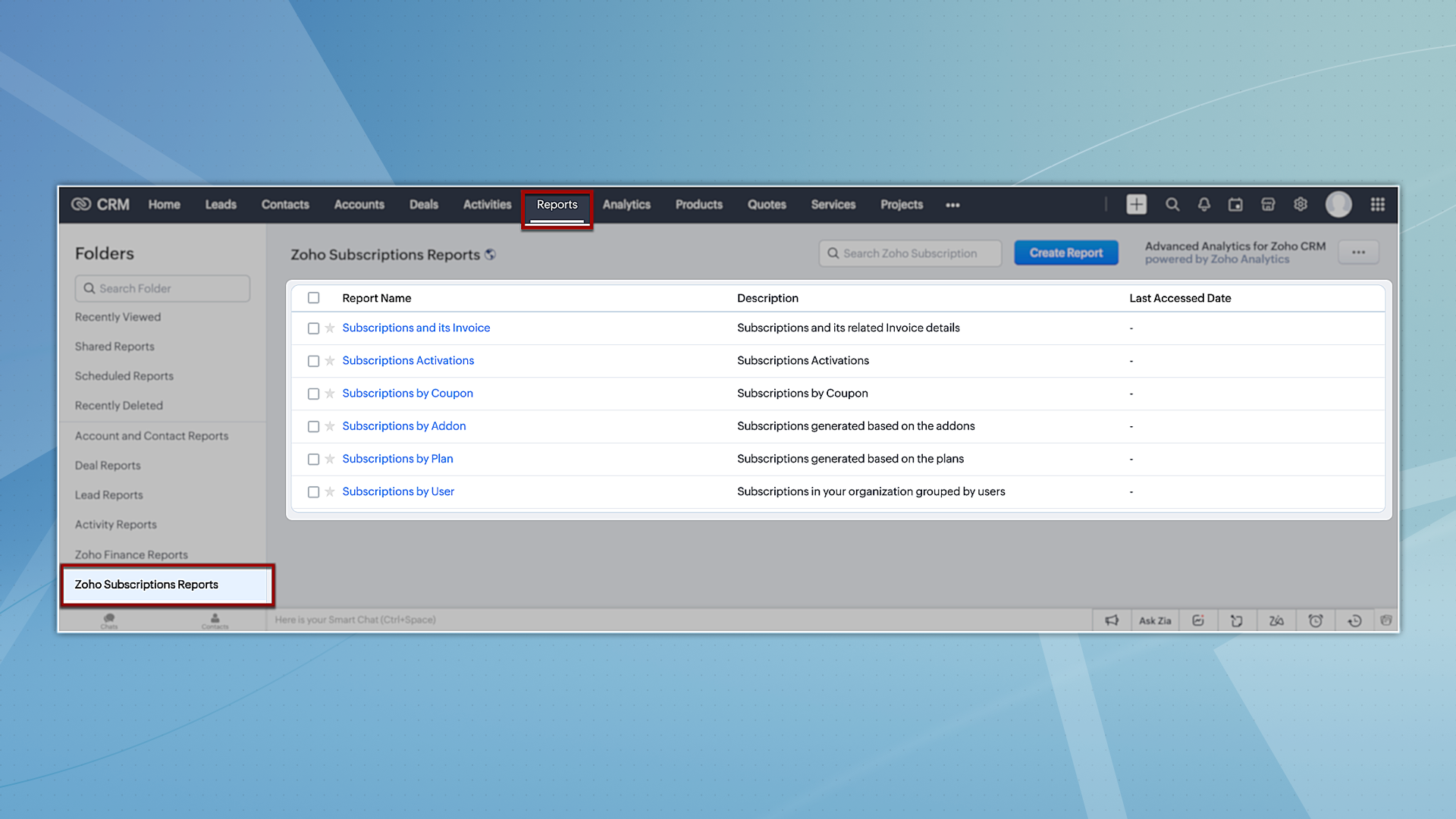
Zoho CRM offers report and analytical dashboard presets that users can adjust as needed to create personalized reports. In turn, this allows users to gain a better understanding of their customers and track key performance metrics, enabling them to make more informed decisions.
To try out system-defined reports based on Zoho Subscriptions, you can navigate to the Reports module and select any of the reports available under the Zoho Subscription Reports folder.
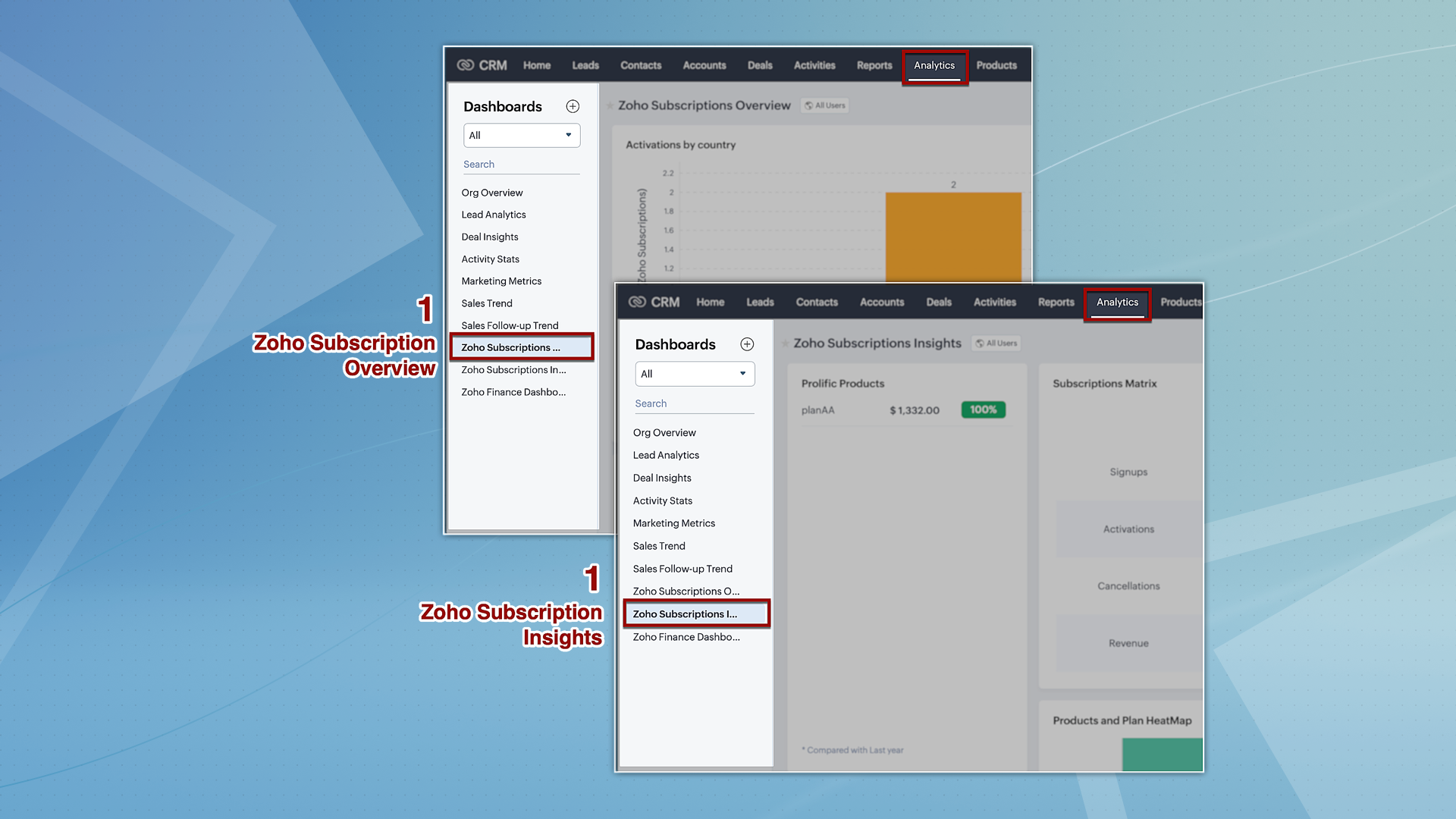
However, for analytics, we're providing two dashboards: Zoho Subscription Overview and Zoho Subscription Insights. You can navigate to the Analytics module and find these dashboards by default on the left panel.
3. Streamlined user permissions
The integration between Zoho CRM and Zoho Subscriptions, which used to be controlled by integration owner/admin permissions, will now operate based on the current users' scope. This guarantees uniformity in user permissions across both platforms, preventing users from accessing CRM features that they do not have authorization for in Zoho Subscriptions.
That's all we have for the enhancements in this edition. We'll keep you posted on further updates. Please feel free to share your thoughts and feedback in the comments below.
Resources: Zoho Finance Suite Knowledge Base
Release Plan:
- These enhancements are being rolled out in phases and are now available to all users across all data centres, with the exception of the US DC, where they are currently available only to organizations on editions below Enterprise.
Thanks!
Nizamuddin
 P.S. We would like to acknowledge the significant contributions and ongoing recommendations provided by our MVP, @Kevin Flynn. His insights – shared in the community forum – have been instrumental in addressing challenges related to users experiencing difficulties in sending emails with their addresses, as well as issues concerning user and field-level permissions.
Topic Participants
Nizamuddin Sohel SK
Nick
Robert
Mikhail Koval
Sunderjan Siddharth
Sticky Posts
Enhancement to ICR’s field prompting: Preferred data extraction using advanced field prompting
Dear Customers, We hope you’re well A quick background Intelligent Character Recognition (ICR) comes as part of Zia’s optical recognition capability called Zia Vision. When we introduced it last April, the data extraction was training-based and was applicableGood news! Calendar in Zoho CRM gets a face lift
Dear Customers, We are delighted to unveil the revamped calendar UI in Zoho CRM. With a complete visual overhaul aligned with CRM for Everyone, the calendar now offers a more intuitive and flexible scheduling experience. What’s new? Distinguish activitiesAccessibility in Zoho CRM: Not just a feature—a way to empower
For instructions on setting up these controls, please check this help document: Configuring accessibility controls. Hello everyone, Today (December 3, 2024), on the International Day of Persons with Disabilities, we begin our journey towards a CRM thatScaling the customer journey: What's new in CommandCenter
Dear Customers, The last time we connected about CommandCenter, it was about the tool's new controls and revamped UI. Personally, the overhaul of the UI from the last update, still excites me. Today, we're here with news about its scalability and addedZoho CRM's sales trend and sales follow-up trend dashboards are now customizable
Dear Customers, We're here with good news! Sales trend and sales follow-up trend are two system-defined dashboards that help you understand trends and anomalies in your sales outreach and conversion efforts. They use Zia's intelligence to identify patterns
Recent Topics
Edit Project Number?
Hi all: We just signed up for a trial of zoho one, which includes ZoHo Projects. We've noticed there was a 'dummy project' preloaded in projects to help familiarize yourself with the software. We've created a couple of our own projects now but noticed since the dummy project was preloaded, our projects start with number 2 then 3, sequentially. Since it seems we will be keeping zoho past the trial, If we delete the dummy project, how do we get our own projects renumbered, beginning with 1? We'd likeDownload pricebook products & details - not just pricebook creation date & name
We're looking to download a copy of a pricebook and its associated products & book prices (as we have several offices in different countries selling the same products), however, when using the export feature under Data administration it only gives me554 5.1.1 – Mail sending blocked for the domain(s): [gmail.com]
Here's your corrected text: Hello, I hope you are doing well. I was unable to send a message and received the following error: "554 5.1.1 – Mail sending blocked for the domain(s): [gmail.com]" I tried to send and deliver an email but got this error. IOutgoing Mail Blocked – Suspicious Login Activity (Need Clarification and Solution)
Hello, I’m currently facing an issue where my Zoho Mail account has been blocked due to “suspicious login activity,” and outgoing emails are restricted. Here are the details shown: Block type: Outgoing mail blocked Reason: Suspicious login activity AAssign Meeting in records
It would be nice to be able to "call and assing" meetings from a record, for example from a Deal. Right now - calendar is synced with CRM - meetings show in calendar - you can go in each meeting and assign it to a record It would be nice to be able toAllow Global Admin to access/edit all forms without changing owners
Hi there, Please consider adding a feature where the Global Admin of the account an automatically access/edit any form in the Company Account. I'm the Global Admin on our Zoho One plan, and we have multiple users that use/create forms. But for me to accessERROR: "Please enter a valid Phone"
WHAT IS THE PHONE FORMAT? There is nothing ANYWHERE to define the format. At least the error should either show the correct format or provide a link to the help file I enter a valid phone number in as many formats as I can think of and none of them allow me to save the number to CRM Nothing works! No matter what format I enter I keep getting a red error "Please enter a valid Phone" The international format for MY mobile is +61414652366 (or +61 414 652 366) Local format is 0414652366 I call all overIntroducing Zoho Sprints 3.0
Zoho Sprints is consistently evolving in steady increments. The introduction of the latest version, with its enterprise level solutions, brings to you advanced capabilities that propel your agile efforts in the right direction. Here's a quick glimpseTransaction Rules & Customer Payments
So I have a situation as follows. We have many clients who are all invoiced on the 1st of each month on a recurring invoice for 1 of 10 plans. This means that almost all payment dates are the same (some people pay late) and that a lot of the amounts areCustomize Sign-out Button
Are there some url parameters I can use to make a form button sign-out the user from the app? The sign-out link on the top right is small. Here's and example of the url for the top right sign-out: https://creator.zoho.com/logoutpage.jsp?sharedBy=niskypto&appID=212085000006568003&appLinkName=MYAPP&signOutUrl=niskypto/MYAPP/view-login/SOMEPAGE Note: In my account, the sign-out is set to redirect users to my website. Can I also override this with some url parameters? John M. WhitneyPlease can the open tasks be shown in each customer account at the top.
Hi there This has happened before, where the open tasks are no longer visible at the top of the page for each customer in the CRM. They have gone missing previously and were reinstated when I asked so I think it's just after an update that this featureTip #65 - Exploring Technician Console: Short Keys - 'Insider Insights'
Hello Zoho Assist Community! Have you ever been in the middle of a remote support session, trying to pass a key combination onto the remote machine, only to find it's reflecting on the technician's computer. The Short Keys feature in Zoho Assist is hereReading from and writing to Zoho Projects Custom Module with Deluge
Does anyone know if there is a way to read from and write to the Custom Modules that Zoho now supports. I would love to be able to loop through a set of data and create the entities I need to for this new custom module I'm looking to put together.Disappointment with Zoho Payments
Dear Gowdhaman, I am writing to inform you that I am removing Zoho Payments from my website. I cannot continue to disappoint my customers due to the lack of UPI support, as has been the case with my experience so far. Please note that the 0.5% transactionEvolução do modelo de ambientes: Dev, Homologação e Produção com pacotes versionados
Hoje o Zoho CRM já oferece Sandbox, o que é um avanço importante para organizações que trabalham com customizações mais complexas. No entanto, na prática, o modelo atual ainda apresenta limitações significativas quando múltiplas equipes ou consultoriasPermissões granulares por usuário além do modelo baseado exclusivamente em perfis
Atualmente, o modelo de segurança do Zoho CRM é fortemente baseado em perfis. Embora funcional, esse modelo apresenta limitações quando equipes possuem variações individuais de acesso dentro do mesmo grupo operacional. Em cenários reais, é comum que usuáriosAdd or update lookup field values during Blueprint transition
Hello everyone, During blueprint transition users can add or modify the value of a lookup field. For instance, if the Tickets module includes a lookup field that connects it to records in the Assets module, agents can link the ticket to the correct assetCan you limit SEO penalties by delaying the appearance of a pop-up?
Google is not keen on pop-ups and has got even less keen on them with the new Core Web Vitals updates. But I like using pop-ups. If you delay the pop-up so it only appears 10 seconds after the page loads, do you avoid Google’s penalties?Adding bank details to the contact through API
How to add bank-related information to the contact while creating it using API? The account number needs to be encrypted before sending it through API but not sure how to encrypt and get those values. Please guide me in this.Restrict Payment Methods
Allow us to restrict certain payment methods specific for each customer.Clone Banking Transaction
Why is there no option to CLONE a Transaction in the Banking module?? I often clone Expenses (for similar expense transactions each month) so I would also like to clone Income transactions. But there is no option in Banking to clone an existing IncomePDF limit
Hello everyone, We have received an e-mail that we have reached our PDF limit. (see screenshot) However, I cannot find any reference to a PDF limit in our tariff plan (Premium). (see screenshot). What is the maximum number of PDFs that can be generatedHow can I see content of system generated mails from zBooks?
System generated mails for offers or invices appear in the mail tab of the designated customer. How can I view the content? It also doesn't appear in zMail sent folder.Credit Card Pre-Authorization with later Capture/Settlement
We really enjoy the convenience of being able to pay off a customer's invoice using our Auth.Net integration with Zoho Books. Unfortunately, we can only take advantage of this feature with a small percentage of our customers as it leaves a gaping holeZoho Projects and CRM Integration in Analytics
Hi Team, In Zoho CRM, I’ve integrated CRM with Zoho Projects and associated a project within the CRM. The integration is visible under the Deals module. However, I’m unable to find this data in Zoho Analytics. Does anyone know where this information isAccessibility in Zoho CRM: Not just a feature—a way to empower
For instructions on setting up these controls, please check this help document: Configuring accessibility controls. Hello everyone, Today (December 3, 2024), on the International Day of Persons with Disabilities, we begin our journey towards a CRM thatAutomation Series #1: Round Robin vs Direct Assignment in Zoho Desk
Direct Assignment vs Round Robin: Choosing the right routing method in Zoho Desk This post is part of the "Desk Automation Series," Chapter 1. Through this series, we will help you choose the right automation type in Zoho Desk by comparing commonly confusedInvalid tax authority ID.
How do I correct this ?Pay Pal Paylater button
I am testing the paypal setup to have my customers pay invoices with paypal and credit cards. But it seems to have two options. Paypal and Pay later. I don't want my customers access to pay later feature. How can I turn that part off.. My other integrationZoho Workshops are coming to the Netherlands - Join us on 14-16 April in Amsterdam!
Dear Zoho Community Members, After succesful recent editions in the UK and Scandinavia, we’re pleased to invite you to the upcoming Zoho Benelux Workshop 2026, taking place 14–16 April 2026 in Amsterdam. This three-day, in-person event at the Park PlazaHow to install Widget in inventory module
Hi, I am trying to install a app into Sales Order Module related list, however there is no button allow me to do that. May I ask how to install widget to inventory module related list?Sub form auto field population based on parent form
I have a parent form called "Sites" with a text field called "Site". I have a subform called "Design Comments" (actual form name "Review Comments") with a lookup field name "Sites1" that looks up from the Sites form. I want the Sites1 lookup field toBuilding Toppings #7 - Using schedules and workflow functions
Hello Biginners, In our previous forum post, we explored install and uninstall actions and learned how to trigger custom logic the moment a topping is added or removed from an organization. In this post, we'll look at how to automate actions during regular,Simplify scripting with Zia assistant bot
Hello everyone, Building automation using Deluge custom functions gives users flexibility and control. Traditionally, creating these functions required writing scripts, testing the logic, and validating the configuration before using it. With Zia assistantZoho Sprints iOS app update: Global view, screen capture control, file encryption, tags enhancement
Hello everyone! We are excited to introduce new features in the latest version(v2.1) of the Zoho Sprints iOS app update. Let’s take a quick look at what’s new. 1. Global view Global view brings all your project items into one centralised space. You canResource Management System built using Zoho CRM, Creator, Projects, and People:
In a Resource Management System built using Zoho CRM, Creator, Projects, and People: CRM Deal Closed → Creator Allocation Engine → Zoho Projects Task Assignment What is the recommended architecture to handle dynamic reassignment when: an employee goesRequest to Remove LinkedIn Verification from My Emai
I would like to submit a complaint regarding my Zoho Mail account. I previously used this email address to verify a LinkedIn account, but that LinkedIn account has now been closed. I need to remove or cancel the verification associated with the closedPin multiple columns and adjust column widths in CRM subforms
Hello all, Subforms act as secondary forms or tables in which you can associate multiple line items to a primary record and thereby ensure more structured and comprehensive data organization. We've made some recent enhancements to subforms. Here's what'sRemoving To or CC Addresses from Desk Ticket
I was hoping i could find a way to remove unnecessary email addresses from tickets submitted via email. For example, a customer may email the support address AND others who are in the helpdesk notification group, in either the TO or CC address. This resultsFrom Zoho CRM to Paper : Design & Print Data Directly using Canvas Print View
Hello Everyone, We are excited to announce a new addition to your Canvas in Zoho CRM - Print View. Canvas print view helps you transform your custom CRM layouts into print-ready documents, so you can bring your digital data to the physical world withNext Page