Kaizen 224 - Quote-driven Deal Reconciliation Using Zoho CRM Functions and Automation

Hello everyone!
Welcome back to another instalment in the Kaizen series.
This post covers quote-driven deal reconciliation, emphasizing Functions and Automation to address practical sales challenges.
Business Challenge
Sales organizations often mark deals as Closed Won before commercial transactions fully conclude. Quotes generate promptly upon closure, yet businesses typically provide a brief window such as one week for renegotiation or payment. During this period, currency fluctuations, payment delays, and risk thresholds can significantly alter the final deal value.
This Kaizen demonstrates how Zoho CRM Functions and Automation work together to reconcile deal financials with quote activity over time. Sales, finance, and operations teams can thus access accurate, policy-compliant values.
Here is a typical sequence:
- Deal closes with Closed Won status
- Quote generates immediately
- Customer receives grace period (e.g., one week) for payment or adjustments
Key factors during this window:
- Exchange rates fluctuate
- Payments may succeed or fail
- Business absorbs limited losses(up to 10%, for example)
- Major variances trigger renegotiation
CRM must reflect actual outcomes rather than initial closure assumptions. Quotes serve as the authoritative commercial record, with final deal values depending on execution timing. This approach captures intermediate and final financial states to enable automated decisions and audits.
Key business scenarios covered
Scenario 1: Payment is made during the grace period
- Quote is generated on day 0
- Customer completes payment on day 7
- Exchange rate has changed since quote generation
Business Requirement
The business wants to calculate the actual payable amount using the exchange rate on the payment day and store it explicitly in CRM.
Outcome
The realized value is captured and stored, ensuring that reports and downstream systems reflect the true commercial result.
Scenario 2: Acceptable loss threshold (10%)
- Exchange rate movement results in a loss
- The business is willing to absorb losses up to 10%
- Loss exceeds the acceptable threshold
Business requirement
If the loss exceeds the defined tolerance, the quote should move to renegotiation instead of being accepted automatically.
Outcome
CRM enforces pricing policy consistently, without manual intervention or subjective judgment.
Scenario 3: Significant currency fluctuations
- Exchange rate volatility is unusually high
- Even if loss is within limits, risk exposure is significant
Business requirement
Large fluctuations should trigger renegotiation, regardless of absolute loss percentage.
Outcome
Financial risk is handled proactively based on measurable criteria.
Scenario 4: No payment after the grace period
- Customer does not pay within the allowed window
- Updated exchange rate is favorable to the business
Business Requirement
If the updated rate is profitable, the quote can be revised and reissued with the new amount.
Outcome
CRM reflects market-aligned pricing while maintaining transparency around why the amount changed.
Why Zoho CRM Functions is the best fit?
This reconciliation pattern requires the following capabilities beyond static configuration.
- Reading and reconciling data across Deals and Quotes
- Applying time-based and threshold-based business rules
- Writing calculated values into dedicated fields
- Supporting multiple decision paths(accept, renegotiate, revise)
- Running logic at specific business moments
Zoho CRM Functions provide the flexibility and control required to implement this logic cleanly, while automation ensures it runs consistently and reliably.
Custom fields used in this post
Deals
- Final Accepted Amount - Currency - Amount finally agreed and accepted
- FX Impact Percentage - Percent - Gain or loss due to exchange movement
- Reconciliation Status - Picklist - Accepted or Renegotiate
- Reconciled On - DateTime- Timestamp of final reconciliation
Quotes
- Quote Reference Amount - Currency - Amount at quote generation
- Quote Exchange Rate - Decimal - Exchange rate used in quote
- Payment Due Date - Date - End of grace period
- Potential Payable Amount - Currency - Recalculated amount at evaluation time
- FX Variance Percentage - Decimal - Difference vs quoted amount
- FX Evaluation Status - Picklist - Pending or Evaluated
- Recalculate FX - Checkbox - Explicit recalculation trigger
These fields capture commercial intent and outcome, not just static numbers.
High level automation flow
- Deal is marked Closed Won
- Workflow triggers a function to generate a Quote
- Business updates evaluation inputs when needed
- User explicitly triggers FX recalculation
- Function
- Calculates financial impact
- Updates quote and deal
- Applies business decisions
- CRM reflects finalized commercial reality
Function 1: Generate a Quote from the Deal
This function creates a Quote automatically when a Deal is closed, ensuring downstream processes start immediately and consistently.
void automation.generateQuoteFromDeal(int dealId) { deal = zoho.crm.getRecordById("Deals", dealId); if(deal == null) return; amount = deal.get("Amount"); exchangeRate = deal.get("Exchange_Rate"); account = deal.get("Account_Name"); productItem = Map(); productItem.put("product", {"id":"<PRODUCT_ID>"}); productItem.put("quantity", 1); productItem.put("list_price", amount); productList = List(); productList.add(productItem); quoteMap = Map(); quoteMap.put("Subject", "Quote for Deal"); quoteMap.put("Deal_Name", dealId); quoteMap.put("Account_Name", account.get("id")); quoteMap.put("Product_Details", productList); quoteMap.put("Quote_Stage", "Draft"); quoteMap.put("Valid_Till", zoho.currentdate.addDay(7)); quoteMap.put("Quote_Reference_Amount", amount); quoteMap.put("Quote_Exchange_Rate", exchangeRate); zoho.crm.createRecord("Quotes", quoteMap); } |
Function 2: Reconcile Deal from Quote
This function calculates payable values, evaluates financial impact, and updates the Deal with finalized financial information.
void automation.reconcileDealFromQuote(Int quoteId) { info "Starting FX reconciliation for Quote ID: " + quoteId; // ------------------------------------------------- // Fetch Quote // ------------------------------------------------- quote = zoho.crm.getRecordById("Quotes", quoteId); if(quote == null) { info "Quote not found"; return; } dealInfo = quote.get("Deal_Name"); if(dealInfo == null) { info "Quote not linked to Deal"; return; } dealId = dealInfo.get("id"); deal = zoho.crm.getRecordById("Deals", dealId); if(deal == null) { info "Deal not found"; return; } // ------------------------------------------------- // Mark FX Evaluation as PENDING // ------------------------------------------------- zoho.crm.updateRecord( "Quotes", quoteId, {"FX_Evaluation_Status" : "Pending"} ); // ------------------------------------------------- // Read required FX inputs // ------------------------------------------------- quotedAmount = quote.get("Quote_Reference_Amount"); quoteRate = quote.get("Quote_Exchange_Rate"); evaluationRate = quote.get("Evaluation_Exchange_Rate"); info "Quoted Amount: " + quotedAmount; info "Quote Rate: " + quoteRate; info "Evaluation Rate: " + evaluationRate; if(quotedAmount == null || quoteRate == null || evaluationRate == null) { info "Missing required FX inputs"; return; } // ------------------------------------------------- // FX Calculations(rounded) // ------------------------------------------------- payableAmount = (quotedAmount * evaluationRate / quoteRate).round(2); fxVariance = (((payableAmount - quotedAmount) / quotedAmount) * 100).round(2); info "Payable Amount: " + payableAmount; info "FX Variance %: " + fxVariance; // ------------------------------------------------- // Decide Quote Stage(Business decision here) // ------------------------------------------------- quoteStage = ""; reconciliationStatus = ""; if(fxVariance <= 10) { quoteStage = "Acceptable FX Impact"; reconciliationStatus = "Accepted"; } else { quoteStage = "FX Impact Exceeds Threshold"; reconciliationStatus = "Renegotiate"; } // ------------------------------------------------- // Update Quote(Final state) // ------------------------------------------------- quoteUpdate = Map(); quoteUpdate.put("Potential_Payable_Amount", payableAmount); quoteUpdate.put("FX_Variance_Percentage", fxVariance); quoteUpdate.put("FX_Evaluation_Status", "Evaluated"); quoteUpdate.put("Quote_Stage", quoteStage); quoteUpdate.put("Recalculate_FX", false); quoteResp = zoho.crm.updateRecord("Quotes", quoteId, quoteUpdate); info "Quote update response:"; info quoteResp; // ------------------------------------------------- // Update Deal // ------------------------------------------------- dealUpdate = Map(); dealUpdate.put("Final_Accepted_Amount", payableAmount); dealUpdate.put("FX_Impact_Percentage", fxVariance); dealUpdate.put("Reconciliation_Status", reconciliationStatus); dealUpdate.put( "Reconciled_On", zoho.currenttime.toString("yyyy-MM-dd'T'HH:mm:ssXXX") ); dealResp = zoho.crm.updateRecord("Deals", dealId, dealUpdate); info "Deal update response:"; info dealResp; info "FX reconciliation completed successfully"; } |
Workflow
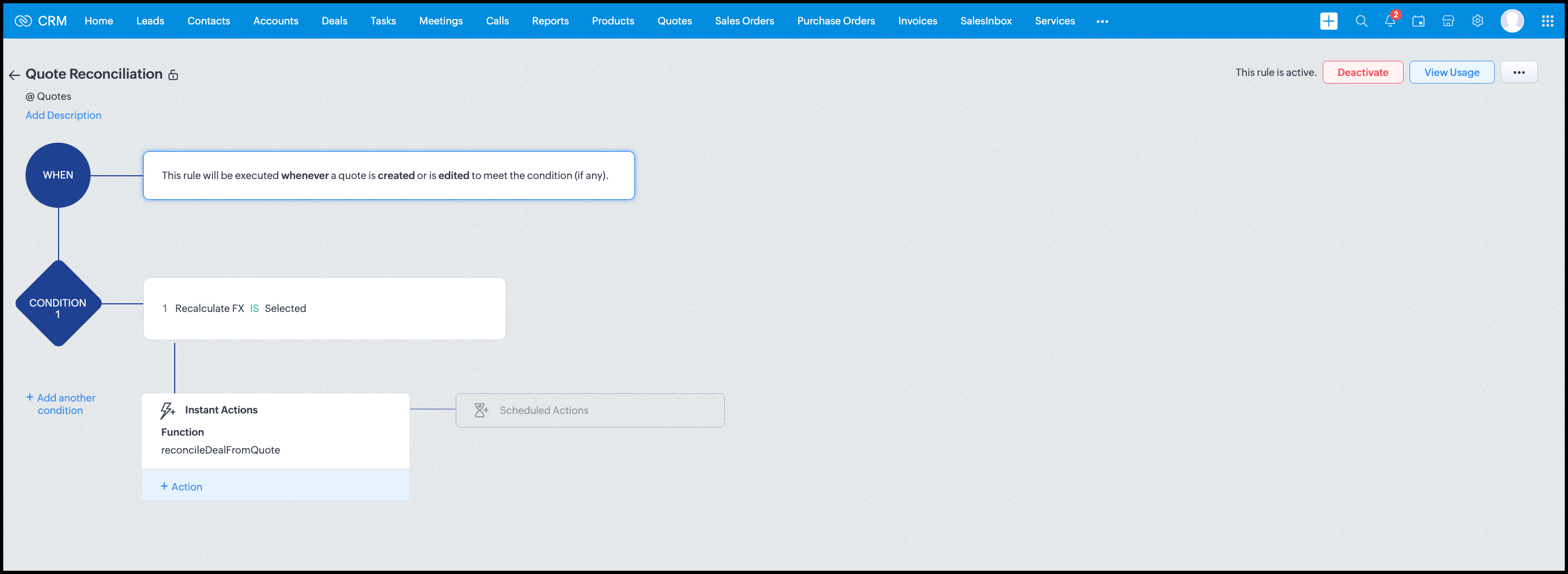
Module: Quotes
Trigger: On create or edit
Condition: Recalculate FX = true
Action: Execute reconcileDealFromQuote
Argument: quoteId -> ${Quotes.id}
All decision logic lives inside the function.
Business Outcome
After implementing this pattern,
- Deals and quotes stay aligned with real-world behavior
- FX risk is measurable and auditable
- Renegotiation is policy-driven
- Reports reflect finalized values, not assumptions
- Sales and finance operate on the same truth.
Summary
Zoho CRM extends beyond static closures by reconciling deals against quote behavior. Functions plus Automation enforce pricing, limit exposure, and capture true outcomes reliably at scale.
The true value of this implementation is not the calculation itself, but the fact that it produces stable, auditable financial states that can be reused across reporting, approvals, integrations, and policy enforcement.
Further extensions
Executive reporting and dashboards
You can build Dashboards that answer questions like
- Total revenue before vs after FX reconciliation
- Total FX gain or loss by
- Region
- Currency
- Quarter
- Sales owner
- Percentage of deals renegotiated due to FX risk
Without the function,
- FX impact is implicit
- Numbers keep changing
- Finance does not trust reports
With the function,
- Final Accepted Amount is stable
- FX Impact % is explicit
- Reconciled On gives a time anchor
Policy enforcement and compliance
Examples
- Automatically flag deals where FX loss > 10% but status = Accepted
- Audit trail for
- Who recalculated FX
- When renegotiation was triggered
- SLA checks when Deals are not reconciled within 'X' days of quote creation
For many companies, FX policy violations are discovered at a later point in time, but you now enforce them at the moment of decision.
Sales coaching and deal hygiene
Unlock insights such as
- Which sales reps close deals with high FX volatility or frequently trigger renegotiation?
- Which regions or currencies produce unstable deals?
- Which deals are consistently over-optimistic at closure?
Other scenarios
- Approval and exception workflows
- Integration with ERP or accounting systems
- Predictive insights to forecast FX risk
- Historical snapshots for audit and analytics
We hope you found this post useful. Let us know your feedback in the comments or write to us at support@zohocrm.com.
Thanks!
=============================================================================

See Also
Topic Participants
Shylaja S
Sticky Posts
Kaizen #198: Using Client Script for Custom Validation in Blueprint
Nearing 200th Kaizen Post – 1 More to the Big Two-Oh-Oh! Do you have any questions, suggestions, or topics you would like us to cover in future posts? Your insights and suggestions help us shape future content and make this series better for everyone.Kaizen #226: Using ZRC in Client Script
Hello everyone! Welcome to another week of Kaizen. In today's post, lets see what is ZRC (Zoho Request Client) and how we can use ZRC methods in Client Script to get inputs from a Salesperson and update the Lead status with a single button click. In thisKaizen #222 - Client Script Support for Notes Related List
Hello everyone! Welcome to another week of Kaizen. The final Kaizen post of the year 2025 is here! With the new Client Script support for the Notes Related List, you can validate, enrich, and manage notes across modules. In this post, we’ll explore howKaizen #217 - Actions APIs : Tasks
Welcome to another week of Kaizen! In last week's post we discussed Email Notifications APIs which act as the link between your Workflow automations and you. We have discussed how Zylker Cloud Services uses Email Notifications API in their custom dashboard.Kaizen #216 - Actions APIs : Email Notifications
Welcome to another week of Kaizen! For the last three weeks, we have been discussing Zylker's workflows. We successfully updated a dormant workflow, built a new one from the ground up and more. But our work is not finished—these automated processes are
Recent Topics
Inactive Items - Make Less Prominent by Default
Currently, when one marks an Item as "Inactive", it really doesn't do much of anything to hide it or get it out of the way. Search and reporting within Finance should, by default, hide inactive Items from standard reports, searches, etc. If one specificallyHow to calculate GST based on "Ship To Address"
We into the interior designing work, providing "Works Contract Services" to our clients across India. We are registered under GST in Maharashtra state. For works contract services as per the GST rule, we need to decide place of supply based on "Ship toI NEED TO NUMBER TO TEXT NO HERE
=NUMBERTEXT NEEEDAuto-fill New Row with Previous Row Values
rowsize = input.Order_Items.count(); for each row1 in input.Order_Items { rowsize = rowsize - 1; if(rowsize == 1) { row.Door_Model = row1.Door_Model; row.Door_Color = row1.Door_Color; row.Materials = row1.Materials;Python - code studio
Hi, I see the code studio is "coming soon". We have some files that will require some more complex transformation, is this feature far off? It appears to have been released in Zoho Analytics alreadyAPI question - adding a thread to an existing ticket
Hi Is there an API function for the customer to add to an existing ticket thread? example, customer puts in new support ticket. support replies and ask for more details. customer replies with more details -what api function is used for this (will add record append to same ticket number?) ThanksCalendar week view: Today + 6
Is there anyway to have the calendar change dynamically based on the date? Due to the amount of events, we only display a week at a time, but towards the end of the week, we can no longer see ahead to next week (without changing it manually every time).How to restrict user/portal user change canvas view
Hi , I would like to restrict user / portal user change their canvas view because I hide some sensitive field for them. I dont want my user switch the canvas view that do not belong to them But seems Zoho do not provide this setting?How to add to Subforms via Zapier with Zoho Writer?
I have the following layout for a Zoho Writer Document. As you can see there is a repeating subform taking in "Items". I am trying to make a Zapier integration with it, and I can see there is 1 field saying: "Items", but it does not specify how I'm supposedContrôles administratifs granulaires : un atout pour la sécurité des e-mails
La moindre erreur dans votre système de messagerie peut coûter très cher à votre entreprise, tant en argent qu’en conformité et en image de marque. Pour beaucoup d’organisations, ce risque est bien réel. Les e-mails véhiculent quotidiennement des informationsCollections Management: #6 Realign Customers who gets back In-Term
Arun stared at the subscription list on his dashboard. Another account had just been moved to Cancelled status after completing the whole dunning process. Nothing unusual, just that payment failures happen, retries fail, and cancellation is the expectedZoho Mail IP Blacklist
I need problems with send mails: Error: junk mail rejected - sender4-op-o10.zoho.com 136.143.188.10, is in RBL. Spamcop. Please remove FQDN for blacklist. Regards.I can receive but not send emails
Hello, I've been not able to send emails for almost a year now. I been using alternate email to do this. I want to know how to fix this so I can use my zoho account normally again.The challenge of 24/7 connectivity: Being present and meeting customer expectations
Before television entered our homes, radio was our window to the world. We had to tune carefully to catch voices from distant places. When television arrived, the world began to grow smaller. We can watch rocket launches, see the goal that wins our favoriteHow to download all attachments from inbox, send, other folders in one go
Hi All, Appreciate if anyone could help me with steps for below requirement. How to download all attachments from inbox, send, other folders in one go. Even mapping to new folder will help me. Thanks in advance.Cannot connect mail accounts to Thunderbird
Hi Support - I'm attempting to add my mail accounts to Thunderbird but I'm getting an unable to login to server error. I tried to use the password associated with my account I received the unable to login error. So I went into Zoho Accounts and generateAlias Email Id already exists
Hi, I just verified my domain sesque (dot) com and now I am trying to create the admin account using admin (at) sesque (dot) com, but I am getting an error saying "Alias Email Id already exists". I used to have another Zoho account with this email address,Unable to connect to smtp server, connection timed out
Hi Team, I am facing below issue, while sending out emails from thunderbird client. It used to work, facing this issue from morning. Error: Sending of the message failed. The message could not be sent because the connection to Outgoing server (SMTP) smtp.zoho.comKaizen #217 - Actions APIs : Tasks
Welcome to another week of Kaizen! In last week's post we discussed Email Notifications APIs which act as the link between your Workflow automations and you. We have discussed how Zylker Cloud Services uses Email Notifications API in their custom dashboard.DKIM Verification Failed (Namecheap)
Hi! I have already set up the TXT records in Namecheap but I keep getting the "Verification Failed" pop up. Was wondering if I'm the only one who has this problem and can anyone help me with this? Thanks!Emails stuck in Queue
Hi there, Since yesterday I have a few out going emails stuck in a queue. It say it will auto retry sending however nothing is happening. It seems to be affecting roughly 50% of my outgoing emails. Please help ThanksSoft Bounce from transational emails from BREVO (Sendinblue)
I manage the website of a client who uses your EMAIL service for the domain floranativadobrasil.com. And I use the BREVO email service, previously called SendinBlue, to send transactional emails about events specific to the website. All emails sent toGetting an error Address not found Your message wasn't delivered
Hey, I'm trying to configure zoho mail for my website https://businessentity.org/ The email is meredith.karter@businessentity.org I'm able to successfully send the mails but when someone sends an email to above mail, this error shoots up: Address notSupport Uploading YouTube Videos Longer Than 60 Minutes
Hi Zoho Social Team, How are you? We would like to request support for uploading YouTube videos longer than 60 minutes directly through Zoho Social. Your support team informed us that Zoho Social currently cannot upload videos over 60 minutes due to “APINeed Faster Help? Try Live Chat Support
Hello there, We understand that sometimes, whether you’re facing an issue, exploring a feature, or need quick clarification, sending an email and waiting for a response just doesn’t cut it. You need answers, and you need them now. That’s exactly why weCan't deactivate Spell Check
Hi Community, right now I'm using the Zoho Mail Desktop-Software. So far, so good.. many possibilities. Overall very nice. What is extremely annoying right now, is that we are not able to deactivate the Spell Check feature. And we are barely able to focusZoho Toolkit Email Signature Generator
I'm having real issues with the email signature generator with no matter where I host the photo, Zoho doesn't seem to show the photo on the link provided?Company Policy Upload - Request All EE to review and sign
How can I upload policies into Zoho People and have the employees review them and sign off saying they agree, etc.? Also, if I make a revision to a policy, I would like that changed or updated policy to be distributed or have the employees notified thatZoho Sign Global Settings vs. Template and Document
Hello, We are running into an issue on a current use case. We already use Zoho Sign. Now that KBA is available, we want to begin using it in our tax delivery process, by allowing clients to sign electronically, but also download a copy of their returnZoho Mail Desktop Crashes on Linux - Ubuntu 24 LTS
Hi, I have been trying to run the desktop app on Ubuntu for the past few day with no luck. I have tried both the .deb package and the appImage. When I attempt to open the app. It just crashes immediately. The crash error dialog appeared once and I cantZoho IP blocked by SpamCop
Hi, Many of my emails are blocked and I receive this: INVALID_ADDRESS, ERROR_CODE :550, ERROR_CODE :spamcop.mimecast.org Blocked - see https://www.spamcop.net/bl.shtml?136.143.188.51. - https://community.mimecast.com/docs/DOC-1369#550 [DGwIYPPSOfWIServer error when trying to Data > Sort > Custom Sort
Been using Data > Sort > Custom Sort for a while, now it has suddenly stopped working. When selecting the same data range and trying to execute, I get "Sorry! There was a problem saving your last edit. Please try again."To Assign a genrated pdf to a file upload field using delug
content = "<html><body>HTML Content on page One <div style='page-break-after:always'></div> HTML Content on page Two </body></html>"; file = zoho.file.convertToPDF(content); file.setFileName("Name of the file"); <variableName> = <FormLinkName>[ID == input.ID];TArgets To Accounts (Modules)
How can i set sale target to Customers (Accounts Module)Breaking barriers with multilingual WhatsApp templates in IM
Ever wondered what it feels like to be greeted in your own language by a brand you love? A “Welcome!” feels nice, but a “¡Bienvenido!” or “स्वागत है!” feels personal. In today’s global world, conversations often need to cross both time zones and crossHow to share private Opportunities with whole org at an account level
Opportunities are currently set to private, so our sales team only sees their own opportunities, along with their manager and upper leadership. The need is the ability for the rest of the Org to see the opportunities at an account level, not within theProblema Verificacion con proveedor NIC.AR
No puedo realizar la verificación del correo, he seguido los pasos indicados y configurado los MX. Y no puedo verificar el correo. He leido en el foro que otros han tenido el mismo problema. Alguno pudo solucionarlo?How to remove some users in zoho accounts
How to remove some users in Zoho accounts.Unified Inbox for all, including fetched mails
I fetch mails from different third-parties mailboxes. But I need to switch mailbox too see fetched mails. It's strange. All mailboxes have one shared disk space for own mail and fetched mail, but why do we need to switch mailbox (on the left bottom) toWhatsapp Limitation Questions
Good day, I would like to find out about the functionality or possibility of all the below points within the Zoho/WhatsApp integration. Will WhatsApp buttons ever be possible in the future? Will WhatsApp Re-directs to different users be possible basedNext Page