Kaizen 224 - Quote-driven Deal Reconciliation Using Zoho CRM Functions and Automation

Hello everyone!
Welcome back to another instalment in the Kaizen series.
This post covers quote-driven deal reconciliation, emphasizing Functions and Automation to address practical sales challenges.
Business Challenge
Sales organizations often mark deals as Closed Won before commercial transactions fully conclude. Quotes generate promptly upon closure, yet businesses typically provide a brief window such as one week for renegotiation or payment. During this period, currency fluctuations, payment delays, and risk thresholds can significantly alter the final deal value.
This Kaizen demonstrates how Zoho CRM Functions and Automation work together to reconcile deal financials with quote activity over time. Sales, finance, and operations teams can thus access accurate, policy-compliant values.
Here is a typical sequence:
- Deal closes with Closed Won status
- Quote generates immediately
- Customer receives grace period (e.g., one week) for payment or adjustments
Key factors during this window:
- Exchange rates fluctuate
- Payments may succeed or fail
- Business absorbs limited losses(up to 10%, for example)
- Major variances trigger renegotiation
CRM must reflect actual outcomes rather than initial closure assumptions. Quotes serve as the authoritative commercial record, with final deal values depending on execution timing. This approach captures intermediate and final financial states to enable automated decisions and audits.
Key business scenarios covered
Scenario 1: Payment is made during the grace period
- Quote is generated on day 0
- Customer completes payment on day 7
- Exchange rate has changed since quote generation
Business Requirement
The business wants to calculate the actual payable amount using the exchange rate on the payment day and store it explicitly in CRM.
Outcome
The realized value is captured and stored, ensuring that reports and downstream systems reflect the true commercial result.
Scenario 2: Acceptable loss threshold (10%)
- Exchange rate movement results in a loss
- The business is willing to absorb losses up to 10%
- Loss exceeds the acceptable threshold
Business requirement
If the loss exceeds the defined tolerance, the quote should move to renegotiation instead of being accepted automatically.
Outcome
CRM enforces pricing policy consistently, without manual intervention or subjective judgment.
Scenario 3: Significant currency fluctuations
- Exchange rate volatility is unusually high
- Even if loss is within limits, risk exposure is significant
Business requirement
Large fluctuations should trigger renegotiation, regardless of absolute loss percentage.
Outcome
Financial risk is handled proactively based on measurable criteria.
Scenario 4: No payment after the grace period
- Customer does not pay within the allowed window
- Updated exchange rate is favorable to the business
Business Requirement
If the updated rate is profitable, the quote can be revised and reissued with the new amount.
Outcome
CRM reflects market-aligned pricing while maintaining transparency around why the amount changed.
Why Zoho CRM Functions is the best fit?
This reconciliation pattern requires the following capabilities beyond static configuration.
- Reading and reconciling data across Deals and Quotes
- Applying time-based and threshold-based business rules
- Writing calculated values into dedicated fields
- Supporting multiple decision paths(accept, renegotiate, revise)
- Running logic at specific business moments
Zoho CRM Functions provide the flexibility and control required to implement this logic cleanly, while automation ensures it runs consistently and reliably.
Custom fields used in this post
Deals
- Final Accepted Amount - Currency - Amount finally agreed and accepted
- FX Impact Percentage - Percent - Gain or loss due to exchange movement
- Reconciliation Status - Picklist - Accepted or Renegotiate
- Reconciled On - DateTime- Timestamp of final reconciliation
Quotes
- Quote Reference Amount - Currency - Amount at quote generation
- Quote Exchange Rate - Decimal - Exchange rate used in quote
- Payment Due Date - Date - End of grace period
- Potential Payable Amount - Currency - Recalculated amount at evaluation time
- FX Variance Percentage - Decimal - Difference vs quoted amount
- FX Evaluation Status - Picklist - Pending or Evaluated
- Recalculate FX - Checkbox - Explicit recalculation trigger
These fields capture commercial intent and outcome, not just static numbers.
High level automation flow
- Deal is marked Closed Won
- Workflow triggers a function to generate a Quote
- Business updates evaluation inputs when needed
- User explicitly triggers FX recalculation
- Function
- Calculates financial impact
- Updates quote and deal
- Applies business decisions
- CRM reflects finalized commercial reality
Function 1: Generate a Quote from the Deal
This function creates a Quote automatically when a Deal is closed, ensuring downstream processes start immediately and consistently.
void automation.generateQuoteFromDeal(int dealId) { deal = zoho.crm.getRecordById("Deals", dealId); if(deal == null) return; amount = deal.get("Amount"); exchangeRate = deal.get("Exchange_Rate"); account = deal.get("Account_Name"); productItem = Map(); productItem.put("product", {"id":"<PRODUCT_ID>"}); productItem.put("quantity", 1); productItem.put("list_price", amount); productList = List(); productList.add(productItem); quoteMap = Map(); quoteMap.put("Subject", "Quote for Deal"); quoteMap.put("Deal_Name", dealId); quoteMap.put("Account_Name", account.get("id")); quoteMap.put("Product_Details", productList); quoteMap.put("Quote_Stage", "Draft"); quoteMap.put("Valid_Till", zoho.currentdate.addDay(7)); quoteMap.put("Quote_Reference_Amount", amount); quoteMap.put("Quote_Exchange_Rate", exchangeRate); zoho.crm.createRecord("Quotes", quoteMap); } |
Function 2: Reconcile Deal from Quote
This function calculates payable values, evaluates financial impact, and updates the Deal with finalized financial information.
void automation.reconcileDealFromQuote(Int quoteId) { info "Starting FX reconciliation for Quote ID: " + quoteId; // ------------------------------------------------- // Fetch Quote // ------------------------------------------------- quote = zoho.crm.getRecordById("Quotes", quoteId); if(quote == null) { info "Quote not found"; return; } dealInfo = quote.get("Deal_Name"); if(dealInfo == null) { info "Quote not linked to Deal"; return; } dealId = dealInfo.get("id"); deal = zoho.crm.getRecordById("Deals", dealId); if(deal == null) { info "Deal not found"; return; } // ------------------------------------------------- // Mark FX Evaluation as PENDING // ------------------------------------------------- zoho.crm.updateRecord( "Quotes", quoteId, {"FX_Evaluation_Status" : "Pending"} ); // ------------------------------------------------- // Read required FX inputs // ------------------------------------------------- quotedAmount = quote.get("Quote_Reference_Amount"); quoteRate = quote.get("Quote_Exchange_Rate"); evaluationRate = quote.get("Evaluation_Exchange_Rate"); info "Quoted Amount: " + quotedAmount; info "Quote Rate: " + quoteRate; info "Evaluation Rate: " + evaluationRate; if(quotedAmount == null || quoteRate == null || evaluationRate == null) { info "Missing required FX inputs"; return; } // ------------------------------------------------- // FX Calculations(rounded) // ------------------------------------------------- payableAmount = (quotedAmount * evaluationRate / quoteRate).round(2); fxVariance = (((payableAmount - quotedAmount) / quotedAmount) * 100).round(2); info "Payable Amount: " + payableAmount; info "FX Variance %: " + fxVariance; // ------------------------------------------------- // Decide Quote Stage(Business decision here) // ------------------------------------------------- quoteStage = ""; reconciliationStatus = ""; if(fxVariance <= 10) { quoteStage = "Acceptable FX Impact"; reconciliationStatus = "Accepted"; } else { quoteStage = "FX Impact Exceeds Threshold"; reconciliationStatus = "Renegotiate"; } // ------------------------------------------------- // Update Quote(Final state) // ------------------------------------------------- quoteUpdate = Map(); quoteUpdate.put("Potential_Payable_Amount", payableAmount); quoteUpdate.put("FX_Variance_Percentage", fxVariance); quoteUpdate.put("FX_Evaluation_Status", "Evaluated"); quoteUpdate.put("Quote_Stage", quoteStage); quoteUpdate.put("Recalculate_FX", false); quoteResp = zoho.crm.updateRecord("Quotes", quoteId, quoteUpdate); info "Quote update response:"; info quoteResp; // ------------------------------------------------- // Update Deal // ------------------------------------------------- dealUpdate = Map(); dealUpdate.put("Final_Accepted_Amount", payableAmount); dealUpdate.put("FX_Impact_Percentage", fxVariance); dealUpdate.put("Reconciliation_Status", reconciliationStatus); dealUpdate.put( "Reconciled_On", zoho.currenttime.toString("yyyy-MM-dd'T'HH:mm:ssXXX") ); dealResp = zoho.crm.updateRecord("Deals", dealId, dealUpdate); info "Deal update response:"; info dealResp; info "FX reconciliation completed successfully"; } |
Workflow
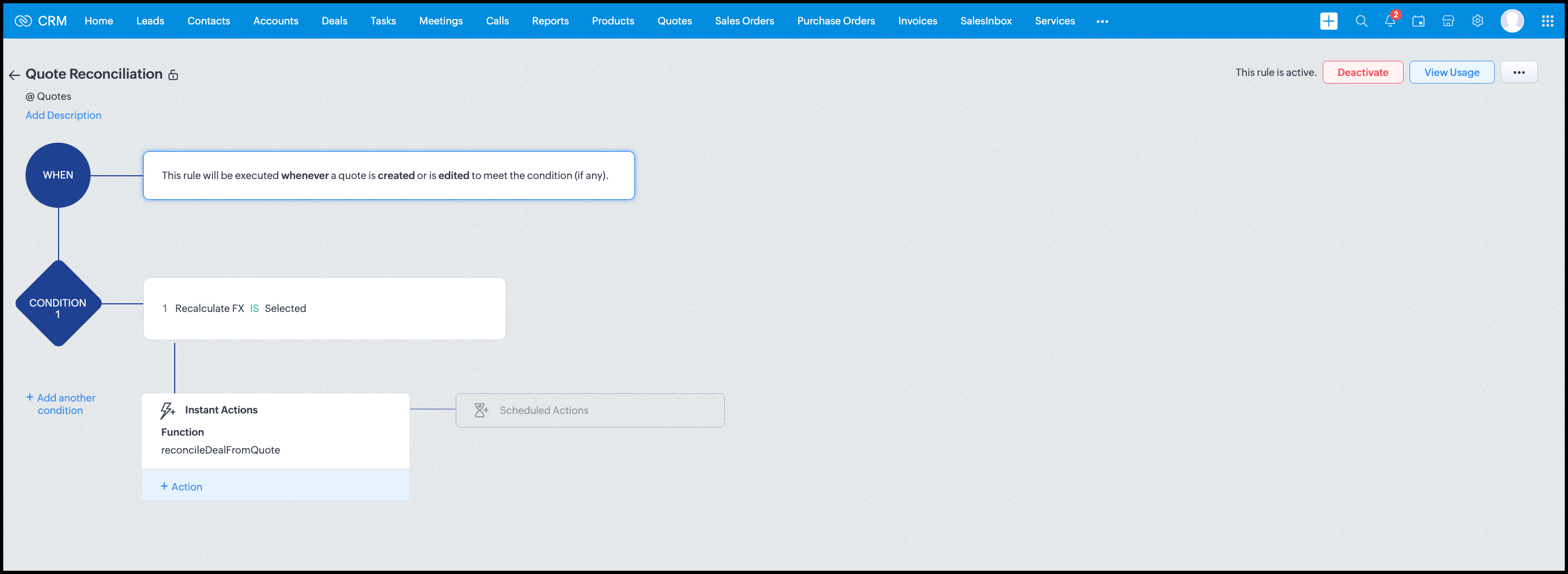
Module: Quotes
Trigger: On create or edit
Condition: Recalculate FX = true
Action: Execute reconcileDealFromQuote
Argument: quoteId -> ${Quotes.id}
All decision logic lives inside the function.
Business Outcome
After implementing this pattern,
- Deals and quotes stay aligned with real-world behavior
- FX risk is measurable and auditable
- Renegotiation is policy-driven
- Reports reflect finalized values, not assumptions
- Sales and finance operate on the same truth.
Summary
Zoho CRM extends beyond static closures by reconciling deals against quote behavior. Functions plus Automation enforce pricing, limit exposure, and capture true outcomes reliably at scale.
The true value of this implementation is not the calculation itself, but the fact that it produces stable, auditable financial states that can be reused across reporting, approvals, integrations, and policy enforcement.
Further extensions
Executive reporting and dashboards
You can build Dashboards that answer questions like
- Total revenue before vs after FX reconciliation
- Total FX gain or loss by
- Region
- Currency
- Quarter
- Sales owner
- Percentage of deals renegotiated due to FX risk
Without the function,
- FX impact is implicit
- Numbers keep changing
- Finance does not trust reports
With the function,
- Final Accepted Amount is stable
- FX Impact % is explicit
- Reconciled On gives a time anchor
Policy enforcement and compliance
Examples
- Automatically flag deals where FX loss > 10% but status = Accepted
- Audit trail for
- Who recalculated FX
- When renegotiation was triggered
- SLA checks when Deals are not reconciled within 'X' days of quote creation
For many companies, FX policy violations are discovered at a later point in time, but you now enforce them at the moment of decision.
Sales coaching and deal hygiene
Unlock insights such as
- Which sales reps close deals with high FX volatility or frequently trigger renegotiation?
- Which regions or currencies produce unstable deals?
- Which deals are consistently over-optimistic at closure?
Other scenarios
- Approval and exception workflows
- Integration with ERP or accounting systems
- Predictive insights to forecast FX risk
- Historical snapshots for audit and analytics
We hope you found this post useful. Let us know your feedback in the comments or write to us at support@zohocrm.com.
Thanks!
=============================================================================

See Also
Topic Participants
Shylaja S
Sticky Posts
Kaizen #198: Using Client Script for Custom Validation in Blueprint
Nearing 200th Kaizen Post – 1 More to the Big Two-Oh-Oh! Do you have any questions, suggestions, or topics you would like us to cover in future posts? Your insights and suggestions help us shape future content and make this series better for everyone.Kaizen #226: Using ZRC in Client Script
Hello everyone! Welcome to another week of Kaizen. In today's post, lets see what is ZRC (Zoho Request Client) and how we can use ZRC methods in Client Script to get inputs from a Salesperson and update the Lead status with a single button click. In thisKaizen #222 - Client Script Support for Notes Related List
Hello everyone! Welcome to another week of Kaizen. The final Kaizen post of the year 2025 is here! With the new Client Script support for the Notes Related List, you can validate, enrich, and manage notes across modules. In this post, we’ll explore howKaizen #217 - Actions APIs : Tasks
Welcome to another week of Kaizen! In last week's post we discussed Email Notifications APIs which act as the link between your Workflow automations and you. We have discussed how Zylker Cloud Services uses Email Notifications API in their custom dashboard.Kaizen #216 - Actions APIs : Email Notifications
Welcome to another week of Kaizen! For the last three weeks, we have been discussing Zylker's workflows. We successfully updated a dormant workflow, built a new one from the ground up and more. But our work is not finished—these automated processes are
Recent Topics
Kaizen #212 - Map Dependency Fields in Zoho CRM using APIs
Hi Everyone!! Welcome back to another week of Kaizen series! Over the past few weeks, we have been addressing your questions and feedback shared through our Kaizen 200th feedback form. Thank you for your continued engagement and thoughtful queries. WeOutdated state in mexico
Hello Zoho team, the drop down to add the state for customers, when they introduce their state in mexico has a city named “Distrito Federal” that name changed many years ago to “ciudad de mexico”. could you please update this so my clients can find theIs anyone using Zoho Flow with airtable?
I need to build a flow that collects data from airtable and uses some of that data to create folders and files in google drive. I have fully function version of this in zapier and want to migrate to zoho. I am trying to perform a very basic fetch fromAI in Zoho Workplace: A Sneak Peek into What’s Coming!
Hello everyone, We’re super excited to share something we’ve been working on and we want you to be part of it! You may have seen our announcement blog post introducing a major evolution in how AI works within Zoho Workplace. Want to be among the firstBest way to share/download presentation files in Zoho without losing formatting?
Hello Zoho Community, I often work with PPT/PDF files in Zoho Docs and share them with colleagues. While PDFs usually give a direct download option, I’ve noticed that PPT/PPTX files sometimes only open in the viewer without a clear download link. Is thereWorkflow Failure - Notifications
Good afternoon, I have just experienced an error whereby a Workflow failed, for a reason currently unknown. The problem is that one of my users had to flag this manually (thankfully he's very thorough) and this otherwise would have flown under the radar.Introducing Bin Locations In Zoho Inventory
Hello users, We are excited to let you know that your wait for the Bin Locations feature has now come to an end! Yes, you heard us right! We are here to introduce the much-awaited Bin Locations now in Zoho Inventory. But before we dive into the featureError "Invalid client task found corresponding properties" only when triggered from workflow ?
Hi All, I am facing an error message I never encountered previously: Error in executing On Add - On Load script Error in executing thisapp.get_all_projects_api_call function. Line:(2) Error in executing thisapp.getAccessTokenFromRefreshToken function.How to interpret Campaign report statistics - definitions/explanation
I am trying to make sure I understand the Campaign report correctly Do you have a list of definitions for: Delivered - it has reached the recipient's inbox Campaign reach - is this the number that have opened the campaign email? Unique Opens Clicks/OpenSchedule a Call by Date and Time when a specific lead status is selected
Hi Wanting to create a workflow where a call can be scheduled by date & time when a specific lead status is selected. Can only currently set the date by Due Date - Trigger Date - Plus 'x' day(s) ThanksZoho CRM's Copy Customization functionality now works across DCs, for customized accounts, and more
Availability This feature is available in Standard, Professional, Enterprise, and Ultimate editions. These changes have been rolled out to all users in all DCs. For more information, please refer to these help documents: Overview | Instructions HelloHow can I bold text on Zoho Forms submit buttons?
In the old theme builder, I could bold the text on a form's submit button. With the new theme builder, I can only change the text of the header or fields in the form, and not the button itself.Hiding Pre-defined Views
You can enhance Zoho with custom views - but you cannot hide the pre-defined views. Most users focus on 4 or 5 views. Right now for EVERY user EVERY time they want to move to one of their 4 or 5 views - they have to scroll down past a long list of pre-defined views - we don't use ANY of the pre-defined views. Adding the feature to allow a predefined view to be hidden completely or only visible to certain users would be a big improvement in usability for Zoho CRM. This feature is already available[Integration Edition] Deluge Learning Series – Third-Party Integrations with Deluge | October 2025
We’re excited to continue this three-month edition of the Deluge Learning Series: Session 1 – Integrating Zoho Apps with Deluge Using Built-In Integration Tasks Session 2 – Integrating Zoho Apps with Deluge Using invokeURL and invokeAPI Session 3 – Third-PartyFeature Request: Tag, Search, and Report on Individual Private Comments
Zoho Desk Team, First, I want to say that we are extensive users of Zoho Desk and it is a core part of our support operations. We rely heavily on the private comments feature for internal communication, knowledge sharing, and maintaining a clear historyZoho CRM Community Digest - August 2025 | Part 2
Hello Everyone! Here's a quick round-up of handy tips, clever workarounds, and product updates from late August. Product Updates: Meeting Enhancements in Zoho CRM! Track whether a meeting is online, in-office, or at the client’s location using the newAssistance Needed: Ticket Status Not Updating and Sorting by Last Customer Reply in Zoho Desk
Hello, I’m facing two issues in Zoho Desk that I’d like your guidance on: Ticket Status Not Updating: When a customer replies to a ticket, the status does not change to Reopened. Instead, it remains in Waiting on Customer, even after the customer’s responseRound robin
Hi, I'm trying to set up a round robin to automatically distribute tickets between agents in my team but only those tickets that are not otherwise distributed by other workflows or direct assignments. Is that possible and if so which criteria should ITime Entry Notifications
Hi All - I have support staff who place notes of their work in the time entry section of Zoho Desk. Is there a specific workflow or setting I need to enable to have the ticket holder updated via email when an entry is saved?Change text in help desk
Hi, Please let me know how can i change the this text, see screenshot.Customer happiness customisation
Hi, I was wondering if it's possible to somehow customise to whom and when customer happiness request is sent? Can you enable it only for selected tickets for example based on workflow or any other criteria (customer name, tag or anything else)? AlsoNo Zoho Support Response in Months
I want to say that I love Zoho FSM, Books, and CRM, but the support is scary bad. About 2-3 months ago, I emailed Zoho FSM support with two specific issues I needed help with, and I have still not received one single response. I also submitted a supportNull
If a result is null how do I make it so that a custom error pops up instead of the default error? Can someone write an example as if I were using the script builder?Format a "return" message
Good day, Is there a way to format the message of the "return" function in CRM deluge script?Having Trouble Opening The Candidate Portal
Recently am having trouble opening the Candidate Portal. It keeps loading but cannot display any widgets. Tried Safari, Chrome and Edge. Non of them work. Please solve the problem ASAP.Tip of the Week - Spot Risky Sales with Conditional Formatting
In Zoho Analytics, small tweaks can lead to big insights. One such feature is Conditional formatting based on other columns, your key to instantly spotting where sales success is overshadowed by product returns. Our tip this week shows you how to applyHow do I duplicate / copy a campaign
I am evaluation Zoho Campaigns and sent an email to one of my personal email accounts from Zoho Campaigns. It went into my junk file in Hotmail. I want to duplicate that same (1-page) campaign and send it to another of my personal accounts to try toFor a Bill, can "Pay via Check" - Can we also "Pay via Check" when documenting refund for payment?
We really like when we have a Bill in Zoho Books that we can record payment by selecting "Pay via Check" and that will cut the check for us from Zoho Books. However, when we have to write checks as a result of invoice overpayment, we can not select "PayCreator Change History: Ways to improve
Hi Everyone, Recently been working in developing this change history(an idea from Zoho Forms) - unlike forms that you can this with a click but using Creator, we can use "old" keyword. The concept I come up with is to put the result in a table however,Suitability of Zoho One (Single User License) for Multi-State GST Compliance & Cost Analysis
Hello Zoho Team, I am an e-commerce business owner selling on platforms like Amazon, Flipkart, and Meesho, and I'm currently using their fulfillment warehouses. I have two GSTIN registrations and am planning to register for an additional 2-3 to expandadd employees and customiz
I want a Zoho software to track employees record. I logged in a demo so now I tried adding employee, first thing when I click on add employee it takes me to a page where it says add user maximum 10 users, my first doubt why users I don't want employeesInactive User Auto Response
We use Zoho One, and we have a couple employees that are no longer with us, but people are still attempting to email them. I'd like an autoresponder to let them no the person is no longer here, and how they can reach us going forward. I saw a similarZoho People Attendance Module - Split Shifts
Hello, Our business employs a number of college students who often split their workdays between work hours and class schedules, resulting in split shifts. For example: Employee 1 works 9am to 11:30am and then leaves for class, returning to work at 3pmZoho One subscription
we have got Zoho CRM for 3 users and we paid for the app , and we have still 9 months to go , but if we join Zoho one , does it mean the payment for that subscription would be a waste? Please help. Thanks.How Zoho CRM Can Enhance Your Faucets Accessories Business Operations?
In today's competitive market, having a reliable CRM system is crucial for managing customer relationships and streamlining business operations. For businesses in the faucets accessories niche, Zoho CRM offers powerful tools to help manage everythingDashboard
I’m currently working on a project using the Zoho IoT Cloud with an ESP32 and MQTT. I’ve successfully connected the ESP32 to Wi-Fi and MQTT, and the data from the ESP32 is displayed in the telemetry section of the cloud. However, when I try to createCan i connect 2 instagram accounts to 1 brand?
Can i connect 2 instagram accounts to 1 brand? Or Do i need to create 2 brands for that? also under what subscription package will this apply?Zoho Forms - Improved Sub-Forms
Hi Forms team, I'm helping a client move from JotForms to Zoho Forms and I've found another opportunity for improvement. In the below screenshot, JotForm left and Zoho Forms right. The Zoho Forms Sub-Form is quite a poor visually. There is no way to makeWhat's New in Zoho Billing | Q3 2025
Hello everyone, We are excited to share the latest set of updates and enhancements made to Zoho Billing in Q3 2025. From the latest GST updates to multi-level discounting, Zia-powered report summaries, and customizable web forms, these updates are designedHow to Delete Personal Account Linked with My Mobile Number in past or by someone else
How to Delete Account Created with My Mobile Number in past or by someone else This is creating issues in making or sync with my credentials mobile and email address..Next Page