Client Script Support for List Page (Canvas)
Hello everyone!
Welcome to another week of Kaizen. In today's post lets see how Client Script can be used in Canvas List Page to mask sensitive information from specific roles and add colors to Canvas List Page records based on custom criteria.This use case solves the question raised in this post.
In this Kaizen post,
- About Canvas List Page
- Supported Events for List Page(Canvas)
- Supported ZDKs for List Page(Canvas)
- Use Case
- Solution
- Summary
- Related Links
1. About Canvas List Page
The Canvas List Page provides ways to customize the record display in the module list. You can add record images, use custom buttons to represent fields, use specific font style or size for the field labels, change the alignment of field types and more.
2. Supported Events for List Page(Canvas)
You can write Client Script for three different views of the Canvas List page.
You can trigger Client Script on your List Page (Canvas) using the following events.
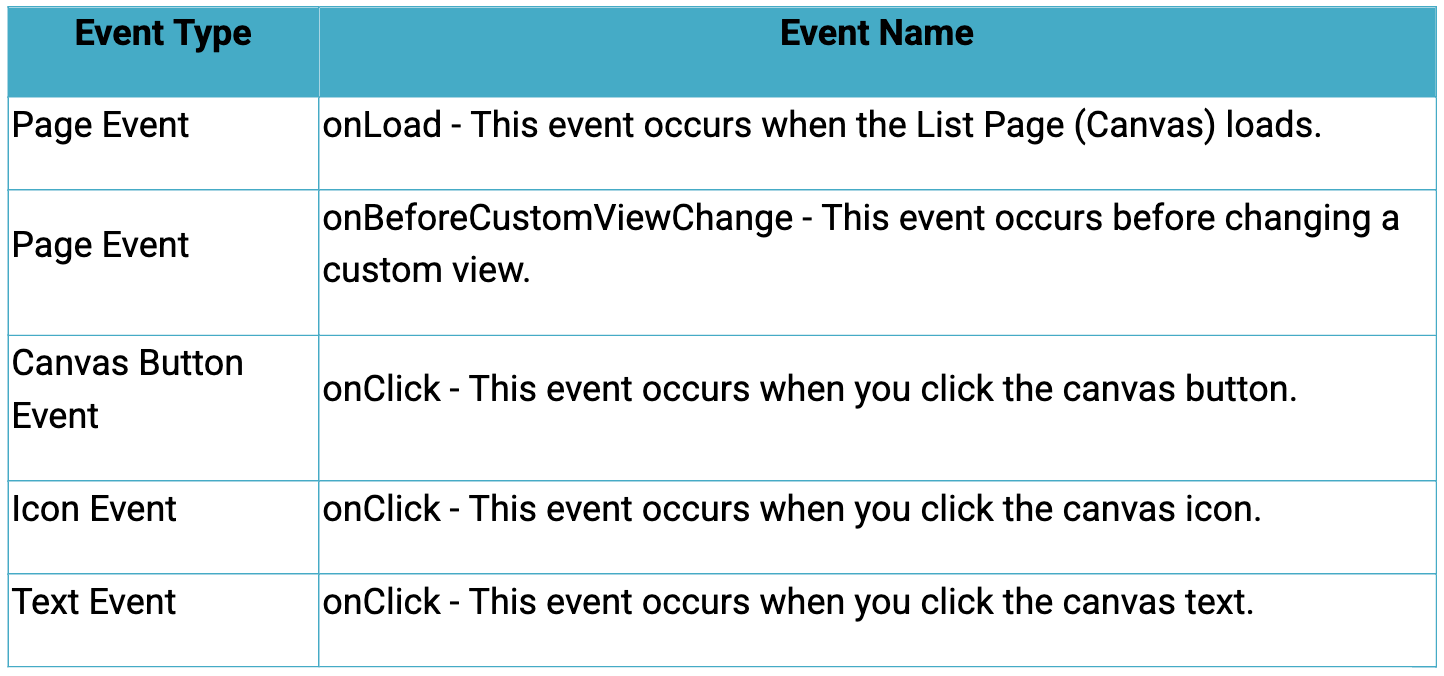
Click here to know more about the Events.
3. Supported ZDKs for List Page(Canvas)
Client Script enables you to customize List Views using the following list of ZDKs and Client Script functions.
- freezeColumns(option) - You can freeze list view and disable modifying columns.
- maskField(field_name, (length,character,reverse)) - You can mask fields in the List View
- sortByField(field_name, option) - You can sort field in the List View
- getRecords() - You can get Records in the List View
- selectRecords(criteria) - You can select Records in the List view by criteria
- selectRecordsByID(ids) - You can select Records in the List view by record ID
- clearSelection() - You can clear selected Records in the List view
- style(style_config, criteria) - You can style Records in the List View.
4. Use Case
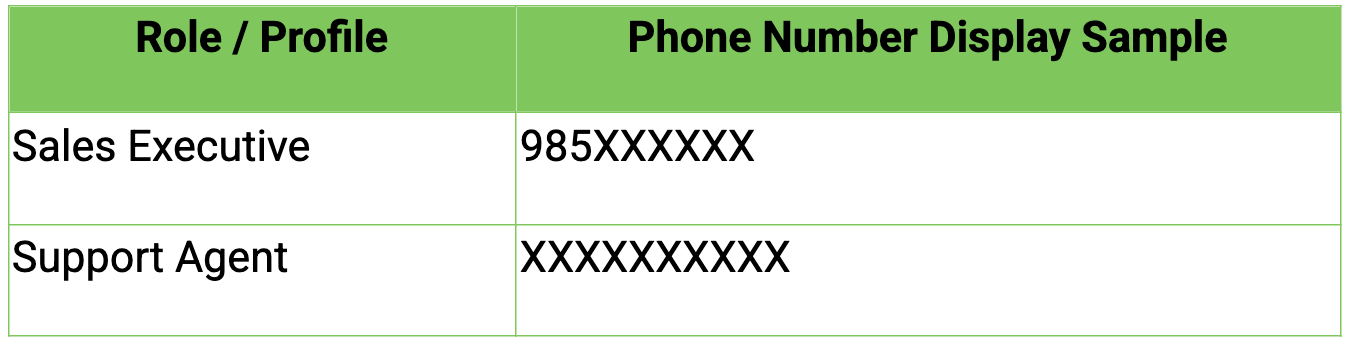
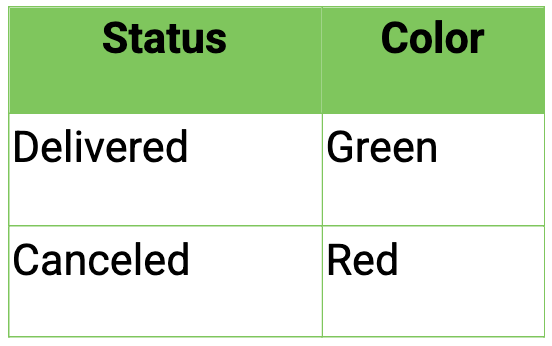
Zylker uses Zoho CRM to manage high-volume orders where customer phone numbers are sensitive data. The CRM Admin wants role-based phone number masking on the Orders List Page (Canvas). To improve visibility and speed, the Admin also wants color-coded order cards in the List View based on order status.
Role-Based Phone Number Visibility
Order Status Color Coding
5. Solution
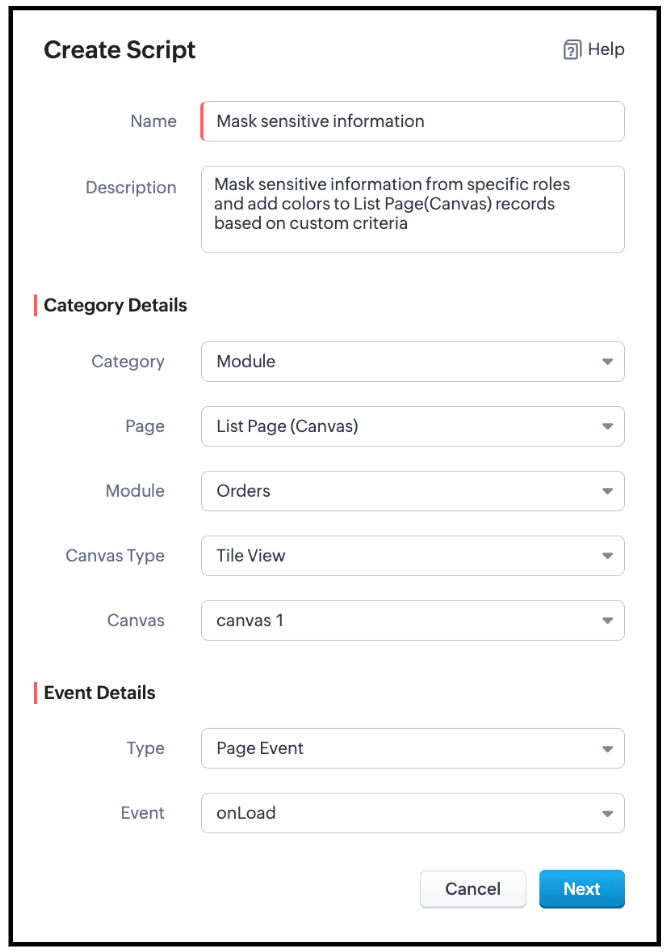
- Go to Setup > Developer Space > Client Script. Click +New Script.
- Specify the details to create a script and click Next.
- Enter the following script and click Save.
- // Mask phone number based on user role
- if ($Crm.user.role.name === "Sales Executive") {
- // Mask 7 digits for Sales Executive
- ZDK.Page.getList().maskField("Phone_Number", {
- length: 7,
- character: "#",
- reverse: true
- });
- } else if ($Crm.user.role.name === "Support Agent") {
- // Mask 10 digits for Support Agent
- ZDK.Page.getList().maskField("Phone_Number", {
- length: 10,
- character: "#",
- reverse: true
- });
} - // Highlight cancelled orders in light red
- ZDK.Page.getList().style({
- record: {
- backgroundColor: "#FFD6D6"
- }
- },
- "(Status:equals:Cancelled)"
- );
- // Highlight delivered orders in light green
- ZDK.Page.getList().style({
- record: {
- backgroundColor: "#D3F9D8"
- }
- },
- "(Status:equals:Delivered)"
- );
- Use $Crm.user.role.name to retrieve the role of the currently logged-in user.
- When the role is Sales Executive, use ZDK.Page.getList().maskField() on the Phone_Number field to mask the first 7 digits, where
- length defines how many characters should be hidden
- character: '#' specifies the masking symbol
- reverse: false ensures masking starts from the beginning, allowing partial visibility.
- When the role is Support Agent, use ZDK.Page.getList().maskField() on the Phone_Number field to mask all 10 digits, fully hiding the phone number using the same masking parameters.
- Use ZDK.Page.getList().style() to apply conditional styling to list records by configuring the record parameter to set the row backgroundColor.
- Apply the condition (Status:equals:Cancelled) to highlight cancelled records in light red, and (Status:equals:Delivered) to highlight delivered records in light green, enabling quick visual identification.
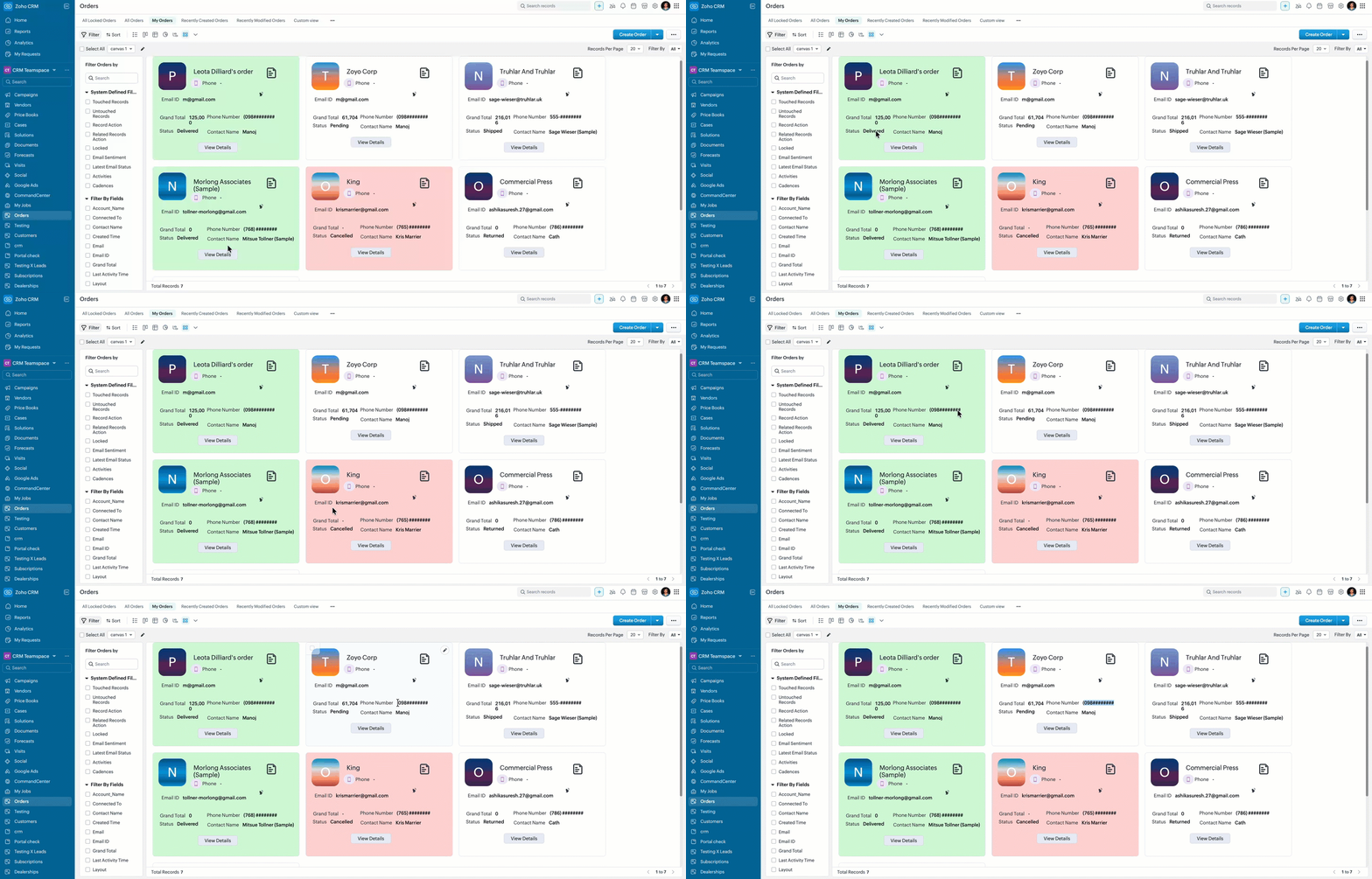
- Here is how the Client Script works for a "Sales Executive".
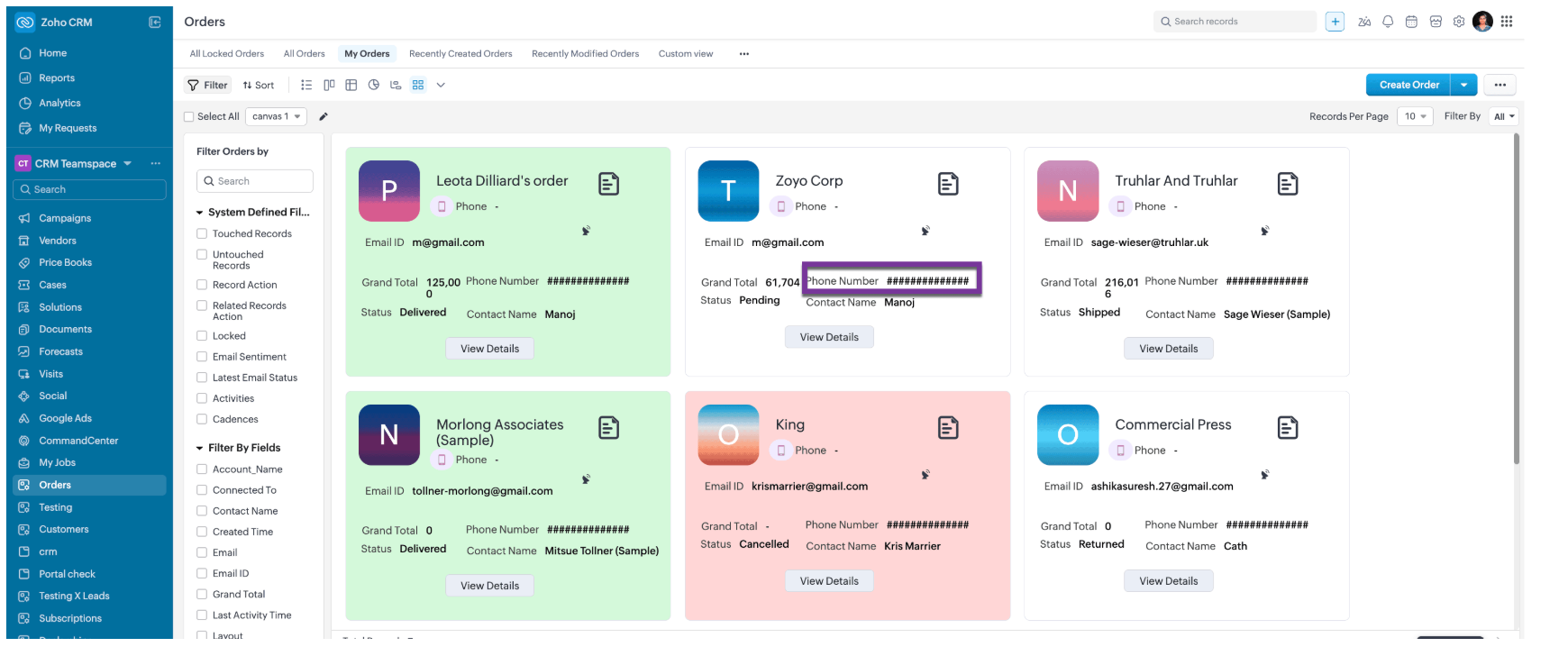
- Here is how the Client Script works for a "Support Agent".
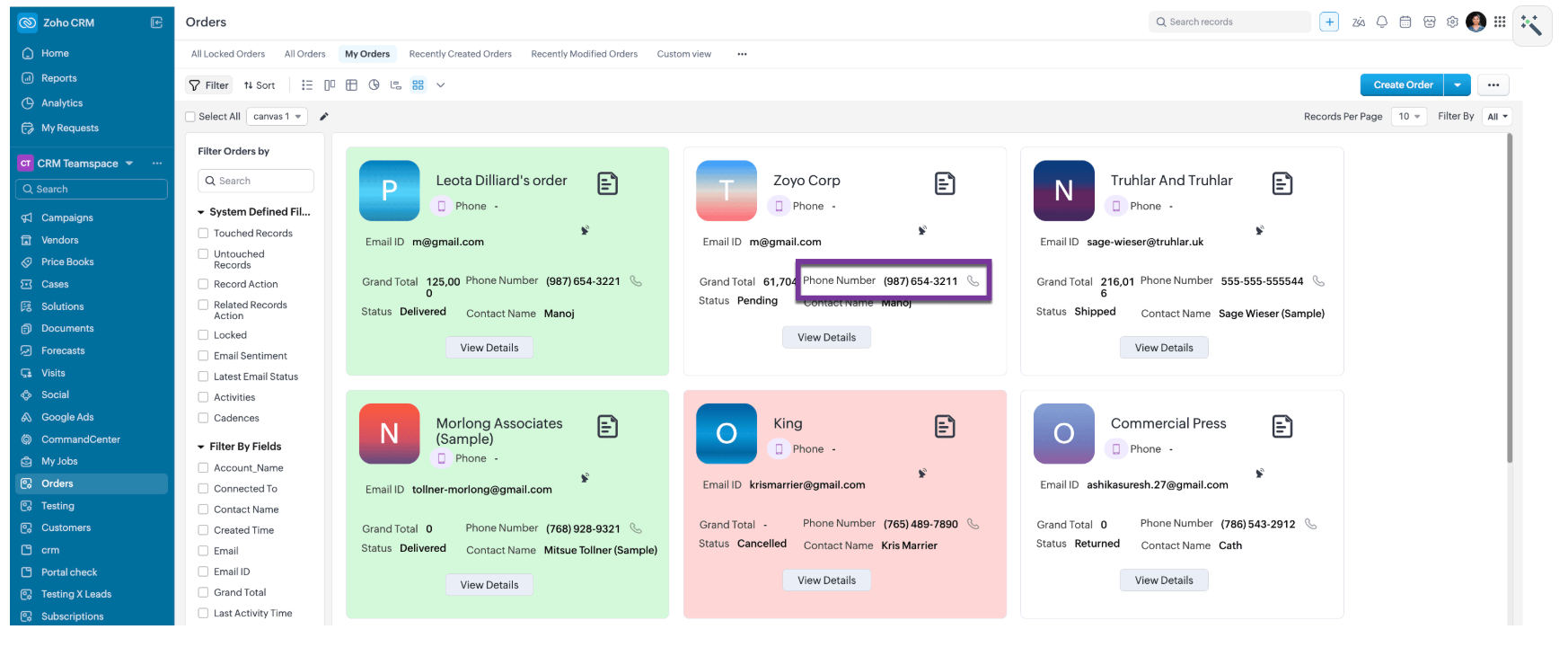
- Here is how the Client Script works for a for other roles like, Manager and Admin.
6. Summary
- Mask sensitive fields dynamically in List Page Canvas
- Apply role-based logic using current user context
- Improve list view readability with conditional record styling
7. Related Links

Topic Participants
Maadhari M
Sticky Posts
Kaizen #198: Using Client Script for Custom Validation in Blueprint
Nearing 200th Kaizen Post – 1 More to the Big Two-Oh-Oh! Do you have any questions, suggestions, or topics you would like us to cover in future posts? Your insights and suggestions help us shape future content and make this series better for everyone.Kaizen #226: Using ZRC in Client Script
Hello everyone! Welcome to another week of Kaizen. In today's post, lets see what is ZRC (Zoho Request Client) and how we can use ZRC methods in Client Script to get inputs from a Salesperson and update the Lead status with a single button click. In thisKaizen #222 - Client Script Support for Notes Related List
Hello everyone! Welcome to another week of Kaizen. The final Kaizen post of the year 2025 is here! With the new Client Script support for the Notes Related List, you can validate, enrich, and manage notes across modules. In this post, we’ll explore howKaizen #217 - Actions APIs : Tasks
Welcome to another week of Kaizen! In last week's post we discussed Email Notifications APIs which act as the link between your Workflow automations and you. We have discussed how Zylker Cloud Services uses Email Notifications API in their custom dashboard.Kaizen #216 - Actions APIs : Email Notifications
Welcome to another week of Kaizen! For the last three weeks, we have been discussing Zylker's workflows. We successfully updated a dormant workflow, built a new one from the ground up and more. But our work is not finished—these automated processes are
Recent Topics
Tip of the Week #63 – Keep personal emails out of team view.
Shared inboxes are great for teamwork—they let everyone stay on the same page, respond faster, and avoid duplicate replies. But not every message needs to be shared with the entire team. Think about those one-on-one chats with a manager, a quick internalEpisode III : Powering Automation: Custom Functions in Action
Hello Everyone, In our previous episodes, we explored custom functions and the Deluge programming language. If you’ve been wondering why the Episode series have been quiet, here’s the reveal! On our community, we've been showcasing custom functions integratedNarrative 2 - Understanding Organizational Departments
Behind the scenes of a successful ticketing system - BTS Series Narrative 2 - Understanding Organizational Departments A ticketing system's departments are essential because they provide an organized and practical framework for handling and addressingZoho Projects Plus for the healthcare industry
The global healthcare industry is complex and diverse; from patient record maintenance, healthcare supply chain, to manufacturing complex medical equipment, the industry functions on many layers. Managing all these layers requires tested out techniquesMissing Outlook calendar option in Calendar
Hi all I don't have an Outlook Calendar option in the Settings > Synchronise settings of Calendar. Any ideas why not?Whats App Automation
It would be nice to be able to send out an automated whats app message template on moving stages or creation of a ticket (same as you can do for automated emails). Currently only automated emails can be sent. Also, if whats app could be used more effectivelyZoho Projects Android app update: Enhanced Documents module within the projects.
Hello everyone! In the latest Android version(v3.9.35) of the Zoho Projects app update, we have enhanced the documents module within the projects. Now, you can view all the attachments that you have added across the project in tasks, bugs, comments, etc,Lead Source Disappears
When adding a new lead and saving the page, the page refreshes itself and the lead source field becomes blank. We set the "Lead source" as a required field to see if it would help, but the problem persists and we always have to re-enter the lead souInquiry Regarding Monitoring ZOHO CRM API Credit Usage
Hello ZOHO Community, I hope this message finds you well. I have a question regarding monitoring the usage and remaining credits of the ZOHO CRM API. I recently discovered that within ZOHO CRM, by navigating to Settings ⇒ Developer Hub ⇒ APIs & SDKs,Payment Gateways - A unified hub to manage all your payment integrations in Zoho Creator
Hello everyone, We're thrilled to announce that we've completely reimagined the way payment gateways are handled in Creator. The result is a centralized Payment Gateways section that provides a clean, user-friendly interface to configure and manage allCommunity Digest Julio 2025 - Todas las novedades en Español Zoho Community
¡Hola, Español Zoho Community! Ha pasado un tiempo desde el último Digest pero, ¡ya estamos de vuelta con las novedades más relevantes en las aplicaciones de Zoho y su universo! Si no te quieres perder ninguna de las novedades que vamos publicando, teTip #35- How to use Notifications in Zoho Assist to stay on top of session activities- 'Insider Insights'
Hello Zoho Assist Community! This week, we’re exploring Zoho Assist’s built-in notification system for improved visibility and accountability. Keeping track of session activity is crucial, especially when you're managing multiple remote devices and technicians.Assistance with Exporting Specific Data from Zoho CRM
Hi, Could you please guide me on how to export specific information, such as the model number and serial number, from the Accounts module in Zoho CRM? Thank you in advance for your assistance.Coming Soon in Zoho Invoice: Send Invoices Instantly via WhatsApp
We're working on bringing a new level of convenience to your invoicing experience. Introducing a much-requested feature in Zoho Invoice: You can now share invoices directly to your customers via WhatsApp! With this new option, you can: Share invoicesfield update from the value of another field
Hello, I need to do a field update from the value of another field, but i don´t know how can i do it. In the mass update option it is not possible... I need to put the last name value form the leads module to other custom field that i have created. thanks for your helpWhat is a realistic turnaround time for account review for ZeptoMail?
On signing up it said 2-3 business days. I am on business-day 6 and have had zero contact of any kind. No follow-up questions, no approval or decline. Attempts to "leave a message" or use the "Contact Us" form have just vanished without a trace. It stillIs there any way to prevent the row cloning feature(on edit page)
My initial requirement is to prevent some users from adding new rows in the subform. For that, I have implemented the client script, and the script is working fine. But users are able to clone the row and make changes. For that, I was unable to find anyHow Do I Change Business Location
Ive just shifted my business to a new country and would like to update my address and Business location in the "Organisation Profile" page but it is locked in the previous country. How do I unlock it / change it? ThanksVerify details pop-up windows
Hi, Is it possible to turn-off the anoying "Verify details" window that ask for closing date, "Reason for Lost" or other concepts. If I would like the user to enter such data, I will implement a rule .... How can I turn-off such pop-up? it's not necessaryMonthly overtime wrong after adding/changing attendance time for past month
Hi there, as I understand it, the montly overtime overview under attendance is calculated at the end of each month. If someone was not able to enter his attendance in time but entered it in the new month, this time will not be considered in the overview.As a security measure, you need to link your phone number with this account and verify it to proceed further.
I want to disable this feature as my one staff travels with different phone numbers so it is hard to verify by phone. How do I do that?Asset Tracking
I am looking to create custom modules to track customer assets. We install serialized and non-serialized equipment into customers vehicles. So we will have vehicles belonging to the customer then equipment that will belong to a vehicle (if installed)【参加無料】8月8日(金) 福岡 ユーザ交流会 参加登録 受付開始!
ユーザーの皆さま、こんにちは。コミュニティチームの藤澤です。 8月8日(金)に1年ぶりに、福岡でZoho ユーザー交流会を開催します! ユーザー事例セッションでは、CreativeStudio樂合同会社の前田 美知太郎さまが、労働時間を削減したZoho活用のリアルな工夫を語ります。 Zoho社員セッションでは、データ収集から自動処理まで一気に効率化できるZoho Formsの最新活用アイディアをお届けします。 ▷▷詳細はこちら:https://www.zohomeetups.com/Fukuoka2025#/?affl=fuk2508forumpostUnusable due to "server" issues but there's nothing on Zoho or Down Detector saying there's an outage
I just started the Zoho trial and I cannot do anything because no apps or even the "contact support" will actually load. I tried to create a project but it keeps giving me the error "server is unable to process your request at this time". I tried to loadIssue After Updating to Zoho Desk Android SDK v4.5.0 – Authentication Fails (Status Code 204)
Hi Zoho Support Team, I was previously using the Zoho Desk Android SDK with the following dependency: implementation 'com.zoho.desk:asapsdk:3.0_BETA_17' Everything was working as expected — including user authentication, the tickets section, and theadd another department to helpcenter
After activating multi-brand, how to add another department to help center? For example department A has associated with help center 1. We have another department B and would like user to be able to submit ticket to department B via help center 1, howTask and Milestones - Dependency feature needed
I'm sure we're not the first to bring this up. We've been using zoho project for a while. Every project manager knows that to manage a successful project you need option to stack tasks and milestones and be able to create dependencies between tasks and milestones. I think you get the idea... Can you let us know if this feature is in the making or not? any chance we'll see this in future releases? If you need customer feedback about this feature or other enhancements, we'll be happy to test new productsZOHO DESK | SET PERMISSION NOT TO ALLOW SPECIFIC AGENTS TO CREATE TICKET
Hi Zoho Team, I have a question regarding this: "Team Desk are the ones to have the permission to create a ticket, Team OPS resolvers must not create a ticket." - How to set permission to Team OPS resolvers for not creating a ticket? Only Team Desk shouldOn success Workflow not triggering from external Zoho Form submission
Hello everyone, I'd really appreciate your help. I'm building a system, where I'm using Zoho Creator as a crm/spreadsheet to manage movements of inventory. I have 3 "forms" or tables, where one is a main table for obersving status on all inventory, anotherTax is missing in expense unable to submit report
Im getting the above error when submitting a report with an expense. Its complaining about the Tax is missing but there is no Tax area just "Amount". And if I try to Itemize the amount to break out the tax portions with the initial product portion itTime-based Automations updates does not trigger Webhook
Hi, When a ticket is updated by Time-based automation, it doesn't seem to trigger the webhook event. I looked at the ticket history for the problematic tickets, they were all changes made by action with this label: `Ticket was updated through a Time-basedCan't find parent child ticketing
Hi I can't find parent child ticketing under tickets in this new organization... I have in the past on other organizationsFiltering Parent and Child Tickets in Analytics
Hello Zoho Support Team, We’ve noticed that when checking our ticket analytics in Zoho Desk, the data merges both parent and child tickets for key metrics like the number of new tickets, closed tickets, and first response time. This results in inaccurateLink Zoho Inventory Sales Order with Zoho Desk Ticket
I'd like to, in a Zoho Inventory Sales Order, see linked/related Zoho Desk tickets. When I'm in Zoho Desk, I can look up related tickets to the sales order, but I can't seem to do it in the reverse manner (where when I'm in a Zoho Inventroy Sales Order,Shopify integration
I need to integrate Shopify with Zoho BooksCan't type latin characters Mac x Windows
I access a Win XP machine using Chrome on Mac OS X High Sierra and I can't get special characters like á é ó â ê ô ã õ à í ú to work. I tried a few different keyboard layout setups, but nothing worked. I end up having to type a lot of stuff in a local notepad for further copy and paste, which is not convenient at all. Am I missing anything? How can I make this work? Thanks.Zoho People & Zoho CRM Calendar
Hi, Does anyone know if it is possible to link Zoho People and the calendar in CRM? I would like when holidays are approved they automatically appear in the calendar on CRM. ThanksHow to add Leave Type Permission Start Time
Hi, I have a requirement to add Leave Type : Permission Start Time on the email template to which is end to the reporting manager. But I am unable to find the field in the list of fields. How to achieve this?How to get batch number of item by api?
Hi there, Is there any way to get batch number of item by api? Batch number is the batch reference number in https://www.zoho.com/inventory/help/advanced-inventory-tracking/batch-tracking.html . When I call the https://www.zoho.com/books/api/v3/#Items_Get_an_itemQuestions about ACH in Zoho Billing
We have ACH enabled for subscriptions in Zoho Billing and we have the option enabled for users to be able to log in to their bank to add the account to their payment methods. Questions: 1) If the user's bank isn't supported via the log-in method, willNext Page