Tip #7: Customize the appointment confirmation page
A confirmation page plays a crucial role in creating the first impression, as that's where customers land when booking with you. It shows your brand identity, engages your audience, and drives more conversions. Yet, this section is often overlooked when establishing an online scheduling process. That's why Zoho Bookings makes it simple to create your own confirmation page.
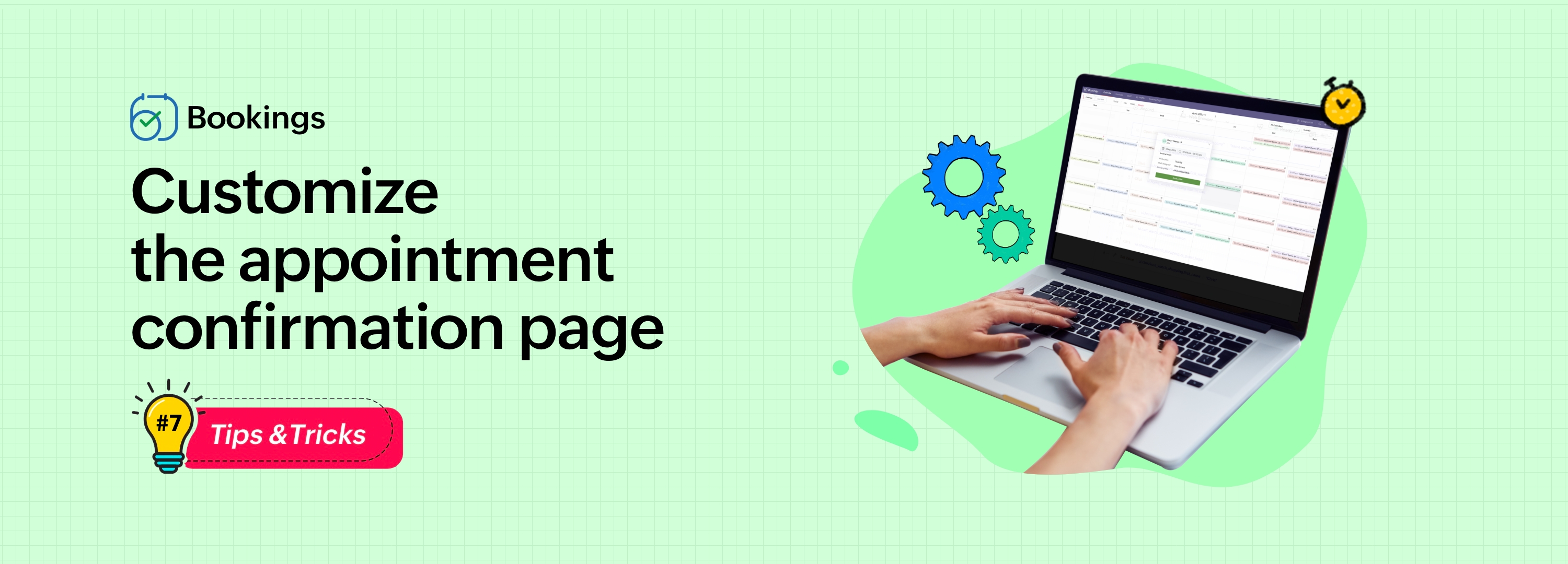
After booking an appointment, the customer will see a confirmation page. This is the default confirmation page of Zoho Bookings.
If you'd like, you can redirect the customer to your website instead. You can also get the customer and appointment details through the URL and utilize it to enhance the user experience.
Redirecting to your webpage offers many advantages.
➤ Better branding: Gain better control over the page design and give the customer a more cohesive navigation experience.
➤ Cross-promotion: Promote other services and encourage the user sign up for your newsletter or promotional emails to improve revenue.
- ➤ Additional information: Show additional details than that of the existing confirmation page and customize according to your need.
Use case
Jacob is a financial advisor in Zylker Consultations. Whenever a customer books a Medical Insurance Planning session with him, he wants the customer to explore other services related to it (say, life insurance or car insurance). So, he sets the confirmation page so that it lands on his site's insurance page. This way, he attracts more business by offering special discounts for further bookings.
Please note that each service can have different confirmation pages.
To customize the confirmation page for a service
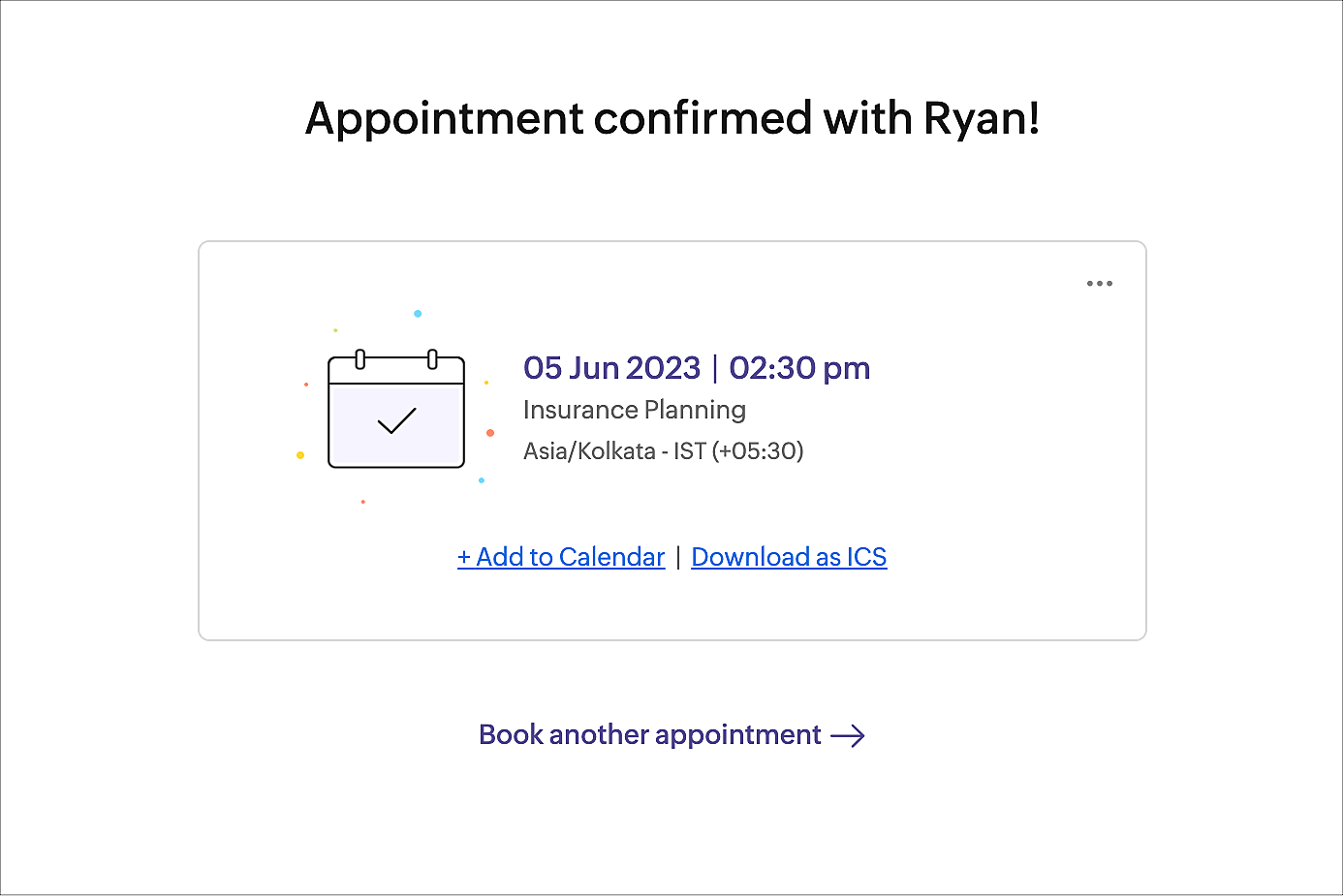
Navigate to Services > (Select the required service) > Service Preferences.
Under General, click the edit icon next to the option Booking Confirmation Page.
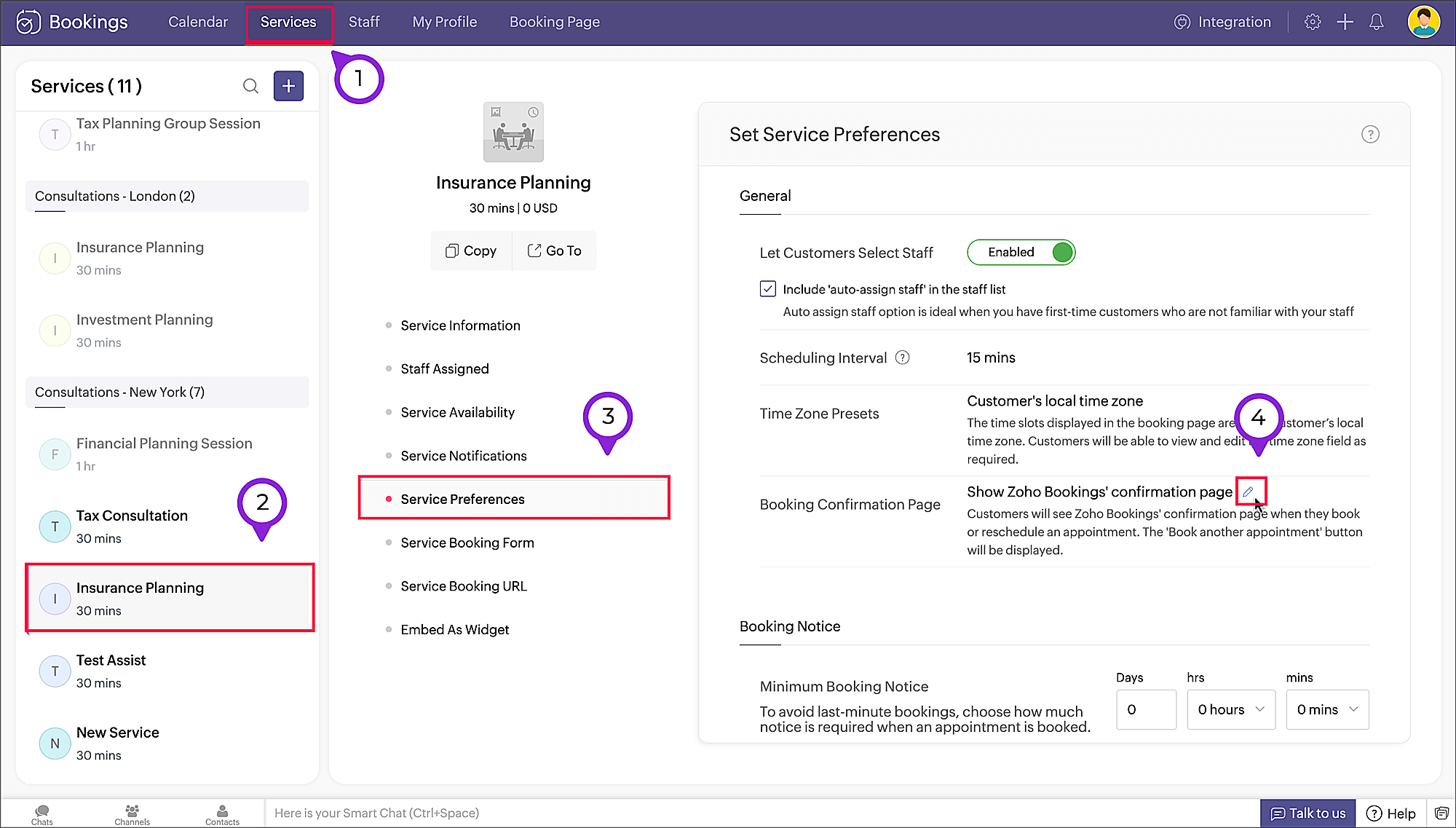
A pop-up appears. From the dropdown, select Show your own confirmation page.
In the Enter page URL textbox, enter the url of your preferred confirmation webpage.
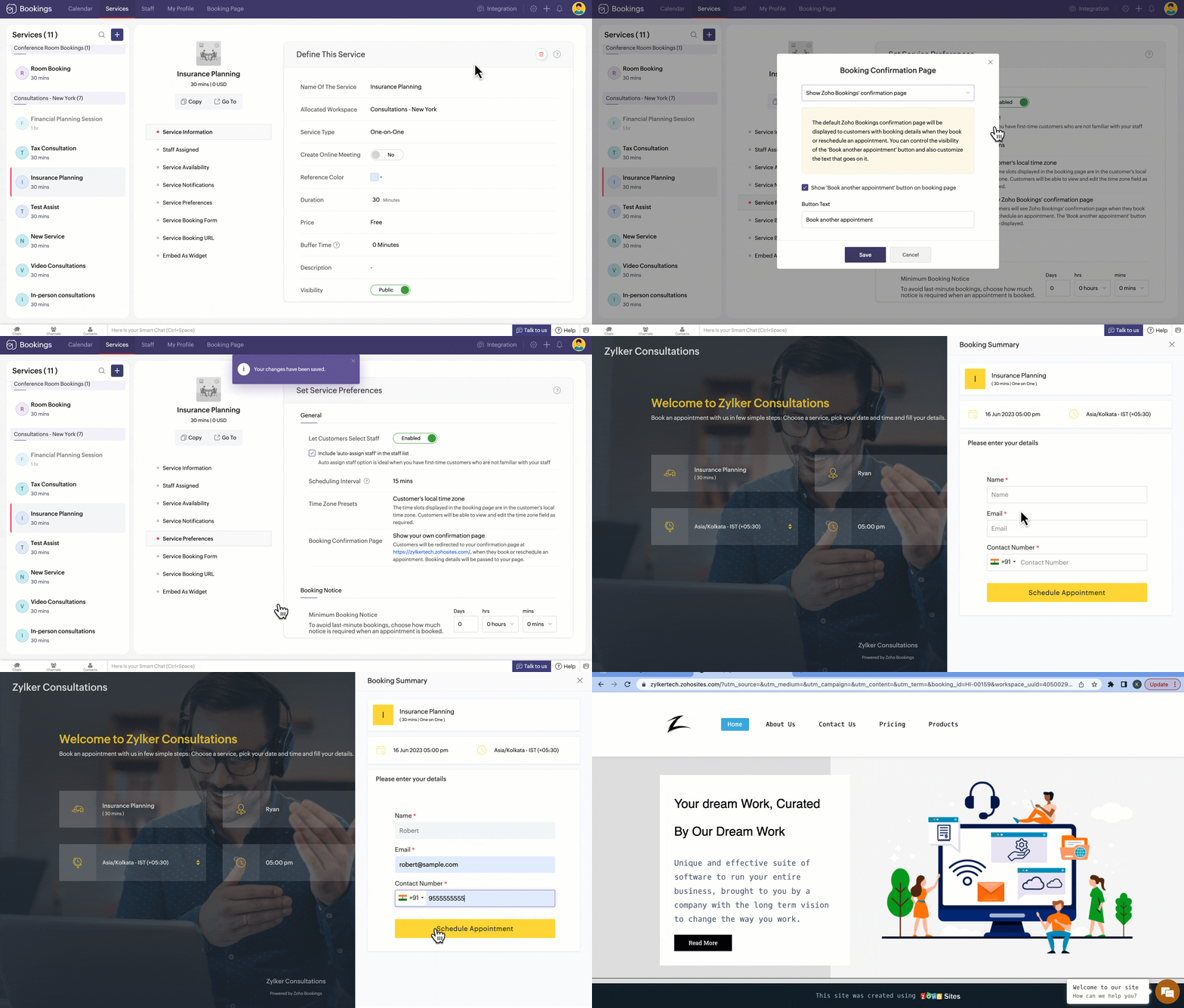
The appointment details are included in the URL and can be used to show customer or service details on your website. This is useful if, for instance, you'd like to retrieve the customer's age range and show them relevant services.
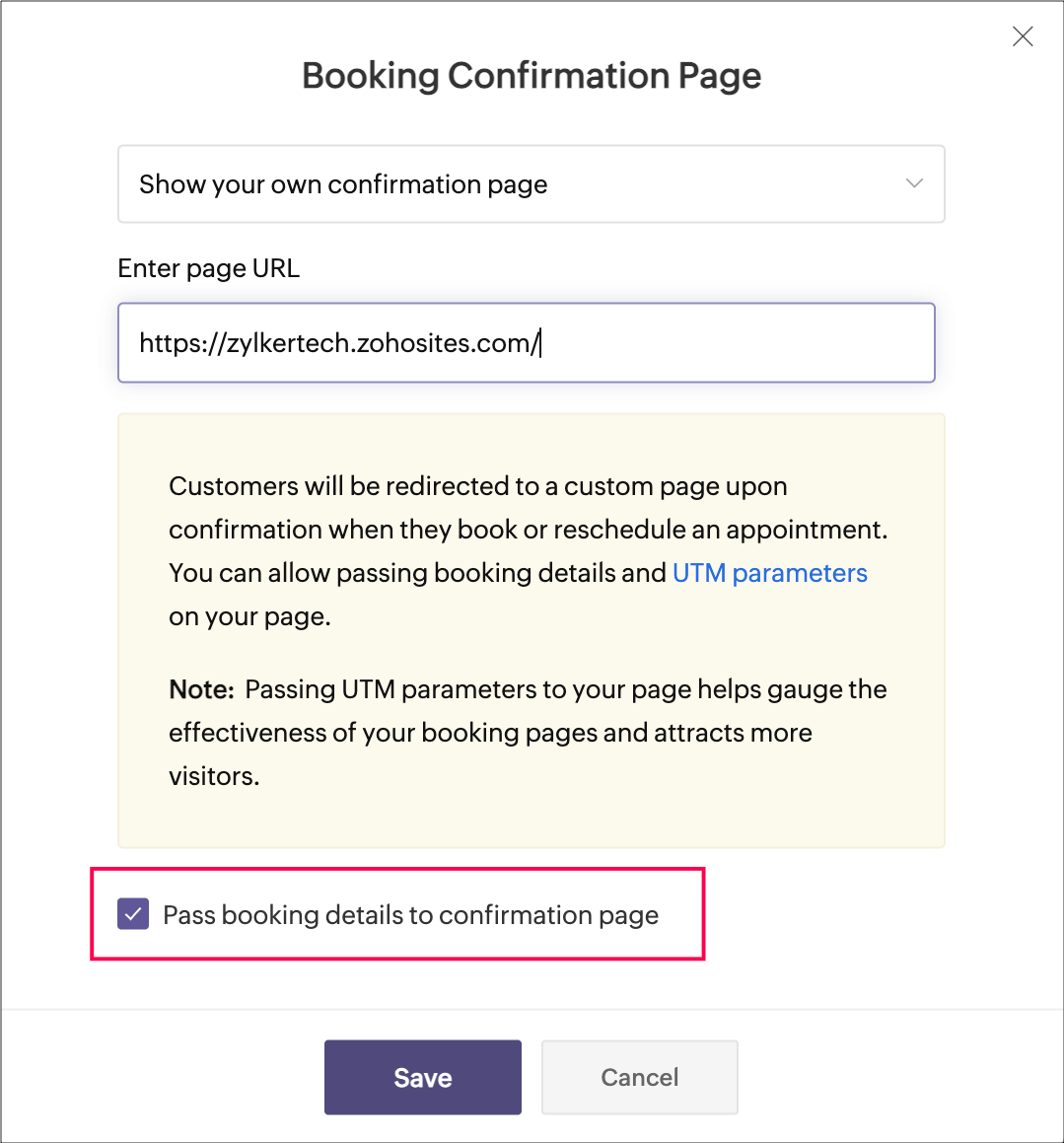
Below is the list of parameters that are passed.
Booking details
1. booking_id=<value>
2. workspace_uuid=<value>
3. workspace_name=<value>
4. assigned_to=<value> (staff or resource name)
5. service_uuid=<value>
6. service_name=<value>
7. booking_start_time=<value> (represented in ISO 8061 format in customer timezone)
8. booking_end_time=<value> (represented in ISO 8061 format in customer timezone)
9. booking_cost=<value>
10. booking_cost_paid=<value>
11. booking_currency=<value>
Customer details
12. customer_name=<value>
13. customer_first_name =<value> (if applicable)
14. customer_last_name=<value> (if applicable)
15. customer_contact_no=<value>
16. customer_email=<value>
Custom fields
17. customer_<custom_field_name>=<value>
You can fetch these values and use them on your confirmation page as you wish.
In the above case, you can fetch the customer name (Robert) and the service he booked (Insurance Planning) from the URL. This can be used to display the confirmation message of your choice ("Hey Robert! Thanks for booking the Insurance Planning consultation.").
This custom confirmation page can also be set at the workspace level. Refer to the help articles below for more info.
Workspace Preferences - Confirmation Page
Service Preferences - Confirmation Page
Hope you find this tip helpful. Let us know in the comments if you have any questions.
Stay tuned and happy scheduling!
Topic Participants
Praveena Chandran
Total BusinessWare
Akshara Amarnath
Ward van de Oudeweetering
Sticky Posts
Tip #13: Identify where your bookings come from with Source Tracking
Source tracking is the practice of identifying where your bookings originated. This is important, because online bookings come from a wide variety of sources like social media platforms, your website, email and ad campaigns, partner websites, organicTip #17: How to mandate partial payment for your appointments
When you require partial payments during the booking process, customers can only schedule with you after paying a certain amount in advance. This deposit acts as a commitment between both parties. Apart from that, it has many more advantages. BenefitsTip #18: Organize a group workshop in a few steps
It's the season for workshops—they're everywhere, catering to diverse interests and needs. Whether for more professional goals like leadership development or creative endeavors like painting, there's an abundance of workshops offered every day. A schedulerTip #16: Custom labels for staff, service, and resources
Every industry uses its own jargon. Take healthcare, for example; when you visit a doctor, it's not just an appointment, it's a consultation. The people who provide consultations are the providers. Similarly, in the tranquil world of a spa, a massageTip #15: Customize service prices for each staff member
It's common practice for a service to be priced differently based on the staff member providing it. For example, an experienced hair stylist may charge more for a haircut compared to the other stylists. This pricing strategy allows businesses to charge
Recent Topics
Introducing Contract Settings & Backdated Contracts in Zoho Contracts
We are rolling out updates that give you more control over how contracts are created and managed in Zoho Contracts. From defining default workflows with Contract Settings to aligning agreements with real timelines using Backdated Contracts, these enhancementsCelebrating our customers on International Client's Day
Hi everyone, Every customer is part of our Zoho Desk family, and we wouldn’t want to miss celebrating you on this special day. This International Client's Day, we’d like to take a moment to appreciate every customer who has helped us grow and build meaningfulFaster Ticket Response with use of Snippets in comments
Hello everyone, Responding to tickets often involves repeating the same messages, whether it is sharing updates with customers or leaving notes for internal collaboration. To make this easier and more consistent, we are allowing agents to use snippetsImproving Zoho Creator's email deliverability
Hi all, We're pleased to announce updates to email handling in Zoho Creator to improve the deliverability of the emails sent from the Creator platform. These updates have been designed keeping in mind the fact that emails from domains with strong senderWhat's New in Zoho Billing | February 2026
February brings a powerful set of updates to Zoho Billing, from smarter subscription management and flexible payment options to better reporting and more control over your hosted pages. Here's everything that's new this February. Create SubscriptionsReassign Partially Saved Entries
Hi, I would like to be able to go to Partially Saved Entries and like the option to delete them I would like the option to multi-select and be able to reassign them to another user to complete (Such as when a user has left the company). Thanks DanDisplaying only unread tickets in ticket view
Hello, I was wondering if someone might be able to help me with this one. We use filters to display our ticket list, typically using a saved filter which displays the tickets which are overdue or due today. What I'd really like is another filter thatIssue creating a YTD report with last years numbers
I am looking to create a widget to compare the YTD leads we have in 2023 to the YTD leads we had in 2022. I'm having issues with the aggregate formula creation to gain access to the 2022 Leads YTD data point. Feeling like this is a common view of dataBrand Studio Projects in Analytics
Hi All, Currently pulling my hair out over trying to link together some social media posts for a reporting dashboard in Analytics, so I thought I'd see if anyone on here had a solution. Our Marketing Team created a LinkedIn campaign in Zoho Brand Studio,Manage Testing Process in Zoho Sprints
Agile framework supports a robust quality assurance system that incorporates continuous testing throughout the development lifecycle of the product. The agile testing team focuses on planning the testing around the development, identifying defects earlyAnnouncing the Zohotshots of the ZDC Hackathon 2025
Hey everyone, The wait is finally over! After weeks of building, experimenting, and pushing creative boundaries, we’re excited to announce the winners of the second edition of the ZDC Hackathon. This edition brought together an incredible community ofZOHO CRM Button Integration
Hi Team, I’m currently working with Zoho CRM along with a custom application where I fetch deal details from the CRM and use them based on my requirements for each deal. Now, I want to enhance this setup. I plan to create a button on the Deal Detail pageMajor journey crash and not loading. Zoho Marketing Automation
Hi all. Last night (19MAR, 2026) Marketing Automation for a specific journey completely crashed, and since the crash the specific journey has failed to load at all (blank journey canvas, no journey appears, no menu accessible) but other separate journey'sSubtotals per Header
Hey, we would like to display subtotals per header in our invoices:Candidate Assessments, no workflows.
I have an issue where I would like to trigger a workflow based on a candidate assessment being completed. Sometimes a returning candidate will complete a second assessment, on completion the status of the candidate will be updated to "Unqualified" ifMail Merge in Zoho Desk
Hello Team, Do we have an option of mail merge within Zoho Desk like we have in Zoho CRM? We have a requirement to generate some pdf file in the form of mail merge doc from the ticket.Support Required for Integrating Zoho SalesIQ in Flutter Web
Hi Team, I have developed a Flutter application and I am currently using the salesiq_mobilisten: ^6.5.4 package. As per the package documentation ( https://pub.dev/packages/salesiq_mobilisten ), it supports only Android and iOS, and it is working fineZoho vault filling in a form it's not supposed to fill in
Hey there, I have a problem with ZOHO Vault autofill. In a software package, we have these options: For some reason zoho vault always replaces what's in the top option and fills a 2fa password in there, and then saves that value.. Meaning whatever wasZoho Booking Integration with Desk
Just wanting to share something in case it helps someone else who may run into a similar use case as we did. Issue: Currently, the Zoho Booking integration with desk will drop a comment into the ticket when a customer books a time, however it won't changeLet us view and export the full price books data from CRM
I quote out of CRM, some of my clients have specialised pricing for specific products - therefore we use Price Books to manage these special prices. I can only see the breakdown of the products listed in the price book and the specialised pricing forSyncing calendar with Google Calendar doesn't work when events are sent to auto repeat
Hi... The ZOHO CRM -- GOOGLE CALENDAR sync is broken. If I create a single event on either side, sync works, but if I create an event with auto repeat on either side it doesn't work. Furthermore, events created before the sync don't show up in the calendar.Organization wide Account and Contacts Visibility/Sharing Capabilities?
Has anyone figured out a way to make visibility or sharing of Accounts and Contacts to be available across the entire organization without having to have every individual user edit their Sharing permissions? For our sales folks they need to be able toNotification of Interaction Assignment
If a user is assigned an interaction, they should be notified via email. These are almost useless because if I assign an interaction for someone to respond to, they dont know that I assigned it to them without me telling them or them logging in and discoveringCountries List Global Set- Complete with Phone Country Code and Continent.
Dear Zoho Team I saw your recent addition to the Global Sets regarding the Countries list and states. While working on it, why didn't you also add things like Continent and Phone Country Code? Also, some ISO codes from some Countries/regions are misCustom Display Field for Lookup Dropdowns in Zoho CRM
Could Zoho CRM support changing the display field in lookup dropdowns, like Zoho Creator does? This would make it much easier to select the right record by showing a more useful field instead of only the default one. It would improve speed, clarity, andMessage as bot
I would like to be able to send a Cliq message truly as a bot. the current implementation of this function, while it sends the message as a bot it sends that message inside a chat from the user how authenticated the flow cliq connection instead of directlyA2P 10DLC Opt-in Rejection Issue with Zoho Creator Public Form
Hi everyone, I’m working on an A2P 10DLC SMS campaign and running into repeated rejections due to opt-in issues. I’m using Zoho Creator for the registration flow. The form is public (no login required). Users enter their phone number and there is an uncheckedTrouble with using Apostrophe in Name of Customers and Vendors
We have had an ongoing issue with how the system recognizes an apostrophe in the name of customers and vendors. The search will not return any results for a name that includes the mark; ie one of our vendors names is "L'Heritage" and when entering theBooks <-> CRM synchronisation with custom Fields
Hello, We are synchronising Books Customers with CRM Accounts. In CRM Accounts I set up last year a "segments" multiselect field shown below In Books, I set up a custom multi-select field with the same value as in the CRM And set up the synchronisation inside Books. Want to synchronise the Books Segments with the CRM Segments, but the later doesn't exist, and another non-existing is there ?! First, I don't understand where the field Segmentation is coming from. Second, I set CRM Segmentation to syncRecording overpayment?
So a customer just overpaid me and how do I record this? I can't enter an amount that is higher than the invoice amount. Eg. Invoice is $195 and he sent $200. He's a reccuring customer so is there a way to record so that he has a $5 advance for future invoice?Introducing the New Zoho Assist Quick Support Plugin
We are thrilled to announce the new Zoho Assist Quick Support Plugin, the upgraded and enhanced version of the Zoho Assist Customer Plugin. This new plugin allows organizations and IT administrators to deploy it directly onto their customers’ devices,Automate your signing workflows with Zoho Sign + n8n
Hello! We're excited to announce that Zoho Sign is now available as a community node on n8n, a popular open-source workflow automation platform used by tens of thousands of teams worldwide. n8n lets you connect apps, APIs, and services through a visualRetainer invoice in Zoho Finance modlue
Hello, Is there a way of creating retainer invoices in the Zoho Finance module? If not can I request this is considered for future updates please.Spotlight #27: Embed visual collaboration Spaces in your presentations using the Vani add-on
Hello everyone! This month’s spotlight feature is the Vani add-on for Zoho Show. Every time you pause your presentation to open another tab or pull up supporting material, you lose a bit of momentum. At Zoho Show, we design features that keep everythingCRM
Is anyone else experiencing this issue? Our company is not moving out of using Gmail's web app. It just has more features and is a better email program than Zoho Mail. Gmail has an extension (Zoho CRM for Gmail) that we're using but we've found some seriousGood news! Calendar in Zoho CRM gets a face lift
Dear Customers, We are delighted to unveil the revamped calendar UI in Zoho CRM. With a complete visual overhaul aligned with CRM for Everyone, the calendar now offers a more intuitive and flexible scheduling experience. What’s new? Distinguish activitiesGlobal Search / Command Palette in Live App
Zoho Creator applications can contain many forms, reports, pages, and dashboards. While navigation inside the app is smooth, users still need to move through multiple menus or screens to find specific records or open particular modules. Currently, inNew 2026 Application Themes
Love the new themes - shame you can't get a little more granular with the colours, ie 3 different colours so one for the dropdown menu background. Also, I did have our logo above the application name but it appears you can't change logo placement positionSmarter appointment allocation with round-robin distribution
Greetings from the Zoho Bookings team! We’re excited to introduce the Appointment Distribution feature, a new way to decide how appointments are assigned among users. By default, appointments are distributed evenly across all event types, but this enhancementAnalytics & Reporting Improvements + Export Bug
Hello, I would like to raise several important product suggestions and issues regarding Zoho Expense: 1. Filter in Admin View → Analytics → Expense Details → Receipt Is it possible to add a filter that allows us to prioritize or sort reports that haveNext Page