Zoho One Tips & Tricks 03: Zoho Commerce integraties
Sinds een aantal maanden behoort Zoho Commerce tot Zoho One. Met deze app heb je de mogelijkheid om een webwinkel op te zetten en net zoals met alle andere Zoho-apps is het mogelijk om meerdere apps te integreren. Uiteraard is de vraag, waar begin je? En welke voordelen levert dit op?
Voordeel integraties:
Door deze apps te integreren leg je alvast de basis voor toekomstige activiteiten zoals nieuwe producten toevoegen, je salespipeline managen en je marketing-activiteiten uitvoeren. Zo hoef je niet meer op afzonderlijke apps dezelfde producten toe te voegen, je mailing op te stellen en behoud je het overzicht van je sales en inventaris.
Van alle apps die binnen Zoho One mogelijk zijn, adviseren wij om deze vijf apps als eerste te integreren met Zoho Commerce.
- Zoho CRM
- Zoho Inventory
- Zoho PageSense
- Zoho Markering Automation
- Zoho SalesIQ
Om te beginnen, ga naar Zoho Commerce.
1. Klik op "Settings"
2. Ga vervolgens naar "Integrations"

Zoho CRM:
Met Zoho CRM beschik je over de mogelijkheid om je verkoop te managen. Je kan de app gebruiken om producten en klanten van jouw winkel te synchroniseren in CRM en vice versa.
Voordelen van de integratie:
- Je vereenvoudig je salesproces. Voeg onder andere alle inschrijvingen van jouw online winkel rechtstreeks toe aan CRM,
- Stuur gepersonaliseerde sms-berichten naar jouw klanten wanneer hun bestelling is bevestigd, verzonden of afgeleverd
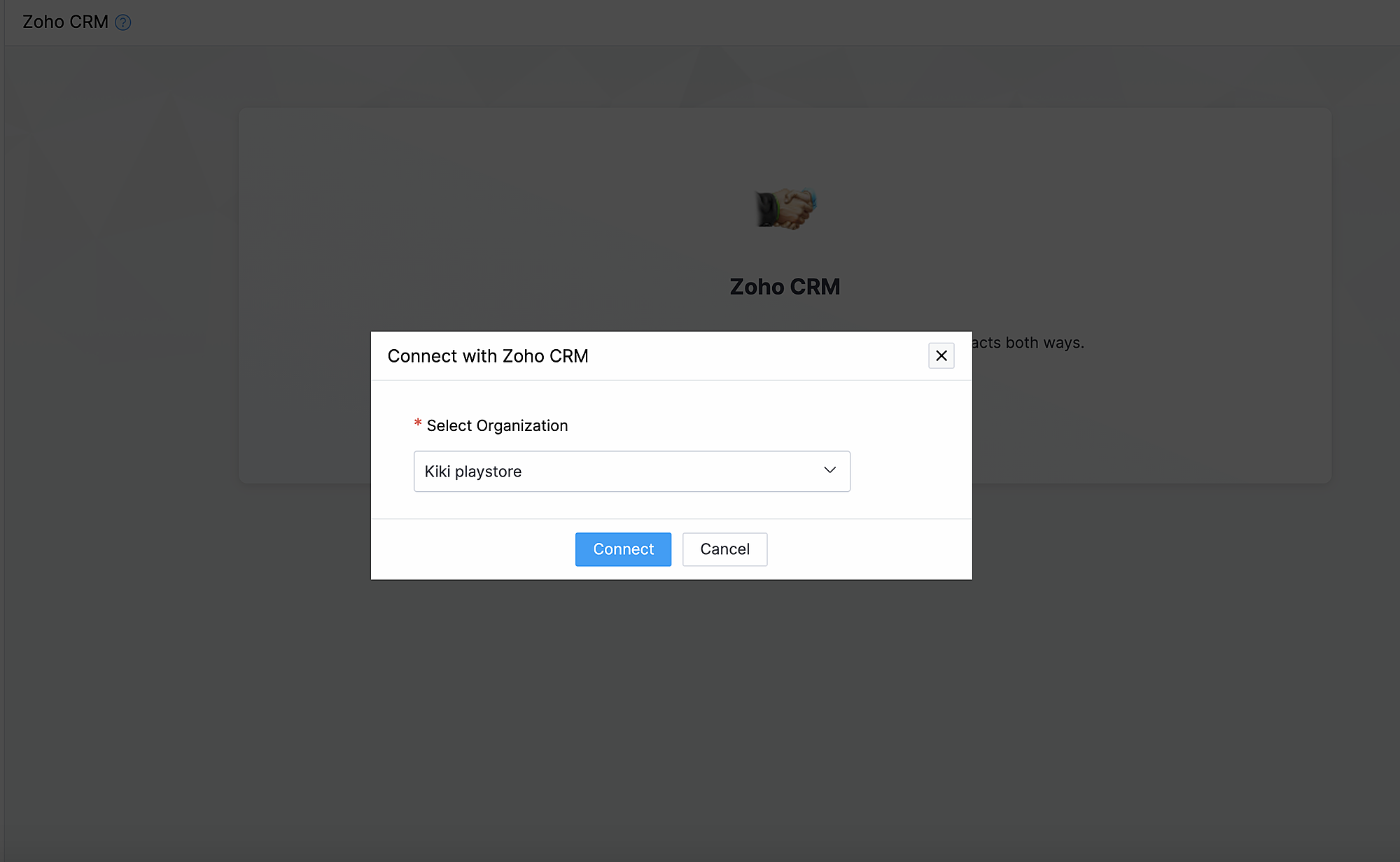
1. Ga naar instellingen, klik onder Integraties Zoho CRM.
2. Klik op Connect
3. Importeer contacten en producten van Zoho CRM en kies de organisatie van de dropdown.
Synchroniseer contacten.
Met deze functionaliteit synchroniseer je de contacten die je in Zoho CRM heb gemaakt met Zoho Commerce.
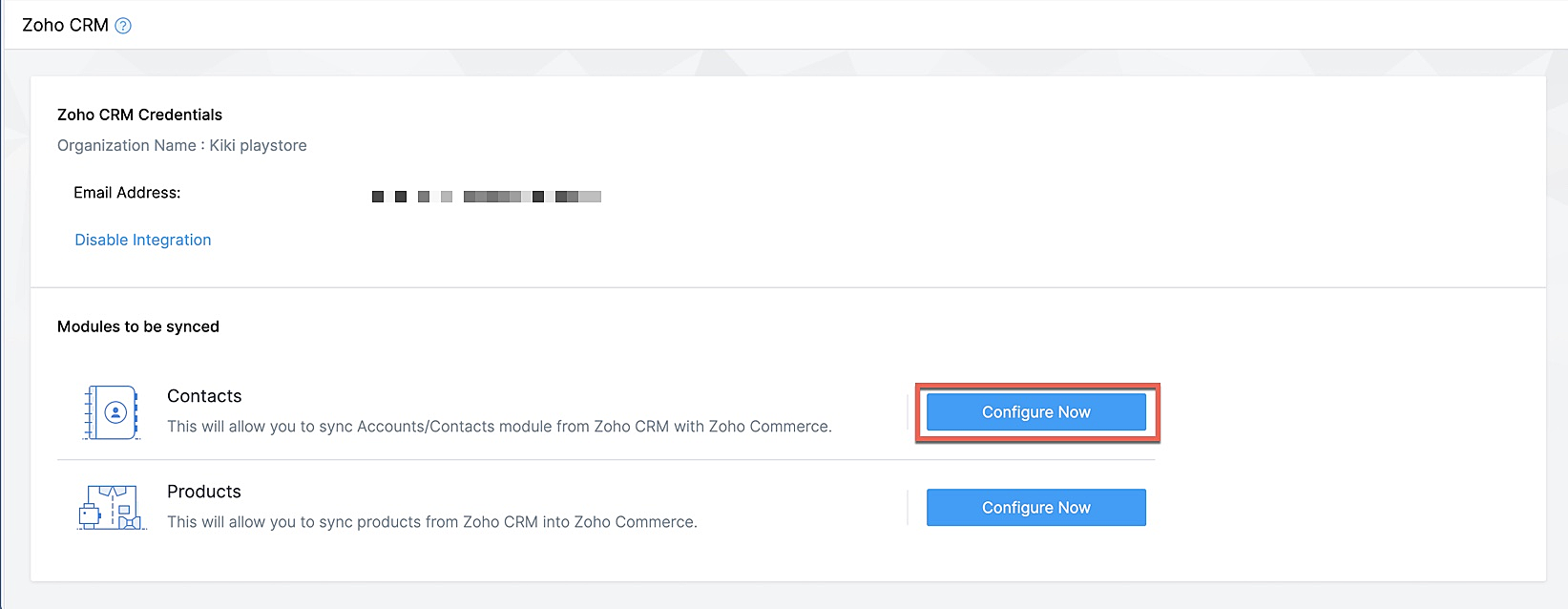
Klik op Configureer nu naast Contact
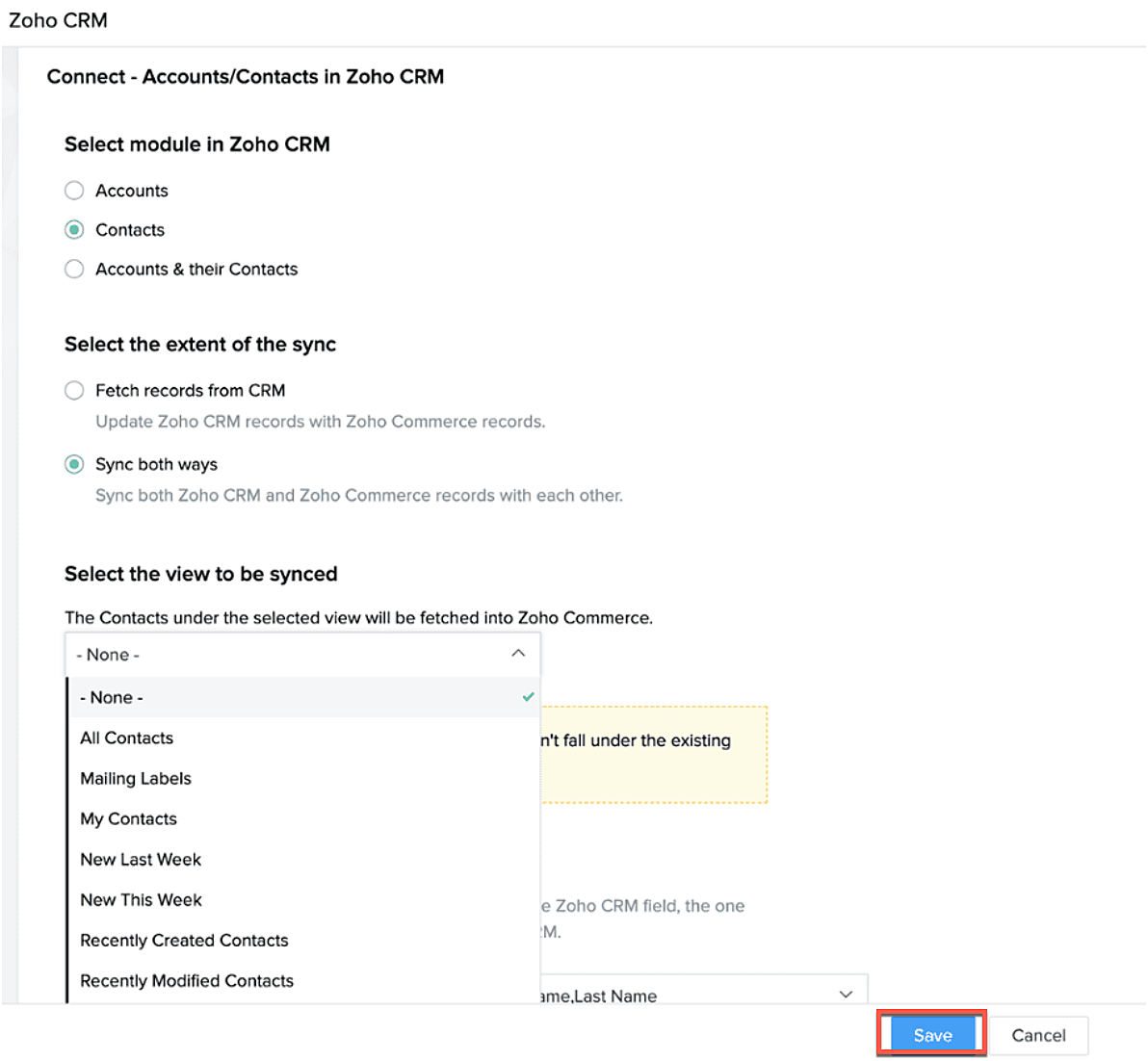
Selecteer de Zoho CRM module die je wilt synchroniseren
Kies tot hoever je wilt synchroniseren.
Selecteer de type CRM view die je wilt synchroniseren.
Producten synchroniseren.
Maak je producten in CRM of in Zoho Commerce? Synchroniseer het met elkaar zodat je ze niet twee keer hoef in te voeren. Klik op deze link om te lezen hoe je producten moet toevoegen in Zoho Commerce.
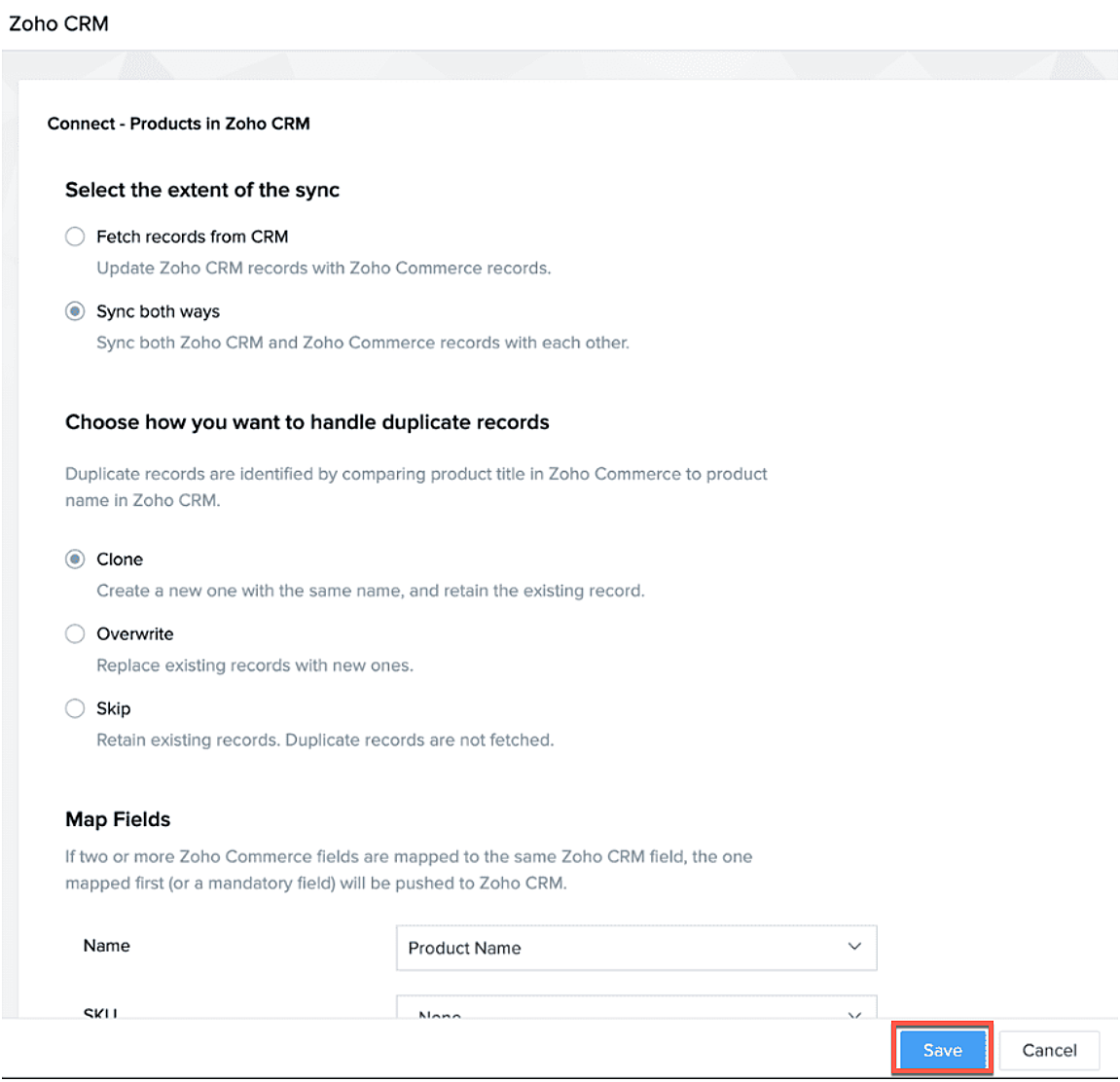
Klik op configureer producten.

Selecteer of je alleen je producten wilt ophalen of je van beide platformen wilt synchroniseren.
Selecteer of je het wilt klonen, overschrijven of na wilt bootsen.
Geef aan waar je het wilt plaatsen zodat Zoho Commerce de velden kan blijven synchroniseren.
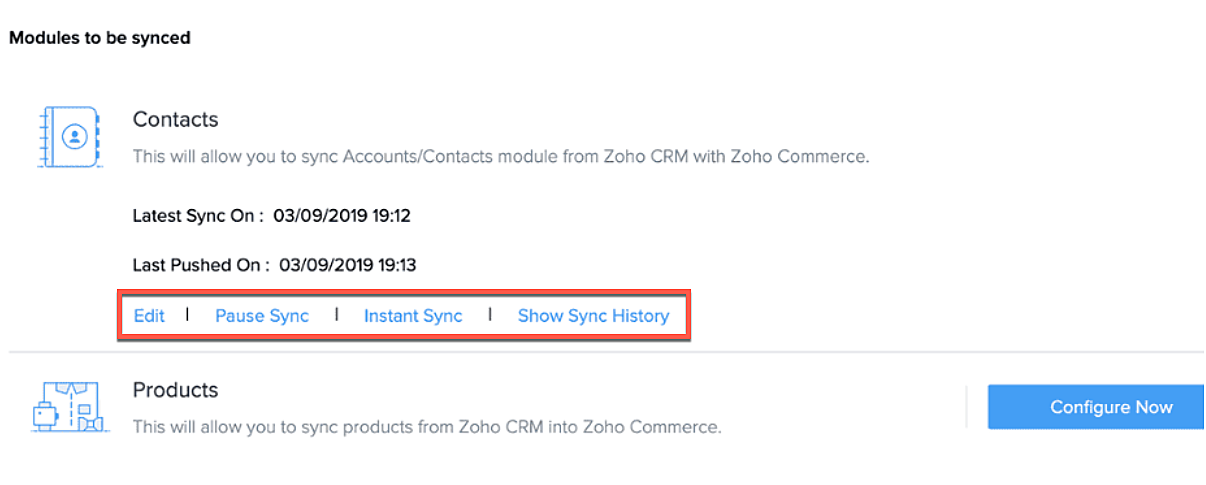
Na synchronisatie kan je de volgende acties uitvoeren.
- Aanpassen
- Pauseer sync
- Instant sync (Handmatig synchroniseren)
- Laat geschiedenis zien.
Formulieren
Je kan ook webformulieren koppelen vanuit Zoho CRM aan Zoho Commerce. Voeg vanuit de sitebuilder een formulier toe die je hebt gemaakt in Zoho CRM.
- Open sitebuilder
- Klik op +
- Selecteer "Forms"
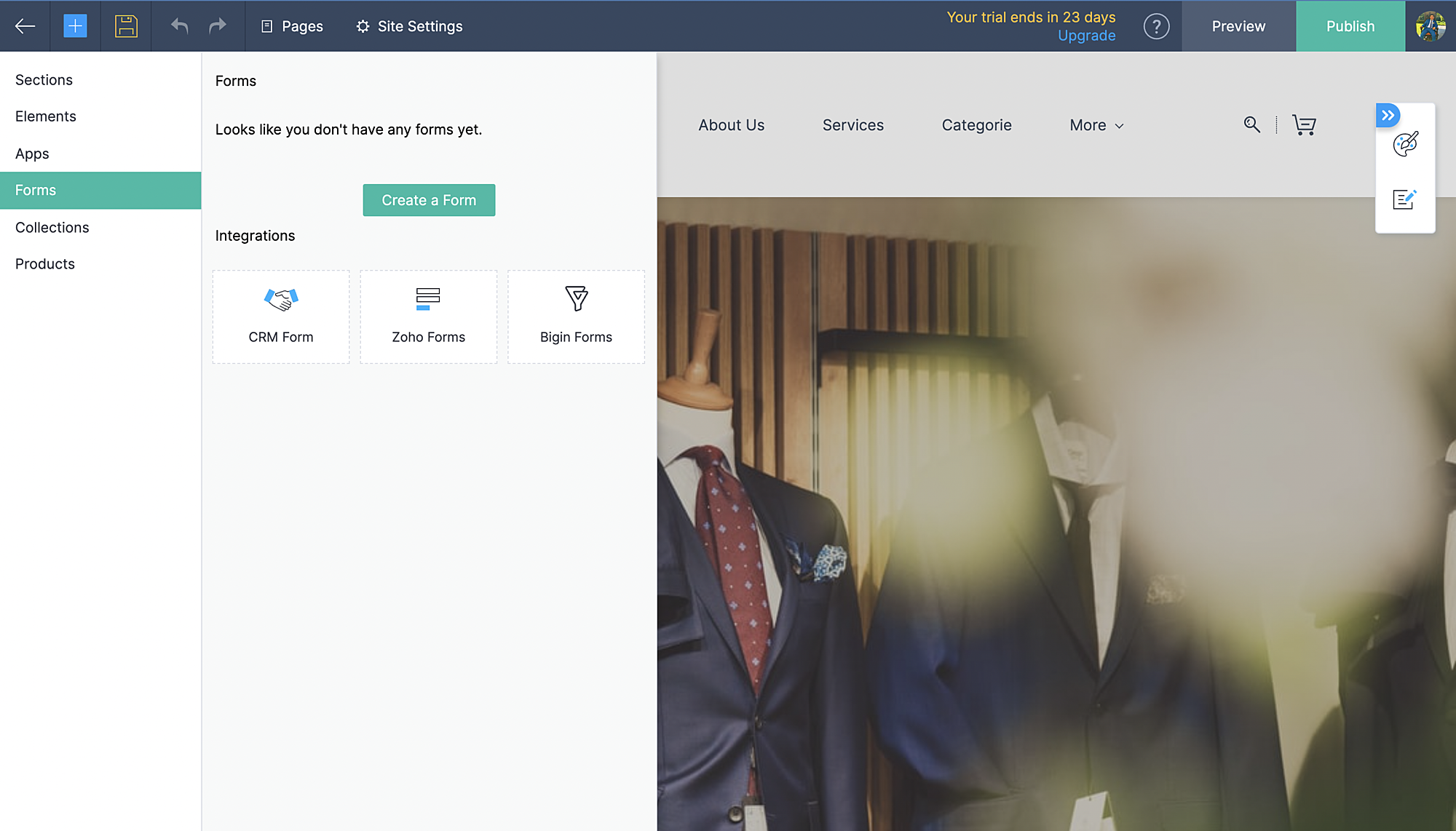
- Kies vervolgens CRM-form en selecteer de form die jij hebt ontworpen in CRM.
- Voeg formulier toe.
- De aanvraag komt vervolgens in je Leadmodule in CRM terug.
Zoho Inventory:
Met de integratie met Zoho Inventory kan je het voorraad- en voorraadbeheer van jouw online winkel naar een hoog niveau tillen. Gegevens van jouw Commerce-winkel worden gesynchroniseerd met je Inventory-account, zodat je naadloos tussen de twee kunt werken.
Voordelen van de integratie:
- Vergemakkelijk jouw voorraadbeheer en bijbehorende activiteiten.
- Houd zicht op leveranciers, retourzendingen en gedane betalingen
- Verruim de mogelijkheden van jouw online winkel
Ga naar instellingen, Zoho Inventory
Selecteer je bedrijf

Alle portal members en guest shoppers worden gesynchroniseerd naar contacten.
*Als je al Inventory gebruikt, selecteer je organisatie vanuit Zoho Commerce en start met je online shop.
Al je verkoop en rapporten worden gesynchroniseerd
Je organisatie profiel wordt geüpdate.
Zoho PaginaSense
Met Zoho PageSense beschik je over de mogelijkheden om de prestaties van je webwinkel te meten.. Zo kan je onder andere A/B tests uitvoeren op jouw winkel en jouw winkel optimaliseren voor verbeterde bezoekersconversies.
Voordelen van Integratie
- Voer A/B-tests uit en begrijp het gedrag van jouw publiek
- Creëer gepersonaliseerde variaties van jouw website voor jouw publiek
- Begrijp waar jouw bezoekers op klikken en optimaliseer jouw teksten en CTA-knoppen
- Creëer trechterexperimenten om te begrijpen waar jouw bezoekers afhaken
Vereisten
Je moet jouw winkel gepubliceerd hebben om de integratie te laten werken.
Ga naar instellingen, kies Zoho PageSense onder integraties
Klik op Access Portal, je wordt doorverwezen naar Zoho PageSense

Maak een portal door op Mijn Spaces te klikken rechts bovenin.
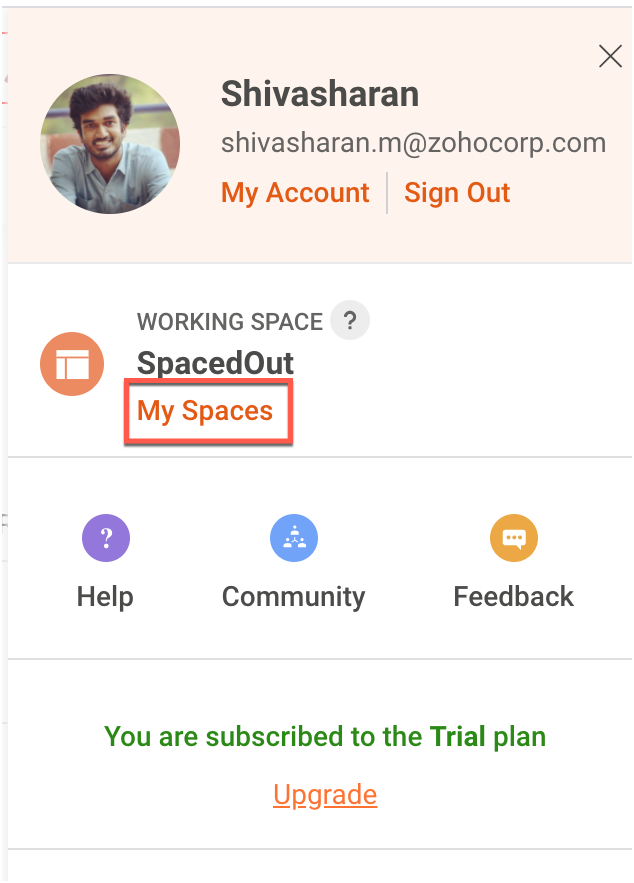
In Zoho Commerce selecteer je de Portal naam.
Maak een project of gebruik een bestaande project. (Klik op deze link om te leren hoe je een project aanmaakt.)
Maak een Funnel Experiment of gebruik een bestaande. (Klik op deze link om te leren hoe je een Funnel Experiment maakt.)
Klik op Connect.
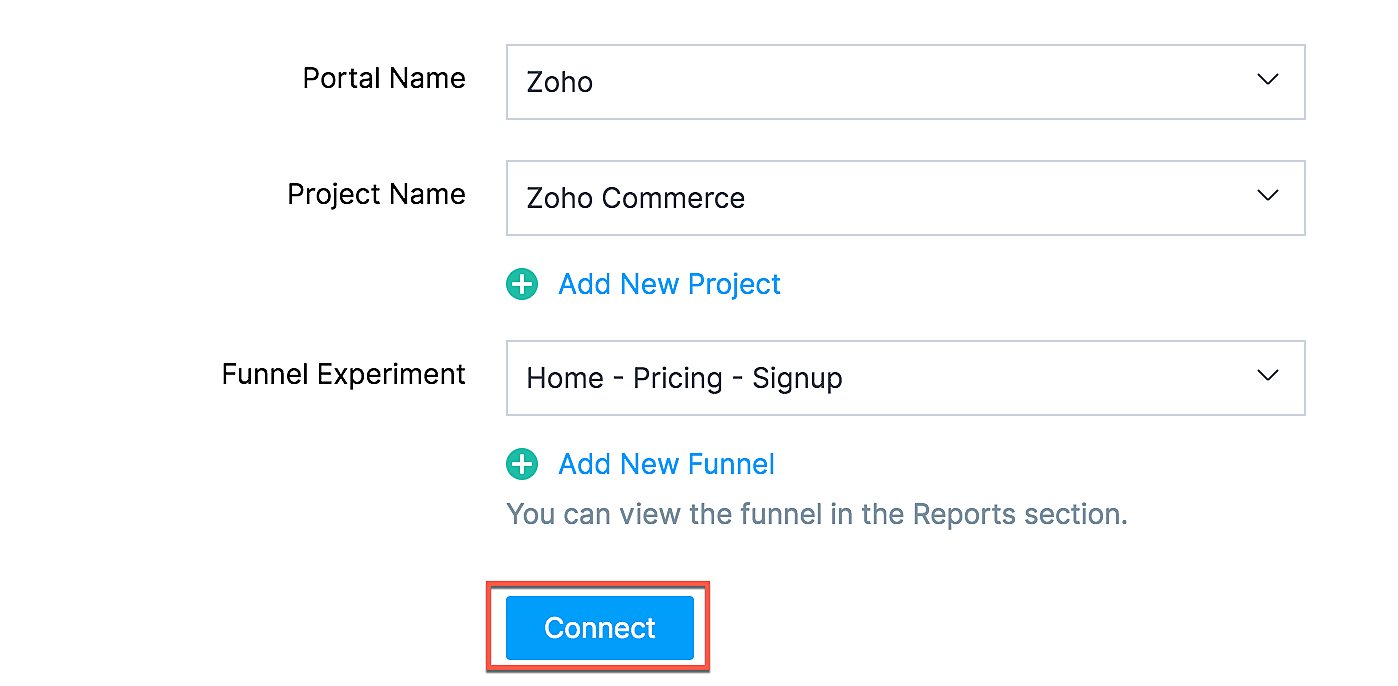
Als jij je selectie wilt wijzigen zoals een project of funnel experiment, klik dan op de beste optie en klik op Update.

Jouw Zoho Commerce is nu verbonden met je PageSense-account. Klik op Access Portal wanneer je integratie compleet is.
Marketing Automation
Automatiseer je jouw marketing activiteiten door je webwinkel te integreren met Zoho Marketing Automation
De voordelen van de integratie
- Bekijk winkelomzet, productdetails en klantinzichten op één pagina
- Stuur promotiecampagnes en creëer klantreizen
- Segmenteer leads op basis van hun activiteiten
- Initieer geautomatiseerde reeksen van opvolgingsberichten en actiesflows
Ga naar instellingen en selecteer Marketing Automation onder integraties.
Klik op Access Marketing Automation.
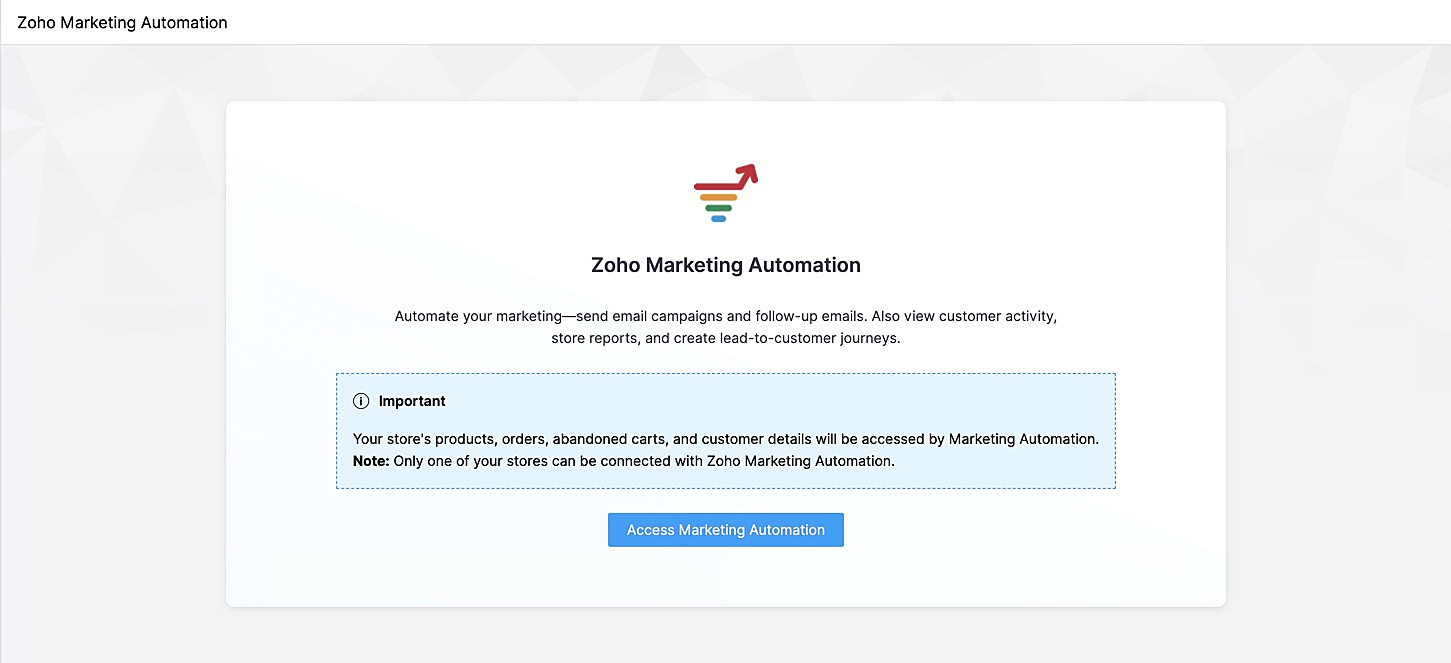
Je wordt naar Marketing Automation gebracht. Als je nog geen account hebt aangemaakt, ga je naar Engagement op het linker tabblad en klik je op Ecommerce.
Selecteer de winkel die je wilt koppelen en de mailinglijst waaraan je de klanten van jouw winkel wilt toevoegen en beheren. Maak een nieuwe mailinglijst aan als je er nog geen hebt gemaakt. Klik op deze link om te leren hoe je een mailinglijst moet maken.
Jouw winkel zal nu worden verbonden, en jouw producten, klanten, winkelwagen, en ordergegevens zullen worden gesynchroniseerd met Marketing Automation.
SalesIQ
Wil je direct in contact komen met je klanten? Met behulp van Zoho SalesIQ, kunt u een live chat widget toevoegen aan uw online winkel, en tevens de activiteit van uw bezoekers bijhouden.
Voordelen van integratie:
- Interactie met bezoekers via live chat
- Verhoog verkoopconversies met geprioriteerde bezoekers
- Bekijk activiteit, leg leads vast en geef bezoekers prioriteit voor outreach
Vereisten
Je moet jouw Zoho Commerce winkel hebben gepubliceerd om deze integratie te laten werken.
Hoe te integreren
1. Ga naar Instellingen in het linkerpaneel en klik op Zoho SalesIQ - Live Chat onder Integraties.
2. Zorg ervoor dat de Live Chat aan staat en click op "Connect"

3. Publiceer het op je website en controleer of de Live Chat aan staat. Die wordt rechtsonder weergegeven.
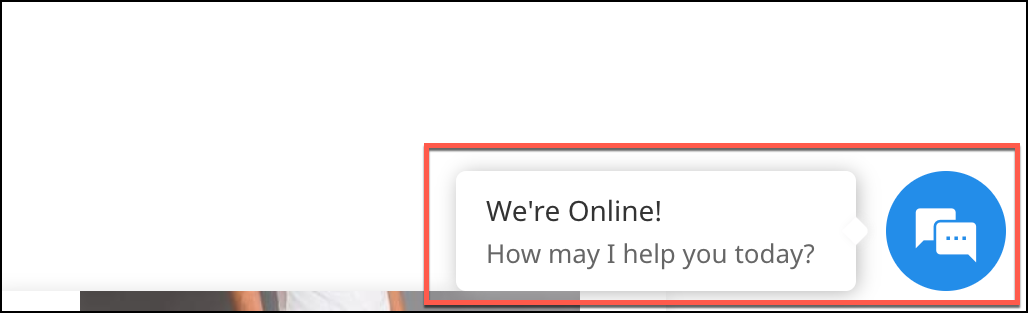
4. Verstuur een bericht. Dit wordt weergegeven in SalesIQ onder Chat history.

Heb jij een andere tips en tricks. Laat het weten.
Topic Participants
Theo Su
Sticky Posts
De nieuwe Zoho One is hier! Deel 1
Beste Community-leden, Zoho One, hét besturingssysteem voor bedrijven introduceert vandaag haar nieuwste update met maar liefst 5 nieuwe apps, 3 nieuwe services en 7 grote platform verbeteringen. Wij hebben gekeken naar hoe wij jullie verder kunnen helpen.Tips &Tricks: Jouw online boekingssysteem in 5 stappen!
1 Creëer een afsprakenkalender die past bij jouw branding Met Zoho Bookings behoud je de kleuren van jouw merk in alle applicaties. Je kan kiezen uit vier voorgedefinieerde thema's (Modern Web, Nieuwe Opmaak, Klassiek en Nieuw) met daarnaast opties omStart met Zoho One
Welkom op de community-pagina van Zoho One, hét besturingssysteem voor bedrijven. Op deze pagina geven wij een korte introductie over Zoho One. Daarnaast geven wij een aantal tips om te starten met deze besturingssysteem. Tegenwoordig zijn Cloud-oplossingen
Recent Topics
Depositing funds to account
Hello, I have been using Quickbooks for many years but am considering moving to Zoho Books so I am currently running through various workflows and am working on the Invoicing aspect. In QB, the process is to create an invoice, receive payment and thenFacing email delivery issues? Verify your domain's DNS records
Have you ever wondered why your legitimate emails are landing in the recipient’s spam folder? Or been surprised to see emails sent from your registered domain getting rejected by recipient email servers? Why does this happen? In most cases, this happensOrder of Departments in Help Desk
In the end user portal, , the departments are sorted by the date of creation of the department (or perhaps their id). Is there a way to choose the display order of the departments or at least to be able to sort them alphabetically?COGS - Account showing negetive
I have multiple COGS account and in these all there is one account is negetive so suggest why it is showing negetive value.?Create CRM Deal from Books Quote and Auto Update Deal Stage
I want to set up an automation where, whenever a Quote is created in Zoho Books, a Deal is automatically created in Zoho CRM with the Quote amount, customer details, and some custom fields from Zoho Books. Additionally, when the Sales Order is converted%PaymentLink%
Does not work. Software creates a BAD link. ....and yes payment options are turned on. Link on the invoice pdf once opened will work but this template is a joke.Google Photos
I am hoping that my question already has a fix. I current have Google synced accounts that I want to get away from. One in particular on is Google photos. Is there any software, or 3rd parties that I can join to back my photos up straight to specifically designated file in the ZOHO cloud that's tied to Docs? Please advise... MikeZoho Books Items Categorisation/Grouping/Folder
Is there a way to do items categorisation? a folder structure? Product Type A - Option 1/2/3 Product Type B - Option 1/2/3 Current problem : I have more than 50 items on the list, its hard for team to navigate.Cash payments before invoice date
We have been using zoho books for our hospitality business for some time and have been very happy with the system. However in 2025 an update was pushed through and we are now not able to record payments for invoices before the invoice date. the case scenarioCopy / Duplicate Workflow
I have workflows setup that are very similar to each other. We have a monitoring system watching servers, and all notifications - no matter what client it is about - will come from a noreply@ address which is not very helpful in having it auto assigned to the right account. I have setup a workflow that will change the contact name of the ticket (currently it would say noreply@) to the correct customer which is based on the subject line, as that mentions which server the alert it is about. I needTransfer between two customers (Peters Rental account to Peters Private account)
we are a Property Management company. Our customers have to accounts (registered as two customers - Peter Rental and Peter Private On the rental account all income and costs fron rental activities are noted. On the private account all private are notedAutomation#18: Automatically Fetch Values from Contacts to the Tickets Module
Hello Everyone, Welcome to this week's edition, where you can seamlessly sync fields from the Contacts to the Tickets module. For efficient business operations, it's crucial to have details mapped across different modules. Zylker Secure offers antivirusCharge multiple invoices
We use auto-charge/recurring invoicing for 100's of clients. If we create a single manual invoice we can charge it to the credit card for these clients with the CC added to their recurring invoices. If a client has multiple outstanding invoices, is there a way to make one charge for all of the invoices instead of a separate charge to the cc for each invoice?Handling/tracking escalation management in Zoho
Hi all, I am working on finding a tool to register and track our escalation management process. Specifically, this is about client escalations, typically related to project delivery issues. The idea is that we could have some sort of form with core questionsGlobal Choice List share ownership
I have created several forms that use one or more Global Choice Lists. These lists have been published to Org. I would like to allow one or more admins to edit the choices in these lists. Any help appreciated. GeoffSetting up property management in Zoho Books
Hi, I run a property management business that manages property complexes. There are multiple owners, some owning more than one property on the same complex. My role is to manage the fees they pay for maintenance of common areas, such as the swimming poolHow to prevent users from switching price lists in an order?
Hi, I have Zoho Finance integrated with Zoho CRM. My team will be placing orders through the CRM using the Finance module. When creating a new customer I will assign it a price list, I don't want the sales rep to switch to a different Price List, otherUnable to Change Display Name for my outlook mail ID
Hello, I recently added my personal outlook mail to Zohomail (in the web interface) using POP3 options. I tried to change the display name of the outlook account, but it changes for a brief moment and reverts back to the old name. Kindly help me withMollie Connect in Zoho Books
Have noticed that Zoho Books is missing the most popular payment provider in Europe: Mollie. Knowing that Mollie has a solid Java SDK, why is this not yet implemented in Zoho Books for European customers? More info: https://docs.mollie.com/oauth/ovUnable to change Lookup field from Multi Select to Single Select
I am trying to change a Lookup field in my Zoho Creator form from Multi Select to Single Select, but I am unable to find any option to do this.Simple Callback Notifications Needed
My team are terrible at remembering their CRM callbacks, often due to how long in the future they are set for. Is there a way i can set an e-mail notification for when a callback is due? For example we set it for 9am one day and five minutes before theyPersonal Data (RODO), Cookies / Trackers - ePrivacy
I have noticed several issues that should be addressed on the customer support page. Zoho Desk provides the support portal, but it currently lacks the following options: A GDPR and personal data processing consent checkbox before logging in, located inHow to set a multi-lookup field as mandatory?
Allow Multiple Scheduled Appointments with Zoho Support
Dear Zoho Team, I hope you're doing well. First, thank you for introducing the option to schedule support calls via the Zoho CRM booking link. This has been a fantastic enhancement, eliminating the need for back-and-forth coordination when schedulingAudit Log for Zoho One Admin Panel
Dear Zoho One Team, We would like to request the addition of an Audit Log feature in the Zoho One Admin Panel. This log should provide visibility into any changes made within the Zoho One admin panel and directory, including but not limited to: Adding,Bug: OAuth 2.0 State Parameter fails with Pipe Delimiters (RFC 6749 Non-Compliance)
I've discovered a bug in how Zoho's API Console handles the OAuth 2.0 authorization flow when the state parameter contains pipe characters (|), and I'm hoping the Zoho team can address this in a future update. The Issue Zoho's OAuth 2.0 implementationCustom Function to increment a value by one
Hi, I'm trying to find a solution to set up a counter on CRM records that tracks how many times certain actions have taken place. As a specific example: We have a field on Deals called "Times Close Updated". This starts at 0 on record creation. I'd likeAccess token generate from the refresh token not working for API
Dear Sir/Madam, When I use my refresh token to obtain new access_token, that token return INVALID_TOKEN when the same API is called. I made sure that my api site is correct and match the auth web site. However the original access_token work fine.why does my campaign move back to draft?
Every time I try to send my email campaign, it reverts back to Draft status.. this has happened three times in a row..how do i find out what the problem is? ThanksService and Parts Line Item Limitations
Hi FSM Team, We work with clients who deliver large-scale field service projects. In many cases, a single work order can contain 200+ service and parts line items. Currently, Zoho FSM limits work orders to 30 service and parts line items. While this works【Zoho CRM】やりとりの要約機能リリースのお知らせ
ユーザーの皆さま、こんにちは。コミュニティチームの藤澤です。 今回は「Zoho CRM アップデート情報」の中から、新機能のやりとり要約機能をご紹介します。 Zoho CRMのやりとりの要約は、Ziaが生成する機能で、データに関連付けられた最近のやりとりを簡潔にまとめて提供します。 メール、通話、ミーティング、メモなどを1つの明確な要約にまとめ、重要なポイント、過去の話し合いの要点、結果、次のステップを表示することで、日常的な課題に対処します。 Ziaの強みは、単なる要約にとどまらず、内容の解釈も行える点です。やりとりの要約では、顧客との会話に潜む遅延、フォローアップ漏れ、約束、期限、感情、意図を特定します。Recent post analytics not very useful
Hi, I'm enjoying some aspects of the Zoho Social. like being able to schedule posts to multiple channels. However, the recent posts analytics is disappointing. For example, I put up a reel on Instagram and Facebook yesterday. Instagram insights showsWhat happens to the files created by user, whose account is deleted.
Hello, I created a folder in the My folders names "Quote" I shared the same with my colleague. She created some files and folders in that folder over the period of 1 and half year. Now she left company, and I deleted her account from Zoho. What happensInternal Error When Accessing Team Inbox.
All our users are seeing this error in teaminbox. Because its a critical tool kindly resolve this issue ASAP.Sharing URLs and direct access
Hello, I am storing my team's email signature images on Workdrive. I am creating a public image download share and adding “?directDownload=true” so that the image can be accessed without the Workdrive interface. A few questions: 1) Can we generate friendlyZoho Mail Android app update: Calendar enhancements
Hello everyone! In the most recent version of the Zoho Mail Android app update, we have introduced various new enhancements for the calendar module. Let's explore what's new. Drag and drop events to update the date and time We have enhanced the calendarEnhance Delay Configuration in Zoho Flow
Dear Zoho Flow Support Team, We are writing to request an improvement to the delay configuration process within Zoho Flow. Currently, users are required to manually enter the exact delay duration (e.g., "2 days") in the delay block. This can be time-consumingContratação ProdutivosX
Bem-vindo(a) ao processo de contratação da ProdutivosX. Este formulário tem como objetivo coletar informações essenciais para análise de perfil profissional, alinhamento de competências e possível integração ao equipamento ProdutivosX. A ProdutivosX éEnhance Sign CRM integration
Hello all, I'm working on a custom Deluge script to enhance the integration between Zoho CRM and Sign by using a writer merge template for additional flexibility. I want to replicate the post-sign document integration that exists between CRM and SignUnified WhatsApp Number Management in Zoho Desk and SalesIQ
Dear Zoho Desk Support Team, We are currently utilizing both Zoho Desk and Zoho SalesIQ for our customer support operations. While both platforms offer WhatsApp integration, we are facing challenges due to the requirement of separate WhatsApp numbersNext Page