Building extensions #8: Improve and enhance user experience with modal boxes
Modal box - What is it and where can you use it?
A modal box is a user interface pop-up window or dialog box that appears over the currently active UI screen. When prompted, the modal box deactivates all other page content until the user closes it. The modal box feature is commonly used to display information based on user input or to engage the user in some activity, such as an attachment picker, where they can proceed only after selecting an attachment.
Support offered in Zoho Projects for modal boxes
Zoho Projects provides support for modal boxes through extension development, which includes methods for opening and closing modal boxes, passing and receiving data to and from modal boxes, and so on. You can view the various methods offered by Zoho Projects to use modal boxes in this document.
In this post, we'll go over an example scenario for using a modal box in depth.
Scenario
A Zoho Desk ticket agent handles issue/feature request tickets in Zoho Projects to work on development-related requests. When the development in Zoho Projects is completed, the Desk agent provides a solution to the customer. In this case, it would be beneficial for the Desk agent to have all open Desk tickets associated with them displayed in a single, dedicated tab within Zoho Projects.
Goal
Improve, enhance, and simplify an agent's work in Zoho Projects by:
➤ Showcasing all open Desk tickets within a single tab.➤ Providing them with ticket-specific details, allowing them to view ticket details and prioritize the Zoho Projects task associated with that ticket accordingly.
Solution
To accomplish this goal, use the modal box feature as part of the widgets concept discussed earlier. A Project tab widget labeled "Desk open tickets" can be created to display all open Desk tickets associated with an agent. When a specific ticket is selected, the agent can access all relevant information about the ticket, such as its status, priority, and so on. This will allow them to prioritize and work on the appropriate task in Zoho Projects that is associated with that ticket.
Now, let's go ahead and see the components that would be required to achieve this use case solution as part of an extension.
Required components
- In order to establish a secure integration between Zoho Projects and Zoho Desk for a seamless data transfer, a connection between Zoho Projects and Zoho Desk has to be established.
- An extension configuration process includes:
- Creating an extension.
- Configuring the plugin manifest.
- Setting up the widget code.
- Display all open Zoho Desk tickets associated with an agent in a tab called "Desk open tickets."
- Incorporate the modal box feature to display ticket-specific details while the agent chooses a ticket from the list of open desk tickets.
We have already explored the steps to establish a connection, create an extension, and configure the plugin-manifest.json file as part of our earlier posts. You can refer to those resources for detailed guidance. In this case, we have already completed most of these steps (screenshots below).
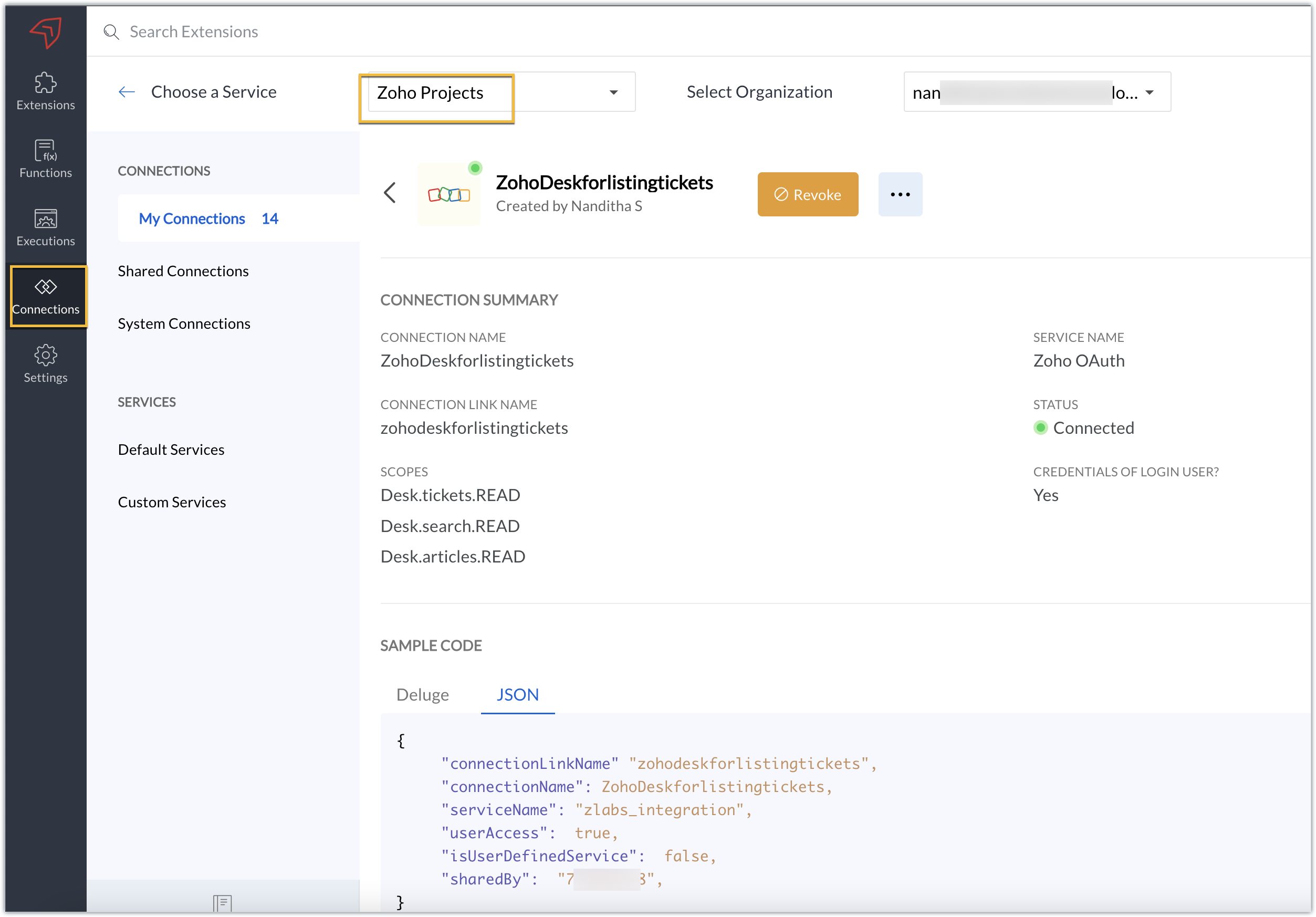
Connection
We have created a connection to establish a secure integration between Zoho Projects and Zoho Desk.
Extension configuration
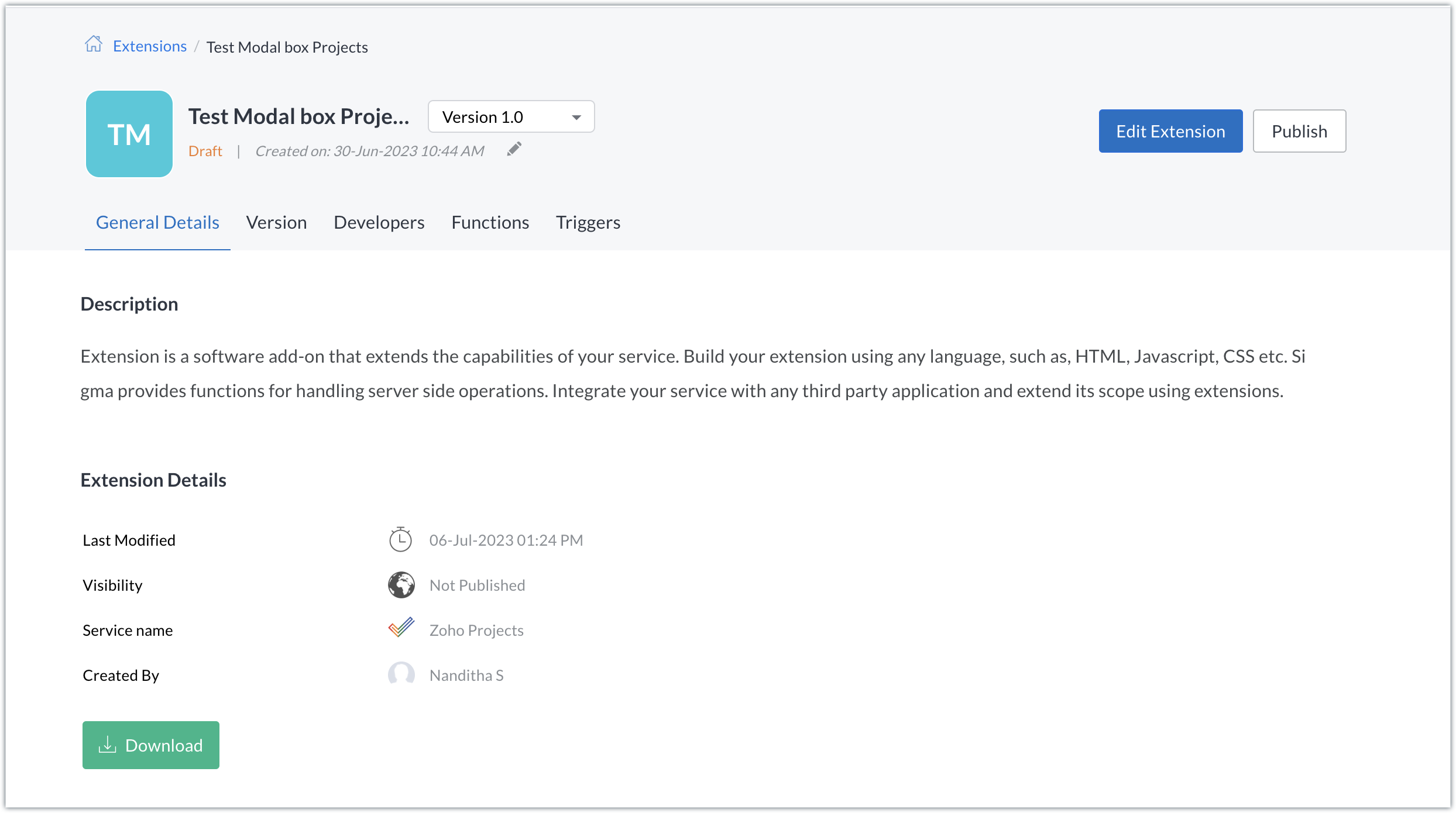
Extension creation: We have created a new extension for Zoho Projects.
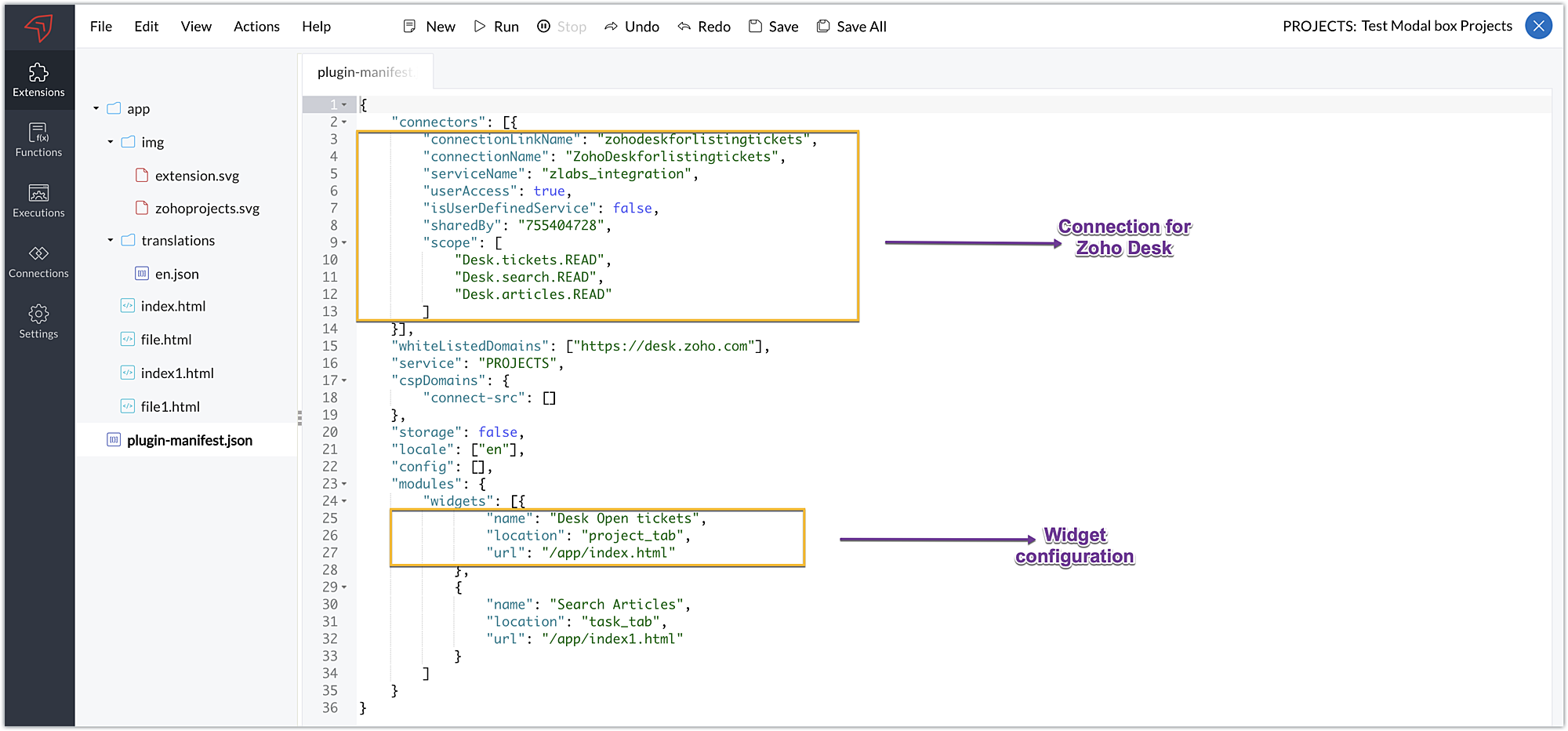
Plugin-manifest.json configuration: Once the extension was created, we configured the plugin-manifest.json file to include the created connection and a widget.
For our extension use case, the plugin-manifest.json file is configured as shown in the below screenshot.
Setting up the widget code
Now that we've set up the other components, let's move on to writing our widget code and incorporating the modal box feature.
Displaying open tickets in "Desk open Tickets" tab code snippet - index.html (find attachment in post)
- In the code snippet, the Zoho Desk API to list all associated tickets is invoked using the Zoho Projects request JS SDK method to get associated desk tickets.
- Certain mandatory parameters must be passed to the Zoho Projects Request Method, such as the third-party URL, data object, and connection. The details for the mentioned parameters in our use case are as follows:
➤ Data object - The data that must be constructed in order to invoke the third-party URL.➤ Connection - The name of the secure connection link created and configured in the plugin-mainfest.json file, as described in the previous section.
- A dropdown list displaying all open and associated desk tickets is created using the Zoho Desk API response.
- The dropdown list value selected by the end-user (i.e. the chosen ticket) is then fetched and stored in a variable called "selected ticket ID."
- Upon clicking Get Ticket Details, a modal box instance is created and opened using the modal.create and instance methods. The selected ticket ID value is emitted using the emit method with the keyword "stored-files" when the modal box is opened.
If you require further details on how the Zoho Projects Request method works, you can refer to our earlier post which explains the working and the required parameters for invoking this method in detail.
Modal box to display the details of the chosen ticket - file.html (find attachment in post)
- In the code snippet, the value emitted using the emit method for the keyword "stored-files" is received by the on method in the modal box UI. Using the received value, a hit is made to the Zoho Desk Get tickets API using the Zoho Projects Request Method again.
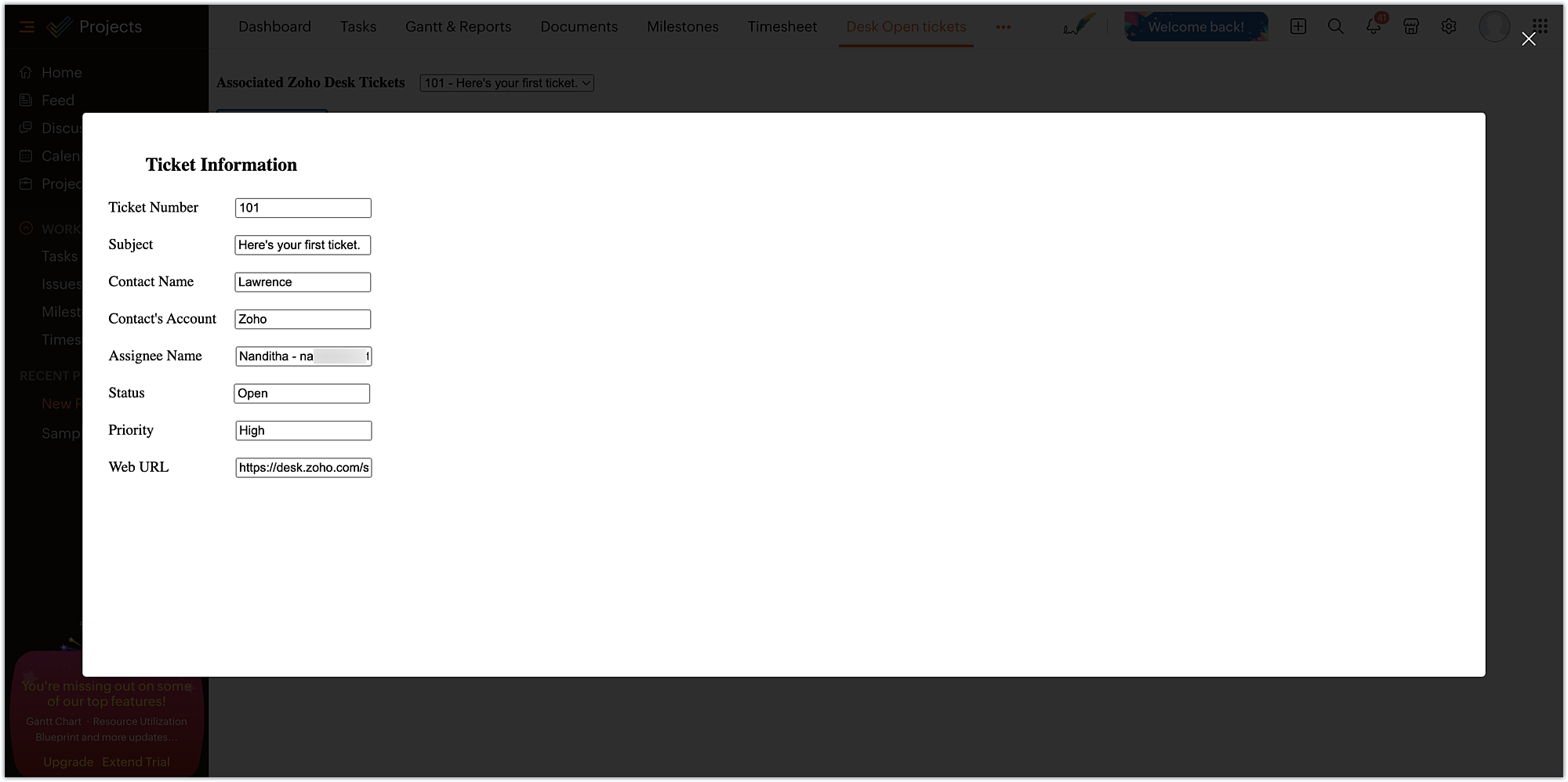
- From the ticket-specific details returned as the response of the Zoho Desk Get tickets API, the necessary details are fetched and then displayed to the agent for their reference. These details help them check on the status and prioritize the relevant Zoho Projects task related to that ticket.
Now, that we have completed the setup and have all the extension components ready, let's go ahead and see the output.
Sample output:
- Enter the Zoho Projects portal and select a project.
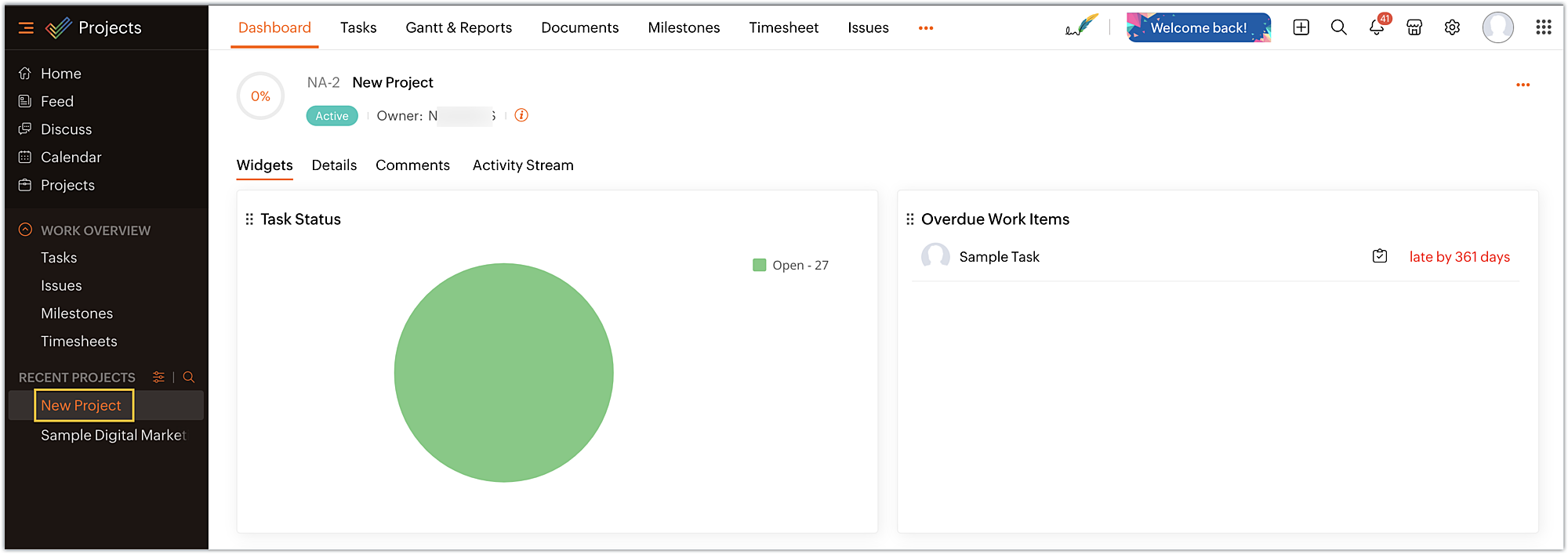
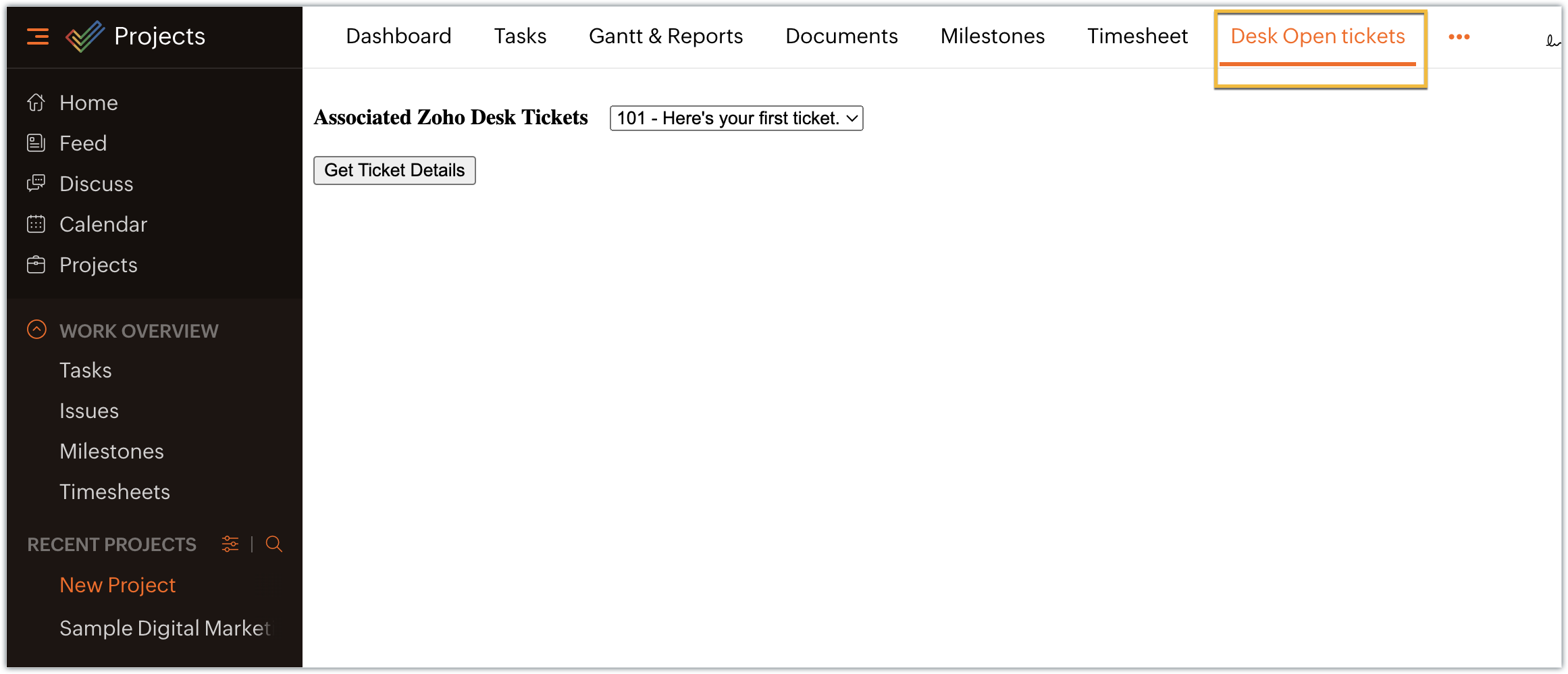
- Select the Desk open tickets option under the Projects tab. The dropdown menu appears, displaying a list of associated open tickets. Choose the ticket for which you want more details and click on Get Ticket Details.
- The selected ticket details are displayed in the modal box.
In this example, we have used the modal box feature to display some information based on user input. Similarly, a modal box can also be used to engage the user in performing some activity, like an attachment picker, wherein they can proceed further only after choosing an attachment. We hope you found this information useful. Keep following this space for more insights!
 Sign up for a Zoho Developer account and start developing extensions for Zoho products using Sigma.
SEE ALSO
Topic Participants
Nanditha Somasundaram Somasundaram
Sticky Posts
Building extensions #10: Fetch customized user inputs, store them globally at the app level, and access them across entities
This data storage concept enables you to store data related to your extension for both entity properties and extension properties. In our previous piece, we looked at how to store data for entities using entity properties. In this post, we'll look atBuilding extensions #9: Store, retrieve, and access entity-specific data in widgets using data storage
Data storage - Overview Storing data related to the extension you are working on is essential. It can be saved as key-value pairs for an entity or extension, known as entity and extension properties, respectively. Data can be saved for the following entitiesBuilding extensions #7: Create custom widgets for a simplified end-user experience
Discover the benefits of using widgets! We explored the significance of widgets, prerequisites, and the availability of JS SDK methods as part of our previous post. In this post, let's go over a detailed example of using widgets along with certain ZohoBuilding extensions #6: Custom user interfaces with Widgets
Welcome to our post on Widgets for Zoho Projects! In our last post, we explored the significance of the connections feature, showed how to use it, and provided an example use case. In this article, we'll look at the importance of widgets, another featureBuilding extensions #5: Integrating applications with Zoho Projects through Connections
In our last post, we discussed the essential features that a Zoho Projects extension can provide. Starting with this post andin every subsequent post going forward, we'll go through each of those features in depth, one by one, with an example use case.
Recent Topics
Setting up property management in Zoho Books
Hi, I run a property management business that manages property complexes. There are multiple owners, some owning more than one property on the same complex. My role is to manage the fees they pay for maintenance of common areas, such as the swimming poolHow to prevent users from switching price lists in an order?
Hi, I have Zoho Finance integrated with Zoho CRM. My team will be placing orders through the CRM using the Finance module. When creating a new customer I will assign it a price list, I don't want the sales rep to switch to a different Price List, otherUnable to Change Display Name for my outlook mail ID
Hello, I recently added my personal outlook mail to Zohomail (in the web interface) using POP3 options. I tried to change the display name of the outlook account, but it changes for a brief moment and reverts back to the old name. Kindly help me withMollie Connect in Zoho Books
Have noticed that Zoho Books is missing the most popular payment provider in Europe: Mollie. Knowing that Mollie has a solid Java SDK, why is this not yet implemented in Zoho Books for European customers? More info: https://docs.mollie.com/oauth/ovUnable to change Lookup field from Multi Select to Single Select
I am trying to change a Lookup field in my Zoho Creator form from Multi Select to Single Select, but I am unable to find any option to do this.Simple Callback Notifications Needed
My team are terrible at remembering their CRM callbacks, often due to how long in the future they are set for. Is there a way i can set an e-mail notification for when a callback is due? For example we set it for 9am one day and five minutes before theyPersonal Data (RODO), Cookies / Trackers - ePrivacy
I have noticed several issues that should be addressed on the customer support page. Zoho Desk provides the support portal, but it currently lacks the following options: A GDPR and personal data processing consent checkbox before logging in, located inHow to set a multi-lookup field as mandatory?
Allow Multiple Scheduled Appointments with Zoho Support
Dear Zoho Team, I hope you're doing well. First, thank you for introducing the option to schedule support calls via the Zoho CRM booking link. This has been a fantastic enhancement, eliminating the need for back-and-forth coordination when schedulingAudit Log for Zoho One Admin Panel
Dear Zoho One Team, We would like to request the addition of an Audit Log feature in the Zoho One Admin Panel. This log should provide visibility into any changes made within the Zoho One admin panel and directory, including but not limited to: Adding,Bug: OAuth 2.0 State Parameter fails with Pipe Delimiters (RFC 6749 Non-Compliance)
I've discovered a bug in how Zoho's API Console handles the OAuth 2.0 authorization flow when the state parameter contains pipe characters (|), and I'm hoping the Zoho team can address this in a future update. The Issue Zoho's OAuth 2.0 implementationCustom Function to increment a value by one
Hi, I'm trying to find a solution to set up a counter on CRM records that tracks how many times certain actions have taken place. As a specific example: We have a field on Deals called "Times Close Updated". This starts at 0 on record creation. I'd likeAccess token generate from the refresh token not working for API
Dear Sir/Madam, When I use my refresh token to obtain new access_token, that token return INVALID_TOKEN when the same API is called. I made sure that my api site is correct and match the auth web site. However the original access_token work fine.why does my campaign move back to draft?
Every time I try to send my email campaign, it reverts back to Draft status.. this has happened three times in a row..how do i find out what the problem is? ThanksService and Parts Line Item Limitations
Hi FSM Team, We work with clients who deliver large-scale field service projects. In many cases, a single work order can contain 200+ service and parts line items. Currently, Zoho FSM limits work orders to 30 service and parts line items. While this works【Zoho CRM】やりとりの要約機能リリースのお知らせ
ユーザーの皆さま、こんにちは。コミュニティチームの藤澤です。 今回は「Zoho CRM アップデート情報」の中から、新機能のやりとり要約機能をご紹介します。 Zoho CRMのやりとりの要約は、Ziaが生成する機能で、データに関連付けられた最近のやりとりを簡潔にまとめて提供します。 メール、通話、ミーティング、メモなどを1つの明確な要約にまとめ、重要なポイント、過去の話し合いの要点、結果、次のステップを表示することで、日常的な課題に対処します。 Ziaの強みは、単なる要約にとどまらず、内容の解釈も行える点です。やりとりの要約では、顧客との会話に潜む遅延、フォローアップ漏れ、約束、期限、感情、意図を特定します。Recent post analytics not very useful
Hi, I'm enjoying some aspects of the Zoho Social. like being able to schedule posts to multiple channels. However, the recent posts analytics is disappointing. For example, I put up a reel on Instagram and Facebook yesterday. Instagram insights showsWhat happens to the files created by user, whose account is deleted.
Hello, I created a folder in the My folders names "Quote" I shared the same with my colleague. She created some files and folders in that folder over the period of 1 and half year. Now she left company, and I deleted her account from Zoho. What happensInternal Error When Accessing Team Inbox.
All our users are seeing this error in teaminbox. Because its a critical tool kindly resolve this issue ASAP.Sharing URLs and direct access
Hello, I am storing my team's email signature images on Workdrive. I am creating a public image download share and adding “?directDownload=true” so that the image can be accessed without the Workdrive interface. A few questions: 1) Can we generate friendlyZoho Mail Android app update: Calendar enhancements
Hello everyone! In the most recent version of the Zoho Mail Android app update, we have introduced various new enhancements for the calendar module. Let's explore what's new. Drag and drop events to update the date and time We have enhanced the calendarEnhance Delay Configuration in Zoho Flow
Dear Zoho Flow Support Team, We are writing to request an improvement to the delay configuration process within Zoho Flow. Currently, users are required to manually enter the exact delay duration (e.g., "2 days") in the delay block. This can be time-consumingContratação ProdutivosX
Bem-vindo(a) ao processo de contratação da ProdutivosX. Este formulário tem como objetivo coletar informações essenciais para análise de perfil profissional, alinhamento de competências e possível integração ao equipamento ProdutivosX. A ProdutivosX éEnhance Sign CRM integration
Hello all, I'm working on a custom Deluge script to enhance the integration between Zoho CRM and Sign by using a writer merge template for additional flexibility. I want to replicate the post-sign document integration that exists between CRM and SignUnified WhatsApp Number Management in Zoho Desk and SalesIQ
Dear Zoho Desk Support Team, We are currently utilizing both Zoho Desk and Zoho SalesIQ for our customer support operations. While both platforms offer WhatsApp integration, we are facing challenges due to the requirement of separate WhatsApp numbersEmail Field Validation Incorrectly Rejects RFC-Compliant Addresses (Forward Slashes)
I've encountered a validation issue with Zoho Creator's Email field that rejects RFC-compliant email addresses containing forward slashes, and I'm hoping the Zoho team can address this in a future update. The Issue When entering an email address containingPlug Sample #15 - Enable Human-Like, Contextual Interactions in SalesIQ with Zia Agents
Zia Agents are conversational AI assistants designed to understand user intent and respond intelligently, helping businesses automate conversations and offer personalized support at scale. While Zia Agents are yet to be publicly released, access is currentlyBest way to schedule bill payments to vendors
I've integrated Forte so that I can convert POs to bills and make payments to my vendors all through Books. Is there a way to schedule the bill payments as some of my vendors are net 30, net 60 and even net 90 days. If I can't get this to work, I'll haveSeamless Round-Trip Navigation for Related Blocks (Detail View)
As highlighted previously in this post (and here, here, here, and here), we still lack a fundamental capability for seamless navigation in Related Blocks. The popup that appears when adding a related record doesn't exist for viewing/editing existing records,Social Profile Logo Format
Hello, I'm using Zoho Sites and am attempting to add a couple of social media accounts to my profile that aren't included in the default platforms that are available. What format is the logo required to be in? I have tried .png and .jpg with no success.How to create Sepa Direct Debit XML file: solution and code
Even though Books provides a payment integration for Stripe and Gocardless (in Europe) there are customers that want to use the Sepa services of their own bank. Mainly because Stripe and Gocardless are quite expensive. In that case they would need a SepaTraditional Spreadsheet vs Zoho Tables
Hello everyone, This article explains the differences between Spreadsheet applications and no-code databases, such as Zoho Tables. While both tools belong to the "grid" family, the core difference lies in their purpose. A spreadsheet (such as Zoho Sheet,RFQ MODEL
A Request for quotation model is used for Purchase Inquiries to multiple vendors. The Item is Created and then selected to send it to various vendors , once the Prices are received , a comparative chart is made for the user. this will help Zoho booksDelegate Access - Mobile iOS/iPad
We’re over the moon that delegate access is now available in Zoho Mail as we were nearly ready to switch platforms because of it! Is there a timeline on when delegate mailboxes will be accessible from the iOS and iPad OS applications? Thanks, JakeRequest For Quotation (RFQ) module
Hello, Do you have any plans to implement a RFQ module in to ZOHO Inventory? I would like to chose items that I require a price for, select a number of different suppliers to e-mail and have them submit there pricing online. I would then like to see aSupport for Developing Zoho Recruit Extensions via Zoho Sigma
Hi, I’m interested in building an extension for Zoho Recruit using Zoho Sigma. However, when I navigate to Sigma and attempt to create a new extension (via the "New Extension" option), Zoho Recruit does not appear as a listed service—only options likeFOLDER DISAPPEARED
Hello Zoho Community. I recently found a problem with no explanation: a folder in Zoho Analytics just disappeared, but the tables and SQL sentences still existed, the folder was not deleted. The solution for me in this case was to create a new folder,How to create estimates/Invoices with sub-totals
Every other accounting package can create estimates and invoices with Sub-totals. How can I do that in ZohoBooks?Deluge scripts
Why is there not a search function to make it easier to find the script of interest when modifications are required.Social media simplified with Zoho Social: Why should brands have a Threads profile?
Just over a year ago, Instagram launched Threads, the all new social media app primarily focusing on sharing text online. It was welcomed by people worldwide with more than 10 million users in just seven hours, and it currently has over 175 million activeNext Page