Create and embed custom capabilities across CRM with Kiosk, our latest low-code tool

[6 Mar 2024] This feature has been released to all users in all DCs.

Exciting Update Alert: “Process Flows” is now “Kiosk” with a better and more accessible spot. Kiosk will be available under Setup -> Customization.
As a result, the old help doc links have been replaced with the new ones found here:
You'll need to be logged in to view these help documents.
Here's a quick overview of Kiosk:
By today (4 Jan 2024), we will be enabling this feature for all (partners and customers) who've requested it. Please contact support in case you're unable to access it.
Do check this out and let us know your feedback. We would love to hear from you!

In addition, we're hosting a webinar with Kiosk's product manager on January 17, 2024 to help you get familiar with this exciting feature. You can attend it at a time convenient to you by registering here:
https://meet.zoho.com/3m6H9k2xmg [ 3:30 AM GMT | 9 AM IST | 7:30 PM (Jan 16) PST]
https://meet.zoho.com/b0pckHASBe [ 5 PM GMT | 10:30 PM IST | 9 AM PST]
https://meet.zoho.com/3m6H9k2xmg [ 3:30 AM GMT | 9 AM IST | 7:30 PM (Jan 16) PST]
https://meet.zoho.com/b0pckHASBe [ 5 PM GMT | 10:30 PM IST | 9 AM PST]
Hello folks,
The typical CRM user is a sales rep whose time is valuable. They're busy connecting with contacts and closing deals. At the same time, best practices and processes in the CRM demand that sales reps do the following:
The typical CRM user is a sales rep whose time is valuable. They're busy connecting with contacts and closing deals. At the same time, best practices and processes in the CRM demand that sales reps do the following:
- Perform multiple clicks
- Juggle multiple tabs
- Search for specific records or fields
- Update data in fields
- Wait for page loads
- And much more
The result is that CRM data is often not properly added or updated, which leads to another set of problems entirely. A poor user experience leads to poor process compliance.
Our solution
Let us present process flows: the latest addition to our set of process management tools. Process flows enable you to provide your users with a much simpler (and faster) way to follow processes and best practices. For instance, they can achieve the following:
-
Initiate process flows from a convenient location in the CRM.
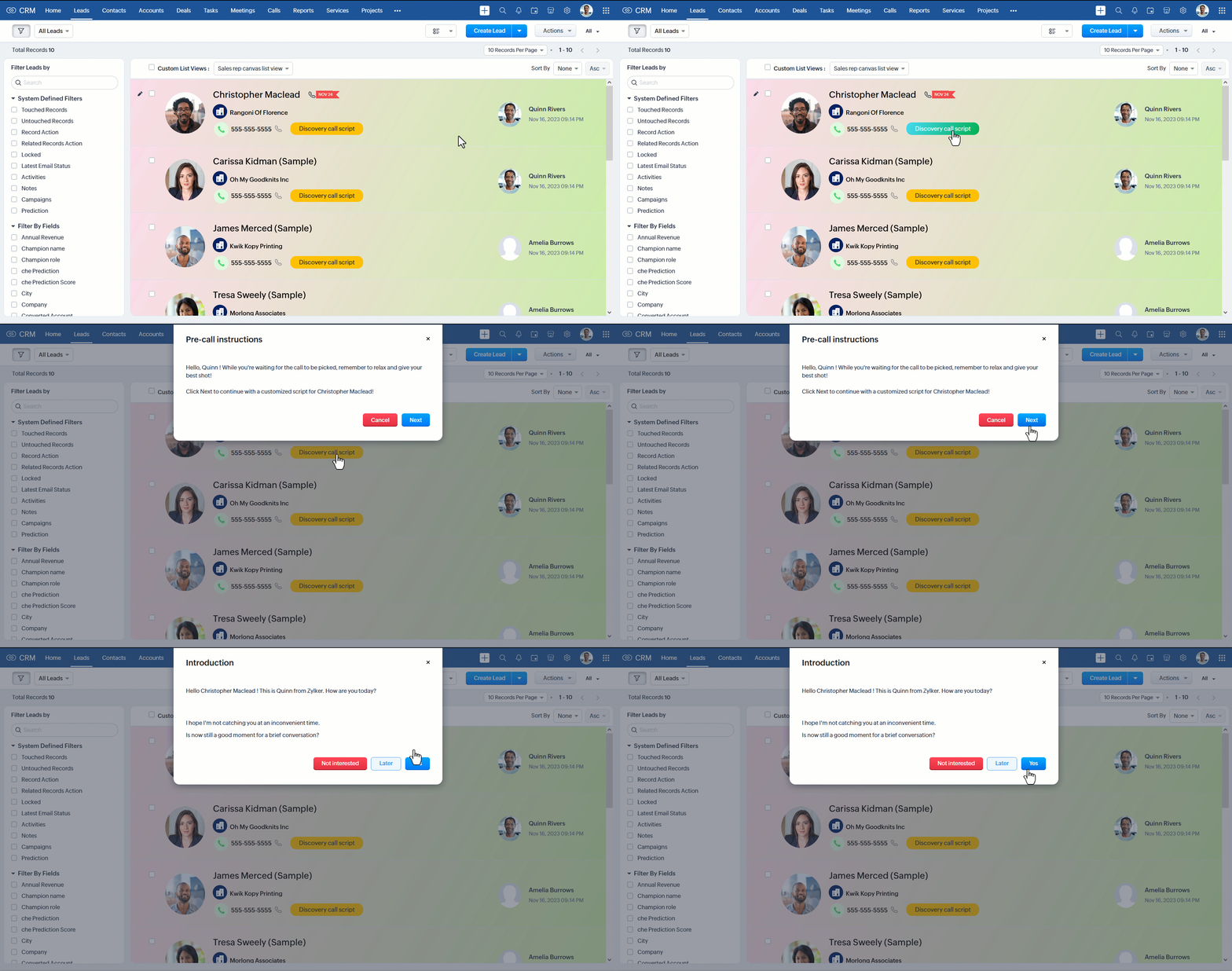
-
Follow instructions as they enter data and move to the next screen.
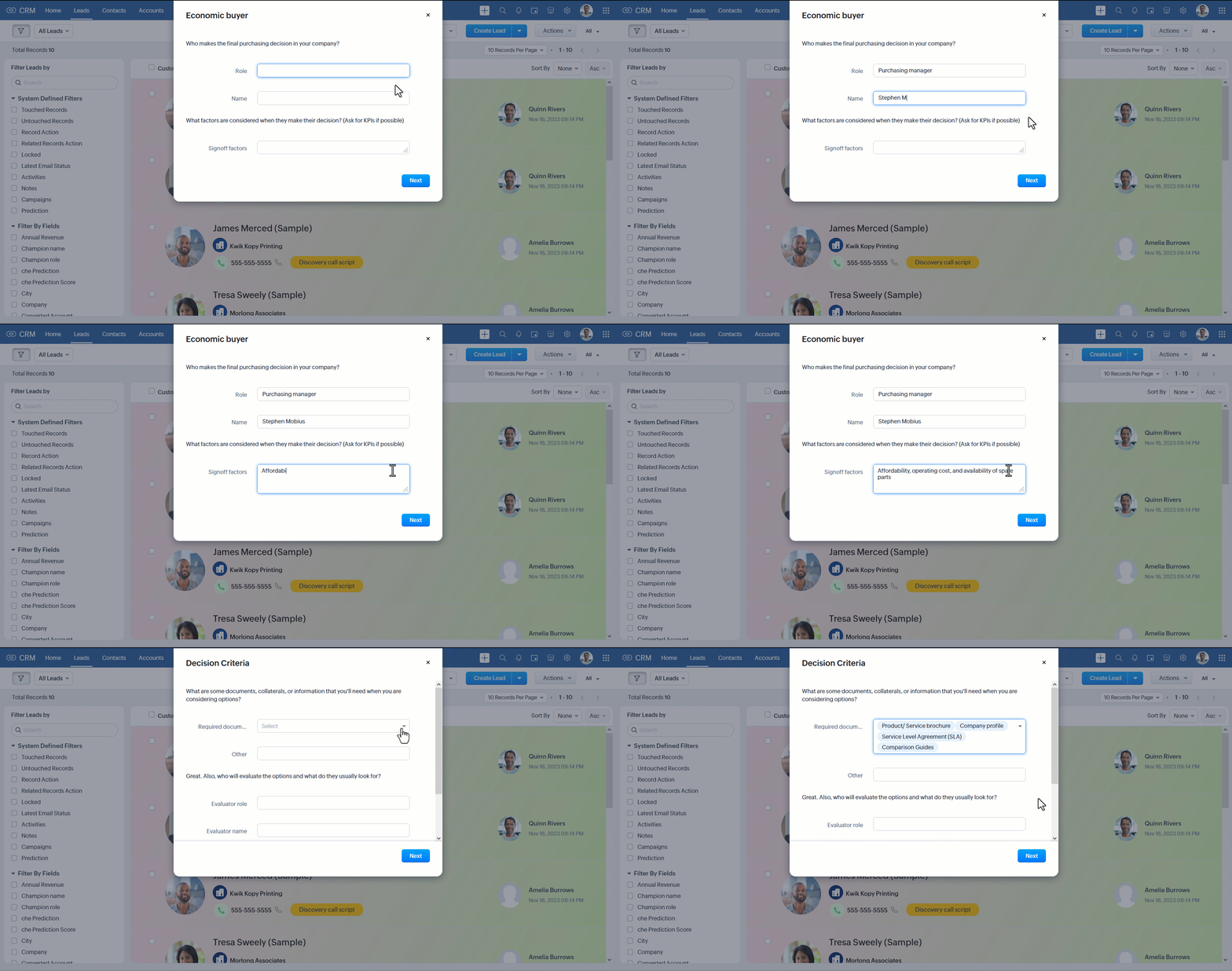
-
Click a button to end a flow once they're done.
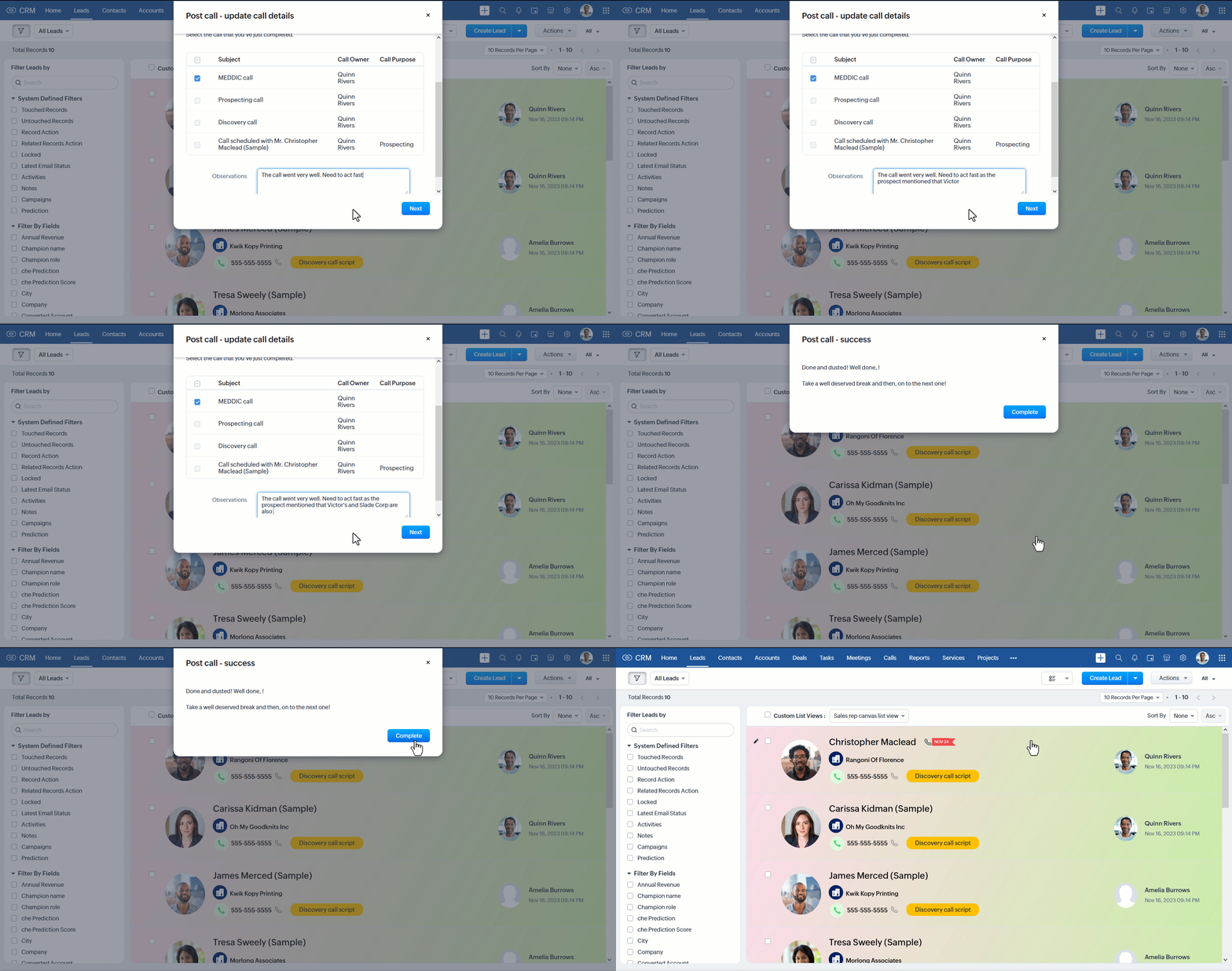
While a user is completing a process, Zoho CRM uses the gathered data to update fields in multiple modules across the tool, create new records, trigger webhooks, and execute functions. Users therefore have a pleasant experience of working with a tool built around their actual workflow, while admins and sales managers can ensure process compliance and accurate data entry into the CRM.
Creating process flows
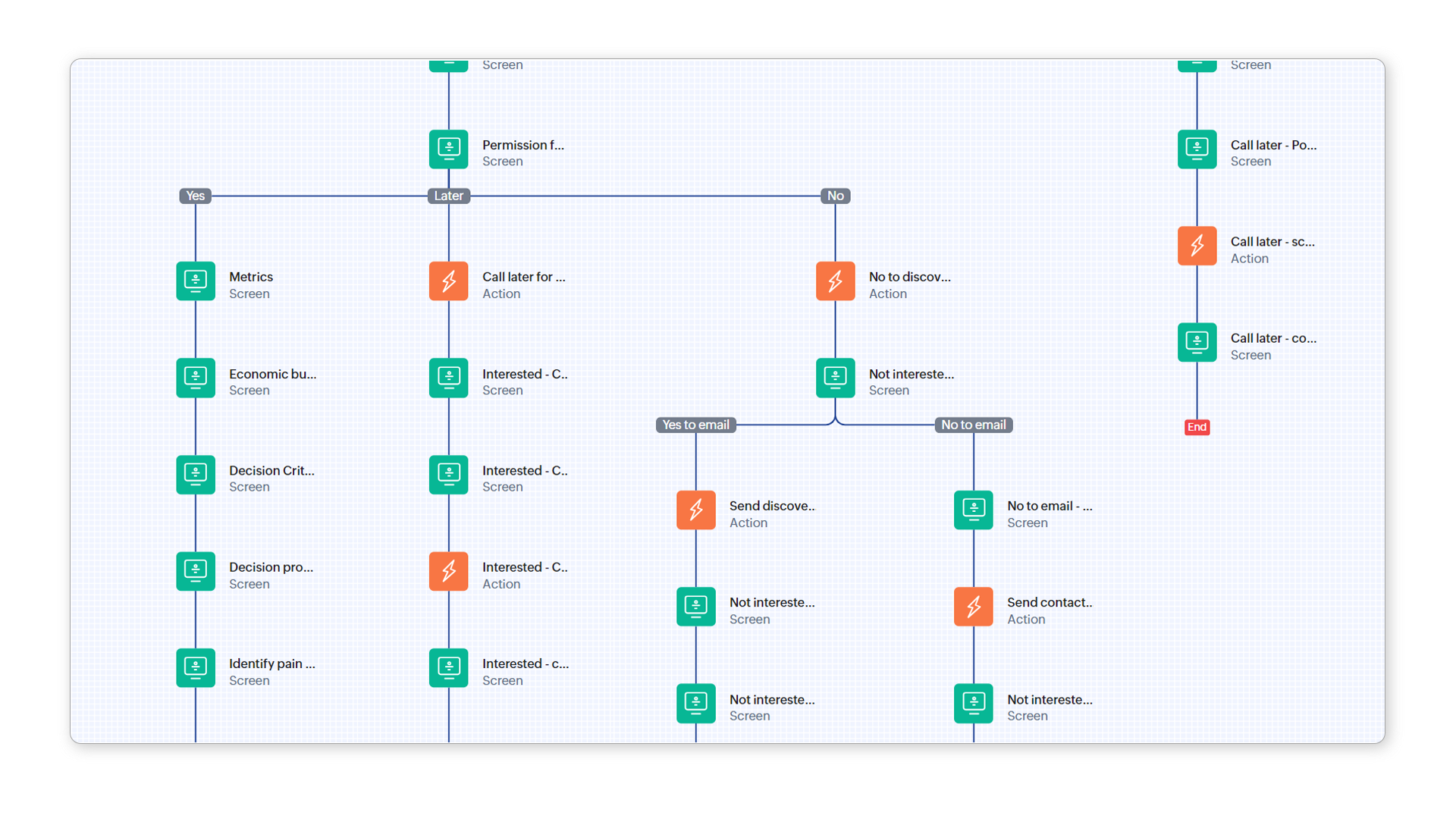
You can create process flows using the low-code process flow builder. You can build process flows to cover multiple use cases, but in the end, all process flows are the same in that they're made up of a few basic elements: screens, decisions, and actions that are added, configured, and connected in multiple ways. Process flows are supported in CRM sandboxes so you can test them out in your sandbox before deploying them to your production environment.
Use cases
Processes with the following characteristics are well-suited for process flows:
- The action requires user input and/or a user to choose the correct next step.
- The process requires different screens to be shown to the user based on previous decisions and supplied data.
- Gathered data is required to perform a range of actions in the CRM.
- The process needs to be completed continuously.
Some obvious use cases include the following:
- Call scripts for sales representatives
- CRM updates that involve a handoff between account executives and customer success representatives
- Record creation and modification when a contact has moved to a new company or position
- Providing reps a walkthrough of how to offer discounts per company policy
- Filling out an application form for new students, where new records need to be created in multiple modules
Availability
Editions: Enterprise, Ultimate
DCs: All
Release plan: [Updated on 4 Jan 2023 - Feature has been enabled for partners and customers who've requested early access]
Editions: Enterprise, Ultimate
DCs: All
Release plan: [Updated on 4 Jan 2023 - Feature has been enabled for partners and customers who've requested early access]
To register for early access, please fill in this form: Kiosk in Zoho CRM - Early Access. (Previously named 'Process Flow')
In case you have any questions, do let us know in the comments section. Thanks!
Moderation update (26 Dec 2023):
We are doing a few last minute improvisations. We will start enabling early access from the New Year.
Happy New Year wishes to all!
Topic Participants
Kiran Karthik P
Andres
Ashish Bhatnagar
Ishwarya SG
Jordan Talmor
Sticky Posts
Announcing Early Access to "Zoho CRM for Everyone" — A new and exciting update to Zoho CRM
Update : Zoho CRM For Everyone's Nextgen Interface gets an upgrade! Hello everyone, We’ve updated the Zoho CRM for Everyone Nextgen interface based on your feedback. The UI is now simpler with a unified sidebar, a more visible global search and features[Early Access] Voice of the Customer (VoC) for Zoho CRM
Happy new year, everyone! We have an exciting addition to our suite of features and would like to introduce you to VoC (Voice of the Customer) for Zoho CRM, powered by Zia. 2023 is definitely the best time to be a customer with rapid innovations and advancementsAdding calls as a channel in Voice of the Customer
Dear All, We hope you're well! It's been almost a year since we opened Zoho CRM's Voice of the Customer solution up for early access. We are grateful for the reception and support you have been showing us with regards to its adoption and feedback. Since
Recent Topics
Last/Previous month in relative date filter
In the relative date filter, what is the difference between "Last 2 months" and "Previous 2 months"? So, if we are on 25-July, then is my understanding correct of the following: Last 2 months :=: 25-May~24 July Previous 2 months :=: 01-May~30-June Thanks.Tags get removed from notes on mobile
I don't know why this keeps happening even after all these app updates but if you log out and log back into the app or you reinstall it, all the tags you assigned to your notes get taken off, but if you go on the desktop version the tags are still there.VAT rates - exempt and out of scope
Good Evening, UK based company here. I am a bit confused in respect of setting up VAT rates for exempt goods and services; at present I am simply leaving the VAT rate blank in the transactions in order to prevent any VAT appearing in the VAT return. WhenIntroducing Lead Capture: Empower exhibitors to capture leads effortlessly
Events provide a great opportunity for exhibitors to generate awareness and engage with potential customers. Efficiently distributing attendee information to exhibitors through a seamless and secure way is of paramount importance. Introducing Lead CaptureWork Order Creation Issue
Dear Team, I would like to inquire about the daily limit for Work Order creation in Zoho FSM. Yesterday (02/05/2025) at around 6:30 PM GST, I attempted to create a Work Order, but I have been unable to do so since then. Please find the attached imageURGENT: ChatGPT Extension Failing With “gpt-3 Access Error” (Priority Support)
Appreciate support reviewing this urgently. I am a Priority Support member and need immediate clarification on a recurring issue involving the ChatGPT extensions inside Zoho Desk. Both extensions — including the version created and published by Zoho —Zoho Desk iOS update: Custom buttons, follow/ unfollow option on tickets
Hello everyone! In the most recent Zoho Desk iOS app update, we have brought in support to access the custom buttons configured on web app(desk.zoho.com). Using custom buttons you can seamlessly execute predefined actions directly from their mobile devices,Zoho pdf suit
Pl. design products with following feature: 1. Please add all features given in Ilovepdf website to work on pdf files. It is mandatory to use pdf in court work. 2. Courts have prescribed New Times Roman, pl. add this font as well 3. Indexing, signatureZoho Not Working
Today Zoho not wokringDynamically autofill fields with URL parameters
I have a zoho form embedded in my organization's WP website. Our users find their account with a search tool, and then can select to open this page with the embedded form. The URL of the page holds the parameter that I need, but I cannot figure out howUser Automation: User based workflow rules & webhooks
User management is an undeniable part of project management and requires adequate monitoring. As teams grow and projects multiply, manual coordination for updating users & permissions becomes difficult and can give way to errors. User automation in ZohoIntegrate Projects for Desk KB article release tasks
Could you please look into the possibility of integrating project tasks for Zoho Desk article release processes? We are looking for an internal integration between Zoho Projects and Zoho Desk's KB article drafting, reviewing and releasing tasks. We couldIssue in Annual Leave
We created a policy to credit 21 days at the Start of the Year An employee has taken 16 days of leaves thought the year, so we expect to see 5 Leaves remaining right? But Zoho People is Showing 12 Days of Leave Balance Available If we check the LeaveUse the searchBy parameter to find user by email address
I'm trying to find a user is Zoho Desk via the Api. In the documentation I see that there is the possibility to add a searchBy parameter in the request. But I can't find how the search values should be formatted. I've tried multiple things and get eitherZoho CRM Community Digest - September 2025 | Part 2
Hello Everyone! Mid-September vibes: fresh tips, smart hacks, and practical Zoho CRM updates all in one place. Let’s dive in. Product Updates: The All-New Address Field! The new Address field type makes it easier to capture complete addresses in one structuredZoho Vault API: Create new Secrets
Hello, I attempt to Post Secrets to the vault, since the encrypted entries are almost impossible to decrypt, since there is no documentation on how to decrypt them. Like with the lack of documentation on how to descrypt, there are missing information regarding on how to create new secrets/post secrets. Source: https://www.zoho.com/vault/api/#create-a-new-secret When I try to send JSON Informationen as a POST-Request I only receive the error message: { "operation": { "result": { "error_code": "",CRM and Finance Tab - Add Invoice "Subject " Column
When On a contact in CRM, and you click the Zoho Finace tab, how can I put in the invoice subject line? Or even a custom field for this. We need to see what that invoice is for, without opening it. If we have tons of invoices we need a way to quickCollections Management: #4 Before, During & After Payment Processing
"Mark, I think the payment link isn't working. Can you send it again?" Staring at a message, Mark got on his phone. This was the third time the same customer had asked him that week. A few minutes later, another message came, "Hey, the invoice total seemsAccount name not populating when importing contacts
When importing a csv file to add contacts the account name is blank? Every other filed gets mapped and imported correctly, i.e contact name, phone number. However not the account name which I have mapped to "company" field in my csv fileSuggestion to improve zoho writer
I am using your product, I believe it is very useful, however, i was writing a note and I needed to draw an arrow in different angles to explain a point and I couldn't. it would be helpful, to add draw functions to the zoho writer. thankswebhook basic authentication
II want to use a webhook to send out a SMS. Unfortunately Twilio does not use an authToken but basic authentication. I created the webhook as POST and get this url: https://{username}:{password}@api.twilio.com/2010-04-01/Accounts/{account}/Messages?body=<BODY>&to=+155555555&from=+1555555555Custom function return type
Hi, How do I create a custom deluge function in Zoho CRM that returns a string? e.g. Setup->Workflow->Custom Functions->Configure->Write own During create or edit of the function I don't see a way to change the default 'void' to anything else. AddingIssue with Hour Calculation in Zoho People Attendance Module
I have noticed an issue in the attendance regularization feature of Zoho People. When trying to regularize past dates, the total working hours are not calculated correctly. For example, if I enter a check-in and check-out time for a previous day, thePush Notification for New Bookings in Zoho Bookings App
when a someone schedules an appointment through the booking page, is there any option to receive a push notification in the mobile app?Automation in Zoho Sprints
Hi. I have a Sprints board with the following statuses: ToDo, InProgress, CodeReview, Testing, Preprod, Live When a ticket is moved from e.g. Testing to Preprod, the following tags should be modified: remove 'tested OK' remove 'ready for Preprod' addExport Purchase orders as Excel
Is it possible to export purchase orders as excel rather than PDF? Our suppliers don't want orders made in PDF, they need it to be excelDraft & Schedule Emails Directly in Bigin
Greetings, I hope all of you are doing well. We're happy to announce a few recent enhancements we've made to email in Bigin. We'll go over each one in detail, but here's a quick overview: Previously, you couldn't draft or schedule emails in Bigin, butCreate CRM Deal from Books Quote and Auto Update Deal Stage
I want to set up an automation where, whenever a Quote is created in Zoho Books, a Deal is automatically created in Zoho CRM with the Quote amount, customer details, and some custom fields from Zoho Books. Additionally, when the Sales Order is convertedSend email template "permission denied to access the api"
Hello, Per the title, I'm trying to send a Zoho CRM Email template based on the advice given here: https://help.zoho.com/portal/en/community/topic/specify-an-email-template-when-sending-emails-in-custom-functions (I'd prefer to send right from DelugeZia’s AI Assist now helps you write clearer notes — in seconds
After helping recruiters craft job descriptions, emails, and assessments, Zia’s AI Assist is now stepping in to make note-taking effortless too. Whether you’re recording feedback after an interview or sharing quick updates with your team, you can nowShortcut to fill a range of cells
Good evening: I'm writing because I haven't been able to find a feature that allows you to select a range of cells, type in one of them, and then use a key combination to type in all of them. In Excel, the keyboard shortcut is Ctrl+Enter. I haven't foundIntroducing Dark Mode / Light Mode : A New Look For Your CRM
Hello Users, We are excited to announce a highly anticipated feature - the launch of Day, Night and Auto Mode implementation in Zoho CRM's NextGen user interface! This feature is designed to provide a visually appealing and comfortable experience forObject required error
Hi, I am getting an 'Object required' error on the line Call HideColumnsOutsideRange(ws, startOfWeek, endOfWeek) when I run the ShowCurrentWeek macro but not when I run the ShowCurrentMonth macro. Any ideas? Regards, GW Option Explicit Sub HideColumnsOutsideRange(wsZoho CRM - Rename "Estimates" in CRM Finance Suite Integration to "Quotes"
I'm not sure if it's been 2 or 3 years now since Zoho Books renamed Estimates to Quotes. I still see "Estimates" in the Zoho CRM integration. Could this be added to Translation settings so that some customisation could be made on an account by accountIts 2022, can our customers log into CRM on their mobiles? Zoho Response: Maybe Later
I am a long time Zoho CRM user. I have just started using the client portal feature. On the plus side I have found it very fast and very easy (for someone used to the CRM config) to set up a subset of module views that make a potentially extremely usefulNew Series Announcement - Ecommerce Marketing Tips
Running an online business is more than just having a website. It’s about getting the right customers to discover you, trust you, and keep coming back. To support your growth journey, we’re launching a weekly Marketing Tips series right here on Zoho CommerceMarketing Tip #7: Add a blog to your online store
A blog is more than content. It’s a magnet for new customers. Sharing product guides, styling tips, or industry insights through blog posts builds trust and helps you rank higher on search engines. Try this today: Write one blog post answering a commonKanban view on Zoho CRM mobile app!
What is Kanban? The name doesn't sound English, right? Yes, Kanban is a Japanese word which means 'Card you can see'. As per the meaning, Kanban in CRM is a type of list view in which the records will be displayed in cards and categorized under the givenAllow Regular Users to Directly Transfer Ownership of Files & Folders
Hi Zoho WorkDrive Team, Hope you are doing well. We would like to request an important enhancement related to file and folder ownership management in Zoho WorkDrive. At the moment, a regular user cannot directly transfer ownership of their files or foldersTriggering rules on lead conversion
There is no field on the Rule list for rule conversion to trigger an alert on liead conversion to a potential. I assigned a rule to file on any creation or update of a lead. The lead was changed a lead to a potential but no rule was fired. Rajesh BhadraNext Page