Plug Sample #9 - Get Notified on Cliq When Your Premium Customers Interact with SalesIQ's Zobot

Plug Sample #9 - Get Notified on Cliq When Your Premium Customers Interact with SalesIQ's Zobot

Hi everyone! 

We're here with another simple yet effective plug for your chatbot to integrate with Zoho Cliq to make your job easier. Just imagine whenever a potential lead or your premium customers are on your website, and they engage with your chatbot, you'll receive instant notifications on Cliq, complete with their details and a chat URL.

Sounds helpful, right? 

Now get all this information on your cliq as a message. If a prospect or a premium customer is conversing with the bot, then on a click you will be redirected to SalesIQ. You will get the complete information of the chat and can also take over the chat from the bot, thus providing your best assistance. 



Are you new to SalesIQ? Wondering what these plugs and bots are?

Zoho SalesIQ is a customer engagement and live chat platform for your website. To automate customer engagement, SalesIQ offers chatbots. With the Codeless bot builder, you can build chatbots by dragging and dropping cards. This bot builder has almost all essential cards needed to build your bot. However, at times, businesses would require unique actions from the bot and for those instances, we have Plugs. With plugs, you can create a unique action and bring it as a card inside the codeless bot builder like the rest of the cards. In this post, we will take a look at how to create a plug integrating your bot with Zoho Cliq and the possible benefits. 

How can this Plug help your business?
  • Get notified in Cliq when a specific type of visitor engages with chatbot. These visitors can be who you think are important for your business like premium customers, potential leads, visitor with a good lead score, visitors from a specific URL or source, visitor with CRM deal closing date period, etc. as per your requirement.
  • Cliq bot will notify on the personal chat (subscribers of the bot) or on a group channel based on the preference.
  • Get your visitor details like name, chat URL, and other information, in the message notification. 
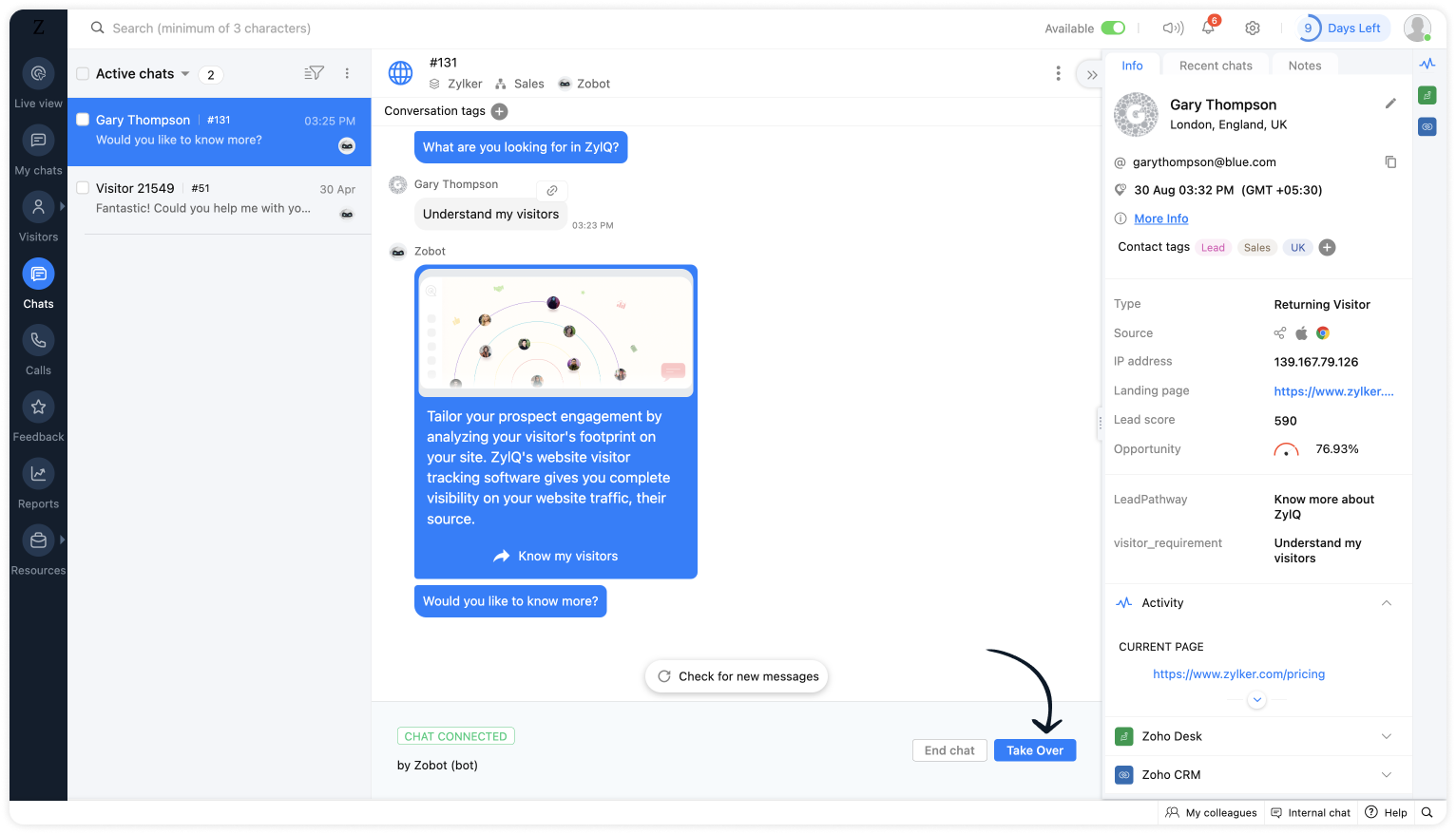
  • Clicking on the chat URL, you will get redirected to the SalesIQ's bot conversation, where you can look at the bot chat. If required, you can take over the chat. 

Plug overview
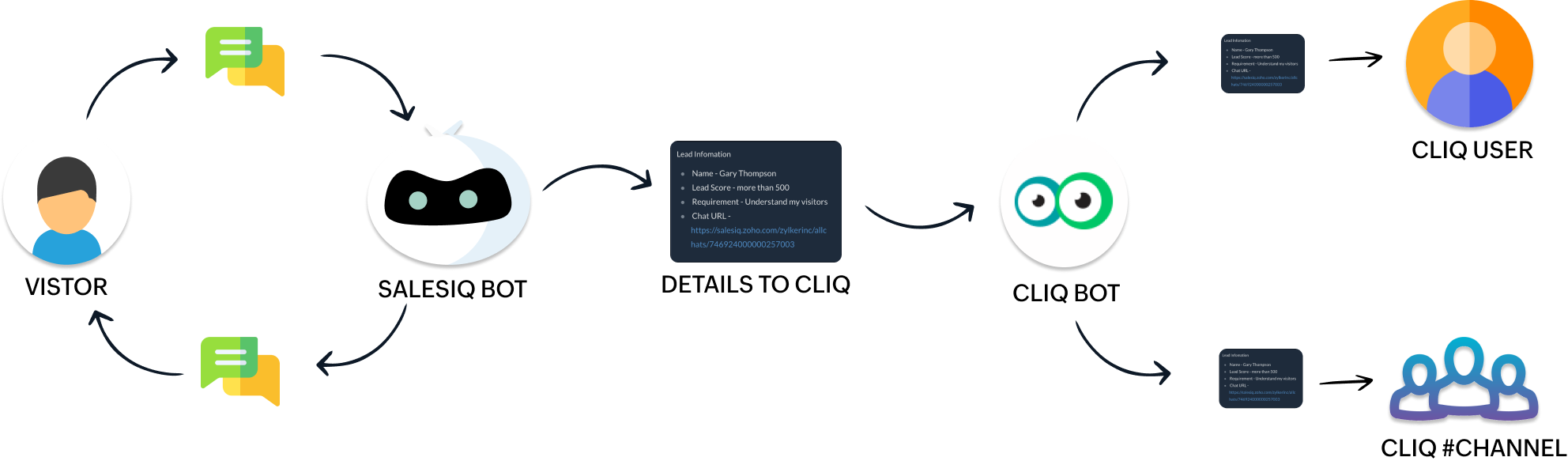


  • The SalesIQ bot will collect the required information and send it to the Cliq bot while the conversation is ongoing. 
  • Next, the Cliq bot will send this information to personal chat or a group channel in Cliq as per your business needs.

How to build this Plug (promising lead engages with your bot) ?

Step 1 - Create a connection between SalesIQ and Zoho Cliq
  • In your SalesIQ Dashboard, navigate to Settings > Developers > Plugs > Click on Add .
  • Provide your plug a name, and description, select the Platform as SalesIQ Scripts , and finally, click on Connection to your left bottom. You will be redirected to the connection interface.
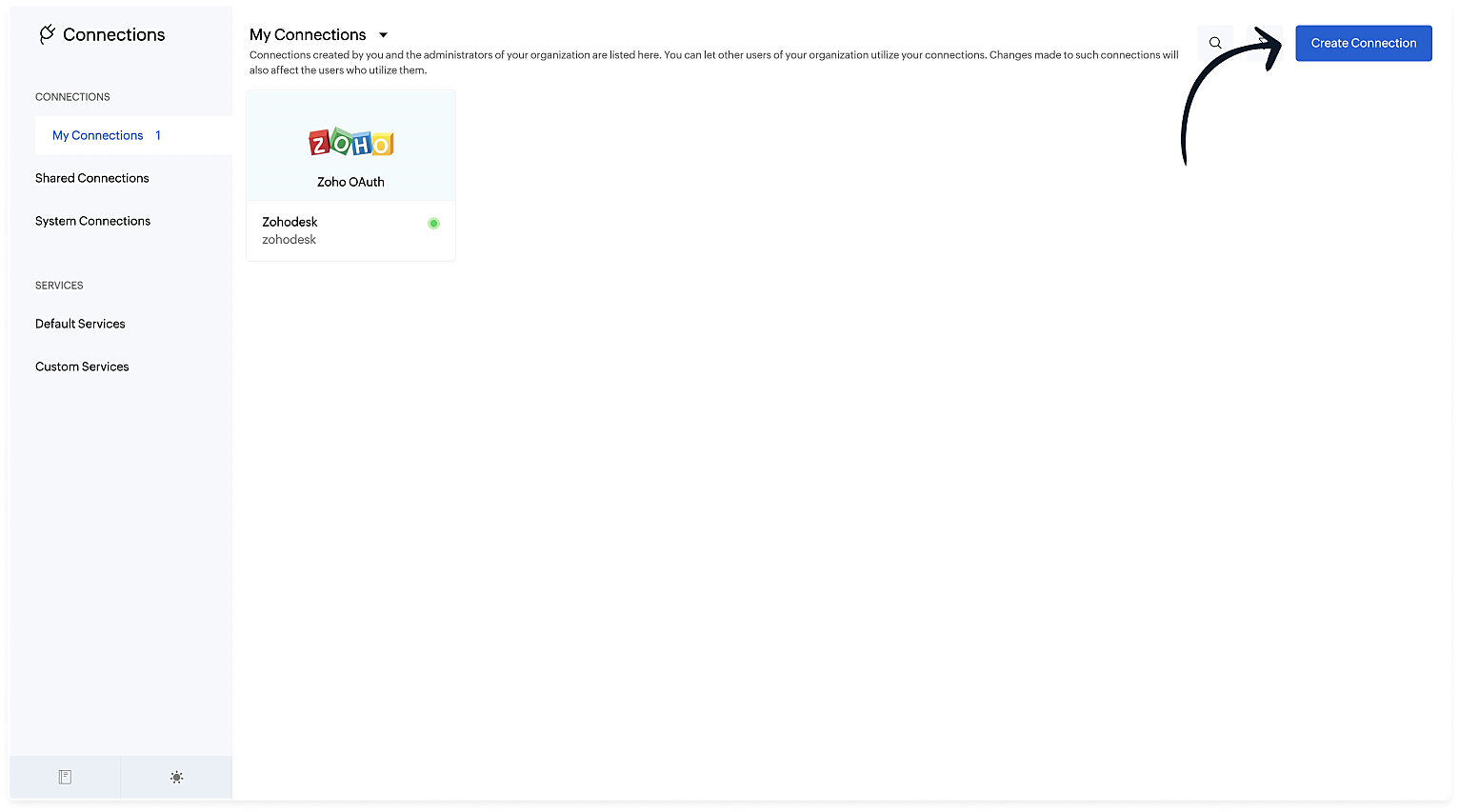
  • Click on Create connection at the top right corner. 
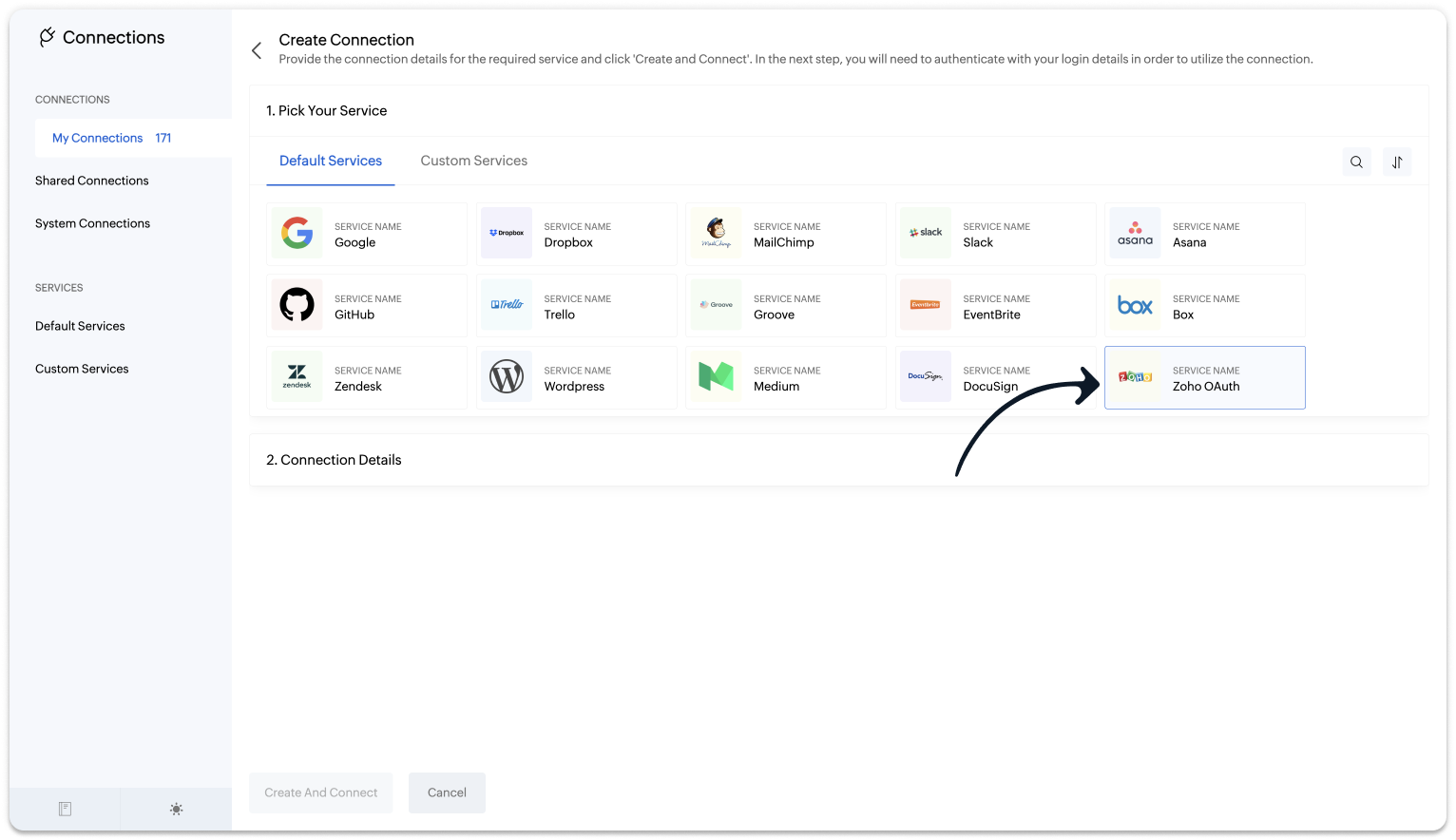
  • Under Default connection, select Zoho OAuth service. 
  • Provide your connection name, connection link name, and choose the scopes below.
    • ZohoCliq.Webhooks.CREATE
    • ZohoCliq.Messages.ALL
  • Click on Create And Connect to connect Zoho SalesIQ and Zoho Cliq.
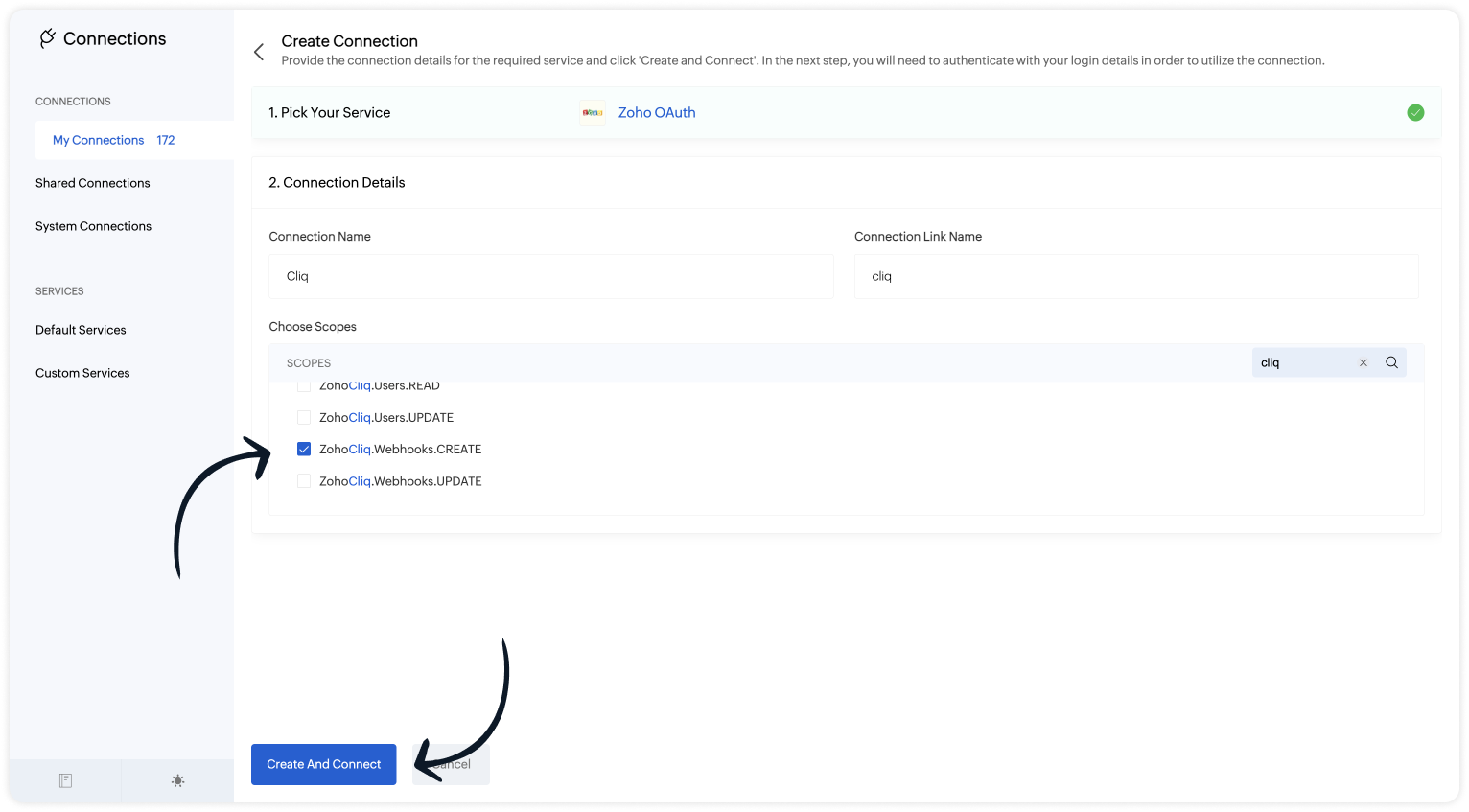

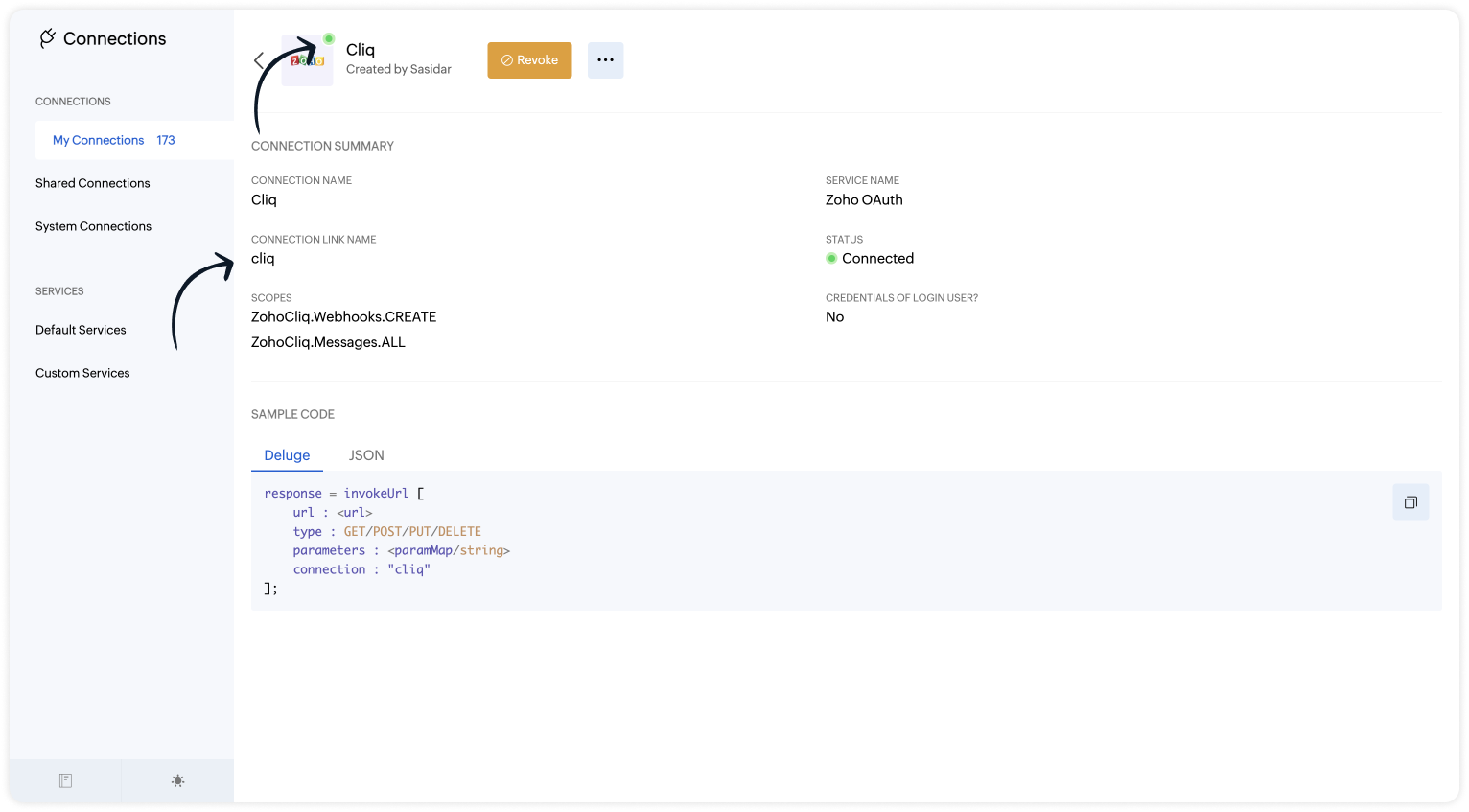
Note: The Connection Link Name will be used in the scripts to invoke URL tasks.

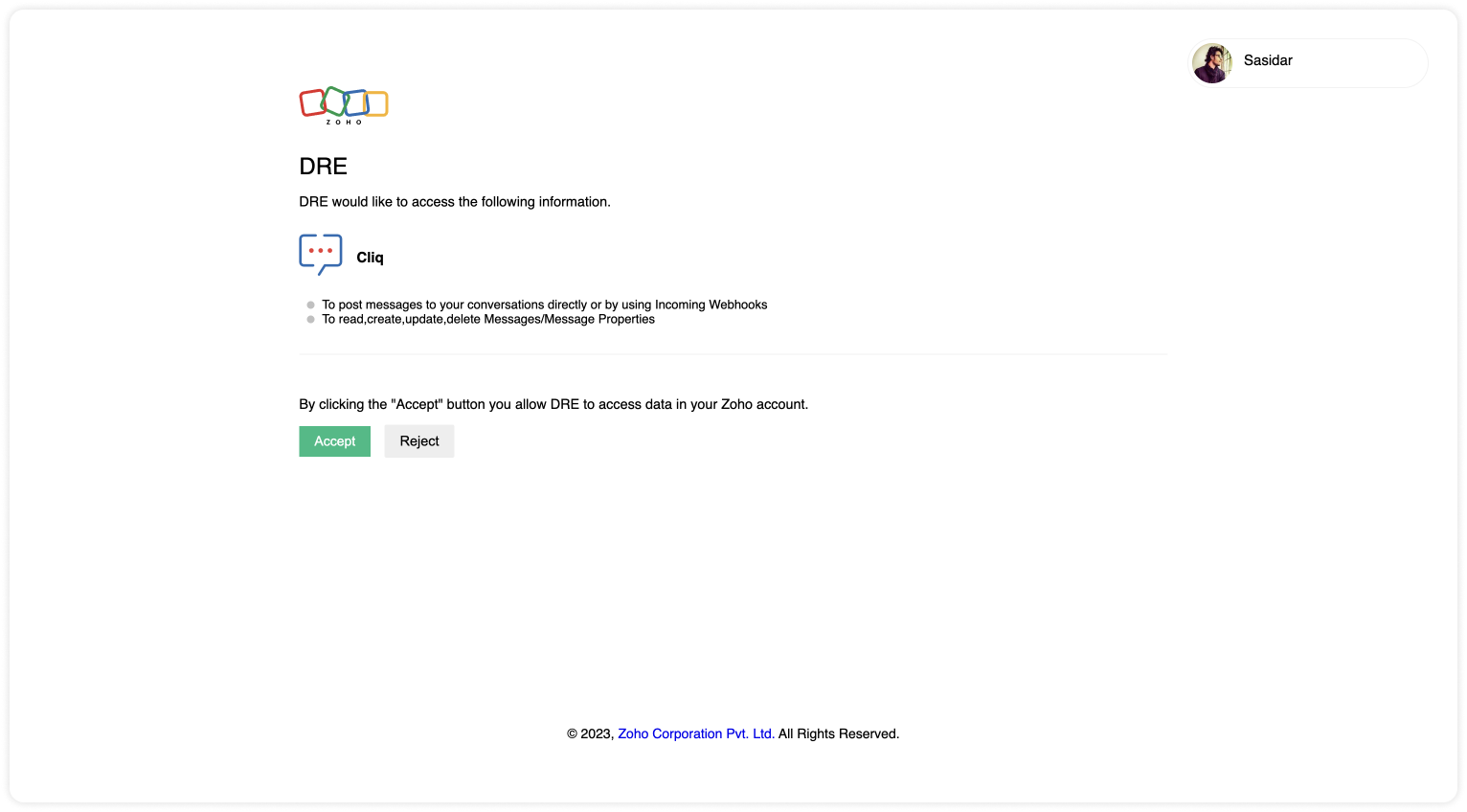
Upon successful authentication,  Zoho SalesIQ will be connected with Zoho Cliq. 

  • The connection is successfully established. 

Step 2 - Build the Plug

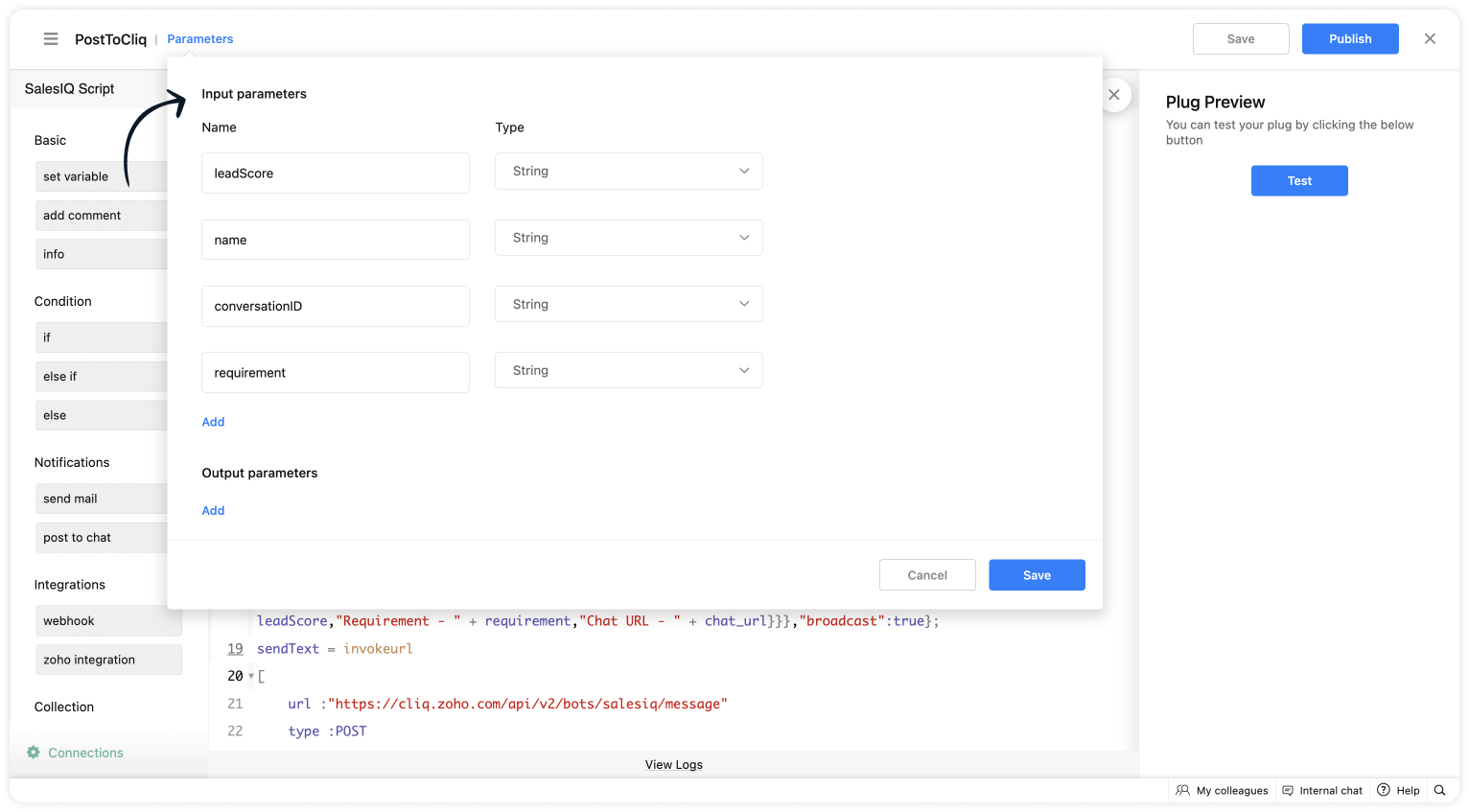
As we have created a connection between SalesIQ and Cliq successfully. It's time to build the plug.  The first step in building the plug is defining the parameters. You can enter the metrics (information) which you want the SalesIQ bot to send to Cliq bot. I've taken the name, lead score, requirement (lead's interest) and conversation ID to create the chat URL.  

Input Parameters
  • Name : name | Type : String
  • Name : leadScore | Type : String
  • Name : requirement | Type : String
  • Name : conversationID | Type : String


Script to notify a specific user via Cliq bot

If you want to notify (post information) to specific users in Cliq, copy the code below and paste it into your plug builder. Then, make the following changes. 
  • In line #16, get your portal's chat URL. For that, navigate to SalesIQ > Chats > Copy the URL except the conversation ID.
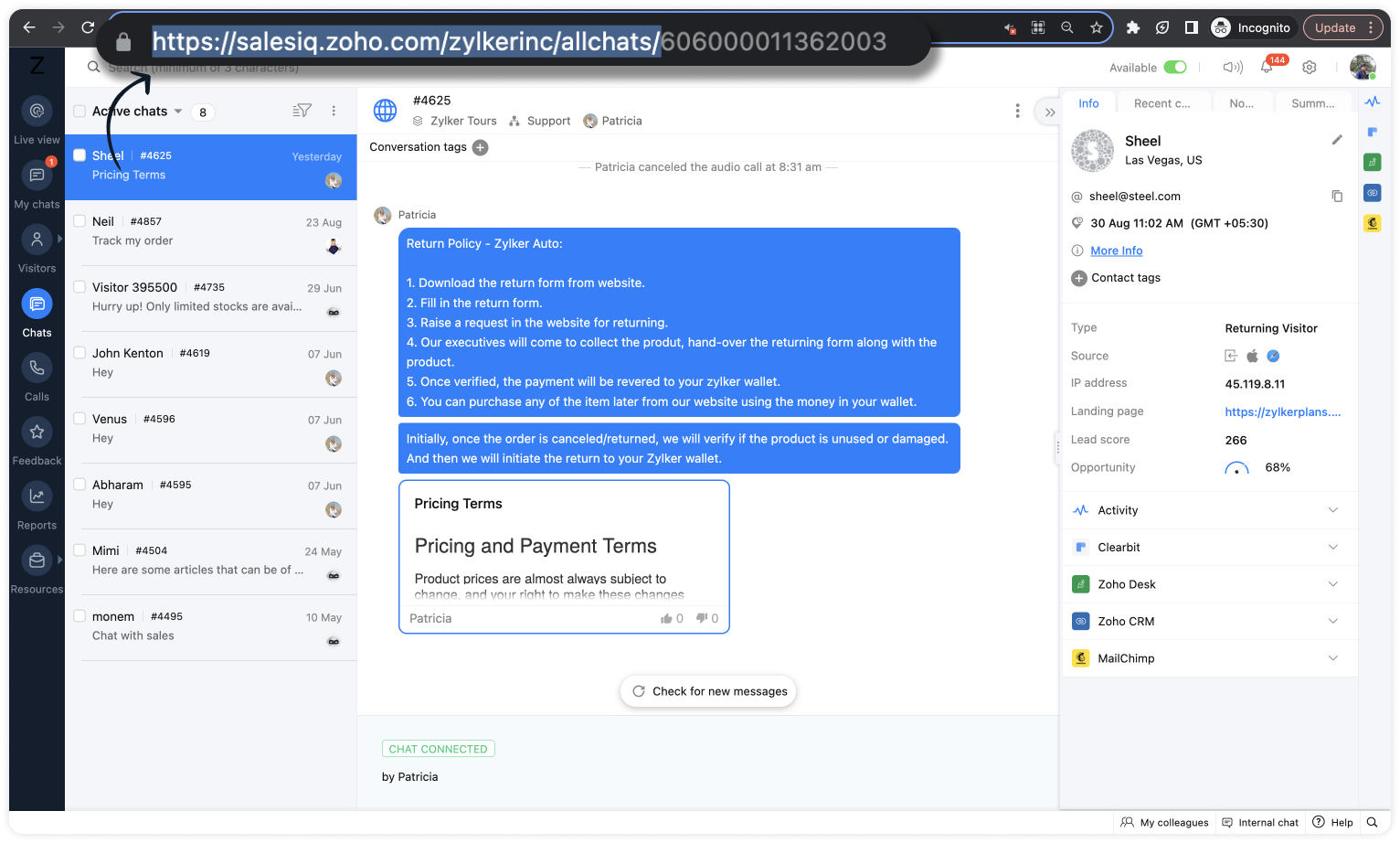
  • In line #22, replace the cliq bot name in the URL. To get the bot name from your Cliq dashboard, click on your profile in the top right corner > Bots & Tools. Then, create a new bot or click on any existing bot. (All subscribers of this bot will get notified.)
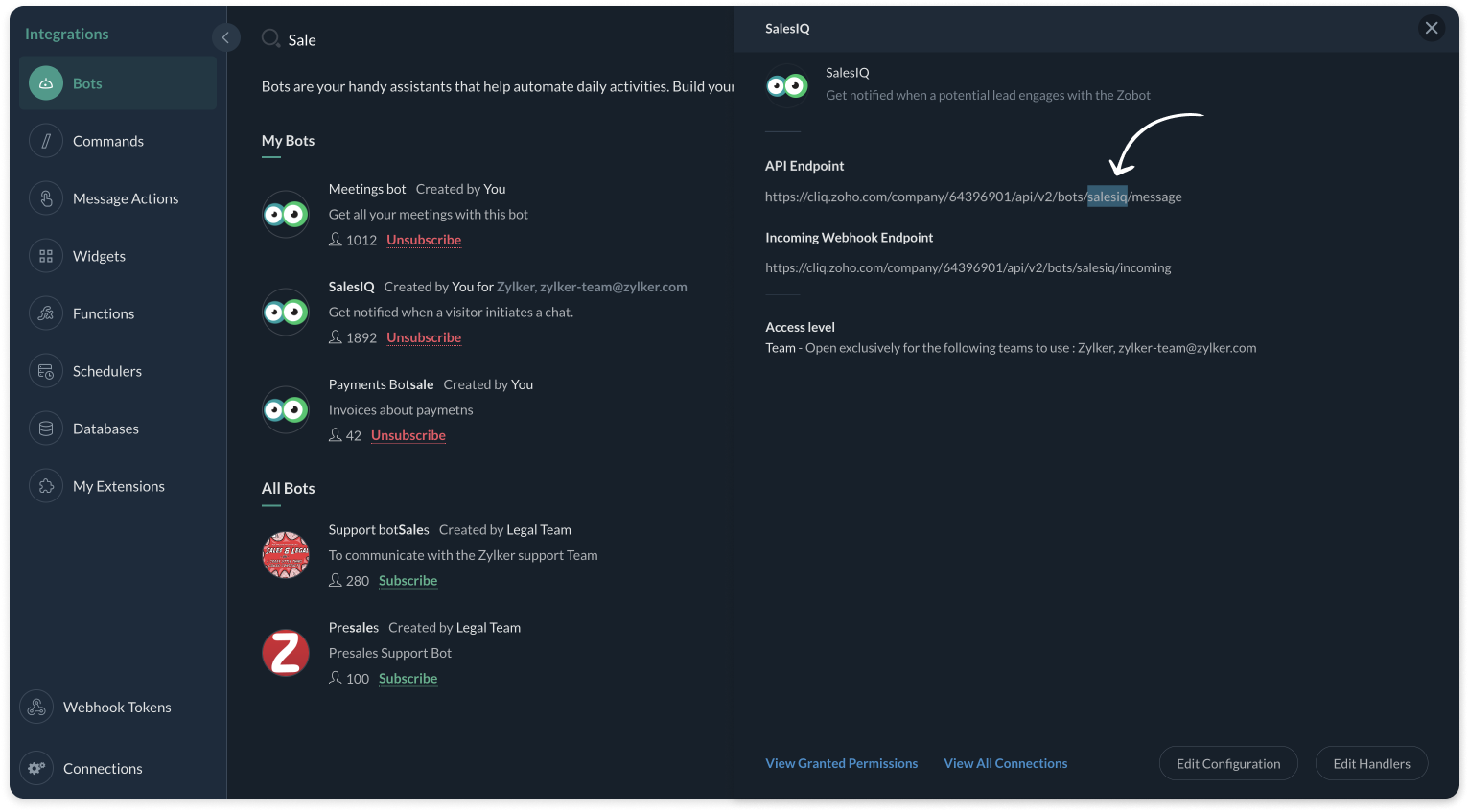
  • And, make sure, the connnection line name in line #25 is same as created during creating the connection between SalesIQ and Cliq (Step 1).
Plug Script/Code
  1. if(session.containsKey("name"))
  2. {
  3. name = session.get("name").get("value");
  4. }
  5. if(session.containsKey("leadScore"))
  6. {
  7. leadScore = session.get("leadScore").get("value");
  8. }
  9. if(session.containsKey("requirement"))
  10. {
  11. requirement = session.get("requirement").get("value");
  12. }
  13. if(session.containsKey("conversationID"))
  14. {
  15. id = session.get("conversationID").get("value");
  16. chat_url = "https://salesiq.zoho.com/zylkerinc/allchats/" + id;
  17. }
  18. list_data = {"text":"Lead Infomation","slides":{{"type":"list","data":{"Name - " + name,"Lead Score - " + leadScore,"Requirement - " + requirement,"Chat URL - " + chat_url}}},"broadcast":true};
  19. //replace your cliq bot name (salesiq)  in line #22
  20. sendText = invokeurl
  21. [
  22. url :"https://cliq.zoho.com/api/v2/bots/salesiq/message"
  23. type :POST
  24. parameters:list_data + ""
  25. connection:"cliq"
  26. ];
  27. response = Map();
  28. return response;
  • Then, click Save, preview the plug and Publish it. 
Note: API invoked in the plug is Post message to a bot

Script to notify a specific channel via Cliq bot

If you want to notify (post information) to a specific channel in Cliq, copy the code below and paste it in your plug builder. Then, make the following changes. 
  • In line #16, get your portal's chat URL. For that, navigate to SalesIQ > Chats > Copy the URL except the conversation ID.
  • In line #22, replace the Cliq bot and channel name in the URL. To get the bot name, click on your profile in the top right corner > Bots & Tools. Then, create a new bot or click on any existing bot. To get the channel name, click on the channel properties and get the channel's Unique Name. 
  • And, make sure, the connnection line name in line #25 is same as created during creating the connection between SalesIQ and Cliq (Step 1).
Plug Script/Code
  1. if(session.containsKey("name"))
  2. {
  3. name = session.get("name").get("value");
  4. }
  5. if(session.containsKey("leadScore"))
  6. {
  7. leadScore = session.get("leadScore").get("value");
  8. }
  9. if(session.containsKey("requirement"))
  10. {
  11. requirement = session.get("requirement").get("value");
  12. }
  13. if(session.containsKey("conversationID"))
  14. {
  15. id = session.get("conversationID").get("value");
  16. chat_url = "https://salesiq.zoho.com/zylkerinc/allchats/" + id;
  17. }
  18. list_data = {"text":"Lead Infomation","slides":{{"type":"list","data":{"Name - " + name,"Lead Score - " + leadScore,"Requirement - " + requirement,"Chat URL - " + chat_url}}}};
  19. //replace your cliq channel (leadsfromzobot) and bot name (salesiq) in line #22
  20. sendText = invokeurl
  21. [
  22. url :"https://cliq.zoho.com/api/v2/channelsbyname/leadsfromzobot/message?bot_unique_name=salesiq"
  23. type :POST
  24. parameters:list_data + ""
  25. connection:"cliq"
  26. ];
  27. response = Map();
  28. return response;
  • Then, click Save, preview the plug and Publish it. 
Note: API invoked in the plug is Post message in a channel

Step 3 - Adding the plug to the Codeless bot builder
  • Navigate to Settings > Bot > Add, provide the necessary information, and select Codeless Bot Builder as a bot platform or open an existing bot.
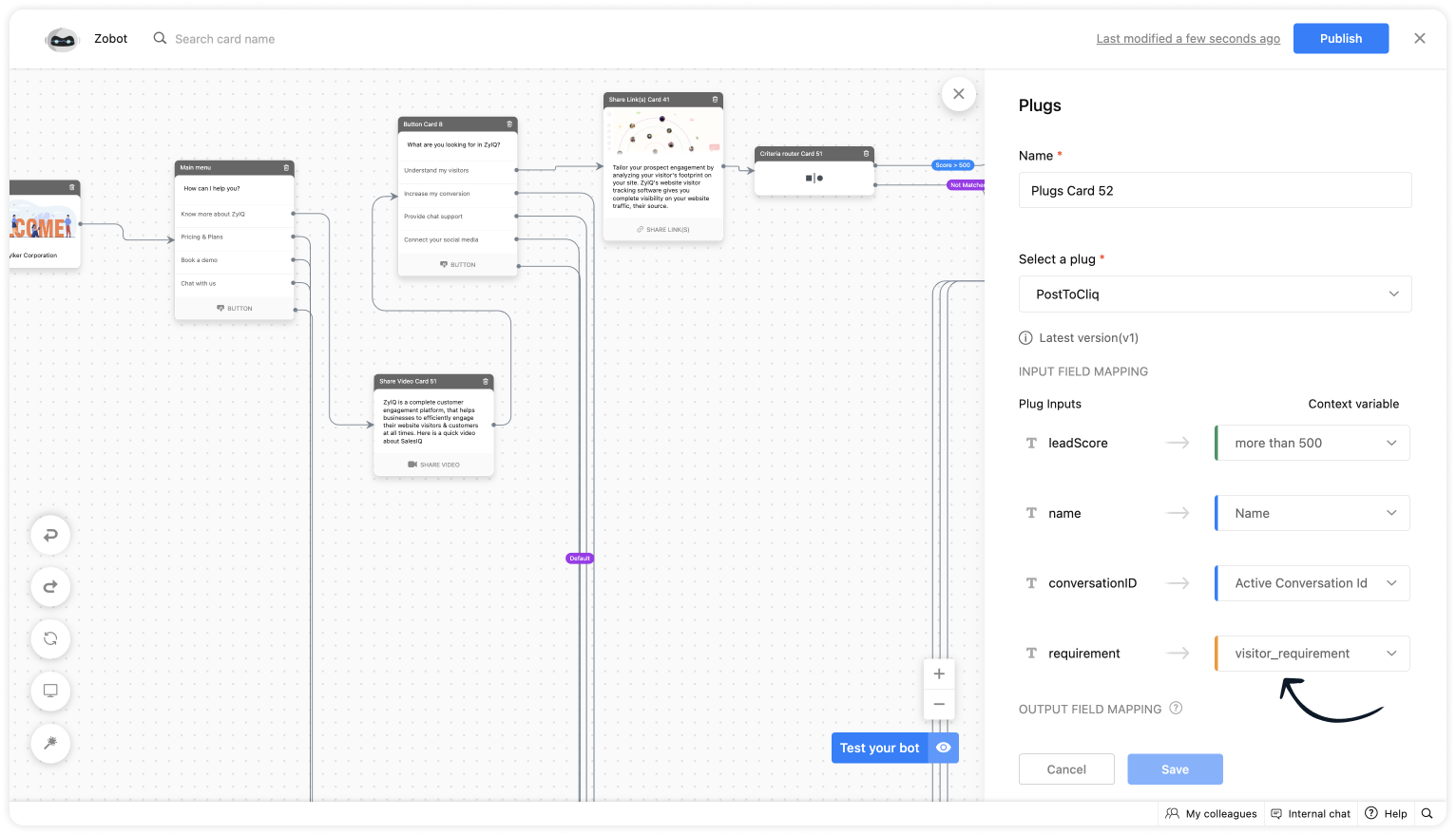
  • To notify in Cliq, click on Plugs under Action cards, select the plug you have created and provide the input values for the parameters defined in the plug builder.
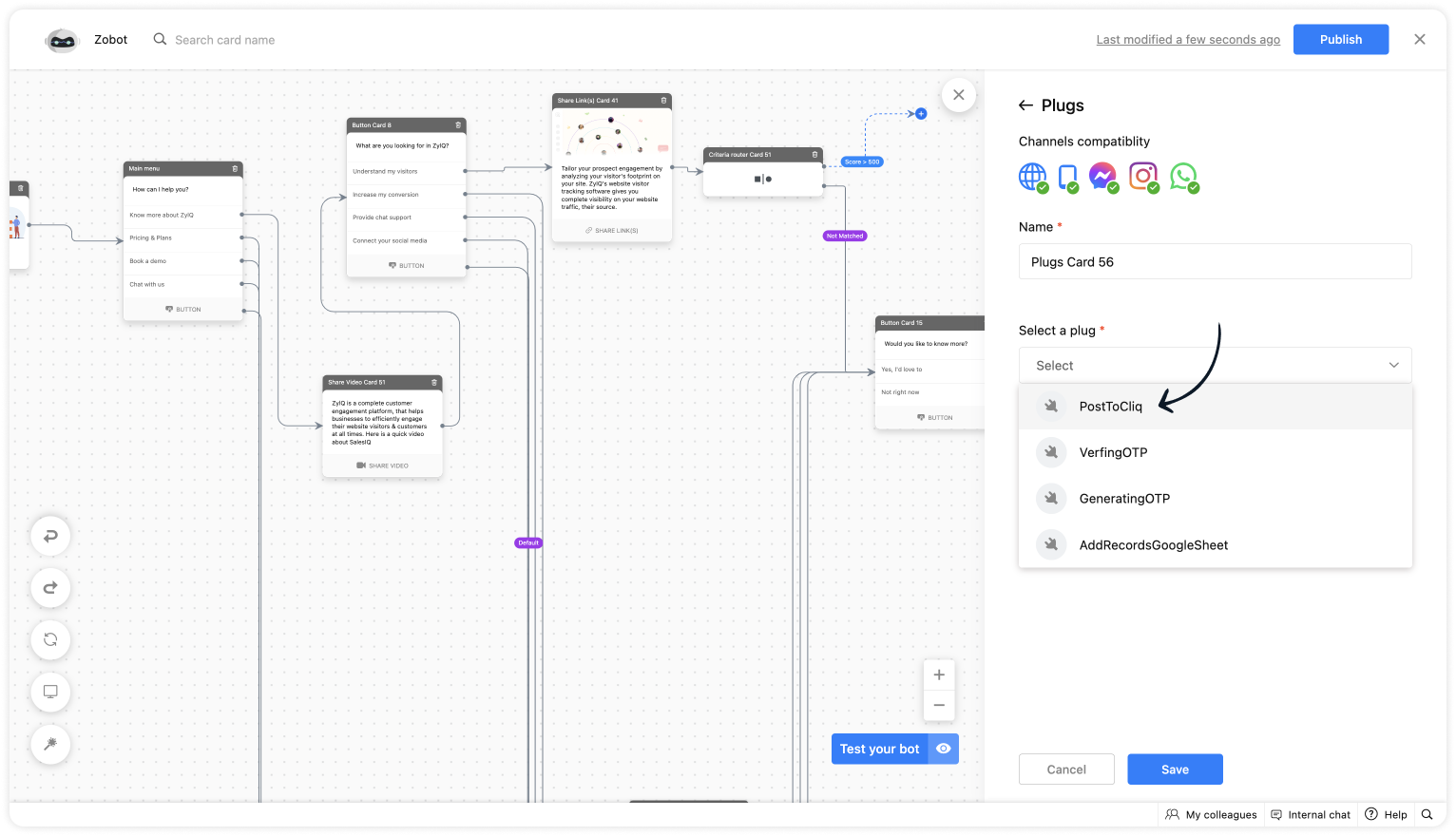
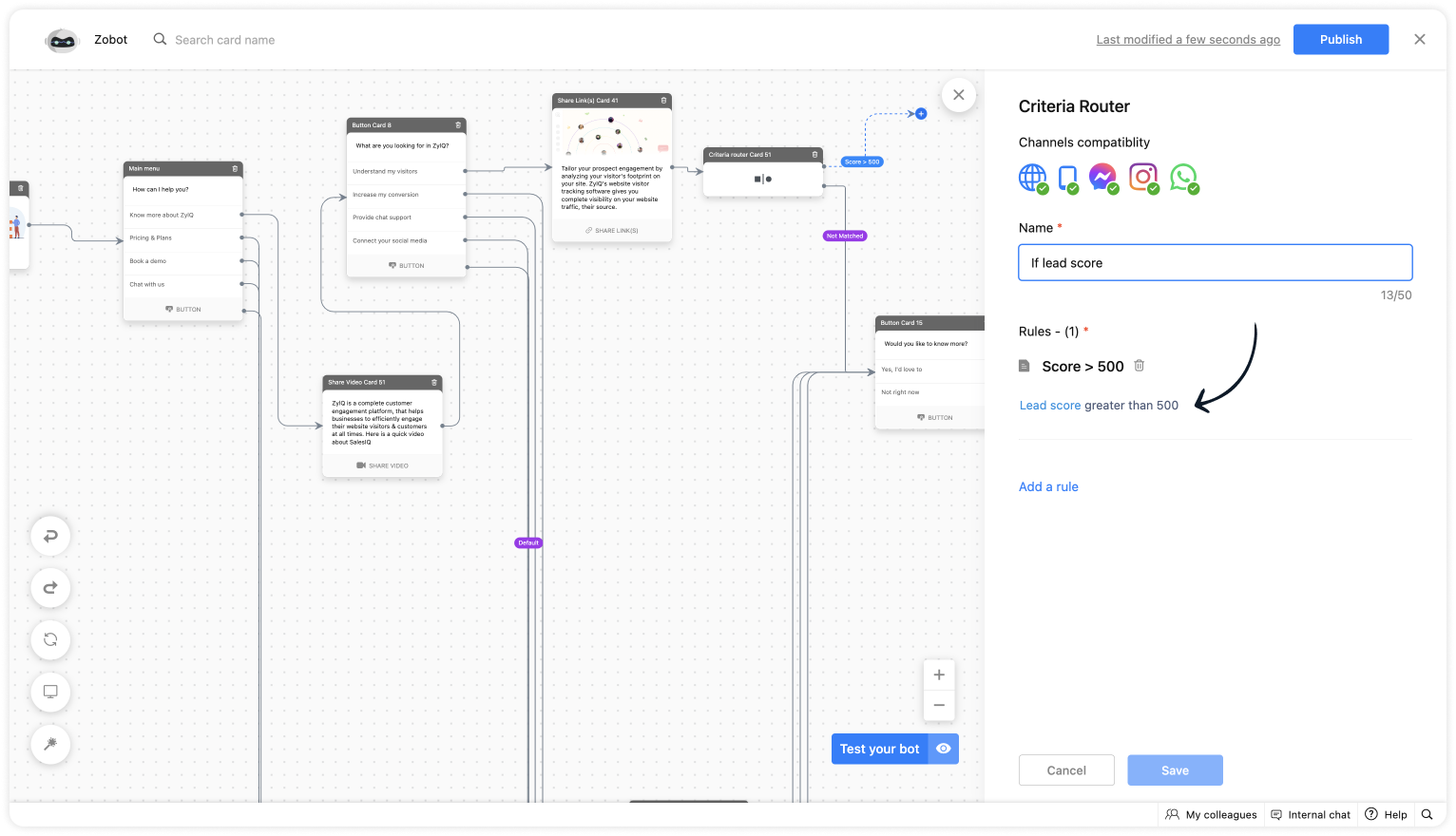
  • As we want to notify only the visitors whose lead score is more than 500. Use the Criteria router card and set up a rule. 
  • For lead score, provide the value "more than 500".
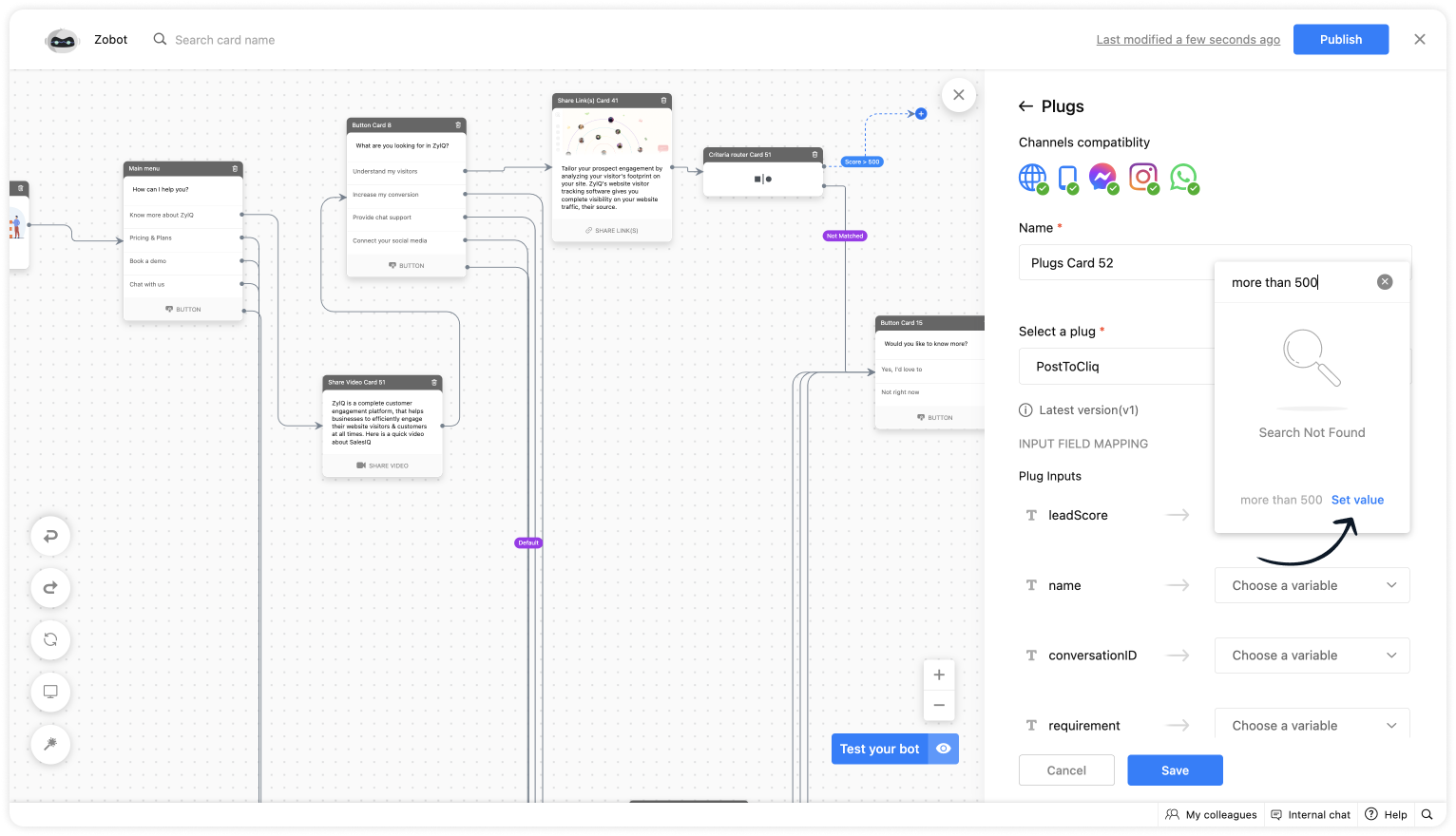
  • Choose the %visitor.name% variable for the name.
  • Select the %Active conversation id% to get the conversation ID for the chat URL. 
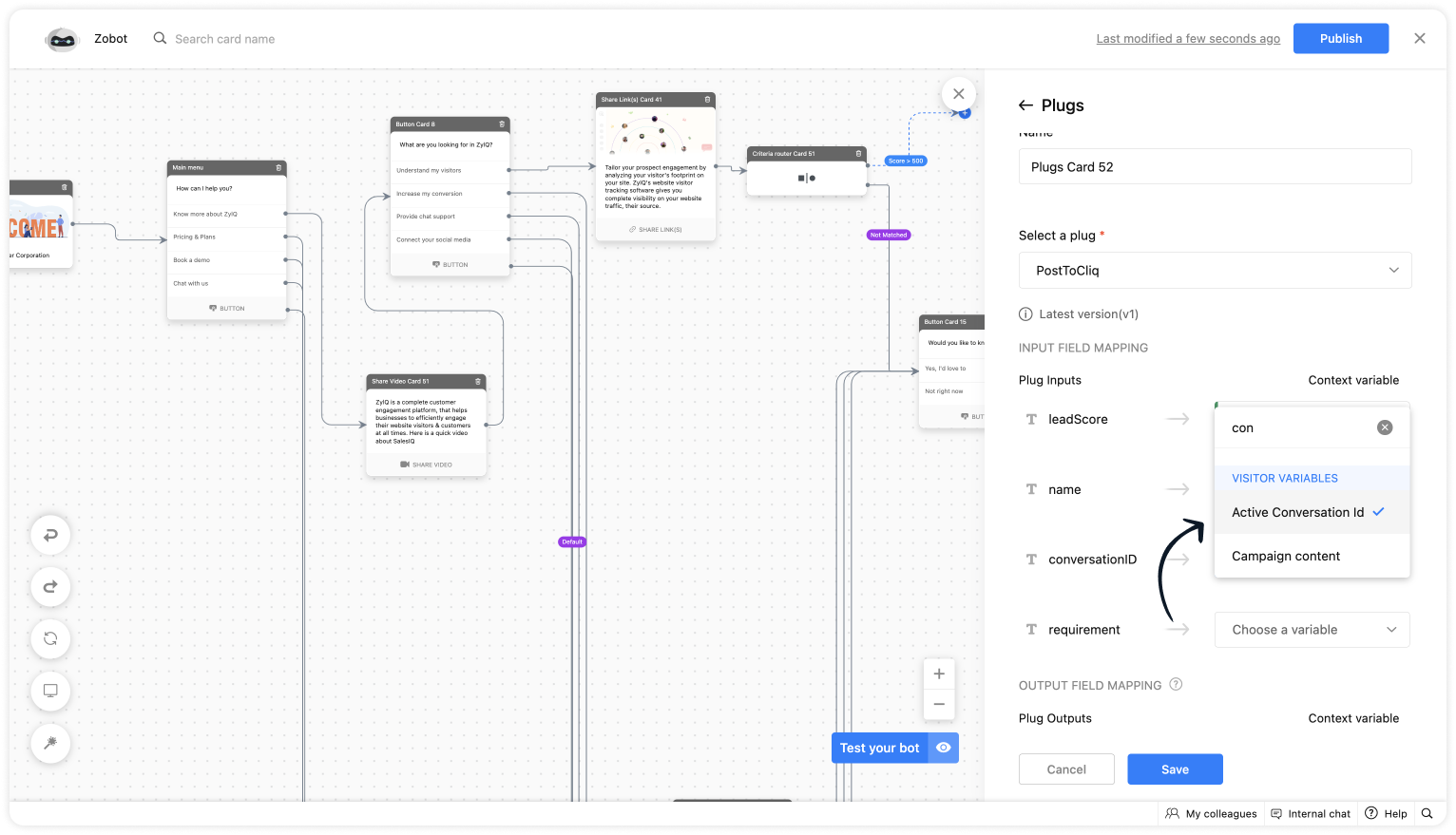
  • Get the requirement before using any input card, save it in the context variable and select the variable here. 

Plug Output

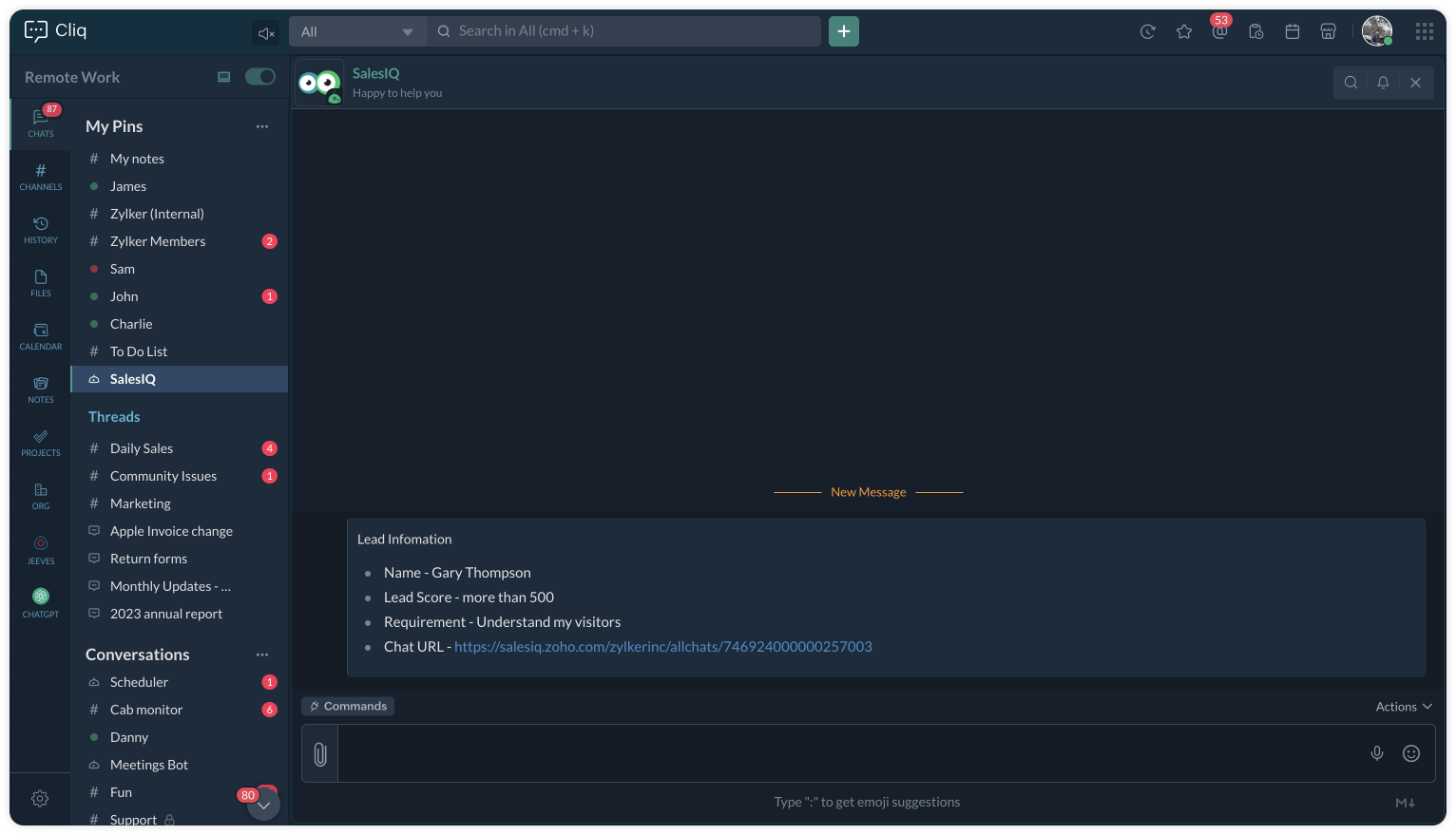
This is how the Cliq users will be notified. 

To a specific user


To a specific channel
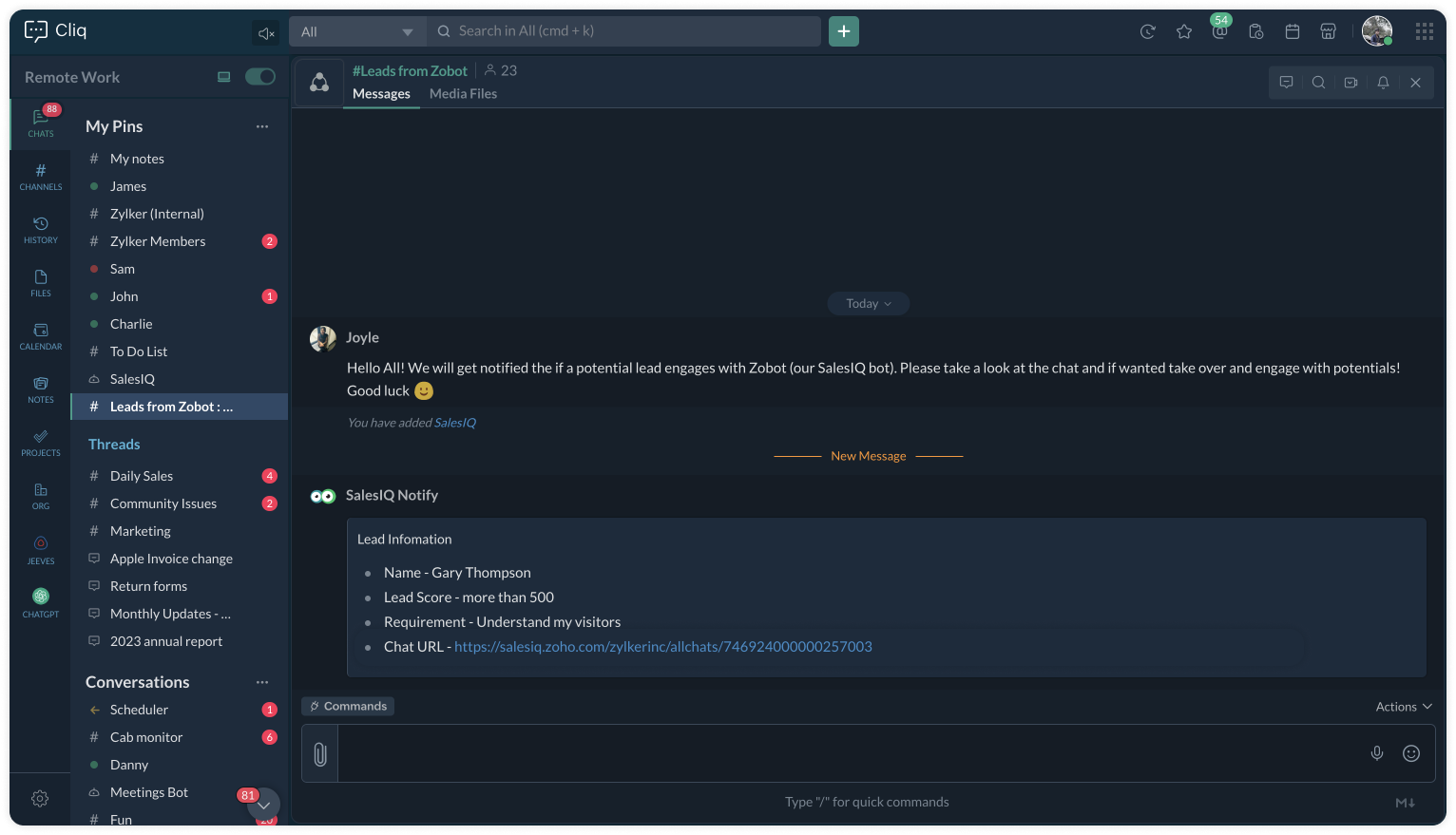


Upon clicking the chat URL, you will be redirected to the ongoing bot chat, where you can monitor and take the chat if required. 


See you again with another efficient plug sample :)

Best regards
Sasidar Thandapani

    • Recent Topics

    • Goods In Transit

      Hi I was wondering if anyone had any tips or work-around to show goods in transit as a liability? We raise a PO with our supplier in China and when the goods are shipped and are invoiced, hence they are a liability of the business. However I can't convert
    • Accounts Payable and receivable

      I'm currently creating my accounts and noticed that I cannot create any more accounts payable or receivable. Is there any way to create more of this accounts and associate them to the default one available?
    • How to display Pick List values with vertical separation in Canvas

      I have a Multi-Select Pick List whose values I would like displayed vertically. So far, I have only been able to figure out how to adjust the width and other sizing of the field itself or even how to wrap the values to the next line below. I am trying
    • Ability to Use Both AND and OR When Creating Rules (Advanced Conditions)

      I'd like to be able to use more complicated logic when setting up rules. E.g. in Zoho Mail, I can choose "Advanced conditions (AND/OR) to create a rule that can be applied to multiple subject lines from the same sender. But in Zoho TeamInbox, I will have
    • Introducing a knowledge management and training software in Zoho Projects Plus

      Keeping your workforce updated on emerging technology trends is essential to stay on top of the game. While project management software focuses on planning, execution, and project tracking, incorporating a learning management solution within project management
    • Problem with UTM Parameters: Zoho Forms - Zoho Desk Integration

      Hi Zoho Support Team, I want to automatically capture UTM Parameters from my website URLs and pass it from Zoho Forms into Zoho Desk. I have activated the UTM tracking feature. I've integrated the UTM Tracking code in my website footer on all pages. I've
    • #13 Fix Mistakes Without Breaking Your Records

      A customer purchases 100 custom-printed invitations for an upcoming event. A few days after delivery, they call to say that some invitations were damaged and others need to be reprinted. They request a return. The customer isn't asking for a completely
    • Zoho CRM upload files error

      Since today, we have been experiencing issues with uploading photos to opportunities. The message indicates that the storage is full, but as far as I can see, there is still plenty of space available. Could there be an issue or a bug?
    • Zoho Directory : transformez vos données d’identité en décisions de sécurité

      Que sont les rapports d’identité dans Zoho Directory et pourquoi sont-ils importants? À mesure que les organisations se développent, la gestion des identités devient plus complexe. Les informations existent, mais elles sont souvent réparties entre plusieurs
    • Re-Apply SLA When Ticket Reopened from Closed Status?

      If you have an SLA applied, timers are deactivated when going to "On Hold" status type and reactivated when going back to an Open status type. What we discovered is when a customer replies to a closed case and it reopens, the SLA is not applied and timers
    • How to use Zoho Billing info in a workflow

      We have Zoho Billing and CRM sync'd and the Billing info appears as expected for each Account in Zoho CRM, including subscription status, plan type etc. But how can we use this in a workflow? Thanks Dylan
    • Why can't we choose Fixed Asset account for Purchased Items? (eTims issue?)

      Hello, When the company purchase items not for sale and not supposed to be in the inventory stock, like equipment for operational use, there is no way to access the Fixed Asset accounts in the drop down list. Is that an eTims limitation again? Or something
    • Auto-approval for shared key access not working for new users

      Hello, I'm an admin of a Zoho Vault organization (34 active users, ZOHO identity provider). I have the "Auto-approval for shared key access" setting enabled in Settings → Fine-Grained Controls → Global, but it does not work as expected. The problem: When
    • Zoho Analytics UI Bug

      Hello, all, The Aggregate Formulas in Zoho Analytics' list of fields have a 3-dot menu: If the formula has a long name, the name is not fully visible in the list, and a 3-dot menu is not accessible from it: This is not convenient, especially when the
    • Canvases Auto-Skewing/Adding Scroll Bars When They Were Not There Prior

      Is anyone else noticing rendering issues in their canvases today? It seems to be mainly icons which now have scroll bars added which makes them all look off, though some fields seemed to revert to squished length as well. Were the icons replaced with
    • Marketing Tip #37: Reduce purchase doubts with better product images

      When customers shop online, they cannot pick up, turn around, or inspect a product in person. That is why your product images need to do more of the selling. Two simple upgrades can make a big difference: Use zoom-friendly images so customers can look
    • Why don't Zia agents support file uploads?

      I am trying to build a Zia Agent that allows uploading of a PDF file and uses the GLM5 model to process it and extract information. But agents.zoho.com has no way to enable file uploads on the agent. Additionally, GLM5 based agents keep outputting their
    • Zia Agent built in ChatKit UI does not render markdown

      Hi, You have a major shortcoming in the Zia Agent UI. The test UI that is embedded in agents.zoho.com allows you to test the agent has full support for rendering markdown, but your ChatKit UI does not have support for rendering markdown. If I embed it
    • Zoho Forms - Failed CRM Sync Improvement

      I'd like to suggest an enhancement to the Zoho Forms and Zoho CRM integration. Currently, once a form entry has been submitted, there is no simple way to push that individual entry to CRM again if needed. Before anyone mentions it, I am aware that the
    • Will I see emails sent via campaigns in CRM?

      It would be useful for people to be able to see emails sent via campagins in Zoho CRM is that possible?
    • Cliq iOS can't see shared screen

      Hello, I had this morning a video call with a colleague. She is using Cliq Desktop MacOS and wanted to share her screen with me. I'm on iPad. I noticed, while she shared her screen, I could only see her video, but not the shared screen... Does Cliq iOS is able to display shared screen, or is it somewhere else to be found ? Regards
    • Zoho Books | Product updates | June 2026

      Hello users, Welcome to this month's roundup of what's new in Zoho Books! We have an exciting line-up this time. The highlight is the launch of the all-new France Edition with full ISCA compliance. We're also introducing features such as Layout Rules
    • What is MCP and How Does It Connect to Zoho Invoice?

      If you've ever wished you could just tell your invoicing software what to do, without clicking through menus, pulling up reports manually, or switching tabs every five minutes, that's exactly what the Zoho MCP server is built for. MCP stands for Model
    • Add spaces to input format

      In Zoho Inovices, I am trying to do a custom input format for a custom field. I have tried a few variations, but this is my most recent: ^[a-z][A-Z][0-9][,][-][_][:][ ]$ In this field, I will be entering different alphanumeric information, depending on
    • Enhancement in Zoho CRM: Introducing New Return Types for String Fields Based on Character Length

      Dear Customers, We hope you’re well! In Zoho CRM, formula field with string return type is used in various scenarios where text is involved like concatenating customers’ first and last names, trimming characters from texts, performing find and replace
    • GLM 5 not available

      Hello, I am trying to setup a Zia Agent using agents.zoho.com. The settings says that GLM5 is among the list of free zoho hosted models available. However, when I try to setup an agent and pick a model from the list only GLM 4.7 Flash is available. How
    • Supervisor Rules --> Custom Function

      Hello, currently I can't add a custom function to a supervise rule. Is there a reason for this? Background: We have BluePrint managed tickets and actually we have a Supervise rule which should set the ticket to "closed" after 168 hours since the last
    • Vault Chrome Extension Asks for Master Password every single time

      Is this supposed to be a feature, or is this a bug?  My assumption is that it's a bug, because every time I click on the Extension, there is a red exclamation mark/notification on the Zoho Vault extension.  Is the idea with the Extension that I have to
    • What's New in Zoho Inventory | April & May 2026

      Hello users, We're excited to roll out the latest Zoho Inventory updates for April and May 2026. These enhancements are designed to make your daily operations smoother and more efficient, from advanced inventory management and flexible pricing to automated
    • "Make online" not clearing previously downloaded files from disk

      I downloaded a large folder via "Make offline" so I could copy it to another location. This worked. When I was done I hoped that "Make online" would restore it to the previous state where those files are not stored locally in TrueSync. This did not work—Finder
    • Permission Denied for Worklogs URL

      We're attempting to pull worklogs data from service desk plus and when using the below URL we are met with a message stating we do not have permission. https://sdpondemand.manageengine.com/api/v3/requests/xxxxxx/worklogs/ We used SDPOnDemand.requests.ALL
    • Anyone in Australia using Zoho Books AND has their account with NAB?

      Hi I have an account with both NAB and Suncorp. Suncorp transaction come in the next day however NAB transactions take 4-5 business days to appear. eg: A deposit made today in my Suncorp will be imported into Zoho tomorrow. A deposit made today to the NAB account will be imported maybe Saturday (Friday overnight). I have contacted both Zoho and NAB but noone seems to know why. I was just wondering if anyone else in Australia uses NAB and has this issue (or doesn't) maybe we could compare notes and
    • Please Make Zoho CRM Cadences Flexible: Allow Inserting and Reordering Follow-Up Steps

      Sales processes are not static. We test, learn, and adapt as customers respond differently than expected. Right now, Zoho Cadences do not support inserting a new step between existing follow-ups or changing the type of an existing primary step. If I realize
    • Partner with HDFC And Sbi Bank.

      Hdfc and sbi both are very popular bank if zoho books become partner with this banks then many of the zoho books users will benefit premium features of partnered banks.
    • #12 Never Leave a Billable Hour Behind

      A client approves a website redesign project. The estimated effort? 40 hours. The project is going well. A few additional review meetings are scheduled. Several rounds of content changes are requested. A few "quick fixes" get added along the way. The
    • Close task on Completion Date entry

      This discussion is similar to my issue: "backdated-task-completion-date" discussion Scenario: A bunch of tasks have been completed. But, they have not been closed. Time goes by You finally get around to closing those tasks Projects assigns the date the
    • Can I add Conditional merge tags on my Templates?

      Hi I was wondering if I can use Conditional Mail Merge tags inside my Email templates/Quotes etc within the CRM? In spanish and in our business we use gender and academic degree salutations , ie: Dr., Dra., Sr., Srta., so the beginning of an email / letter
    • Records from ATE 29: Knowledge Base, Community, and AI for smarter user education

      Hi Everyone, "Ask the Experts 29" was an engaging session, where we explored how to utilize the Knowledge Base for customers and internal teams, as well as emphasizing the importance of our Community. This post highlights the questions and use cases discussed,
    • Deleted User Emails

      I need to delete a user as I need to re-use their license, but I'd like to keep all their emails that are attached to various contacts in the CRM. Their emails are hosted externally on an M365 license. Anyone any idea how best to engineer this? TIA
    • Its 2022, can our customers log into CRM on their mobiles? Zoho Response: Maybe Later

      I am a long time Zoho CRM user. I have just started using the client portal feature. On the plus side I have found it very fast and very easy (for someone used to the CRM config) to set up a subset of module views that make a potentially extremely useful
    • Next Page