Direct Assignment vs Round Robin: Choosing the right routing method in Zoho Desk
Direct Assignment vs Round Robin: Choosing the right routing method in Zoho Desk
 This post is part of the "Desk Automation Series," Chapter 1. Through this series, we will help you choose the right automation type in Zoho Desk by comparing commonly confused automations through real scenarios and business processes, so you can clearly see what to use, when, and why.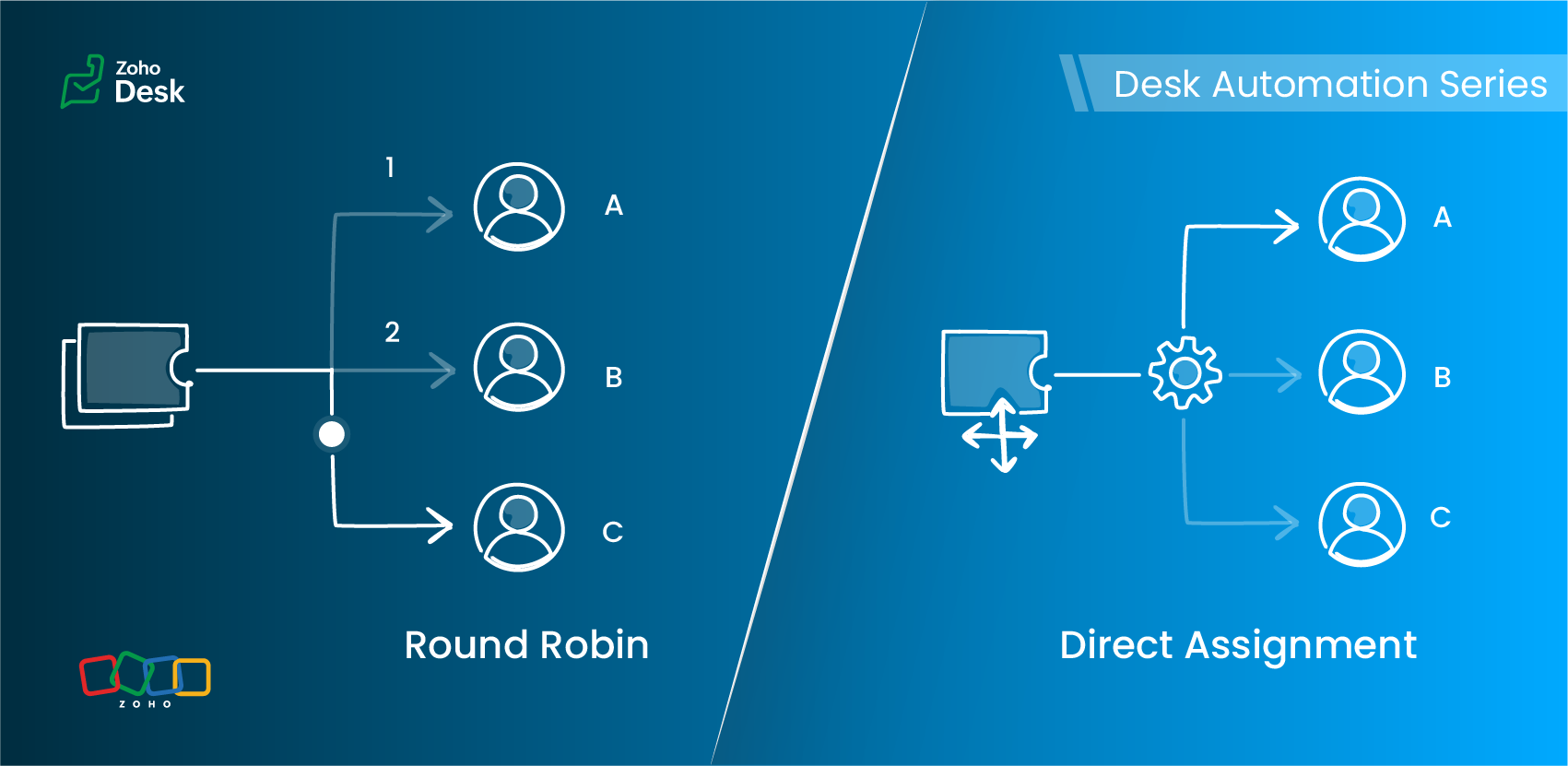
- Should this ticket always go to a specific owner?
- Or should it be automatically distributed across a team of agents in a specified pattern?
Understanding Assignment Rules
Zoho Desk offers two primary routing options under Assignment Rules:
- Direct Assignment
- Round Robin Assignment
Each serves a different need, depending on the structure of your support team and the type of tickets you handle.
Direct Assignment
When to use Direct Assignment
- A particular ticket type is always handled by the same person or team
- Ownership should remain consistent
- You want predictable, rule-based routing
- The responsibility for a category of tickets never changes
- Required to be re-assigned to a different agent
Direct Assignment keeps routing clear and ensures that the right team always receives what they are trained to handle.
Round Robin Assignment
Round Robin supports multiple distribution patterns
Round Robin type | How it works | Best for |
Load-based assignment | Tickets are routed to the agent with the least number of tickets in their queue until the configured capacity is reached. | Balancing agent queues efficiently to ensure faster response times. |
Skill-based assignment | Tickets are assigned to the agent whose skills match the most according to the criteria defined for the ticket. | Handling tickets that require specific language support, product knowledge, or domain expertise. |
Sequential-based assignment | Tickets are distributed among agents in a fixed sequence, following the alphabetical order of agent names. | Ensuring a predictable rotation and evenly distributing tickets among agents. |
Round Robin preferences
Key differences at a glance
Feature | Direct Assignment | Round Robin |
Primary purpose | Route tickets to a specific team | Distribute tickets equitably across agents |
Useful when | Responsibility for a ticket type is clearly defined | Ticket volume is high and needs balanced distribution |
Supports skill-based routing | No | Yes |
Supports capacity limits | No | Yes (Agent-level and department-level thresholds) |
Assignment frequency | Always assigned to the same agent or team | Varies based on the configured Round Robin type |
Control over assignment order | No | Yes (Sequence-based rotation) |
Handles workload balancing | No | Yes (Load-based assignment) |
Supports backlog management | No | Yes (Backlog assignment for queued tickets) |
Includes offline agents in assignment | No | Yes (Offline agents can be included in the assignment queue) |
Optimized for high ticket volume | Limited | Yes (Immediate assignment and backlog handling support continuous distribution) |
Choosing the right assignment method
Requirement | Direct Assignment | Round Robin |
A specific agent must always handle certain issues | ✓ | — |
Balanced distribution of tickets | — | ✓ |
Skill-specific routing | — | ✓ (Skill-based) |
Avoiding agent overload | — | ✓ (Load-based) |
Predictable rotation | — | ✓ (Sequential-based) |
Flexible assignment based on agent availability | — | ✓ |
A practical scenario
1. Billing and subscription changes
Use: Direct Assignment
2. Account suspension reviews
3. General how-to queries
Load-based assignment routes tickets to the least-loaded agent up to their set capacity, ensuring faster response times through efficient workload distribution.
4. High traffic during feature launches
Load-based assignment routes tickets to the agent with the fewest active tickets until the configured capacity is reached, helping distribute high volumes to prevent agent overload and support faster response times.
5. Advanced technical or API-related tickets
6. Product feedback review queue
7. Multilingual customer support
Use: Skill-based assignment
More everyday support examples
Scenario | Best-suited assignment method | Why |
Warranty claims in an electronics company | Direct Assignment | Tickets are routed to the team responsible for warranty operations. |
Appointment requests in a multi-specialty clinic | Direct Assignment for specialist bookings; Sequence-based assignment for general checkups | Specialist requests can be routed to a specific team, while general requests can be distributed among agents. |
System outage tickets in an IT helpdesk | Load-based assignment | Tickets are assigned to the agent with the fewest tickets in their queue, helping distribute workload and support faster first responses. |
Onboarding queries in a company | Sequential-based assignment | Tickets are distributed among agents in a fixed sequence, ensuring each agent receives tickets in turn. |
Marketing campaign inquiries in a SaaS company | Skill-based assignment | Tickets are assigned to agents whose skills match the required business expertise, such as Marketing. |
Best practices
- Use Direct Assignment for clear, consistent ownership.
- Apply Round Robin when distribution, fairness, or skills matter.
- Keep your criteria focused.
- Avoid using multiple Round Robin patterns for the same category.
- Review agent capacity and skills regularly.
- Test your rules with a sample set of tickets before enabling them.
Guidelines for quick selection
- Only routing is needed → Direct Assignment
- Balanced distribution is the goal → Load-based or Sequential-based assignment
- Specific skills required → Skill-based assignment
- Workload limits apply → Load-based assignment
- Predictable rotation needed → Sequential-based assignment
The verdict

Read more related articles:
Topic Participants
Amrita U
Sticky Posts
Zoho Desk Partners with Microsoft's M365 Copilot for seamless customer service experiences
Hello Zoho Desk users, We are happy to announce that Zoho Desk has partnered with Microsoft's M365 to empower customer service teams with enhanced capabilities and seamless experiences for agents. Microsoft announced their partnership during their keynoteWhatsApp pricing changes: Pay per message starting July 1, 2025
Starting July 1, 2025, WhatsApp is shifting from conversation-based pricing to per-message billing. That means every business-initiated message you send will count. Not just the first one in a 24-hour window. Pricing updates on the WhatsApp Business PlatformLive Webinar - Work smarter with Zoho Desk and Zoho Workplace integration
Hello customers! Zoho Desk and Zoho Workplace are coming together for a webinar on 14th May, 2024. Zoho Workplace is a suite of productivity apps for email, chat, docs, calls, and more at one single place. Zoho Desk is closely integrated with a few toolsApple iOS 17 and iPadOS 17 updates for Zoho Desk users
Hello Zoho Desk users! Apple recently announced the release of iOS 17 and iPad OS 17. These latest OS updates will help you stay productive and efficient, through interactive and seamless user experiences. Zoho Desk has incorporated the updates to helpZoho Desk Cheat Sheet For The Year-End
Check out these Zoho Desk best practices to end this year on a high and have a great one ahead! #1 Set Business (Holiday) Hours - If you have limited working hours, please make sure you restrict your business hours or set them as holidays for the coming days. Let your customers know when you will, and won't, be available. #2 Update the Annual Holiday List - Check the holidays for the new year and update the holiday schedule. Usually, holidays from the current year will be carried over for the next
Recent Topics
Custom View and Custom Fields on Zoho Books
Hi, I have some custom fields on Estimates and Invoices. I also use Custom Views so I can have a lot of information at a glance. I want to include my custom fields as columns in my custom views of estimates / invoice, but it looks like is not possible.%PaymentLink%
Does not work. Software creates a BAD link. ....and yes payment options are turned on. Link on the invoice pdf once opened will work but this template is a joke.Can Zoho Marketing Automation send OTP codes via WhatsApp during user registration?
The flow I would like to implement is: A user signs up in the mobile app and enters their phone number. The system generates a one-time verification code (OTP). The OTP is sent to the user via WhatsApp message. The user enters the code in the app to confirmWhere to show Customization Field ?
Dear Sir, I have made some New Field in Item Field Customisation. Now I don't require that field in Estimate, Sales Orders etc. I just wants that field in Sales Invoice to Show/Hide... Is that possible ?What's New in Zoho Analytics - February 2026
Hello Users! We're back with another round of updates for Zoho Analytics. This month's release focuses on giving you greater flexibility in how you visualize, manage, and act on your data - with new features like custom visualizations, remote MCP server,Zoho Books (and other Finance Suite Apps) - Clickable Item Name on Invoices and Reports
Hi Zoho Books team, It would be really helpful if the Item Name on Reports were clicable to take me to the item. The same on Invoices, often I am looking at an invoice and I want to look at the deails of a product. A link here would be helpful to jumpDisplay actual mileage on an invoice
My users are creating expenses in Zoho expense. For example, they expense 10 miles and get paid 7 dollars (10 miles * IRS rate of .70). If I look at the expenses in Zoho Books, it does show them at 10 miles at .70 cent When I add these expense to an invoiceCan you create relationships BETWEEN contacts within the same module
I am setting up my CRM, and I want to have a way to connect contacts within the same module. Is there a way to do this? If not - how do I decide how to split up contacts to make connections? What are best practices for this? We have clients who needFunction and workflow to create customer payment and send receipt
I am attempting to set up a workflow/custom function for the automatic creation of a customer payment and sending the email receipt, but am receiving the error "Improper Statement Error might be due to missing ';' at end of the line or incomplete expression" I've been over everything several times and cannot see where the error is (code is copied into the attached document). I haven't used custom functions before with Deluge, so it's very likely something very simple, or I've completely muckedDisable Sign Up option in Zoho Creator Portal and show only Sign In page
Is it possible to disable the Sign Up option in a Zoho Creator portal? The requirement is to show only the Sign In page and completely remove or hide the Sign Up page, so users cannot create accounts directly from the portal login page. Is there any settingCan I view the KB in the same way as a customer logged in as my Agent?
Sorry if this seems a mad question. I have some Articles that I want to be seen by my Agents and the status of these is set to Agents only. We also have some that are set to Public. When I sign in with my private email address (as a customer) I canWhat’s New in Zoho Inventory — Latest Features, Integrations & Updates | December 2025
Zoho Inventory has evolved significantly over the past months, bringing you smarter, faster, and more connected tools to streamline your operations. Whether you’re managing multichannel sales, complex fulfillment workflows, or fast-moving stock, our newestWhich user's capacity is used for Shared Mailbox storage?
We use shared mailboxes at our company, and their size is increasing daily. Which user(s)'s total mailbox limit is being used up by this space?Evernote (ENEX) import limitations
I have been with Evernote since 2010, but the latest price increase is ridiculous. I am currently testing Zoho Notebook as a replacement. I am impressed so far - if it were not for critical need to import legacy Evernote notes, I would 100% migrate toCan I create a CODE 128 custom field for my items in Zoho Inventory and then use it for generating Sales Orders?
Can anyone helps me, I don't want to use the SKU code for scanning my products. Because all my products have a CODE-128 label attached.Prevent duplicate with custom fields?
I was wondering something about custom field/custom modules in Zoho Desk. For some reason you can make a custom field mandatory but not unique? For example, if I create a custom module to manage equipment and renewal and make a field serial number noZoho Books' 2025 Wrapped
Before we turn the page to a new year, it’s time to revisit the updates that made financial management simpler and more intuitive. This annual roundup brings together the most impactful features and enhancements we delivered in 2025, offering a clearMultiple Vendor SKUs
One of the big concerns we have with ZOHO Inventory is lack of Vendor Skus like many other inventory software packages offer. Being able to have multiple vendor skus for the same product would be HUGE! It would populate the appropriate vendor Sku forCreate Invoice automated with Package
Does anyone knows how to create an invoice from a SO when we have created the package? We do these manually. and validate that the product packed is the product invoiced (if the order is partially packed) Regards, JSUnable to integrate Zoho Projects and Zoho Workdrive
I'm a Zoho One subscriber. When I go to Zoho Projects > Settings > Marketplace > Zoho Apps I do not see an option for Zoho Workdrive but I do see one for Zoho Docs that does nothing. How do I get the option to integrate Zoho WorkDrive and Zoho ProjeDisable payment thank-you emails
Hello, can someone please tell me how to disable sending of the "Payment Thank-You" emails?How to backdate record payment for the invoice
I would like to record a payment which happened 2 days ago, but I am not able to select any date later than today. I backdated the invoice, too, but it doesn't change anythingHelp with deluge script
Hi Community, this is my first Deluge script. I've pieced it together from reading various articles I want to use it in a workflow to 1 Convert a lead to a contact 2. Create a record in a custom module Below is what I have got so far but it does not fireConnect Airwallex in Zoho Books
I have a question. I’m trying to connect our Airwallex account to Zoho Books, but the integration does not seem to work. Could you please guide me on how to properly connect Airwallex? I need to see the expenses also, since it only shows the profits nowMarketer's Space: Why email authentication matters in Zoho Campaigns
Welcome back to another post in Marketer's Space! If you've recently started using Zoho Campaigns, you've probably come across terms like SPF and DKIM. You may have also noticed emails that show "via zcsend.net" in Gmail when testing or sending campaigns.Edit email address that appears on invoice
Hi How do I change the email address that appears on invoices, it is showing the email address that i used to sign up to zoho with but I want to change it to another email address that we use for accounts. also is there a way to edit the position of aClone Entire Zoho Boooks Organization, including all transactions for testing & training
Can Zoho Books support help with direct cloning of entire Zoho Books & Inventory Organization? including all transactions, just like a copy & paste or disk cloning. Is this possible?Restrict portal signup until registration form and payment are completed
Hi everyone, I am working on a Zoho Creator portal for a project. In our business flow, users must first fill out a registration form and pay a registration fee before they are allowed to access the portal. However, when I share the portal link, usersZoho Creator In-App Notification
Hi Team, I have implemented an in-app notification using code, as it required some customization. I followed the example in the link below: https://www.zoho.com/deluge/help/pushnotify-using-deluge.html#Example I have a couple of questions regarding thisTip #64- Exploring Technician Console: Screenshot- 'Insider Insights'
Hello Zoho Assist Community! Have you ever needed to capture exactly what's happening on a remote machine, whether to document an issue, guide a customer, or keep a record of your session? That's where the Screenshot feature in Zoho Assist comes in! WithRelating Invoices to Projects
Hi Zoho team, If I have already created previously an invoice in Books, so I want to know how can I associate it with a relevant project? Thank youCreate a quote/estimate that includes a range of prices
I am interested in using Zoho Books' Quote templates to create estimates for my customers. I do a mix of fixed-bid quotes and quotes based on an hourly rate. For the hourly rate quotes/estimates, I like to include a price range, for example: 2-4 laborBudget
I have just upgraded to the standard plan in order to be able to utilize the budgeting function and record budget amountCapirec bank Automatic feed update
Can anyone tell me if Zoho supports Automatic bank feed update from a Capitec bank account in south africa?Free webinar! Accelerate deals with Zoho Sign for Zoho CRM and Bigin by Zoho CRM
Hello, Paperwork shouldn’t slow you down. Whether you’re growing a small business or running a large enterprise, manual approvals and slow document turnaround can cost you time and revenue. With Zoho Sign for Zoho CRM and Bigin by Zoho CRM, you can takeAdd Lookup Field in Tasks Module
Hello, I have a need to add a Lookup field in addition to the ones that are already there in the Tasks module. I've seen this thread and so understand that the reason lookup fields may not be part of it is that there are already links to the tables (Upload own Background Image and set Camera to 16:9
Hi, in all known online meeting tools, I can set up a background image reflecting our corporate design. This doesn't work in Cliq. Additionally, Cliq detects our cameras as 4:3, showing black bars on the right and left sides during the meeting. WhereZeptoMail API
Hello Since today, we experience issues with the ZeptoMail API. When trying to send e-mails using: https://api.zeptomail.eu/v1.1/email we receive the error: (503) Site unavailable due to a traffic surge. Please try again shortly. I kindly ask you to identifySender Email Configuration Error.
Hello Team, Hope you are all doing well. We are in the process of creating the Zoho FSM environment in the UAE. When we try to add the sender email address “techsupportuae@stryker.com”, we receive the error message: “Error occurred while sending mailManaging user mailbox actions
An organization often has users with different roles and responsibilities, such as leadership, operations, or support teams. While some users may require full access to email features, others may only need limited functionality. For example, enablingNext Page