Todas las novedades de Zoho Desk
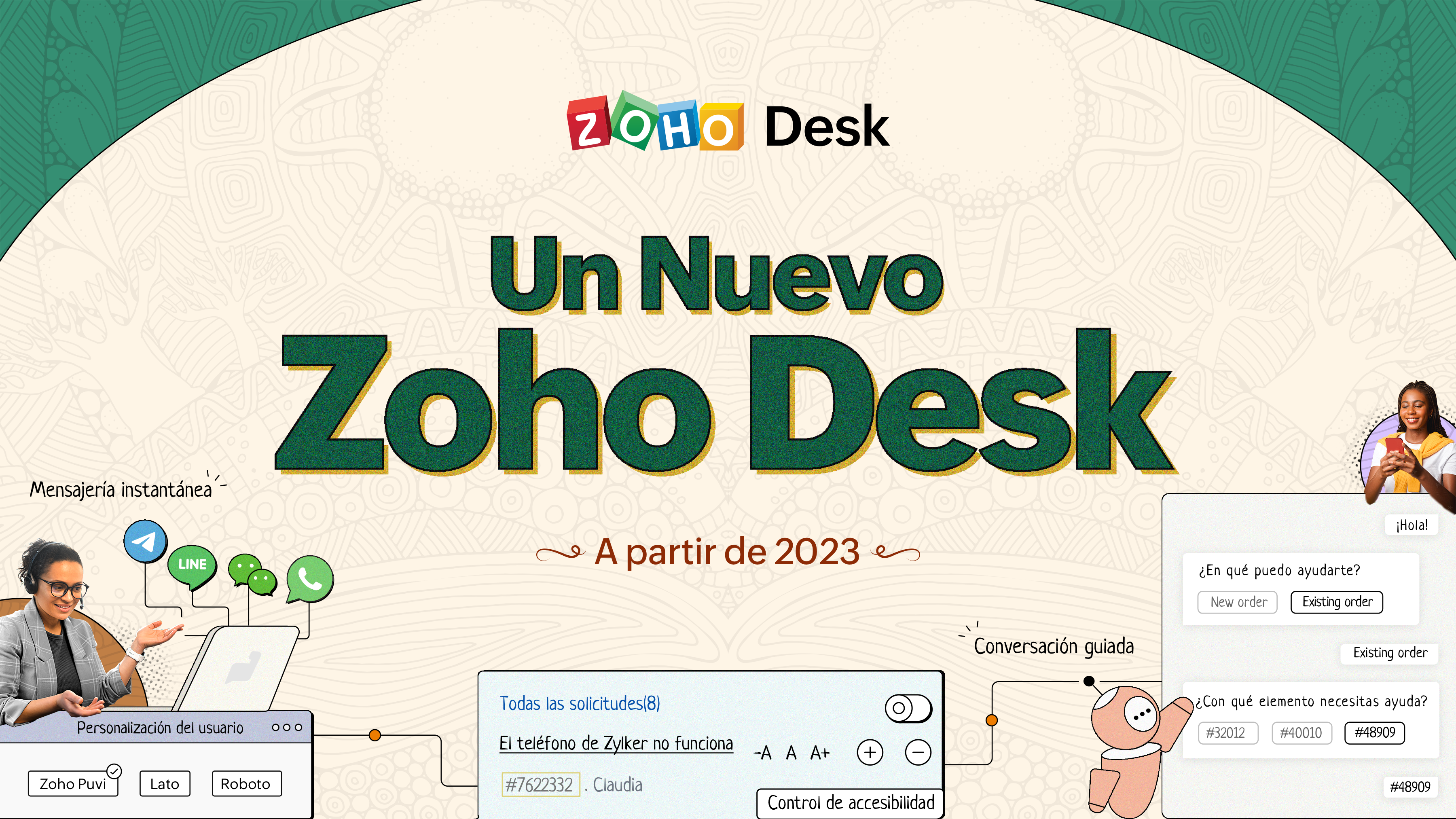 Un Nuevo Zoho Desk
¡Hola comunidad!
Novedades en Zoho Desk 2022
Como agente de atención al cliente, por mucho que ames a tus clientes y tu trabajo, es probable que te encuentres con días difíciles. Nos referimos a los días en los que pulsas el botón equivocado, se derrama el café en tu camisa favorita y entras en el trabajo y te encuentras con una pila de solicitudes de asistencia sin abrir en la cola. A veces, durante esos turnos de asistencia, un "gracias por tu ayuda" es lo que te hace seguir adelante.
Los agentes de atención al cliente desempeñan un papel tan vital en la felicidad del cliente que algunas empresas han redefinido el papel como "agente de la felicidad del cliente". Los agentes juegan un papel directo en asegurar que los clientes tengan una gran experiencia con tu empresa. Y en Zoho Desk, nuestra misión es mantenerte el "agente de la felicidad" feliz.
Con la felicidad del cliente en mente, la nueva versión de Zoho Desk fortalece la comunicación omnicanal, el autoservicio del cliente y la experiencia del agente. Sigue leyendo para conocer todo lo que hemos hecho.
Los agentes de atención al cliente desempeñan un papel tan vital en la felicidad del cliente que algunas empresas han redefinido el papel como "agente de la felicidad del cliente". Los agentes juegan un papel directo en asegurar que los clientes tengan una gran experiencia con tu empresa. Y en Zoho Desk, nuestra misión es mantenerte el "agente de la felicidad" feliz.
Con la felicidad del cliente en mente, la nueva versión de Zoho Desk fortalece la comunicación omnicanal, el autoservicio del cliente y la experiencia del agente. Sigue leyendo para conocer todo lo que hemos hecho.
Mensajería instantánea
Estamos encantados de desvelar una nueva forma de interactuar con tus clientes en Zoho Desk. La plataforma de mensajería instantánea (IM) para Zoho Desk permite a los clientes contactar con tu negocio a través de WhatsApp, Telegram, LINE y WeChat. Dado que la mayoría de tus clientes ya están utilizando estas plataformas para comunicarse, tiene sentido reunirse con ellos allí. Hemos combinado todas las herramientas que ya conoces con nuestro completo módulo de mensajería instantánea, junto con algunas nuevas características diseñadas para maximizar la productividad.
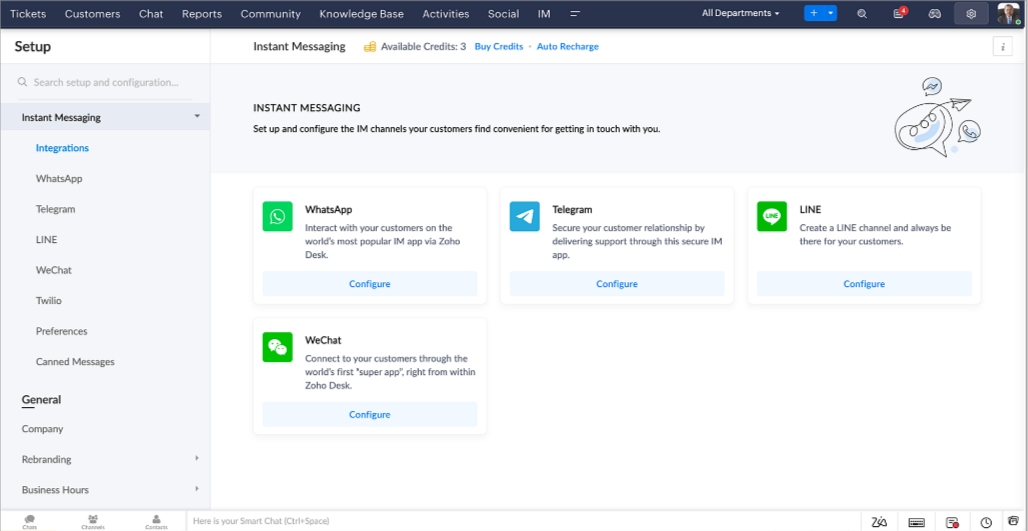
Zoho Desk te notifica los chats entrantes en tiempo real para que puedas conectarte fácilmente con los clientes desde la interfaz que ya utiliza y le encanta. Mientras tanto, tu puedes:
- Seguir el contacto con el cliente, la información del ticket, el historial de conversaciones entre canales y los detalles de los archivos adjuntos dentro de la ventana de chat del cliente para obtener un contexto inmediato.
- Acceder y adjuntar artículos de la base de conocimientos directamente desde la sección de entrada, utilizar respuestas enlatadas para obtener esoluciones rápidas y añadir emojis para una mayor personalización.
- Participar en varios chats simultáneamente en todos los canales sin tener que cambiar de pestaña.
- Asignar conversaciones a tus compañeros de equipo.
- Convertir las conversaciones en tickets para facilitar el seguimiento hasta su resolución.
- ¿Y la automatización? Ya lo tienes. La automatización, como los flujos de trabajo, los Blueprints, las reglas de asignación y los SLAs, y más, que son posibles para los tickets creados desde otros canales, son posibles para los tickets creados desde los canales de mensajería instantánea. También puedes establecer respuestas automáticas para las horas en las que estás ausente o tus clientes deciden enviar mensajes a horas extrañas.
- Facilitar que los clientes se pongan en contacto instalando códigos QR en los puntos de venta físicos o incrustando en el sitio web nuestro botón fácil de implementar. Incluso pueden ponerse en contacto contigo a través de la búsqueda directa de negocios en la plataforma de mensajería instantánea como Telegram.
Conversaciones guiadas
Estamos especialmente contentos de presentar las Conversaciones Guiadas (CG), que son el resultado del compromiso de nuestro equipo de productos para ofrecerte las mejores opciones de autoservicio.
Como profesional de la atención al cliente, sabes que la mayoría de las preguntas no tienen respuestas sencillas. A menudo requieren preguntas de seguimiento, y mucho contexto, antes de que surja una solución. Ahí es donde entra GC. Se trata de una plataforma de autoservicio proactiva y de bajo código que simplifica el camino hacia las respuestas a las preguntas complejas de tus clientes. Selecciona entre una serie de preguntas o respuestas de seguimiento predefinidas para crear un flujo de CG que conduzca sistemáticamente a los clientes a las mejores soluciones posibles. Puede crear CG con funcionalidades específicas para tu público. Además, en cualquier momento de la conversación, puedes dirigir a tus clientes a la interacción humana, y luego volver a cambiar, si es necesario.
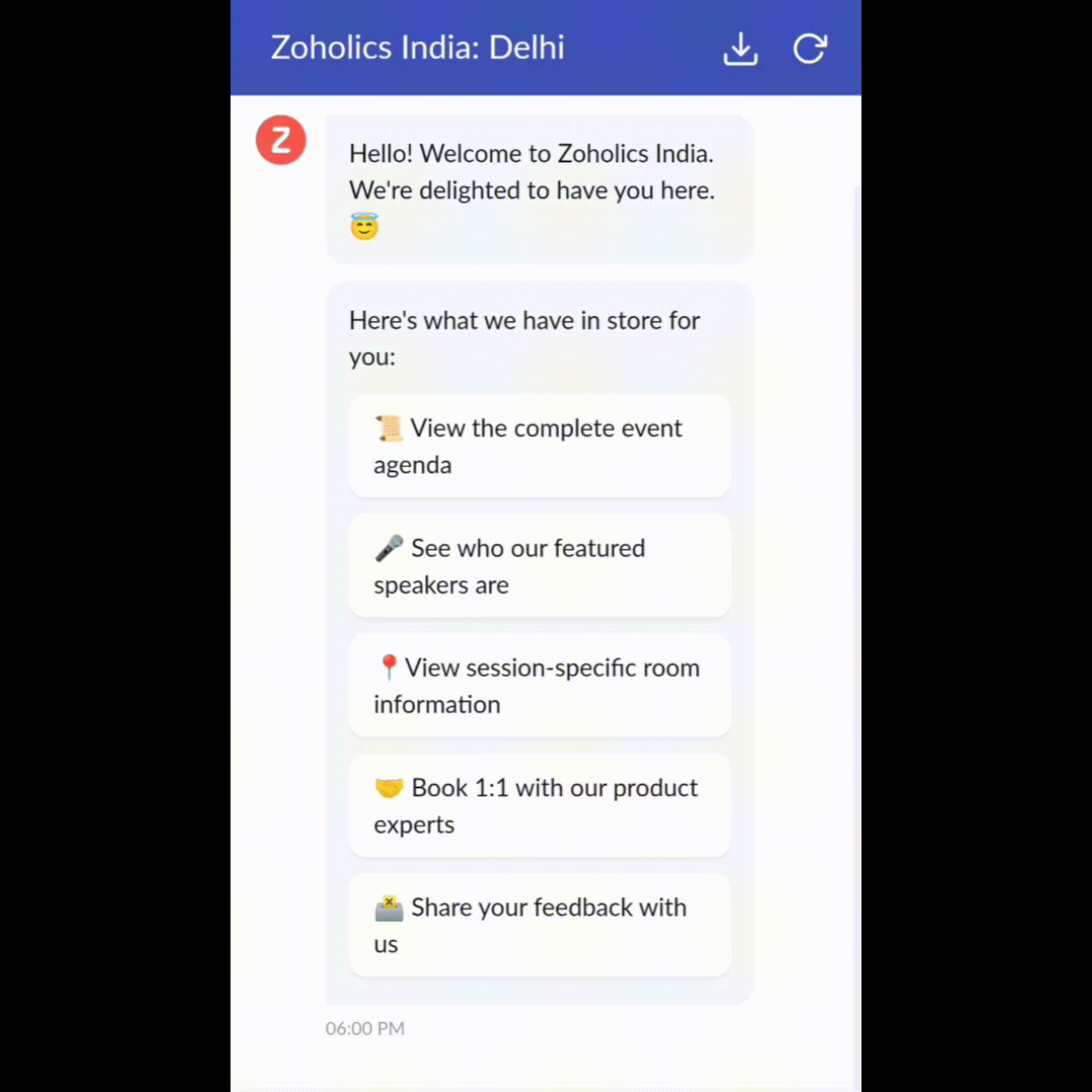
Las conversaciones guiadas pueden utilizarse en diversas situaciones, como la reserva, el pedido, la solicitud de devolución o la recopilación de información para el procesamiento de la tarjeta de crédito o el seguro. Las posibilidades son infinitas. Así es como utilizamos las Conversaciones Guiadas para Zoholics, nuestra conferencia anual más importante:
Como profesional de la atención al cliente, sabes que la mayoría de las preguntas no tienen respuestas sencillas. A menudo requieren preguntas de seguimiento, y mucho contexto, antes de que surja una solución. Ahí es donde entra GC. Se trata de una plataforma de autoservicio proactiva y de bajo código que simplifica el camino hacia las respuestas a las preguntas complejas de tus clientes. Selecciona entre una serie de preguntas o respuestas de seguimiento predefinidas para crear un flujo de CG que conduzca sistemáticamente a los clientes a las mejores soluciones posibles. Puede crear CG con funcionalidades específicas para tu público. Además, en cualquier momento de la conversación, puedes dirigir a tus clientes a la interacción humana, y luego volver a cambiar, si es necesario.
Las conversaciones guiadas pueden utilizarse en diversas situaciones, como la reserva, el pedido, la solicitud de devolución o la recopilación de información para el procesamiento de la tarjeta de crédito o el seguro. Las posibilidades son infinitas. Así es como utilizamos las Conversaciones Guiadas para Zoholics, nuestra conferencia anual más importante:
Drag-and-drop builder
Construye tu flujo de CG utilizando una serie de formatos o bloques de respuesta, como texto, imágenes, moneda, fecha y hora, deslizador, elección, salto y vuelta a empezar. Para construir un flujo de CG, basta con arrastrar y soltar bloques, añadir variables o marcadores de posición dinámicos y conectar rutas para determinar la secuencia de eventos en función de la elección del usuario en cada etapa de compromiso.
Webhooks para una integración inmejorable
Webhooks para una integración inmejorable
Al configurar los bloques Webhook, puedes construir tu flujo de conversación para interactuar con los procesos de Zoho Desk, otros servicios de Zoho o aplicaciones de terceros. Por ejemplo, si el usuario ya es tu contacto, el bloque Webhook recuperará su información directamente de tu CRM, en lugar de pedirle que la proporcione cada vez.
Incrusta la CG en cualquier lugar para que los clientes puedan acceder a ella
Previsualizar y luego implementar tu flujo final asociándolo a tu centro de ayuda ASAP en tu sitio web, páginas de destino y aplicaciones móviles.
¡Estamos deseando ver los flujos únicos que creas usando las Conversaciones Guiadas de Zoho Desk!
Incrusta la CG en cualquier lugar para que los clientes puedan acceder a ella
Previsualizar y luego implementar tu flujo final asociándolo a tu centro de ayuda ASAP en tu sitio web, páginas de destino y aplicaciones móviles.
¡Estamos deseando ver los flujos únicos que creas usando las Conversaciones Guiadas de Zoho Desk!
Experiencia mejorada
Es posible que ya hayas notado la opción de probar la nueva versión en Zoho Desk e incluso hayas probado nuestra renovada interfaz de usuario (UI), que introdujimos a principios de este año. Esto es parte de nuestro esfuerzo para hacer Zoho Desk más lógico y visualmente atractivo para darle la mejor experiencia de trabajo-porque sabemos que una mesa de ayuda complicada puede hacer que ocho horas parezcan 20.
¿Qué ha cambiado?
Una interfaz de usuario más limpia, más contexto y una navegación más sencilla
Creemos que un software bien diseñado necesita pocas o ninguna instrucción. Con esto en mente, hemos creado una interfaz de usuario más atractiva, cohesionada y comprensible. Presenta mejor los datos, ofrece más contexto y es más fácil de navegar.
No se puede exagerar la importancia de que los equipos de atención al cliente tengan un acceso rápido a la información relevante. Hemos optimizado nuestra interfaz de usuario y hemos facilitado la navegación por las distintas pantallas para localizar la información adecuada. También hemos renovado algunas pantallas para ofrecerte una visión global de tus clientes y tickets en una única interfaz. ¿Recuerdas lo mucho que nos gusta darte contexto? Echa un vistazo a nuestro nueva interfaz en:
Una interfaz de usuario más limpia, más contexto y una navegación más sencilla
Creemos que un software bien diseñado necesita pocas o ninguna instrucción. Con esto en mente, hemos creado una interfaz de usuario más atractiva, cohesionada y comprensible. Presenta mejor los datos, ofrece más contexto y es más fácil de navegar.
No se puede exagerar la importancia de que los equipos de atención al cliente tengan un acceso rápido a la información relevante. Hemos optimizado nuestra interfaz de usuario y hemos facilitado la navegación por las distintas pantallas para localizar la información adecuada. También hemos renovado algunas pantallas para ofrecerte una visión global de tus clientes y tickets en una única interfaz. ¿Recuerdas lo mucho que nos gusta darte contexto? Echa un vistazo a nuestro nueva interfaz en:
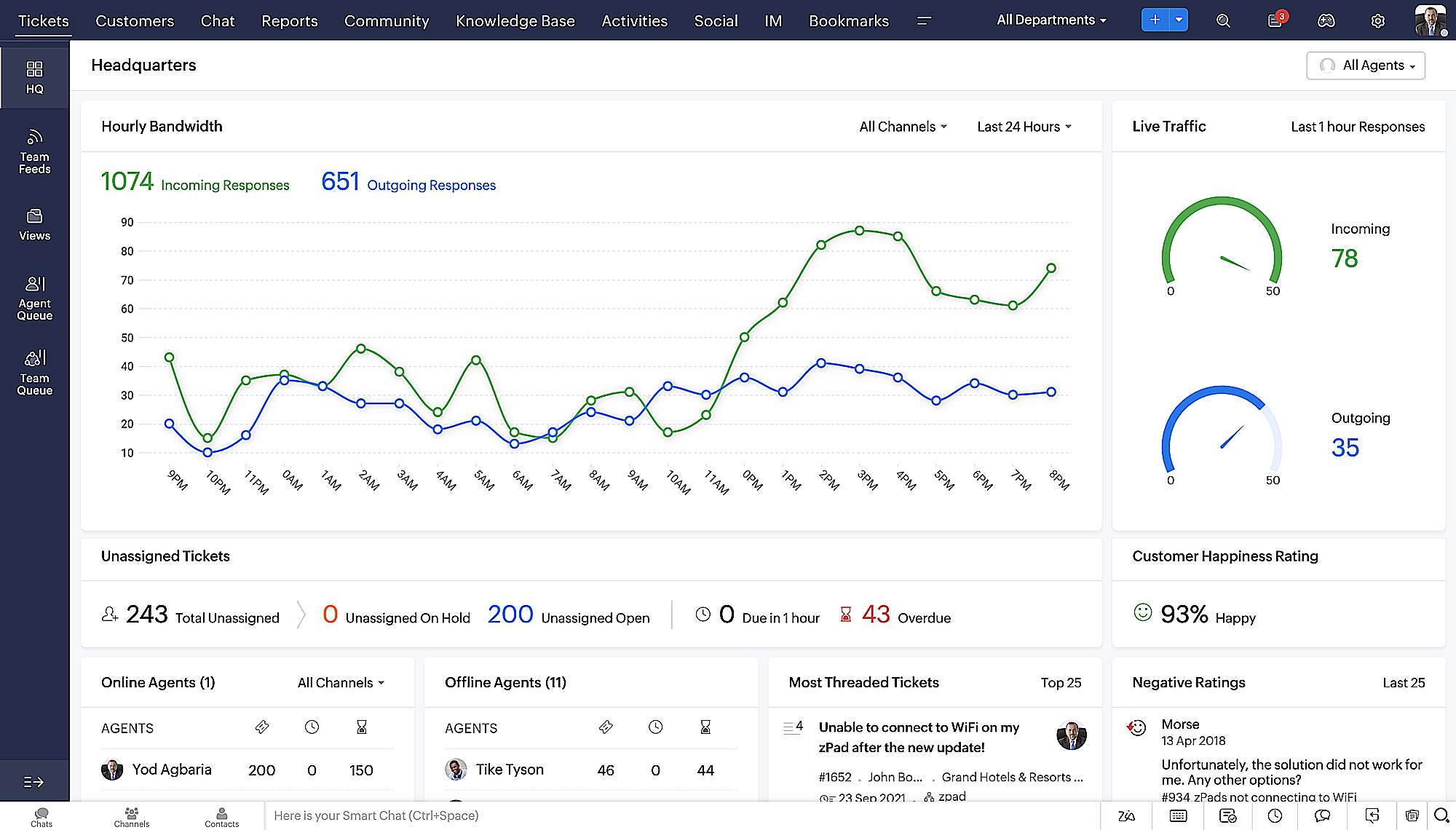
Vista de la Sede más reciente, con una disposición de datos refinada y un aspecto general renovado.
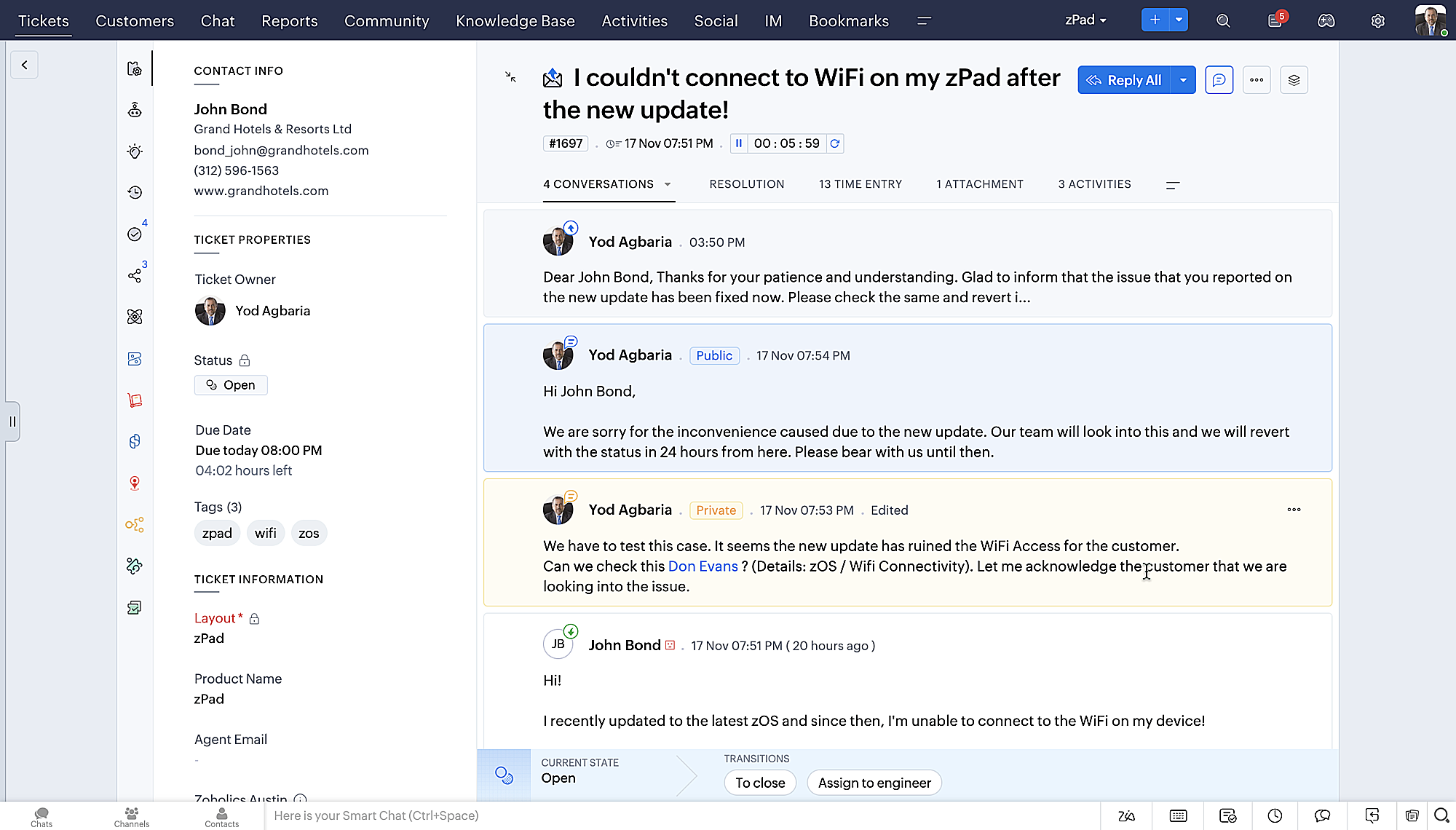
- Vista detallada de los tickets con hilos codificados por colores para facilitar la navegación entre las conversaciones y los comentarios.
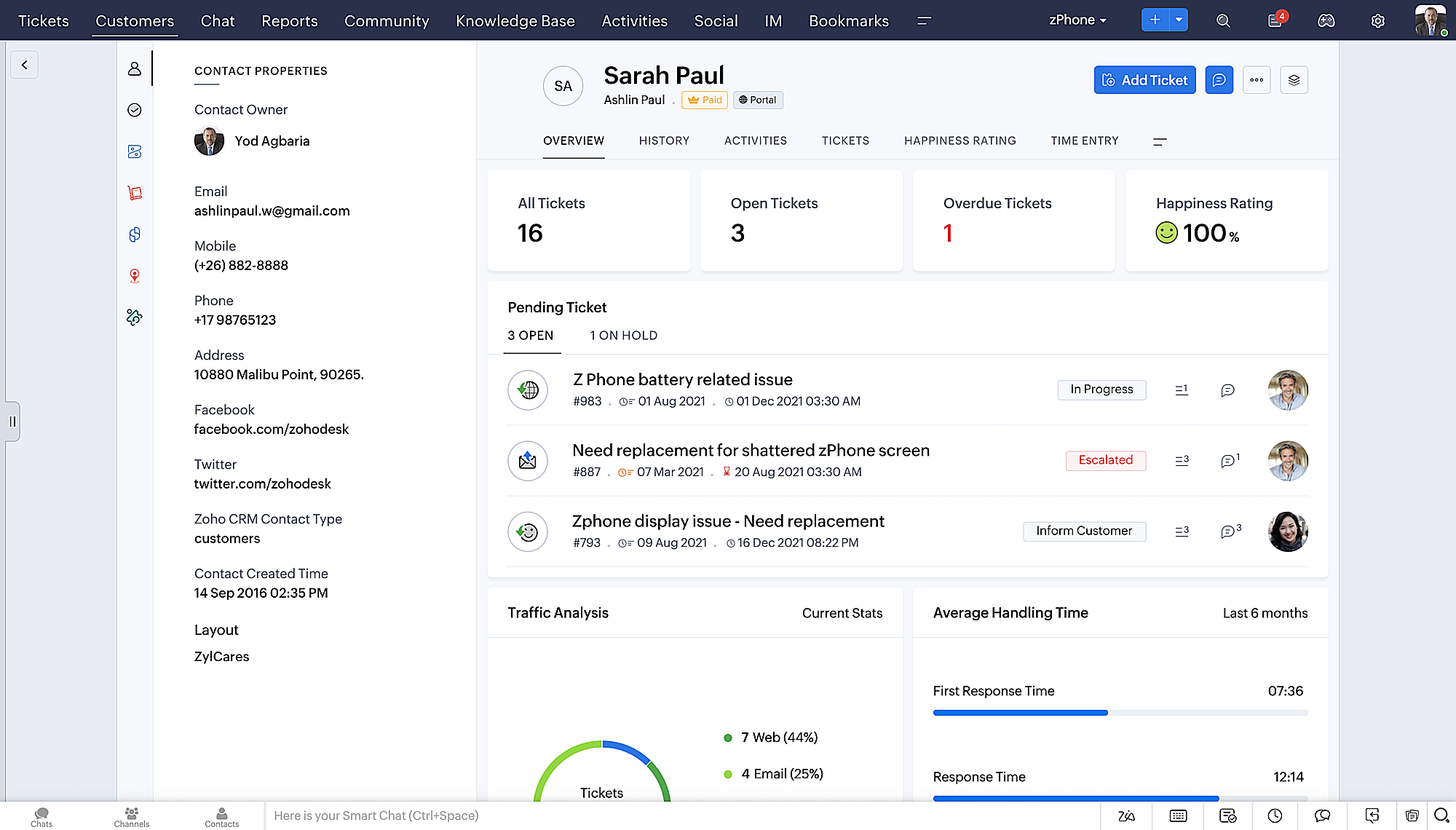
- Vista detallada de los contactos con botones de adición rápida, una sección de tickets pendientes y una visión general de Ticket Insights.
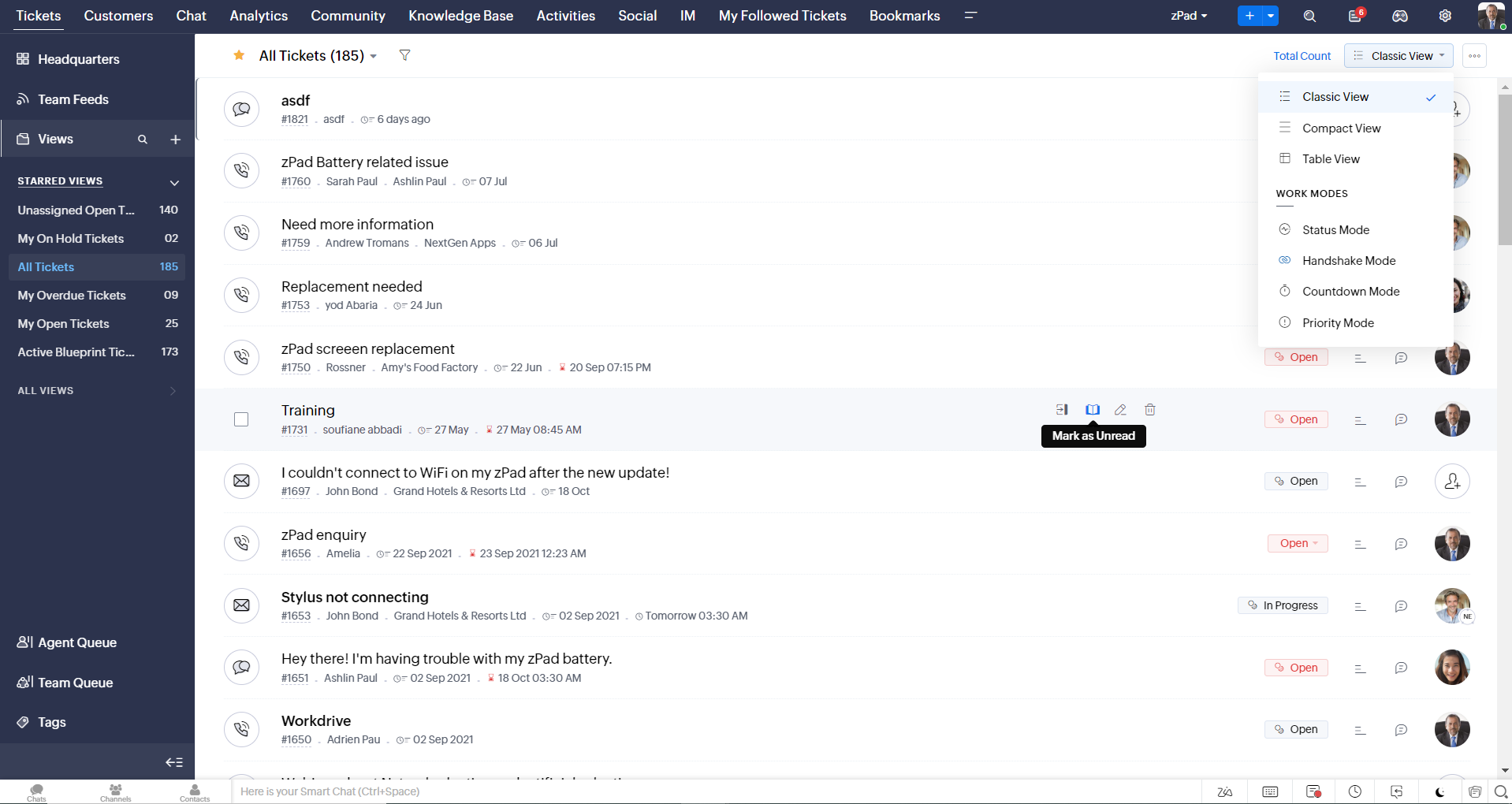
- Vista de la cola de tickets con opciones de estado desplegables, para que pueda ofrecer actualizaciones rápidas sin tener que abrir la vista de detalles de los tickets.
- Una nueva opción de marcar como leído/no leído en la vista de lista de tickets, y un desplegable consolidado de modos de trabajo implementado en todo el módulo de tickets.
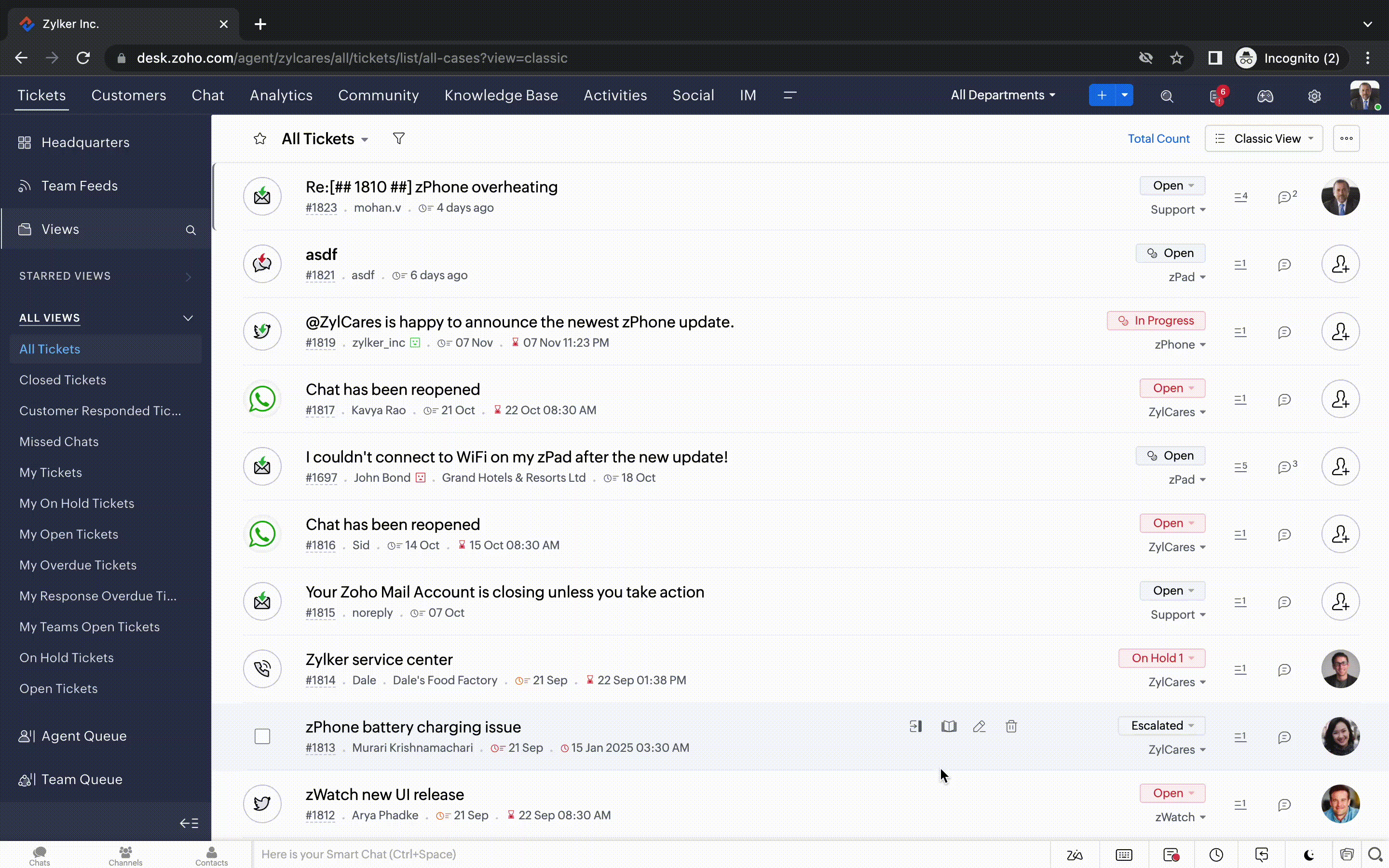
- Desplazamiento infinito para una búsqueda más rápida de entradas y botones de navegación que le llevan rápidamente a la parte superior o inferior de la página.
Nuevas opciones de personalización del usuario:
La personalización se ha convertido en una parte tan común de nuestra vida diaria que tendemos a esperarla en la mayoría de nuestras interacciones con los productos.
En Zoho Desk ya puedes personalizar diseños, campos, roles, plantillas y tu centro de ayuda. Ahora, también puedes personalizar el aspecto de tu portal para que te sientas más conectado con tu centro de ayuda. Esto es lo nuevo:
La personalización se ha convertido en una parte tan común de nuestra vida diaria que tendemos a esperarla en la mayoría de nuestras interacciones con los productos.
En Zoho Desk ya puedes personalizar diseños, campos, roles, plantillas y tu centro de ayuda. Ahora, también puedes personalizar el aspecto de tu portal para que te sientas más conectado con tu centro de ayuda. Esto es lo nuevo:
- Dark Mode/Night Mode para una cómoda experiencia de visualización y lectura en condiciones de poca luz.
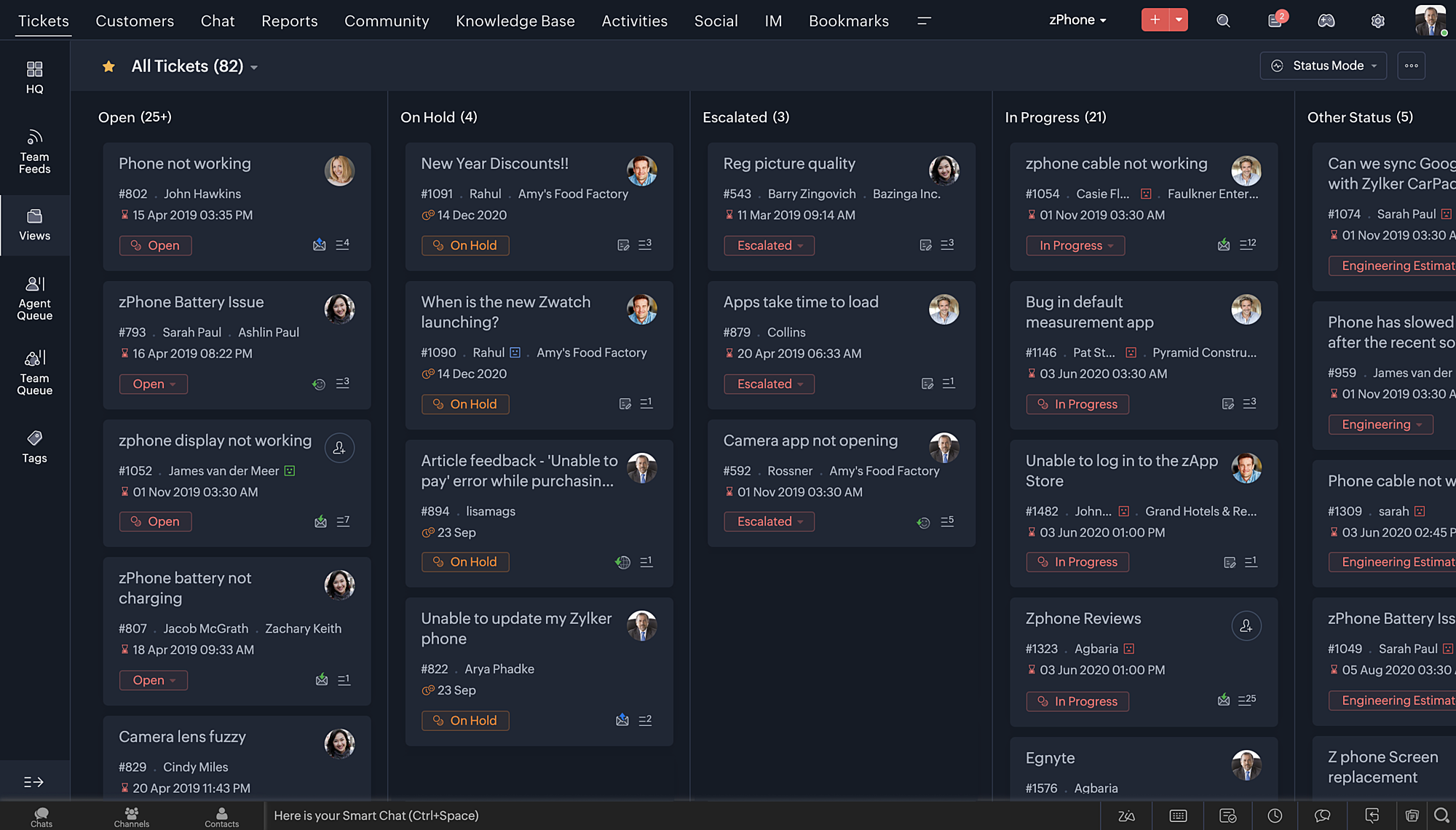
- Nuevos temas para ver el Escritorio en su color favorito, o en los colores que representan tu marca.
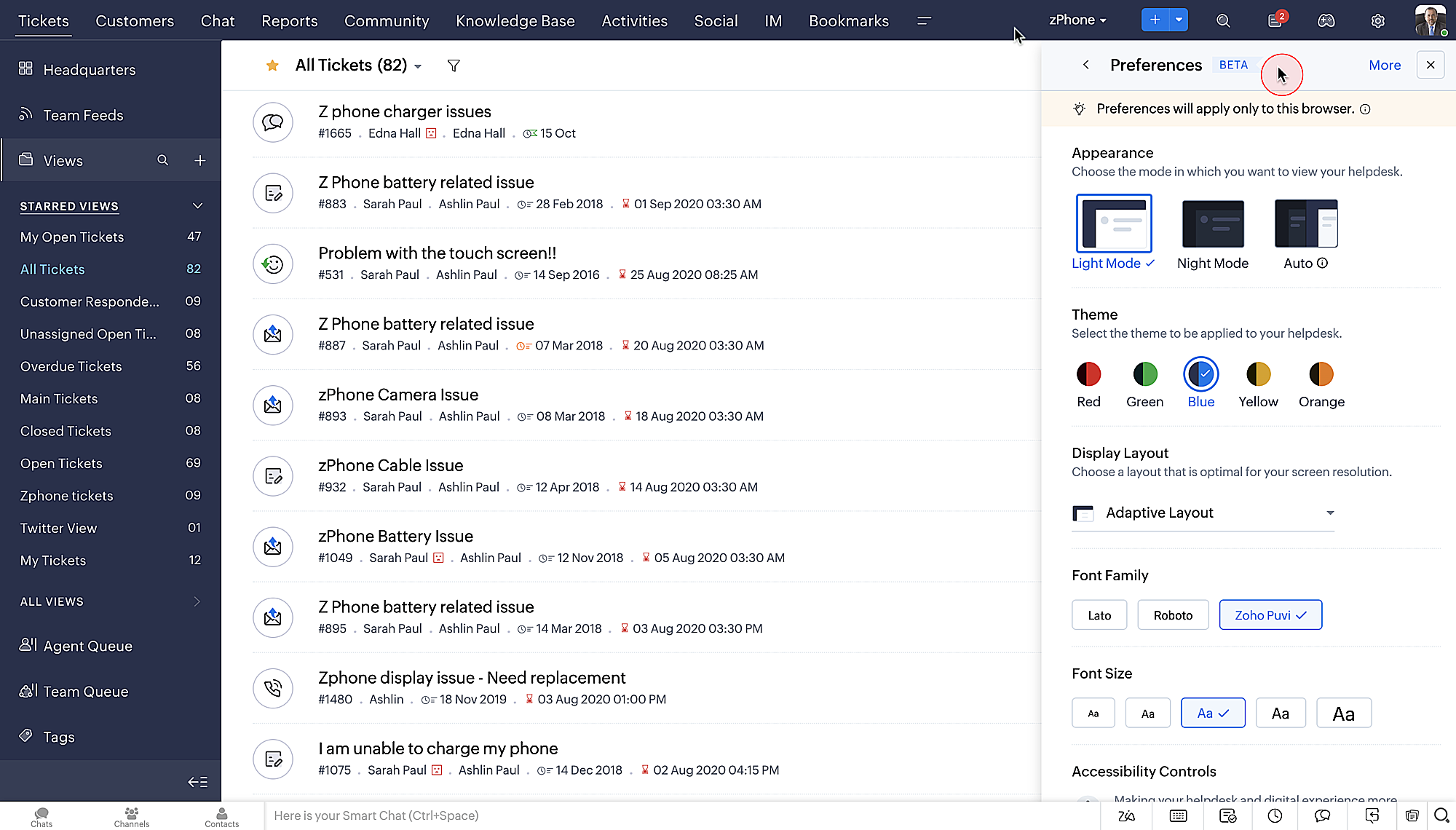
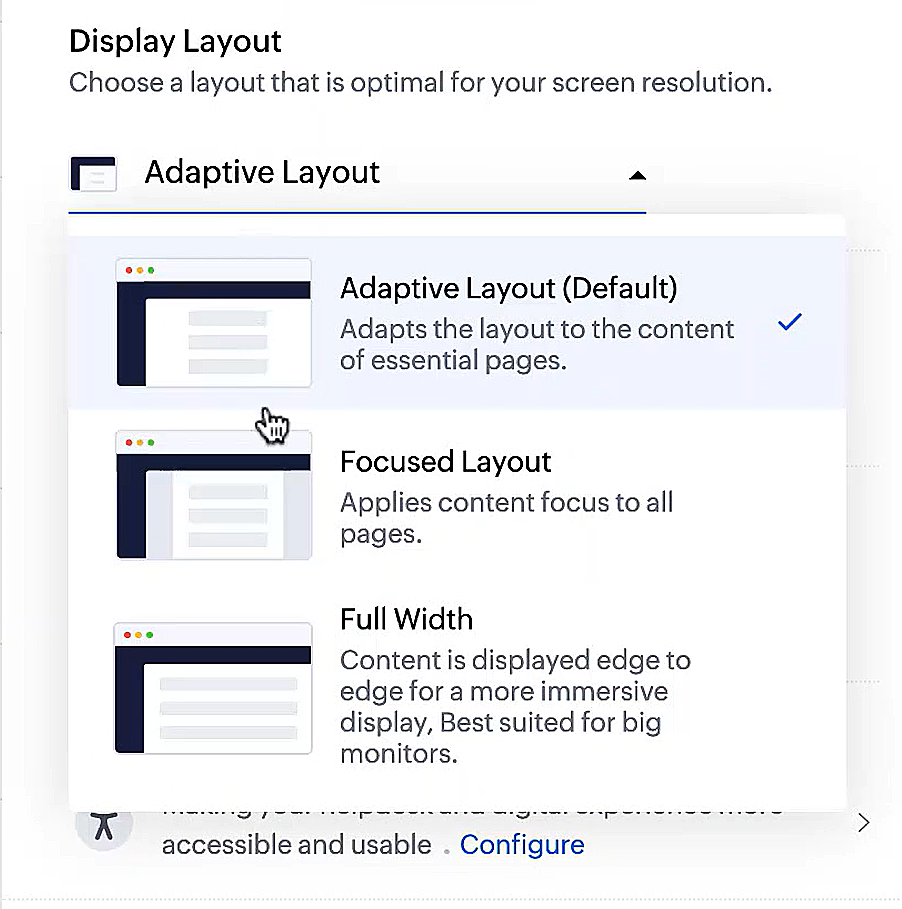
- Diseños de pantalla que te permiten elegir cómo se presenta tu contenido.
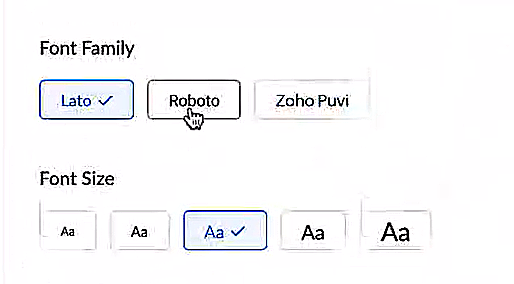
- Nuevos tipos y tamaños de letra para que tu texto se ajuste exactamente a tus preferencias.
Controles de accesibilidad
Nuestra misión siempre ha sido facilitar a todos los usuarios el acceso a nuestros productos y, con nuestros nuevos controles de accesibilidad, estamos más cerca de conseguirlo. Hemos añadido múltiples controles para apoyar sus necesidades de visión, físicas y motoras, y de aprendizaje.
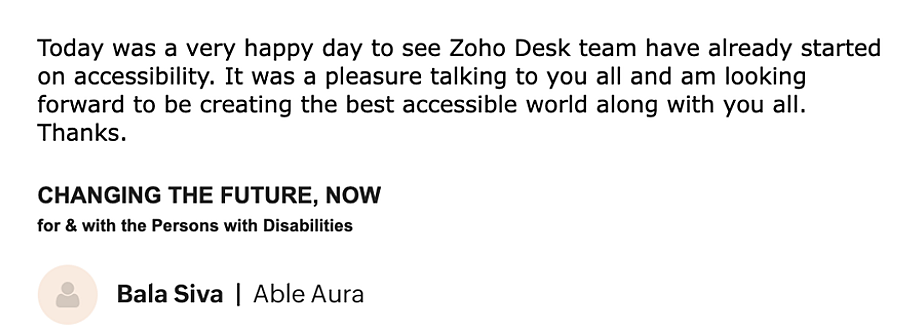
- Resaltar la información crítica muestra la información clave, como el ID del ticket, el propietario del v y los datos de contacto en un color llamativo.
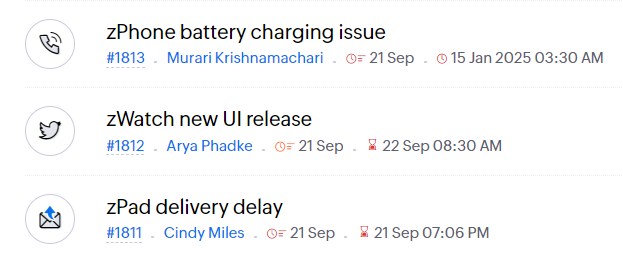
- Subrayar enlaces aumenta la visibilidad de los enlaces en los que se puede hacer clic.
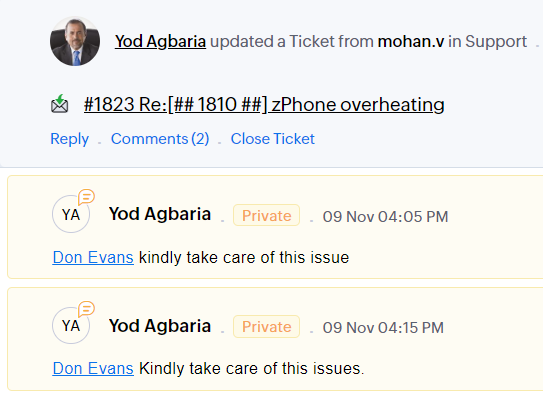
- Enfatizar área de enfoque: añade un borde alrededor de su área de enfoque para indicar la extensión y la posibilidad de hacer clic.
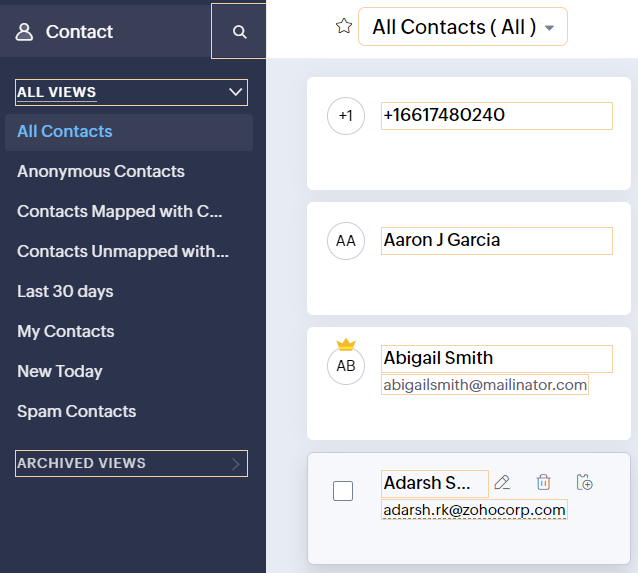
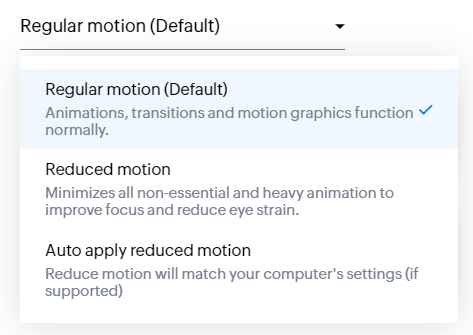
- Los controles de animación optimizan las animaciones y transiciones en tu servicio de asistencia.
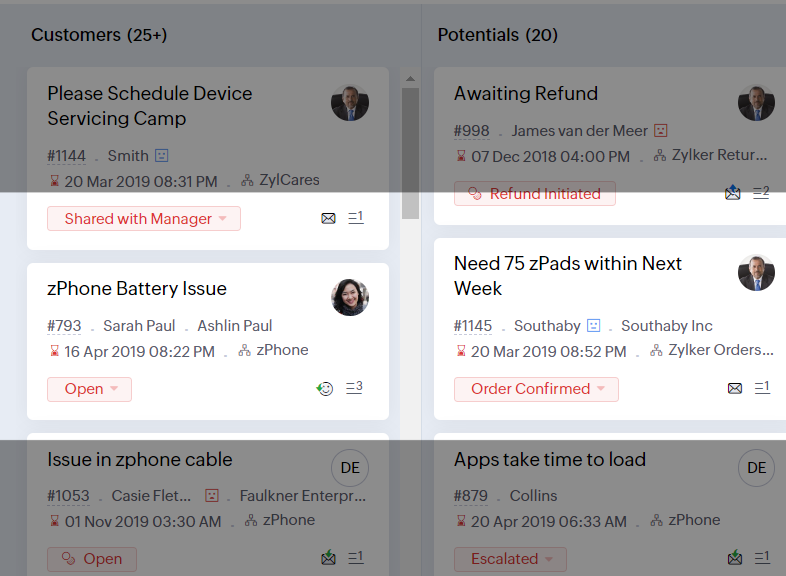
- La máscara de lectura elimina las distracciones enmascarando el texto que no estás leyendo.
- Nivel de zoom te permite ampliar y reducir hasta que la página sea fácil de ver.
- Ajustar el tamaño de la fuente hasta que la página sea fácil de leer.
Con todas las nuevas características de la edición Zoho Desk 2022, las empresas tienen ahora más poder para fomentar agentes felices y clientes incluso más felices.
Nos encantaría saber qué opinas de las nuevas funciones añadidas. Comparte tu opinión en los comentarios o en las redes sociales.
¡Hasta pronto!
Topic Participants
Lorenza Pasca
Sticky Posts
Nuevos tiempos en Zoho Community en español
¡Hola! Os saluda Elsa Perpiñá Subiñas, la cara visible de la comunidad en español, y encargada de crear y mantener esta plataforma como un lugar donde conectar y compartir con otros usuarios. Os doy la bienvenida a una nueva era en esta comunidad, en la que las publicaciones, contenido, preguntas y respuestas estarán escritas en español, y realizadas especialmente para vosotros. A partir de esta semana podréis encontrar: 1. Nuevos subforums en los que encontrar información y realizar vuestras consultas,
Recent Topics
Desk DMARC forwarding failure for some senders
I am not receiving important emails into Desk, because of DMARC errors. Here's what's happening: 1. email is sent from customer e.g. john@doe.com, to my email address, e.g info@acme.com 2. email is delivered successfully to info@acme.com (a shared inbox"Spreadsheet Mode" for Fast Bulk Edits
One of the challenges with using Zoho Inventory is when bulk edits need to be done via the UI, and each value that needs to be changed is different. A very common use case here is price changes. Often, a price increase will need to be implemented, andEmail Notifications not pushing through
Hi, Notifications from CRM are not reaching my users as they trigger. We have several workflow triggers set up that send emails to staff as well as the notifications users get when a task is created for them or a user is tagged in the notes. For the past 6 days these haven't been coming through in real time, instead users are receiving 30-40 notifications in one push several hours later. This is beginning to impact our daily usage of CRM and is having a negative effect on our productivity becauseTicket layout based on field or contact
Hi! I want to support the following use-case: we are delivering custom IT solutions to different accounts we have, thus our ticket layouts, fields and languages (priority, status field values should be Hungarian) will be different. How should I setupAdd specific field value to URL
Hi Everyone. I have the following code which is set to run from a subform when the user selects a value from a lookup field "Plant_Key" the URL opens a report but i want the report to be filtered on the matching field/value. so in the report there isSyncing Bills in Zoho Books to Zoho CRM
Is there any way to sync the Bills in Zoho Books in Zoho CRMSAML in Zoho One vs Zoho Accounts
What is the difference between setting up SAML in Zoho Accounts: https://help.zoho.com/portal/en/kb/accounts/manage-your-organization/saml/articles/configure-saml-in-zoho-accounts ... vs SAML in Zoho One?: https://help.zoho.com/portal/en/kb/one/admin-guide/custom-authentication/setting-up-custom-authentication-with-popular-idps/articles/zohoone-customauthentication-azureHow do I change the order of fields in the new Task screen?
I have gone into the Task module layout, and moving the fields around does not seem to move them in the Create Task screen. Screenshot below. I have a field (Description) that we want to use frequently, but it is inconveniently placed within the MoreZoho Inventory. Preventing Negative Stock in Sales Orders – Best Practices?
Dear Zoho Inventory Community, We’re a small business using Zoho Inventory with a team of sales managers. Unfortunately, some employees occasionally overlook stock levels during order processing, leading to negative inventory issues. Is there a way toCRM gets location smart with the all new Map View: visualize records, locate records within any radius, and more
Hello all, We've introduced a new way to work with location data in Zoho CRM: the Map View. Instead of scrolling through endless lists, your records now appear as pins on a map. Built on top of the all-new address field and powered by Mappls (MapMyIndia),Deactivated Zoho One account can sign in
I am concerned by the fact that deactivated users in Zoho One have the ability to sign in even after their account has been deactivated (not deleted). these inactive identities have no access to individual Zoho apps or data. based on my experience theyHow can I reset the password for a user in Zoho Projects
We need to reset the password for a user in Zoho Projects. I am the admin portal owner and there was nothing to be found to do this. very confusing.No funcionan correctamente el calculo de las horas laborales para informe de tickets
Hola, estoy intentando sacar estadísticas de tiempo de primera respuesta y resolución en horario laboral de mis tickets, pero el calculo de horas en horario laboral no funciona correctamente cree los horarios con los feriados : Ajusté los acuerdos deHow can I add a comment to an existing ticket via API?
I need to add comments/notes to the history of an existing ticket using the API without overwriting the original ticket description. Thanks!Notification to customers when I use a Zoho function
Hi all, I tried searching the community but couldn't find anything about it. I noticed that the customer receives the notification of reopening the old ticket but does not receive the notification of opening a new ticket when I use the function: "separateInternal Error When Accessing Team Inbox.
All our users are seeing this error in teaminbox. Because its a critical tool kindly resolve this issue ASAP.Marketer's Space: Proven tips to improve open rates – Part III
Hello Marketers! Welcome back to another post in Marketer's Space! This is the final post in the "open rate series". In the first and second parts, we discussed topics ranging from sender domains to pre-headers—but we're not done yet. A few more importantMCP no longer works with Claude
Anyone else notice Zoho MCP no longer works with Claude? I'm unable to turn this on in the claude chat. When I try to toggle it on, it just does nothing at all. I've tried in incognito, new browsers, etc. - nothing seems to work.Change Number Field to Decimal Field
Hi, It would be nice to be able to change the field type without having to delete it and create a new one, messing up the database and history. Thanks DanAllow Text within a Formula
Hi, I would like to be able to use this for others things like taking an existing Date Field and copying its value, so by entering getDay(Date)&"-"&getMonth(Date)&"-"&getYear(Date) it results in 01-02-2026. And then when the Date is changed so is thisZoho Social - Feature Request - Reviewer Role
Hi Social Team, I've come across this with a couple of clients, where they need a role which can review and comment on posts but who has no access to create content. This is a kind of reviewer role. They just need to be able to see what content is scheduledZoho Books/Inventory - Update Marketplace Sales Order via API
Hi everyone, Does anyone know if there is a way to update Sales Orders created from a marketplace intigration (Shopify in this case) via API? I'm trying to cover a scenario where an order is changed on the Shopify end and the changes must be reflectedZoho Inventory / Finance Suite - Add feature to prevent duplicate values in Item Unit field
I've noticed that a client has 2 values the same in the Unit field on edit/create Items. This surprised me as why would you have 2 units with the same name. Please consider adding a feature which prevents this as it seems to serve no purpose.Zoho CRM for Everyone's NextGen UI Gets an Upgrade
Hello Everyone We've made improvements to Zoho CRM for Everyone's Nextgen UI. These changes are the result of valuable feedback from you where we’ve focused on improving usability, providing wider screen space, and making navigation smoother so everythingKaizen #224 - Quote-driven Deal Reconciliation Using Zoho CRM Functions and Automation
Hello everyone! Welcome back to another instalment in the Kaizen series. This post covers quote-driven deal reconciliation, emphasizing Functions and Automation to address practical sales challenges. Business Challenge Sales organizations often mark dealsDependent / Dynamic DropDown in ZohoSheets
Has anyone figured out a way to create a Dropdown, the values of which is dependent on Values entered in the other cell ?Zoho Inventory - Composite Items - Assembly - Single Line Item Quantity of One
Hi Zoho Inventory Team, Please consider relaxing the system rules which prevent an assembly items from consisting of a single line item and outputting a quantity of 1. A client I'm currently working with sells cosmetics and offers testers of their productsDirectly Edit, Filter, and Sort Subforms on the Details Page
Hello everyone, As you know, subforms allow you to associate multiple line items with a single record, greatly enhancing your data organization. For example, a sales order subform neatly lists all products, their quantities, amounts, and other relevantBARCODE PICKLIST
Hello! Does anyone know how the Picklist module works? I tried scanning the barcode using the UPC and EAN codes I added to the item, but it doesn’t work. Which barcode format does this module use for scanning?Zoho Inventory - Allow Update of Marketplace Generated Sales Orders via API
Hi Inventory Team, I was recently asked by a client to create an automation which updated a Zoho Inventory Sales Order if a Shopify Order was updated. I have created the script but I found that the request is blocked as the Sales Order was generated byHow do I create an update to the Cost Price from landed costs?
Hi fellow Zoho Inventory battlers, I am new to Zoho inventory and was completely baffled to find that the cost price of products does not update when a new purchase order is received. The cost price is just made up numbers I start with when the productManage control over Microsoft Office 365 integrations with profile-based sync permissions
Greetings all, Previously, all users in Zoho CRM had access to enable Microsoft integrations (Calendar, Contacts, and Tasks) in their accounts, regardless of their profile type. Users with administrator profiles can now manage profile-based permissionsZoho OAuth Connector Deprecation and Its Impact on Zoho Desk
Hello everyone, Zoho believes in continuously refining its integrations to uphold the highest standards of security, reliability, and compliance. As part of this ongoing improvement, the Zoho OAuth default connector will be deprecated for all Zoho servicesVoC in Zoho CRM is now data savvy: Explore response drilldown, summary components and participation in CRM criteria
VoC has all the goods when it comes to customer intelligence—which is why we're constantly enhancing it. We recently added the following: A customer drilldown component that shows you the list of prospects and customers behind a chart's attribute ExpandedHow do I bulk archive my projects in ZOHO projects
Hi, I want to archive 50 Projects in one go. Can you please help me out , How can I do this? Thanks kapilError 0x800CCC0F Outlook
Hello, i cannot send or receive email in outlook. can you please help. 'Sending' reported error (0x800CCC0F) : 'The connection to the server was interrupted. If this problem continues, contact your server administrator or Internet service provider (ISP).'Passing the CRM
Hi, I am hoping someone can help. I have a zoho form that has a CRM lookup field. I was hoping to send this to my publicly to clients via a text message and the form then attaches the signed form back to the custom module. This work absolutely fine whenCan I add Conditional merge tags on my Templates?
Hi I was wondering if I can use Conditional Mail Merge tags inside my Email templates/Quotes etc within the CRM? In spanish and in our business we use gender and academic degree salutations , ie: Dr., Dra., Sr., Srta., so the beginning of an email / letterZoho vault instal on windows
I am trying to use Zoho Vault Desktop for Windows, but I am unable to complete the sign-in process. Problem description After logging in to my Zoho account and clicking Accept on the authorization page, nothing happens. The application does not proceedZoho Browser??
hai guys, this sounds awkward but can v get a ZOHO BROWSER same as zoho writer, etc. where i can browse websites @ home and continue browsing the same websites @ my office, as v have the option in Firefox, once i save and close the browser and again when i open it i will be getting the same sites. If u people r not clear with my explanation, plz let me know. Thanks, SandeepNext Page