2025 Ask the Experts sessions wrap-up : Key highlights from the experts

Here is a rewind journey of our Ask the Experts (ATE) Sessions, where we brought you expert insights and practical best practices together in one place. This recap highlights the key takeaways, learnings, and best practices from all these sessions so you have everything in one place.
Insights from Zoho Desk: A year of listening, learning, and connecting
In every Ask the Expert (ATE) session, we received a diverse mix of questions. We addressed a variety of requests, ranging from tailored business solutions to customized feature requests and tips to support their businesses better.
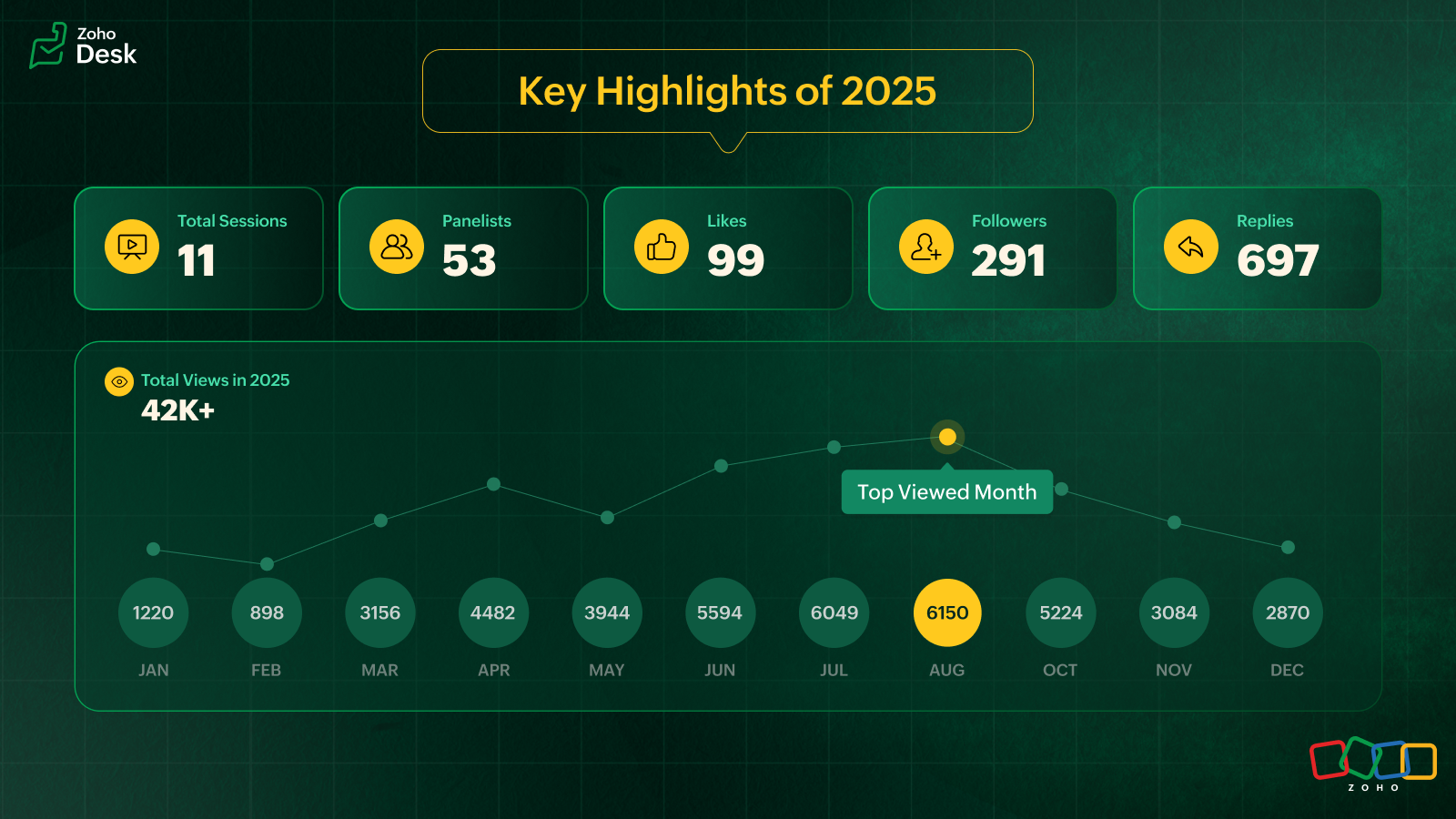
In 2025, we hosted 11 ATE sessions covering a wide range of Zoho Desk features and modules, designed to help teams get the most out of the platform. We brought together panelists from across Zoho Desk to share real-world expertise for every business.
Live video ATE
ATE 19 focused on the 2025 Spring release. We hosted live sessions in a webinar style. This session was eventful as users got to interact with and listen to our panelists live. After the session, the panelists followed up with all the users over tickets and offered sessions to help users with customized solutions.
In an attempt to cater to as many of our users across the globe as possible, we hosted two live sessions: one serving users in Australia, Asia, and the Middle East, and the other to connect with users across the US and Europe. Here's a walkthrough of the sessions: Inside Zoho Desk Spring Release 2025 and Zia in Focus.
Ask the Experts, 2025, addressed various topics covering all the modules within Zoho Desk
- Onboarding and getting started with Zoho Desk
- Multichannel support and self-service portals
- Automation and AI with Zia
- Integration, accessibility, and personalization
- Analytics, data administration, and mobile apps
- Spring and Autumn releases for 2025
We wrapped up the ATE series in December with The Merry Metrics Edition = Best of Zoho Desk [Best Practices + Holiday Automation + Year-End Insights]
Guest panelists
In the ATE themed around integrations and extensions, we partnered with RingCentral. Luis Vargas and Matthew Ludwig from RingCentral shared the panel with Zoho Desk experts to discuss best practices for integrating RingCentral's telephony system with Zoho Desk.
ATE 2025 highlights: Best practices you should know
I. Migrating to Zoho Desk? Here's what you shouldn't miss
For simple and straightforward CSV imports, try the UI import feature to import data into your Zoho Desk account. Zoho Desk is equipped with dedicated templates to process and accept data from known help desk services like Freshdesk, Zendesk, Salesforce, Kayako, Help Scout, HappyFox, and others. For unsupported services, a CSV file is accepted.
To export data from the source service, submit a Zwitch form for migration. Share the required details relating to department mapping, agent mapping, and more in the Zwitch note section of the form.
Once the data is evaluated, the migration will be initiated. The migration engineer will follow up with you regarding the import and if there are cases of invalid files, source portal inaccessibility, or destination OAuth issues.
The migration time depends on the queue length and the volume of data being handled. On completion, a migration report will be shared.
You can also share the residual/delta backup via Zwitch. Residual requests are normally expected within two weeks of the full data import. The migration process for the residual import happens like the Zwitch migration.
Points to remember
- The migration data and information will be retained for 30 days and then wiped off from our import engine. This is in compliance with GDPR and its regional counterparts across the globe.
- Upon migration completion, a report will be shared with a module-wise list of all completed and failed entities with reasons for failure. Data availability and integrity are assured by the end of data transit.
Precaution
Please ensure imported entities aren't deleted/trashed from your help desk service until the completion of the last import batch.
From @Gopalavasan G G Ask the Experts 16: A 5-hour Live Q&A - Tackling Zoho Desk's Onboarding Challenges

II. Optimizing customer support across messaging platforms with Zoho Desk
Automate first-level support with Zia Answer Bots to reduce response times.
- Utilize chatbots to address frequently asked questions (FAQs), provide troubleshooting steps, and handle simple queries.
- Use preset replies and guided responses to help customers find quick solutions.
- Automate ticket creation and status updates to keep customers informed without human intervention.
Enable seamless hand-offs to human agents
- Design workflows where chatbots can connect to live agents based on the complexity of the queries.
- Provide agents with customer history from prior conversations across different platforms to avoid repetition.
Optimize response time with structured workflows
- Implement prioritization rules in IM tickets for priority cases (for example, billing issues or service disruptions).
- Set up automated notifications via custom notification for customers when their issue is being processed.
Utilize rich media for effective communication
- Allow customers to send screenshots, videos, or PDFs to clarify issues faster.
- Use videos to serve as engaging and quick troubleshooting guides.
Ensure channel-specific compliance
- WhatsApp: Requires approved message templates if beyond 24 hours.
- Facebook Messenger: Allows direct messaging for up to 7 days.
- Telegram: No restriction; allows an agent to message anytime.
- WeChat: Allows direct messaging within 48 hours.
- Line: Allows an agent to messages without restrictions.
- Instagram: Enables direct messaging within a 24-hour window.
Provide proactive support and notifications
- Send order updates, payment reminders, and appointment confirmations via automated messages.
- Implement triggered proactive chats based on customer behavior via WhatsApp (for example, abandoned cart reminders).
- Use push notifications on WhatsApp messaging apps to alert customers about service changes or outages.
Create a unified customer experience
- Ensure conversations remain consistent across platforms even if customers switch between apps and resume conversations from another app.
- Provide multi-language support via answer bots with automated translation where necessary.
@Ralph Martin from Ask the Experts 17: Elevate Customer Communication With Multichannel & Instant Messaging
III. Best practices for setting up an email channel
Setting up your email channel in Zoho Desk is key to streamlining your customer support process. The following approaches protect your brand and build trust with your customers.
- Default setup & branded forwarding: Use the default Zoho Desk support email (support@yourcompany.zohodesk.com) and configure email forwarding to your company's email (support@yourcompany.com) to auto-create a ticket for every customer's email.
- Email aliases for departments: Create specific email aliases like sales@yourcompany.zohodesk.com or billing@yourcompany.zohodesk.com for each department, and set up a forwarding rule from your from addresses (like sales@yourcompany.com or billing@yourcompany.com). This will automatically route emails to the appropriate departments, ensuring efficient query management.
- Forwarding verification: After setting up email forwarding, verify the process by checking for the confirmation ticket in Zoho Desk to complete the configuration.
- Secure email with SPF & DKIM: Update your domain’s DNS settings with SPF and DKIM records to prevent spam and spoofing. To bolster email security, DKIM is mandatory for all business-owned domains used in your "From Address" configuration. DKIM cannot be configured for "From" addresses hosted on public domains like Google, Outlook, or AOL; in such cases, you must use your own SMTP servers.
- Custom “From Address": Add and verify your custom "From Address" in Zoho Desk, and update your DNS with the necessary SPF and DKIM values. Verify your domain using the DKIM keys.
- Default domain name: In Zoho Desk, you cannot change the domain name in the default support email address. This domain name is set automatically based on your portal name when you sign up (for example, support@<mycompany>.zohodesk.com). Update it with a unique portal name by reaching out to support@zohodesk.com.
@Sumaya Howth from Ask the Experts 17: Elevate Customer Communication With Multichannel & Instant Messaging
IV. How does a telephony system enhance customer support in Zoho Desk?
Instantly identify your caller
- When a call comes in, the telephony system in Zoho Desk pulls up the caller’s name, phone number, and recent tickets.
- Agents can view contact details and related tickets before picking up the call.
Track every call automatically
- Every call, answered and missed, is logged as a Call Activity in Zoho Desk.
- Answered calls update in real time, while missed calls get recorded at the end of the ring.
- Call duration and status update automatically, keeping your records accurate.
Convert missed calls into actionable tickets
Configure Zoho Desk to create tickets for missed calls: inbound, outbound, or both. This ensures no customer inquiry falls through the cracks.
Handle unknown callers effortlessly
Zoho Desk automatically creates a new contact using the caller’s phone number for new contacts. Agents can edit and update details instantly.
Link calls to tickets for seamless tracking
- Agents can create a new ticket and associate the call activity with it or associate the call activity with an existing ticket.
- Zoho Desk automatically logs a call thread inside the ticket, keeping everything in one place.
- Call activity will be automatically associated with the ticket when you use click-to-call from the Ticket Detailed View.
Record call duration & summarize conversations
- A call timer runs in the background, helping agents track time spent on each call.
- Agents can add notes during the call and after the call.
- This call summary will be added to the call activity and to the ticket, if associated.
Never miss a voicemail or call recording
- If the PBX provider supports it, call recordings and voicemails appear in the call thread, complete with an audio player for easy access.
- Ensure fail-proof call handling
- If the system doesn’t detect an answered or ended call, agents can manually mark the call as answered or ended, ensuring accurate records despite vendor failures.
Keep calls organized with multiple tickets
Agents can create multiple tickets from a call while keeping the call linked to a single ticket.
Note: Creating a ticket automatically for every answered call is possible in Zoho Desk's enterprise edition via a custom function.
@Srini | Zoho Desk from Ask the Experts 17: Elevate Customer Communication With Multichannel & Instant Messaging

V. Enhancing self-service through Guided Conversations (GC) in Zoho Desk
Guided Conversations (GC) empowers businesses with structured, intuitive self-service through conversational flows. GC provides around-the-clock support and ensures a smooth transition from the bot to the support rep. It reduces agents' workload, minimizes response times by automating dynamic responses, and personalizes interactions based on user inputs. GC functions across the web, instant messaging, and mobile apps.
Tips to get the best out of GC
Structuring your flow
To prevent exceeding the 500-block limit, optimize your flow using the action blocks:
- Jump to flow – Redirect users to another flow instead of adding more blocks. It aids transition between different conversation sections.
- Fork – Split the conversation or branches logically into multiple paths efficiently.
- Button Block – Use buttons for seamless navigation across flows.
- Operation block – Executes predefined actions in a flow.
- Webhook – Connects with external services for data transfer
Maintain consistency in cards
Ensure uniform formatting on all cards. If the first card includes a title, image, and description, make sure all subsequent cards follow the same structure.
Ensure uniform formatting on all cards. If the first card includes a title, image, and description, make sure all subsequent cards follow the same structure.
GC uses different types of variables to store and retrieve user information, enabling personalized interactions across IM channels, web, and mobile apps.
- Block Variables – Store responses within a specific block (for example, a user’s name after input).
- Local Variables – Available only within the flow where they are defined (for example, a discount percentage used within the same flow).
- Global Variables – Shared across all departments and flows (for example, company name or logo).
- Session Variables – Specific to a user’s session and accessible across all flows (for example, country-based redirection using the Fork block).
- IM-specific variables – IM variables can retrieve user details and automate tasks. These help identify users by name and unique ID, associate contact details from IM channels, customize experience based on the IM channels, and perform automated actions like creating and updating existing tickets.
Transfer to Agent Block (IM-Specific)
To enable agent transfer in GC on ASAP, GC must be linked to a business messaging channel, that should be connected to the ASAP widget.
You can use Integration Blocks to connect Zoho Desk with Zoho Cliq instead of webhooks, which require manual setup and coding.
Track performance with GC flow metrics
GC flow metrics track performance at each block level, identify areas for optimization, and improve flow performance based on real user interactions.
Get the best out of your Guided Conversations (GC) flows, ensuring a smooth, efficient, and user-friendly experience across instant messaging (IM) channels, web, and mobile apps.
@Chaya Jayasankar from Ask the Experts 22: Scale up your customer support with integrations & extensibility
VI.I Key insights on the RingCentral and Zoho Desk integration
Seamless user experience: RingCentral call recordings play natively within Zoho, and the WebRTC integration ensures calls are logged from any endpoint, including mobile. This means no app switching and a complete view of the communication history within Zoho Desk.
Boost team efficiency: Agents can save time with click-to-call and instant screen pop-ups, providing customer context. Automated call logging reduces manual work, leading to faster resolutions and a better customer experience.
Enhanced collaboration & coaching: Easy access to call recordings within Zoho Desk helps with training and quality assurance. A unified view of all interactions fosters better teamwork.
Luis Vargas with RingCentral from Ask the Experts 22: Scale up your customer support with integrations & extensibility
VI.II Mistakes to avoid while using RingCentral
Poor setup & training: Don't skip defining workflows or training users; it's crucial for adoption.
Ignoring mobile logging: Ensure calls from the RingCentral mobile app are logged in Zoho Desk for full visibility.
Underutilization: Don't just use basic features; leverage custom dispositions and analytics for maximum benefit.
Expert insight: The core value is unified, accurate customer data. The native recording, playback, and universal call logging (even from mobile) are game-changers for seamless, efficient customer interactions.
Matthew Ludwig with RingCentral from Ask the Experts 22: scale up your customer support with integrations & extensibility
VII. Handling the Instant Messaging module in Zoho Desk
The Instant Messaging (IM) module in Zoho Desk provides a unified interface to manage customer conversations across multiple messaging channels.
Messaging channels
Zoho Desk supports the following instant messaging (IM) channels: WhatsApp, Facebook Messenger, Instagram, Telegram, WeChat (primarily used in China and its regions) and Line (commonly used in Japan and its regions).
Business Messaging
Zoho Desk supports its native-live chat application: Business Messaging (BM). Add the Business Messaging widget to your website to connect your customers with your support reps.
Tips for IM configuration (Across all channels)
- Channel integration: Integrate your official IM apps' business accounts with Zoho Desk's IM module to handle conversations from a single platform.
- Agent association: Associate agents with specific messaging channels to ensure a dedicated point of contact for the agents to improve response time and service quality.
- Embed channel options: Each channel provides embeddable options such as links, QR codes, or buttons to place on your website to make it easy for customers to reach out.
- Canned messages: Canned messages save time by responding to common questions with standard message formats. They can be used across all IM channels, and associated with specific departments for better control and consistency.
- Welcome messages: Configure a Welcome Message to greet customers automatically when they initiate their first conversation through IM.
- Offline notifications & business hours: Set business hours for each IM channel to manage availability effectively. When agents are offline or on a holiday, an offline message can notify customers about the availability of support.
IM offerings for 24/7 support
- Answer bot: Use the Answer Bot to handle Level 1 (L1) queries during out-of-business hours and holidays.
- Guided conversations: For structured customer interactions, configure Guided Conversations based on your business flow and associate them with IM to guide the customers.
- Automate notifications via workflows: Zoho Desk workflows support IM-based notifications using Reply via Instant Messaging and Notify via Instant Messaging. Define the criteria in workflows and select the appropriate channel and use templates for custom messages.
Note: WhatsApp supports template-based messages, and other channels support custom templates.
Tracking IM conversations as tickets: IM conversations → Tickets
You can configure IM preferences to automatically convert conversations into tickets. Under Preferences in the Instant Messaging modules, if you select None, IM conversations will not be converted into tickets. If you select Always, all conversations for a contact will be tracked in a single ticket. Configure a time interval to track ticket creation based on your business requirements.
- Auto-closing conversations: Use Auto-Close to automatically close conversations when agents or bots remain idle beyond a configured timeout period.
- Automatic agent assignment (chat routing): Enable Chat Routing in IM to automate agent assignment where online agents are assigned conversations sequentially, while offline agents are excluded from assignment.
Leverage Instant Messaging in Zoho Desk to collaborate effectively with your customers.
@Hareesh P from Ask the Experts 26: Brighten every customer interaction with Zoho Desk all year long
From feature walkthroughs within Zoho Desk to personalized follow-ups via tickets, emails, and one-on-one meetings, every session reflected how Zoho Desk helps businesses grow and benefit customers worldwide. The ideas, questions, and feature requests shared during these sessions continue to guide us in crafting Zoho Desk into a more intuitive, accessible, and human-centered platform.
We thank everyone who participated and contributed to the 2025 ATE series. We look forward to continuing our conversations in the upcoming sessions.
Happy New Year, everyone!

Cheers,
Lydia | Zoho Desk
Lydia | Zoho Desk
Topic Participants
Lydia | Zoho Desk
Sticky Posts
Ask the Experts 10: A 5-hour online Q&A on Zoho Desk Best Practices
Welcome to Zoho Desk's Ask the Experts session! This is a monthly discussion on our forums; wherein a panel of experts will take on questions specific to topics related to Zoho Desk. The panel will be available for a 5-hour period and will answer anyAsk the Experts 7: A 5-hour online Q&A on Telephony and Call Module
Welcome to Ask the Experts session! This is a monthly discussion in forums; each session, a panel of experts will take questions on specific topics related to Zoho Desk. The panel will be available for a 5-hour period and answer any questions posted here.Ask the Experts 5: Online Q&A on Zoho Desk Extensibility
Welcome to Ask the Experts session! This is a monthly discussion in forums; each session, a panel of experts will take questions on specific topics related to Zoho Desk. The panel will be available for a 5-hour period and answer any questions posted here.Ask the Experts 4: A 5 hour online Q&A on agent productivity
Welcome to Ask the expert session! This is a monthly discussion in forums; each session, a panel of experts will take questions on specific topics related to Zoho Desk. The panel will be available for a 5-hour period and answer any questions posted here.Ask the Experts 3: A 5 hour online Q&A on reports and dashboards
Welcome to Ask the expert session! This is a monthly discussion in forums; each session, a panel of experts will take questions on specific topics related to Zoho Desk. The panel will be available for a 5-hour period and answer any questions posted here.
Recent Topics
How to implement new online payment gateway?
Hello, Can you tell me how to proceed to implement my local payment gateway? DIBS has an open avaiable API that should be easy to implement into ZOHO BOOKS. http://tech.dibspayment.com/dibs_payment_windowFormula working in MS Excel , is not working in Zoho Sheets, Filter fuction which is working in MS sheets per the attached workbook / Daily update.
Filter function , which is working in MS Excel is not working in Zoho sheets. Please help on function of filter of particular class sheets and extract students name who has more than 3.5 hours of study hours on particular day depending on date in D7 cell.New in Smart Prompt: Record Assistant for contextual assistance, and support for new AI models
Smart Prompt helps teams stay informed and move faster by providing relevant suggestions where work happens in CRM. With this update, Smart Prompt becomes more adaptable to your organization’s AI preferences. You can now choose which Large Language ModelImproved Integration Failure Information (And Notification Options)
Hi, When an attachment service for example fails, you just get "Field x - Error", I can check the field it is failing on and find nothing wrong, same file size, type, dimensions, etc. so more information as to the actual issue would be helpful. And anCreate static subforms in Zoho CRM: streamline data entry with pre-defined values
Last modified on (9 July, 2025): This feature was available in early access and is currently being rolled out to customers in phases. Currently available for users in the the AU, CA, and SA DCs. It will be enabled for the remaining DCs in the next coupleChange User Role in a Form
Hi, When in a form, it would be good (And consistent) to be able to change the user role/permission like you can with Shared Reports, All Entries or the actual User itself, rather than having to delete the users permission and then add it back again withReassign Partially Saved Entries
Hi, I would like to be able to go to Partially Saved Entries and like the option to delete them I would like the option to multi-select and be able to reassign them to another user to complete (Such as when a user has left the company). Thanks DanIncrease the "Maximum Saved Entries per User" Options Limit
Hi, You can create lots of saved entries, yet the Limit when you apply one is 25, we may often expect 32 to be in draft, and therefore want to enforce that, can we increase the limit of this field from 25 to 100 (As you can just turn it off and have moreDynamic Field Folders in OneDrive
Hi, With the 2 options today we have either a Dynamic Parent Folder and lots of attachments all in that one folder with only the ability to set the file name (Which is also not incremented so if I upload 5 photos to one field they are all named the sameProduct Updates in Zoho Workplace applications | December 2025
Hello Workplace Community, Let’s take a look at the new features and enhancements that went live across all Workplace applications this December. Zoho Mail Block emails without notifying the sender Block emails without sending a rejection notificationZoho CRM for Gmail Extension Not Working in Brave Browser?
Is anyone able to get the Zoho CRM Chrome Extension working in the Brave browser? They're both built on the Chromium platform and every other Chrome Extension works with the exception of Zoho CRM for Gmail so any ideas here?Set Frozen Cells in the Report Settings
Hi, It would be nice to be able to set the frozen cells in the report Settings, and have an option if this is fixed or can be changed after loading (On the next load it still goes back to the Settings). Thanks DanMicrosoft Teams now available as an online meeting provider
Hello everyone, We're pleased to announce that Zoho CRM now supports Microsoft Teams as an online meeting provider—alongside the other providers already available. Admins can enable Microsoft Teams directly from the Preferences tab under the MeetingsTip of the week #26: Import/ Export calendars in Zoho Calendar.
Any calendar on the web or calendars that you create in any other calendar application can be imported in to Zoho Calendar. This will help you to add the events from the calendars that you import to your Zoho Calendar. You also have the option to exportAdd Zoho Forms to Zoho CRM Plus bundle
Great Zoho apps like CRM and Desk have very limited form builders when it comes to form and field rules, design, integration and deployment options. Many of my clients who use Zoho CRM Plus often hit limitations with the built in forms in CRM or Desk and are then disappointed to hear that they have to additionally pay for Zoho Forms to get all these great forms functionalities. Please consider adding Zoho Forms in the Zoho CRM Plus bundle. Best regards, Mladen Svraka Zoho Certified Consultant andBlocklist candidates in Zoho Recruit
We’re introducing Block Candidate, which helps recruiters to permanently restrict a candidate from applying to current/future job openings. Once the candidate is blocked, they will no longer be able to participate in the recruitment process. This willWhat is the safest way to convert OST to PST files?
The safest way to convert OST to PST files is by using a reliable and professional OST to PST Converter tool. Manual methods often risk data loss, corruption, or dependency on Exchange Server connectivity. A trusted converter Aryson OST to PST ConverterZoho CRM for Everyone's NextGen UI Gets an Upgrade
Hello Everyone We've made improvements to Zoho CRM for Everyone's Nextgen UI. These changes are the result of valuable feedback from you where we’ve focused on improving usability, providing wider screen space, and making navigation smoother so everythingSocial icons, open in new tab?
Hello, I have two social icons on my footer, Facebook and Psychology Today. Clicking on the Facebook icon opens a new tab, the Psychology Today icon does not. I would like them both to open a new tab. Am I missing a setting somewhere?Introducing Connected Records to bring business context to every aspect of your work in Zoho CRM for Everyone
Hello Everyone, We are excited to unveil phase one of a powerful enhancement to CRM for Everyone - Connected Records, available only in CRM's Nextgen UI. With CRM for Everyone, businesses can onboard all customer-facing teams onto the CRM platform toReal-Time Screen Annotation During Zoho Cliq Screen Sharing
Hi Zoho Support Team, Hope you're doing well. We’d like to request the addition of real-time screen annotation tools during screen sharing sessions in Zoho Cliq video calls. 🔍 What We're Looking For: The ability for the presenter—and optionally, otherencountering an error when attempting to associate an email with a Deal using the Zoho CRM extension in Zoho Mail.
When I click "Yes, associate," the system displays an "Oops!! Something went wrong" error message. I have attached a screenshot of the issue for reference.Autofill address using smart fields mapped over the pdf document
Hi, I'm using mail merge to map smart fields onto PDF documents I plan to distribute for signing. I already have a Zoho Sign subscription. When mapping smart fields from the Employee form, I only see the permanent and current addresses which include theLive Chat for user
Hi everyone, I’m new to Zoho Creator and wanted to ask if it’s possible to add a live chat option for all logged-in portal users so they can chat internally. I’m trying to create a customer portal similar to a service desk, but for vehicle breakdowns,How do I cap employee leave accrual
HI there, How do I cap an employee's leave accrual? The policy is that you accrue 15 days leave annually (1.25 days a month) and once you reach 15 days, you wont accrue more until you take leave. Thank you!Open sub form from a button as a popup form
Is there a way within a form to use similar code as below to show a button in the form when clicked opens the subform for data to be added to the record being viewed in the form OpenUrl("#Form:<Customer_Delivery_Address>?<Delivery_Address>=" + input.ID,"popupDont have backup option in setting
Hi guys. I started using zoho book a week ago. I bought premium package yet I don't have backup option in setting. I hope anyone can help me find a solution. Thanks in advanceMaking Tags Mandatory
When creating an expense, is it possible to make the Tags field mandatory? I see the option in settings to make other fields mandatory, like Merchant, Description, Customer, etc, but nothing about Tags. Thanks! KevinIs there a plan to integrate zoho voice with zoho books?
Hello, Is there a plan to integrate zoho voice with zoho books? Right now we are using the Twilio SMS integration into zoho books, but have recently decided to switch to zoho voice for calls and sms. Is there a plan to integrate zoho voice natively intoPass variables to Zoho Desk via URL to create a fast new ticket landing page
We are integrating our phone system into Zoho Desk. Currently when a helpdesk agent answers the phone, a soft client opens a new tab with zoho desk at the new case page. https://desk.zoho.com/support/companyname/ShowHomePage.do#Cases/new We would likeZoho Books Extension: What Happens If Custom Fields Already Exist?
When developing Zoho Books extensions, what happens if the target Zoho Books organization already has a custom field with the same API name as one defined in the extension? I’m asking because we originally created an on-Books version of this functionality,Modular Permission Levels
We need more modular Permissions per module in Books we have 2 use cases that are creating problems We need per module export permission we have a use case where users should be able to view the sales orders but not export it, but they can export other¡Vuelven los Workshops Certificados de Zoho a España!
¡Hola usuarios de Español Zoho Community! Hace ya unos días que hemos dado la bienvenida al 2026, y promete ser un año de lo más emocionante. Y es que nos gustaría haceros nuestro particular regalo de Reyes, aunque lleguemos un poco tarde. 🎁 ¡Nos gustaríaFree Webinar on 21 January: Looking back at Zoho Mail in 2025
Hello Zoho Community! Curious about how Zoho Mail evolved in 2025? Wondering how these updates can make your everyday email work simpler? We’ve got a session you won’t want to miss. In our Zoho Mail 2025 recap webinar, we’ll walk you through the key featuresCliq Networks users can see all other network users contact information
Is there a way to hide user contact information from each user in networks? I would only like the users to see the admin's contact information, not other users. Network users information shared by defaultZoho Sheet - Printing - Page Breaks and Printing Customization
I think the title is descriptive enough in that I cannot find help documentation on a simple task of adding in page brakes for separating pages on print. ThanksMissing the "Find & Merge Duplicates" choice
Hi, I am missing the "Find & Merge Duplicates" choice. I looked under the "More Actions" menu in Contacts, Accounts, Vendors, and Leads and it is not there. I have full permissions. Please assist me on finding this feature. Thanks!OAuth integration issues
I'm experiencing persistent OAuth errors when trying to connect Make with Zoho API. I've tried multiple approaches but keep encountering the following issues: First error: 'Invalid Redirect Uri - Redirect URI passed does not match with the one configured'Marketing Tip #16: Ideal sizes and formats for adding images to your online store
Images can make (or break) your storefront experience. When your banners and product photos follow the right sizes and aspect ratios, your store looks cleaner, loads faster, and feels more trustworthy—especially on mobile. Here are recommended image sizesImprove WhatsApp Module in Zoho CRM
The current WhatsApp module UI in Zoho CRM feels cluttered and complex, especially when handling high volumes of conversations. It would be great to enhance the WhatsApp module UI/UX by adopting a clean and simplified interface similar to Bigin CRM’sNext Page