Advance Your Churn Predictions with Zia's Usage Data Feature: Event Mapping
Greetings all,
This is an important and exciting update about feeding usage data into Zoho CRM. To expand the scope of how usage data can be used by Zia, we are introducing a new section called Usage Data under Zia. Users can now easily import, edit, and update usage data within their CRM.
This feature helps you understand if your customers are losing interest or satisfaction with your service, experiencing technical difficulties, or switching to a different platform with the usage data you feed. Identifying these behavioral changes early on can provide valuable insights for businesses to step in and re-engage customers.

Through this enhancement,
- Improve the CRM's capability to leverage usage data for Zia-generated insights such as churn prediction, recommendations, and engagement signals.
- Enable users to link key attributes from usage data to terms that the system can understand for accurate Zia processing.
- Facilitate the seamless import of usage data from different sources into Zoho CRM.
What's new?
When AI models sometimes struggle to interpret the usage data, customers often find it challenging to use their usage data in CRM systems effectively. Event mapping is a proper mapping mechanism to utilize usage data fully, not missing any opportunity on customer engagement, retention, and personalized service delivery.
With the new Usage Data under Zia, you can map each static set of events to the fields of the custom module. This enhancement helps Zia provide a deep analysis that can help predict more insights. Likewise, your churn prediction goes on, and the data is automatically updated with incoming data whenever your customers engage.
Zia can expand the range of applications for the usage data beyond Churn prediction after being trained with the data. The scope of Zia expands with the full utilization of usage data, helping with the following use cases in other features.
- Recommendations help you decide what products you can cross-sell or upsell to which customers.
- Analyze your customers' signals and engagement rates to gain deeper insights.
- Bring in more accuracy to churn predictions, like when a specific customer is likely to churn.
Additionally, Zoho CRM can now access usage data sourced via API, URL, or any supported file format from any tool to be stored in a custom module. This lowers your dependency on restricted tools.
Let's get started with the details of the enhancement.
What is usage data?
All businesses need transactional data as a base to study user purchase behavior on metrics like customer details, date and time, payment methods, discounts, and inventory movements.
Unlike transactional data, which only includes information about customer purchases and subscription details, usage data tracks how these customers interact with or use them, through an app or a website, concentrating on metrics like frequency, duration, and patterns of usage, helping businesses understand user behavior and preferences.
Tools like Google Analytics track customer actions, such as logins, interests, purchases, and location, to provide us with this data. It is used for behavior analysis, engagement metrics, churn prediction, and more.

What is event mapping?
Event mapping is a learning technique for the system so the user can activate Predictions, such as churn prediction. Through event mapping, the system will learn and understand how to interpret usage data. Mapping involves certain data attributes like event name, event timestamp, event initiator, and others.
Why event mapping?
Since event mapping requires the mapping of information, you are directly feeding in more details about the user interactions, easing the accuracy of churn prediction. In simple words, more details give you more accurate prediction.
For instance, a sudden reduction in the amount of logins serves as a significant indication of decreasing engagement, potentially indicating churn. Through event mapping, Zia can anticipate the reasons why a certain demographic of users cease logging in at specific times and whether device-related factors impact their logins.
Moreover, event mapping unlocks various functionalities like calculating churn scores, generating personalized recommendations, and monitoring customer engagement. For example, through Workflow Rules, users can send promotional emails to encourage customers who have not logged in for over 30 days to stay engaged.
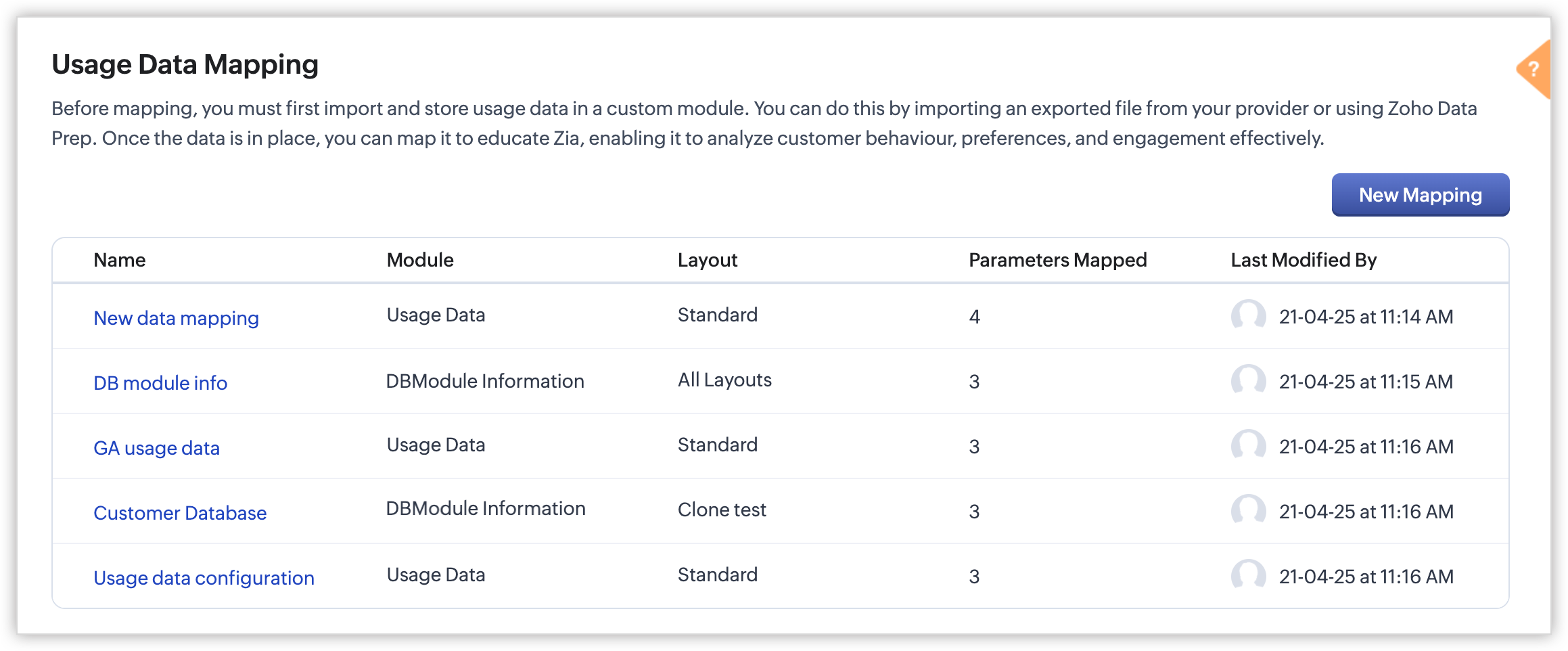
Steps to configure:
With the enhancement, import usage data into a CRM custom module, create a mapping of the data called event mapping, and utilize that data for churn prediction and more Zia insights. Through event mapping, AI increases the accuracy of Zia-driven predictions and also widens its scope for personal recommendations and other predictions.
Let's look at this activation in the below steps:
- Create a custom module and three (mandatory) fields to store the following data: event name, event timestamp, and event initiator.
- Import the usage data from other sources (via API, DataPrep, CSV, or any supported file format) to the created custom module and map the fields.
- In Usage Data under Zia, perform the event mapping to create a way that the system understands.
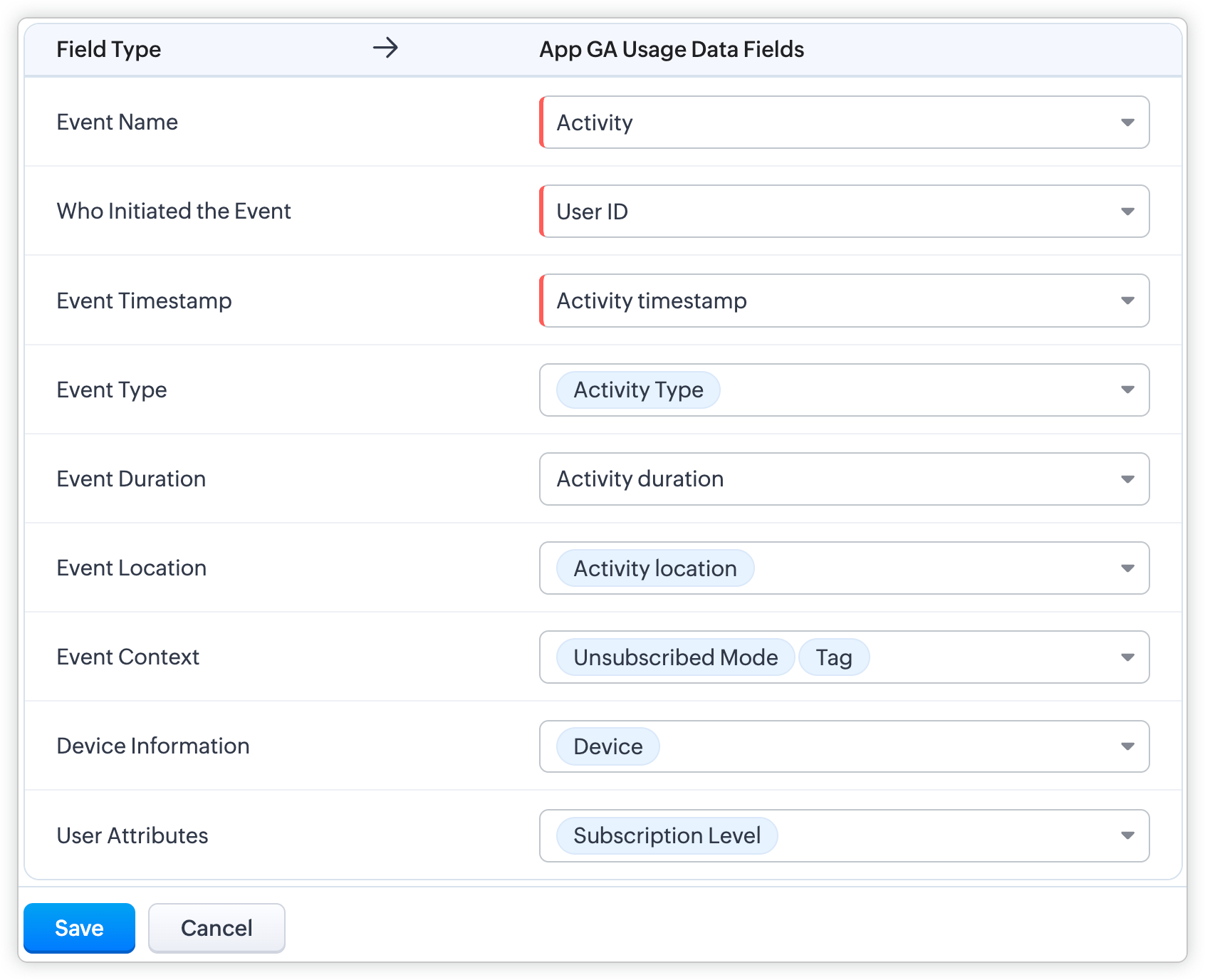
Availability
DC: All DCs
Editions: Enterprise and Ultimate editions
Release Plan: This feature will be released phase-wise to all DCs
For detailed description and guide, refer to our resources:
Topic Participants
Pauplin Fiona Peries G
Rich Brandwein
Sunderjan Siddharth
Sticky Posts
Introducing Multiple Sandbox Types and Support for Module's Data Population
Register here for the upcoming Focus Group webinar on Multiple Sandbox | Help documentation to learn more about the new enhancements Hello everyone, Sandbox in CRM is a testing environment for users to create and test new configurations like workflowGood news! Calendar in Zoho CRM gets a face lift
Dear Customers, We are delighted to unveil the revamped calendar UI in Zoho CRM. With a complete visual overhaul aligned with CRM for Everyone, the calendar now offers a more intuitive and flexible scheduling experience. What’s new? Distinguish activitiesVoC in Zoho CRM is now data savvy: Explore response drilldown, summary components and participation in CRM criteria
VoC has all the goods when it comes to customer intelligence—which is why we're constantly enhancing it. We recently added the following: A customer drilldown component that shows you the list of prospects and customers behind a chart's attribute ExpandedWrapping up 2025 on a high note: CRM Release Highlights of the year
Dear Customers, 2025 was an eventful year for us at Zoho CRM. We’ve had releases of all sizes and impact, and we are excited to look back, break it down, and rediscover them with you! Before we rewind—we’d like to take a minute and sincerely thank youPresenting ABM for Zoho CRM: Expand and retain your customers with precision
Picture this scenario: You're a growing SaaS company ready to launch a powerful business suite, and are looking to gain traction and momentum. But as a business with a tight budget, you know acquiring new customers is slow, expensive, and often delivers
Recent Topics
Resume Harvester: New Enhancements for Faster Sourcing
We’re excited to share a set of enhancements to Resume Harvester that make sourcing faster and more flexible. These updates help you cut down on repetitive steps, manage auto searches more efficiently, and review candidate profiles with ease. Why we builtLooking for best practices to import data from SAP Business One (on-prem) into Zoho Analytics via Zoho DataPrep / Databridge — daily automated schedule
Hi all, I’m using SAP Business One on-prem (SQL Server / or HANA — depending on DB backend) as our ERP. I want to build a pipeline that, every morning at 9:00 AM IST: pulls transactional data (invoices, customers, products, stock, etc.) from SAP B1, loadsZoho One Unified Portal - Applications
Hello, It is great to see the work on the New Unified Customer Portal. Thanks for that. The number of applications is limited though. It is now only around the Zoho Books ecosystem (Books, Expense...) and Zoho Social. = Are other applications plannedMarketing Tip #10: Start a customer loyalty program
Winning a new customer is great, but keeping them coming back is even better. A loyalty program rewards repeat buyers with points, giving them more reasons to shop again. Over time, this builds trust and long-term relationships. Try this today: Set upZia Actions: AI-powered Workflow Automation for Faster and Smarter Execution
Hello everyone, Updated on 12th Dec 2025 Zia actions for Workflow is available for Enterprise edition ONLY. These features are currently available in the following DCs: US, CA, EU, IN, and AU Email Auto reply and Content Generation are available as EarlyDo Individual Forums within Categories, in Desk Community, Produce Their Own RSS Feed?
Do Individual Forums within Categories, in Desk Community, Produce Their Own RSS Feed? If not, can anyone share a work-around that could help me get an RSS feed for individual category forums?Incremental Migration Issue – Ticket Showing Resolution on Dec 9 Despite Urgent MX Cutover (Ticket ID: 152080262)
I am experiencing an issue with Zoho Mail incremental migration from Rackspace. The initial full migration completed successfully, but the incremental migration for one mailbox failed immediately with the message: “User not exist” This appears to be aResend Client Portal Invitation + View Email Delivery Status
Hi Zoho Team, We hope you are doing well. We would like to request two important enhancements related to the Zoho Creator Client Portal invitation process. At the moment, when we add a user to the Client Portal, Zoho Creator automatically sends an invitationGet user last login
1. Is there a way to programmatically get the last user login to trigger certain workflows? 2. Is there a way to programmatically access the custom fields on a user's account?Seeking Zoho Creator Expert (Delivery Management App / Logistics Ops) — Built & Deployed Before
Hi everyone, We’re building a Delivery Management App (focused on delivery operations for now) using Zoho Creator. We’re looking for a Zoho Creator expert who has already developed and deployed a similar delivery/workflow system and can assist us withAdding Multiple Files to a Zoho Vault Entry
There is a old blog post talking about adding multiple file attachments to one Zoho Vault Secret: https://www.zoho.com/blog/vault/introducing-new-features-in-zoho-vault-powerful-password-sharing-wider-storing.html Is that still possible, I can see howFNB South Africa Bank Feed
I should've thought this wouldn't work. As suspect, Zoho claims to be able to pull bank feeds from First National Bank (South Africa), but fails everytime. I suppose Xero (or even Sage One) is the way to go? If they (miraculously) get it to work again,Zoho unreliable
Some mails are delivered, others not. How can I trust Zoho any more? Some friends get my e-mail, some don't. Same with receiving e-mails: Some I get, some not. If I use Google, everything works well. But Zoho?!!! How to solve this problem? I already reported this problem before, but didn't get any reply. Thanks, Kimthe custom domain forwards by default to the old career site / how to switch it off??
dear friends, how to switch off the old version of the career site?? The set up custom domain forwards directly to the old site, so that I cant publish it... Any ideas? Thank you! KR, VictoriaPreserve Ticket Issue Mapping When Migrating from Jira to Zoho Projects
Hello Zoho Projects Team, We hope you are doing well. We are currently exploring a full migration from Jira to Zoho Projects, and we identified a critical limitation during the migration process involving Zoho Desk integration. Current Situation: We useRecording Shopify/Amazon fees in Zoho Books - Zoho Inventory
We are currently flushing out the connections between Shopify/Amazon and Zoho Inventory. For other users of Zoho Books - Zoho Inventory, where and at what point do you record the merchant fees associated with theses channels? I have gotten mixed responsesPre-fill webforms in Recruit
I don't want to use the career site portal (as I have my own already), but I would like to direct users to the application forms for each role, from my website job pages. Is there a way to pre-fill fields in Recruit application forms, so that I only haveTaxes Payable Adjustment
I am from Canada and I need to make an adjustment to my Taxes Payable (HST) account. Basically I need to take a portion of the amount within Taxes Payable and expense that portion to another account. The adjusting entry would like like the following:ASAP Widget Not showing "My Tickets"ed
Hello Team, I have created a ZOHO ASAP Widget and embedded to my portal app.clearvuiq.com , widget renders ok and I can open tickets from widget. However I want my opened tickets to be visible in the widget. How can I achieve that?How to view CRM Sales Orders in Desk
What's the usual way to view all CRM sales orders linked to a contact, when viewing a ticket in Desk? I don't want to have to open a new tab to see the order in CRM. And the Desk CRM sidebar doesn't seem to be configurable. Would I have to use an extensionKaizen #219: Actions API - Webhooks APIs - Part 1
Hello all!! Welcome back to a fresh Kaizen week. In the previous weeks, we covered Workflow Rules APIs, Actions APIs - Email Notification APIs, Tasks Update API, and Field Update API. This week, we will continue with another Actions API - Webhooks APIPricing Strategies: #3 Services never Stop with just Plans
"Hey, while you're here, could you also take a look at the vegetable patch?" Aaron hears that line almost every week. He runs a small gardening service, the kind where customers subscribe to a simple monthly plan that includes basic maintenance, mowing,Cropping Photos for Zoho Sites
Hi, I'm wondering if there is a built in crop tool for zoho sites for my photos so I can crop them and see what the crop looks like on the site?Possible for first Signer of Sign Form to specify the next signer in the sequence
We have many use cases where multiple signers need sign the same document. We'd love to be able to use sign forms, where the a signer who uses the Sign Form link can specify the name and email address for the next person in the sequence.BUG: Can't copy-paste data outside Sheet
Currently I can't paste data copied from inside any of my Zoho Sheet files to any other app. Copy-paste works inside the sheet It does NOT work between two different sheets These sheets are built from automation templates Everything works fine if I createZoho CRM Community Digest - November 2025 | Part 1
Hello Everyone! Here’s what came through in the first half of November: new updates and a few helpful community discussions with real, notable solutions. Product Updates: Android App Update: Inctroducing Swipe Actions You can now swipe left or right onUpload own Background Image and set Camera to 16:9
Hi, in all known online meeting tools, I can set up a background image reflecting our corporate design. This doesn't work in Cliq. Additionally, Cliq detects our cameras as 4:3, showing black bars on the right and left sides during the meeting. WhereTruesync for Linux
Is Truesync available on linux ?Hidding/excluding specific picklist options from filter
Hi. Is it possible to hide/exclude specific picklist options from this filter? I don't want them to be shown when someone tries to filter in the leads moduleSubforms to Capture Multi-Row Data in Job Sheets
Subforms transform your job sheets from simple checklists to powerful, data-rich forms. In field service work — whether maintenance, inspection, installation, or repair — a single job can involve multiple repeatable entries: readings, parts used, activitiesAdd "Fetch Composite Item" Action for Inventory
I want to make a Flow that uses information returned in the GET call for Composite Items, and it's not currently available in Zoho Flow. Please consider adding this functionality.Adress Labels for sending of the oder und barcode
We want to print with my address labels to stick on the order of the ware can. there are these options?printing individual labels - Dymo LabelWriter
I am trying to print individual labels to my Dymo LabelWriter - has anyone done this? Latest Update (December 2025): The Canvas Print View is now available! We encourage you all to try it out and share your feedback with us. Learn more here: Zoho CRMZoho Creator for Agriculture
Greetings, I am starting to work on Zoho Creator specifically for the agricultural field, any recommendations, tips or ideas that might be helpful ? Also, if you are interested by any means in working on such project, kindly contact me. The project isCustom Print Layout
I would like to create a custom print layout of a Lead or Contact. Is there a way to do that? What I mean is that if I'm viewing a specific lead or contact I'd like to be able to print or export that lead/contact and only print and/or export certain information.Print View
Nothing happens when I'm in a module , ie; Contacts, and I hit the Print View Button. Even when it does come up and say "loading", nothing loadsGet Holiday ready with Zoho Mail's Offline mode
With the holiday season right around the corner, this is the perfect time to get ready to unplug, relax, and enjoy a well-deserved break. In addition to preparing yourself, you can also make sure your organization members are set for their time away fromSolution to Import OST File into Office 365.
MailsDaddy OST to Office 365 Migration Tool is an outstanding solution to recover OST files and migrate them into Office 365 without any hassle. Using this software users can multiple OST files into Office 365 with complete data security. It offers usersZoho CRM Kiosk issues
Firstly this is for a system on the AU servers if that makes a difference. Issues are as follows (For Kiosk): 1. Re-ordering fields in the screen builder is broken. The fields seem to be re-ordering themselves, unless you order everything by moving theEmail Template Edits Not Saving
I can make an edit, click save, and see the blue bar annimation at the top, but the edits don't actually save. Important, because my email templates are now broken and clients are receiving bad emails. Tried on Chrome, Firefox and IE.Next Page