An Overview Of Zoho Cliq And Its Features
It comes off as no surprise that the implementation of Zoho CRM comes with much better and streamlined business operations. Zoho is known for making exceptional-quality and cloud-based business software applications that do not cost much. The team chat app of Zoho called the Zoho Cliq is no exception in this case.
A thoughtful and quick messaging app, Zoho Cliq borrows some of the best ideas from its competitors and adds a special paneled layout so that numerous interactions that go on between the members of an organization can be viewed. Zoho Cliq costs really less than any other application that might be in this space. Additionally, in terms of features and other integrations also, it is a great option to ensure maximum productivity and minimum costs within an organization.
In this blog, we will understand all the features that can come with Zoho Cliq. However, let us first begin by understanding Zoho Cliq in detail.
What is Zoho Cliq?
Zoho Cliq is actually a chat platform that can be accessed for free with emails, the Zoho CRM, and the Zoho One subscription. One has the option to choose this team chat app separately but there won’t be any chance of using the platform for its true capabilities.
With the help of Zoho Cliq, organizations can streamline their communications and move their work forward. Communication gets much more organized and simple because it presents easy to find information by connecting the tools that you will love.
In the present time and age, there are so many platforms to choose from when it comes to chatting with your team members. The reason why Zoho Cliq stands out amongst all of them is because of the benefits that it offers. It brings everything that matters to an organization in one place.
Let’s look at the features offered by Zoho Cliq one by one:
1. Group Chats
The most important function of Zoho Cliq is the fact that it creates space for group chats. One can create an account, set up channels, and invite people to join. These channels become open to any member of the account for joining or inviting someone. Every channel gets represented by a name and a certain description which is optional. It is very common for companies to have these channels for departments, teams within the departments, projects, and socializing.
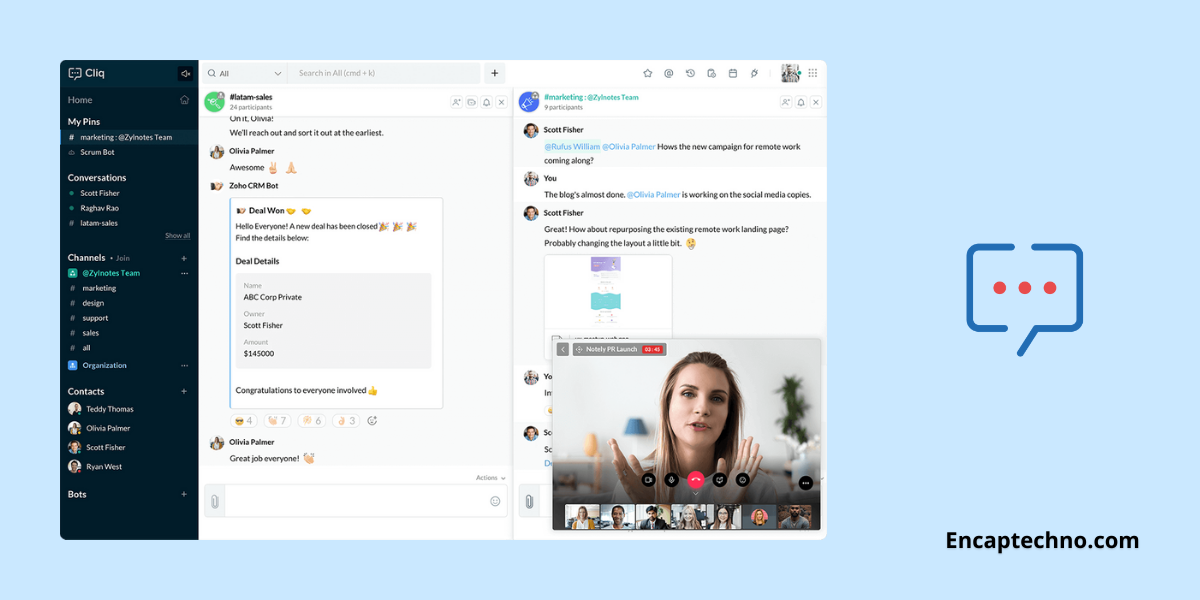
That being said, the channel feature is not the only way in which individuals can have a conversation. Zoho Cliq is a team chat app that also supports direct messages with individuals and groups. One of the most important aspects of Zoho Cliq is the columnar design with which it comes. As more and more channels begin to join and messaging with people gets opened, each chat opens its panel or column.
The more the number of chats you open the more columns are likely to fill your screen. The layout is actually simple and organized because it allows you to open more than one chat window at any particular time. You can reference any conversation while replying to another. However, the columns cannot be rearranged at will because that will feel like a big oversight.
With most of the other online apps that are using this layout, one has to drag and drop the column for reordering them. However, in Zoho Cliq, the only way in which the columns can fall in order is by closing all the windows and then opening them sequentially in a preferred order.
2. Tracking Conversions
A common problem that many messaging apps have struggled to solve is that tracking the conversions that happen between team members becomes hard. When someone asks a question or begins a conversation in a channel and if it might get delayed in the sense that the other person does not reply in timely then the conversation flow might get skipped.
Another scenario is multiple prompts in one conversation might lead to missing out on many questions asked by some team members. When your Zoho partner implements Zoho Cliq for you, one of the best features that you will discover is no ignored conversation. When a post that asks for additional follow-up separates from the rest of the channel, it can be forked to a private message.
The forked conversation, in fact, will appear as an independent selection in the list of channels and direct messages on the left with the annotation of Forked. This feature proves to be beneficial for people who work in different time zones and might feel the need to catch up on a day’s worth of conversation in one sitting only.
3. Apps and Integrations
Zoho Cliq is also available as a web app and desktop store app for Mac, Ubuntu, and Windows. There are mobile apps for iOS and Android. Zoho helps in making a wide range of online business applications from its popular CRM software to a project management platform. Zoho Cliq effectively works with other applications in the portfolio of Zoho CRM.
Zoho Cliq is also available as a web app and desktop store app for Mac, Ubuntu, and Windows. There are mobile apps for iOS and Android. Zoho helps in making a wide range of online business applications from its popular CRM software to a project management platform. Zoho Cliq effectively works with other applications in the portfolio of Zoho CRM.
In addition to this, it also supports integration with some of the outside applications such as Dropbox, Google Drive, Trello, Zendesk, GitHub, etc. This actually signifies that you can take reports, contact information, invoices, or any other data you require and send the same with the help of Cliq. It only takes one-word commands for initiating the action and is an easy way to communicate important information.
With Zoho Cliq login, you can also make custom integrations with Zoho flow, an integration service that is very similar to the IFTTT, Zapier, and Integromat. You can use Zoho Flow and the drag and drop feature that it comes with for creating integrations with other applications and services. In case you do not know how to code, even then you can create simple integrations. However, in case you wish to get much more advanced, a little knowledge of coding might be helpful.
4. Use Taz and Bots For Reminders
Chatbots are extremely convenient tools to work with. As a default feature, Zoho Cliq comes with a bot called Taz which is made by Zoho natively. You can use Taz for sending messages to yourself for saving important things, setting reminders for important events, and creating events that you would want to attend otherwise.
Chatbots are extremely convenient tools to work with. As a default feature, Zoho Cliq comes with a bot called Taz which is made by Zoho natively. You can use Taz for sending messages to yourself for saving important things, setting reminders for important events, and creating events that you would want to attend otherwise.
There are other bots available as well such as Deskbot which is tied with the Zoho Desk application only. The bot actually sends reminders when a ticket is assigned to you or when a customer replies to a ticket and needs to take some action on a ticket.
It must be understood that customer service is everything and Deskbot helps in staying up to date with your tasks. You can also add more bots if you please.
5. Ease of Access: Zoho Cliq comes with the ability to be accessed in multiple ways. One can access it via desktop applications, mobile, tablets, or browsers. Not just this, in case you are working with a number of Zoho applications, you are likely to find the Cliq bar at the bottom of your browser so that you can begin to communicate while working with other applications simultaneously.
In fact, you can also begin a conversation on your mobile, continue the same on the tablet and then finish it from the desktop itself. This way, you will not lose any chats and you will also not have any hassle downloading the chats because you will be able to see all your chats instantly.
As opposed to any other applications, adding a new user to any of your Zoho Cliq channels means that the new user will be eligible to access any older chats prior to the time at which they were added. All that a user has to do is scroll in the upwards direction and it will become possible to access the complete chat history. This additionally means that finding the messages will become very easy.
6. Extensions
With the Zoho Cliq login, you can be sure about downloading a variety of extensions from the Zoho Marketplace. You can also connect your Google Drive, other Zoho applications, Dropbox, etc. with the integration of relevant extensions. In addition, you can also download extensions such as the meme extension that allows you to post interactive memes in your chat quickly.
With the Zoho Cliq login, you can be sure about downloading a variety of extensions from the Zoho Marketplace. You can also connect your Google Drive, other Zoho applications, Dropbox, etc. with the integration of relevant extensions. In addition, you can also download extensions such as the meme extension that allows you to post interactive memes in your chat quickly.
An entire list of the extensions that can be integrated is easily accessed on the website of the Zoho marketplace. Zoho makes sure that the extensions are published and created for the Cliq Marketplace.
7. Video Calls and Screen Sharing
In addition to all the features offered by Zoho Cliq, there is one other feature and that is video calling screen sharing. This makes connecting with your team members much easier and more interactive. You can talk to a team member sitting across the world thinking that he/she is sitting right in front of you.
In addition to all the features offered by Zoho Cliq, there is one other feature and that is video calling screen sharing. This makes connecting with your team members much easier and more interactive. You can talk to a team member sitting across the world thinking that he/she is sitting right in front of you.
All you need is a stable internet connection and you will be able to make video calls, and audio calls, and share your screen effectively with your peers. This can also be done with group chats.
8. Additional Features
Zoho Cliq comes with a feature called PrimeTime that enables anyone with the right permissions to host a one-way video stream that can be seen by anyone in the organization. This feature is extremely useful for all the town hall meetings, announcements, and presentations.
Some of the fine details assist Zoho Cliq to stand out from other business messaging applications as well. When you have a private chat with someone who might be on a mobile device, you spot a smartphone icon next to that person’s chat. This ends up being extremely helpful for exploring how soon a response might be delivered.
Moreover, when you are using a mobile device, you can choose a location feature that tells your colleagues about your location. You can also adjust the setting for alerting them to find the specific location or the city.
Conclusion
As it is evident from all of the information mentioned above, Zoho Cliq is actually an extremely functional and helpful team chat app that streamlines communication. There are multiple integrations that can be used with the help of Zoho Cliq and it can also be used for setting reminders.
As a platform, it comes with ease of accessing from different devices, be it a PC, tablet, or mobile. You can switch between the devices very easily and access the older chats of different groups that you were not present in before.
Zoho Cliq comes with a good combination of effective business and communication which makes it great assistance for building effective culture within an organization.
New to Zoho Recruit?
Zoho Campaigns Resources





Topic Participants
Abhishek - Zoho Partner
Manuel
Sticky Posts
New in Zoho Chat : Search for contacts, files, links & conversations with the all new powerful 'Smart Search' bar.
With the newly revamped 'Smart Search' bar in Zoho Chat, we have made your search for contacts, chats, files and links super quick and easy using Search Quantifiers. Search for a contact or specific conversations using quantifiers, such as, from: @user_name - to find chats or channel conversations received from a specific user. to: @user_name - to find chats or channel conversations sent to a specific user. in: #channel_name - to find a particular instance in a channel. in: #chat_name - to findNew in Zoho Chat: Threaded conversation at its finest best
Perform effective team communication in Zoho Chat with our new 'Reply' option. Converse and stay focussed on the parent conversation, rather than getting entangled in the web of several, never-ending sub threads. To reply to a certain message, all you need to do is hover to the left hand side of the message. Then, click on the three dots to open a pop up menu. Here, click on the Reply button and type the reply to the message in the compose box and press Enter. Voila, that was pretty simple.Changes in Cliq iOS app notification due to iOS 13 and Xcode 11
Hello everyone! With the iOS 13 update, Apple has updated its policy on usage of VoIP push notifications. Over the past few months, we tried our best to provide a similar experience with the updated policy. Changes in iOS 13: With iOS 13, Apple mandates all VoIP push notifications to be reported to the CallKit framework as a new call. If a VoIP push notification is not reported to the CallKit within a designated time window, iOS will terminate the app. If enough VoIP push notifications are notWhat's new in Zoho Cliq - June 2020 updates
Hello again, everyone! I'm back to share with you the recent feature improvements and updates that we've pulled together for enhancing your experience in Cliq. Here's what's new this June for you all in Cliq's web and iOS app! New on Cliq Web: Drag and drop files to a chat in your left side panel Now you can drag and drop attachments from your open conversation window to a specific chat or channel in the left side menu without opening it. Swift up actions and collaborate efficiently with Cliq's4 Things You Should Do Once You Get Started with Cliq
Hey there, new user! You've successfully logged in and set up your organization and you're all set to start working. What's next? Buckle up because here are 4 essential things you need to do first in order to get the most out of your Cliq experience: 1. Invite your colleagues Now that you've set up your Cliq for business, you need to bring in all your employees, of course, because how else can you collaborate with them? To invite your colleagues to Cliq, head on over to the Admin Panel which
Zoho CRM Plus Resources
Zoho Books Resources
Zoho Subscriptions Resources
Zoho Projects Resources
Zoho Sprints Resources
Zoho Orchestly Resources
Zoho Creator Resources
Zoho WorkDrive Resources


Zoho CRM Resources
Get Started. Write Away!
Writer is a powerful online word processor, designed for collaborative work.
Zoho CRM コンテンツ
-
オンラインヘルプ
-
Webセミナー
-
機能活用動画
-
よくある質問
-
Ebook
-
-
Zoho Campaigns
- Zoho サービスのWebセミナー
その他のサービス コンテンツ
ご検討中の方
Recent Topics
Does Zoho Learn integrate with Zoho Connect,People,Workdrive,Project,Desk?
Can we propose Zoho LEarn as a centralised Knowledge Portal tool that can get synched with the other Zoho products and serve as a central Knowledge repository?Reading from and writing to Zoho Projects Custom Module with Deluge
Does anyone know if there is a way to read from and write to the Custom Modules that Zoho now supports. I would love to be able to loop through a set of data and create the entities I need to for this new custom module I'm looking to put together.How Does Knowledge Base Search and Article Recommendation Work?
Hello, I would like to understand how the Knowledge Base search engine works. Specifically, does it search based on: The article title only? The full article content? Both, the article and the content? Keywords? Tags? Also, how does the system determineZoho Books/Inventory - Restrict Items With Pricebook
Hi Zoho Team, I'm trying to address as use case where a client needs to restrict which products certain customers can purchase. I have been able to find a way to do this based on the current Zoho Books or Zoho Inventory configuation. My feature requestBest Way to Integrate Zoho Campaigns with Amazon SES Without Third-Party Tools
I am looking for the most seamless and efficient method to integrate Zoho Campaigns with Amazon SES. My goal is to avoid using any third-party automation tools like Zapier, Make, or Pabbly, and instead, leverage Zoho's native capabilities for this integration.Release Notes | January 2026
We have rolled out a set of powerful new enhancements across Zoho Vertical Studio that bring several long-awaited capabilities to your applications. These updates focus on deeper customization, smarter automation, better reporting, and improved usabilityscope for phonebridge in CRM and phonebridge API documentation
Hi I cannot find the scope to be used for phonebridge in CRM API V2 calls. I am getting OAUTH_SCOPE_MISMATCH for scope group ZohoCRM.modules.ALL,ZohoCRM.setttings.ALL Also I am not able to locate the documentation for the same, All I have is phonebridge API documentation for desk and url [ https://www.zohoapis.com/crm/v2/phonebridge/ ] from a web forum. It makes a reply and error in case of missing arguments, but scope error is returned when all arguments are provided. Regards Devel DevHow to charge Convenience fee OR payment gateway charges to the end client who is paying the invoice?
Hello, I am creating this topic after having discussions with various sets of users and have understood that with people moving more and more to digital payments, it is important for the client to enable the "Convenience fee" kind of scenario. I haveCard payment surcharge?
Hi, I would like to offer my customers the ability to pay invoices by card (using the PayPal integration). However, PayPal charges me around 5% to receive a card payment, and I would like to pass on this cost to my customer by way of a card payment surcharge. Is there any way for Zoho Invoice to be set up to automatically add a defined "card processing fee", say 5% of the invoice total, if the customer elects to pay by card? I don't want to add this on to invoice manually, since most of my clientsAutomate Credit Card Surcharge
Is there a way to create an automation that will add a 3.0% credit card surcharge to a subscription whenever a customer pays via credit card?Zoho Books | Product updates | January 2026
Hello users, We’ve rolled out new features and enhancements in Zoho Books. From e-filing Form 1099 directly with the IRS to corporation tax support, explore the updates designed to enhance your bookkeeping experience. E-File Form 1099 Directly With theZoho POS App Hanging Issue – Sales Becoming Difficult
The Zoho POS app frequently hangs and becomes unresponsive during billing, making it very difficult to complete sales smoothly. This commonly happens while adding items, during checkout, or at payment time, especially during peak hours. These issues causeTip #62- Exploring Technician Console: Send Ctrl + Alt + Del- 'Insider Insights'
Hello Zoho Assist Community! Imagine you are a technician supporting a remote employee who cannot log into their system. The computer is stuck on the login screen after multiple attempts, and the user is unsure how to proceed. Instead of walking the userSKUs for Invoices, POs, etc.
It doesn't appear that one can enable SKU display on invoices, POs, etc. This is problematic, and I don't see a good reason why this shouldn't be an option. Some of our vendors and customers use this in their system. Every other identifier code is availablehow to avoid duplicate customer
How can i avoid to create a duplicate customer. I charged a same customer with two different plans and it showed up twice in my customer list and subsequently in Zoho books contacts. It creates confusion to have a same customer appears multiple times in customer or contact list. How can i avoid it.RSC Connectivity Linkedin Recruiter RPS
It seems there's a bit of a push from Linkedin Talent Solutions to keep integrations moving. My Account Manager confirmed that Zoho Recruit is a Certified Linkedin Linkedin Partner but does not have RSC as of yet., (we knew that :-) She encouraged meim facing issue on generate the Estimate price
i couldn't understand what is the issue , i cant generate Estimate price where is the issuecannot be able to add user
Dear team I tried to add a new user for sales team, but after entering the OTP its showing error message cannot add nowChanging an existing item to different accounts & inventory-tracked
Hi everyone, I have an item in Zoho Books that was originally set up as a non-inventory item. Over time, I associated it with different sales and purchase accounts, and I now have many invoices, bills, and reports that use this item. My business processHow do I edit the Calendar Invite notifications for Interviews in Recruit?
I'm setting up the Zoho Recruit Interview Calendar system but there's some notifications I don't have any control over. I've turned off all Workflows and Automations related to the Calendar Scheduling and it seems that it's the notification that is sentBookings duration - days
Hi team, Is there any way to setup services/bookings that span multiple days? I am using Zoho Bookings for meeting room bookings. Clients may wish to book a room for more than one day, for up to a month. If not, is there a plan to allow services to be setup with durations of Days as well as hours and minutes? Many thanks, Anna.big 5 accounts
how do you find what accounts are listed as Big 5 ?Zoho recruit's blueprint configuration is not functioning as mapped
Current Status: Zoho Blueprint is not functioning as configured. Issue: We are moving a Candidate status in Zoho Recruit "for active file" but we encountered: "Status cannot be changed for records involved in Blueprint." This happens to various clientActual vs Minimum
Hi all, I am sure I am not the only one having this need. We are implementing billing on a 30-minute increment, with a minimum of 30 minutes per ticket. My question is, is there a way to create a formula or function to track both the minimum bill vs theDelay in rendering Zoho Recruit - Careers in the ZappyWorks
I click on the Careers link (https://zappyworks.zohorecruit.com/jobs/Careers) on the ZappyWorks website expecting to see the job openings. The site redirects me to Zoho Recruit, but after the redirect, the page just stays blank for several seconds. I'mHow to add interviews through API
I'm trying to add an interview without much luck. The documentation gives examples of adding just about everything except an interview. However, the issue might be the way I'm formatting it, because the documentation is unclear to me. It seems as if the xml should be passed in the url, which seems unusual. I've tried the data as both plain and character escaped, but nothing seems to work, nor do I even get an error response. https://recruit.zoho.com/recruit/private/xml/Interviews/addRecords?authtoken=***&scope=recruitapi&version=2&xmlData=<Interviews> <rowCan't scroll the page down unless I refresh the page
Hello, This issue has been going on with me and a lot of other users in my organization, we can't scroll down! the scrolling side bar doesn't appear and scrolling down through mouse or keyboard keys doesn't work, it seems that the page just ends in theOffer already made- but I withdrew it
I made an offer letter, but made a mistake on it. I withdrew the offer but now I can't recreate the correct offer. Zoho keeps saying that "A same offer has already been made". I look in the "offers" and there are NO offers (this is the first time I'veControl the precision of answer bot responses
Hello everyone, Admins can control the precision with which the Answer bot analyzes and generates a response by adjusting the threshold levels. Based on predefined threshold values, Zia analyzes how closely the query matches with the available KB articles.Rebrand your CRM with the all-new custom domain mapping setup
UPDATES TO THIS FEATURE! 19th Jan, 2024 — Custom domain mapping has been made available for portal users in Zoho One and CRM Plus. 23rd June, 2023 — Custom domain mapping has been made available for all users, in all DCs. Hello everyone! We are elatedAdd Israel & Jewish Holidays to Zoho People Holidays Gallery
Greetings, We hope you are doing well. We are writing to request an enhancement to the Holidays Gallery in Zoho People. Currently, there are several holidays available, but none for Israel and none for Jewish holidays (which are not necessarily the sameSender Email ID is duplicate
My sender id "automate@erplaunchpad.com" is coming as duplicate but I have not used it anywhere else please helpCRM x WorkDrive: File storage for new CRM signups is now powered by WorkDrive
Availability Editions: All DCs: All Release plan: Released for new signups in all DCs. It will be enabled for existing users in a phased manner in the upcoming months. Help documentation: Documents in Zoho CRM Manage folders in Documents tab Manage filesBuilding Toppings #6 - Install and uninstall actions
Hello Biginners! In our previous forum post, we explored creating connections - specifically, custom service connections in the Bigin Developer Console. In this post, we'll focus on another feature that can be used in every topping: install actions. We'llNew UI in Zoho One CRM
Hello, Just switched to the new UI for Zoho One CRM, do not like it, especially the search functions. What are the steps to backstep to the previous UI? UPDATE: I found it.App like Miro
Hi all, is there a way to have a interactive whiteboard like in Miro? We want to visualize our processes and workflows in an easy way.Important updates to your connectors
Hello everyone, Greeting from Zoho Creator! We're excited to announce that we'll be rolling out significant backend updates to Zoho Creator's built-in connectors to enhance security by following the latest frameworks. The existing version of some of theProduct Request: Send email to Secondary email
Guys, we should be able to send the campaign to the secondary email too. Is this on the plans for Zoho Campaign? It looks like I can map the secondary email from the CRM to the Campaigs, but can not send the message.Logic for sending to a non-primary email address
Hi, I have a scenario where contacts are able to sign up for emails with 2 different email addresses (example: work, personal). I've mapped both to Campaigns from Zoho CRM, but when I go to target an email only the primary email addresses are pulling in. How can I update this to look at both of the email addresses - or specifically the secondary email address in Campaigns? Thanks, JennyHow Do Mutliple Sales People Prospect in the "LEADS" module without calling the same leads?
We have 4 sales reps and the Leads module does not have real time intuitive knowlodge to make the sales rteps dont call the same people at the same time. How can we crate a fluent prospecting sytem where the salres reps can go out bound without callingNext Page