Client Script | Update - Introducing ZRC: Simplified HTTP request library
Hello Developers!
Are you tired of juggling different methods to make API calls? Are you confused with multiple syntaxes and version restrictions? Have you ever wished for one simple way to make all API calls in CRM?
We heard you :)
Here comes ZRC (Zoho Request Client), the new way of making any API call in Client Script with one simple syntax!

What is ZRC?
ZRC (Zoho Request Client) is a built-in SDK that simplifies making API calls in Client Script. It uses one simple and consistent syntax to handle,
- CRM APIs
- Connection requests
- Public APIs .
There is no setup or configuration needed, making API calls hassle free.
ZRC is now available for use in Client Script, helping you build faster with less effort.
Why use ZRC ?
APIs serve as the backbone for customizing Zoho CRM, powering vital tasks like updating records, adding leads, and integrating with external services. For developers, working with these APIs has not always been simple. Each type of API, whether internal CRM APIs, Connection APIs, or external APIs, requires different methods and boilerplate codes, which creates friction and slows down building solutions. Here comes ZRC to address this by handling authentication, supporting all CRM API versions, and managing requests and responses automatically, so developers can focus on building meaningful solutions.
Here is why ZRC is a game changer for scripting in Zoho CRM:
Supports Any CRM API Version
With ZRC, you can use any version of the CRM APIs, even the latest ones like v7 and v8.
Self domain calls
For CRM API calls, ZRC requires only the API endpoint without specifying the domain. This enables usage across different domains and simplifies API calls.
Unified Syntax for All Calls
Whether it is a CRM API, a custom Connection, or an external public API, all calls follow the same simple syntax.

No Authentication Needed for Same CRM Org
You do not have to worry about tokens or domain configurations. Just pass the endpoint, ZRC takes care of authentication behind the scenes.
Smart JSON Handling
ZRC automatically handles JSON responses. There is no need to manually stringify or parse response objects.
Async/Await & Clean Code
Write clean, modern code with full support for async/await and promise chains using `.then().catch().`
Let us see how to use ZRC to make API calls for different scenarios.
Use Cases
1. CRM API Use Case - Create Task with one click
At Zylker, a custom button “Log Call Attempt” should prompt the user to enter call details, save them as a Note on the Lead, update the Lead_Status to “Contacted”, and create a follow-up task for the next day, streamlining the process and reducing errors.


Click here to view source code
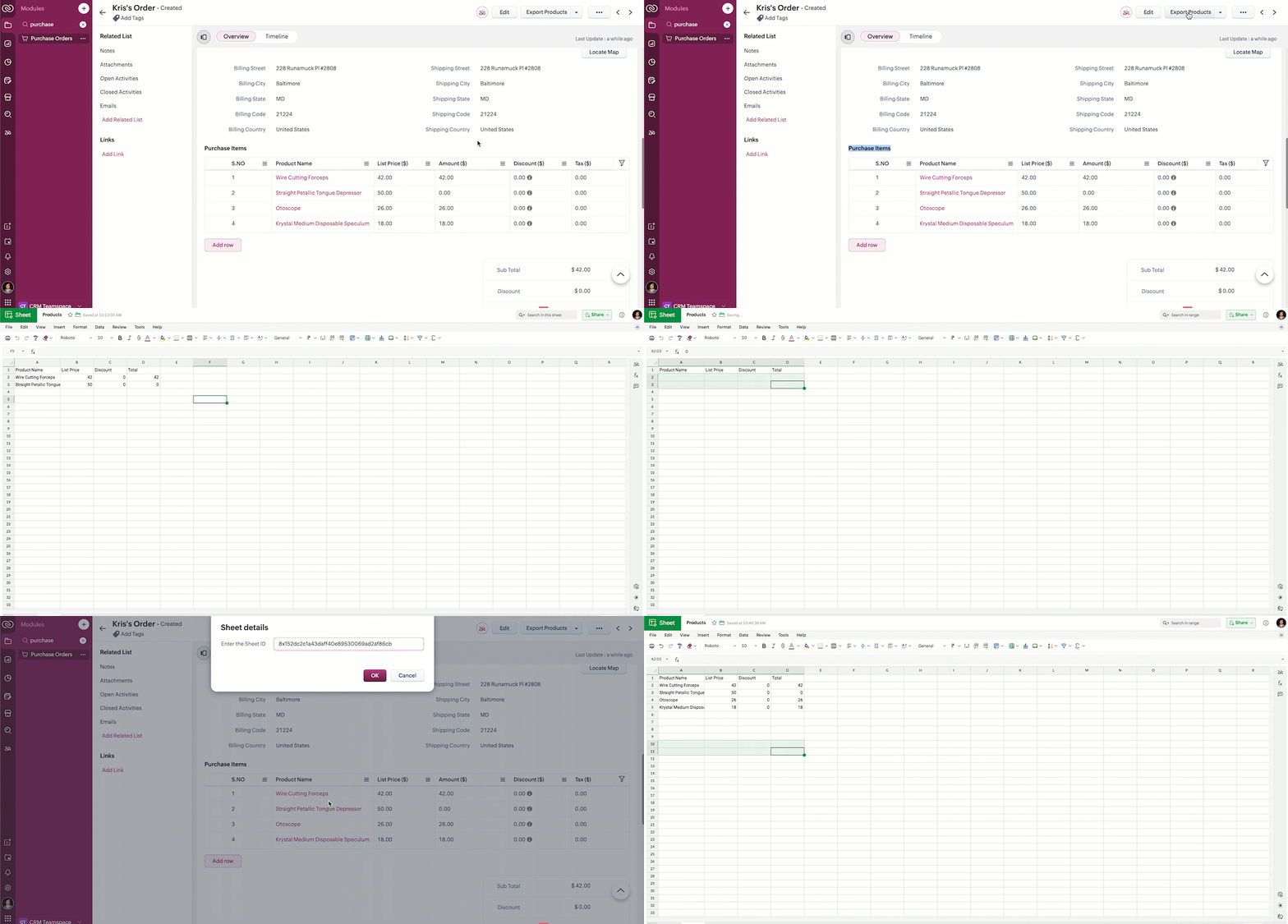
2. Connection based Use Case - Export Subform Data to Zoho Sheet via API
At Zylker Finance, users maintain multiple loan options under each lead using a subform in Zoho CRM. The Admin requires the ability to export these subform rows to Zoho Sheet via API. This export should allow structured data transfer for further analysis, comparison, and reporting, all without manual copying or downloading.

Click here to view source code.
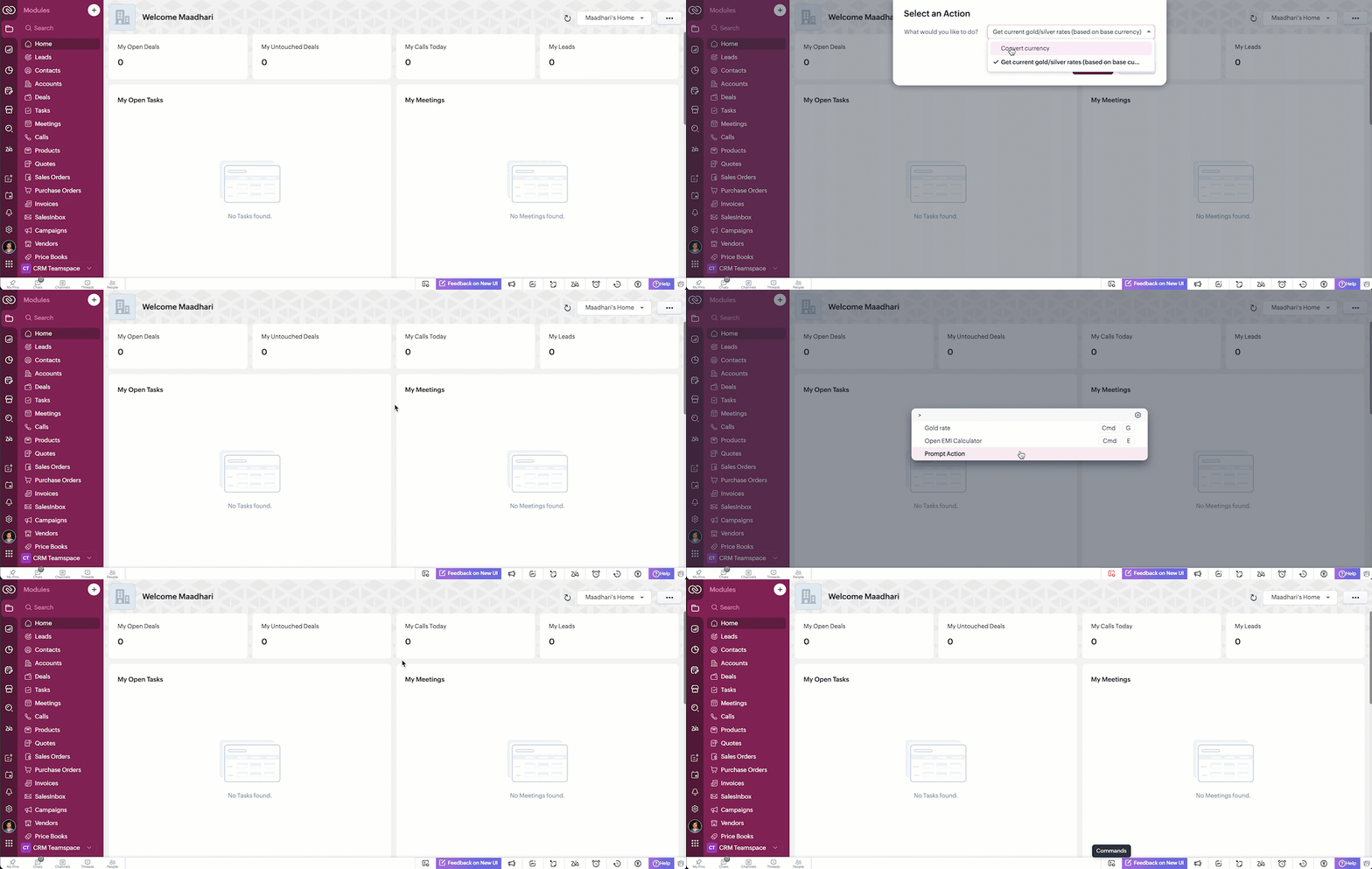
3. Public API - Instantly retrieve real-time gold prices and perform currency conversions directly within the CRM interface
At Zylker, a gold jewelry company using Zoho CRM, the Admin needs the ability to instantly retrieve real time gold prices and perform currency conversions directly within the CRM interface without switching to external tools or websites.

Click here to view source code.

Note :
- Now, all your API calls are made using one SDK, one format, and with full browser capabilities.
- No need to worry about authentication, domains, or response formats.
- Available now in Client Script. ZRC support in Mobile App will be available soon.
- Coming soon to Widgets
- Function Invoke APIs also follow the same fundamentals as ZRC.
From fetching CRM data to integrating with third-party tools, you can now achieve powerful customizations in Zoho CRM.
This feature is live across all DCs.
Go ahead. Try ZRC in your next Client Script, and feel the difference. Let us know your comments and feedback!
The help documentation of ZRC is available here.
Happy Coding!
Zoho Campaigns Resources





Topic Participants
Maadhari M
Haiku Technical Support
Sticky Posts
Kaizen #226: Using ZRC in Client Script
Hello everyone! Welcome to another week of Kaizen. In today's post, lets see what is ZRC (Zoho Request Client) and how we can use ZRC methods in Client Script to get inputs from a Salesperson and update the Lead status with a single button click. In thisKaizen #222 - Client Script Support for Notes Related List
Hello everyone! Welcome to another week of Kaizen. The final Kaizen post of the year 2025 is here! With the new Client Script support for the Notes Related List, you can validate, enrich, and manage notes across modules. In this post, we’ll explore howKaizen #217 - Actions APIs : Tasks
Welcome to another week of Kaizen! In last week's post we discussed Email Notifications APIs which act as the link between your Workflow automations and you. We have discussed how Zylker Cloud Services uses Email Notifications API in their custom dashboard.Kaizen #216 - Actions APIs : Email Notifications
Welcome to another week of Kaizen! For the last three weeks, we have been discussing Zylker's workflows. We successfully updated a dormant workflow, built a new one from the ground up and more. But our work is not finished—these automated processes areKaizen #152 - Client Script Support for the new Canvas Record Forms
Hello everyone! Have you ever wanted to trigger actions on click of a canvas button, icon, or text mandatory forms in Create/Edit and Clone Pages? Have you ever wanted to control how elements behave on the new Canvas Record Forms? This can be achieved
Zoho CRM Plus Resources
Zoho Books Resources
Zoho Subscriptions Resources
Zoho Projects Resources
Zoho Sprints Resources
Zoho Orchestly Resources
Zoho Creator Resources
Zoho WorkDrive Resources


Zoho CRM Resources
Get Started. Write Away!
Writer is a powerful online word processor, designed for collaborative work.
-
オンラインヘルプ
-
Webセミナー
-
機能活用動画
-
よくある質問
-
Ebook
-
-
Zoho Campaigns
- Zoho サービスのWebセミナー
その他のサービス コンテンツ
ご検討中の方
Recent Topics
record submitted from creator and invoice is creating in books , but the workflow of books is not tiggering on create of record in books
record submitted from creator and invoice is creating in books , but the workflow of books is not tiggering on create of record in books headermap = Map(); headermap.put("X-ZOHO-Execute-CustomFunction","true"); response_inv = invokeurl [ url :"https://www.zohoapis.com/books/v3/invoices/fromsalesorder?salesorder_id="Prevent editing of a record after getting approved/rejectedr
Hi, I'd like to block any user from editing a record after it was approved or rejected, how can I do that?Formula Field/Campo de Fórmula
Hello everyone, I have a purchase requisition form in which each department submits a request, and the request is automatically routed to the person responsible for that department. In this form, I have several fields with the following link names: Quantidade1,Free Webinar: Zoho Sign for Zoho Projects: Automate tasks and approvals with e-signatures
Hi there! Handling multiple projects at once? Zoho Projects is your solution for automated and streamlined project management, and with the Zoho Sign extension, you can sign, send, and manage digital paperwork directly from your project workspace. JoinFormatting Problem | Export to Zoho Sheet View
When I export data to Zoho Sheet View, ID columns are automatically formatted as scientific notation. Reformatting them to text changes the actual ID values. For example, 6557000335603071 becomes 6557000335603070. I have attached screenshots showing thisIntroducing Workqueue: your all-in-one view to manage daily work
Hello all, We’re excited to introduce a major productivity boost to your CRM experience: Workqueue, a dynamic, all-in-one workspace that brings every important sales activity, approval, and follow-up right to your fingertips. What is Workqueue? SalesFeature Request - The Ability to Link A Customer with a Vendor
Hi Finance Suite Team, Many businesses buy and sell products from the same companies or individuals. For example, a car sales business may buy a car from a member of the public, and that member of the public may also buy a new car from us. This makesLong table name (sync from Zoho Creator)
Dears, How can I remove the suffix in parentheses? These tables are synced from Zoho Creator and are treated as system tables, so their names cannot be changed. This issue makes the aggregation formulas look awful.[Free Webinar] Learning Table Series - Streamlining incident management process with Zoho Creator
Hello everyone, We’re excited to invite you to another edition of the Learning Table Series webinar. As you may already know, we've moved to a purpose-based approach in the Learning Table Series this year. Each session now focuses on how a Zoho CreatorUnattended - Silent
How can I hide the tray icon / pop up window during unattended remote access for silent unattended remote access?Importing into Multiselect Picklist
Hi, We just completed a trade show and one of the bits of information we collect is tool style. The application supplied by the show set this up as individual questions. For example, if the customer used Thick Turret and Trumpf style but not Thin Turret,Text snippet
There is a nice feature in Zoho Desk called Text Snippet. It allows you to insert a bit of text anywhere in a reply that you are typing. That would be nice to have that option in Zoho CRM as well when we compose an email. Moderation Update: We agree thatMarketing Tip #18: Make your online store mobile-friendly to improve traffic
Most online shoppers browse on their phones first. If your store is hard to read, slow to load, or tricky to navigate on mobile, they’ll bounce fast. A mobile-friendly store doesn’t just look nice; it improves engagement, reduces drop-offs, and helps[Need help] Form closed. Please contact your form administrator for further assistance.
https://forms.zohopublic.com/cceinfoifly1/form/CCE2025CCEFocusGroupRegistrationForm2025Fall/formperma/s_8XcLETTbFxZ_TAS4r_W6W5UBl8o5oxEnIX35IBKg4 I checked we didn't exceed the usage limit and form availability is enabled, Please help us enable this formZoho People. Updating TabularData
I am trying to update tabular data in the record. I always have the same response. I have checked many times. Section ID is correct. May be something wrong with request structure itself. Can someone help me. Body content type: form urlencoded query paramsAutomatically CC an address using Zoho CRM Email Templates
Hi all - have searched but can't see a definitive answer. We have built multiple email templates in CRM. Every time we send this we want it to CC a particular address (the same address for every email sent) so that it populates the reply back into ourUnable to Send Different Email Templates for Different Documents in Zoho Sign
Hello Zoho Community, I am facing a limitation with Zoho Sign regarding email notifications sent to customers when a document is sent for signing. Currently, whenever I send any template/document for signing, the email notification that goes to the customerIntroducing real-time document commenting and collaboration in Zoho Sign
Hi, there! We are delighted to introduce Document commenting, a feature that helps you communicate with your recipients more efficiently for a streamlined document signing process. Some key benefits include: Collaborate with your recipients easily withoutCustomer ticket creation via Microsoft Teams
Hi all, I'm looking to see if someone could point me in the right direction. I'd love to make it so my customers/ end users can make tickets, see responses and respond within microsoft teams. As Admin and an Agent i've installed the zoho assist app withinIs there a way to update all the start and end dates of tasks of a project after a calendar change?
Hi! Here's my situation. I've built a complete project planning. All its tasks have start dates and due dates. After completing the planning, I've realized that the project calendar was not the right one. So I changed the project calendar. I now haveHow to update task start date when project start date changes?
Hi there, When the start date of a project changes, it's important to update the start dates of the tasks associated with that project to reflect the new timeline. Is there a way to shift the start date of all project tasks when the start date of a projectIssue with Picklist Dropdown Not Opening on Mobile
Hello I am experiencing an issue with picklist values on mobile. While the arrow is visible, the dropdown to scroll through the available values often does not open. This issue occurs sporadically, it has worked occasionally, but it is very rare and quiteusing the client script based on the look up filed i wnat to fetch the record details like service number , service rate
based on selected service look up field iwant to fetch the service serial number in the serice form how i achive using client script also how i get the current date in the date field in the on load of the formZoho Books/Square integration, using 2 Square 'locations' with new Books 'locations'?
Hello! I saw some old threads about this but wasn't sure if there were any updates. Is there a way to integrate the Square locations feature with the Books locations feature? As in, transactions from separate Books locations go to separate Square locationsZoho Commerce - How To Change Blog Published Date and Author
Hi Commerce Team, I'm discussing a project with a client who wants to move from Woo Commerce / Wordpress to Zoho Commerce. They have around 620 blog posts which will need to be migrated. I am now aware of the blog import feature and I have run some tests.Does zoho inventory need Enterprise or Premium subsrciption to make Widgets.
We have Zoho One Enterprise and yet we can't create widgets on inventory.Writing by Hand in "Write" Notes
Hi there! I just downloaded this app a few moments ago, and I was wondering if there was a way to write things by hand in "Write" mode instead of just typing in the keyboard. It would make things a bit more efficient for me in this moment. Thanks!Remove the “One Migration Per User” Limitation in Zoho WorkDrive
Hi Zoho WorkDrive Team, Hope you are doing well. We would like to raise a critical feature request regarding the Google Drive → Zoho WorkDrive migration process. Current Limitation: Zoho WorkDrive currently enforces a hard limitation: A Zoho WorkDriveCheck & Unchecked Task Segregation in Export
It must have a feature to represent checked and unchecked tasks as [ ] and [✅] respectively when exporting it to Arratai or WhatsApp ; as Keep Notes by Google contains…Handling Agent Transfer from Marketing Automation Journey to SalesIQ WhatsApp
We are currently using Marketing Automation for WhatsApp marketing, and the features are great so far We have a scenario where, during a campaign or journey, we give customers an option to chat with our sales team. For this, we are using SalesIQ WhatsAppComment to DM Automation
Comment to DM automation feature in Zoho Marketing Automation, similar to what tools like ManyChat offer. Use case: When a user comments on a social media post (Instagram / Facebook), the system should automatically: Send a private DM to the user CaptureZMA shows as already connected to Zoho CRM, but integration not working
When I try to connect ZMA with Zoho CRM, it shows as already connected, but the integration doesn’t seem to be working. I’ve attached the screen recording for reference.Automatic Email Alerts for Errors in Zoho Creator Logs
Hello, We would like to request a feature enhancement in Zoho Creator regarding error notifications. Currently, Zoho Creator allows users to view logs and errors for each application by navigating to Zoho Creator > Operations > Logs. However, there isCan you default reports/charts to report the current week?
Our data table maintains two years of data. Management wants certain report to automatically filter the report to the latest calendar week. I know I can do this manually with filters but I want the report to automatically default to the latest calendarRecurring Automated Reminders
Hi, The reminders feature in Zoho Books is a really helpful feature to automate reminders for invoices. However, currently we can set reminders based on number of days before/after the invoice date. It would be really helpful if a recurring reminder featureNo Automatic Spacing on the Notebook App?
When I'm adding to notes on the app, I have to add spaces between words myself, rather than it automatically doing it. All my other apps add spacing, so it must be something with Zoho. Is there a setting I need to change, or something else I can do soWorkflow Rule - Field Updates: Ability to use Placeholders
It will be great if you can use placeholder tags to update fields. For example if we want to update a custom field with the client name we can use ${CONTACT.CONTACT_FIRSTNAME}${CONTACT.CONTACT_LASTNAME}, etcZobot Execution Logs & Run History (Similar to Zoho Flow)
Dear Zoho SalesIQ Team, We would like to request an enhancement for Zoho SalesIQ Zobot: adding an execution log / run history, similar to what already exists in Zoho Flow. Reference: Zoho Flow In Zoho Flow, every execution is recorded in the History tab,Password Assessment Reports for all users
I'm the super admin and looking at the reporting available for Zoho Vault. I can see that there is a Password Assessment report available showing the passwords/weak and security score by user. However I'm confused at the 'report generated on' value. MonitorCan't change form's original name in URL
Hi all, I have been duplicating + editing forms for jobs regarding the same department to maintain formatting + styling. The issue I've not run into is because I've duplicated it from an existing form, the URL doesn't seem to want to update with the newNext Page