Collaboration autour des fichiers

S'il est aujourd'hui évident de travailler sur des outils de bureautique, la technologie a elle-même pu mettre des obstacles sur son propre chemin. En effet, bien que l'objectif ait été de simplifier les opérations et de partager l'information, de nombreux chefs d'entreprise constatent que leurs employés sont confrontés à un ensemble frustrant de problèmes courants liés aux documents et à la collaboration parce que les systèmes qu'ils utilisent ne sont pas alignés.
7 problèmes courants liés à la collaboration autour des documents :
- Duplication de fichiers et difficulté d'accéder à la version la plus récente du document. Les utilisateurs sont ne sont pas sûrs de savoir quelle est la version finale.
- Des documents importants sont accidentellement supprimés.
- Perte de temps à rechercher des documents qui, souvent, ne sont jamais retrouvés.
- Les conventions de dénomination des documents sont compliquées.
- Les autorisations d'accès aux documents portent à confusion.
- La collaboration avec les clients et le partage des fichiers ne sont pas clairement définis.
- Les utilisateurs sont incapables d'accéder aux documents, formulaires et modèles standard.
Le temps où nous annotions nos documents au stylo est derrière nous ; aujourd'hui, nous disposons d'outils qui permettent de co-créer en temps réel dans le cloud et tout est en zéros et en uns derrière des couches de cryptage et des mots de passe.
Dans WorkDrive, la collaboration n'a pas besoin d'être présentée ; mais il convient de rappeler qu'il ne s'agit pas d'un simple stockage de documents : depuis WorkDrive, on peut collaborer directement.
Les dossiers d'équipe
Le travail d'équipe à l'aide de plateformes de collaboration de contenu traditionnel implique le partage de fichiers avec vos coéquipiers, la gestion de leurs autorisations d'accès, mais cela ne s'arrête pas là. Chaque fois que vous avez besoin d'accéder à un fichier créé par quelqu'un d'autre, vous devez demander l'accès et attendre qu'il le partage avec vous. Il est encore plus difficile de garder ces fichiers organisés pour un accès facile. Ces problèmes de collaboration font désormais partie du passé. Zoho WorkDrive introduit une toute nouvelle façon de créer, stocker et partager des fichiers pour collaborer avec les membres de votre équipe - les dossiers d'équipe.
Les dossiers d'équipe sont de deux types : les dossiers d'équipe privés et les dossiers d'équipe publics.
Dossiers d'équipe privés
Vous pouvez créer des dossiers d'équipe privés pour stocker et travailler sur des fichiers qui sont exclusifs à votre département ou liés à un projet spécifique. Seuls les membres de l'équipe qui ont été ajoutés à un dossier d'équipe privé peuvent accéder à ceux-ci.
Dossiers d'équipe publics
Vous pouvez créer des dossiers d'équipe publics pour stocker des fichiers d'équipe communs auxquels tous les membres de votre équipe ou organisation peuvent accéder. Tout membre de l'équipe ou de l'organisation peut rejoindre un dossier d'équipe public et accéder à ses différents fichiers et dossiers.
Les dossiers d'équipe facilitent votre travail quotidien
Une intégration en toute simplicité pour les nouveaux membres de l'équipe.
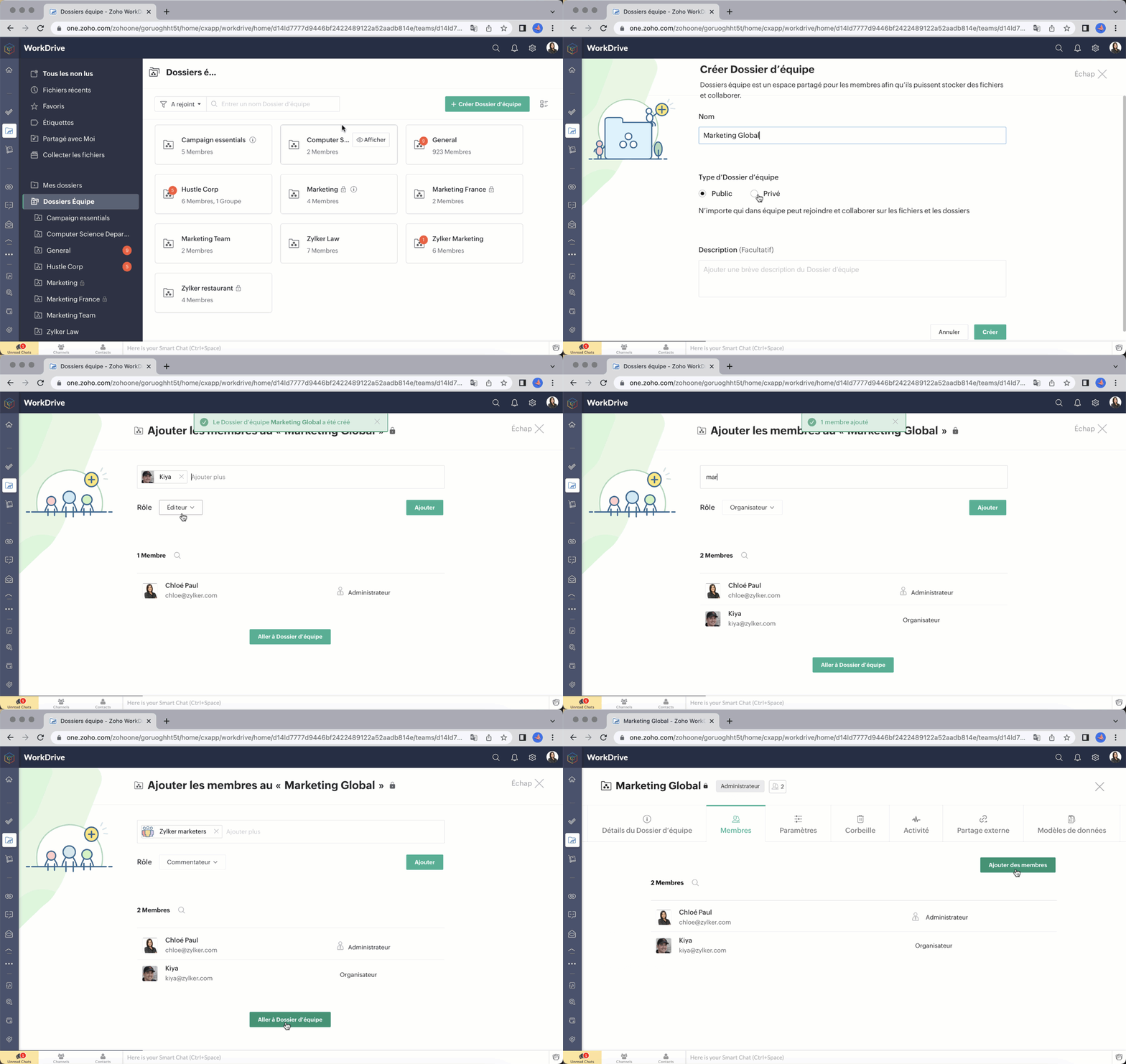
Ajouter des membres à votre dossier d'équipe est simple et rapide. Il suffit de saisir l'adresse e-mail, d'attribuer un rôle approprié (administrateur/ organisateur/ éditeur/ commentateur/ visiteur) et de les ajouter.
Vous pouvez également ajouter des groupes à un dossier d'équipe. Si votre équipe ou organisation utilise des groupes dans WorkDrive, vous pouvez facilement ajouter un groupe entier à un dossier d'équipe et attribuer au groupe un rôle spécifique au lieu d'ajouter chaque membre individuellement. Tous les membres du groupe recevront le rôle attribué à leur groupe dans ce dossier d'équipe. Vous pouvez ajouter des groupes, modifier les rôles des membres et supprimer des groupes des dossiers d'équipe à tout moment.
Rôles et autorisations à structure précise
WorkDrive vous permet d'attribuer à un membre d'un dossier d'équipe des autorisations d'accès plus élevées à un fichier ou à un dossier au sein de celui-ci. Par exemple, un membre ayant le rôle de visiteur dans un dossier d'équipe peut recevoir un accès de modification ou un accès plus élevé à un sous-dossier ou à un fichier.

Partage de fichiers avancé
L'objectif des dossiers d'équipe est de réduire le nombre de fois où vous devez partager des fichiers individuellement avec vos coéquipiers. Les fichiers ajoutés à un dossier d'équipe sont déjà disponibles pour tous ses membres.
Notre fonction avancée de partage externe vous permet de créer plusieurs liens pour partager le même fichier avec différentes personnes, comme des clients et des partenaires. Vous pouvez définir des autorisations d'accès, des mots de passe et des dates d'expiration, et décider qui peut télécharger un fichier. Vous pouvez également demander les données de l'utilisateur, comme son nom, son numéro de téléphone et son e-mail.
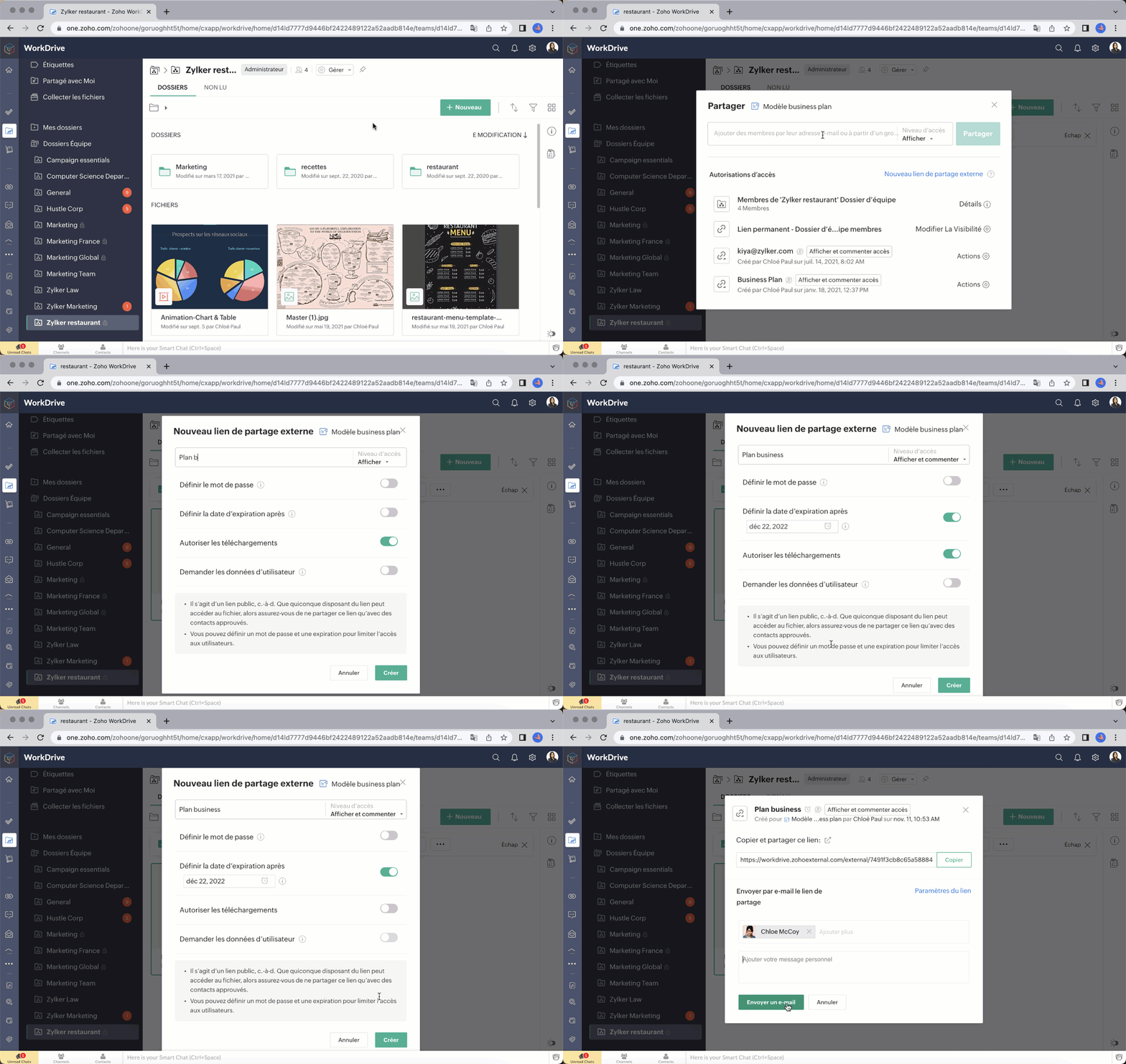
Bon à savoir : en tant qu'administrateur, vous pouvez désactiver complètement le partage externe pour votre Dossier d'équipe si nécessaire.
Souhaitez-vous nous faire part de votre expérience avec Zoho Work Drive ? N'hésitez pas à laisser vos commentaires dans la section ci-dessous.
L'équipe Zoho France
New to Zoho Recruit?
Zoho Campaigns Resources





Topic Participants
Kinjal Lodaya
François Ehret
Mariam Abrahamyan
Sticky Posts
Collaboration sans faille avec Zoho One
Bonjour à tous, Dans cet article nous allons voir comment Zoho One permet une collaboration à différents niveaux . La façon dont nous travaillons évolue. À mesure que les entreprises se mondialisent, la plupart des activités sont menées en équipe.
Zoho CRM Plus Resources
Zoho Books Resources
Zoho Subscriptions Resources
Zoho Projects Resources
Zoho Sprints Resources
Zoho Orchestly Resources
Zoho Creator Resources
Zoho WorkDrive Resources


Zoho CRM Resources
Get Started. Write Away!
Writer is a powerful online word processor, designed for collaborative work.
Zoho CRM コンテンツ
-
オンラインヘルプ
-
Webセミナー
-
機能活用動画
-
よくある質問
-
Ebook
-
-
Zoho Campaigns
- Zoho サービスのWebセミナー
その他のサービス コンテンツ
ご検討中の方
Recent Topics
Quote PDF – Header image stopped rendering suddenly
Hello Zoho Support Team, We are facing an issue with Quote PDF templates in Zoho Books. Previously, images added inside the Quote header HTML were rendering correctly. However, recently the header image is no longer appearing, while header text stillChanging Default PDF Name
Is it possible to change the default name of a PDF? As of right now, all of my quotes are named 'QT_$QuoteNumber' (i,e: 'QT_19803471298374) - would it be possible to change this to: '$CompanyName - $AccountName - $QuoteNumber' for instance?Tip 2: Recursive functions in Deluge: How to dynamically run a function for a specified number of times.
Hi folks, As part of the Zoho Creator - Tips and Tricks series every fortnight, we are back today with a new tip on Recursive functions. Let us first quickly understand what Recursive functions are: A function that calls itself one or more times is known as a Recursive function. That is, you can execute a function to perform a particular action a specific number of times. And, at the end of each iteration, a new output is generated. Recursive functions are commonly used by programmers as it enablesFunction #48: Manage fixed installment payments using Zoho Books
Hello everyone, and welcome back to our series! Businesses offer installment payment options to their customers, particularly for expensive purchases, to ease the financial burden on them. By breaking down the total cost into smaller, more manageableSpotlight series #6: The Show app for Android TV has a new look!
Hello everyone! We are delighted to introduce our revamped and redesigned Show app for Android TV. Smart TVs are exploding in popularity. Android TV alone has over 110 million active monthly devices. Zoho Show, as part of a constant effort to improveCan’t create alias “Email alias already exists”
Hi, I’m trying to create the following alias for my domain email. contact@ personal@ private@ But I get a email alias already exists. I had a soho account previously which I deleted which I suspect is causing the issue. Can someone assist? Kind RegaAppraisals - Order of Previous Reviews Should Be Newest to Oldest
The new Zoho People layout generally does a decent job at providing the necessary information for performing appraisals of employee performance. One example of this is the Previous Reviews section: This information is helpful when conducting a review.Paging through API results. a major gap in your documentation.
There is no way for me. to get all of my data through a single API call. Typically REST APis have mechanisms for paging through API results. But the documentation for the API I am using: https://desk.zoho.com/DeskAPIDocument#Introduction Has no mentionRecurring invoices were generated with old template...
I have recurring invoices setup. Ones generated on 10.20.2025 used the modified template I had used. But for some reason, on the ones created on 11/20/2025, it seems the invoices created reverted to the previous version of the invoice template. Notably,Tip #54- Exploring the Files Icon in Zoho Assist- 'Insider Insights'
As we’re already in mid-December, it’s a good time to take a closer look at one of the most useful options in the Zoho Assist remote support dashboard—the Files icon. To get started, log in to Zoho Assist using your credentials. Once you’re in, navigateTip#47: Estimation planner
Sprint planning becomes easier, smoother, more collaborative and more accurate with the Estimation Planner extension. Most work items involve multiple users, and each user's role and effort vary. To provide an unbiased and fair estimation point to theTime Tracking on Iphone doesn't stop
When I start a time tracking session the timer starts as expected. However when I hit stop, the timer remains on that project. The only buttons available are discard and start. Start runs the timer more and discard says it will throw away the data fromZoho Sign - Zoho CRM extension upgrade
Hi everyone, We've updated Zoho Sign extension for Zoho CRM with significant internal changes. Impact on existing Zoho Sign extension users Users using the extension without customization If you are using the integration without implementing Zoho Sign'sGroup by Owner/ Owner Kanban /Group by Custom Field
Hi, We are missing the option of viewing Tasks grouped by their owner, as it is an essential function for us to manage our employees' working tasks. We find it hard to inspect what are the tasks that our employees are working on. We are seeking an optionFlow using way too many tasks
I built a flow that is using way too many tasks for what it is doing. I reached out to support a week ago but never heard back so hoping the community can help. Does a filter count as a task? I am seeing tons of records filtered with < 1 Sec Time TakenRegarding the integration of Apollo.io with Zoho crm.
I have been seeing for the last 3 months that your Apollo.io beta version is available in Zoho Flow, and this application has not gone live yet. We requested this 2 months ago, but you guys said that 'we are working on it,' and when we search on GoogleStart Workflow from Deluge Script
I have developed a customized process from our CRM that leverages a deluge script to create a statement of work document. Once the document has been created via the merge and store function, I would like the ability to start a workdrive review & approveSaved Sections?
In sites editor, the + button reveals options to add a section, element, etc. It includes Saved Sections, but I can find no way to save a section I've already created. Otherwise, is there a way to copy a section from one page to another?Marketer's Space: Unable to select a sender address? Here's the fix
Hello Marketers, Welcome back to yet another post! So you've added a sender address in Zoho Campaigns and later found that you're not able to select it while creating an email campaign. Has this ever happened to you? If so, don't worry—you're not alone.Loading Project Balances in ZOHO Books for each project
Hello, What is the best method for loading project balances actual and budget into ZOHO books to provide tracking to our project managers. We have projects and federal awards (also treated as projects) which span multiple years. We are converting fromScale up your writing style with content analysis tool in Knowledge Base
Hello everyone, Sometimes writers may have strong knowledge about the subject but may find it challenging to articulate clearly or produce comprehensible, jargon free content. To make the process easier and to ensure consistent, high-quality articles,Zoho Books "Update" Trigger for Zapier?
Hi Zoho Team, I've been in talks with Zapier about using their services to connect my Zoho Books account to various apps, but I require an additional trigger beyond the "New" trigger. I require an "Update" trigger, which will allow me to filter and create Zaps only when certain conditions are fulfilled on the Zoho Books end before I automate a separate app. Specifically this will help me create invoices in QuickBooks Online only when payments are recorded in Zoho Books, rather than when a new invoiceHow to prevent editing of closed tickets in Zoho Desk?
I would like to confirm whether it is possible to completely prevent agents from editing tickets once their status is set to Closed. Is there any configuration, permission, or best practice in Zoho Desk to ensure that closed tickets remain read-only andZoho Desk Limitations
Good day, all, I would like to know whether others share my frustration with some of Zoho's limitations. Don't get me wrong, I like Desk (and I also have a subscription for Analytics), I have been with them for close to 10 years, and unfortunately, INew Mandatory One-Click Unsubscribe Link Overshadowing Custom Unsubscribe Link
I was recently informed by Zoho CRM Support that they are now mandated by the large email service providers like Google and Yahoo to provide a one-click unsubscribe option in the header (not the body) of all mass emails. I have a custom unsubscribe linkhow to undoreconciled transaction
how to undo reconciled transactionExciting Updates to the Kiosk Studio Feature in Zoho CRM!
Hello Everyone, We are here again with a series of new enhancements to Kiosk Studio, designed to elevate your experience and bring even greater efficiency to your business processes. These updates build upon our ongoing commitment to making Kiosk a powerfulChange eMail Template for Event-Invitations
Hello ZOHO-CRM Team How I can change the eMail Template for Event-Invitations? I work with the German Version of the Free Version. I know how I can modify eMail alerts or Signature Templates, but where I can other eMails modify you send out? Thank you for your answer. Regards, JuergService Title in Service Report Template Builder
I am currently working on the Service Report Template Builder in Zoho FSM. I have created three separate service report templates for different workflows: Preventive Maintenance Report Requested Service Report Installation Report My issue is that I cannotZoho Sign for Zoho Projects
Documents authorization and validation with signature is now easier in project management with Zoho Projects' Zoho Sign extension. Sign documents or send them for signatures directly from tasks and issues using Zoho Sign extension in Zoho Projects. ExtensionDeluge Learning Series – Best Practices in Deluge | December 2025
We’re excited to bring you the next session of the Deluge Learning Series, focused entirely on writing cleaner, faster, and more reliable Deluge code. In this edition, we’ll dive deep into the essential best practices every Deluge developer should followAssociate a Contact to a Campaign using deluge?
If I want to add one record to another related list, which zoho function do I use? zoho.updateRelatedRecord is not it I don't think. I simply want to take a "Contact" and associate it to a "Campaign" using deluge. Can anyone help? contactId = 5122008000000796037;Add "Groups" above "Users" in the Zoho Forms Left Menu
Hi, We have Groups but you have to go to a Form and Share or use the Directory App to manage them, please add "Groups" above "Users" in the Zoho Forms Left Menu so you can manage them in 1 place within Zoho Forms too. Thanks DanZoho Books | Product updates | October 2025
Hello users, We’ve rolled out new features and enhancements in Zoho Books. From iOS 26 updates to viewing reports as charts, explore the updates designed to enhance your bookkeeping experience. Zoho Books Updates for Apple Devices At WWDC 2025, AppleAdding Taxes to paid consultations in Zoho Bookings
I created a 'paid' consultation under Zoho Booking and integrated it with payment gateways for online/instant payment before a booking is done. How can I add 'taxes' to the price of consultation? I can add taxes to other Zoho apps (liks Books, Checkout,Zoho CRM Reports Module on Mobil App
I have the mobile app and the reports module doesn't appear in the sidebar for some reason. I saw a Youtube video where the user had the Reports module on mobile. Is there a setting to show it on mobile? Thanks.Inquiry on Help Centre Tab Customisation
Hi Zoho team, I’m wondering if it’s possible to further customise the Help Center tabs, specifically the descriptions under Knowledge Base, Community, and Tickets. While the current setup allows customising tab names, being able to tailor the descriptionsPassing a form object to a function
Suppose I have a sort_order field in multiple tables and I want to increment it by +1 onCreate of a new record. Is there a way to pass the form object as an argument into the function to keep things DRY? The following function from Zia works, but I'dCan you copy and paste a page within a form?
I have been looking at trying to copy/duplicate a whole page within a form. I can't see how I can do this without having to add all the data in again. This is very time consuming. Any help would be great.Unable to sort as Descending order
Trying to change the sort order for a lookup field (checkboxes) from Ascending to Descending and keep getting an error in Deluge that the order must be Ascending Did anyone ran into this? Thanks EyalNext Page