[Early Access] Circuits in Zoho CRM- Orchestrate Functions in Zoho CRM
Early Access | |
Resources | |
Feature availability | Currently supported for CRM accounts in US Data Centers |
Editions | CRM Enterprise & Ultimate, CRMPlus, Zoho One |
Default credits added | 15,000/Month - Enterprise | 20,000/Month - Ultimate |
Usability | For Workflows, Blueprints, and Custom Buttons |
Customers often need a way to extend their CRM functionality through various means. Functions, a simple way to write code, can define business logic on top of the CRM offerings.
Often, functions become bloated as the business needs grow. Invariably, they become big monolithic blocks of code. Their maintenance, re-use, debugging, etc., become a challenge.
Moreover, when you want to offload the series of operations to be orchestrated by functions, based on various business scenarios, customer touch points, or any third party application’s status, etc., it becomes even more cumbersome to make the functions work.
This is where Circuits in Zoho CRM come in very handy. Through Circuits, you can orchestrate the business flow through functions asynchronously offloaded from the CRM layer, still meaningfully hooked into the salesforce automation. It offers a great platform to write a typical step-function with easy using drag-and-drop(DIY builder) interface, adding great value to the business users.
Circuits offer a cascading structure to different states in a business process, allowing you to write functions that each individually feed their output into the next one, or any other one you pre-define. Not just that, it allows you to reroute, park for a certain period, or feed it in batches to enable just about any sort of action.
Circuits offer the following benefits that allow developers to focus more on business logic:
- Low-code - Create a circuit effortlessly with the visual drag-and-drop interface, which makes it easier for the users with minimum coding knowledge.
- Developer-friendly - Circuits help you manage parallel processes, service integrations, spot failures, retry, and view logs, within minutes. Developers can focus on the business logic and not worry about these factors.
- Orchestrate CRM Functions - Use various CRM functions on your circuit to integrate multiple third-party apps and Zoho CRM, seamlessly. Write functions once, and orchestrate them in circuits to solve different business needs.
- Automate IT and business processes within CRM - Create a circuit, associate it to a workflow, blueprint, or button, and automate your entire business process. With high availability, scalability, and fault tolerance, circuits ensure the performance of your workflow remains consistent even with changing states and an increase in frequency.
Sample business scenario
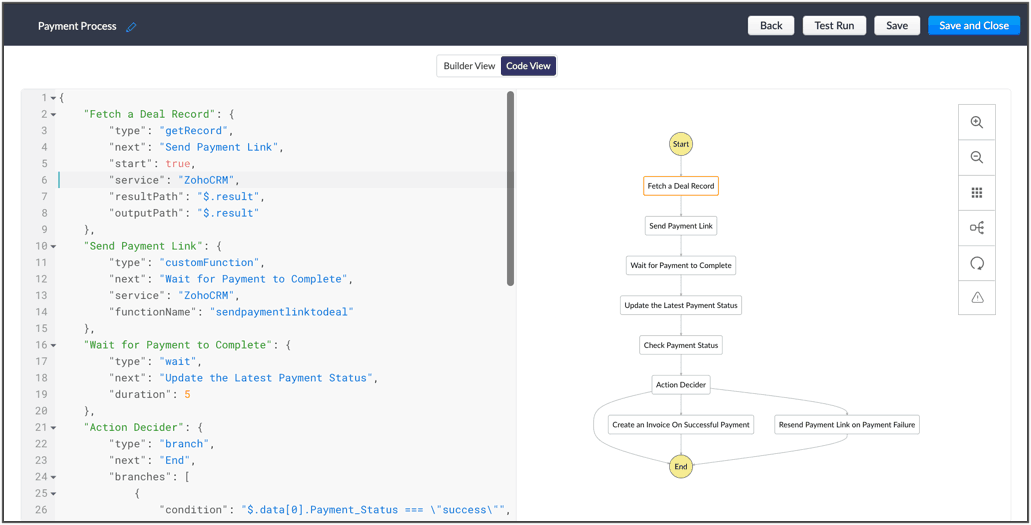
To put it in action, let's talk about payment processes, that are a part of most business processes. Say for your business process, once a deal is won, you'd like to send a payment link to said deal, and then generate an invoice on successful payment. If the payment is unsuccessful, the link is re-sent.
Here, we're building a circuit with two functions, in the order as mentioned below, and with the output of the former feeding into the consecutive function
A function that parses the details of the deal record, fetches the email ID, fetches the right payment URL and sends it to the deal.
A function that checks the payment status and updates the corresponding fields in CRM and generates an invoice on successful payment or resends the payment link to the deal upon payment failure.
So, let's understand why circuits are necessary in this business scenario.
- The order of orchestration - While CRM offers the option to write individual functions, as and when necessary for custom actions and workflows let you automatically execute them, Circuits goes one step further and streamlines the flow of your functions' logic, and simultaneously performs error handling. This ability to pick the order and states of your functions lets you pull in different third-party or external services to address minute use-cases.
- A single, editable space - A flow diagram that uses states and flows that include everything from functions to trigger record movement, using wait or parallel actions as others simultaneously occur, to record states that give you the record details. This not only gives you a bird's eye view of all that's configured in your circuit, but also, allows you to pinpoint issues, modify or reorganize it.
- Diagnose errors and view audit logs - A detailed log of each execution provides the status of each state's task execution, the payload and parameters passed, and the responses and exceptions generated.
- Use Existing Functions - From picking functions you've already tried, tested, and are up and running in your CRM account, to using a circuit within another circuit, this flexibility opens up possibilities of handling so much of your out-of-the box requirements in a single space.
The flow of action here:
Other examples of actions that can be performed with Circuits:
- Generate reports automatically, track inventory, fulfil orders and track them, and generate receipts.
- Trigger a circuit when a deal is won, update the deal's details in a sheet, calculate the commission based on the revenue, and update the details back in CRM.
- Manage users, send custom push notifications based on specific conditions, and manage user-generated files in applications, automatically.
Once enabled for your account, Circuits will be available under:
Setup > Developer Space > Circuits
Learn more about the components of Circuits and how you can make the most of it in the help documentation. Once we enable early-access to Circuits for your account, we'll send out an email confirming the same.
Cheers!
Shylaja
Shylaja
New to Zoho Recruit?
Zoho Campaigns Resources





Topic Participants
Shylaja S
Ryan N.
Sunderjan Siddharth
Greg Robson
Praveen Sankar
Sticky Posts
Announcing Early Access to "Zoho CRM for Everyone" — A new and exciting update to Zoho CRM
Update : Zoho CRM For Everyone's Nextgen Interface gets an upgrade! Hello everyone, We’ve updated the Zoho CRM for Everyone Nextgen interface based on your feedback. The UI is now simpler with a unified sidebar, a more visible global search and features[Early Access] Voice of the Customer (VoC) for Zoho CRM
Happy new year, everyone! We have an exciting addition to our suite of features and would like to introduce you to VoC (Voice of the Customer) for Zoho CRM, powered by Zia. 2023 is definitely the best time to be a customer with rapid innovations and advancementsAdding calls as a channel in Voice of the Customer
Dear All, We hope you're well! It's been almost a year since we opened Zoho CRM's Voice of the Customer solution up for early access. We are grateful for the reception and support you have been showing us with regards to its adoption and feedback. Since
Zoho CRM Plus Resources
Zoho Books Resources
Zoho Subscriptions Resources
Zoho Projects Resources
Zoho Sprints Resources
Zoho Orchestly Resources
Zoho Creator Resources
Zoho WorkDrive Resources


Zoho CRM Resources
Get Started. Write Away!
Writer is a powerful online word processor, designed for collaborative work.
Zoho CRM コンテンツ
-
オンラインヘルプ
-
Webセミナー
-
機能活用動画
-
よくある質問
-
Ebook
-
-
Zoho Campaigns
- Zoho サービスのWebセミナー
その他のサービス コンテンツ
ご検討中の方
Recent Topics
Agent Performance Report
From data to decisions: A deep dive into ticketing system reports An agent performance report in a ticketing system provides a comprehensive view of how support agents manage customer tickets. It measures efficiency and quality by tracking key performancePourquoi dans zohobooks version gratuite on ne peut ajouter notre stock d'ouverture??
Pourquoi dans zohobooks version gratuite on ne peut ajouter notre stock d'ouverture ??How can I adjust column width in Zoho Books?
One issue I keep running into is as I show or hide columns in reports, the column widths get weird. Some columns have text cut off while others can take a fourth of the page for just a few characters. I checked report layout guides and my settings, butInvalid value passed for file_name
System generated file name does not send file anymore - what is the problem?Custom Function for Estimates
Hey everyone, I was wondering if there was a way to automate the Subject of an estimate whenever one is created or edited: * the green box using following infos: * Customer Name and Estimate Date. My Goal is to change the Subject to have this format "<MyFirm>-EstimateSearch in module lists has detiorated
Every module has a problem with the search function :-/YouTube Live #1: AI-powered agreement management with Zia and Zoho Sign
Hi there! We're excited to announce Zoho Sign’s first YouTube live series, where you can catch the latest updates and interact with our Zoho Sign experts, pose questions, and discover lesser-known features. We're starting off by riding the AI wave inSearch in module lists has detiorated
Every module has a problem with the search function :-/Bigin: filter Contacts by Company fields
Hello, I was wondering if there's a way to filter the contacts based on a field belonging to their company. I.e.: - filter contacts by Company Annual Revenue field - filter contacts by Company Employee No. field In case this is not possibile, what workaroundHas Zoho changed the way it searches Items?
Right now all of our searches have broken and we can no longer search using the SKU or alias. It was fine last night and we came in this morning to broken.....this is impacting our operations now.Refunds do not export from Shopify, Amazon and Esty to Zoho. And then do not go from Zoho inventory to Quickbooks.
I have a huge hole in my accounts from refunds and the lack of synchronisation between shopify , Amazon and Etsy to Zoho ( i.e when I process a refund on shopify/ Amazon or Etsy it does not come through to Zoho) and then if I process a manual credit note/CRM->INVENTORY, sync products as composite items
We have a product team working in the CRM, as it’s more convenient than using Books or Inventory—especially with features like Blueprints being available. Once a product reaches a certain stage, it needs to become visible in Inventory. To achieve this,Zoho Calendar not working since a few days
Hey there, first off a minor thing, since I just tried to enable the Calendar after reading this in another topic (there was no setting for this though) : For some reason my current session is showing me based in New York - I'm in Germany, not using aMonthly timesheet, consolidation of time by project
I have time logs for various jobs for project. Is it possible to consolidate the time spent for each job, when I am generating a timesheet for a month? I am getting the entries of jobs done on each day when I generate a timesheet for a month For exampleSending emails from an outlook account
Hi, I need to know if it's possible to send automatic emails from an Outlook account configured in Zoho CRM and, if so, how I can accomplish that. To give you some context, I set up a domain and created a function that generates PDF files to be sent laterStruggling with stock management in Zoho CRM – is Zoho Inventory the solution?
My biggest pain point today with Zoho is inventory management. I run a retail business and reliable stock management is absolutely critical. Obviously, I need this inventory to be visible inside the CRM. At first, I tried handling it through custom modulescan't login Kiosk URGENT
already try, can't login pls help to support. thanks.【Zoho CRM】CRM for Everyoneに関するアップデート:関連データ機能
ユーザーの皆さま、こんにちは。コミュニティチームの中野です。 今回は「Zoho CRM アップデート情報」の中から、CRM for Everyoneの新機能「関連データ機能」をご紹介します。 関連データ機能は、あるタブのデータを別のタブに柔軟に関連付け、異なるタブで管理されている情報を1か所にまとめて表示できます。 たとえば、組織タブとチームタブのデータを関連付けることで、必要な情報に効率よくアクセスでき、顧客理解を深めながら他チームとの連携もスムーズに行えます。 目次 1. 関連データの設定方法Profit / margins on Sales orders / Invoices / Estimates
When we select an SKU or item name in any of these documents, much info such as invoice.line_items.rate is pulled from the item & filled into the document being worked on. If we had another lineItem DB field (hidden) auto filled at the same time: invoice.line_items.purchase_rateInventory to Xero Invocie Sync Issues
Has anyone had an issue with Invoices not syncing to Xero. It seems to be an issue when there is VAT on a shipping cost, but I cannot be 100% as the error is vague: "Unable to export Invoice 'INV-000053' as the account mapped with some items does notHow to activate RFQ? What if a price list has ladder price for items?
Where can I find the option to activate request for quotation? How does it work? If the item has ladder price, does it gets calculated depending on how many items are in the cart?Can't join canal Developers Zoho User
Hello, I received an invitation to join this channel, but I get an error when I try to join it, and I get the same error when I go to the Zoho Cliq interface > Search for a channel. Is this because I don't have a license linked to this email address?Desk Email reply - set default font / use custom font
Hello, in our e-mails, which we send to our customers, a certain font must be used (Corporate Design): Segoe UI https://en.wikipedia.org/wiki/Segoe#Segoe_UI How can this be included? How can this be set as the default font to ensure that this font isPDF Templates - Checkbox Borders
Is there a way to remove the border of a radio/checkbox on a PDF? I'd like to use the function of checkbox but if there's no easy way to remove the border (the PDF form already has a rectangle so it gets cluttered), then I'm forced to create a singleSettings Icon No Longer in ZOHO Desk?
In ZOHO desk, there has been a gear icon for settings. as of yesterday, it is no longer there. I showed up briefly this morning but is gone again. Anybody else experiecing this?Tip #43 - Track, Review, and Analyze Your Assist Sessions with Reports-'Insider Insights'
Did you know you can generate detailed reports for both remote support sessions and unattended access sessions in Zoho Assist? This makes it easy to monitor technician activity, measure efficiency, and review customer interactions. Let us now take a closerSimplified Call Logging
Our organization would like to start logging calls in our CRM; however, with 13 fields that can't be removed, our team is finding it extremely cumbersome. For our use case, we only need to record that a call happened theirfor would only need the followingSub form doesn't as formula field
Is it possible to get formula field in sub form in futures?Week date range in pivot table
Hello, I need to create a report that breakouts the data by week. I am using the pivot table report, and breaking out the date by week, however the date is displayed as 'Week 1 2014' format. Is there anyway to get the actual dates in there? ex. 1/6/2014-1/12/2014 Thanks,How do I get Status History data of my Projects?
I want to build a table in Zoho Analytics that Groups by Date, when Projects entered a certain status. I cannot find Status History or any such useful data available in the Setup of my Data Source sync. Please advise how I can achieve this?Is it possible to hide fields in a Subform?
Since layout rules cannot be used with Subforms, is there another way, or is it even possible, to hide fields in a subform based on a picklist fields within said subform? For example, if the Service Provided is Internet, then I do not want to see theWeekly Tips :Instantly find what you need with Attachment Viewer
Your inbox must be packed with project emails, shared notes, and scattered attachments. You are looking for one specific file—a presentation slide or maybe a media clip from a team update—but don’t want to dig through endless email threads or switch betweenMissing Zoho Desk integration option for form workflows
According to the help page "Configure Zoho Desk integration in form workflows" we should be able to select Zoho Desk as an integration target but when I open the integrations list then Zoho Desk is not being listed in it. We are on the Premium plan which should already support Zoho Desk integrations.Gantt for 2 or more projects
Hello, I'm trying the free version of your produtc. It is veryyy good!!!! I don't know if in the Standard plan, I can overview a Gantt Graph for 2 or more Projects Milestone. This would be very helpfull for managing teams and taking decisions about who I will assign a task to. In the paid plan Do I have this possibility? Thank you.Integrating a Zoho Project Gantt Chart into Reports
Is is possible to integrate a Zoho Project Gantt Chart into a Zoho Report Dashboard. I am in the process of creating Project Status Dashboards for the projects that we track in Zoho Projects and I would like to incorporate the gantt chart within Reports. Please let me know! ThanksZOHO BOOKS - EXCESSIVELY SLOW TODAY
Dear Zoho Books This is not the first time but it seems to be 3 times per week now that the system is extremely slow. I work on Zoho Books 95% of my day so this is very frustrating. Zoho you need to do something about this. I have had my IT guy checkDisplaying related quotes in sales order and back
Hi, My colleague liked to see to which sales orders, the quote has been converted. Quote shows Invoices, but not SO. Same, they would like to see the quotes in the sales order, as they can see invoices, packages, shipment, How can we achieve this ? ThankTip of the Week #71–Auto-move incoming messages to the right inboxes with keywords
We all know that customer-facing teams, especially your sales and support teams, can’t afford to miss even a single customer conversation. But sometimes, sales queries or support requests can easily get lost in a crowded inbox or even end up in the wrongClearing Fields using MACROS?
How would I go about clearing a follow-up field date from my deals? Currently I cannot set the new value as an empty box.Migrating a Zoho Forms form into Zoho Creator
Hi, How can I migrate my Zoho Forms form into Zoho Creator? Thanks. Truly, EmadNext Page