Featurecast Story 12 - Auto response
IM'ing (Instant Messaging) Feature Story Series
Featurecast Story 12 - Auto response
Provide prompt, clear communication
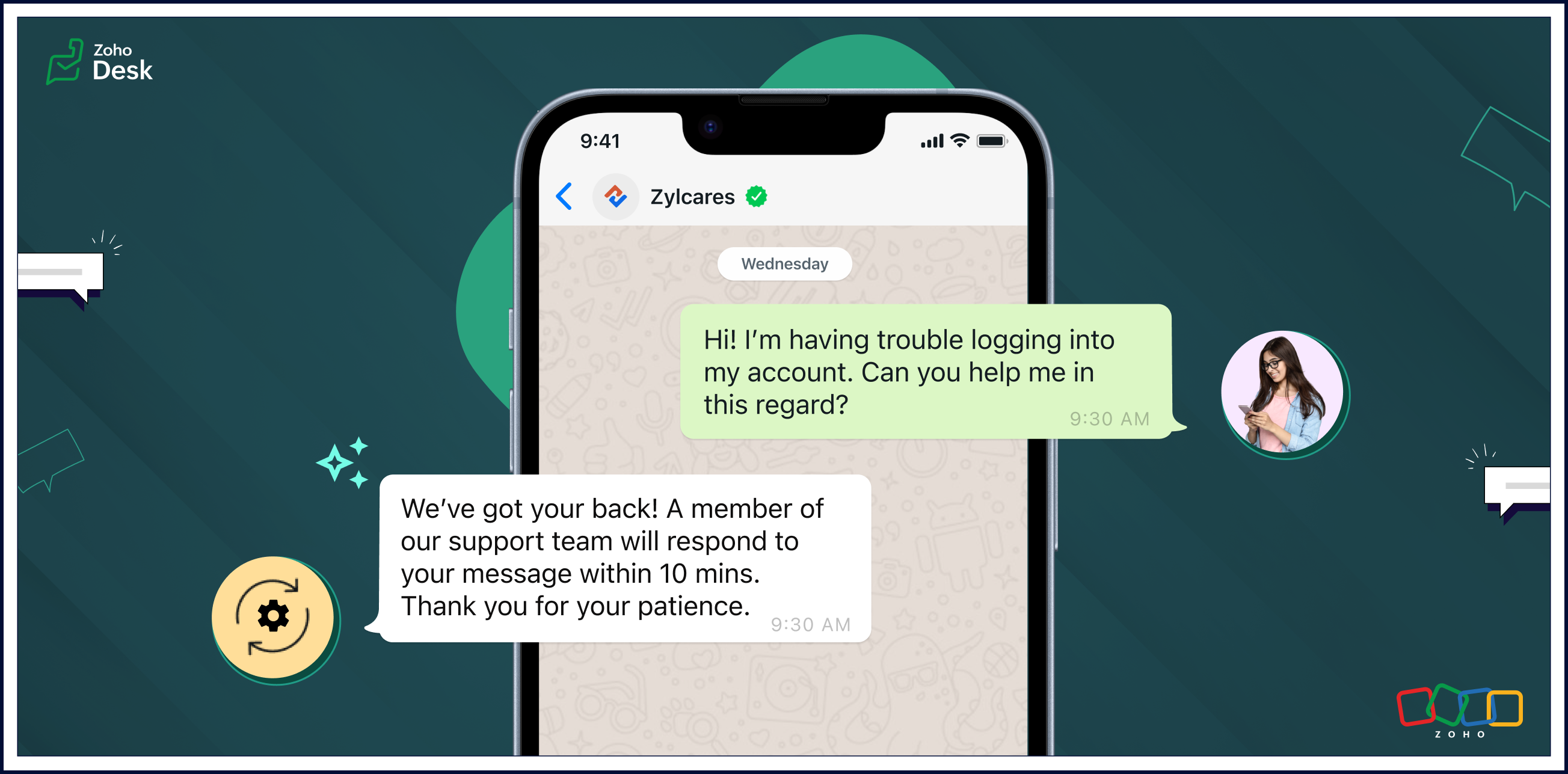
Auto response ensures that users receive an immediate confirmation of their message, setting a positive tone for their interactions with your organization.
Automatic replies enable businesses to streamline routine interactions, freeing up agents to focus on more complex issues and requests. The strategic use of auto-response messages enhances customer satisfaction, optimizes workflow efficiency, and contributes to cost savings.
Pros of auto-response messages
Prompt, clear communication
Automatic responses help maintain clear and uniform communication. These messages can include essential information, such as expected response times, alternative contact details, or links to relevant resources.
Fast response times
Auto-response messages excel in expediting response times. Customers appreciate swift acknowledgements of their questions or concerns and will be more willing to wait patiently if they know help is coming soon.
Reduced burdens on support reps
One of the primary advantages of auto-response messages is the time-saving benefit for agents. Routine inquiries or frequently asked questions can be addressed automatically, allowing agents to focus on more complex issues. This efficiency contributes to improved overall customer service.
Cons of auto-response messages
Limited capabilities compared to a human agent
Given a choice, customers often prefer to interact with human agents despite the convenience of automated replies. Even though auto replies are efficient, they lack the personal touch and empathy that human communication can provide. Also, auto responses may struggle to meet customer expectations in situations requiring emotional understanding.
Potential customer frustration
Auto replies can lead to customers becoming frustrated in some scenarios. They may need help with urgent or sensitive issues and be upset about not being able to reach an agent immediately. Standardized messages might not be able to address unique concerns adequately, leaving customers feeling unheard. Striking the right balance between automation and personalization is essential to mitigate frustration and provide a positive experience.
Uses of auto-response messages
• Sending out-of-office notifications
• Managing high volumes of incoming messages
• Providing information outside of business hours
• Handling customer interactions during events
• Saving time and making support teams more cost-efficient
• Managing high volumes of incoming messages
• Providing information outside of business hours
• Handling customer interactions during events
• Saving time and making support teams more cost-efficient
Auto-reply messages are quickly becoming an essential tool for providing effective customer support. Here are a few examples of auto-reply messages that you can use in different situations.

• Hi there! Thank you for contacting us. A support agent has already received your request and will reply soon.
• Hi there! You've reached [company name], and one of our support reps will get back to you shortly.
• Thank you for your message. We are currently unavailable, but a service agent will contact you as soon as possible.
• Welcome aboard! We can't wait to start working with you. Our team is always here for you if you have any questions or need support. Thank you for joining us!
• Thank you for reaching out to us. We're aware of the issue, and we're working on it. We'll update you as soon as we have more information.
• We're closed, but our support team will be available at [time] to get back to you and address your concerns. Thanks for your patience.
• Hi there! Thank you for opting into our newsletter. You'll start receiving exclusive content and updates from us soon.
• Sorry for the late delivery. We're on it and doing our best to get your order to you as quickly as possible. We appreciate your patience.
• Thank you for your message. We are currently unavailable, but a service agent will contact you as soon as possible.
• Welcome aboard! We can't wait to start working with you. Our team is always here for you if you have any questions or need support. Thank you for joining us!
• Thank you for reaching out to us. We're aware of the issue, and we're working on it. We'll update you as soon as we have more information.
• We're closed, but our support team will be available at [time] to get back to you and address your concerns. Thanks for your patience.
• Hi there! Thank you for opting into our newsletter. You'll start receiving exclusive content and updates from us soon.
• Sorry for the late delivery. We're on it and doing our best to get your order to you as quickly as possible. We appreciate your patience.
Closing thoughts
Automated replies save time, ensure prompt acknowledgement of customer requests, and help manage expectations when agents are unavailable or busy due to high communication volumes.
They enhance the transparency of business communication by providing immediate responses, even outside regular business hours. This helps foster a positive support experience and nurture long-term relationships with customers.
Clarity in communication improves customer satisfaction by setting appropriate expectations and reducing uncertainty in the support process. It's a win-win for customers and businesses.
I hope you found this article helpful and start using auto responses to help deliver great service to your customers. There's more to come, so please watch this space for more IM feature stories.
Until next time,
Kavya Rao
The Zoho Desk Team
New to Zoho Recruit?
Zoho Campaigns Resources





Topic Participants
Kavya Rao Addepalli
Antonio
Shivani | Zoho Desk
Sticky Posts
Register for Zoho Desk Beta Community
With the start of the year, we have decided to take a small step in making the life of our customers a little easier. We now have easy access to all our upcoming features and a faster way to request for beta access. We open betas for some of our featuresShare your Zoho Desk story with us!
Tell us how you use Zoho Desk for your business and inspire others with your story. Be it a simple workflow rule that helps you navigate complex processes or a macro that saves your team a lot of time; share it here and help the community learn and grow with shared knowledge.Tip #1: Learn to pick the right channels
Mail, live chat, telephony, social media, web forms—there are so many support channels out there. Trying to pick the right channels to offer your customers can get pretty confusing. Emails are most useful when the customer wants to put things on record. However, escalated or complicated issues should not be resolved over email because it's slow and impersonal. When you need immediate responses, live chat is more suitable. It's also quick and convenient, so it's the go-to channel for small issues.Welcome to Zoho Desk Community - Say hello here!
Hello everyone! Though we have been here for a while, it’s time to formally establish the Zoho Desk Community; we’re really happy to have you all here! This can be the place where you take a moment to introduce yourself to the rest of the community. We’d love to hear all about you, what you do, what company or industry you work for, how you use Zoho Desk and anything else that you will like to share! Here’s a little about me. I am Chinmayee. I have been associated with Zoho since 2014. I joined hereWebinar 1: Blueprint for Customer Service
With the launch of a host of new features in Zoho Desk, we thought it’ll be great to have a few webinars to help our customers make the most of them. We’re starting off with our most talked about feature, Blueprint in Zoho Desk. You can register for the Blueprint webinar here: The webinar will be delivered by our in-house product experts. This is a good opportunity to ask questions to our experts and understand how Blueprint can help you automate your service processes. We look forward to seeing
Zoho CRM Plus Resources
Zoho Books Resources
Zoho Subscriptions Resources
Zoho Projects Resources
Zoho Sprints Resources
Zoho Orchestly Resources
Zoho Creator Resources
Zoho WorkDrive Resources


Zoho CRM Resources
Get Started. Write Away!
Writer is a powerful online word processor, designed for collaborative work.
Zoho CRM コンテンツ
-
オンラインヘルプ
-
Webセミナー
-
機能活用動画
-
よくある質問
-
Ebook
-
-
Zoho Campaigns
- Zoho サービスのWebセミナー
その他のサービス コンテンツ
ご検討中の方
Recent Topics
Introducing Workqueue: your all-in-one view to manage daily work
Hello all, We’re excited to introduce a major productivity boost to your CRM experience: Workqueue, a dynamic, all-in-one workspace that brings every important sales activity, approval, and follow-up right to your fingertips. What is Workqueue? SalesSupport Custom Background in Zoho Cliq Video Calls and Meetings
Hello Zoho Cliq Team, We hope you are doing well. We would like to request an enhancement to the video background capabilities in Zoho Cliq, specifically the ability to upload and use custom backgrounds. Current Limitation At present, Zoho Cliq allowsUpload own Background Image and set Camera to 16:9
Hi, in all known online meeting tools, I can set up a background image reflecting our corporate design. This doesn't work in Cliq. Additionally, Cliq detects our cameras as 4:3, showing black bars on the right and left sides during the meeting. WhereISO 27001 Compliance
What are people doing to ensure ISO 27001 compliance for their Zoho environments? It would make sense for Log360 Cloud to integrate natively with the Zoho suite, but that is not the case. It requires a gateway cluster, which is not an option for a fullyZoho People - Retrieve the Leave Details - get("LeaveCount")
Hi, Zoho People I need to collect all of an employee's leave requests for the calendar year and check how many half-days they have taken. If I run the script on the query he just modified, I can retrieve the information related to that query and use theWhat's new in Zoho Sheet: Simplify data entry and collaboration
Hello, Zoho Sheet community! Last year, our team was focused on research and development so we could deliver updates that enhance your spreadsheet experience. This year, we’re excited to deliver those enhancements—but we'll be rolling them out incrementallyMarketer's Space: New to Campaigns? Some common early mistakes that might occur
Hello Marketers, Welcome back to another post in Marketer's Space. If you're just getting started with Zoho Campaigns, things can feel exciting and slightly confusing at the same time. You're not alone. Most early frustrations come from setup gaps ratherThis user is not allowed to add in Zoho. Please contact support-as@zohocorp.com for further details
Hello, Just signed up to ZOHO on a friend's recommendation. Got the TXT part (verified my domain), but whenever I try to add ANY user, I get the error: This user is not allowed to add in Zoho. Please contact support-as@zohocorp.com for further details I have emailed as well and writing here as well because when I searched, I saw many people faced the same issue and instead of email, they got a faster response here. My domain is: raisingreaderspk . com Hope this can be resolved. Thank youWorkflow Rule - Field Updates: Ability to use Placeholders
It will be great if you can use placeholder tags to update fields. For example if we want to update a custom field with the client name we can use ${CONTACT.CONTACT_FIRSTNAME}${CONTACT.CONTACT_LASTNAME}, etcNeed a Universal Search Option in Zohobooks
Hello Zoho, Need a Universal Search Option in Zohobooks to search across all transactions in our books of accounts. Please do the needful ThanksImplement Date-Time-Based Triggers in Zoho Desk
Dear Zoho Desk Support Team, We are writing to request a new feature that would allow for the creation of workflows triggered by specific date-time conditions. Currently, Zoho Desk does not provide native support for date-time-based triggers, limitingWhy is my Lookup field not being set through Desk's API?
Hello, I'm having trouble setting a custom field when creating a Ticket in Zoho Desk. The endpoint I'm consulting is "https://desk.zoho.com/api/v1/tickets" and even though my payload has the right format, with a "cf" key dedicated to all custom fields,How exactly does "Reply assistance" work in Zoho Desk? What context is sent to the LLM?
Hi, Im trying to better understand the technical behavior of the feature "Reply assistance" in Zoho Desk, and I couldn’t find detailed information in the current documentation. Specifically, I have questions about what data is actually being sent to theDeletion Workflows
Hello, Unless I missed it, we can't create deletion workflows. My usecase is to auto-delete junk leads. We have field called lead status, and an agent qualify all our new leads. When it's a junk lead she chose the correspondant value in the picklist. My goal is that the system delete them automatically. Is that possible? Planed ?URGENTImpossible to book an appointement
J'essaie plusieurs fois mais aucun créneau n''est disponible Message d'erreur lorsque j'essaie de sélectionner une dateSendpulse SMTP/IMAP Issues
It’s possible Zoho made some changes on their side. Sometimes, even if your regular password works, Zoho requires an app-specific password for external apps like SendPulse to connect via IMAP. You can create this in Zoho’s security settings and use itInsane mail security
I cannot access my email... anywhere. For some reason the password for the Mail app on my Mac is being rejected, it worked yesterday but now it doesn't? Ok let's try the web interface. I can access my general Zoho login with the password but if I wantUI issue with Organize Tabs
When looking at the organize Tabs window (bellow) you can see that some tabs are grayed out. there is also a "Add Module/Web Tab" button. When looking at this screen it's clear that the grayed out tabs can not be removed from the portal user's screenTask list flag Internal/External for all phases
Phases are commonly used in projects to note milestones in the progression of a project, while task lists can be used to group different types of tasks together. It makes sense to be able to define a task list as either internal or external however theHAVING PROBLEM WITH SENDING EMAIL
Hi all, I'm unable to receive emails on info@germanforgirls.eu. I'm getting an error code 550. 5.1.1. invalid email recipients. Moreso, I would like info@germanforgirls.eu to be the default "send from" email and not solomon@germanforgirls.eu. Kindly seeSharing my portal URL with clients outside the project
Hi I need help making my project public for anyone to check on my task. I'm a freelance artist and I use trello to keep track on my client's projects however I wanted to do an upgrade. Went on here and so far I'm loving it. However, I'm having an issue sharing my url to those to see progress. They said they needed an account to access my project. How do I fix this? Without them needing an account.Different Task Layouts for Subtasks
I was wondering how it would be possible for a subtask to have a different task layout to the parent task.Subscription went to default (@zoho.com) address instead for custom domain
Hello! So I bought a lite sub to test things out, wanting to use my own domain. However, after passing through all the verification steps (completed now), it seems that the sub I bought was assigned to the default email that I already had with Zoho andCanvas templates and font-family
i dont understant why its always the smallest things that waste all of my time! why in some videos i see they have tamplates in the Canvas editor and i cant seem to fint it? and why oih why cant i cange the font? i just want simple Arial! help meeeeeeeeeeRe: Ca.gory groups and not all email addresses being added to a group emails
Hi, I have added emails under 'Contacts' into categories but when sending a group email and putting the category name in not all email addresses go onto the email. I have refreshed the page, deleted and redone the info etc with no luck. I only found outIMPORTANT
Dear Zoho Support Team, I am currently experiencing an issue when trying to send emails from my Zoho Mail account. Each time I attempt to send a message, I receive the following error: "Unable to send message; Reason: 554 5.1.8 Email Outgoing Blocked."Able to Send Emails from Zoho but Not Receiving Emails from Gmail
Hello, I am experiencing an issue with my shopify domain email setup and would appreciate your help. Current situation: I can successfully send emails using Zoho. I can receive emails from some services (for example, Facebook). However, I cannot receiveAntispam validation failed for your domain in Accounts
I tried adding a domain to zeptomail.zoho.com, but the “add domain” operation failed. The front‑end error reads: “Domain could not be added. Please contact support@zeptomail.com.” The back‑end API returned: ``` { "error": { "code": "TM_3601", "details":Announcing new features in Trident for Windows (v.1.38.5.0)
Hello Community! Trident for Windows just received a major update, with a range of capabilities that focuses on strengthening and enhancing communication. Let’s dive into what’s new! View complete technical email details. For those who need deeper visibilityWindows Desktop App - request to add minimization/startup options
Support Team, Can you submit the following request to your development team? Here is what would be optimal in my opinion from UX perspective: 1) In the "Application Menu", add a menu item to Exit the app, as well as an alt-key shortcut for these menusAccounting of Amazon
I have recently started selling on Amazon.in and I am facing issues with different types of transactions: What entry to do in case of return? If I had sent two products and customer returned both the products but I had received only one and got the claimCompose Emails Faster Using Templates and Snippet
Hello everyone, We have made an enhancement to the Send as Email option in Tickets. Agents can use templates and snippets to draft their response, which helps save time and maintain consistency. The Send as Email page will display the available templatesCustomize Colors used on graphs and charts according to users desire.
It would be great if we could customize the graph's colors as we see fit. I hate that yellow is always the default color!Emails not integrating
My emails from Hubspot did not integrtate over. How do I fix that?Creating meetings from an email
Hi. Similar to Outlook, it would be helpful if a meeting can be scheduled from an email so that the attendees need not be manually entered every time it's created.Zoho Social API for generating draft posts from a third-party app ?
Hello everyone, I hope you are all well. I have a question regarding Zoho Social. I am developing an application that generates social media posts, and I would like to be able to incorporate a feature that allows saving these posts as drafts in Zoho Social.CRM Percent custom fields: When will it show the % symbol and behave like %?
1. Actually Percent custom fields fail to show the % symbol. 2. When in formulas Percent fields work like number: 100 x 5% = 5 ideal world 100 x 5% = 500 what happens actually 3. When importing Percent fields the % symbol has to be removed and the dataDeprecation of the Zoho OAuth connector
Hello everyone, At Zoho, we continuously evaluate our integrations to ensure they meet the highest standards of security, reliability, and compliance. As part of these ongoing efforts, we've made the decision to deprecate the Zoho OAuth default connectorRouteIQ for Zoho FSM
Beste, Zou wel top zijn dat we een RouteIQ hebben voor FSM aangezien we constant moeten zien wat de beste route is voor onze monteurs. Nu moeten we een speciale aparte programma hebben om de beste route te berrekenen voor onze monteurs aangezien de planningLet us view and export the full price books data from CRM
I quote out of CRM, some of my clients have specialised pricing for specific products - therefore we use Price Books to manage these special prices. I can only see the breakdown of the products listed in the price book and the specialised pricing forNext Page