Get your emails from Zoho Mail delivered in Cliq
With a major part of communication happening over emails, it becomes quite a task to keep up with a large amount of email threads. But when a huge portion of your everyday conversation happens in a messaging platform like Zoho Cliq, why not bring in important email notifications into your chats as well?
This forum post will walk you through on connecting your Zoho Mail with Cliq so you can get your emails straight away through your chats.
First, let's see how bringing in an email from Zoho Mail to Cliq can be useful.
Scenarios:
- The support team in every organization receives a substantial amount of emails on a daily basis. There are chances that a high priority email might slip through. So, to overcome this you can create a filter and funnel the high priority email to your team's support channel in Cliq or have a dedicated support bot that will bring in your highly important email.
- Similarly, you can keep a track of all the payments made by your customers and also track down specific emails from your partners and vendors directly from Cliq chat.
Steps:
Follow the simple steps given below to bring in your emails from Zoho Mail to Cliq and centralize them.
1. Log in to your Zoho Mail and click on the settings icon, which is located at the top of the right hand panel.
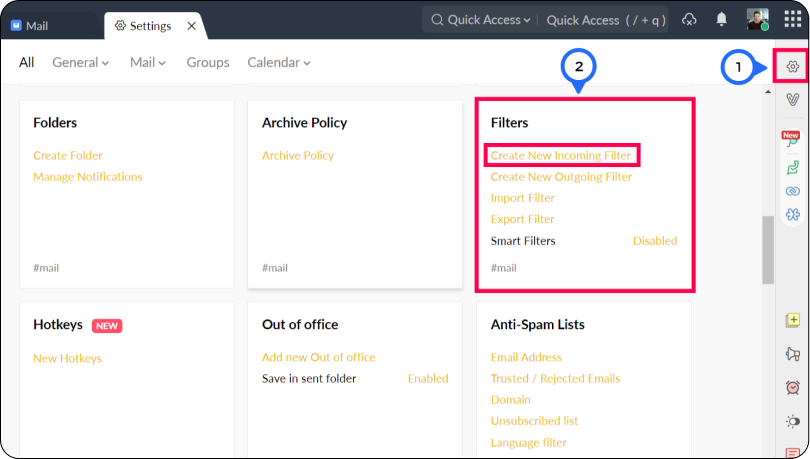
2. The second step involves creating a new incoming filter.
- Go to the filters card and click on create a new filter.
- Give your filter a name - (this is the name the filter will be identifed with).
- Condition Type - Specifies the combination of various conditions that needs to be checked for (OR, AND and All Incoming emails)
- Conditions - The parameters that needs to be satisfied by the emails
- Actions- Actions that will be performed on the emails that match the conditions
- In the actions, select Custom function(creator) from the drop down.
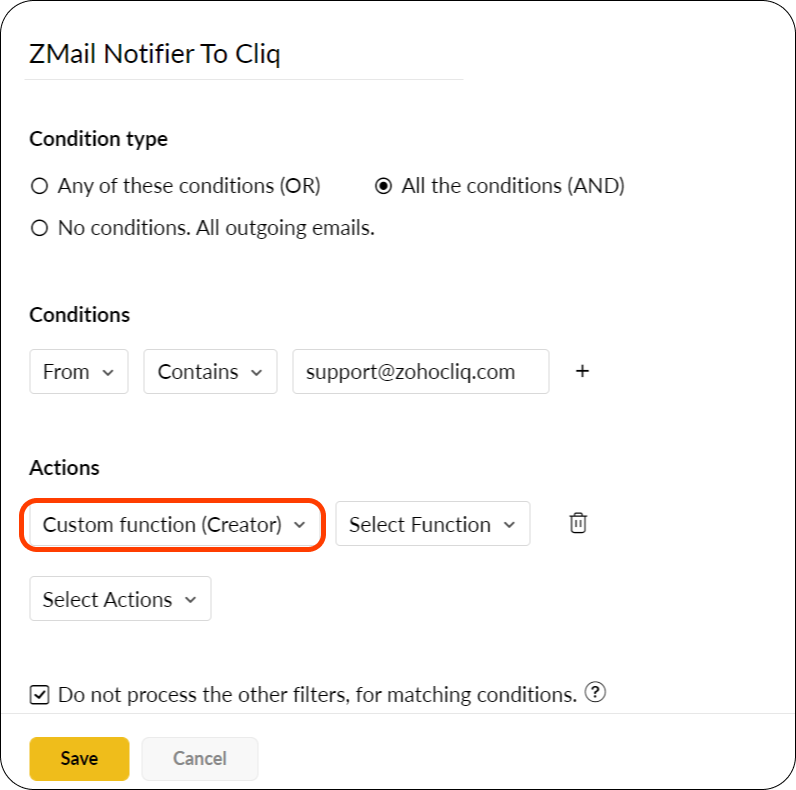
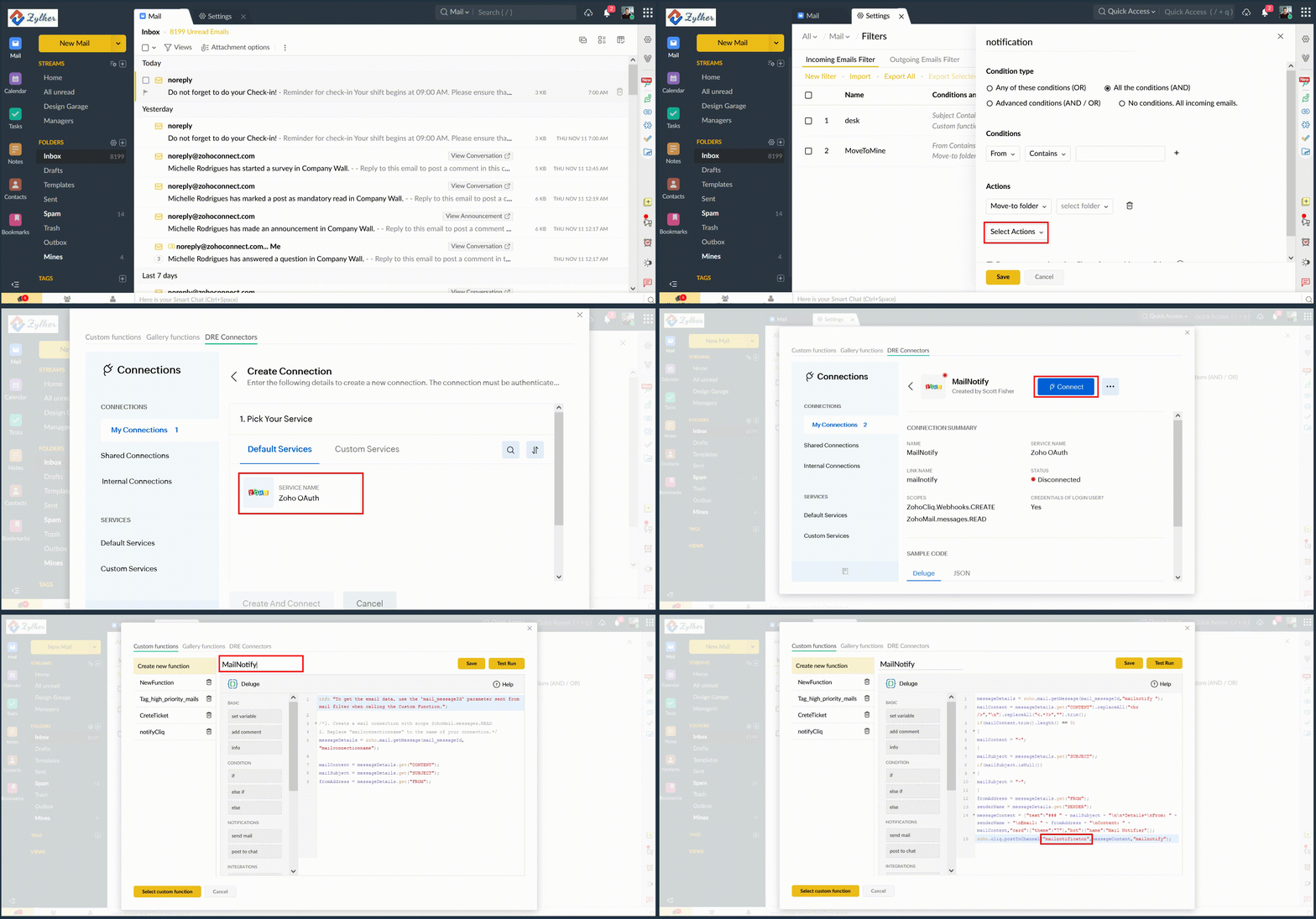
- Select Function to view the deluge script editor pop up.
- Go to the DRE Connectors tab and in My Connections, click on the Create Connection button.
- Select the Zoho OAuth service and enter your preferred connection and connection link name.
- For scopes, select the checkboxes for ZohoCliq.Webhooks.CREATE and ZohoMail.messages.READ .
- Now go back to the custom functions tab and paste the following code in the scipt editor :
- messageDetails = zoho.mail.getMessage(mail_messageId,"CONNECTION LINK NAME");
- mailContent = messageDetails.get("CONTENT").replaceAll("<br />","\n").replaceAll("<.*?>","").trim();
if(mailContent.trim().length() == 0)
{
mailContent = "-";
}
mailSubject = messageDetails.get("SUBJECT");
if(mailSubject.isNull())
{
mailSubject = "-";
}
fromAddress = messageDetails.get("FROM");
senderName = messageDetails.get("SENDER");
messageContent = {"text":"### " + mailSubject + "\n\n*Details*\nFrom: " + senderName + "\nEmail: " + fromAddress + "\nContent: " + mailContent,"card":{"theme":"7"},"bot":{"name":"Mail Notifier"}};
zoho.cliq.postToChannel("CHANNEL UNIQUE NAME",messageContent,"CONNECTION LINK NAME");
 (NOTE : Replace "CONNECTION LINK NAME" with the name of the connection link that you have created, and "CHANNEL UNIQUE NAME" with the unique name of the channel in which you want the mail posted as a chat).
3. Give your custom function a name and click on the Save button to save it.
You can also check if the function works by selecting the Test Run button to execute the code. You will be prompted to enter a message ID for the check which can be retrieved from the URL. Open any mail you want to test it on and copy the last digits in the URL, paste it in the message ID text box and proceed. Sample Response
Note: In case you want to post a response to a bot use the following syntax:
Also you can post the response in a channel (organizational, personal, team or external) using the following syntax:
Retrieving a channel's unique name :
You can retrieve the unique name of a channel by the follwing steps :
1. Hover over to the channel in the left hand side panel and select more info.
2. Click on the connectors tab
3. The API Endpoint URL contains the channel's unique name in block letters.

There you go! We hope this brief example helped you understand in bringing an email from Zoho Mail to Zoho Cliq.
In case of any queries please comment below. We'd be happy to assist you.
Regards
Divya P
Zoho Cliq
New to Zoho Recruit?
Zoho Campaigns Resources





Topic Participants
Divya Parameswaran
Bruce Eisenberg
Anu Anu
Peter Deleon
jithin
Sticky Posts
Automating Employee Birthday Notifications in Zoho Cliq
Have you ever missed a birthday and felt like the office Grinch? Fear not, the Cliq Developer Platform has got your back! With Zoho Cliq's Schedulers, you can be the office party-cipant who never forgets a single cake, balloon, or awkward rendition ofAutomate attendance tracking with Zoho Cliq Developer Platform
I wish remote work were permanently mandated so we could join work calls from a movie theatre or even while skydiving! But wait, it's time to wake up! The alarm has snoozed twice, and your team has already logged on for the day. Keeping tabs on attendanceCustomer payment alerts in Zoho Cliq
For businesses that depend on cash flow, payment updates are essential for operational decision-making and go beyond simple accounting entries. The sales team needs to be notified when invoices are cleared so that upcoming orders can be released. In contrast,Accelerate Github code reviews with Zoho Cliq Platform's link handlers
Code reviews are critical, and they can get buried in conversations or lost when using multiple tools. With the Cliq Platform's link handlers, let's transform shared Github pull request links into interactive, real-time code reviews on channels. ShareApp Spotlight : PagerDuty for Zoho Cliq
App Spotlight brings you hand-picked apps to enhance the power of your Zoho apps and tools. Visit the Zoho Marketplace to explore all of our apps, integrations, and extensions. In today's fast-paced world, seizing every moment is essential for operational
Zoho CRM Plus Resources
Zoho Books Resources
Zoho Subscriptions Resources
Zoho Projects Resources
Zoho Sprints Resources
Zoho Orchestly Resources
Zoho Creator Resources
Zoho WorkDrive Resources


Zoho CRM Resources
Get Started. Write Away!
Writer is a powerful online word processor, designed for collaborative work.
Zoho CRM コンテンツ
-
オンラインヘルプ
-
Webセミナー
-
機能活用動画
-
よくある質問
-
Ebook
-
-
Zoho Campaigns
- Zoho サービスのWebセミナー
その他のサービス コンテンツ
ご検討中の方
Recent Topics
Does Zoho Learn integrate with Zoho Connect,People,Workdrive,Project,Desk?
Can we propose Zoho LEarn as a centralised Knowledge Portal tool that can get synched with the other Zoho products and serve as a central Knowledge repository?Reading from and writing to Zoho Projects Custom Module with Deluge
Does anyone know if there is a way to read from and write to the Custom Modules that Zoho now supports. I would love to be able to loop through a set of data and create the entities I need to for this new custom module I'm looking to put together.How Does Knowledge Base Search and Article Recommendation Work?
Hello, I would like to understand how the Knowledge Base search engine works. Specifically, does it search based on: The article title only? The full article content? Both, the article and the content? Keywords? Tags? Also, how does the system determineZoho Books/Inventory - Restrict Items With Pricebook
Hi Zoho Team, I'm trying to address as use case where a client needs to restrict which products certain customers can purchase. I have been able to find a way to do this based on the current Zoho Books or Zoho Inventory configuation. My feature requestBest Way to Integrate Zoho Campaigns with Amazon SES Without Third-Party Tools
I am looking for the most seamless and efficient method to integrate Zoho Campaigns with Amazon SES. My goal is to avoid using any third-party automation tools like Zapier, Make, or Pabbly, and instead, leverage Zoho's native capabilities for this integration.Release Notes | January 2026
We have rolled out a set of powerful new enhancements across Zoho Vertical Studio that bring several long-awaited capabilities to your applications. These updates focus on deeper customization, smarter automation, better reporting, and improved usabilityscope for phonebridge in CRM and phonebridge API documentation
Hi I cannot find the scope to be used for phonebridge in CRM API V2 calls. I am getting OAUTH_SCOPE_MISMATCH for scope group ZohoCRM.modules.ALL,ZohoCRM.setttings.ALL Also I am not able to locate the documentation for the same, All I have is phonebridge API documentation for desk and url [ https://www.zohoapis.com/crm/v2/phonebridge/ ] from a web forum. It makes a reply and error in case of missing arguments, but scope error is returned when all arguments are provided. Regards Devel DevHow to charge Convenience fee OR payment gateway charges to the end client who is paying the invoice?
Hello, I am creating this topic after having discussions with various sets of users and have understood that with people moving more and more to digital payments, it is important for the client to enable the "Convenience fee" kind of scenario. I haveCard payment surcharge?
Hi, I would like to offer my customers the ability to pay invoices by card (using the PayPal integration). However, PayPal charges me around 5% to receive a card payment, and I would like to pass on this cost to my customer by way of a card payment surcharge. Is there any way for Zoho Invoice to be set up to automatically add a defined "card processing fee", say 5% of the invoice total, if the customer elects to pay by card? I don't want to add this on to invoice manually, since most of my clientsAutomate Credit Card Surcharge
Is there a way to create an automation that will add a 3.0% credit card surcharge to a subscription whenever a customer pays via credit card?Zoho Books | Product updates | January 2026
Hello users, We’ve rolled out new features and enhancements in Zoho Books. From e-filing Form 1099 directly with the IRS to corporation tax support, explore the updates designed to enhance your bookkeeping experience. E-File Form 1099 Directly With theZoho POS App Hanging Issue – Sales Becoming Difficult
The Zoho POS app frequently hangs and becomes unresponsive during billing, making it very difficult to complete sales smoothly. This commonly happens while adding items, during checkout, or at payment time, especially during peak hours. These issues causeTip #62- Exploring Technician Console: Send Ctrl + Alt + Del- 'Insider Insights'
Hello Zoho Assist Community! Imagine you are a technician supporting a remote employee who cannot log into their system. The computer is stuck on the login screen after multiple attempts, and the user is unsure how to proceed. Instead of walking the userSKUs for Invoices, POs, etc.
It doesn't appear that one can enable SKU display on invoices, POs, etc. This is problematic, and I don't see a good reason why this shouldn't be an option. Some of our vendors and customers use this in their system. Every other identifier code is availablehow to avoid duplicate customer
How can i avoid to create a duplicate customer. I charged a same customer with two different plans and it showed up twice in my customer list and subsequently in Zoho books contacts. It creates confusion to have a same customer appears multiple times in customer or contact list. How can i avoid it.RSC Connectivity Linkedin Recruiter RPS
It seems there's a bit of a push from Linkedin Talent Solutions to keep integrations moving. My Account Manager confirmed that Zoho Recruit is a Certified Linkedin Linkedin Partner but does not have RSC as of yet., (we knew that :-) She encouraged meim facing issue on generate the Estimate price
i couldn't understand what is the issue , i cant generate Estimate price where is the issuecannot be able to add user
Dear team I tried to add a new user for sales team, but after entering the OTP its showing error message cannot add nowChanging an existing item to different accounts & inventory-tracked
Hi everyone, I have an item in Zoho Books that was originally set up as a non-inventory item. Over time, I associated it with different sales and purchase accounts, and I now have many invoices, bills, and reports that use this item. My business processHow do I edit the Calendar Invite notifications for Interviews in Recruit?
I'm setting up the Zoho Recruit Interview Calendar system but there's some notifications I don't have any control over. I've turned off all Workflows and Automations related to the Calendar Scheduling and it seems that it's the notification that is sentBookings duration - days
Hi team, Is there any way to setup services/bookings that span multiple days? I am using Zoho Bookings for meeting room bookings. Clients may wish to book a room for more than one day, for up to a month. If not, is there a plan to allow services to be setup with durations of Days as well as hours and minutes? Many thanks, Anna.big 5 accounts
how do you find what accounts are listed as Big 5 ?Zoho recruit's blueprint configuration is not functioning as mapped
Current Status: Zoho Blueprint is not functioning as configured. Issue: We are moving a Candidate status in Zoho Recruit "for active file" but we encountered: "Status cannot be changed for records involved in Blueprint." This happens to various clientActual vs Minimum
Hi all, I am sure I am not the only one having this need. We are implementing billing on a 30-minute increment, with a minimum of 30 minutes per ticket. My question is, is there a way to create a formula or function to track both the minimum bill vs theDelay in rendering Zoho Recruit - Careers in the ZappyWorks
I click on the Careers link (https://zappyworks.zohorecruit.com/jobs/Careers) on the ZappyWorks website expecting to see the job openings. The site redirects me to Zoho Recruit, but after the redirect, the page just stays blank for several seconds. I'mHow to add interviews through API
I'm trying to add an interview without much luck. The documentation gives examples of adding just about everything except an interview. However, the issue might be the way I'm formatting it, because the documentation is unclear to me. It seems as if the xml should be passed in the url, which seems unusual. I've tried the data as both plain and character escaped, but nothing seems to work, nor do I even get an error response. https://recruit.zoho.com/recruit/private/xml/Interviews/addRecords?authtoken=***&scope=recruitapi&version=2&xmlData=<Interviews> <rowCan't scroll the page down unless I refresh the page
Hello, This issue has been going on with me and a lot of other users in my organization, we can't scroll down! the scrolling side bar doesn't appear and scrolling down through mouse or keyboard keys doesn't work, it seems that the page just ends in theOffer already made- but I withdrew it
I made an offer letter, but made a mistake on it. I withdrew the offer but now I can't recreate the correct offer. Zoho keeps saying that "A same offer has already been made". I look in the "offers" and there are NO offers (this is the first time I'veControl the precision of answer bot responses
Hello everyone, Admins can control the precision with which the Answer bot analyzes and generates a response by adjusting the threshold levels. Based on predefined threshold values, Zia analyzes how closely the query matches with the available KB articles.Rebrand your CRM with the all-new custom domain mapping setup
UPDATES TO THIS FEATURE! 19th Jan, 2024 — Custom domain mapping has been made available for portal users in Zoho One and CRM Plus. 23rd June, 2023 — Custom domain mapping has been made available for all users, in all DCs. Hello everyone! We are elatedAdd Israel & Jewish Holidays to Zoho People Holidays Gallery
Greetings, We hope you are doing well. We are writing to request an enhancement to the Holidays Gallery in Zoho People. Currently, there are several holidays available, but none for Israel and none for Jewish holidays (which are not necessarily the sameSender Email ID is duplicate
My sender id "automate@erplaunchpad.com" is coming as duplicate but I have not used it anywhere else please helpCRM x WorkDrive: File storage for new CRM signups is now powered by WorkDrive
Availability Editions: All DCs: All Release plan: Released for new signups in all DCs. It will be enabled for existing users in a phased manner in the upcoming months. Help documentation: Documents in Zoho CRM Manage folders in Documents tab Manage filesBuilding Toppings #6 - Install and uninstall actions
Hello Biginners! In our previous forum post, we explored creating connections - specifically, custom service connections in the Bigin Developer Console. In this post, we'll focus on another feature that can be used in every topping: install actions. We'llNew UI in Zoho One CRM
Hello, Just switched to the new UI for Zoho One CRM, do not like it, especially the search functions. What are the steps to backstep to the previous UI? UPDATE: I found it.App like Miro
Hi all, is there a way to have a interactive whiteboard like in Miro? We want to visualize our processes and workflows in an easy way.Important updates to your connectors
Hello everyone, Greeting from Zoho Creator! We're excited to announce that we'll be rolling out significant backend updates to Zoho Creator's built-in connectors to enhance security by following the latest frameworks. The existing version of some of theProduct Request: Send email to Secondary email
Guys, we should be able to send the campaign to the secondary email too. Is this on the plans for Zoho Campaign? It looks like I can map the secondary email from the CRM to the Campaigs, but can not send the message.Logic for sending to a non-primary email address
Hi, I have a scenario where contacts are able to sign up for emails with 2 different email addresses (example: work, personal). I've mapped both to Campaigns from Zoho CRM, but when I go to target an email only the primary email addresses are pulling in. How can I update this to look at both of the email addresses - or specifically the secondary email address in Campaigns? Thanks, JennyHow Do Mutliple Sales People Prospect in the "LEADS" module without calling the same leads?
We have 4 sales reps and the Leads module does not have real time intuitive knowlodge to make the sales rteps dont call the same people at the same time. How can we crate a fluent prospecting sytem where the salres reps can go out bound without callingNext Page