Kaizen #157: Flyouts in Client Script

Hello everyone!
Welcome back to another exciting edition of our Kaizen series, where we explore fresh insights and innovative ideas to help you discover more and expand your knowledge!In this post, we'll walk through how to display Flyouts in Client Script and break down the key differences between Flyouts and pop-ups in Client Script, including when to use each one.
In this Kaizen post,
1. What are Flyouts in Client Script?2. Flyout- ZDKs and functions in Client Script3. Use Case4. Solution4.a. Create a Widget for EMI Calculator.4.b. Create a Client Script to render the Widget as Flyout.5. Difference between flyout and popup in Client Script6. Summary7. Related links
1. What are Flyouts in Client Script?
Flyouts are floating User Interface that can be moved around and controlled using Client Script. Widgets can be used to render a flyout. The flyout can run independently, and any Client Script can communicate with it.
2. Flyout- ZDKs and functions in Client Script :
- createFlyout(name, config) - Creates a flyout. You can specify the heading, dimensions, and animation type using the config parameter.
- getFlyout(name) - To Fetch the details of a flyout.
- open(config, data) - Opens the created flyout.
- notify(data, options) - Notifies and waits for data in a flyout. The options can be wait: true (Client Script execution will wait for a response from the widget) or wait: false - (Client Script execution will not wait for a response from the widget)
- close() - Closes the active flyout.
Click here for more details about the ZDKs and functions related to flyouts.
3. Use Case :
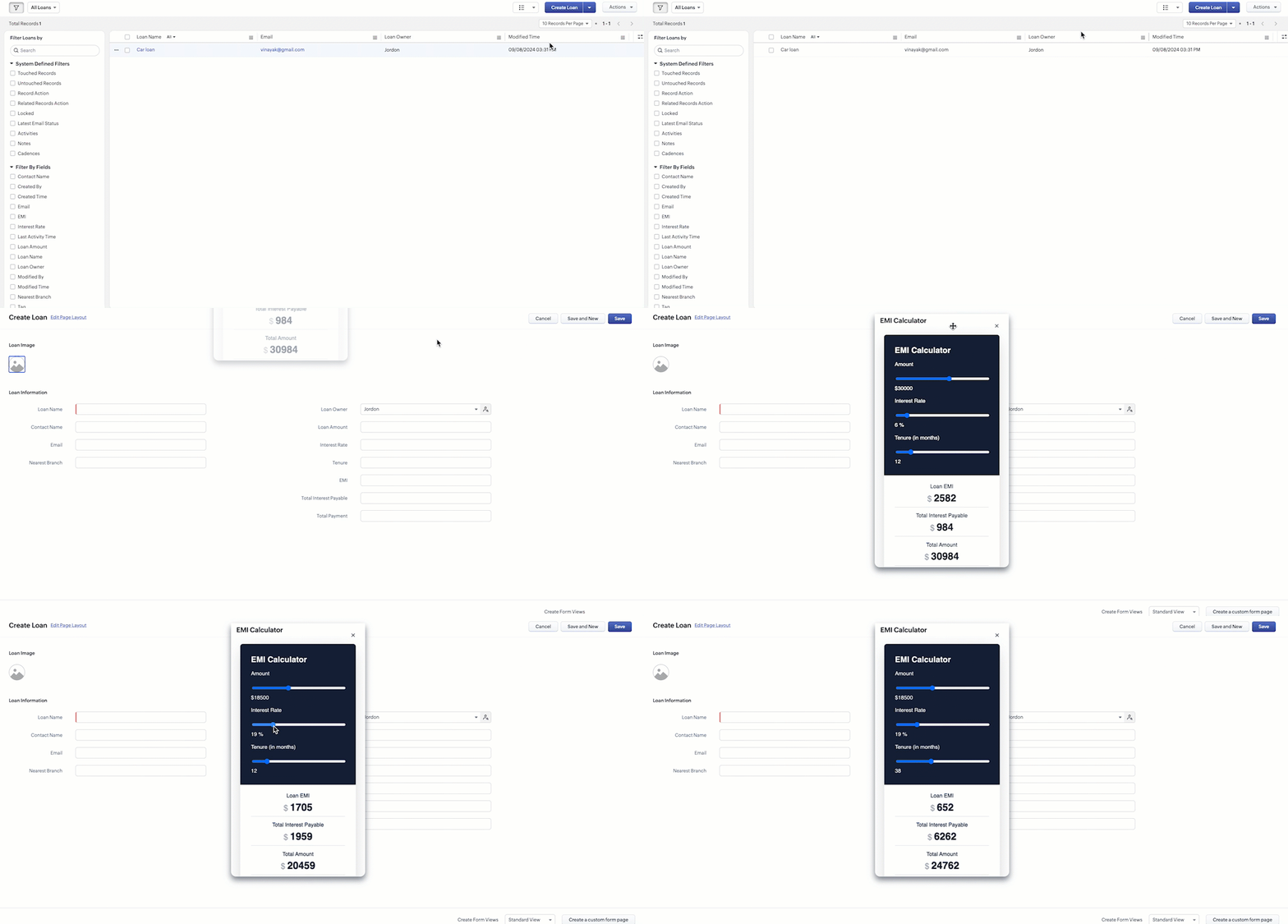
Sales Advisors in a Finance Consulting Company regularly rely on an EMI calculator to help customers with loan queries. To improve their efficiency and eliminate the need to switch between different windows, the admin manager intends to integrate the calculator directly into CRM. The EMI calculator should appear on the Create Page of the Loans module and remain active until the user closes it.
4. Solution:
To achieve this in Zoho CRM, we can use Widgets to create an EMI calculator and render them using flyouts in client script whenever the create Page of Loan page loads.
4.a. Create a Widget for EMI Calculator
Install Zoho CLI, and follow the steps given in this document to create the Widget app folder. Then update the html, javascript, and css code as per your requirement.
index.html
- <!DOCTYPE html>
- <html lang="en">
- <head>
- <meta charset="UTF-8" />
- <meta http-equiv="X-UA-Compatible" content="IE=edge" />
- <meta name="viewport" content="width=device-width, initial-scale=1.0" />
- <title>Document</title>
- <link rel="stylesheet" href="style.css" />
- </head>
- <body>
- <div class="loan-calculator">
- <div class="top">
- <h2>EMI Calculator</h2>
- <form action="#">
- <div class="group">
- <div class="title">Amount</div>
- <input type="range" min="1000" value="30000" max="50000" step="500" class="loan-amount" id="loanAmount" />
- <div class="slider-label">$<span id="loanAmountValue"></span></div>
- </div>
- <div class="group">
- <div class="title">Interest Rate</div>
- <input type="range" min="5" value="6" max="100" step="1" class="interest-rate" id="interesRate" />
- <div class="slider-label"><span id="interesRateValue"></span></div>
- </div>
- <div class="group">
- <div class="title">Tenure (in months)</div>
- <input type="range" min="6" max="100" step="1" value="12" class="loan-tenure" id="tenureMonth" />
- <div class="slider-label"><span id="tenureMonthValue"></span></div>
- </div>
- </form>
- </div>
- <div class="result">
- <div class="left">
- <div class="loan-emi">
- <h3>Loan EMI</h3>
- <div class="value">123</div>
- </div>
- <div class="total-interest">
- <h3>Total Interest Payable</h3>
- <div class="value">1234</div>
- </div>
- <div class="total-amount">
- <h3>Total Amount</h3>
- <div class="value">12345</div>
- <div class="right">
- <canvas id="myChart" width="400" height="400"></canvas>
- </div>
- </div>
- </div>
- <script src="https://cdn.jsdelivr.net/npm/chart.js@3.6.2/dist/chart.min.js"></script>
- <script src="https://live.zwidgets.com/js-sdk/1.2/ZohoEmbededAppSDK.min.js"></script>
- <script src="main.js"></script>
- </body>
- </html>
- Click here to view the complete code.
- Once you have added the code, upload the zip file by following the below steps.
- Go to Setup > Developer Space > Widgets.
- Click Create New Widget and Fill in the details.
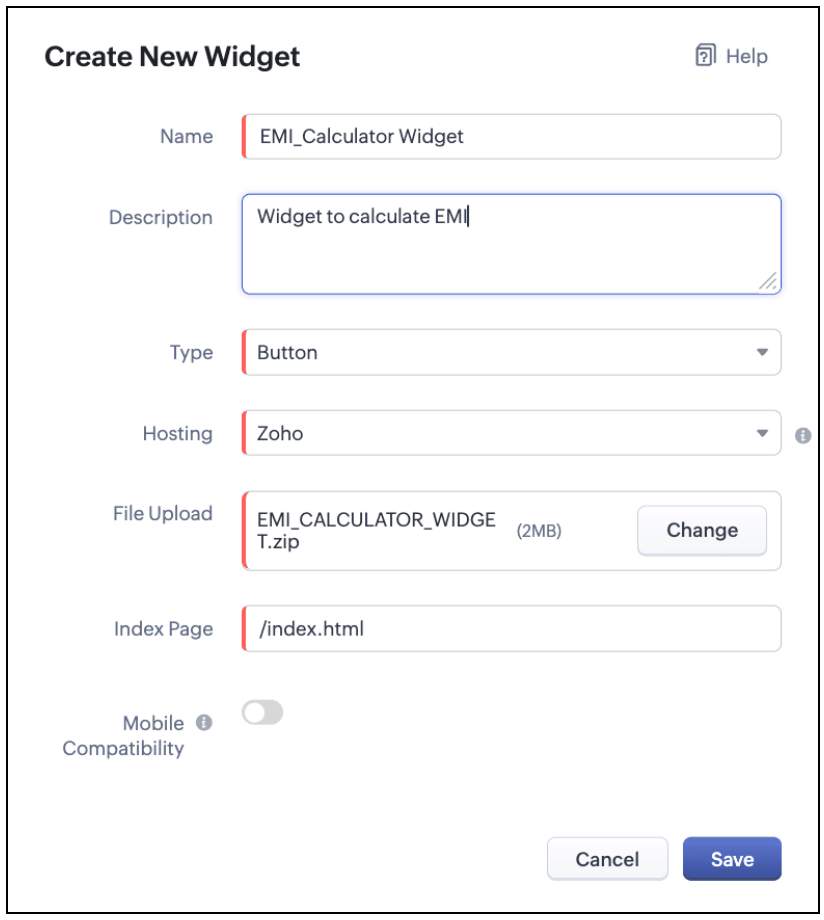
The Hosting should be "Zoho" and mention the html page of the app folder that you uploaded.

Note:
The widget should be of "button" type in order to render through a Client Script.
4.b. Create a Client Script to render the Widget as Flyout
Configure a Client Script for Create Page(Standard) Loans module, that triggers during onLoad event as shown below. Click Next. Click here to know how to configure a Client Script.

Enter the following script and click Save.
- ZDK.Client.createFlyout('EMIFlyout', {
- header: 'EMI Calculator',
- animation_type: 1,
- height: '400px',
- width: '450px',
- close_on_exit: false
- });
- ZDK.Client.getFlyout('EMIlyout').open(
- { api_name: 'EMI_CALCULATOR_WIDGET', type: 'widget' },
- { data: loanDetails }
- );
In the above script, createFlyout() will create a new flyout with header.
Below is the syntax and parameter detail.

Now Open the flyout and render the Widget in the flyout using open() method and specify the api_name of the widget.

Here is how the Client Script renders the flyout.
5. Difference between flyout and popup in Client Script
Flyout | Pop up |
A flyout can be moved around the page. | A pop-up cannot be moved anywhere on the page. |
It can run independently in a separate thread. The user can interact with the background interface without closing the flyout. | The user cannot interact with the background without closing the pop up. |
Use flyouts, when you need to exchange data to and fro between a Widget and Client Script. You can use ZDK.Client.sendResponse() to pass data from a widget rendered as a flyout to the Client Script. | Use popup, when you need to interrupt the screen to gather input from the user or display a message before proceeding. Use $Client.close() to pass data to the Client Script, which will also close the popup. |
In the scenario discussed in this post, if you want to make it mandatory for the user to read or interact with the EMI Calculator before entering any value in the create Page(Standard), then you can use pop-up instead of Flyout. Both pop up and flyout can be used to display widgets, and their dimensions can be altered.
Refer to this post to know how to render widgets as pop up using Client Script.
6. Summary
- In this post, we have seen,
- Flyouts in Zoho CRM.
- ZDKs and methods to render a Flyout(Widget) using Client Script.
- When to use a Flyout and when to use a pop up.
7. Related Links
 Previous Post: Kaizen #156 -Enhancing Mass Communication in Zoho CRM with a Custom Button Widget | Kaizen Collection: Home
New to Zoho Recruit?
Zoho Campaigns Resources





Topic Participants
Maadhari M
Jeremy Nagel - www.smooth.tel
Kava Li
Jeganprabhu S
Ishwarya SG
Sticky Posts
Kaizen #198: Using Client Script for Custom Validation in Blueprint
Nearing 200th Kaizen Post – 1 More to the Big Two-Oh-Oh! Do you have any questions, suggestions, or topics you would like us to cover in future posts? Your insights and suggestions help us shape future content and make this series better for everyone.Kaizen #226: Using ZRC in Client Script
Hello everyone! Welcome to another week of Kaizen. In today's post, lets see what is ZRC (Zoho Request Client) and how we can use ZRC methods in Client Script to get inputs from a Salesperson and update the Lead status with a single button click. In thisKaizen #222 - Client Script Support for Notes Related List
Hello everyone! Welcome to another week of Kaizen. The final Kaizen post of the year 2025 is here! With the new Client Script support for the Notes Related List, you can validate, enrich, and manage notes across modules. In this post, we’ll explore howKaizen #217 - Actions APIs : Tasks
Welcome to another week of Kaizen! In last week's post we discussed Email Notifications APIs which act as the link between your Workflow automations and you. We have discussed how Zylker Cloud Services uses Email Notifications API in their custom dashboard.Kaizen #216 - Actions APIs : Email Notifications
Welcome to another week of Kaizen! For the last three weeks, we have been discussing Zylker's workflows. We successfully updated a dormant workflow, built a new one from the ground up and more. But our work is not finished—these automated processes are
Zoho CRM Plus Resources
Zoho Books Resources
Zoho Subscriptions Resources
Zoho Projects Resources
Zoho Sprints Resources
Zoho Orchestly Resources
Zoho Creator Resources
Zoho WorkDrive Resources


Zoho CRM Resources
Get Started. Write Away!
Writer is a powerful online word processor, designed for collaborative work.
Zoho CRM コンテンツ
-
オンラインヘルプ
-
Webセミナー
-
機能活用動画
-
よくある質問
-
Ebook
-
-
Zoho Campaigns
- Zoho サービスのWebセミナー
その他のサービス コンテンツ
ご検討中の方
Recent Topics
Numbers in MA
I have an issue rationalising the various numbers around MA2. Not convinced that any are truly accurate. However have a specific problem in that i have a list with 1301 records in the list view. When i come to email there is only 1289 Then have anotherAndroid mobile app unable to log in
When I open the mobile up for zoho mail it asks me to sign in, but when i push the sign in button nothing happens. Tried uninstalling and reinstalling still not workingPie chart in Zoho Analytics shows ridicoulous numer of decimals of a percentage.
Is there a way to set the number of decimals of a percentage value in the Pie chart? Now it displays 15 decimals instead of a round-off value. The value is a count and percentage calculated in the chart, so there is no number of decimals that can be specifiedZoho People > Leave Management > Unable to import balance leave
Hello Zoho I am unable to import balance leave into the system I have follow the steps It show only 5 fields - the date field i am unable to select from date and to date Error Date in excelsheetNarrative 4: Exploring the support channels
Behind the scenes of a successful ticketing system - BTS Series Narrative 4 - Exploring the support channels Support channels in a ticketing system refer to the various communication methods that customers use to contact a business for assistance. TheseTip of the Week #65– Share email drafts with your team for quick feedback.
Whether you're replying to a tricky customer question or sharing a campaign update, finding the right words—and the right tone—can be tough. You just wish your teammates could take a quick look and give their suggestions before you send it. Sometimes,How to Initiate WhatsApp Message on SalesIQ?
I've just activated a Business WhatsApp phone number through SalesIQ because of its touted omnichannel chat approach. Sounds exciting. I understand that when a customer sends me a WA message, I can reply to it on SalesIQ and keep the chat going, perfect.Episode IV:Handling User Inputs in custom functions
Hi Everyone, We've been exploring custom functions which help in performing advanced automation tasks. Custom functions enable you to achieve possibilities based on your organization's requirements. Custom functions require user inputs that allow theSet a lead as non-marketing if they opt out of email marketing
I'm gathering Lead data via an enquiry form and wish to give them the option to opt out of marketing emails (which we send from Marketing Automation) whilst retaining the ability to send them non-marketing emails - so the email opt-out field doesn't work.Set up multiple IMAP email addresses
Hi, I just started using CRM and its great, but I just found out I can only add one imap email address for incoming mail in the included salesinbox ...this is ridiculous. All companies have different email such as sales@domain, info@domain , personal@domainZoho Recruit to Zoho People integration
In the mapping of field from Zoho Recruit to Zoho People i am unable to map all fields What can i doZoho Recruit > Career Site > Customisation
Hi All I have created multiple career site to represent my different organization In my Quanta Media career site > I set it with the with Quanta Malta view In my job opening : Quanta Malta view 2 job opening In my URL for quanta media https://lri.zohorecruit.eu/jobs/Quanta-MaltaFormatting Blueprint Stages (buttons)
Is there a way to format Blueprint transition buttons in Creator like background colour, text colour etc.Disable Default Value in Multi-Select field
Hello, Is there a way to disable the default value feature when setting up a custom Multi-Select field? When creating tickets I would like it so there isn't a value pre-selected in the multi-select custom field that was created.How to set custom business hours for different teams in Zoho Desk?
Hi Zoho Team and Community, I’m trying to set different business hours for multiple departments in Zoho Desk. For example, our tech support team works 24/7, while our billing team is only available from 9 AM to 5 PM (Mon–Fri). Is there a way to assignZia Auto Tag Keyword Clusters
Is there a way to remove a keyword from a keyword cluster? We're finding that Zia auto-tag is tagging things incorrectly based on some words that don't really make sense.Centralized Domain Verification in Zoho CRM Plus
Hi Team, I have a suggestion regarding Zoho CRM Plus. It's quite frustrating to verify the same domain separately for each application within the suite. It would be really helpful if you could introduce a centralized admin console—similar to what's availableHOw do I make a refund?
I have a client that needs a refund. I see a refund history in the Report area... but where do I go to make a refund?Creating a work order for dispatch
We currently uses ZOHO for CRM and Intuit Field Service for creating Work orders and dispatching. This is causing double entry and is not efficient use of time. I would like to use ZOHO for all customer related activities so can you tell me if you can : Create a work order that we could manipulate to meet our needs. Also if you could then dispatch that would be ideal. Thank youResidual Formatting in Text Boxes After Undoing Pasting of Formatted Text
Hi, guys! I have another problem to report. Actually, I have been aware of this for many months, possibly years, but I have been too lazy to report it to you. My apologies! Let's say you've pasted a formatted string into a text box. You change your mindFeature Request: Stripe Terminal Integration
I would like to request the addition of Stripe Terminal integration to Zoho Books, which will help process in-person payments. While Zoho Books already supports online payments through Stripe, extending this functionality to include Stripe Terminal wouldImproved Security in SAML/OIDC Sign-in Redirection Flow
To enhance the security of our authentication system, we’ve made a change to how SAML and OIDC sign-in redirections are handled. This update resolves a potential open redirection vulnerability and adds an extra layer of protection during the sign-in process.GA4 data
Hi, I have data being pulled from GA4 into numerous tables. There are a few major errors in the source data. Eg for a period of time GA4 reported ecommerce sales that were $98 as $9,800 and $42 as $4,200. It's not happening now but my historical dataLost Search Box with new UI Design
I would like to suggest bringing back the Search Box in the new Zoho Project UI. I use the search feature a lot and having to click the magnifying glass to type for a search is one extra click that we did not have with the old UI.Adaptación de zoho books a la nueva regulación de facturación electrónica
La facturación electrónica será obligatoria para todas las empresa en España en 2025, en Francia probablemente también e imagino pronto en todos los países europeos. Ya en 2024 todas las empresa grandes tienen que utilizar el sistema de facturación electrónica.ZOHOBOOK Sales_QUOTE: To Add Discount At Each Line Item Table
Hi, Our quote need to display with discount at each line item level as well. Try to edit template, >CUSTOMISE>EDIT TEMPLATE> Table, I can see template view with discount column, but when hit SAVE the template, view in PDF the discount column not shown.How to account for vat with postponed VAT accounting
Hi everyone, looking for some help with postponed VAT accounting, I use DHL express for my imports and they used to pay the VAT for me and then invoice me. I could then log this as a bill and the VAT element from import was recorded as input VAT, allWeekly Automation Trigger for Equipment Calibration Reminder
Dear Team, I’m currently working on an automation in the Equipment module. The goal is to track calibration schedules for tools — all of which require regular calibration. I’ve created an automation that sends email reminders for tools that are due forADDDATE formula using 2 calculations
Hello, I want to create an ADDDATE formula using 2 calculations, add 1 month and deduct 1 day. the formula that I need should look like this: ADDDATE(due_date, 1, "Months")+ ADDDATE(due_date, -1, "Days") Each row itself works fine, but when I'm tryingUpgrading from Zoho Invoice to Books was a major downgrade in functionality for me
I have been a user for many years of a free plan on Zoho Invoice for my personal consulting business. I recent upgraded my organization to Books since some of the additional functionality looked useful to me, and played around with the free trial for🎉 Dynamic Org Chart for Zoho CRM Extension Published [2025]
Hey Zoho CRM Community! We're thrilled to unveil our latest Zoho extension:🥁 Dynamic Org Chart for Zoho CRM 🎊 This extension is now available to transform the way your teams visualize, manage, and interact with org chart directly inside any Zoho CRM'sDetailed General Ledger has problem of exporting out to excel and missing ledger details for some accounts
I have been encountering some problems generating Detailed General Ledger report with Zoho books. Firstly, I cannot export out the report of Detailed General Ledger to Excel. It will show this error message "invalid value passed for sort column", andUpload a file to a File Upload Field through API
Hello, Is there any way to upload a file to a custom file upload field in a module when doing an Update using the Record API? I've found and I am able to upload files to attachments but I don't know how to upload them to a field. I've checked the documentation at https://www.zoho.com/crm/help/api/v2/#update-specify-records but the File Upload field type does not appear in the examples. ThanksKaizen #131 - Bulk Write for parent-child records using Scala SDK
Hello and welcome back to this week's Kaizen! Last week, we discussed how to configure and initialize the Zoho CRM Scala SDK. This week, we will be exploring the Bulk Write API and its capabilities. Specifically, we will focus on executing bulk writeAutomatic pricing feature for sales orders
I am currently setting up my Zoho Inventory system and would like to implement an automatic pricing feature for sales orders. We have created a custom field called "brandline" for our items. All products with the same brandline value should have the sameAbility to access VAT returns and submit them has disappeared.
I have been using Zoho books successfully to submit quarterly VAT returns. Without reason I have lost that facility. I have followed all available instructions eg going into settings, taxes, VAT etc. without success. My registration number is there andHow to automatically schedule a meeting After Blueprint Transition
As part of our sales process, we require a technician to go to the customer's site and perform an installation prior to advancing to the next stage of the blueprint. So this will require (a) scheduling a meeting for the technician to visit the customer's site and (b) a reminder phone call the day before the scheduled meeting. As I'm designing the Deal Blueprint, I see that I can automatically add a Task to the deal, but I can't add a Meeting or a Call. What am I missing? There seem to be 3 typesZoho Recruit > Workflow
I have created a workflow for my application module Whenever a record is created The condition , application status is 1st call invitation I have set this OI do not receive the email that was suppose to be send outMultiple locations but one parent company
I am trying to configure my accounts that have multiple locations under one parent company to show separate locations in the portal.Stock Count History in Product Details – Zoho Inventory
Hello Zoho Team, When I perform a Stock Count for a product in Zoho Inventory, I would like to view the history of those stock counts later — especially from the product details page. Currently, I can perform the count and update the quantity, but I’mNext Page