Understand Customer Purchase Behavior and Boost Sales with Market Basket Analysis
Delivering a personalized purchase experience is the key differentiator for businesses to increase sales and brand loyalty. Market basket analysis, also called affinity or association analysis, is a data mining technique that helps discover significant patterns and relationships exhibited by individuals while making a purchase.
By identifying the items that occur together,
having adequate stock levels.
Data Requirements
To conduct a market basket analysis, you'll need a transactional dataset that includes the item name, bill number (or order ID), quantity, and date and time of the transaction.
We are using a sample e-commerce store data saved as Orders for illustration. Each row in the Orders data table denotes a transaction.
Preparing the data for analysis
To conduct the market basket analysis, we need to extract the following data from the base table (Orders) using SQL queries.
- A query table that contains all possible pairs of combinations that could occur together.
- A query table to get the number of transactions for combinations that have appeared together or combinations that has been purchased.
- As a final step, merge the all possible combinations query table and the number of transactions query table.
Generating all Possible Pairs of Combinations
The first step in the data preparation process is to generate all distinct pairs of items that could appear on the transaction. To get that,
- Perform a self-join operation on the Items Name column of the base table, Orders. The self-join operation compares each row (transaction) with every other row (transaction).
-
Use the condition Greater than (>) to ensure that each pair of items is considered only once and avoid duplicates where the same pair appears in reverse order, like (Lavender Candle, British Rose) or (British Rose, Lavender Candle) or (Lavender Candle, Lavender Candle)SELECT"Orders" . "Item Name" "Item","Orders copy". "Item Name" "Item Copy"FROM ( SELECT `orders` .`Item Name` "Item Name"FROM "Orders"GROUP BY 1) AS "Orders"JOIN(SELECT `orders`.`Item Name` "Item Name"FROM "Orders"GROUP BY 1) AS "Orders copy" ON "Orders" . "Item Name" > "Orders copy" . "Item Name"
Finally, save the query table with a suitable name. We are saving it as All Items Combinations.
Distinct Count for Existing Combination
The second step in the data preparation process is to get the distinct count for the pairs of items that appear together in transactions.
- Perform a self-join operation on the Items Name column of the base table, Bill Items. The self-join operation compares each row (transaction) with every other row (transaction).
- Use the count_distinct function on the Bill Number column to get the total number of times a combination has occurred together.
|
SELECT
"Orders" . "Item Name" "Item",
"Orders Copy" . "Items Name" "Item Combo",
count_distinct ("Orders Copy" . "Bill Number") "Number of Transactions"
FROM "Orders"
JOIN( SELECT
`Orders`.`Item Name` "Items name",
`Orders`.`Bill Number` "BillNo"
FROM "Orders"
) AS "Orders Copy" ON "Orders" . "Bill Number" = "Orders Copy". "Bill Number"
AND "Orders" . "Item Name" > "Orders Copy" ." Items Name"
GROUP BY 1,
2
|
Finally, save the query table with a suitable name. We are saving it as Count for Existing Combinations.
Merge Tables using Left Join
The final step in the data preparation process is to join the All Combinations table and the Count for Existing Combinations table. Use the Left Join operation on the All Items Combination table, and use the if_null function for combinations that have not occurred or been bought together.
|
SELECT
"All Items Combination" . "Item" "Item",
"All Items Combination" . "Item Copy" "Item Copy",
if_null("Count for Existing Transactions" . "Number of Transactions", 0) as "Number of Transactions"
FROM "All Items Combination"
LEFT JOIN "Count for Existing Transactions" ON "All Items Combination" . "Item" = "Count for Existing Transactions". "Item"
AND "All Items Combination" . "Item Copy" = "Count for Existing Transactions" . "Item Combo"
|
By doing this, we will have a query table showing the count of pairs of items that occur together, with 0 assigned to combinations that do not occur together.
Data Visualization - Creating a Heat map
- Access the Total Transactions for all Combinations query table, click the Create icon on the side navigation panel.
- Choose New Chart view from the drop-down menu.
- Drag and drop the column as shown below
- X - axis: Item
- Y - axis - Item Copy
- Color - Number of transactions
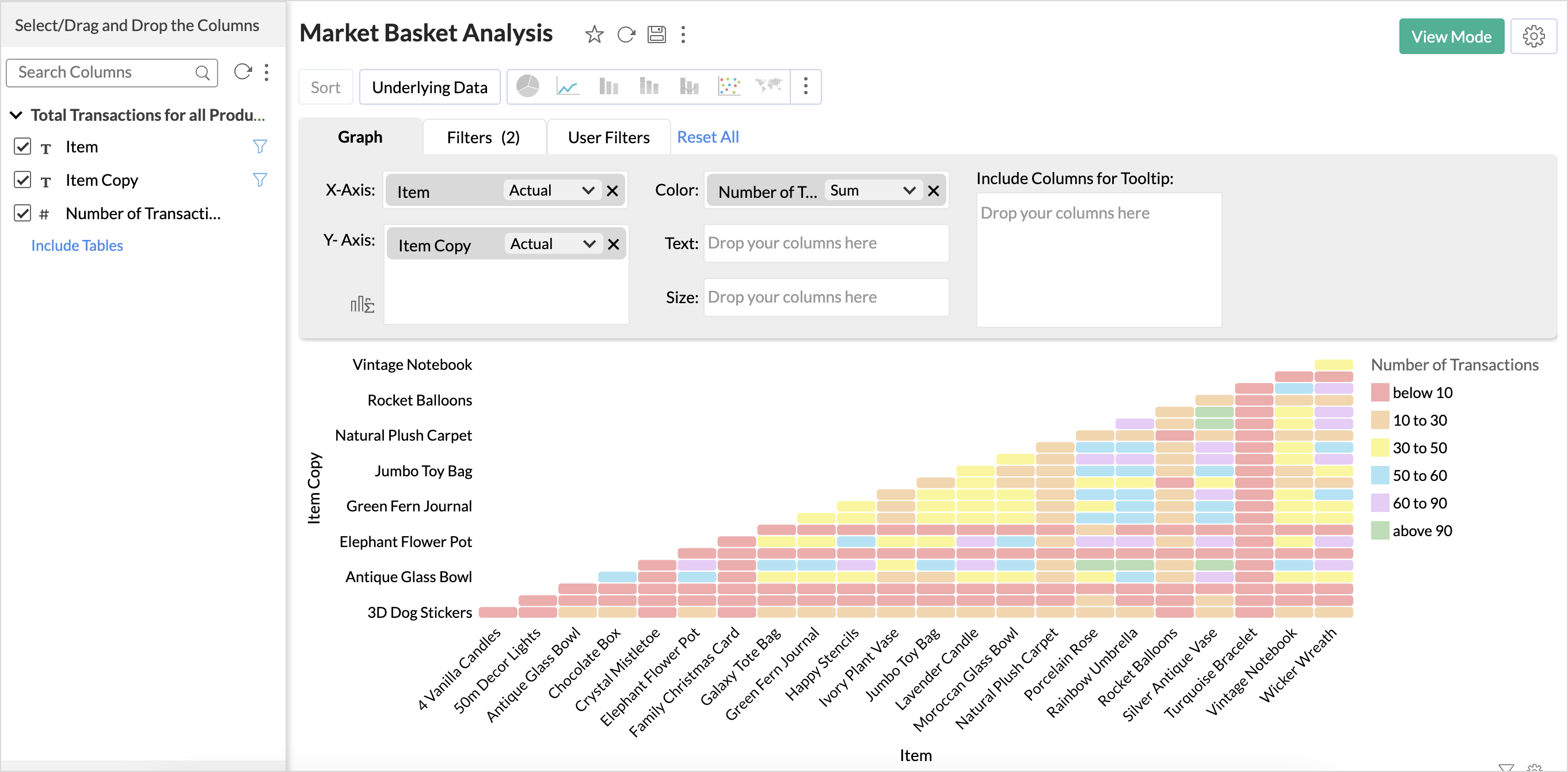
- Click Generate Graph.
- The heat map for pairs of combinations will be ready!
Inference
From the above graph, we infer that combinations like {Silver Antique Vase, Chocolate Box} and {Silver Antique Vase, Rainbow Umbrella} {Rainbow Umbrella, Chocolate box} {Silver Antique Vase, Porcelain Rose} have a higher purchase frequency.
Items with a higher purchase frequency can be displayed on the home page of the e-commerce site as Best Sellers. They can also be shown as recommendations to cross-sell products if the cart has any one of the related items that is frequently bought.
Market Basket Analysis for 3 - item Combination
You can create a query table similar to the above query table to find the three items that occur together in transactions and create a pivot table for visualization. Refer to the sample workspace for queries.
New to Zoho Recruit?
Zoho Campaigns Resources





Topic Participants
Nisha Angel J
Sticky Posts
Tip of the Week - Spot Risky Sales with Conditional Formatting
In Zoho Analytics, small tweaks can lead to big insights. One such feature is Conditional formatting based on other columns, your key to instantly spotting where sales success is overshadowed by product returns. Our tip this week shows you how to apply
Zoho CRM Plus Resources
Zoho Books Resources
Zoho Subscriptions Resources
Zoho Projects Resources
Zoho Sprints Resources
Zoho Orchestly Resources
Zoho Creator Resources
Zoho WorkDrive Resources


Zoho CRM Resources
Get Started. Write Away!
Writer is a powerful online word processor, designed for collaborative work.
Zoho CRM コンテンツ
-
オンラインヘルプ
-
Webセミナー
-
機能活用動画
-
よくある質問
-
Ebook
-
-
Zoho Campaigns
- Zoho サービスのWebセミナー
その他のサービス コンテンツ
ご検討中の方
Recent Topics
Good news! Calendar in Zoho CRM gets a face lift
Dear Customers, We are delighted to unveil the revamped calendar UI in Zoho CRM. With a complete visual overhaul aligned with CRM for Everyone, the calendar now offers a more intuitive and flexible scheduling experience. What’s new? Distinguish activitiesQuick way to add a field in Chat Window
I want to add Company Field in chat window to lessen the irrelevant users in sending chat and set them in mind that we are dealing with companies. I request that it will be as easy as possible like just ticking it then typing the label then connectingHow to create a two way Sync with CRM Contacts Module?
Newbie creator here (but not to Zoho CRM). I want to create an app that operates on a sub-set of CRM Contacts - only those with a specific tag. I want the app records to mirror the tagged contacts in CRM. I would like it to update when the Creator appZoho Sheet for Desktop
Does Zoho plans to develop a Desktop version of Sheet that installs on the computer like was done with Writer?Where is the settings option in zoho writer?
hi, my zoho writer on windows has menu fonts too large. where do i find the settings to change this option? my screen resolution is correct and other apps/softwares in windows have no issues. regardsDevelop and publish a Zoho Recruit extension on the marketplace
Hi, I'd like to develop a new extension for Zoho Recruit. I've started to use Zoho Developers creating a Zoho CRM extension. But when I try to create a new extension here https://sigma.zoho.com/workspace/testtesttestest/apps/new I d'ont see the option of Zoho Recruit (only CRM, Desk, Projects...). I do see extensions for Zoho Recruit in the marketplace. How would I go about to create one if the option is not available in sigma ? Cheers, Rémi.How to import data from PDF into Zoho Sheet
I am looking to import Consolidated Account Statement (https://www.camsonline.com/Investors/Statements/Consolidated-Account-Statement) into zoho sheet. Any help is appreciated. The pdf is received as attachment in the email, this document is passwordZoho Projects Android app: Integration with Microsoft Intune
Hello everyone! We’re excited to announce that Zoho Projects now integrates with Microsoft Intune, enabling enhanced security and enterprise app management. We have now added support for Microsoft Intune Mobile Application Management (MAM) policies throughCant't update custom field when custom field is external lookup in Zoho Books
Hello I use that : po = zoho.books.updateRecord("purchaseorders",XXXX,purchaseorder_id,updateCustomFieldseMap,"el_books_connection"); c_f_Map2 = Map(); c_f_Map2.put("label","EL ORDER ID"); c_f_Map2.put("value",el_order_id); c_f_List.add(c_f_Map2); updateCustomFieldseMapAbout Zoneminder (CCTV) and Zoho People
Hi team I would like to implement a CCTV service for our branches, with the aim of passively detecting both the entry and exit of personnel enrolled in Zoho Peeple, but my question is: It is possible to integrate Zoho People with Zoneminder, I understandCreate CRM Deal from Books Quote and Auto Update Deal Stage
I want to set up an automation where, whenever a Quote is created in Zoho Books, a Deal is automatically created in Zoho CRM with the Quote amount, customer details, and some custom fields from Zoho Books. Additionally, when the Sales Order is convertedHow to show branch instead of org name on invoice template?
Not sure why invoices are showing the org name not the branch name? I can insert the branch name using the ${ORGANIZATION.BRANCHNAME} placeholder, but then it isn't bold text anymore. Any other ideas?Admin asked me for Backend Details when I wanted to verify my ZeptoMail Account
Please provide the backend details where you will be adding the SMTP/API information of ZeptoMail Who knows what this means?Kaizen #223 - File Manager in CRM Widget Using ZRC Methods
Hello, CRM Wizards! Here is what we are improving this week with Kaizen. we will explore the new ZRC (Zoho Request Client) introduced in Widget SDK v1.5, and learn how to use it to build a Related List Widget that integrates with Zoho WorkDrive. It helpsSet connection link name from variable in invokeurl
Hi, guys. How to set in parameter "connection" a variable, instead of a string. connectionLinkName = manager.get('connectionLinkName').toString(); response = invokeurl [ url :"https://www.googleapis.com/calendar/v3/freeBusy" type :POST parameters:requestParams.toString()Possible to connect Zoho CRM's Sandbox with Zoho Creator's Sandbox?
We are making some big changes on our CRM so we are testing it out in CRM's Sandbox. We also have a Zoho Creator app that we need to test. Is it possible to connect Zoho CRM's Sandbox to Zoho Creator's Sandbox so that I can perform those tests?I Need Help Verifying Ownership of My Zoho Help Desk on Google Search Console
I added my Zoho desk portal to Google Search Console, but since i do not have access to the html code of my theme, i could not verify ownership of my portal on Google search console. I want you to help me place the html code given to me from Google searchTimeline Tracker
Hi Team, I am currently using Zoho Creator – Blueprint Workflows, and I would like to know if there is a way to track a timeline of the approval process within a Blueprint. Specifically, I am looking for details such as: Who submitted the record Who clickedPrimary / Other Billing Contacts
If you add an additional contact to a Zoho Billing Customer record, and then mark this new contact as the primary contact, will both the new primary and old primary still receive notifications? Can you stop notifications from going to the additional contactsIs it possible to enforce a single default task for all users in a Zoho Projects ?
In Zoho Projects, the Tasks module provides multiple views, including List, Gantt, and Kanban. Additionally, users can create and switch to their own custom views. During project review meetings, this flexibility creates confusion because different users[Free Webinar] Zoho Creator webinars - Learning Table and Creator Tech Connect Series in 2026
Hello everyone, Wishing you all a wonderful new year! May 2026 and the years ahead bring more opportunities, growth, and learning your way 🙂 We’re excited to kick off the 2026 edition of the Learning Table Series and Creator Tech Connect Series ! LearningReply and react to comments
Hi everyone! We're excited to bring to you a couple of new features that'll make your sprint process simpler. A cloud application brings with it an array of social media features that can be efficiently used in your organizational setup. As an agile scrumModule Customisation - Lookup function not available
Good evening, Within my business, I can have multiple customers, who have multiple mobile assets. When I set these assets up, I enter information such as vehicle registration, Vehicle identification number (VIN), Unit number, YOM, in addition to others.zoho click, and nord VPN
Unfortunately, we've been having problems with Zoho Click, where essentially the line cuts off after about a minute's worth of conversation every time we are on VPN. Is there a way we can change this within the settings so it does not cut the line offZoho Calender
a) does the clanender in zoho project allow you to see the name of the event in the celnder view, it currently says either "Task (1) or "Milestoen (1)" b) Alternatively does the calender in Zoho project integrate with zoho calender?Matching ZOHO Payments in Banking
Our company has recently integrated ZOHO Payments into our system. This seemed really convenient at first because our customers could pay their account balance by clicking on a link imbedded in the emailed invoice. Unfortunately, we can't figure out howNew Enhancements to Zoho CRM and Zoho Creator Integration
Hello Everyone, We’ve rolled out enhancements to the Zoho Creator and Zoho CRM integration to align with recent updates made to the Zoho Creator platform. With enhancements to both the UI and functionality, This update also tightens access control byWork Type - Limitation
Hello, I'm setting up work types and have noticed, a limitation on the parts area to 10 lines. Can this be increased to 20 or greater? In addition to this, when I attempt to add the work type to a work order, the correct labour hours doesn't flow through.Emails sent through Bigin are not posting in IMAP Sent folder
I have set up my email to work from within Bigin using IMAP. I am using IMAP so I can sync my email across multiple devices - phone / laptop / desktop / iPad / etc. I want all my emails to populate my email client (outlook & iphone email) whether orTurning the page for Zoho SalesIQ: 2025 to 2026
As we wrap up 2025, we would like to take a moment to reflect on what we set out to achieve this year, what we’ve delivered, and where we’re headed next. What we focused on in 2025 This year was all about strengthening the core of engagement and AI, makingTemporary Outage in Zoho Cliq Affecting US Users – July 23, 2025
We experienced a service disruption in Zoho Cliq that impacted core functionality for users in the US region. The issue occurred between Jul 23, 2025, 06:54:00 PM IST and 07:13:13 PM IST, lasting approximately 19 minutes. To restore service stability,Why Sharing Rules do Not support relative date comparison???
I am creating a Sharing Rule and simply want to share where "Last Day of Coverage" (Date field) is Greater than TODAY (Starting Tomorrow). However, sharing rules don't have the option to compare a date field to a relative date (like today), only to StaticZoho Cliq not working on airplanes
Hi, My team and I have been having this constant issue of cliq not working when connected to an airplane's wifi. Is there a reason for this? We have tried on different Airlines and it doesn't work on any of them. We need assistance here since we are constantlyMulti-currency and Products
One of the main reasons I have gone down the Zoho route is because I need multi-currency support. However, I find that products can only be priced in the home currency, We sell to the US and UK. However, we maintain different price lists for each.Create an Eye-Catching Announcement Widget for Your Help Center
Hello Everyone! In this week’s edition, let’s explore how to keep your customers updated with exciting news in the Help Center. See how ZylkerMobile wowed their customers by bringing updates right to their portal. ZylkerMobile, the renowned brand forSend Whatsapp with API including custom placeholders
Is is possible to initiate a session on whatsapp IM channel with a template that includes params (placeholders) that are passed on the API call? This is very usefull to send a Utility message for a transactional notification including an order numberCustomer Management: #6 Common Mistakes in Customer Handling
Managing customers doesn't usually fall apart overnight. More often, slight gaps in the process slowly become bigger problems. Incidents like missed follow-ups, billing confusion, and unhappy customers will lead to revenue loss. Many businesses don'tZoho Desk iOS app update: UI enhancement of picklist and multi picklist fields
Hello everyone! We have enhanced the UI of the picklist and multiselect picklist fields on the Zoho Desk iOS app to provide a more refined, efficient, and user-friendly experience. We have now supported an option to Search within the picklist and multiselectZoho Desk iOS app update: Revamped scribbles with Apple pencil kit
Hello everyone! We’re excited to introduce a revamped Scribble experience, rebuilt from the ground up using Apple PencilKit for smooth strokes, proper scaling, and seamless image uploads. Please update the app to the latest version directly from the AppZoho Desk Android app update: Norwegian language support
Hello everyone! In the most recent Android version of the Zoho Desk app update, we have brought in support to access the app in Norwegian language. We have introduced the Norwegian language on the IM module of the Zoho Desk app as well. Please updateNext Page