Building extensions #1: Creating and testing extensions for Zoho Finance Suite applications
Hello developers!
We're excited to announce a new series called "Building extensions" to assist developers in creating efficient extensions for Zoho Finance Suite products. We'll support and guide you through the process of creating an extension and using the features offered in the developer portal.
What are extensions?
Extensions are installable plugins or add-ons that help enhance the existing functionality of your Zoho product or seamlessly integrate and interact with third-party applications for data transmission.
How can you build extensions?
Zoho offers a developer platform called Zoho Developer that allows you to build different types of applications. Sigma is a platform offered within Zoho Developer that is specifically designed for creating extensions for various Zoho products. Throughout this series, we'll look at how to create and develop extensions for the Zoho Finance Suite applications using Sigma.
Get to know all about extensions and building them further in detail.
Sigma extension support
The Zoho Finance Suite consists of seven applications: Zoho Books, Zoho Inventory, Zoho Expense, Zoho Invoice, Zoho Billing, Zoho Checkout, and Zoho Payroll. Currently, the Sigma platform supports creating and building extensions for these five Zoho Finance applications:
- Zoho Books
- Zoho Inventory
- Zoho Expense
- Zoho Invoice
- Zoho Billing
Creating an extension
- Log in or sign up at developer.zoho.com.
- Go to Sigma and access your workspace.
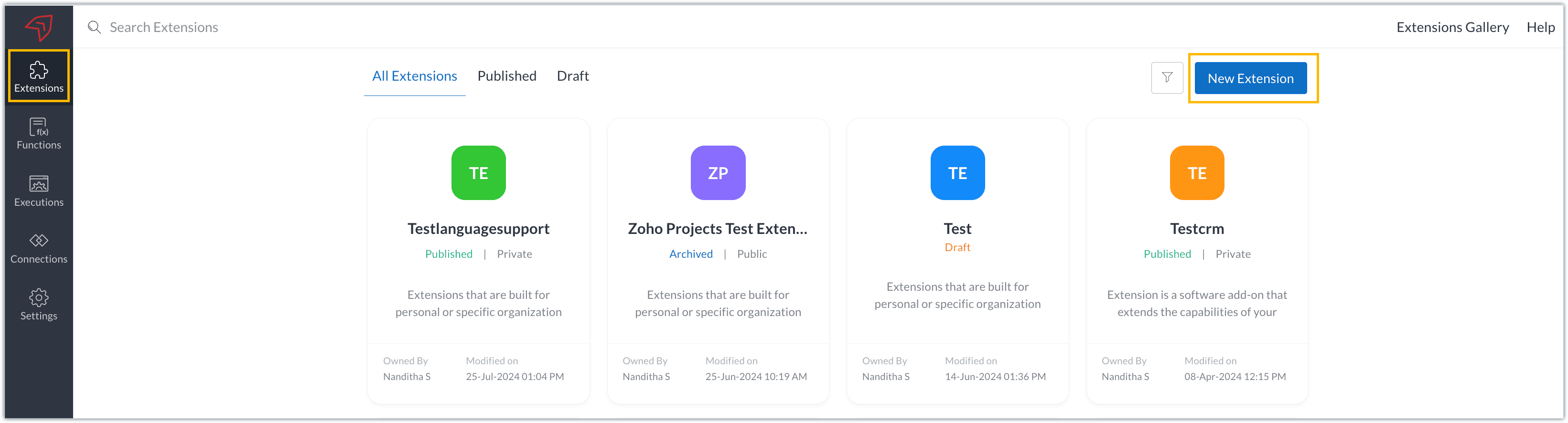
- Once you enter your workspace, you'll be taken to the Extensions section in Sigma.
- Click the New Extension button to start building an extension.
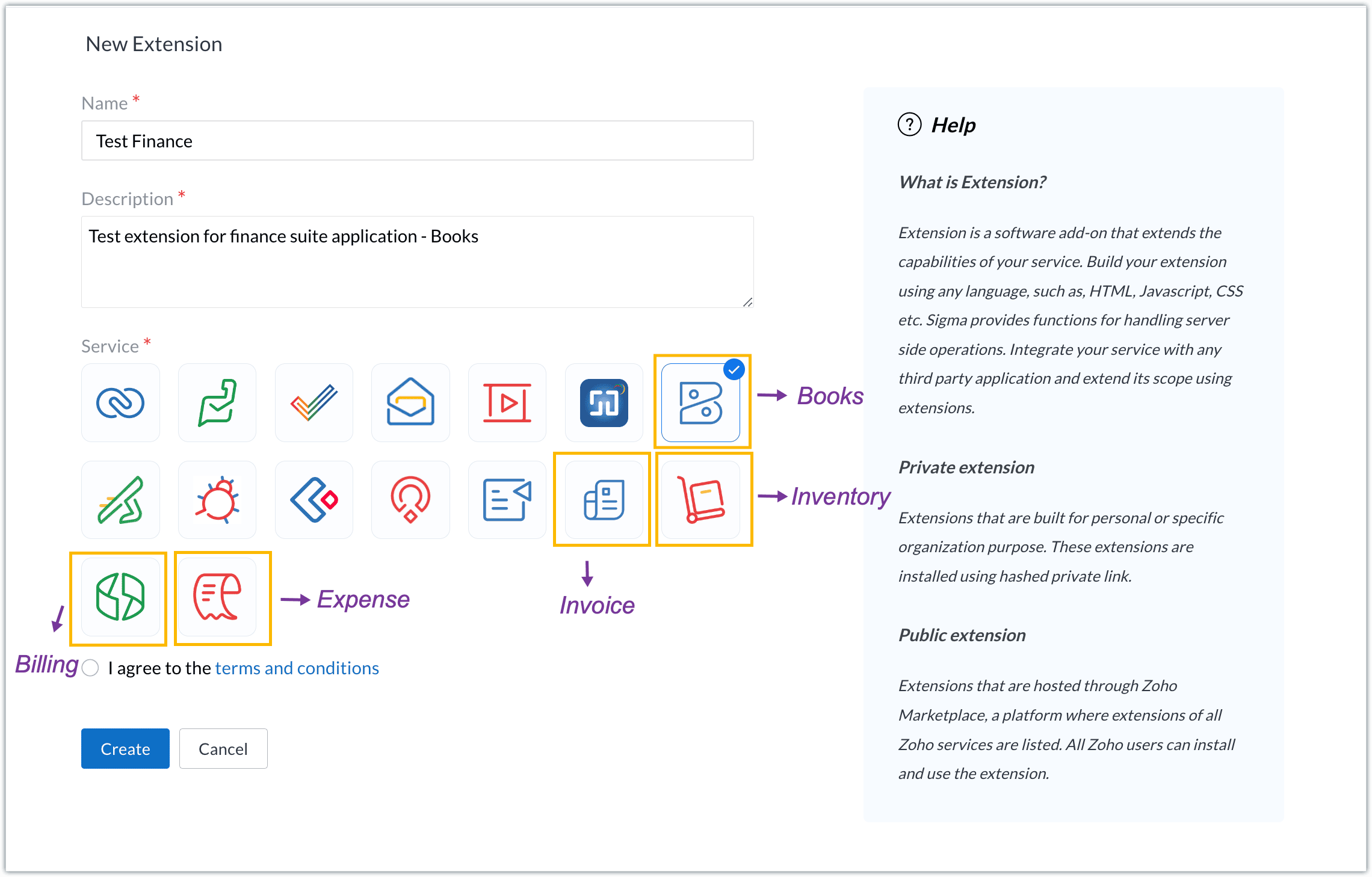
- Enter a name and description for the extension and choose the service you want to build the extension for. As mentioned earlier, Sigma offers support for Zoho Books, Zoho Invoice, Zoho Inventory, Zoho Billing, and Zoho Expense.
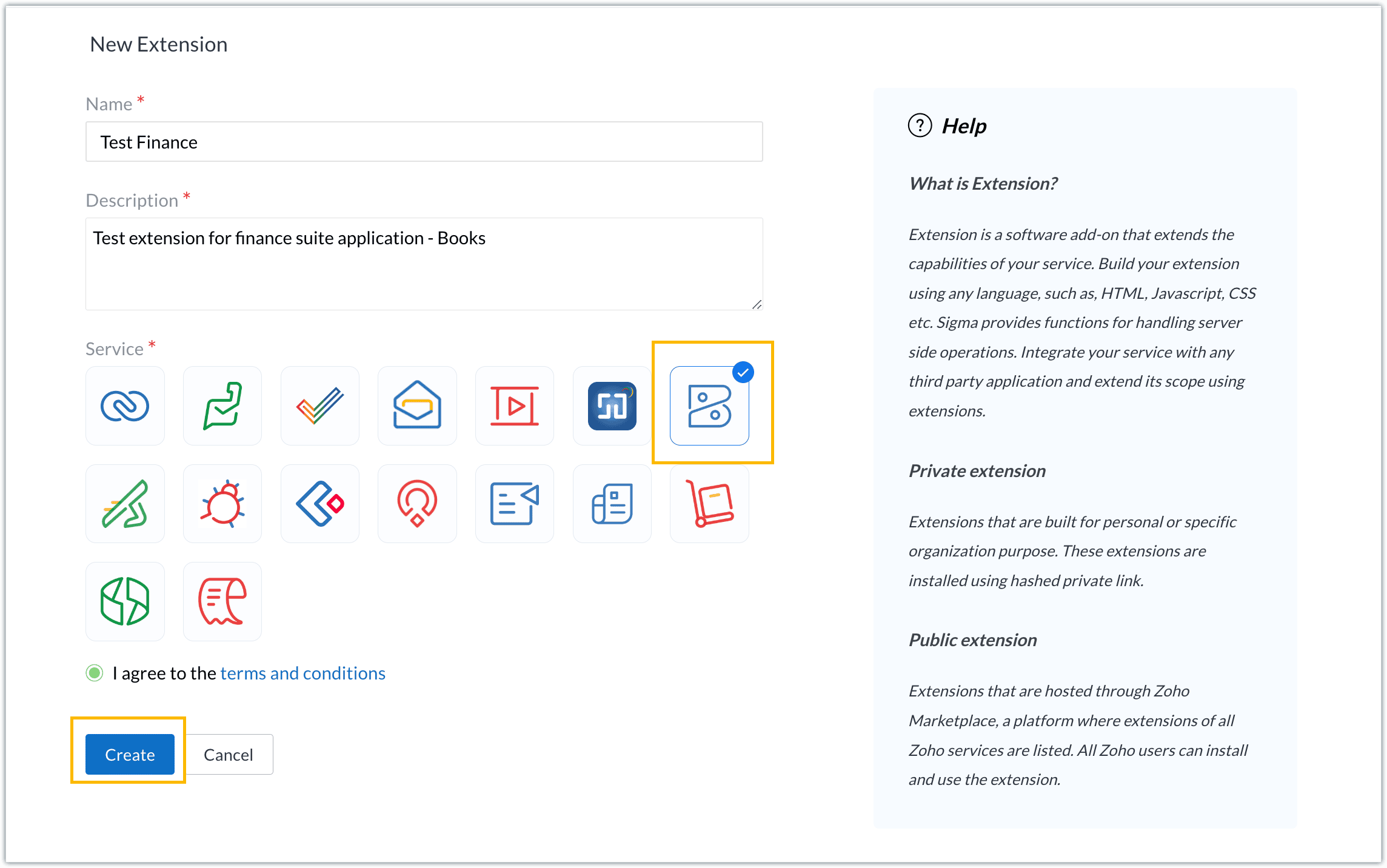
- For our demo, let's choose the service as Zoho Books. Accept the terms and conditions, and then click Create.
- The extension is successfully created. You can click the Extension Details icon to see an overview of the extension.
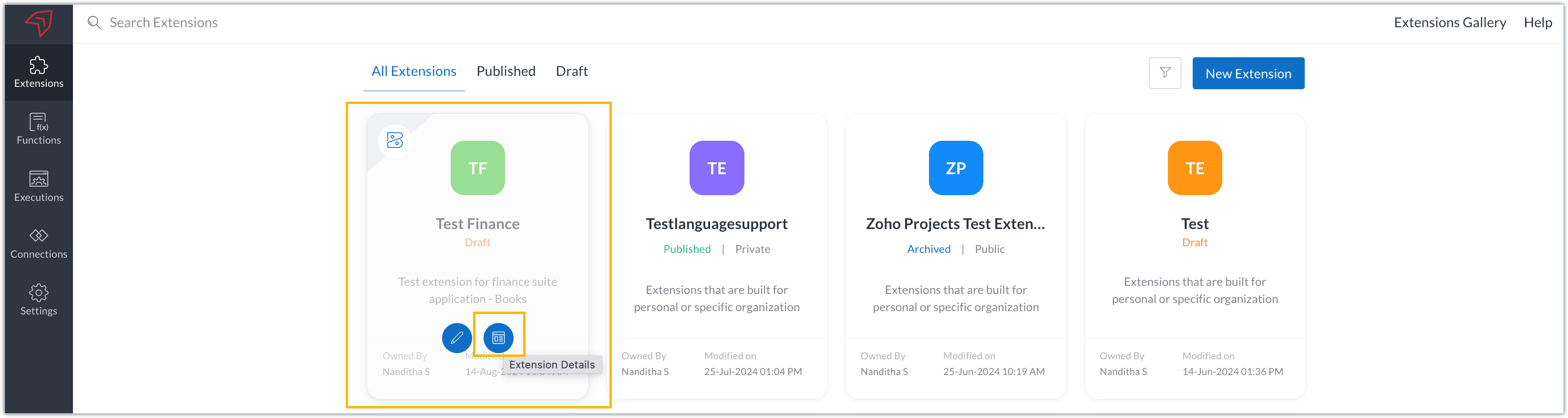
The extension details page shows the general details of the extension, such as creation date, creation time, and version, and allows you to associate developers with the extension.
- Click the Edit Extension icon to start developing the extension.
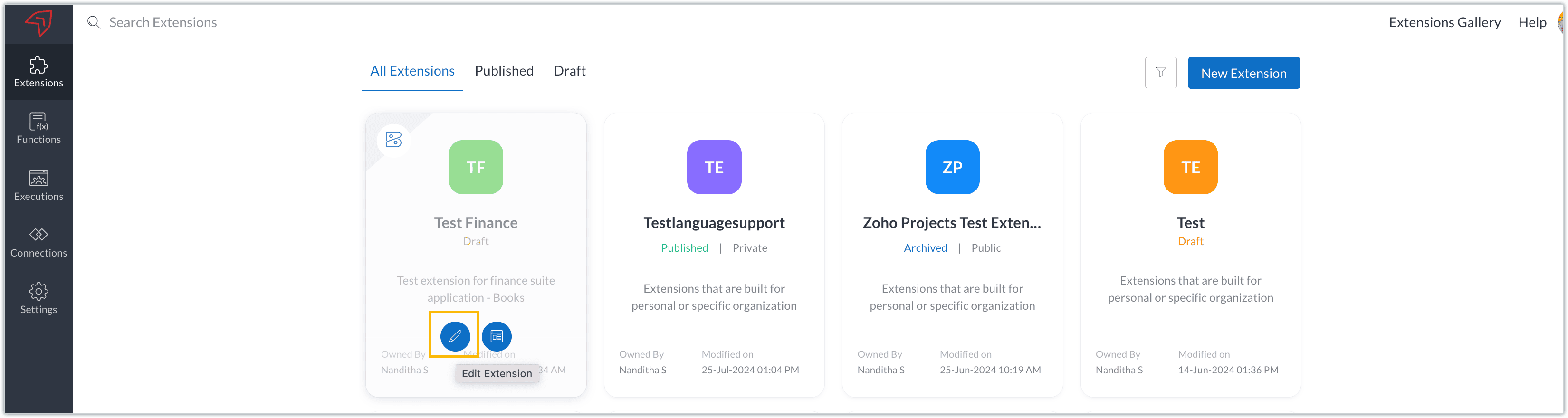
- The Zoho Books Developer Portal opens with the options and native features available to customize, curate, and develop your extension.
Zoho Books Developer Portal sections
The developer portal has four different sections to help customize and build your extension.
Learn: This section lists the native Zoho Books capabilities that can be used to create and develop extensions. Clicking the Set up Now button next to each feature will take you to the feature's development setup page.

Build: This is the development setup section, which includes customization, automation, and components like connections, widgets, schedules, webhooks, and signals. You can customize your extension preferences, establish connections to integrate with other applications, and design custom interfaces to enhance user experience.

Configure: This section assists with handling your extension's required configurations, whether they are generic settings or customizations required from the user. You can add global fields, which can be incorporated as either variables that store static data or through custom widgets that retrieve user inputs. You can also define functionalities that happen during installation and uninstallation.

Publish: Once the extension has been built and configured, you can use this section to publish it for either private or public use. In both cases, the Zoho Books team will review the extension; for public extensions listed on Zoho Marketplace, the Zoho Marketplace approval team will also review them. You can share your privately published extension with other users using the Shared List option.

We will explore more about each of these sections and their features in upcoming posts.
Testing an extension
The Zoho Books Developer Portal offers a dedicated testing environment for each extension, allowing you to test and validate it before publishing.
As a developer, you can use the Test Your Extension option in the top right corner of the portal to access your extension's sandbox environment.

This will redirect you to the sandbox testing environment for the extension you're developing, which is similar to Zoho Books and contains relevant modules to test with.

You can populate necessary data and test your extension functionality. Once everything is validated, you can go ahead and publish your extension for private or public use.
For support or questions related to Zoho Finance Suite extension development, you can email developer@zohofinance.com.
We hope you found this guide useful. Keep following this space for more information!
New to Zoho Recruit?
Zoho Campaigns Resources





Topic Participants
Nanditha Somasundaram Somasundaram
Sticky Posts
Building extensions #5: Creating custom connections for extensions
In our previous post, we discussed the significance of connections, identified their types, developed a predefined connection, and demonstrated how it can be integrated with Zoho Books using an example. In this post, we'll walk through the process ofBuilding extensions #4: Integrating Zoho Books with applications using connections
In our last post, we looked at an overview of the key features available for creating a Zoho Books extension, including connections. In this post, we'll go over connections in depth, including their types and applications. What are connections? "Connections"Building extensions #3: Fundamental features of a Zoho Books extension
In our earlier posts, we covered how to create, test, and publish an extension for Zoho Finance suite applications. Moving forward, we'll look specifically at instances relating to one of the products from the Zoho Finance suite: Zoho Books. In this post,Building extensions #2: Publishing an extension
Hello developers, Welcome to our next post about building extensions for Zoho Finance Suite applications. In our previous post, we looked at extensions, their purpose, and how to create and test them. To recap, extensions are installable plugins or add-onsBuilding extensions #1: Creating and testing extensions for Zoho Finance Suite applications
Hello developers! We're excited to announce a new series called "Building extensions" to assist developers in creating efficient extensions for Zoho Finance Suite products. We'll support and guide you through the process of creating an extension and using
Zoho CRM Plus Resources
Zoho Books Resources
Zoho Subscriptions Resources
Zoho Projects Resources
Zoho Sprints Resources
Zoho Orchestly Resources
Zoho Creator Resources
Zoho WorkDrive Resources


Zoho CRM Resources
Get Started. Write Away!
Writer is a powerful online word processor, designed for collaborative work.
Zoho CRM コンテンツ
-
オンラインヘルプ
-
Webセミナー
-
機能活用動画
-
よくある質問
-
Ebook
-
-
Zoho Campaigns
- Zoho サービスのWebセミナー
その他のサービス コンテンツ
ご検討中の方
Recent Topics
Ability to CC on a mass email
Ability to CC someone on a mass email.Bookings duration - days
Hi team, Is there any way to setup services/bookings that span multiple days? I am using Zoho Bookings for meeting room bookings. Clients may wish to book a room for more than one day, for up to a month. If not, is there a plan to allow services to be setup with durations of Days as well as hours and minutes? Many thanks, Anna.Customer address in Zoho Bookings
Hello, Is it possible to add customer address information to the Zoho bookings appointment screen? Or have it pull that information automatically from the CRM? We are wanting to use this as a field management software but it is difficult to pull the address from multiple sources when it would be ideal to have a clickable address on the appointment screen that opens up the user's maps. It would also be advantageous for the "list view" to show appointment times instead of just duration and bookingFeature Request - Allow Customers To Pick Meeting Duration
Hi Bookings Team, It would be great if there was an option to allow customers to pick a duration based on a max and minimum amount of time defined by me and in increments defined by me. For example, I have some slots which are available for customersNew feature: Invite additional guests for your bookings
Hello everyone, Greetings from Zoho Bookings! We are happy to announce the much-awaited feature Guest Invite, which enhances your booking experience like never before. This feature allows additional participants to be invited for the bookings to makeChanging the owner of a call
Am I correct in my conclusion that I cannot change the owner of a call in Zoho? The field does not show up in the screen, nor can I make it show up as the systems does not give me that option. I cannot "mass update" it either. I tried it, but Zoho refuses to change the name of the owner. Please help out: how do I change the owner of a call.Unified Notes View For Seamless Collaboration
To facilitate better coordination among different departments and team members, the notes added to a record can now be accessed in all its associated records. With this, team members, from customer service representatives to field technicians, can easilyRemove Profiles from "Forecast" Module
How can I remove Profiles from My forecast Module? Image Below The only revenue generators are the VP's, and the Estimation Managers, and the Estimators subordinate to the Est. Managers. How can I remove the unused Profiles? Its frustrating to see themRestoring records from the recycle bin programatically
Background I'm working on a piece of software to automate conversion of Leads into Deals based on order status from my company's website. The process is mostly complete, right now I'm just working on handling a few edge cases to ensure data integrity.Does Zoho Learn integrate with Zoho Connect,People,Workdrive,Project,Desk?
Can we propose Zoho LEarn as a centralised Knowledge Portal tool that can get synched with the other Zoho products and serve as a central Knowledge repository?Create static subforms in Zoho CRM: streamline data entry with pre-defined values
Last modified on (9 July, 2025): This feature was available in early access and is currently being rolled out to customers in phases. Currently available for users in the the AU, CA, and SA DCs. It will be enabled for the remaining DCs in the next coupleInvoices not arriving and mail server settings
I am having an issue where some clients are not receiving invoices. I have configured Zoho Books to send on my behalf and configured the appropriate SPF, DKIM and DMARC settings on my mail server and tested these as working. I get the CC'd copies so ISalesIQ Identity Update for Logged In Wordpress User
Hey folks, SalesIQ does not automatically detect when a visitor logs in to WordPress and update their identity to match. For example, if a client of ours visits the site and logs in, SalesIQ will not track them correctly by default. The Solution The solutionParagraph spacings in Zoho Notebook are double-spaced only. Is there a way to keep the original spacing format?
Sorry I don't know the proper terminologies but the best way I can put it is all single-spaced paragraphs that I copy to Zoho Notebook become double-spaced paragraphs. It's very inconvenient and counterproductive when copying and pasting things from andChanging line space in Notebook
My lines are double spaced. How do i change to single space?Plug Sample #14: Automate Invoice Queries with SalesIQ Chatbot
Hi everyone! We're back with a powerful plug to make your Zobot smarter and your support faster. This time, we're solving a common friction point for finance teams by giving customers quick access to their invoices. We are going to be automating invoiceWorkdrive on Android - Gallery Photo Backups
Hello, Is there any way of backing up the photos on my android phone directly to a specific folder on Workdrive? Assuming i have the workdrive app installed on the phone in question. EmmaIs anyone experience missing functions in the new UI until hard refresh?
The set of functions including search is almost always missing upon loading an app in the new UI. If you refresh, the functions return. (see second screenshot) Anyone else experiencing this?Not receiving New Ticket Emails
Hello! The company I work for uses the Zoho ticketing system, however, I've noticed I'm not receiving email notifications when new tickets are published. I have admin rights to see these tickets on Zoho Desk and respond to them, but am not receiving theCan't update a field on a parent form from a child form's On Success workflow
Title: Can't update a field on a parent form from a child form's On Success workflow Hi everyone, I'm building a simple Golf Lesson Tracker app and I'm stuck on what should be a basic operation — updating a number field on a parent form when a child formUpload from Zoho Creator File Upload field to OpenAI Vector Store
I’ve struggled for quite a while to get this working properly. For a long time we relied on Azure Functions as a workaround to handle file transfers between Zoho Creator and OpenAI Vector Stores. It worked, but added unnecessary infrastructure and complexity.Calendar start time limit
Hi all, Has anyone found a magical way to filter calendar reports to start from, let's say 8:00, and not 0:00? Or at least to auto scroll there like Google Calendar for example?EU Problem
Hi all, we've been facing issues with the Europe data center for two days. It's starting to disrupt our daily workflow. Any word on when this will be resolved?How can I clone my website in order to try new templates?
I want to try a new template for my existing Zoho website without the risk of changing the current site or accidentally publishing the wrong template. Therefore I thought a 'clone website'-option should be somewhere, but I can't find it. How do I tryCustom Module Missing from Roles & Permissions List
Hi Zoho Community, I created a new Custom Module in Zoho Expense. The module is fully built and I can see it in the Module Builder (Settings > Customization > Modules). However, I am unable to deploy this to my users because the module does not appearNeed Customer Item Inward Module along with QC
Need Customer Item Inward Module along with QC 1. Using Transfer Orders hit the item balance sheet 2. Items without inventory it becomes difficult for tracking purpose. 3. Custom Modules become tedious to capture multiple items, item subforms are notPossible to Turn Off Automatic Notifications for Approvals?
Hello, This is another question regarding the approval process. First a bit of background: Each of our accounts is assigned a rank based on potential sales. In Zoho, the account rank field is a drop-down with the 5 rank levels and is located on the accountWill be possible to create a merge mail template for products?
Hi, we would need to create a mail merge template for products (native) module. Will be possibile? or do you have a smart solutions to merge products data with a mail merge? thanks ChrisMaximum incoming email (attachment size) limit
I see that the maximum size of received emails can now be set to 20MB, however I'd still like to see it be larger. It's embarrassing when a client sends me an email with a large attachment and I can't receive it. 50, even 100 MB seems reasonable these[Free Webinar] Learning Table Series - Multi-currency management in Zoho Creator
Hello everyone, We’re excited to invite you to another edition of the Learning Table Series webinar. As you may already know, we've moved to a purpose-based approach in the Learning Table Series this year. Each session now focuses on how a Zoho CreatorLESS_THAN_MIN_OCCURANCE - code 2945
Hi I'm trying to post a customer record to creator API and getting this error message. So cryptic. Can someone please help? Thanks VarunRanking by group in report
Dears, I am new to Zoho Analytics and I would like to ask you guys help to creating a ranking column. Report type: Pivot Matter: I want to create a ranking column on the right of Percentage. This ranking is group by column Type, and ranking by Final Score/Percent.How do I add a project template to a pre-existing project?
Help....How do I add a project template to a pre-existing project? Right now I have to delete the old project, make a new one and add the project template at the time of creating the new project.Passing the image/file uploaded in form to openai api
I'm trying to use the OpenAI's new vision feature where we can send image through Api. What I want is the user to upload an image in the form and send this image to OpenAI. But I can't access this image properly in deluge script. There are also some constraintsUsers may not pick the fields to be shown as columns in the Choose Account window when creating a new Deal record
Hi there, by talking with other users I found out that I, as an Admin, am the only one who can pick fields to be shown as columns in the Choose Account window when creating a new Deal record. In fact, if other users click on the "Add Column" symbol onWhy is the ability Customize Calls module so limited?
Why can't I add additional sections? why can't I add other field types than the very limited subset that zoho allows? Why can I only add fields to the outbound/inbound call sections and not to the Call Information section?Report Template - How to remove page break after each record?
Hi, We have report template for a list report. It looks good at screen. But when printing, it creates a page break after each record. How to remove the it? So we can print multiple records in same page. Please look at the attached screenshots. Report Template Report Print PreviewCalendar report with order options and more quick view templates
I think many of us regularly work with calendar-style reports. It would be great to be able to customize the quick view with new templates and have options to sort the entries for each day of the calendar by different criteria. I think this is an interestingDeprecation Notice: OpenAI Assistants API will be shut down on August 26, 2026
I recieved this email from openAI what does it means for us that are using the integration and what should we do? Earlier this year, we shared our plan to deprecate the Assistants API once the Responses API reached feature parity. With the launch of Conversations,Shall we play a game?
Presenting the very first game created using ZOHO Creator: Tic-Tac-Toe (or noughts and crosses) I made this to challenge myself and employ some of the new features of ZOHO Creator. I must admit that the code is very literal and not too elegant. There are plans to improve on the machine AI and streamline the code over time. Currently the code makes extensive use of functions for the machine "AI" - there are 12 of these. The machine AI can be tricked, so to counteract that I made it exceedingly arrogantNext Page