[Edited]Zoho Campaigns: Introducing workspaces, revamped roles and privileges, and streamlined integrations
Dear user,
Update alert! We're making a bunch of enhancements to improve your experience with Zoho Campaigns (visible in your account starting on August 10, 2023).
What are we changing, exactly? We're glad you asked! :D
The changes are focused on the following:
- Introducing Workspaces: an all-new feature in Campaigns
- Streamlined integration capabilities
- Revamped roles and privileges functionality
The updates will be implemented in phases so you can transition smoothly. Once you've set up topic management (if not done already), move on to the integration setup, and wrap everything up neatly by setting up the new roles and privileges upgrades. Yep, it's that simple! Let's look at it one step at a time.
Integrations
Moving forward, integration will be moved to the organization level. Only the admin of your Zoho Campaigns account (and the other application to be integrated) will have the authority to perform integrations and syncs. Each integration will be limited to one sync.

Starting on August 10, 2023, when you access the Integrations page within the product, you'll encounter a warning message indicating that migration is required. By clicking on this message and selecting Migrate Now, you can initiate the migration process. You'll be presented with information to review. Once done, click Proceed to continue. For the next step, select an existing organization account to set up the sync. This is similar to how you've been initiating syncs in the existing version of Zoho Campaigns.
Why the change?
- Our goal is to introduce instant sync for all the integrations in Zoho Campaigns. This update marks the initial phase towards achieving our goal.
- Right now any user within the same account can create a sync and this brings in more confusion because it would be the same contacts that they bring in from the other application. Even though duplicate contacts will be ignored in the current setup, this new update will be of more help to admin and users to streamline processes within the same account.
- Only the person who created the sync will be able to delete the sync in the account right now. With this update, more privileges are given to the admin.
How's this useful?
Streamlining processes is a good thing. By having a single admin perform integrations and managing one sync per integration, the process becomes organized, de-cluttered, and less confusing, resulting in more consistent data.
How do GoToWebinar, Zoho Meeting, Zoho Backstage, and Eventbrite integrations work now?
Currently, it's possible to create separate syncs for past and upcoming webinars or events.
What's changing?
Since the syncs are unified, only one sync will remain active and all these syncs will be instant to maintain a continuous flow of data. After the admin migrates to the new setup, a new sync flow should be created. All the registrants and attendees from the past and upcoming webinars/events will be synced. The old flow will be disconnected. i.e., syncs created before the migration won't be retained after the migration.
Why the change?
If you're conducting an event or a webinar, you are required to create separate syncs for each of the webinars and events. This update simplifies the process and reduces the time and effort required to manage multiple syncs.
How do Google Analytics integrations work now?
Data in Google Analytics will be pushed to Zoho Campaigns, where all analytics-related information can be viewed.
What's changing?
- Google Analytics will be updated to the newest version (i.e., version 4).
- You won't be able to find screens related to Google Analytics in Zoho Campaigns.
- You'll have to get all analytics-related information directly from Google Analytics.
FAQs
What happens to existing syncs?
Existing syncs will work normally until you migrate to the new setup. Once you migrate, existing active syncs will remain active until July 15, 2024, after which the syncs will be deprecated.
Can the synced account be changed later? If so, what about the data and the actions the syncs perform?
Yes, your organization's admin will be able to change the synced account later. The data of the previously synced account will be available for reference.
Roles and privileges
How do roles and privileges work now?
- Roles and privileges are assigned to users in an organization to control their account access.
- The available roles are Standard Admin and Standard User, and the two levels of data access privileges include Self and Others.
- Users can also create custom roles based on the organization's needs.
What's changing?
Zoho Campaigns now provides four default roles: Admin, Manager, Editor, and Viewer. If you've already created additional roles in your account, those will be migrated to the new setup. Admins will still be able to create new roles and make changes to their privileges. Default roles are not editable.

Why the change?
We have the concept of Self and Others in Zoho Campaigns which makes team collaboration difficult, particularly regarding the management of user role and access to data. The current setup makes it difficult for admin to maintain control within the organization.
Currently, users with Self privilege will be able to create sender addresses and custom fields and these cannot be deleted by the admin. This lack of control makes it challenging for admins to manage the account effectively and keep it organized according to their requirements. The new setup enhances the overall user experience and provides better control and organization options for admins.
How's this useful to me?
At Zoho, we're committed to security and privacy. These changes bring tighter security and control over your organization's data. For example, a designer at your organization can be given an Editor access and a marketer can be given a Manager access in order to launch a campaign. This fine-grained access control allows your organization to be responsible with the data.
FAQs
Can I customize the privileges of different roles?
If you are the admin of your organization, you will be able to create new custom roles and control their privileges. Unfortunately, you cannot customize the privileges for default roles.
Introducing Workspaces for marketing teams
Note: Only for Professional edition accounts.
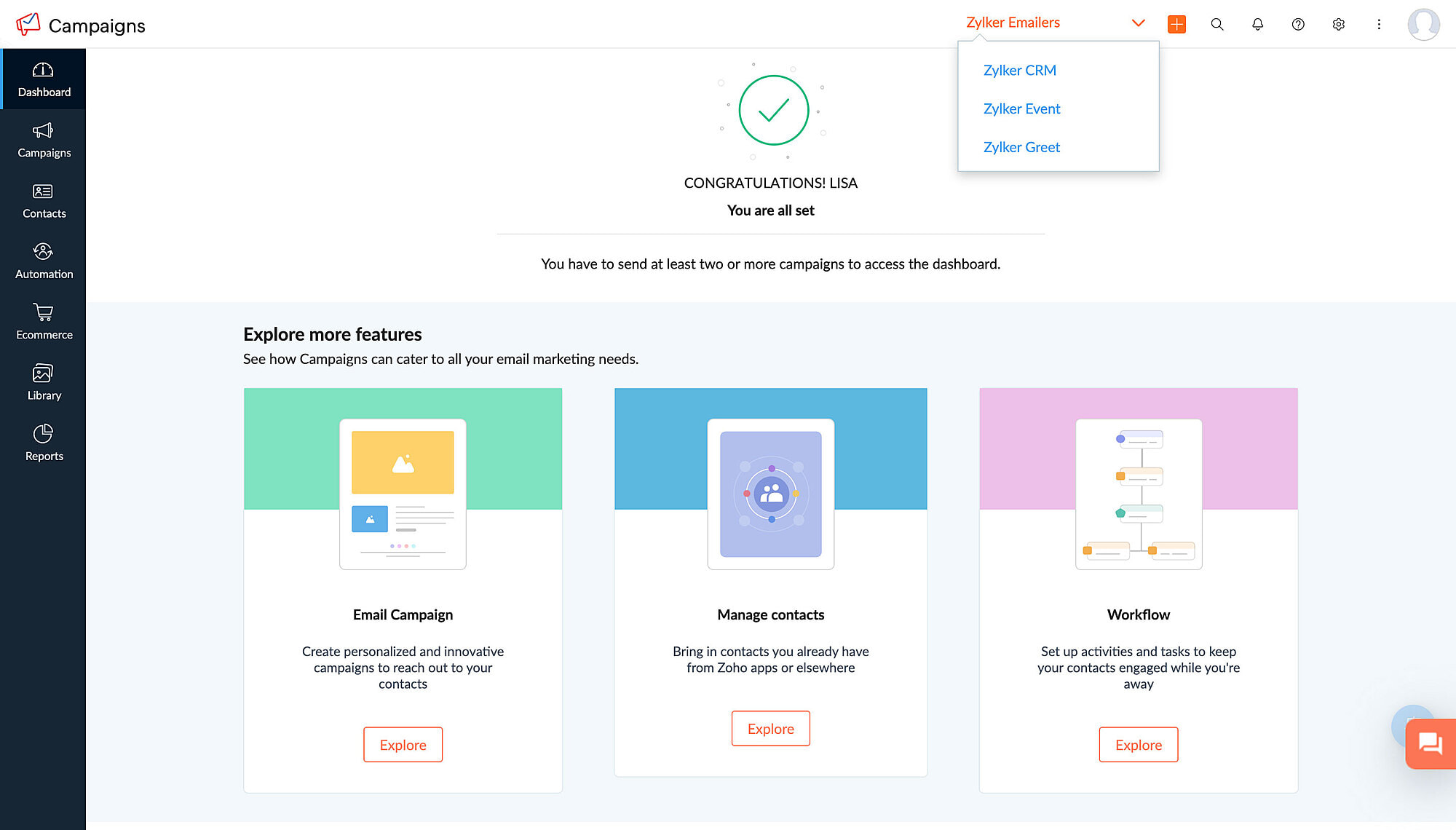
A workspace is a separate space within Zoho Campaigns to create and organize campaigns and workflows. It enables organization admins to create multiple spaces within a single account which can be accessed by multiple individuals. Admins have the authority to determine who can access each workspace based on the specific needs of the business.
To illustrate this, let's consider the example of Zylker, a product based company with different products that caters to various needs of a business. To ensure clarity and efficiency in managing these different products and teams, Zylker admin can create separate workspaces for each of the products, add users to each workspace (their respective products), and carry out marketing activities without encountering any confusion or complications.
By using workspaces, Zylker can maintain a clear separation of data and ensure customer data of one product (workspace) is not accessible to those responsible for managing other products (workspaces). This enhances data security and minimizes the risk of confusion or errors when coordinating marketing efforts.
Altogether,
- Workspace provide a practical solution for organizing and managing different aspects of your business within a single account.
- Workspace streamlines your marketing activities, assign appropriate user access, and maintain data integrity across various departments or business units.
- Workspace stores campaigns, workflows, and contacts and users will have restricted access to them.
- Admins can add all contacts or contacts matching a given criteria into a workspace.
- Users can have one role in one workspace and a different role in another workspace.
How will it function going forward?
After migrating to the new integration setup and assigning roles and privileges, a workspace will be created in your account by default. Admins will be able to create as many workspaces in the account as needed, assign users to each workspace, bring in all contacts or a restricted set of contacts as defined by a specified criteria, and switch between workspaces within the same account. This makes it much easier to manage campaigns across multiple organizations/teams, and also provides greater flexibility and control over campaign management.
FAQs
Where can I find workspaces in my account?
If you're an admin and would like to set up workspaces for your account, navigate to Settings > Users and Controls > Workspace.
Will I still be able to access campaigns and data from different workspaces?
If you're an admin, you'll be able to access campaigns and data from different workspaces. If not, you can access workspaces to which your admin has provided you access.
Is there a limit to the number of workspaces I can have in my account?
No, there is no limit to the number of workspaces that you can create in your account.
Is there a limit to the number of workspaces I can be a part of if I'm not an admin?
No, there is no limit to this either.
We understand that these changes require some adjustment, which is why we're giving you plenty of time for migration. All these updates will be implemented in Zoho Campaigns on August 10, 2023 and you will be able to migrate to this setup until July 15, 2024, after which it will become default for all users.
Please note that these updates doesn't affect the pricing or the subscription plan. If you have any questions or concerns regarding these updates, please reach out to us at support@zohocampaigns.com. We'll be more than happy to assist you throughout the process!
Best regards,
Team Zoho Campaigns
Topic Participants
Annet M
KP
Casey
Greg Obleshchuk
Tim Fockedey
Sticky Posts
Marketer's Space: Proven tips to improve open rates – Part II
Hello Marketers! Welcome back to another post in Marketer's Space! We're continuing from where we left off a fortnight ago. We ended the previous post discussing the subject line, and we'll continue from there. Let's dive right in. Pre-header Pre-headerTip of the week 03 - Sending emails in batches
Today's marketers not only want their email marketing to be efficient, but also smart. For an email campaign, you may think you have all the essential elements for lead conversion—a big mailing list, an attractive template design, and the most-engaging message content, but after hitting the ‘send’ button, you may not get the expected conversions. Wondering why? Here’s one of the major reasons. Many marketers miss out on sending the email campaign the right way. Did you know that you should not beTip of the week 04 - Know about your recipients' 'prime open time.'
In today's market, the importance of customer behavior is astounding, with a vast amount of research and resources going into finding how customers make decisions. The process of persuading your customers to open your email and click on your call-to-action becomes easy when you understand the psychology behind their behavioral traits. Time to turn into a psychologist! Let's get to the basics—you want your emails to resonate well with your recipients. So, what's the primary thing involved here? It'sZoho Campaigns Expert Diaries on SoundCloud, Spotify, Apple Podcasts, and YouTube
Hi email champs, As email marketers, we find great lessons in each other's works—be it the subject lines that worked good, the design that was received well, or the CTA that had the maximum clicks. Email marketing encompasses a wide variety of topics spanning everything from creation and design to development and deliverability. Here's when we from the Zoho Campaigns team found the need to build an email marketing community comprising of seasoned marketers and email geeks who can help each otherEmail Deliverability Tip #3: Seal the deal with the preheader
In the last post, we learned about the subject line. Today we'll be learning about the preheader. A preheader is the short text that follows the subject line in an email. The preheader is designed to hint at what your email message is all about. A good preheader should act as a second subject line and convince your contacts to open the email. Now, let's learn the best way to craft a preheader. Your subject line and preheader should work together and accurately convey the gist of your email. Keep
Nederlandse Hulpbronnen

Recent Topics
Issues Logging into ZOHO
Hello, one of my coworkers is having issues logging into ZOHO, she has requested a code when entering and the email is correct but she has not received the code. can you help us with this?Google Fonts Integration in Pagesense Popup Editor
Hello Zoho Pagesense Team, We hope you're doing well. We’d like to submit a feature request to enhance Zoho Pagesense’s popup editor with Google Fonts support. Current Limitation: Currently, Pagesense offers a limited set of default fonts. Google FontsAdd Popup Rejection Metrics to Reports
Hello Zoho PageSense Team, We would like to request improved reporting for popup interactions. Current Limitation: PageSense currently provides conversion data, but there is no clear visibility into: Popup rejections Popup closes (✕ button clicks) DismissalsAbility to Reset / Reinitialize Popup Cookies
Hello Zoho PageSense Team, We would like to request the ability to manually reset popup cookies. Current Limitation: At the moment, it is not possible to initiate a new popup cookie from the our side. Visitors who rejected or closed a popup will not seeControl Popup Cookie Expiration Duration
Hello Zoho PageSense Team, We would like to request an enhancement related to popup cookie management. Current Limitation: Currently, PageSense popup cookies remain active for 365 days, and this duration cannot be modified by us. If a visitor closes orClone / Export Popup Design Across PageSense Projects
Hello Zoho PageSense Team, We hope you’re doing well. We would like to request an enhancement that allows popup designs to be reused across different PageSense projects. Problem Statement: Currently, Zoho PageSense allows popups to be duplicated onlyAre there settings for hyperlinks?
Clicking a hyperlinked cell in Sheet creates this little pop-up with the actual hyperlink inside. Is it possible to have a 1-click link where if you click the cell it opens the link directly with no pop-up?Automatically include all ticket attachments in the ticket resolution email
Hello Zoho Community, We are implementing Zoho Desk in a real customer-facing production environment and have run into a limitation that is becoming a blocking requirement for our clients. The problem When a ticket is closed or resolved, Zoho Desk sendsFinding text within a ticket: Expand All or Search this Ticket
The auto-collapse feature within a ticket is nice for screen scrolling, however it makes it difficult to find text within the ticket if the email is collapsed. In fact you cannot find text if it is collapsed. I would like to propose a feature that allowsBooks & Desk. Client mapping
Hi, I’ve been using Zoho Books for several years and am now looking to improve my customer service. I'm experimenting with Zoho Desk and want to sync and map my client data from Zoho Books. However, it seems that mapping requires both contacts to haveString handling
If I cut a currency string from a quote and try and paste it into the Deal "Amount", it will fail unless I manually delete any commas. Dollar signs are no problem, but comma's seem to fail. Please correct this Input Validation error.What's new in Zoho Sheet: Simplify data entry and collaboration
Hello, Zoho Sheet community! Last year, our team was focused on research and development so we could deliver updates that enhance your spreadsheet experience. This year, we’re excited to deliver those enhancements—but we'll be rolling them out incrementallyWebDAV / FTP / SFTP protocols for syncing
I believe the Zoho for Desktop app is built using a proprietary protocol. For the growing number of people using services such as odrive to sync multiple accounts from various providers (Google, Dropbox, Box, OneDrive, etc.) it would be really helpfulFeature Request - Allow Customers To Pick Meeting Duration
Hi Bookings Team, It would be great if there was an option to allow customers to pick a duration based on a max and minimum amount of time defined by me and in increments defined by me. For example, I have some slots which are available for customersSupport for Custom Fonts in Zoho Recruit Career Site and Candidate Portal
Dear Zoho Recruit Team, I hope you're doing well. We would like to request the ability to use custom fonts in the Zoho Recruit Career Site and Candidate Portal. Currently only the default fonts (Roboto, Lato, and Montserrat) are available. While theseYouTube Live streaming? how to? Zoom has this feature, built-in. Can't find it on zoho meetings.
YouTube Live streaming? how to? Zoom has this feature, built-in. Can't find it on zoho meetings.Feature Request - A Way To Search Item Groups
Hi Inventory Team, I can't find any way to filter or search by fields of Item Groups. It would be great to see that functionality added. I have a use case where a single product might come from 5 or more suppliers and each supplier's item is an Item inFeature Reqeust - Include MPN In Selectable FIelds
I have noticed that the MPN is not available to show in the list view of Items. Please consider adding it as EAN, UPC and ISBN are all available, so it doesn't make much sense to exclude this similar option. Thanks for considering my feedback.Feature Request - Option To Hide Default System Fields on Items
Hi Zoho Inventory Team, As far as I know it is not possible to hid some of the defult system fields on Items, such as UPC, MPN, EAN, ISBN. A good use case is that in many cases ISBN is not relevant and it would be an improved user experience if we couldMaking an email campaign into a Template
I used a Zoho Campaign Template to create an email. Now I want to use this email and make it a new template, but this seems to be not possible. Am I missing something?Campaigns does not work!
I am running into so many problems trying to use Zoho Campaigns, that I am seriously considering dropping the app from my (shrinking) list of Zoho applications I actually use. Apart from having to fight the software trying to create a design and email,Feature Request - Make Available "Alias Name" Field In Item List View
Hi Zoho Inventory Team, I have noticed that the "Alias Name" field does not appear on the list of selectable columns in the Customise Columns feature in the Items module. This would be very useful to see for businesses who are using the Alias Name fieldMarketing Automation
L.S. Marketing Automation is and has always been part of the Zoho One bundle - according to the information provided on the Zoho Website. Why when I open Marketing Automation do I get the following message?: "Your trial has expired. We hope you enjoyedCliq iOS can't see shared screen
Hello, I had this morning a video call with a colleague. She is using Cliq Desktop MacOS and wanted to share her screen with me. I'm on iPad. I noticed, while she shared her screen, I could only see her video, but not the shared screen... Does Cliq iOS is able to display shared screen, or is it somewhere else to be found ? RegardsBigin, more powerful than ever on iOS 26, iPadOS 26, macOS Tahoe, and watchOS 26.
Hot on the heels of Apple’s latest OS updates, we’ve rolled out several enhancements and features designed to help you get the most from your Apple devices. Enjoy a refined user experience with smoother navigation and a more content-focused Liquid Glassproject name field issue- n8n
Hey guys, I have a question. I want to create a new product using the workflow. The problem is with the product name field; I don't know how to fill it in. The workflow starts with retrieving information from the leads table, retrieving links to scrapeAutomatic Matching from Bank Statements / Feeds
Is it possible to have transactions from a feed or bank statement automatically match when certain criteria are met? My use case, which is pretty broadly applicable, is e-commerce transactions for merchant services accounts (clearing accounts). In theseHow to filter Packages in zoho inventory api
Hi Team, I want to perform some tasks in a schedular on the packages which are in "Shipped" state. I tried to use filter_by in my api call but in return I get response as {"code":-1,"message":"Given filter is not configured"} My Api request is as followsCRM
Is anyone else experiencing this issue? Our company is not moving out of using Gmail's web app. It just has more features and is a better email program than Zoho Mail. Gmail has an extension (Zoho CRM for Gmail) that we're using but we've found some seriousZOHO add-in issue
I cannot connect ZOHO from my Outlook. I am getting this error.Syncing with Google calendar, Tasks and Events
Is it possible to sync Zoho CRM calendar, task and events with Google Calendar's tasks and events. With the increasing adoption by many major tool suppliers to sync seamlessly with Google's offerings (for instance I use the excellent Any.do task planningHow can i view "Child" Accounts?
It can be very useful in our field of business to know the parent-child account relationship. However, there seems to be a shortcoming in the parent account view: no child account list. How can we view the child accounts per each account?Ability to assign Invoice Ownership through Deluge in FSM
Hi, As part of our process, when a service appointment is completed, we automated the creation of the invoice based on a specific business logic using Deluge. When we do that, the "Owner" of the invoice in Zoho FSM is defaulted to the SuperAdmin. ThisEasily perform calculations using dates with the new DATEDIF function
Hey Zoho Writer users! We've enhanced Zoho Writer's formula capabilities with the new DATEDIF function. This allows you to calculate the difference between dates in days, months, and years. Function syntax: =DATEDIF(start_date, end_date, unit) Inputs:Adding Comments Using Workflows - How to Change User Attributed
We have worklflows in Desk where a comment is added to a ticket based on certain criteria. It seems that the comment added is always attributed to the user who last edited the workflow. This does not make sense for us because: - It's misleading to otherAdd Attachment Support to Zoho Flow Mailhook / Email Trigger Module
Dear Zoho Support Team, We hope you are well. We would like to kindly request a feature enhancement for the Mailhook module in Zoho Flow. Currently, the email trigger in Zoho Flow provides access to the message body, subject, from address, and to address,Conect chat of salesiq with zoho cliq
Is there any way to answer from zoho cliq the chat of salesiq initiated by customers?Les dernières avancées en saisie de données et collaboration
Après une année dédiée à la recherche et au développement, notre équipe est prête à dévoiler des améliorations majeures pour Zoho Sheet. Ces nouveautés seront lancées par étapes afin d’en assurer une prise en main optimale. Nous commençons avec des fonctionnalitésDeluge Learning Series – Client functions in Deluge | January 2026
We’re excited to kick-start the first session of the 2026 Deluge Learning Series (DLS) with Client functions in Deluge. For those who are new to DLS, here’s a quick overview of what the series is all about: The Deluge Learning Series takes place on theRich Text For Notes in Zoho CRM
Hello everyone, As you know, notes are essential for recording information and ensuring smooth communication across your records. With our latest update, you can now use Rich Text formatting to organize and structure your notes more efficiently. By usingNext Page