Let’s Talk Recruit: Forms that think before you do!
Welcome back to our Let's Talk Recruit series. In our previous post, we shared highlights from our community meetups held across India.
This time, we’re talking about something that often gets overlooked but makes a huge difference once you set it up right: Webforms and Form Rules.
Let’s say you're rolling out a hiring drive or posting jobs on multiple channels. Candidates start pouring in—but half of them forget to attach their resumes, a few skip critical questions, and some apply to the wrong roles altogether. And that’s before you’ve even started shortlisting.
That’s exactly the kind of cleanup Webforms and Form Rules are built to prevent. They help you collect the right details, personalize the experience for candidates, and automate the little things that usually slow you down. And once you get the hang of them, you'll wonder why you didn’t start sooner.
The Problem
If your team still relies on email attachments or inconsistent spreadsheets to gather applicant info, chances are you’re wasting time fixing errors that shouldn’t exist in the first place.
Candidates entering outdated contact details
Missing info on key fields like skill set, location, or availability
Manually categorizing candidates for different roles or hiring pipelines
Without a structure in place, things slip through the cracks. And when you're hiring at scale, that’s a problem.
Why Webforms matter
A webform is often the first step a candidate takes to engage with your company. Whether it’s embedded on your careers page, linked on a social post, or shared during campus drives — it sets the tone.
But a lot of recruiters still use basic forms. Candidates fill them out, and then it’s a game of manual edits, sorting, and follow-ups.
What if the form did more? What if it already knew:
Which fields to show and when?
Whom to assign the record to?
Whether the candidate should be redirected after submission?
That’s where form rules come in.
What are Form Rules?
Form rules let you customize the candidate’s experience while they’re filling out the form by triggering actions based on their input.
Actions include: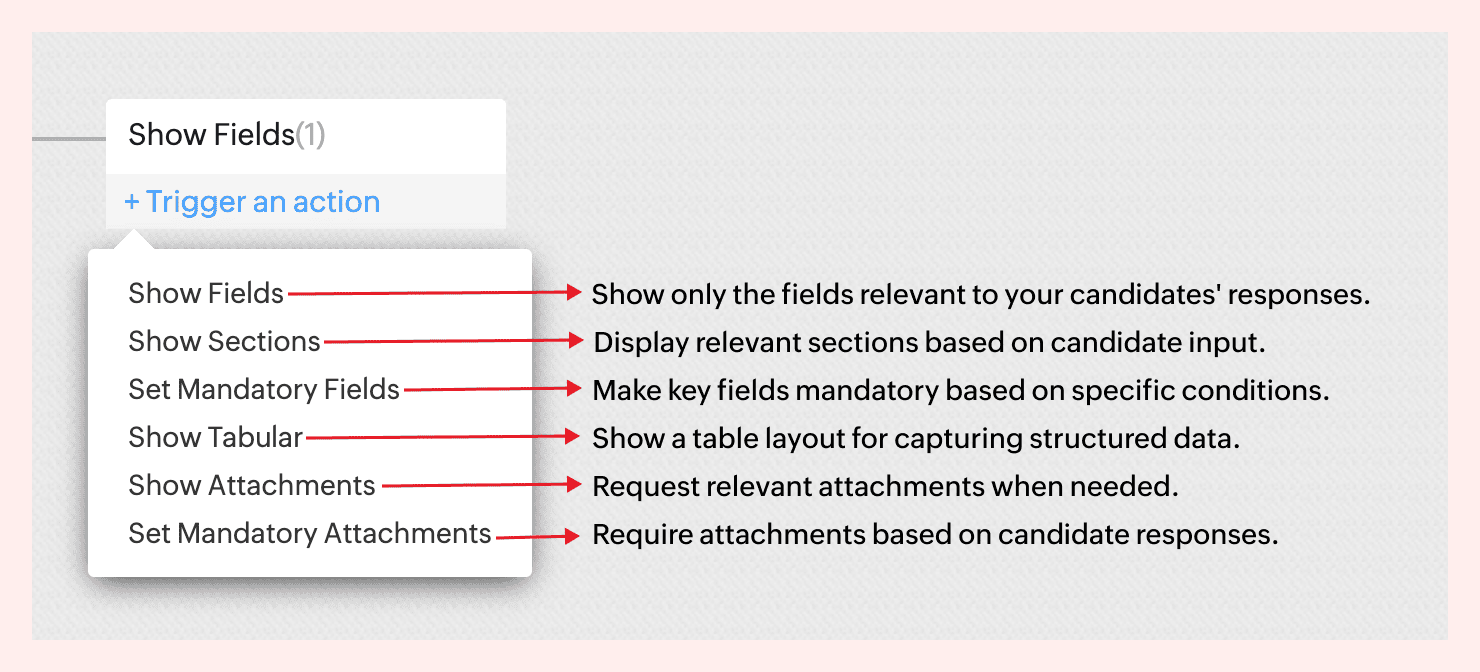
For instance, not all candidates come with the same background—and your forms shouldn’t treat them like they do.
If a candidate indicates they’re a fresher, there’s no need to show fields like Work History or Current Salary. But if they’re experienced, you might want to ask about key projects, past employers, or management experience.
With form rules, you can create this branching logic in just a few clicks—keeping the form clean for early talent and detailed where it matters.
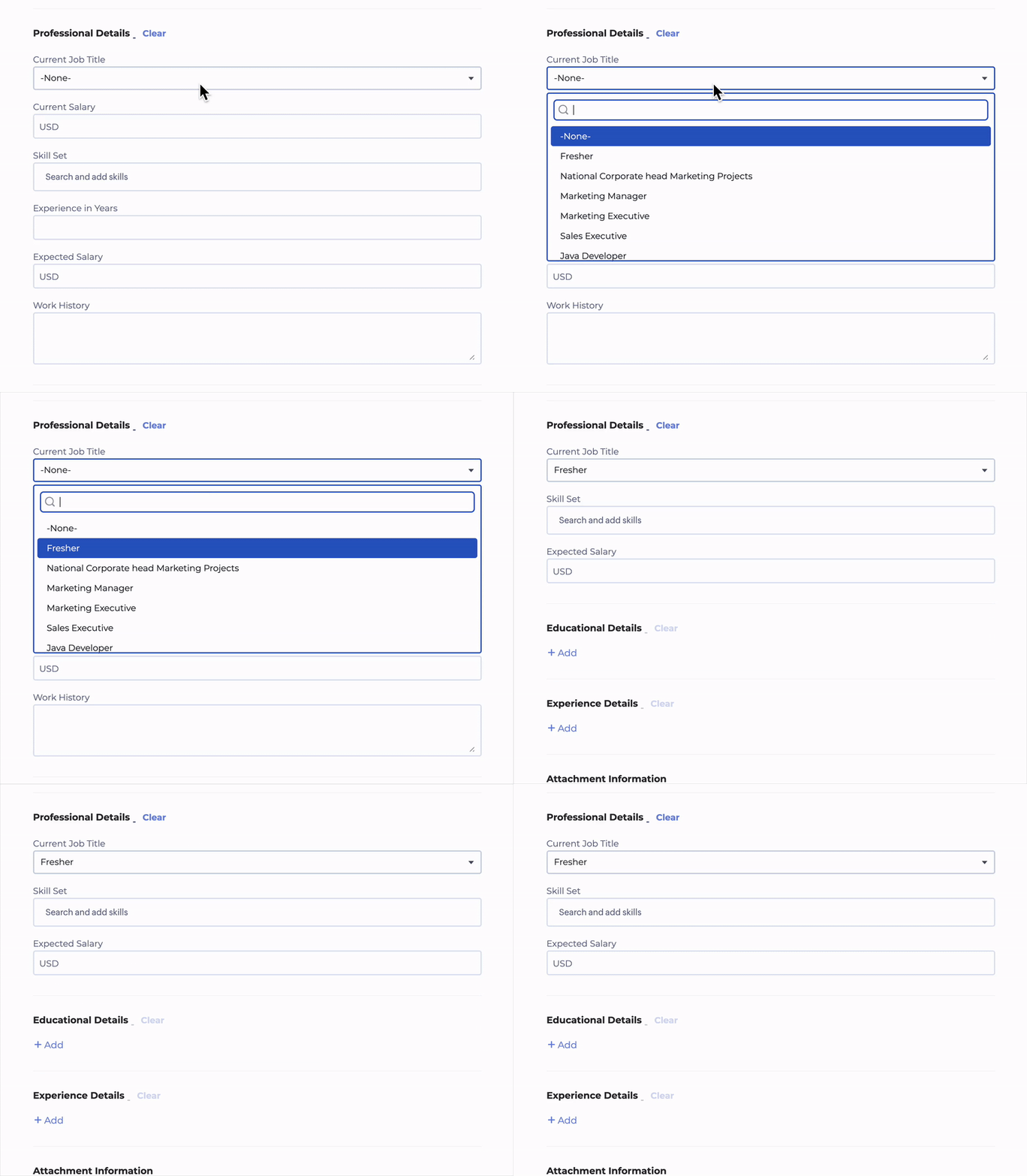
No code required. Just simple logic-based conditions.
→ Learn more
A few use cases to consider
Client Intake to Job Requisition
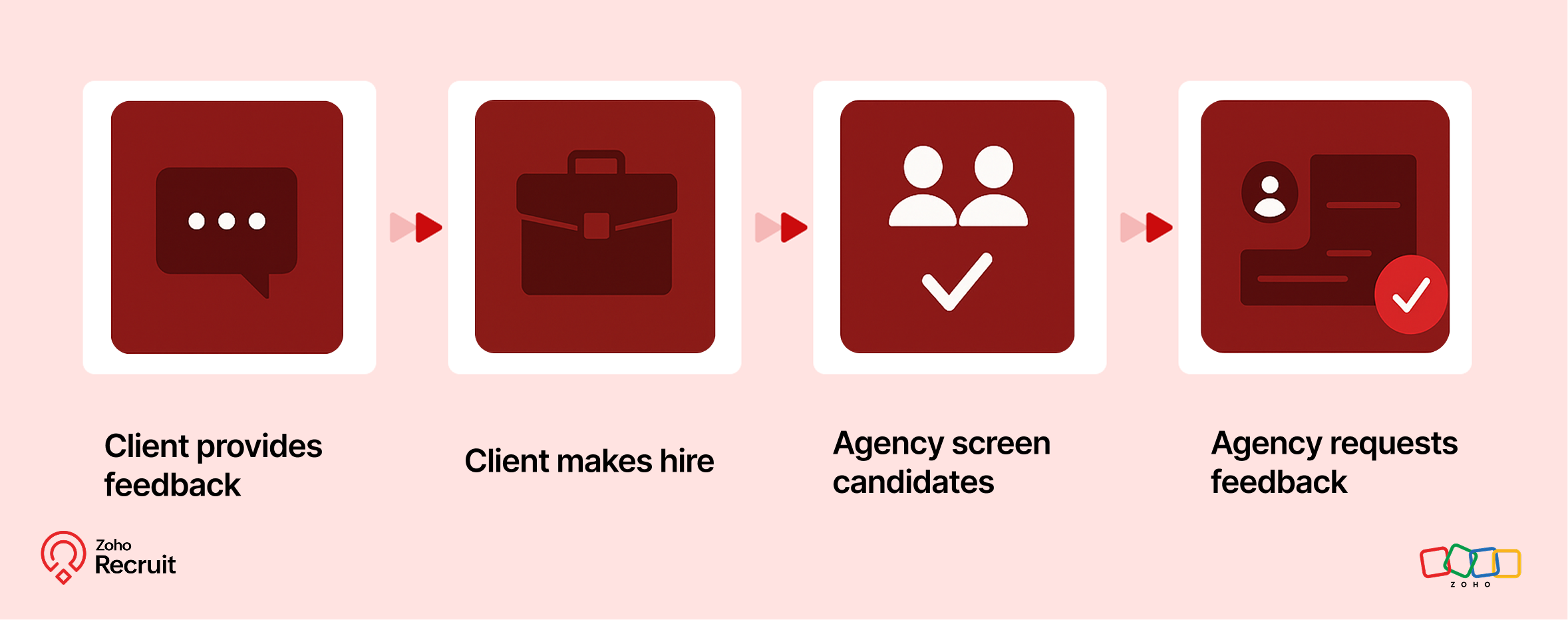
Step 1: Client submits contact form
Embed a Contact webform on your website to capture leads—clients who want to work with your staffing agency.
Step 2: Client shares job details
Once onboarded, clients can submit job requirements through a Job Requisition form. These details feed directly into your system.
Step 3: Agency hires candidates
Use the shared job details to source, match, and hire candidates for the role.
Step 4: Agency requests feedback
After successfully filling positions, request feedback from clients using a Feedback webform.
Candidate Onboarding & Documentation
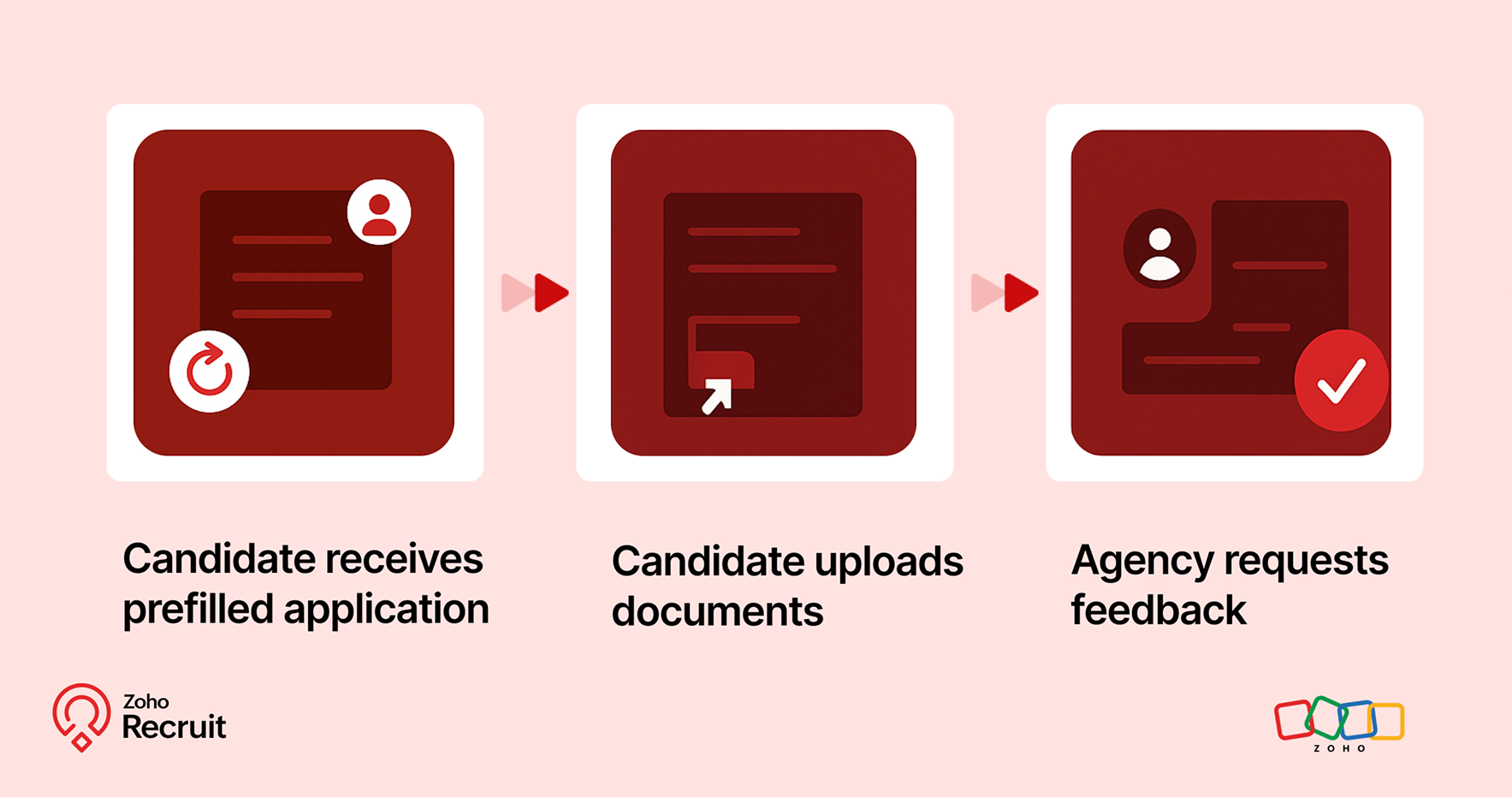
Step 1: Candidate receives prefilled application
Once candidates are selected, use known data to prefill details into a Background Check form.
Step 2: Candidate uploads documents
Share the form with candidates to collect necessary documents—ensuring accuracy and reducing redundant data entry.
Step 3: Agency requests feedback
After onboarding is complete, send a Feedback webform to capture the candidate’s experience.

A quick look at the numbers
Webforms and Form Rules aren’t just about convenience — they actually influence how well candidates interact with your hiring process.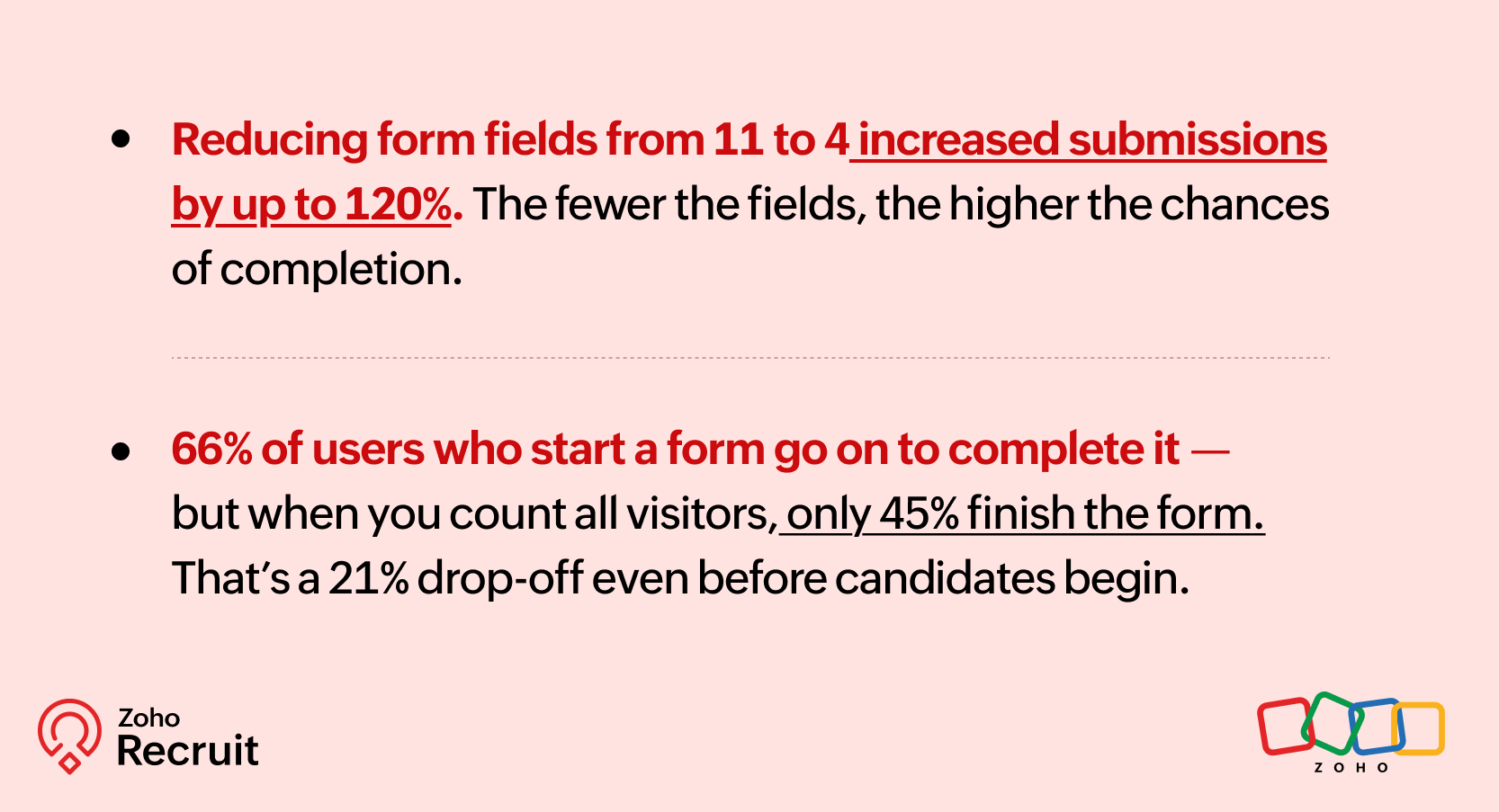
These numbers reinforce what we already know — clearer, shorter, and smarter forms can keep more candidates moving forward.
Getting started: A few setup tips
If you’re new to webforms or haven’t reviewed your setup in a while, here are three things to check:
Do you have job-specific forms?
A generic form might be easier to maintain — but it might also be collecting unnecessary or missing important info.Have you mapped fields correctly?
Ensure that all form fields map directly to your Recruit modules (Candidate, Job Opening, etc.) to avoid duplicates or errors.Are you using rules to simplify things?
Even one simple rule — like showing a “Notice Period” field only for full-time roles — can improve form quality.
Need help setting this up? Here’s how to build a webform and how to configure Form Rules.
Let’s Talk Recruit!
Do you already use Webforms in your hiring flow? Have you explored conditional form rules yet—or is that still on your to-do list?
Drop your experience below or tell us what kind of form use case you'd love to automate—we're all ears (and maybe one of our product folks will drop in with a tip or two!).
Topic Participants
Akshaya P
Sticky Posts
An update to improve email delivery | Email Authentication & Relay
Update Rollout Latest Update: Enterprise users (8th July, 2025) This update is now live for Enterprise plan users in all regions. This includes People Plus, but not Zoho One, which will be covered in an upcoming update. Professional users (31st May 2025)Zoho Recruit User Group Meet-up | INDIA 2025 (Venue Finalised)
Hello Zoho Recruit users from India, We’re pleased and excited to announce our 2025 edition of Zoho user group meet-up in India in five cities! In this meet-up, our team of experts will help you understand the intricate nuances to use Zoho Recruit better,Zoho Recruit is coming to the UK | Zoho Community Learning Series
Customers from the United Kingdom, Exciting news: We will be in London for the Zoho Recruit user meet up. Our team will help you better understand the intricate nuances of Zoho Recruit to help you hire faster, inform about new and upcoming features, andAsk the experts - A live Q & A discussion on Zoho Recruit
We are delighted to come back with another edition of Ask the Experts community series. This edition, we'll be focusing on everything about Zoho Recruit. The topics will focus on the features that are used/asked by the majority of users and also basedRestriction on 'From' addresses with a public domain
Dear Zoho Recruit Community, We hope this message finds you well. This post is to inform you about some important updates regarding email restrictions within Zoho Recruit. Effective post 31st March 2025, we will be implementing changes to the use of email
Recent Topics
BUG: Can't copy-paste data outside Sheet
Currently I can't paste data copied from inside any of my Zoho Sheet files to any other app. Copy-paste works inside the sheet It does NOT work between two different sheets These sheets are built from automation templates Everything works fine if I createZoho CRM Community Digest - November 2025 | Part 1
Hello Everyone! Here’s what came through in the first half of November: new updates and a few helpful community discussions with real, notable solutions. Product Updates: Android App Update: Inctroducing Swipe Actions You can now swipe left or right onUpload own Background Image and set Camera to 16:9
Hi, in all known online meeting tools, I can set up a background image reflecting our corporate design. This doesn't work in Cliq. Additionally, Cliq detects our cameras as 4:3, showing black bars on the right and left sides during the meeting. WhereThe Social Wall: November 2025
We’re nearing the end of the year, and the holiday season is officially kicking in! It’s that time when sales peak and your social media game needs to be stronger than ever. We’re back with exciting new updates across AI, analytics, and the mobile appTruesync for Linux
Is Truesync available on linux ?Hidding/excluding specific picklist options from filter
Hi. Is it possible to hide/exclude specific picklist options from this filter? I don't want them to be shown when someone tries to filter in the leads moduleSubforms to Capture Multi-Row Data in Job Sheets
Subforms transform your job sheets from simple checklists to powerful, data-rich forms. In field service work — whether maintenance, inspection, installation, or repair — a single job can involve multiple repeatable entries: readings, parts used, activities年内最後のユーザー向けイベント:5名限定! 課題解決型ワークショップイベント Zoho ワークアウト開催のお知らせ (12/18)
ANNOUNCEMENT 1 REPLY INSIGHTS ユーザーの皆さま、こんにちは。Zoho ユーザーコミュニティチームの中野です。 12月開催のZoho ワークアウトについてお知らせします。 今回はZoomにて、オンライン開催します。 参加登録はこちら(無料) https://us02web.zoom.us/meeting/register/QHn6kJAcRs-znJ1l5jk0ww ━━━━━━━━━━━━━━━━━━━━━━━━ Zoho ワークアウトとは? Zoho ユーザー同士で交流しながら、サービスに関する疑問や不明点の解消を目的とした「ZohoAdd "Fetch Composite Item" Action for Inventory
I want to make a Flow that uses information returned in the GET call for Composite Items, and it's not currently available in Zoho Flow. Please consider adding this functionality.Adress Labels for sending of the oder und barcode
We want to print with my address labels to stick on the order of the ware can. there are these options?printing individual labels - Dymo LabelWriter
I am trying to print individual labels to my Dymo LabelWriter - has anyone done this? Latest Update (December 2025): The Canvas Print View is now available! We encourage you all to try it out and share your feedback with us. Learn more here: Zoho CRMZoho Creator for Agriculture
Greetings, I am starting to work on Zoho Creator specifically for the agricultural field, any recommendations, tips or ideas that might be helpful ? Also, if you are interested by any means in working on such project, kindly contact me. The project isCustom Print Layout
I would like to create a custom print layout of a Lead or Contact. Is there a way to do that? What I mean is that if I'm viewing a specific lead or contact I'd like to be able to print or export that lead/contact and only print and/or export certain information.Print View
Nothing happens when I'm in a module , ie; Contacts, and I hit the Print View Button. Even when it does come up and say "loading", nothing loadsGet Holiday ready with Zoho Mail's Offline mode
With the holiday season right around the corner, this is the perfect time to get ready to unplug, relax, and enjoy a well-deserved break. In addition to preparing yourself, you can also make sure your organization members are set for their time away fromZoho CRM Kiosk issues
Firstly this is for a system on the AU servers if that makes a difference. Issues are as follows (For Kiosk): 1. Re-ordering fields in the screen builder is broken. The fields seem to be re-ordering themselves, unless you order everything by moving theZoho Books emails suddenly going to Spam since 11 Nov 2025 (Gmail + now Outlook) — anyone else?
Hi everyone, We migrated to Zoho Books in July 2025 and everything worked fine until 11 Nov 2025. Since then, Zoho Books system emails are landing in customers’ Spam (first Gmail, and now we’re seeing Outlook/Office 365 also starting to spam them). Impactedhow to Solve Conflict Invoices in Zoho POS
Hello Team, I am facing a repeated issue in Zoho POS while saving a sale that contains service-based items. My products are intentionally created as Service (Non-Inventory) items because I do not want to track stock for them. However, every time I tryEmail Template Edits Not Saving
I can make an edit, click save, and see the blue bar annimation at the top, but the edits don't actually save. Important, because my email templates are now broken and clients are receiving bad emails. Tried on Chrome, Firefox and IE.Default Ticket View - Table?
Guys, We mostly use the table view to queue tickets. Maybe I am missing it - but how can I set that view as 'default" for all our agents? Thanks JVCan I have different users see different pick list values for Potential Stage?
We have some users focusing on new business and others focusing on existing business, and they follow different sales processes/cycles, so we would like them to see different pick list values for Stage (eventually leading up to Closed Won/Lost in both cases). And just to keep it interesting - some of these users will of course do a combination, so would need to see one pick list for their New business potentials and a different pick list for their Existing business ones. Salesforce does thisTracking Snippet not working in Zoho Marketing Automation!
First off, the fact that you have to wait about 12-24 hours for every response is terrible. How are we supposed to conduct business? Second, we have been trying for several days to get the Tracking Code Snippet in marketing automation to work, to no avail.email moderation issue when email is sent in the name of a mail group
Symptom: an email that is sent by a mail group moderator in the name of a moderated mail group is held back for approval. Reproduction: Create a moderated mail group with members and moderators. Allow that mails can be sent in the name of the group (extendedIs there any way to send an Excel received by email to Dataprep?
Every day I receive an email alert with an Excel file that I want to process through a Dataprep pipeline. To do this, I need to: -Save the file to disk -Open the pipeline -Run the pipeline -Update the source -Several clicks to select and open the savedRecruit paid support?
Hi all, Could anyone who has paid support package advise if it provides value for money with regards to support response times? Exploring the idea as unfortunately when we have faced issues with Recruit it has been a 7+ day timescale from reporting toHotmail is blocking the zoho mail IP
Greetings, Since last Tuesday (5 days ago today) I wrote to Zoho support and I still haven't received a single response (Ticket ID: 2056917). Is this how you treat people who pay for your email service? I am making this public so that those who want toRead webpage - MSXML2.ServerXMLHTTP
I have the following VBA script, put together from various sources (mainly zoho forum/help/support, so it once worked, I guess): private Sub GetListOfSheets() Dim url As String Dim xmlhttp As Object Dim parameters As String Dim html As String range("B1").valueZoho Creator Form Search
I'm new to Zoho Creator and so far i do like it but im shocked there seems to be no easy way to add a search function and/or navigation to there forms as this readily available in every platform i have used in the past. Anyway i have a form which i haveHow to setup DKIM / SPF in Zoho Mail
Hello there! I'm having a hard time understanding how to setup the TXT records for SPF and DKIM with Zoho Mail. I'm following the instructions here: https://www.zoho.com/campaigns/help/setup-spf-dkim.html Specifically, when it comes to the value for theMass update cant trigger a workflow?
Hello there, Is this a normal Creator behaviour? In a report, if I manually edit each data row, it will pass those changes to all other reports. However, if I perform a Mass Update on a few data rows at once, the new data is not pushed to other reports.search and Smart Bar both missing in Mail
One of the users on my account does not have the search bar at the top right or the Smart Bar at the bottom left of the desktop Mail app. Any ideas how to get those back?"Wrong password or login" Problem to configure Zoho on MAIL App on my Macbook
Hi, I'm having problems to configure my e-mail on my MAIL App(Macbook pro). My e-mail is hari@trespontoum.net Actually was working perfectly, and still working on my Iphone. My MAIL App prompt me that my login or password is wrong. I tried to change 3Remote Control Functionality During Screen Sharing in Zoho Cliq
Hello Zoho Cliq Team, We would like to request the addition of remote control functionality during screen sharing sessions in Zoho Cliq. Currently, while screen sharing in Cliq is very useful, it lacks the ability for another participant to take controlLet us add Lookup fields in the Blueprint Transitions
We are unable to add Lookup Fields in the blueprint transitions in Zoho Desk, we wanted to make it a requirement for our workflow but since it's not available in the transition we cannot. The lookup field exists in the Layout: But it cannot be added/selectedZoho Projects API Scope for Issue Attachments
I try to download issue attachments via the API, unfortunately I always get the following error code when trying to download the file from the supplied URL: {"ERROR_MESSAGE":"INVALID_OAUTHSCOPE","ERROR_CODE":401} indicating an auth scope error. I've triedHow to fetch custom fields for time entries in Zoho Project API v3
In the previous Zoho Projects REST API, we were able to retrieve custom field details for time entries, including picklist options, using the endpoint: GET /restapi/portal/[PORTAL_ID]/timesheetcustomfields In the new Zoho Projects API v3, we tried usingZoho Survey Enhancements
We love Survey. We use it a ton. It needs some enhancements. Maybe some of these are already on the roadmap? API - this is crucial. We have some complex surveys that take place and need to update records, trigger other functions/automations, etc. I wouldImages Don't Display on Blog
Hi, I've just posted a new blog entry, but regardless of format (png or jpeg) Images that display in Preview mode do not display on any browser in the published post. I've not done anything different with this post than others regarding images, please advice. Thanks! Edit: I've discovered that moving the image files from a my sub directory folder "Pics for Blog" to the top level of the "Files" folder on my site allows the images to display live. This, even though my other blog posts are correctlyCheckbox Field Mapping Zoho Forms to Zoho Sign
I have an application that will be filled out via Forms that I am mapping into a PDF Filler on Zoho Sign. I need to have a series of checkboxes mapped to the corresponding fields in Sign and I only see single checkboxes available via the mapping, thoughMCP > Creator connection failing with Claude
I'm trying to get claude to access any of my Zoho Creator apps and it keeps failing. I have enabled all tools for creator and ensured in claude settings that everything is authorised. Here is what claude says : Unfortunately, the error messages I'm receivingNext Page