[Early Access] Voice of the Customer (VoC) for Zoho CRM
Happy new year, everyone!
We have an exciting addition to our suite of features and would like to introduce you to VoC (Voice of the Customer) for Zoho CRM, powered by Zia.
2023 is definitely the best time to be a customer with rapid innovations and advancements in the field of CX. Brands these days lose customers within minutes if they refuse to pay attention to what they're saying. The right VoC tool can help you stay on top of your CX game!
VoC for Zoho CRM offers insights into your customers' needs and sentiments which can translate into effective problem redressal, better planning and increased revenue.It also provides context from your CRM data and helps you get a clear picture of what your customers feel or expect from the product/service. While the end goal of VoC may look like just running customer satisfaction polls, it's not merely the act of putting out these surveys. Launching and carrying out customer satisfaction polls won't help a business truly understand their customers. The end goal of VoC is much deeper— it is about listening to your customers and valuing their thoughts, and using these insights for your business to thrive.
| Early Access | Interest form |
| Resources | Help documentation |
| VoC overview video |
Use case
For example, an electronics store that sells laptops and mobiles also provides servicing of these products. The customer and product details are stored in CRM. They regularly send out surveys to gather customer feedback on the products and services. Additionally, they have a separate customer support team to help resolve challenges with products. The company notices a drop in their revenue in spite of the offers and discounts they've rolled out. Manually studying customer purchase patterns and collating feedback from multiple communication channels will cost a business valuable time that can be invested to develop the business further. The answer to this problem lies in automating such processes with better visualization of data within a centralized platform. VoC for Zoho CRM aims to digest customer information and make these results available for users in a single place to grasp information quickly and make goal-oriented as well as contextually-rich modifications to business plans and processes.
How to use VoC?
VoC for Zoho CRM can be activated under "Zia", located on the settings page within CRM.
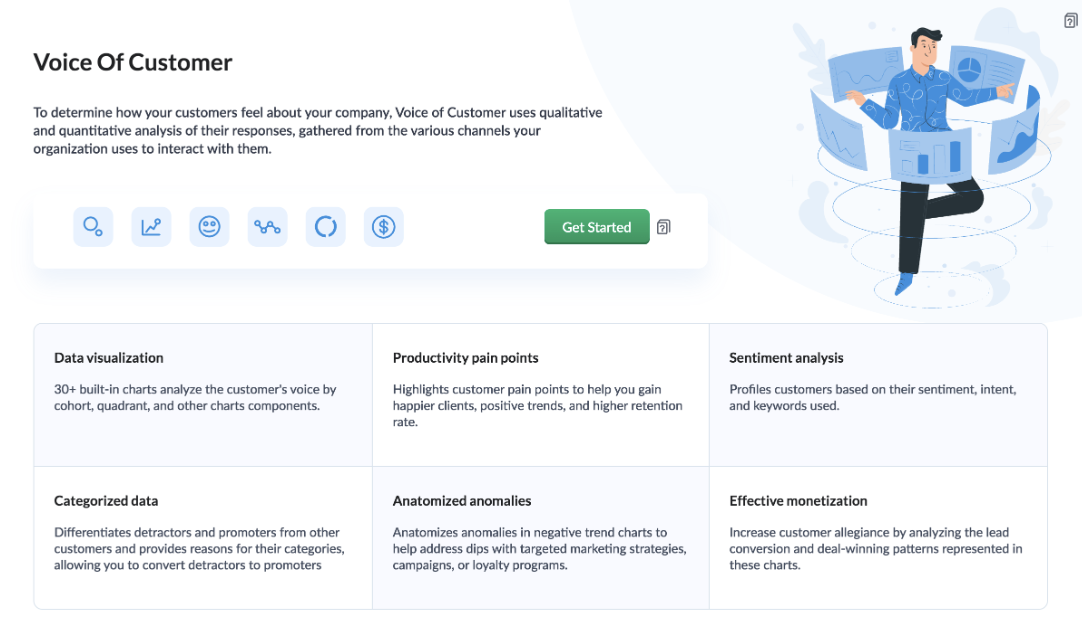
Once you click the 'Get Started' button, the activation page opens. Click 'Activate'.
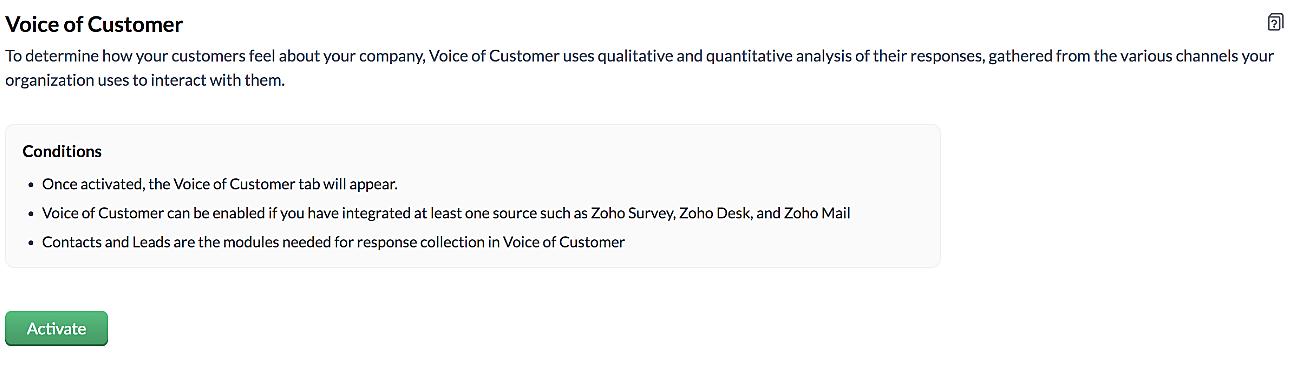
VoC for Zoho CRM is trained to conduct sentiment and intent analysis, keyword extraction, emotion & root cause analysis, customer trend analysis and predictions. It presents several accurate dashboards within your CRM account that showcase customer opinions on your business, competitor activity and sentiment, as well as the customer emotion behind emails, surveys and customer feedback.
Let us take a look at different dashboards that can help the management identify the root cause of inconsistencies in results and chalk out next steps to resolve them quickly.
The Sentiment-based Profile Analysis
The Sentiment Dial Analysis chart provides you with an overall picture of the customer sentiment shared across multiple communication channels such as surveys, emails, and customer ratings.
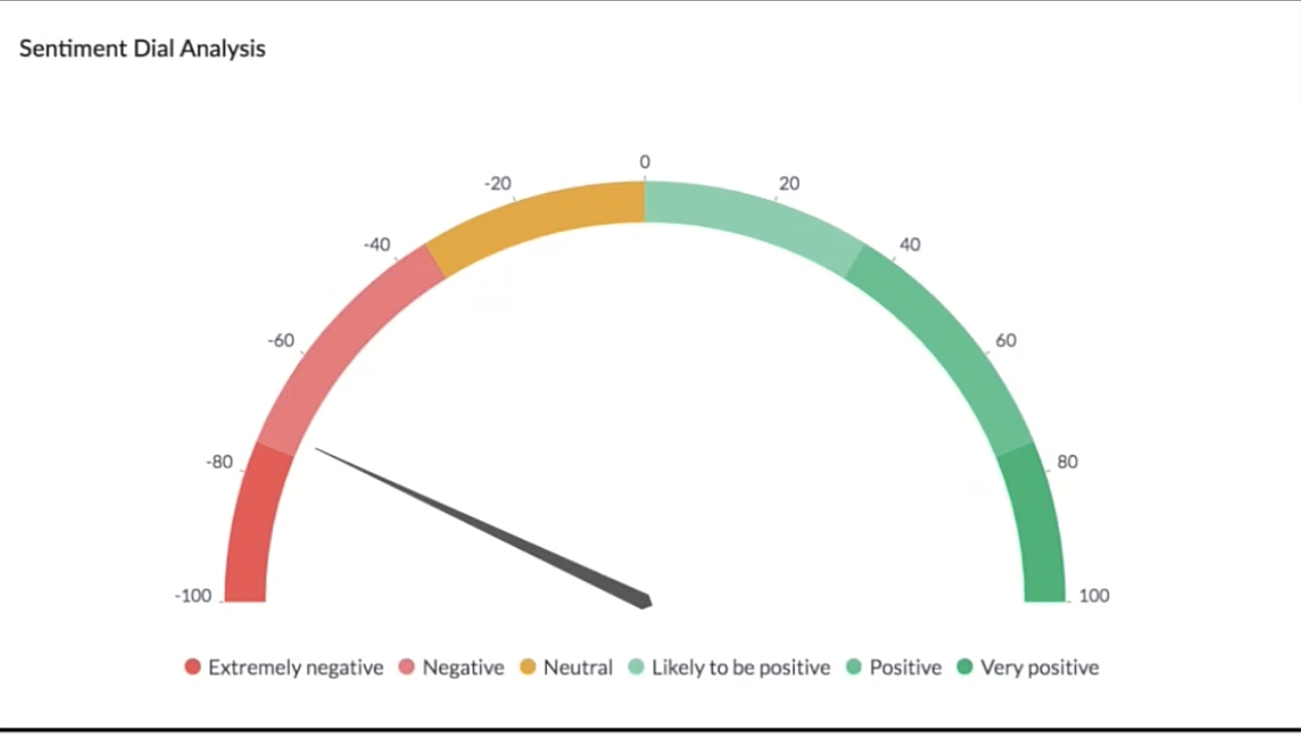
The dial chart shows that the overall sentiment expressed by the customers is on the negative end. This analysis incorporates the feedback from Desk, Survey and CRM emails. With a conservative approach that doesn't incorporate VoC, this requires a separate team to gather the feedback, digest it and incorporate it into business activities.
Even though this dial chart gives you a fair idea of the customers' views, the management needs more clarity on where the problem lies to increase customer satisfaction.
The frequently occurring keywords by sentiment narrow down the customer views expressed.
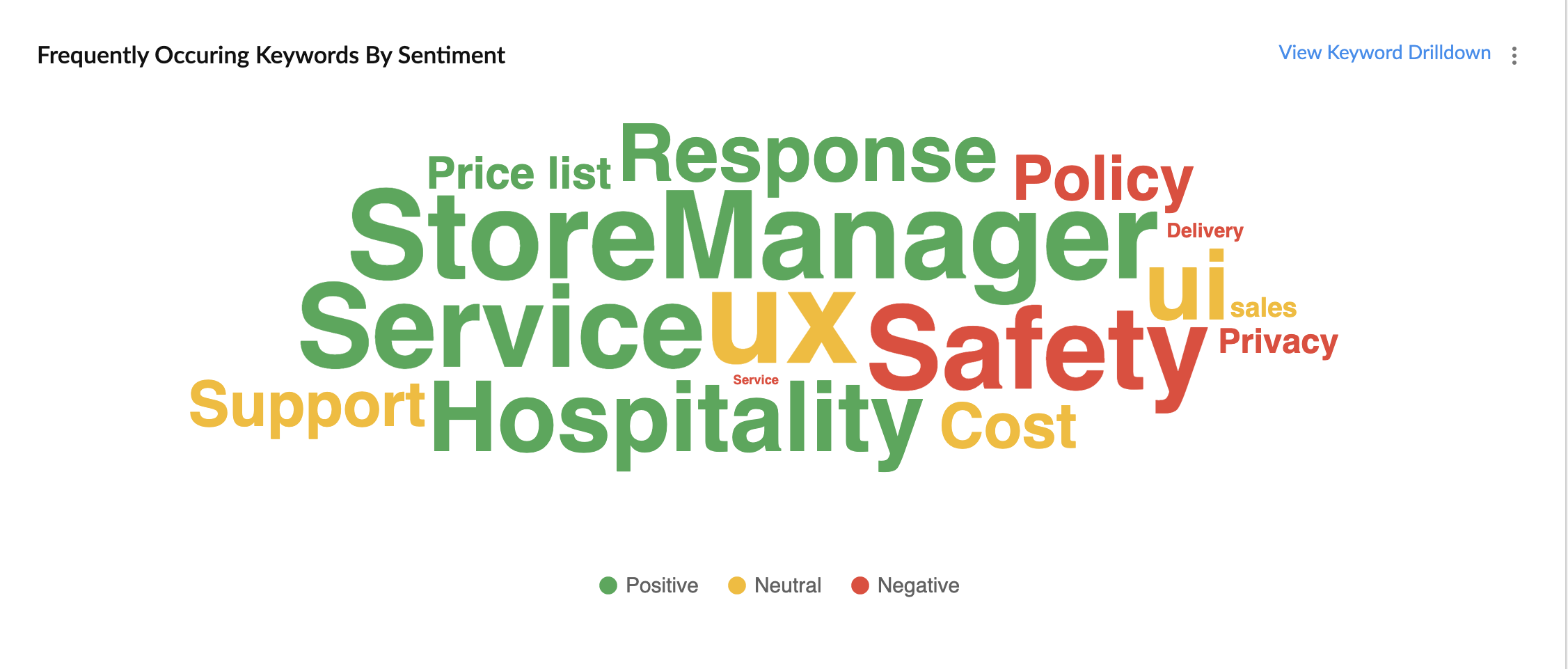
In the image above, the words in green have been used in a positive connotation by the customers. We can infer that customers are happy with the service, hospitality and price list. Whereas, delivery, policy and safety haven't been our strongholds. Therefore, we can now focus on improving our delivery, safety and privacy policies.
A drill down of the number of customers and channels from where their feedback has been gathered can also be viewed a table.
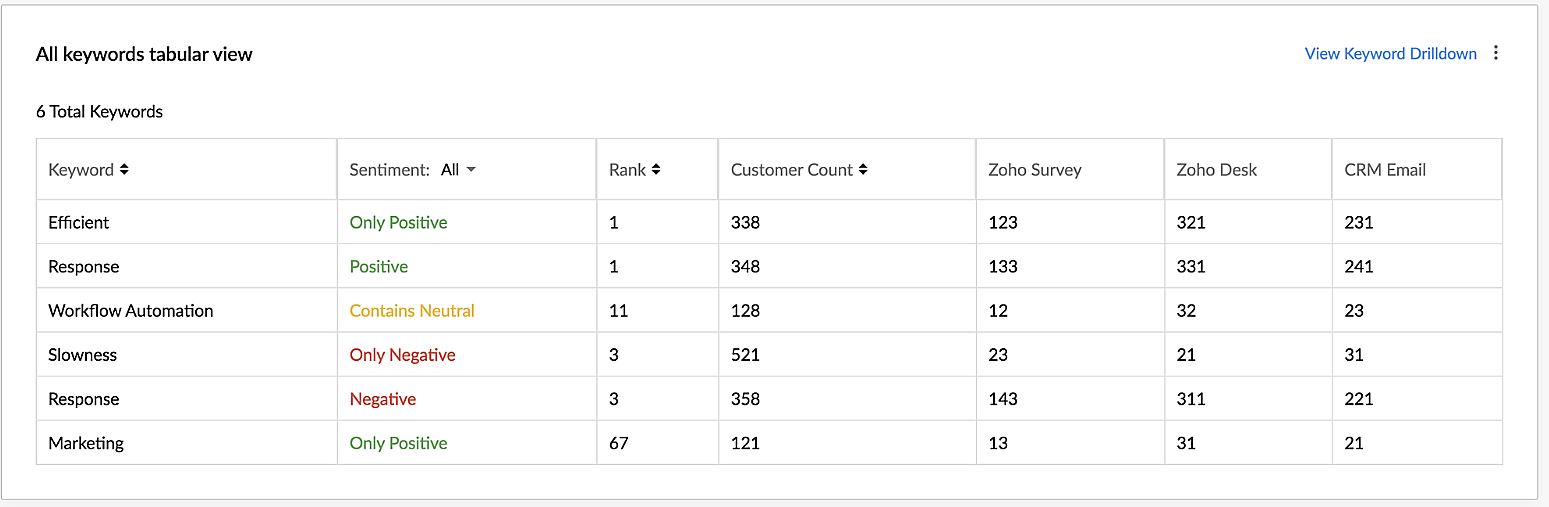
VoC for Zoho CRM helps you derive powerful insights on customer opinions and sentiment by processing data in minutes from several communication channels without burdening your team.
Response-based sentiment analysis
VoC for Zoho CRM captures the underlying emotion and intent behind customer responses and categorizes them by sentiment, intent, medium and revenue based on a particular timeframe.
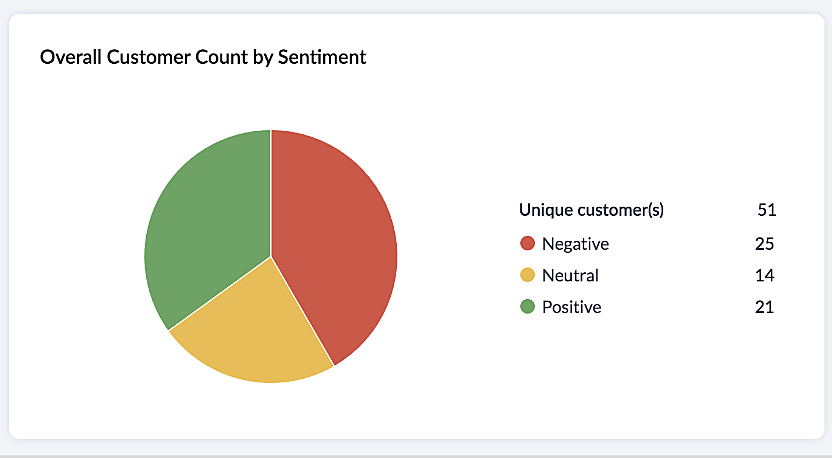
This chart paints an overall picture of the positive, neutral, and negative feedback count based on the responses gathered via surveys and customer rating.
The Sentiment Cohort chart, a variation of the above, showcases the customer feedback with respect to the timeframe.
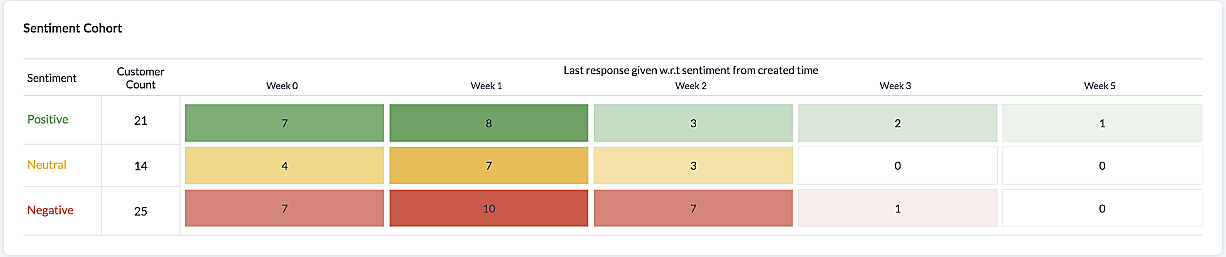
There are a few more dashboards that VoC offers to extract insights from - Competitor analysis, Cross-sell Analytics and Survey comparison.
Competitor Analysis
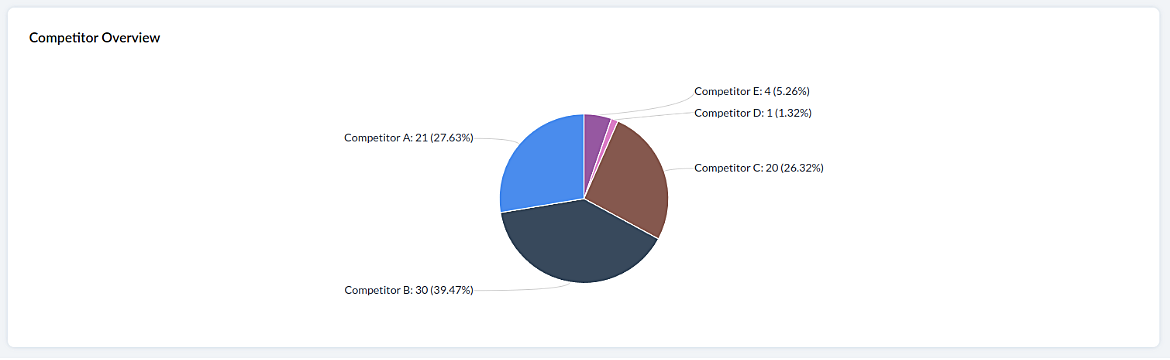
Staying on par with our competitors is an important aspect of customer satisfaction and retention. VoC helps in this regard by offering prominent insights. If the deal closure rate has come down after the mention of the competitor, we can focus on our offerings against our competitors'.
Staying on par with our competitors is an important aspect of customer satisfaction and retention. VoC helps in this regard by offering prominent insights. If the deal closure rate has come down after the mention of the competitor, we can focus on our offerings against our competitors'.
Cross-sell Analytics
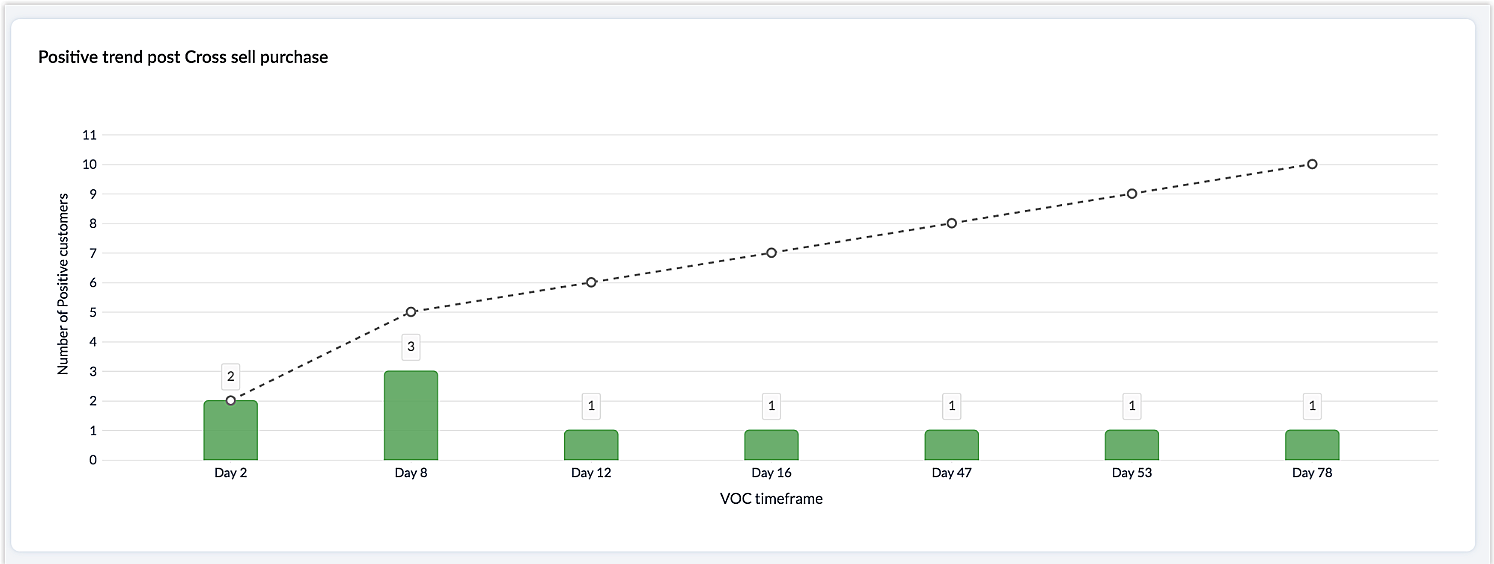
Cross-sell Analytics in VoC is designed to measure the effectiveness of cross-selling efforts. Zia studies the feedback after a cross-sell initiative is made and whether it is positive or negative. Depending on the feedback collected, it predicts the right product/service.
Cross-sell Analytics in VoC is designed to measure the effectiveness of cross-selling efforts. Zia studies the feedback after a cross-sell initiative is made and whether it is positive or negative. Depending on the feedback collected, it predicts the right product/service.
Survey comparison
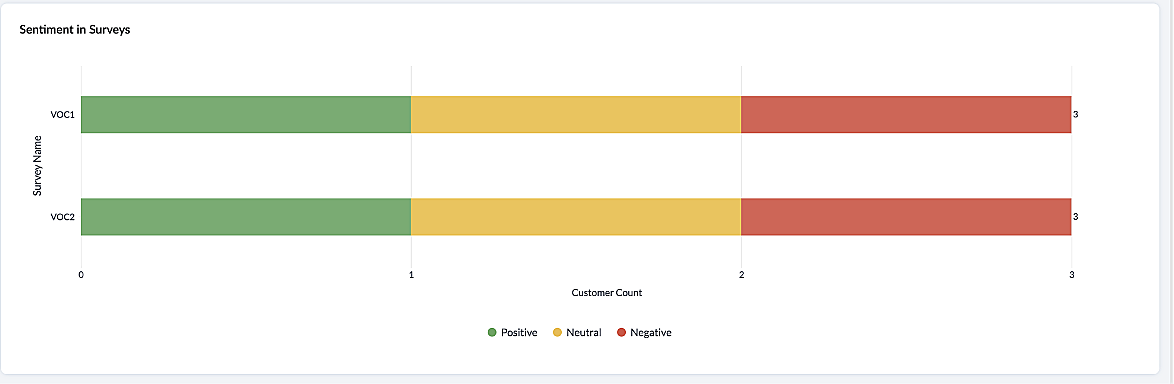
These dashboards come in handy when you want to evaluate your marketing efforts. If the customer feedback for an email offer is positive, you can plan your marketing strategies based on it. You can also improve your product/services based on survey responses.
Listed below are the different charts that VoC supports -
1. Pie chart and donut chart
1. Pie chart and donut chart
2. Line graph
3. Bar graph—single, multi, stacked
4. Cohort
5. Quadrant
6. Waterfall
7. Gauge chart/ Dial chart
8. Anomaly dashboards
9. Word-cloud and Table
Please click here to watch a video about VoC for Zoho CRM to gain a deeper understanding of the feature.
Prerequisites/Notes:
- VoC insights are available for surveys, customer rating and emails, using Zoho Survey, Zoho Desk and Email integration (IMAP) respectively.
- Zia Competitor Alert should be configured for the competitor analysis dashboard. Additionally, Zia Recommendation needs to be configured for the cross-sell analytics dashboard.
- All insights are a result of processing historical data. Collection of relevant data will be initiated upon activation of VoC and we will be processing this data over a period of three months.
- Currently only admin profile users can view the VoC tab.
Pricing
VoC will be available for Zoho CRM to begin with. This will be a priced offering. The final pricing and editions supported will be announced during the time of public release.
VoC will be available for Zoho CRM to begin with. This will be a priced offering. The final pricing and editions supported will be announced during the time of public release.
What's in the roadmap
a) Option to customize dashboards and charts
b) Identify our vanishing customers and declining products
c) Evaluating strategies to attain a target
b) Identify our vanishing customers and declining products
c) Evaluating strategies to attain a target
d) Feedback Summaries, and much more.
Please click here to get early access to VoC for Zoho CRM. We would love to hear your feedback and can't wait for you all to try this.
Note:
Early Access for customers: The Early Access to VoC is provided only for organizations with a license count greater than or equal to 20.
Topic Participants
Ishwarya SG
Priyanka Satish
chandlerb
Aayisha Siddiqua H
Sticky Posts
Announcing Early Access to "Zoho CRM for Everyone" — A new and exciting update to Zoho CRM
Update : Zoho CRM For Everyone's Nextgen Interface gets an upgrade! Hello everyone, We’ve updated the Zoho CRM for Everyone Nextgen interface based on your feedback. The UI is now simpler with a unified sidebar, a more visible global search and features[Early Access] Voice of the Customer (VoC) for Zoho CRM
Happy new year, everyone! We have an exciting addition to our suite of features and would like to introduce you to VoC (Voice of the Customer) for Zoho CRM, powered by Zia. 2023 is definitely the best time to be a customer with rapid innovations and advancementsAdding calls as a channel in Voice of the Customer
Dear All, We hope you're well! It's been almost a year since we opened Zoho CRM's Voice of the Customer solution up for early access. We are grateful for the reception and support you have been showing us with regards to its adoption and feedback. Since
Recent Topics
Issues Logging into ZOHO
Hello, one of my coworkers is having issues logging into ZOHO, she has requested a code when entering and the email is correct but she has not received the code. can you help us with this?Google Fonts Integration in Pagesense Popup Editor
Hello Zoho Pagesense Team, We hope you're doing well. We’d like to submit a feature request to enhance Zoho Pagesense’s popup editor with Google Fonts support. Current Limitation: Currently, Pagesense offers a limited set of default fonts. Google FontsAdd Popup Rejection Metrics to Reports
Hello Zoho PageSense Team, We would like to request improved reporting for popup interactions. Current Limitation: PageSense currently provides conversion data, but there is no clear visibility into: Popup rejections Popup closes (✕ button clicks) DismissalsAbility to Reset / Reinitialize Popup Cookies
Hello Zoho PageSense Team, We would like to request the ability to manually reset popup cookies. Current Limitation: At the moment, it is not possible to initiate a new popup cookie from the our side. Visitors who rejected or closed a popup will not seeControl Popup Cookie Expiration Duration
Hello Zoho PageSense Team, We would like to request an enhancement related to popup cookie management. Current Limitation: Currently, PageSense popup cookies remain active for 365 days, and this duration cannot be modified by us. If a visitor closes orClone / Export Popup Design Across PageSense Projects
Hello Zoho PageSense Team, We hope you’re doing well. We would like to request an enhancement that allows popup designs to be reused across different PageSense projects. Problem Statement: Currently, Zoho PageSense allows popups to be duplicated onlyAre there settings for hyperlinks?
Clicking a hyperlinked cell in Sheet creates this little pop-up with the actual hyperlink inside. Is it possible to have a 1-click link where if you click the cell it opens the link directly with no pop-up?Automatically include all ticket attachments in the ticket resolution email
Hello Zoho Community, We are implementing Zoho Desk in a real customer-facing production environment and have run into a limitation that is becoming a blocking requirement for our clients. The problem When a ticket is closed or resolved, Zoho Desk sendsFinding text within a ticket: Expand All or Search this Ticket
The auto-collapse feature within a ticket is nice for screen scrolling, however it makes it difficult to find text within the ticket if the email is collapsed. In fact you cannot find text if it is collapsed. I would like to propose a feature that allowsBooks & Desk. Client mapping
Hi, I’ve been using Zoho Books for several years and am now looking to improve my customer service. I'm experimenting with Zoho Desk and want to sync and map my client data from Zoho Books. However, it seems that mapping requires both contacts to haveString handling
If I cut a currency string from a quote and try and paste it into the Deal "Amount", it will fail unless I manually delete any commas. Dollar signs are no problem, but comma's seem to fail. Please correct this Input Validation error.Feature Request - Allow Customers To Pick Meeting Duration
Hi Bookings Team, It would be great if there was an option to allow customers to pick a duration based on a max and minimum amount of time defined by me and in increments defined by me. For example, I have some slots which are available for customersYouTube Live streaming? how to? Zoom has this feature, built-in. Can't find it on zoho meetings.
YouTube Live streaming? how to? Zoom has this feature, built-in. Can't find it on zoho meetings.Feature Request - A Way To Search Item Groups
Hi Inventory Team, I can't find any way to filter or search by fields of Item Groups. It would be great to see that functionality added. I have a use case where a single product might come from 5 or more suppliers and each supplier's item is an Item inFeature Reqeust - Include MPN In Selectable FIelds
I have noticed that the MPN is not available to show in the list view of Items. Please consider adding it as EAN, UPC and ISBN are all available, so it doesn't make much sense to exclude this similar option. Thanks for considering my feedback.Feature Request - Option To Hide Default System Fields on Items
Hi Zoho Inventory Team, As far as I know it is not possible to hid some of the defult system fields on Items, such as UPC, MPN, EAN, ISBN. A good use case is that in many cases ISBN is not relevant and it would be an improved user experience if we couldMaking an email campaign into a Template
I used a Zoho Campaign Template to create an email. Now I want to use this email and make it a new template, but this seems to be not possible. Am I missing something?Campaigns does not work!
I am running into so many problems trying to use Zoho Campaigns, that I am seriously considering dropping the app from my (shrinking) list of Zoho applications I actually use. Apart from having to fight the software trying to create a design and email,Feature Request - Make Available "Alias Name" Field In Item List View
Hi Zoho Inventory Team, I have noticed that the "Alias Name" field does not appear on the list of selectable columns in the Customise Columns feature in the Items module. This would be very useful to see for businesses who are using the Alias Name fieldCliq iOS can't see shared screen
Hello, I had this morning a video call with a colleague. She is using Cliq Desktop MacOS and wanted to share her screen with me. I'm on iPad. I noticed, while she shared her screen, I could only see her video, but not the shared screen... Does Cliq iOS is able to display shared screen, or is it somewhere else to be found ? Regardsproject name field issue- n8n
Hey guys, I have a question. I want to create a new product using the workflow. The problem is with the product name field; I don't know how to fill it in. The workflow starts with retrieving information from the leads table, retrieving links to scrapeHow to filter Packages in zoho inventory api
Hi Team, I want to perform some tasks in a schedular on the packages which are in "Shipped" state. I tried to use filter_by in my api call but in return I get response as {"code":-1,"message":"Given filter is not configured"} My Api request is as followsCRM
Is anyone else experiencing this issue? Our company is not moving out of using Gmail's web app. It just has more features and is a better email program than Zoho Mail. Gmail has an extension (Zoho CRM for Gmail) that we're using but we've found some seriousSyncing with Google calendar, Tasks and Events
Is it possible to sync Zoho CRM calendar, task and events with Google Calendar's tasks and events. With the increasing adoption by many major tool suppliers to sync seamlessly with Google's offerings (for instance I use the excellent Any.do task planningHow can i view "Child" Accounts?
It can be very useful in our field of business to know the parent-child account relationship. However, there seems to be a shortcoming in the parent account view: no child account list. How can we view the child accounts per each account?Ability to assign Invoice Ownership through Deluge in FSM
Hi, As part of our process, when a service appointment is completed, we automated the creation of the invoice based on a specific business logic using Deluge. When we do that, the "Owner" of the invoice in Zoho FSM is defaulted to the SuperAdmin. ThisEasily perform calculations using dates with the new DATEDIF function
Hey Zoho Writer users! We've enhanced Zoho Writer's formula capabilities with the new DATEDIF function. This allows you to calculate the difference between dates in days, months, and years. Function syntax: =DATEDIF(start_date, end_date, unit) Inputs:Adding Comments Using Workflows - How to Change User Attributed
We have worklflows in Desk where a comment is added to a ticket based on certain criteria. It seems that the comment added is always attributed to the user who last edited the workflow. This does not make sense for us because: - It's misleading to otherAdd Attachment Support to Zoho Flow Mailhook / Email Trigger Module
Dear Zoho Support Team, We hope you are well. We would like to kindly request a feature enhancement for the Mailhook module in Zoho Flow. Currently, the email trigger in Zoho Flow provides access to the message body, subject, from address, and to address,Conect chat of salesiq with zoho cliq
Is there any way to answer from zoho cliq the chat of salesiq initiated by customers?Les dernières avancées en saisie de données et collaboration
Après une année dédiée à la recherche et au développement, notre équipe est prête à dévoiler des améliorations majeures pour Zoho Sheet. Ces nouveautés seront lancées par étapes afin d’en assurer une prise en main optimale. Nous commençons avec des fonctionnalitésDeluge Learning Series – Client functions in Deluge | January 2026
We’re excited to kick-start the first session of the 2026 Deluge Learning Series (DLS) with Client functions in Deluge. For those who are new to DLS, here’s a quick overview of what the series is all about: The Deluge Learning Series takes place on theRich Text For Notes in Zoho CRM
Hello everyone, As you know, notes are essential for recording information and ensuring smooth communication across your records. With our latest update, you can now use Rich Text formatting to organize and structure your notes more efficiently. By usingImplement Meeting Polls in Zoho Bookings
Dear Zoho Bookings Support Team, We'd like to propose a feature enhancement related to appointment scheduling within Zoho Bookings. Current Functionality: Zoho Bookings excels at streamlining individual appointment scheduling. Users can set availabilityZoho Bookings and Survey Integration through Flow
I am trying to set up flows where once an appointment is marked as completed in Zoho Bookings, the applicable survey form would be sent to the customer. Problem is, I cannot customise flows wherein if Consultation A is completed, Survey Form A would beService Account Admin for API Calls and System Actions
Hello, I would like to request the addition of a Service Account Admin option in Zoho product. This feature would allow API calls and system actions to be performed on behalf of the system, rather than an active user. Current Issue: At present, API callsHow to apply customized Zoho Crm Home Page to all users?
I have tried to study manuals and play with Zoho CRM but haven't found a way how to apply customized Zoho CRM Home Page as a (default) home page for other CRM users.. How that can be done, if possible? - kipi Moderation Update: Currently, each user hasPlease can the open tasks be shown in each customer account at the top.
Hi there This has happened before, where the open tasks are no longer visible at the top of the page for each customer in the CRM. They have gone missing previously and were reinstated when I asked so I think it's just after an update that this featureHow to Customize Task Creation to Send a Custom Alert Using JavaScript in Zoho CRM?
Hello Zoho CRM Community, I’m looking to customize Zoho CRM to send a custom alert whenever a task is created. I understand that Zoho CRM supports client scripts using JavaScript, and I would like to leverage this feature to implement the alert functionality.Send Whatsapp with API including custom placeholders
Is is possible to initiate a session on whatsapp IM channel with a template that includes params (placeholders) that are passed on the API call? This is very usefull to send a Utility message for a transactional notification including an order numberNext Page