Zoho Creator Upcoming Updates - November 2025
Hello everyone,
Welcome to your monthly roundup of new features and enhancements! We hope you've already taken a look at Release Projection 2—it details the features coming your way for the rest of the year. And this month, we're excited to start rolling out some of those key updates.
Without further ado, let's dive in!
- Theme builder
- Sync to external calendars
- Record comments for portal users
- Refreshed UI for mobile apps
- Add and remove dependency apps to environments
- Data sync in integration fields
- New built-in connectors
--------
Theme builder
The upcoming all-new theme builder is designed to help you create a professional and vibrant appearance for your apps. With an intuitive, easy-to-use interface, you can now pick modern themes to align with your brand identity and deliver a polished user experience.
The theme builder allows you to customize:
- Layout: Choose from predefined theme layouts.
- Logo: Decide whether to display your organization logo, app icon, or no logo at all.
- Color: Select preferred colors from preset color palettes.
- Font: Choose from 12 available fonts.

How to access
Once the feature is released, you can navigate to the edit mode of your application and click Themes under the Design section.
Once the feature is released, you can navigate to the edit mode of your application and click Themes under the Design section.

Note: The themes feature is being rolled out in a phased manner. The first time you access it, you'll need to click the Try New Themes button to enable it for your account.
How can this help you?
The theme builder enables you to maintain brand consistency and create visually appealing apps effortlessly. It helps present users of your applications with a superior experience across devices.
The theme builder enables you to maintain brand consistency and create visually appealing apps effortlessly. It helps present users of your applications with a superior experience across devices.
Applicable for: C5, C6
Availability: All DCs
Availability: All DCs
Status: To be released
--------
Adding acyclic dependency apps to environments
Now, you can add applications with dependencies to environments, streamlining the lifecycle management of complex, interlinked apps that share logic through cross-app references (like lookups or page references).
Initially, acyclic dependencies (where apps follow a linear dependency structure without circular references) will be supported. Cyclic dependencies (where apps reference each other in a loop) will be introduced later in a phased rollout.
Additionally, when removing apps from environments, all acyclic dependent apps will now be removed together, ensuring more efficient and consistent dependency management without orphaned references.
Use case
Assume a company uses separate Creator apps for different functions, like employee management and payroll processing. Since the payroll depends on the employee data, one app references another in a linear manner. With this new update, you can add both apps together to environments. This ensures seamless ADLM flow without breaking app relationships.
Assume a company uses separate Creator apps for different functions, like employee management and payroll processing. Since the payroll depends on the employee data, one app references another in a linear manner. With this new update, you can add both apps together to environments. This ensures seamless ADLM flow without breaking app relationships.
How to access
When adding an app to an environment, dependent apps with acyclic references will automatically be included.

When removing from environments, the dependent apps will also be removed together.
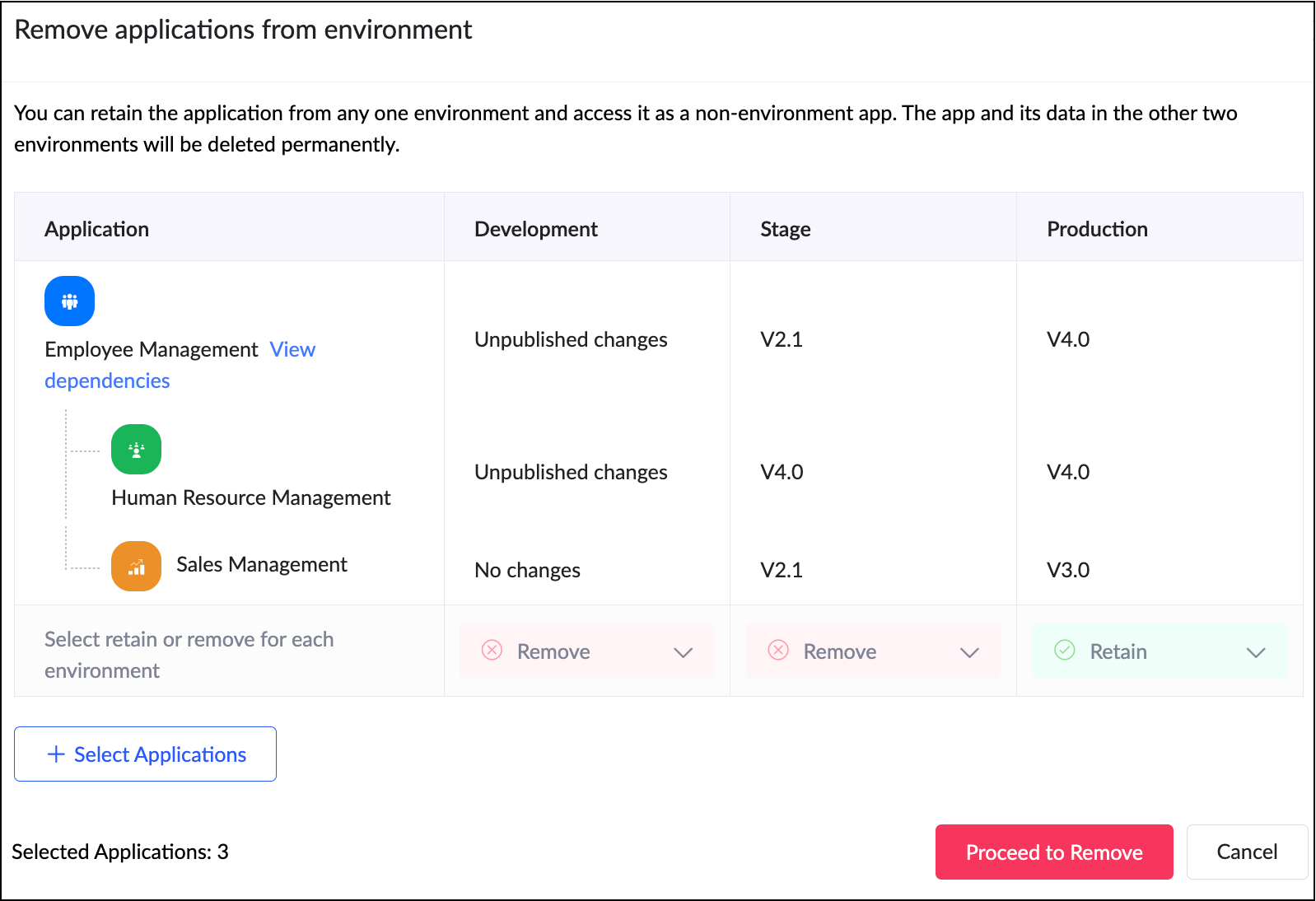
When adding an app to an environment, dependent apps with acyclic references will automatically be included.
When removing from environments, the dependent apps will also be removed together.
How can this help you?
This enhancement removes a long-standing limitation in Zoho Creator and unlocks true environment-level management for dependent applications. It streamlines the management and deployment of dependent applications,ensuring consistency and stability across environments.
Applicable for: C6
Availability: All DCs
Status: General Availability
Reference: Adding applications to environment
Availability: All DCs
Status: General Availability
Reference: Adding applications to environment
--------
Sync to external calendar
The Sync to External Calendar feature allows you to integrate published reports from your app with popular calendar tools like Zoho Calendar, Google Calendar, Outlook, Apple Calendar, and more. This feature works through an iCal feed URL and is helpful in ensuring that your events and schedules stay synchronized across platforms.
Use case
Let's say you use Zoho Creator to manage appointments for your business. With syncing to external calendars, you can automatically push these appointments to Google Calendar or Outlook. This provides your staff and clients with real-time updates directly on their personal calendars.
Let's say you use Zoho Creator to manage appointments for your business. With syncing to external calendars, you can automatically push these appointments to Google Calendar or Outlook. This provides your staff and clients with real-time updates directly on their personal calendars.
How to access
Navigate to the published report, click More Options (⋮), and select Sync to External Calendar. Generate the iCal feed URL and add it to the calendar application of your choice.
Navigate to the published report, click More Options (⋮), and select Sync to External Calendar. Generate the iCal feed URL and add it to the calendar application of your choice.
How can this help you?
This feature keeps your schedules automatically up to date by exporting data from published reports to external calendars, ensuring real-time updates and seamless synchronization across platforms.
This feature keeps your schedules automatically up to date by exporting data from published reports to external calendars, ensuring real-time updates and seamless synchronization across platforms.
Applicable for: C5, C6
Availability: All DCs
Status: General Availability
Reference: Understanding Sync to External Calendar
Availability: All DCs
Status: General Availability
Reference: Understanding Sync to External Calendar
--------
Record comments for portal users
We've brought in the capability for portal users to add comments to records. Previously, only internal users could add comments to records. With this enhancement, portal users can now join the conversation by adding comments as well. This update bridges the gap between internal and external stakeholders, allowing both user types to collaborate seamlessly within records.
Use case
Imagine a training management app where clients log in to a portal to track their sessions. With this feature, both the trainers (internal users) and clients (portal users) can discuss updates or clarify details directly within the record.
Imagine a training management app where clients log in to a portal to track their sessions. With this feature, both the trainers (internal users) and clients (portal users) can discuss updates or clarify details directly within the record.
How to access
Portal users can add comments directly within record details, just like internal users.
Portal users can add comments directly within record details, just like internal users.
How can this help you?
This feature fosters better collaboration and transparency by enabling direct communication between internal users and portal users.
This feature fosters better collaboration and transparency by enabling direct communication between internal users and portal users.
Applicable for: C5, C6
Availability: All DCs
Status: General availability
Reference: Understanding record comments
Availability: All DCs
Status: General availability
Reference: Understanding record comments
--------
Refreshed mobile UI
We're introducing a refreshed, modern UI that redefines the experience for users on Zoho Creator mobile apps. The new interface offers intuitive navigation, simplified data submission, and a clearer presentation of information across reports and dashboards.
Beyond core elements such as forms and reports, the new theme extends to other aspects of the mobile app, such as notifications, error responses, and more, with the aim of ensuring a consistent and polished experience throughout.
How can this help you?
The refreshed UI focuses on enhancing usability and accessibility. It ensures a unified and professional experience across every part of the mobile app.
The refreshed UI focuses on enhancing usability and accessibility. It ensures a unified and professional experience across every part of the mobile app.
Applicable for: iOS and Android
Availability: All DCs
Status: To be released
Status: To be released
--------
Data sync in integration fields
We've introduced the ability to manually sync data in integration fields, ensuring that Creator always reflects the latest information from your connected services. These integration fields in Creator forms serve as lookups to pull data from third-party services when a new record is created within Creator. Previously, once a record was saved, the corresponding data remained static and didn’t automatically reflect updates from the external service.
With this enhancement, admins and developers can now initiate a sync for integration fields from the Connections slider in live mode. This action updates existing Creator records with the most recent information from the connected service keeping both systems aligned.
Further, we've also added support for reconfiguring datasources without affecting your existing connections. If the datasource includes module-specific configuration fields, you can manage them from the Connection slider in Live mode. After the initial setup, these fields can be modified anytime using the Reconfigure option.
Use case
Let's say a Creator app pulls customer details from Zoho CRM via an integration field. Earlier, if a customer updated their phone number in CRM, it wouldn't reflect in those existing records mapped to it. Now, you can refresh the integration fields' data anytime and keep your records up to date, in line with the current value in CRM.
How to access
Navigate to the Connections slider in the live mode of your application and go to Datasource > [Required datasource name] > Integration Fields Sync.
Navigate to the Connections slider in the live mode of your application and go to Datasource > [Required datasource name] > Integration Fields Sync.
How can this help you?
This enhancement ensures the data in integration fields stay accurate, improving data reliability and decision-making.
This enhancement ensures the data in integration fields stay accurate, improving data reliability and decision-making.
Applicable for: C5, C6
Availability: All DCs
Status: General availability
Reference: Connections in Live and Edit mode
Availability: All DCs
Status: General availability
Reference: Connections in Live and Edit mode
--------
Expanded suite of built-in connectors
We've broadened our built-in connector line-up by introducing hundreds of new connectors. Some of the widely used services now supported include:
- AWS services(like Dynamo DB, Kinesis, EC2, Lambda, and more)
- LinkedIn
- Confluence
- Airtable
- Jira Service Management Alert
- Netsuite
- Xero
- Mailchimp
- ... and more!
With this update, Zoho Creator now offers over 1,200 built-in connectors, empowering you to integrate with most popular apps used in different industries.
--------
And that's all for this month! We'll keep this post updated as and when each feature is released.
We'd love to hear your feedback in the comments. Stay tuned for more enhancements coming your way!
Regards,
Zoho Creator Team
Topic Participants
Ashwin Vishal R
Sticky Posts
Introducing Zoho Creator's 2025 Release Projection 2
Hello Creators! I'm Prakash, from the Creator product management team, and today I'm delighted to unveil our next set of features as part of Release Projection 2 for 2025. With thoughtful analysis and planning, we've curated powerful new capabilitiesZoho Creator - 2023 Release Projection 1
Hello everyone! A very Happy New Year to you and your family. Hope you're all good and having a great time using Zoho Creator to make your lives easier and your businesses prosper. 2022 was an action-packed year for us at Creator, and we hope to continueZoho Creator User Group meetups in a city near you! - Oct - Nov, 2023
Greetings from the Zoho Creator team! We're hosting a series of Zoho Creator meetups in various cities across the globe, and we'd love to meet you there! Our meetups are a great opportunity to network with industry peers, exchange ideas and best practices,Zoho Creator - 2023 Release Projection 2
Hello everyone! Time truly flies when you're having an incredible journey, and today we mark the completion of an eventful and action-packed six months. It feels like just yesterday when we embarked on this adventure together with the launch of our newUpcoming Updates - August 2022
Hi all, Greetings from the Zoho Creator team! Today we've got news for you on some exciting updates. And rest assured— there’s more to come! In this post, we'll be going over the upcoming features and improvements for this month as mentioned below. A
Recent Topics
If your IM chats aren’t auto-assigning, here’s what to check
Hey everyone! We’ve been seeing quite a few questions around Instant Messaging (IM) Chat Routing in Zoho Desk, especially around how it actually behaves in real time. So I thought I’d share a practical breakdown of what’s happening behind the scenes.connect zoho creator with google drive
Hello everyone, I need to connect to a folder drive. The idea, is that google drive loads a text document with some data, I must read that text document to be able to autofill a form that I have in zoho creator with that data. I also attach PDFs and placeUploaded files are not included when using "Include user submitted data" in Email Notification
In Send Email notification workflow in Zoho Creator, there is an option called "Include user submitted data" which allows the email to contain all the form submission details. However, when this option is enabled, files or images uploaded through FileExtend Zoho Canvas Customization to Zoho Creator Forms and Reports
Currently, Zoho Canvas allows users to design and customize the UI of Zoho CRM modules with a much better visual experience. This helps organizations create cleaner layouts, improve usability, and design interfaces that match their workflows. However,Kanban View for Projects.
At our organization, we describe active projects with various statuses like "In Proofing" or "Printing" or "Mailing". In the Projects view, one can set these project statuses by selecting from the appropriate drop-down. While this works, it's difficult to view and comprehend the progress of all of your projects relative to each other in a table. Creating a Kanban view for projects where I can move them from one status to another allows me to see where each project is in the order of our workflow.Button ''I'm Interested'' won't translate
Since our main platform is in French, I would like to get this ''I'm Interested'' button translated to French ''Je suis intéressé''. We managed to translate the whole carreer site in French, except the button. How come ? We have a standard subscription,Feature request - image resizing on sales orders
I need to be able to show the items on the sales orders, currently the item image shows really small and no way to resize it, need the ability to make the image larger to showcase the product on the pdfsEmail Parser Not Extracting Fields Correctly with Certain Label Formats
I’ve been testing the Email Parser functionality in Zoho CRM to automatically extract data from incoming emails and map it to CRM fields. During testing, I noticed that parsing sometimes fails when the email contains field labels formatted like this:Zoho CRM Community Digest - February 2026 | Part 1
Hello Everyone! February has been off to a productive start in the Zoho CRM Community, with several thoughtful product enhancements and helpful technical discussions making their way into the forums. To help you stay up to speed, we’ve rounded up theNouvelle fonctionnalité : donnez du style à vos pages avec le Branding
Que vous prépariez un webinaire important. Vous avez investi du temps dans votre contenu, invité des intervenants de qualité, et les inscriptions commencent à affluer. Mais votre page d’inscription ? Elle ressemble à toutes les autres : générique, sansHow to sync Zoho CRM Quotes with Zoho Books/Finance Estimates or Quotes
Hi everyone, We’re building quotes in the Zoho CRM Quotes module because of its strong CPQ features and better communication options (multiple contacts, email customization, etc.). However, these don’t sync directly with Zoho Books/Finance for invoicing.Marketing Tip #24: Encourage customers to leave reviews
Reviews are one of the strongest trust signals in ecommerce. When shoppers see real feedback from other customers, they feel more confident about buying, especially when they’re choosing a brand for the first time. Not all reviews are equal. DetailedAbility to Attach Record-Specific Files Automatically in Workflow Email Templates
Currently in Zoho CRM, email templates allow attachments to be added, but these attachments are static and remain the same for every recipient. There is no straightforward option to automatically attach a file that is stored within the specific CRM recordThis version of app doesn't support this notecard type Error
So this problem is happening for any notes created within the last week, as well as any note recently edited on Android. I can open them on my phone fine, but they don't open on the website version. They DO work on the desktop app version. It's just webIssue with Picklist Dropdown Not Opening on Mobile
Hello I am experiencing an issue with picklist values on mobile. While the arrow is visible, the dropdown to scroll through the available values often does not open. This issue occurs sporadically, it has worked occasionally, but it is very rare and quite{Action Required} Re-authenticate your Google Accounts to Continue Data Sync
Hello Users! To align with Google’s latest updates on how apps access files in Google Drive, we’ve enhanced our integration to comply with the updated security and privacy standards, ensuring safer and more reliable access to your data. With this update,Allocating inventory to specific SO's
Is there a way that allocate inventory to a specific sales order? For example, let's say we have 90 items in stock. Customer 1 orders 100 items. This allocates all 90 items to their order, and they have a back order for the remaining 10 items which couldIs this a SCAM email or is it really Zoho?
L.S. I received the following message. Is this from Zoho? I have had a Zoho One account for many years and my website has been online for years. If it is a scam, I think you should know about it.How to close an estimate ?
Hello, I have created estimates, and converted them to invoices to get 50% payment. Now I have 2 cases where the estimate stills shows status partially invoiced, however: 1. for one of them, project stopped half way, so the remaining part will never beUpdating Analytical Fields Data
Dear Zoho team, I'm having an issue with the recently added fields in both Analytical Desk and Analytical. How can I generate the data in Analytical when new fields are added? https://analytics.zoho.com/workspace/2436819000000007005/edit/24368190000Looking for Guidance on Building a Zoho Website
I'm exploring the possibility of building a custom website with specific features using Zoho as an alternative platform. My goal is to create something similar to https://gtasandresapk.com , with the same kind of functionality and user experience. I'dMy Zoho mail stopped receiving or sending emails about 3 hours ago
Its a pop 3 account. The emails get into the actual mailbox on the server and I can send emails directly from the server, but they are no longer in Zoho, in neither of my Zoho accounts. All green ticks under Mail Accounts under SettingsZoho Cliq not working on airplanes
Hi, My team and I have been having this constant issue of cliq not working when connected to an airplane's wifi. Is there a reason for this? We have tried on different Airlines and it doesn't work on any of them. We need assistance here since we are constantlyRequest to Recover Deleted Task List – Project ID: RIV-MOD-10722
Hi Zoho Team, I hope this message finds you well. My Zoho task list associated with Project ID: RIV-MOD-10722 appears to have been deleted. When I clicked on the task link from the email notification, I received the following message: "Task has been deletedEmail Insights included in Bigin emals are marked as SPAM everywhere
Today I noticed that email recipients who use Office 365 never receive emails sent from Bigin. Further examination showed that all Email Insights links in email headers are marked as spam/phishing by Office 365. Example screen included. The problem isHow do I import Connected Records for a Deal?
Can you point me to an example of the CSV file that would add related records to an existing CRM Deal? I imported a Deal, then tried importing a connected record using a unique ID that references the Deal ID, but it doesn't attach it to the Deal recFile Upload Field in Zoho Forms Not Updating Existing File in Zoho CRM
Hi everyone, I’m trying to understand the behavior of a file upload field mapped from Zoho Forms to Zoho CRM. Scenario There is a File Upload field in a Zoho CRM module. A Zoho Form also has a File Upload field, which is mapped to that CRM field. WhenZoho Training
Greetings! I am trainer. My focus area is Project Management and MS Project. I have used Zoho CRM to a good extent. Though, I was interested in using ZOHO projects, as there were no live projects, I could not take it up for studies. Recently a clientDetailed list of scoring rules in Zoho CRM
Good morning Zoho community, warm greetings The reason for my message today is that I have a problem with my CRM, which I will explain below: Our organization has scoring rules designed to rate our potential customers or leads in the application basedHow to create a summary document from Projects details
Hi, Our team is creating many projects inside Zoho Project. When closing a project, they write a summary document containing data from the projects it-self (understand project budget, customers, etc...), and editable (ie the document is either a WriterHost in US Data Centre
I humble apply to be registered on US Data centreconvert the project to templet
i have some deployment ME product for different customer , i need to create a fixed template for use it rather then keeping creating this template every timeBest practices for managing Project Charters, Business Case and RAID logs within Zoho?
Hello everyone, I’m currently refining our PMO setup within Zoho Projects and I’m curious how others are handling high-level governance documentation. We’ve been using the standardized Project Charter, Business Case and RAID frameworks from projectmanagertemplate.comWork Orders / Bundle Requests
Zoho Inventory needs a work order / bundle request system. This record would be analogous to a purchase order in the purchasing workflow or a sales order in the sales cycle. It would be non-journaling, but it would reserve the appropriate inventory ofIzettle or Sumup Integration for Zoho Books.
The Stripe & Square clearing works great in Zoho Books. Any further integrations planned in the future for Izettle or Sumup? These card processors are very common for taking payments with a card reader.Trying to access records in a custom module in Zoho Desk and not having luck
I've built a custom module in Zoho Desk and am using a custom function to query the records in the module and I'm not having any luck. The only way I have found to retreive a record is by getting it by its recordID (the long zoho assigned one). The functionZOHO Books Smart Accounting Software for Travel Agency
Dear Travel partner, Contact for Travel Agency Accounting Setup & Training Vansh Travel (ZOHO Books Authorised partner) Email: info@vanshtravel.com Mo: +91 98984 95155 Please find PDF452 Mailbox delivery restricted by policy error
We have been testing Zoho desk for about a week now and have been forwarding emails in via an Exchange Online Mail flow rule without issue until yesterday. Suddenly yesterday morning we started getting the vast majority of the emails stuck in PendingSend Email reply on behalf of Agent
Hi, When using the send email reply via the API I can set the reply on behalf of the customer by using impersonatedUserId in the header of the API call. Is there a way to do this for Agents too? I need to be able to send an email reply on behalf of anSharing Tickets to a team within a department
Hi there, We have a need for one department to be able to share tickets to a specific team within a department, I'm wondering if this is possible? All the shared tickets are going into the 'Shared Tickets' view for the whole department but is there aNext Page