Building extensions #7: Create custom widgets for a simplified end-user experience
Discover the benefits of using widgets!
We explored the significance of widgets, prerequisites, and the availability of JS SDK methods as part of our previous post. In this post, let's go over a detailed example of using widgets along with certain Zoho Projects JS SDK methods.
Use case: A developer is working on a Zoho Projects task and wants to know if there are any existing references that could be used to get a head start on their work.
Goal: Our goal here is to simplify the developer's job by presenting them with articles that are relevant to the task at hand.
Solution: Widgets! To achieve this goal, it would be ideal for the developer to have access to relevant Zoho Desk articles from a tab on the Task Details page. This can be accomplished by developing a custom widget.
Required components:
- A connection between Zoho Projects and Zoho Desk.
- An extension configuration process that includes:
A. Creating an extensionB. Configuring the plugin manifestC. Setting up the widget code to display the Zoho Desk articles on the Zoho Projects Task Details tab
We have already explored the steps to establish a connection, create an extension, and configure the plugin-manifest.json file as part of our earlier posts. You can refer to those resources for detailed guidance. In this case, we have already completed most of these steps (screenshots below).
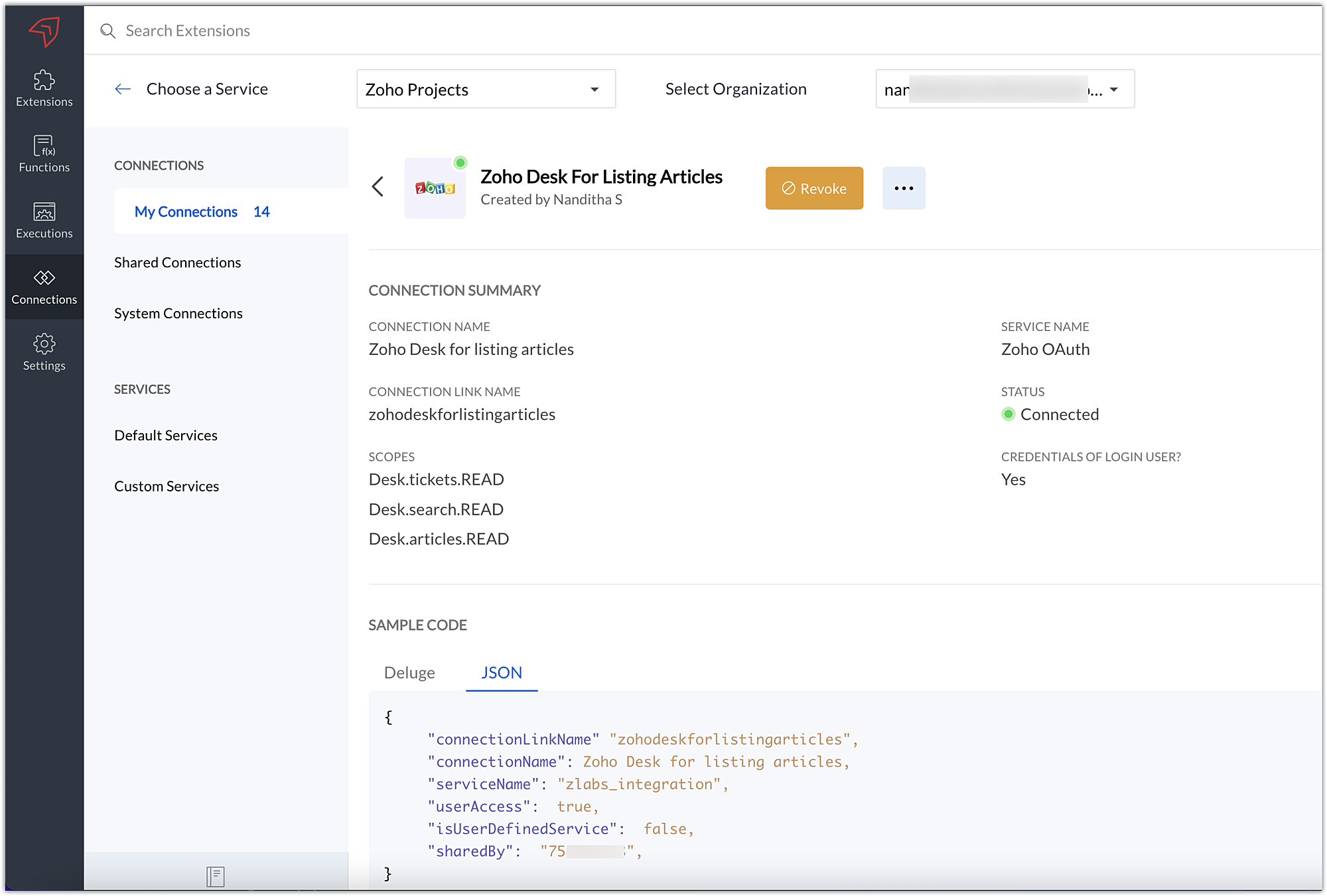
1. Connection
We have created a connection to establish a secure integration between Zoho Projects and Zoho Desk.
2. Extension Configuration
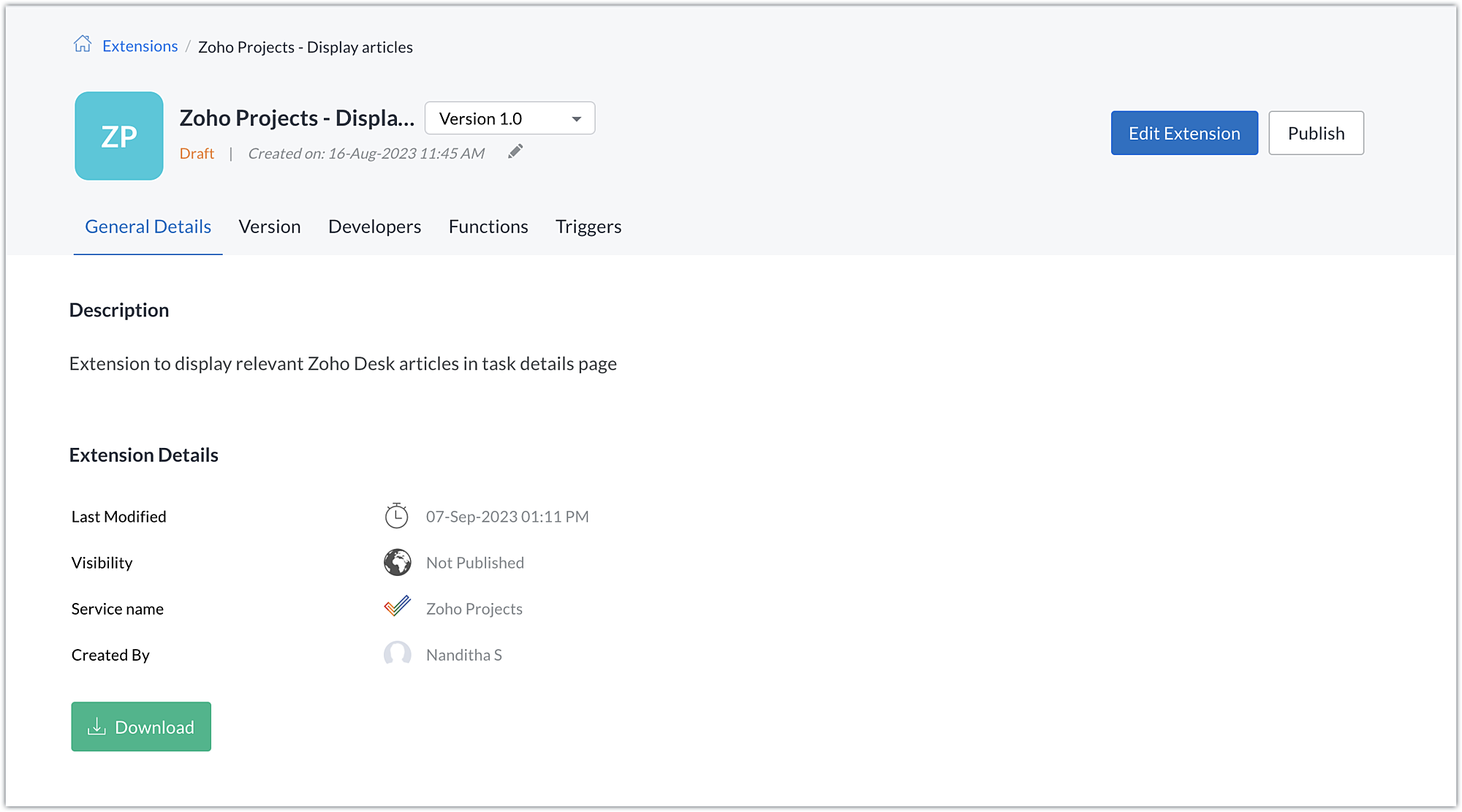
A. Extension creation: We have created a new extension for Zoho Projects.
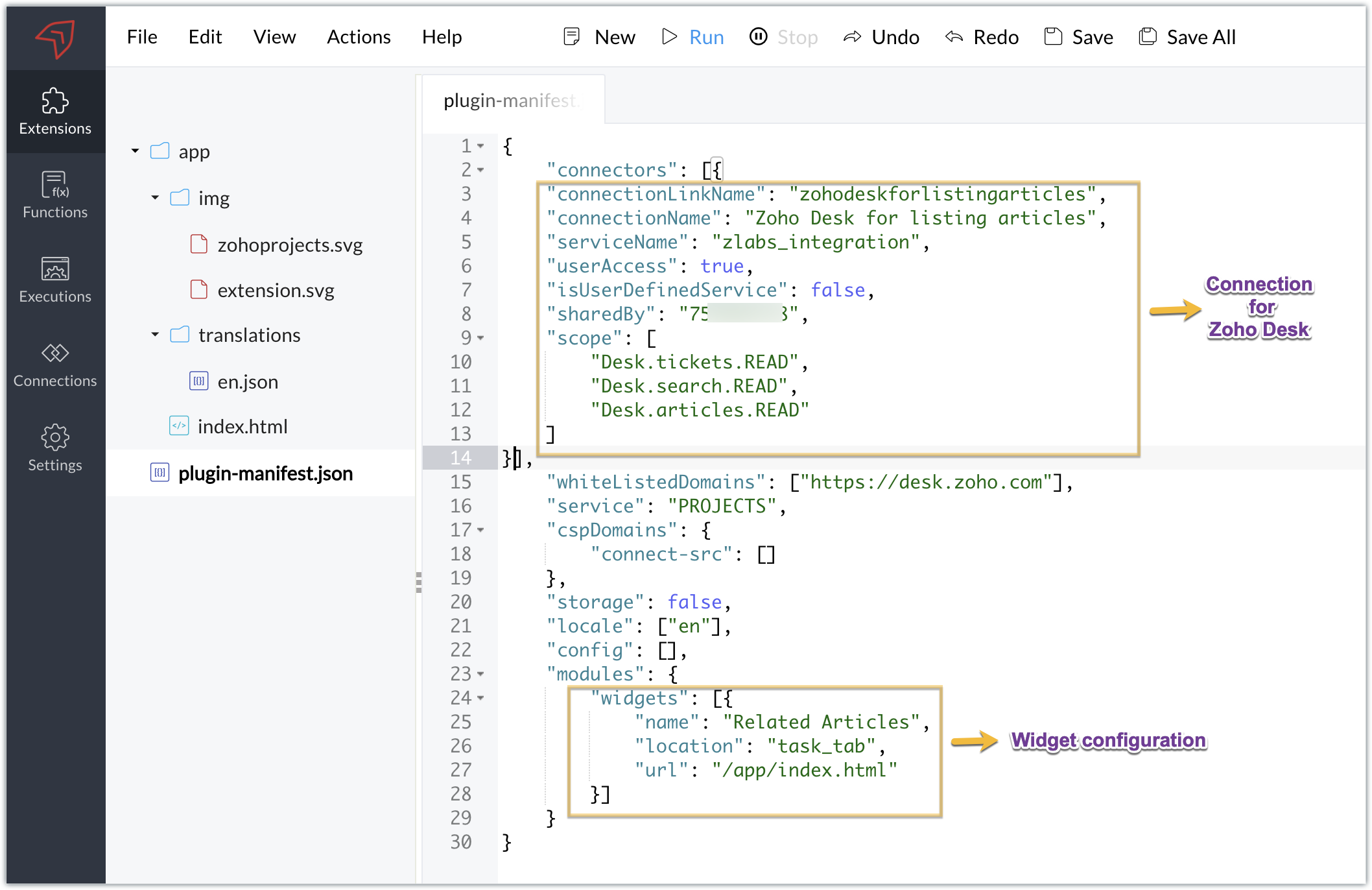
B. Plugin-manifest.json configuration: Once the extension is created, we next configure the plugin-manifest.json file to include the created connection and a widget.
For our extension use case, the plugin-manifest.json file is configured as shown in the below screenshot.
C. Setting up the widget code:
Now that we have the connection established, the extension created, and the plugin-manifest.json configured, let's go ahead and set up the custom widget code to achieve our goal.
Index.html - Widget code
<!DOCTYPE html> <html> <head> <title>App Default Screen</title> <script src="" target="_blank">https://js.zohocdn.com/projects/js/client_sdk.min.js"></script> <script src="" target="_blank">https://code.jquery.com/jquery-1.12.4.min.js"></script> <style> div.a { line-height: 200%; } </style> </head> <body> <div class="a"> <ul id="demo" style="font-size:20px"> <b>Article Details</b></ul> </div> </body> <script> var subject = ""; Util = {}; zohoprojects.init().then(function() { //Fetching the task subject using the Zoho Projects JS SDK method zohoprojects.get("task.name").then(function(response) { subject = response.data; var articledetails = { type: "GET", headers: { "orgId": "xxxxxxx", "Content-Type": "application/json" } }; var url = "https://desk.zoho.com/api/v1/articles/search?title=" + subject + "*"; //Using the request JS SDK method to invoke and get the Desk articles matching the task subject using the connection zohoprojects.request(url, articledetails, "zohodeskforlistingarticles").then(function(response) { var list = document.getElementById('demo'); var a = document.createElement("a"); var result = response.result; var data = result.data; //Looping through the articles for (i = 0; i < data.length; i++) { var title = data[i].title; var author = data[i].author; var authorname = author.name; var weburl = data[i].webUrl; var entry = document.createElement('li'); entry.innerHTML = title.link(weburl) + " by " + authorname; list.appendChild(entry); } }); }); }); </script> </html> |
- Here, we utilized the Zoho Projects JS SDK method to extract the task name, which is the task subject.
- We then used the Zoho Projects Request method to invoke the Zoho Desk API to search for articles.
- The Request method is used to make requests to third-party applications. It must be invoked with the belowparameters:
- Third-party API URL: This is the URL of the third-party application's API that needs to be invoked. In our case, we need to fetch articles from Zoho Desk based on a search value, so we used the Zoho Desk Articles Search API. We've included a search query parameter in the API as the title of the help article (wildcard search), and we've set the value of the search query parameter (title) as the task's subject. As a result, the API will look for any Zoho Desk help articles that satisfy a wildcard match with the task subject.
- Data object: Depending on the type of action being performed, each API requires a method type, body, header, and/or parameters to be invoked. To invoke the third-party application API, a data object with the necessary API details must be created. In our scenario, a header providing the Zoho Desk org ID is required to call the Zoho Desk article search API, which we have hardcoded.
- Connection: To work on the data of a third-party application safely, we would need to connect to that application. The link name of the connection created for the third-party application is the value of the connection parameter. This value will be available in the JSON code generated when the third-party application connection is established. This connection allows you to invoke the Zoho Desk API securely.
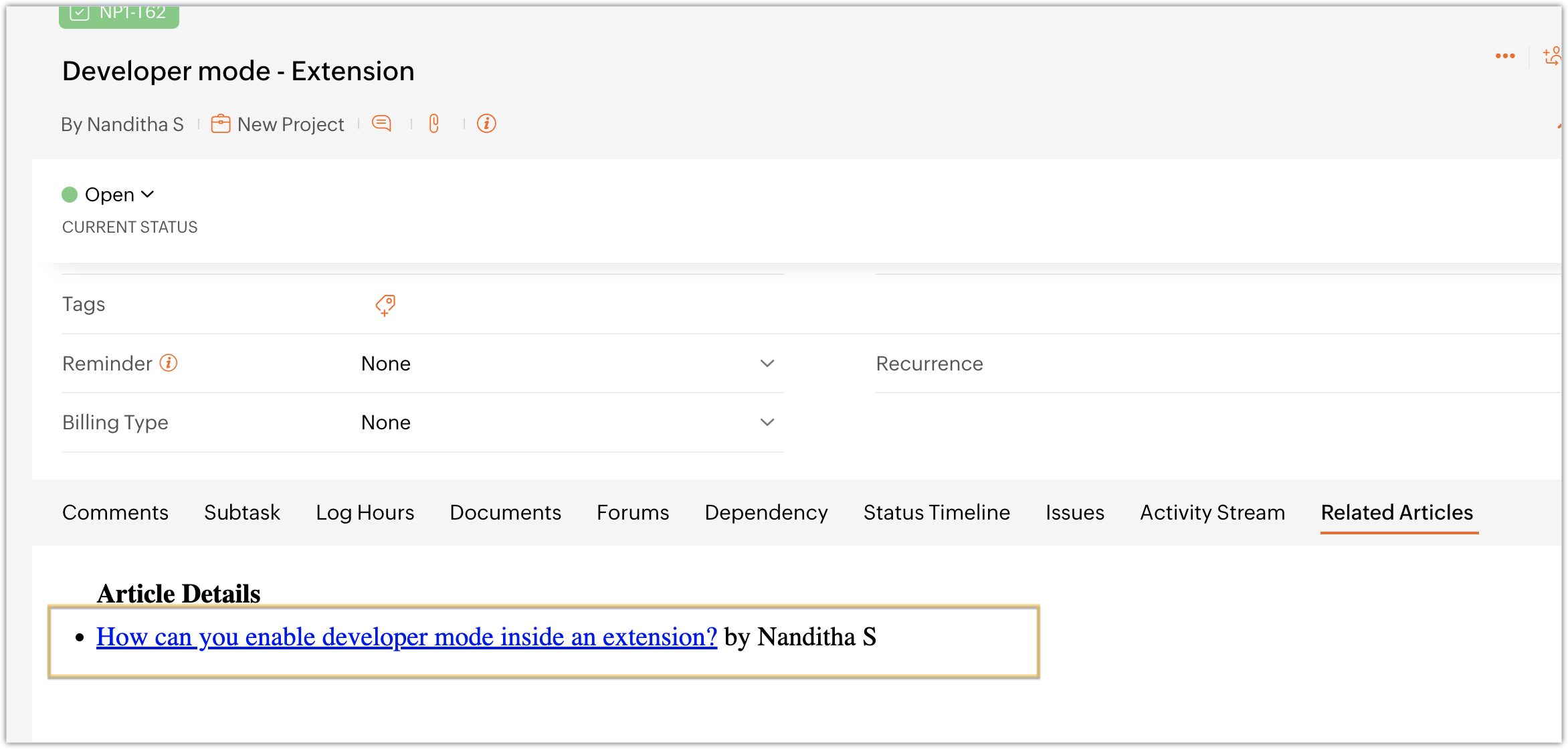
- Once the API is invoked by providing the necessary parameters for the Request method, the response for the invoked Zoho Desk search articles API is returned. We extract the information we require from the response, like the title, author name, and web URL. We then list and display this data in the Zoho Projects task details widget, Related Articles.
Sample output
- Access your Zoho Projects portal and enter into a task.
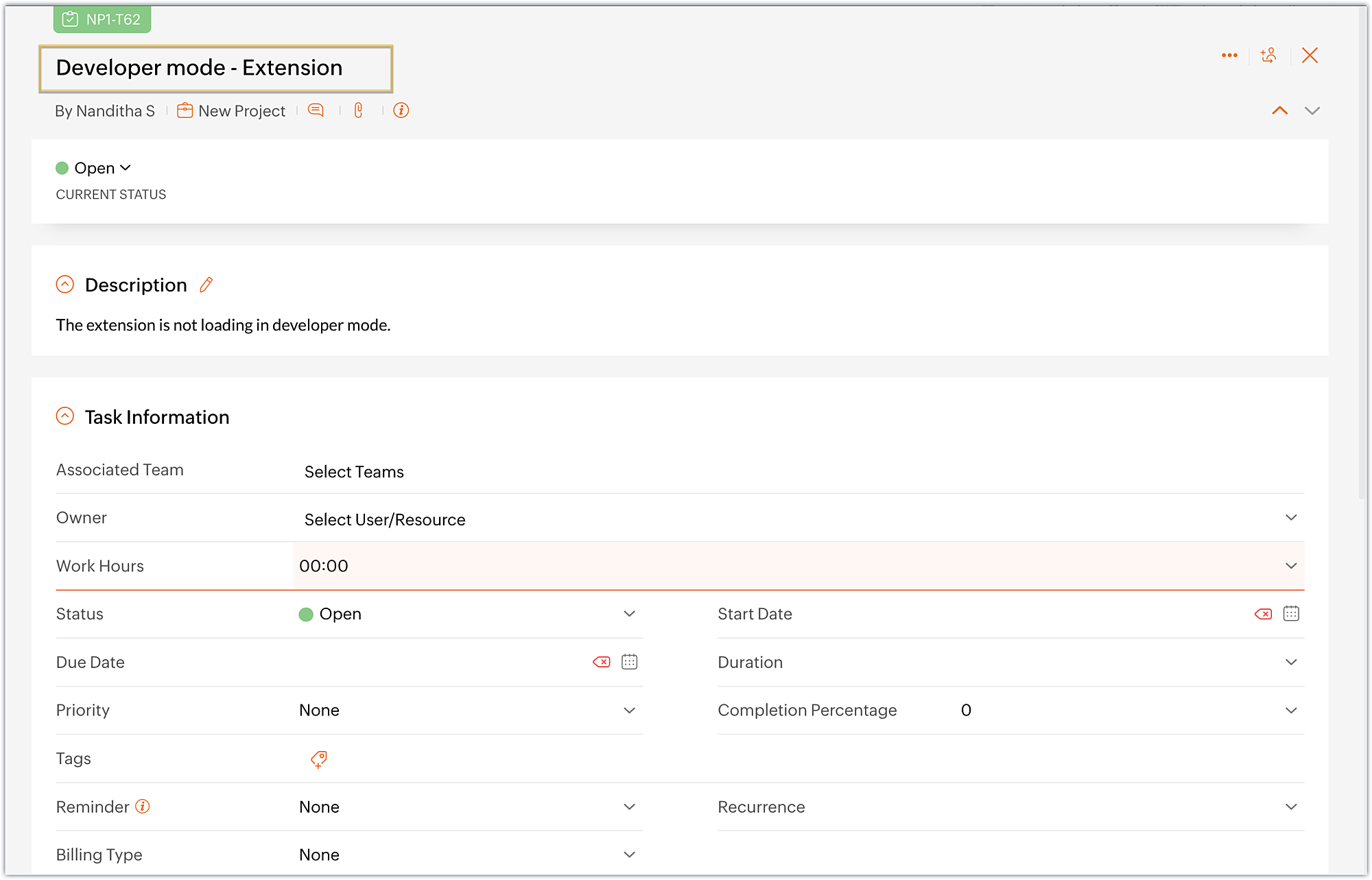
- Choose the Related Articles task tab, which is the widget we created.
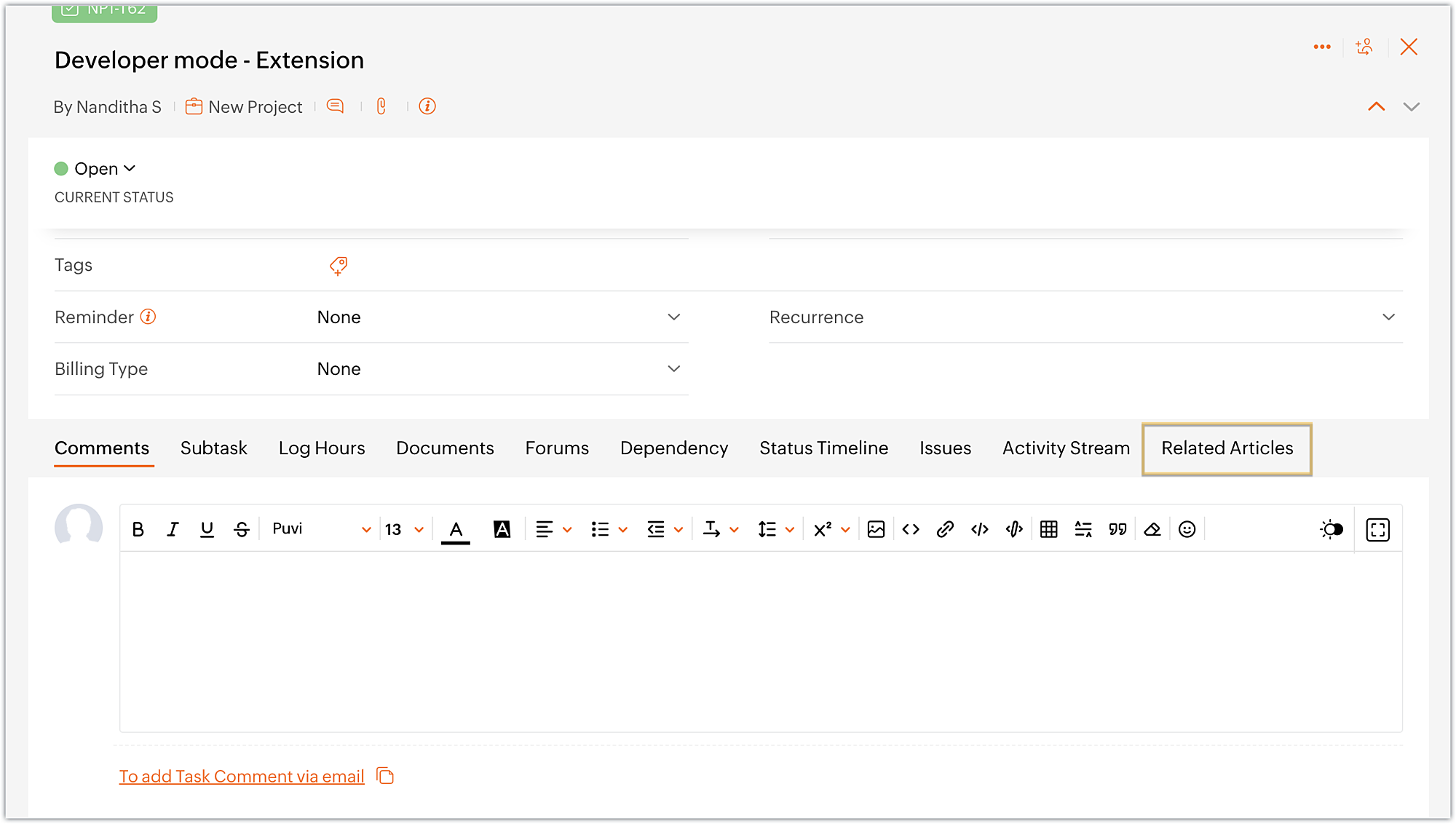
- The widget displays the available Zoho Desk articles that are related to the task at hand.
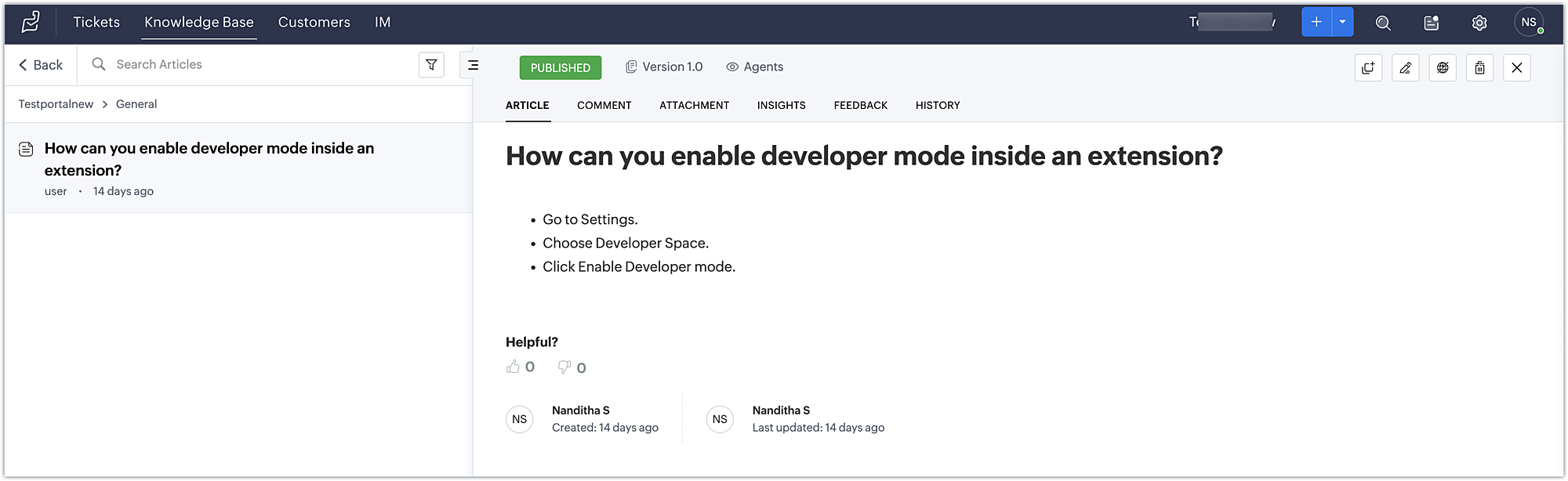
- Finally, click on an article to view its detailed information in Zoho Desk.
Using this method, developers working on Zoho Projects tasks can discover relevant articles and get helpful information to troubleshoot problems.
You can further enhance this use case by including a text box in the widget that allows the developer to enter a keyword and search for related articles using the Zoho Desk search articles API.
You can also accomplish use cases such as creating a task tab widget to associate data with a task. Every time the task loads, task-specific data can be displayed on the Task tab. To accomplish these kind of use cases, the data storage feature is available in Zoho Projects. We look forward to exploring the data storage feature,, and other use cases for custom widgets, in future posts.
We hope you found this information useful. Follow this space for further updates!
 Sign up for a Zoho Developer account and start developing extensions for Zoho products using Sigma.
SEE ALSO
Topic Participants
Nanditha Somasundaram Somasundaram
Sticky Posts
Building extensions #10: Fetch customized user inputs, store them globally at the app level, and access them across entities
This data storage concept enables you to store data related to your extension for both entity properties and extension properties. In our previous piece, we looked at how to store data for entities using entity properties. In this post, we'll look atBuilding extensions #9: Store, retrieve, and access entity-specific data in widgets using data storage
Data storage - Overview Storing data related to the extension you are working on is essential. It can be saved as key-value pairs for an entity or extension, known as entity and extension properties, respectively. Data can be saved for the following entitiesBuilding extensions #7: Create custom widgets for a simplified end-user experience
Discover the benefits of using widgets! We explored the significance of widgets, prerequisites, and the availability of JS SDK methods as part of our previous post. In this post, let's go over a detailed example of using widgets along with certain ZohoBuilding extensions #6: Custom user interfaces with Widgets
Welcome to our post on Widgets for Zoho Projects! In our last post, we explored the significance of the connections feature, showed how to use it, and provided an example use case. In this article, we'll look at the importance of widgets, another featureBuilding extensions #5: Integrating applications with Zoho Projects through Connections
In our last post, we discussed the essential features that a Zoho Projects extension can provide. Starting with this post andin every subsequent post going forward, we'll go through each of those features in depth, one by one, with an example use case.
Recent Topics
Hiding Pre-defined Views
You can enhance Zoho with custom views - but you cannot hide the pre-defined views. Most users focus on 4 or 5 views. Right now for EVERY user EVERY time they want to move to one of their 4 or 5 views - they have to scroll down past a long list of pre-definedwhy can't agent see accounts & contacts
My new user, with 'Agent' privileges, cannot see records that don't belong to them. How can I give them access? Why isn't this the default configuration in Zoho?【Zoho CRM】フィルター機能のアップデート:ルックアップ項目を使ったデータフィルタリング
ユーザーの皆さま、こんにちは。コミュニティチームの藤澤です。 今回は「Zoho CRM アップデート情報」の中からフィルター機能のアップデートをご紹介します。 ルックアップ項目を使ったデータフィルタリングがより詳細に行えるようになりました。 この機能は詳細フィルターとカスタムビューで利用でき、必要な情報を正確に取得できます。 これにより、タブ間を移動することなく、より深く正確な方法でデータを絞り込むことが可能になります。 ◉できること 詳細フィルターとカスタムビューで、ルックアップ先タブの項目が選択可能Zoho Books | Product updates | July 2025
Hello users, We’ve rolled out new features and enhancements in Zoho Books. From plan-based trials to the option to mark PDF templates as inactive, explore the updates designed to enhance your bookkeeping experience. Introducing Plan Based Trials in ZohoZoho Books | Product updates | August 2025
Hello users, We’ve rolled out new features and enhancements in Zoho Books. From the right sidebar where you can manage all your widgets, to integrating Zoho Payments feeds in Zoho Books, explore the updates designed to enhance your bookkeeping experience.Weekly Tips: Protect Confidential Information with PGP in Zoho Mail
We deal with confidential information almost every day, whether it is being sent out or received. Though emails sent using Zoho Mail are encrypted both during transit and at rest, attempts to access and steal your sensitive data are always a threat thatQuotes Approval
Hey all, Could you please help in the following: When creating quotes, how to configure it in a way, that its approval would work according to the quoted items description, not according to quote information. In my case, the quote should be sent to approvalImportant Update: Facebook Pages API Deprecation
Dear Zoho Analytics users, As of January 26, 2026, Facebook has officially deprecated Facebook Pages API version 18. This update involves the removal of several metrics that were previously supported by the API. As a result, these changes will affectAdding a Deal to and Existing Contact
I want to easily add a Deal to an existing Contact. If I click on New Deal on the Contact page this currently this is what happens: All of the mandatory field (and other field) information exists within the Contact. Is there a simple way for it to automaticallyDefault font size for printing is too big
A recent issue in printing e mails is that the default font size is huge. This happens in both Edge and Firefox. In order to get what I would call a "normal" printout of an e mail it is necessary to go into the printer preferences / options and set the scale to 75%, otherwise a short e mail with signature and logos etc printed at 100% can take 3 or 4 pages. The annoying thing is that it is necessary to do this each time a printout is to be made as a change in scale only applies to that particularCustom SMTP is now available in Zoho Sign
Hi there! Want to send Zoho Sign emails from your organization's or personal email server? Look no further! Zoho Sign has introduced custom Simple Mail Transfer Protocol (SMTP) for Enterprise users across all data centers. By enabling custom SMTP, youZohoMail is so close to being Perfect BUT
Why don’t you have HILIGHTING???!! I've been trying to find a substitute for Edison Mail but I want & need hilighting (preferably in more than just yellow)! Is this even on your To Do list? I’m so disappointed. 🙄Deleting a memorized email address
How can I delete a memorized email address? Even though the address has been deleted from Contacts, Zoho mail still auto suggests the address when typing it into the TO field. Thanks!cant upload images in signature- urgent help needed. ta!
HI, I have been trying to insert the company logo in the signature. i have tried it several times since yesterday, the longest I waited was 1 hour and 12 minutes for the pop up window to upload a 180 KB .jpg file. what am i doing wrong.. an urgent replyHow do I get complete email addresses to show?
I opened a free personal Zoho email account and am concerned that when I enter an email address in the "To", "CC", fields, it changes to a simple first name. This might work well for most people however I do need to see the actual email addresses showingEmail was sent out without our permission
Hi there, One customer just reached out to us about this email that we were not aware was being sent to our customers. Can you please check on your end?Flexible Partial-Use Coupons (Stored Value Credits)
Subject: Feature Request: Ability for users to apply partial coupon balances per transaction Problem Statement Currently, our coupons are "one-and-done." If a user has a $50 coupon but only spends $30, they either lose the remaining $20 or are forcedMigrating Brevo Automation Logic to Zoho Campaigns
Hello Zoho Campaigns Support Team, I am in the process of migrating my email marketing from Brevo to Zoho Campaigns. I have around 10,000 contacts, which I have already successfully exported from Brevo and imported into Zoho Campaigns. I now need guidanceIs there a way to delete workspaces?
I want to remove one of the workspaces in my Campaigns account. I don't see any obvious way to do this. Am I missing something?Make CAMPAIGNS email look as simple as possible
Hi there I'm trying to make my Campaigns email look as much like a normal email as possible. I'm a bit stuck with the "justification" of the email email block. Can I LEFT JUSTIFY the "whole email" to make it look "normal"? (Please see screenshot attached)Canadian Banks ?
Can you advise which Canadian Banks can be used to fully sync credit cards and bank accounts? ThanksSorry! we encountered some problems while sending your campaign. It will be sent automatically once we are ready. We apologize for the delay caused.
Hello. Lately we are having problems with some campaigns, which show us this error message. Sorry! we encountered some problems while sending your campaign. It will be sent automatically once we are ready. We apologize for the delay caused. We can't findCan I remove or divert certain contacts from an active Campaigns workflow?
I have created a workflow in Zoho Campaigns, which sends different emails, once contacts have been added to a mailing list. To choose which email to send to the contacts, there are conditions, which divert contacts based on their company type and their company size. There was a subsection of this workflow, where company size wasn't selected correctly, and some contacts have been sent down the wrong path and received the wrong email. The workflow contains a reminder loop and a further series of emails.How to map fields from Zoho Recruit to Zoho People
I've got these fields from my Job Offer that I'm trying to map to the Work information fields in Zoho People, but they arent showing up. For example, how do I get the department name field (in the job post) to map to the work information field in ZohoUTM in zoho campaigns
Helloo everybody!!! Someone know how IF ZOHO CAMPAIGNS has UTM for tracking the url of any campaigns. thank uFull Context of Zoho CRM Records for Zia in Zoho Desk for efficient AI Usage
Hello everyone, I have a question regarding the use of Zia in Zoho Desk in combination with CRM data. Is it possible to automatically feed the complete context of a CRM record into Zia, so that it can generate automated and highly accurate responses forKnowledge base printing
I saw a posting about printing the knowledge base as I was looking for the answer, but we would like the ability to print out the entire knowledge base with a click, keeping the same organization format. Bonus would include an index of keywords andUpdates for Zoho Campaigns: Merge tag, footer, and autoresponder migration
Hello everyone, We'd like to inform you of some upcoming changes with regard to Zoho Campaigns. We understand that change can be difficult, but we're dedicated to ensuring a smooth transition while keeping you all informed and engaged throughout the process.How do i integrate google analytics to Zoho Campaigns?
Looking to track Zoho Traffic from email Current topic is outdatedHow do teams manage meeting follow-ups across Zoho tools?
We’re using Zoho tools for collaboration and tracking, but managing meeting notes, action items, and follow-ups across teams is still challenging. Curious how others are handling this within Zoho workflows. Are there best practices or integrations thatMejoras urgentes para ZOHO MEETING
Tengo unos meses usando Zoho Meeting. En general, es buena, pero hay cosas vitales que no logra cumplir con mínima calidad. 1) Calidad de audio y video: urge mejoras. Audio con retraso, imagen borrosa, mal recorte de silueta con fondos virtuales. Además,Saving sent email campaign as PDF
I'm looking to add all campaigns sent to an archive folder in sharepoint. Is there anyway to accomplish this in Zoho Flow ? I'm falling at the first hurdle ... can I automatically save a sent campaign as a PDF to a folder location ?Conditional Layouts On Multi Select Field
How we can use Conditional Layouts On Multi Select Field field? Please help.Appreciation to Qntrl Support Team
We are writing this topic to appreciate the outstanding level of support from Qntrl Team. We have been using Qntrl since 2022 after shifting from another similar platform. Since we joined Qntrl, the team has shown a high level of professionalism, support,How can I hide "My Requests" and "Marketplace" icon from the side menu
Hello everybody, We recently started using the new Zoho CRM for Everyone. How can I hide "My Requests" and "Marketplace" from the side menu? We don't use these features at the moment, and I couldn't find a way to disable or remove them. Best regards,Whatsapp Integration on Zoho Campaign
Team: Can the messages from Zoho Campaign delivered through Whatsapp... now customers no longer are active on email, but the entire campaign module is email based.... when will it be available on whatsapp.... are there any thirdparty providers who canMandatory Field - but only at conversion
Hello! We use Zoho CRM and there are times where the "Lead Created Date & Time" field isn't populated into a "Contractor" (Account is the default phrase i believe). Most of my lead tracking is based on reading the Lead Created field above, so it's importantUsing data fields in Zoho Show presentations to extract key numbers from Zia insights based on a report created
Is it possible to use data fields in Zoho Show presentations along with Zoho Analytics to extract key numbers from Zia insights based on a report created? For example, using this text below: (note that the numbers in bold would be from Zia Insights) RevenueFree webinar: AI-powered agreement management with Zoho Sign
Hi there! Does preparing an agreement feel like more work than actually signing it? You're definitely not alone. Between drafting the document, managing revisions, securing internal approvals, and rereading clauses to make sure everything still reflectsWhatsApp Channels in Zoho Campaigns
Now that Meta has opened WhatsApp Channels globally, will you add it to Zoho Campaigns? It's another top channel for marketing communications as email and SMS. Thanks.Next Page