Enhancements to the formula field in Zoho CRM: Auto-refresh formulas with the "Now" function, stop formula executions based on criteria, and include formulas within formulas
Dear Customers,
We hope you're well!
By their nature, modern businesses rely every day on computations, whether it's to calculate the price of a product, assess ROI, evaluate the lifetime value of a customer, or even determine the age of a record.
With Zoho CRM, you can include such calculations within records using the formula field. Today, we're introducing some new enhancements that aim to improve the accuracy and usability of formulas in your business processes.
Let's look at them!
Enhancement 1: Auto-refresh time-based formulas to view real-time values.
Businesses rely on time-based computations to conduct various analyses. Some computations measure time like a stopwatch. For example:
- To ascertain the possibility a customer might churn, you would compute the age of their deals.
- To validate an applicant's eligibility for an insurance policy, you would calculate the age of the applicant as of the current date.
The above examples are ongoing calculations that show the age of the record or of the customers. For these types of computations, you might expect that the formula is constantly ticking and rendering an accurate time measurement whenever you view the record. However, formula fields in fact compute and render the latest result only when the record is edited manually or updated via automation. By simply viewing a record, an agent may not be seeing accurate results. This enhancement addresses this.
Though formulas that provide the latest values include a "now" function in their syntax, computing all of these formulas continually and concurrently across all records poses a significant technical constraint. To address this constraint, we've introduced a checkbox to the formula field property labeled, Automatically refresh formula fields containing the Now function in real time.
If checked, the auto-refresh checkbox makes the relevant formula run every time the user visits or edits the record. This means users will always see the correct time measurements.

Limitation:
- You can apply the auto-refresh only for two fields with the Now function per module.
- Formulas with date/ date time return types cannot be used in workflows that are based on date/time -based triggers.
- Fields enabled with auto-refresh will have updated values every time you view them. But, this doesn't qualify for record edit. If you have automations based on edit of a record, this record will not be used unless the record is really "edited".
- Also, creating custom views and filters using these fields cannot be done.
Enhancement 2: Stop formula executions based on criteria
In contrast to the case above—where you'd expect the formula to run constantly—there are scenarios wherein you may want to stop a computation from executing. Let's say a customer has churned, and you want to calculate the time it took them to churn. In that case, you might want the formula to stop computing under certain conditions.
Accordingly, you can use this new function to:
- Calculate the number of days the deal was under negotiation
- Calculate the number of days spent in trial before conversion
- Calculate the number of days taken to ship a product
You may want to stop ongoing computations whenever there are events acting upon a given record. By doing so, you can determine the amount of time the record spent in a particular stage.
Previously, there hasn't been any functionality in Zoho CRM that effectively stops a formula from computing. Even when a cutoff date has passed, formulas continued to compute durations. With this enhancement, you can stop computations or freeze values based on specific criteria.
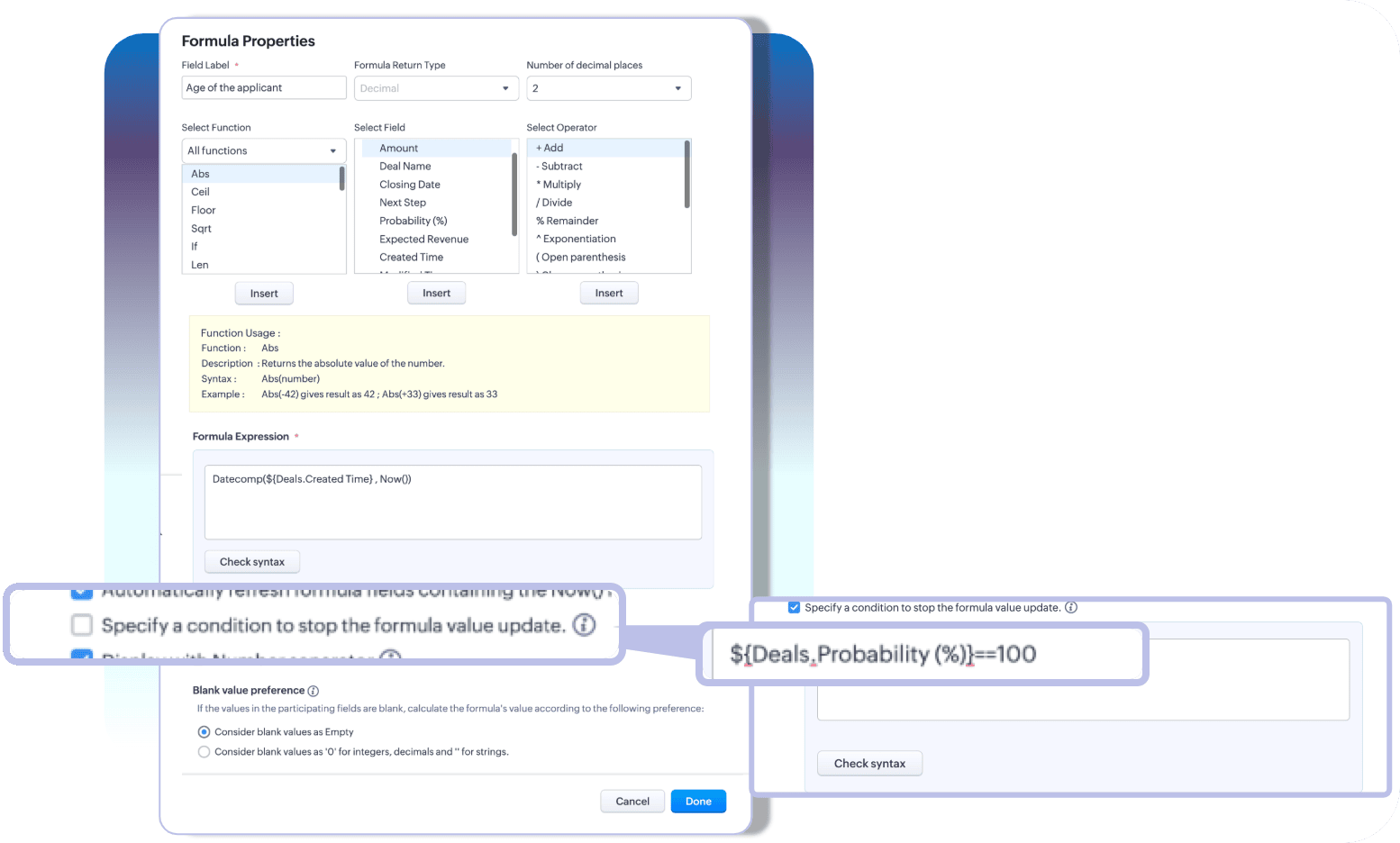
With these two enhancements, you can choose how you want your time-based formulas to be computed—to keep them running or to stop at a given time.
Limitation:
A formula field that has auto-refresh and stop criteria enabled, then those fields cannot have multiline fields, picklists, and lookup fields as participating fields.
Enhancement 3: Include an existing formula as part of another formula's component
A formula is only as powerful as its components. Zoho CRM enables you to construct various complex formulas, but one missing piece has been the inability to include an existing formula field to construct a new one.
Thus far, you could do this by building a long and linear syntax.
For example, let's say you want to determine the discounted value and overall discount percentage for your finalized quotes. Firstly, to determine the discount value, you'd write a formula.

Next, to find the discount percentage, you'd write another formula that looks something like this:

As you can see, the structure of the formula involves an existing computation. In Zoho CRM, to achieve this, you'd first formulate the discount value, and then—to find the percentage—you have to repeat the discount formula to get the percentage.

For a simple formula like this, the syntax is fairly easy to understand. But imagine calculating commissions, which would involve several smaller formulas—in which case, you have to repeat the entire formula structure even if you already have them computed in your record layout.
This is complex, redundant, and time-consuming—problems that this latest enhancement addresses.
A formula field looks like any other field in Zoho CRM. Thus, in addition to the list of fields available under the fields part of the formula configuration, all the existing formula fields will also be listed. Admins can construct new formulas using the existing formulas without having to repeat syntax.

That's all for the updates. If you have any feedback or questions, please drop them in the comments section. Let's connect!
Help document: Creating Formula fields in Zoho CRM
 Release plan: These enhancements are lined up for release DC by DC, gradually. We will keep you posted on the comments accordingly.
Thanks and have a good one!
Kind regards,
Saranya Balasubramanian
Topic Participants
Saranya Balasubramanian
Zohoboy
Haiku Technical Support
Toca Travel
Sravani
Sticky Posts
Presenting ABM for Zoho CRM: Expand and retain your customers with precision
Picture this scenario: You're a growing SaaS company ready to launch a powerful business suite, and are looking to gain traction and momentum. But as a business with a tight budget, you know acquiring new customers is slow, expensive, and often deliversGood news! Calendar in Zoho CRM gets a face lift
Dear Customers, We are delighted to unveil the revamped calendar UI in Zoho CRM. With a complete visual overhaul aligned with CRM for Everyone, the calendar now offers a more intuitive and flexible scheduling experience. What’s new? Distinguish activitiesCreate and populate a record in an instant: Introducing zero-shot field prompting to Zia's ICR
A couple of months ago, we upgraded our in-house AI image detection and validation tool, Zia Vision, with intelligent character recognition (ICR). By training Zia with sample images, you could create and enrich CRM records with data extracted from standardIn-person ZUG Meetups for Real Estate Professionals - US Q1 2026
The Real Estate Zoho User Group is going on a multi-city, in-person meetup tour across the US, and we’d love to see you there! These meetups are a great opportunity to: Connect with fellow real estate professionals using Zoho Share challenges and discoverNimble enhancements to WhatsApp for Business integration in Zoho CRM: Enjoy context and clarity in business messaging
Dear Customers, We hope you're well! WhatsApp for business is a renowned business messaging platform that takes your business closer to your customers; it gives your business the power of personalized outreach. Using the WhatsApp for Business integration
Recent Topics
Add Attachment Support to Zoho Flow Mailhook / Email Trigger Module
Dear Zoho Support Team, We hope you are well. We would like to kindly request a feature enhancement for the Mailhook module in Zoho Flow. Currently, the email trigger in Zoho Flow provides access to the message body, subject, from address, and to address,Zoho unreliable
Some mails are delivered, others not. How can I trust Zoho any more? Some friends get my e-mail, some don't. Same with receiving e-mails: Some I get, some not. If I use Google, everything works well. But Zoho?!!! How to solve this problem? I already reported this problem before, but didn't get any reply. Thanks, Kimthe custom domain forwards by default to the old career site / how to switch it off??
dear friends, how to switch off the old version of the career site?? The set up custom domain forwards directly to the old site, so that I cant publish it... Any ideas? Thank you! KR, VictoriaPreserve Ticket Issue Mapping When Migrating from Jira to Zoho Projects
Hello Zoho Projects Team, We hope you are doing well. We are currently exploring a full migration from Jira to Zoho Projects, and we identified a critical limitation during the migration process involving Zoho Desk integration. Current Situation: We useRecording Shopify/Amazon fees in Zoho Books - Zoho Inventory
We are currently flushing out the connections between Shopify/Amazon and Zoho Inventory. For other users of Zoho Books - Zoho Inventory, where and at what point do you record the merchant fees associated with theses channels? I have gotten mixed responsesPre-fill webforms in Recruit
I don't want to use the career site portal (as I have my own already), but I would like to direct users to the application forms for each role, from my website job pages. Is there a way to pre-fill fields in Recruit application forms, so that I only haveClient Portal ZOHO ONE
Dear Zoho one is fantastic option for companies but it seems to me that it is still an aggregation of aps let me explain I have zoho books with client portal so client access their invoice then I have zoho project with client portal so they can access their project but not their invoice without another URL another LOGIN Are you planning in creating a beautiful UI portal for client so we can control access to client in one location to multiple aps at least unify project and invoice aps that wouldFunction #8: Add additional charges to invoices
Here goes one of the highly sought-after custom functions in Zoho Books. If you find yourself needing to apply additional charges to customers on their invoices (say credit card surcharges, or fuel charges applicable to customers from a certain region,Taxes Payable Adjustment
I am from Canada and I need to make an adjustment to my Taxes Payable (HST) account. Basically I need to take a portion of the amount within Taxes Payable and expense that portion to another account. The adjusting entry would like like the following:ASAP Widget Not showing "My Tickets"ed
Hello Team, I have created a ZOHO ASAP Widget and embedded to my portal app.clearvuiq.com , widget renders ok and I can open tickets from widget. However I want my opened tickets to be visible in the widget. How can I achieve that?Bug Causing Major Sync & SO Access Failures in Zoho POS
We are experiencing critical and recurring issues in Zoho POS that all trace back to role-permission handling defects in the latest POS app version. These issues directly affect syncing, login ability, and Sales Order access for role-restricted usersAdd Zoho Forms to Zoho CRM Plus bundle
Great Zoho apps like CRM and Desk have very limited form builders when it comes to form and field rules, design, integration and deployment options. Many of my clients who use Zoho CRM Plus often hit limitations with the built in forms in CRM or Desk and are then disappointed to hear that they have to additionally pay for Zoho Forms to get all these great forms functionalities. Please consider adding Zoho Forms in the Zoho CRM Plus bundle. Best regards, Mladen Svraka Zoho Certified Consultant andHow to view CRM Sales Orders in Desk
What's the usual way to view all CRM sales orders linked to a contact, when viewing a ticket in Desk? I don't want to have to open a new tab to see the order in CRM. And the Desk CRM sidebar doesn't seem to be configurable. Would I have to use an extensionKaizen #219: Actions API - Webhooks APIs - Part 1
Hello all!! Welcome back to a fresh Kaizen week. In the previous weeks, we covered Workflow Rules APIs, Actions APIs - Email Notification APIs, Tasks Update API, and Field Update API. This week, we will continue with another Actions API - Webhooks APIZoho Books Extension: What Happens If Custom Fields Already Exist?
When developing Zoho Books extensions, what happens if the target Zoho Books organization already has a custom field with the same API name as one defined in the extension? I’m asking because we originally created an on-Books version of this functionality,Zoho Books Extension: What Happens If Custom Fields Already Exist?
When developing Zoho Books extensions, what happens if the target Zoho Books organization already has a custom field with the same API name as one defined in the extension? I’m asking because we originally created an on-Books version of this functionality,Pricing Strategies: #3 Services never Stop with just Plans
"Hey, while you're here, could you also take a look at the vegetable patch?" Aaron hears that line almost every week. He runs a small gardening service, the kind where customers subscribe to a simple monthly plan that includes basic maintenance, mowing,Cropping Photos for Zoho Sites
Hi, I'm wondering if there is a built in crop tool for zoho sites for my photos so I can crop them and see what the crop looks like on the site?Deluge scripts
Why is there not a search function to make it easier to find the script of interest when modifications are required.bulk edit records and run internal logic
hi there is few logics in manner "it this than that" logics work well when i edit entry openning it one by one (via workflow "on add/edit - on success" , for custom field "on update/on user input") but when i try bulk edit records - logic does not work. how can i turn on logic to work as programmed - for mass editing records via bulk edit?WebDAV / FTP / SFTP protocols for syncing
I believe the Zoho for Desktop app is built using a proprietary protocol. For the growing number of people using services such as odrive to sync multiple accounts from various providers (Google, Dropbox, Box, OneDrive, etc.) it would be really helpfulPossible for first Signer of Sign Form to specify the next signer in the sequence
We have many use cases where multiple signers need sign the same document. We'd love to be able to use sign forms, where the a signer who uses the Sign Form link can specify the name and email address for the next person in the sequence.BUG: Can't copy-paste data outside Sheet
Currently I can't paste data copied from inside any of my Zoho Sheet files to any other app. Copy-paste works inside the sheet It does NOT work between two different sheets These sheets are built from automation templates Everything works fine if I createZoho CRM Community Digest - November 2025 | Part 1
Hello Everyone! Here’s what came through in the first half of November: new updates and a few helpful community discussions with real, notable solutions. Product Updates: Android App Update: Inctroducing Swipe Actions You can now swipe left or right onUpload own Background Image and set Camera to 16:9
Hi, in all known online meeting tools, I can set up a background image reflecting our corporate design. This doesn't work in Cliq. Additionally, Cliq detects our cameras as 4:3, showing black bars on the right and left sides during the meeting. WhereTruesync for Linux
Is Truesync available on linux ?Question about upgrade and storage space Zoho Notebook
After upgarding my Zoho Notebook plan, I am running into the following issue. I just upgraded from a free Zoho Notebook subscription to Pro Lite after I got a notification in my Window Zoho Notebook desktop app saying that I had run out of space. However,Hidding/excluding specific picklist options from filter
Hi. Is it possible to hide/exclude specific picklist options from this filter? I don't want them to be shown when someone tries to filter in the leads module"Wrong password or login" Problem to configure Zoho on MAIL App on my Macbook
Hi, I'm having problems to configure my e-mail on my MAIL App(Macbook pro). My e-mail is hari@trespontoum.net Actually was working perfectly, and still working on my Iphone. My MAIL App prompt me that my login or password is wrong. I tried to change 3Subforms to Capture Multi-Row Data in Job Sheets
Subforms transform your job sheets from simple checklists to powerful, data-rich forms. In field service work — whether maintenance, inspection, installation, or repair — a single job can involve multiple repeatable entries: readings, parts used, activitiesAdd "Fetch Composite Item" Action for Inventory
I want to make a Flow that uses information returned in the GET call for Composite Items, and it's not currently available in Zoho Flow. Please consider adding this functionality.Adress Labels for sending of the oder und barcode
We want to print with my address labels to stick on the order of the ware can. there are these options?printing individual labels - Dymo LabelWriter
I am trying to print individual labels to my Dymo LabelWriter - has anyone done this? Latest Update (December 2025): The Canvas Print View is now available! We encourage you all to try it out and share your feedback with us. Learn more here: Zoho CRMZoho Creator for Agriculture
Greetings, I am starting to work on Zoho Creator specifically for the agricultural field, any recommendations, tips or ideas that might be helpful ? Also, if you are interested by any means in working on such project, kindly contact me. The project isCustom Print Layout
I would like to create a custom print layout of a Lead or Contact. Is there a way to do that? What I mean is that if I'm viewing a specific lead or contact I'd like to be able to print or export that lead/contact and only print and/or export certain information.Print View
Nothing happens when I'm in a module , ie; Contacts, and I hit the Print View Button. Even when it does come up and say "loading", nothing loadsGet Holiday ready with Zoho Mail's Offline mode
With the holiday season right around the corner, this is the perfect time to get ready to unplug, relax, and enjoy a well-deserved break. In addition to preparing yourself, you can also make sure your organization members are set for their time away fromSolution to Import PST File into Office 365.
MailsDaddy OST to Office 365 Migration Tool is an outstanding solution to recover OST files and migrate them into Office 365 without any hassle. Using this software users can multiple OST files into Office 365 with complete data security. It offers usersZoho CRM Kiosk issues
Firstly this is for a system on the AU servers if that makes a difference. Issues are as follows (For Kiosk): 1. Re-ordering fields in the screen builder is broken. The fields seem to be re-ordering themselves, unless you order everything by moving theZoho Books emails suddenly going to Spam since 11 Nov 2025 (Gmail + now Outlook) — anyone else?
Hi everyone, We migrated to Zoho Books in July 2025 and everything worked fine until 11 Nov 2025. Since then, Zoho Books system emails are landing in customers’ Spam (first Gmail, and now we’re seeing Outlook/Office 365 also starting to spam them). ImpactedNext Page