Building extensions #7: Create custom widgets for a simplified end-user experience
Discover the benefits of using widgets!
We explored the significance of widgets, prerequisites, and the availability of JS SDK methods as part of our previous post. In this post, let's go over a detailed example of using widgets along with certain Zoho Projects JS SDK methods.
Use case: A developer is working on a Zoho Projects task and wants to know if there are any existing references that could be used to get a head start on their work.
Goal: Our goal here is to simplify the developer's job by presenting them with articles that are relevant to the task at hand.
Solution: Widgets! To achieve this goal, it would be ideal for the developer to have access to relevant Zoho Desk articles from a tab on the Task Details page. This can be accomplished by developing a custom widget.
Required components:
- A connection between Zoho Projects and Zoho Desk.
- An extension configuration process that includes:
A. Creating an extensionB. Configuring the plugin manifestC. Setting up the widget code to display the Zoho Desk articles on the Zoho Projects Task Details tab
We have already explored the steps to establish a connection, create an extension, and configure the plugin-manifest.json file as part of our earlier posts. You can refer to those resources for detailed guidance. In this case, we have already completed most of these steps (screenshots below).
1. Connection
We have created a connection to establish a secure integration between Zoho Projects and Zoho Desk.
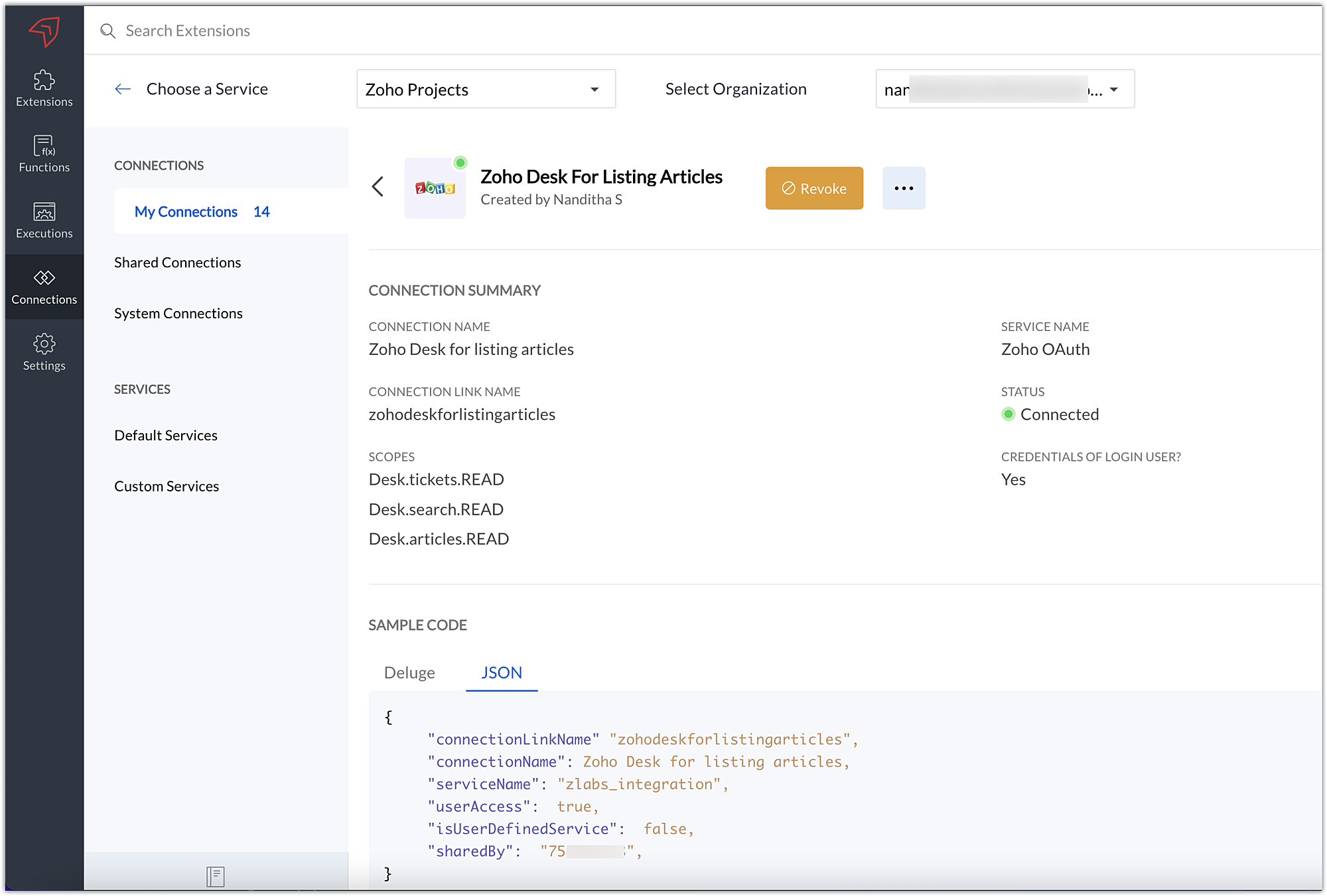
2. Extension Configuration
A. Extension creation: We have created a new extension for Zoho Projects.
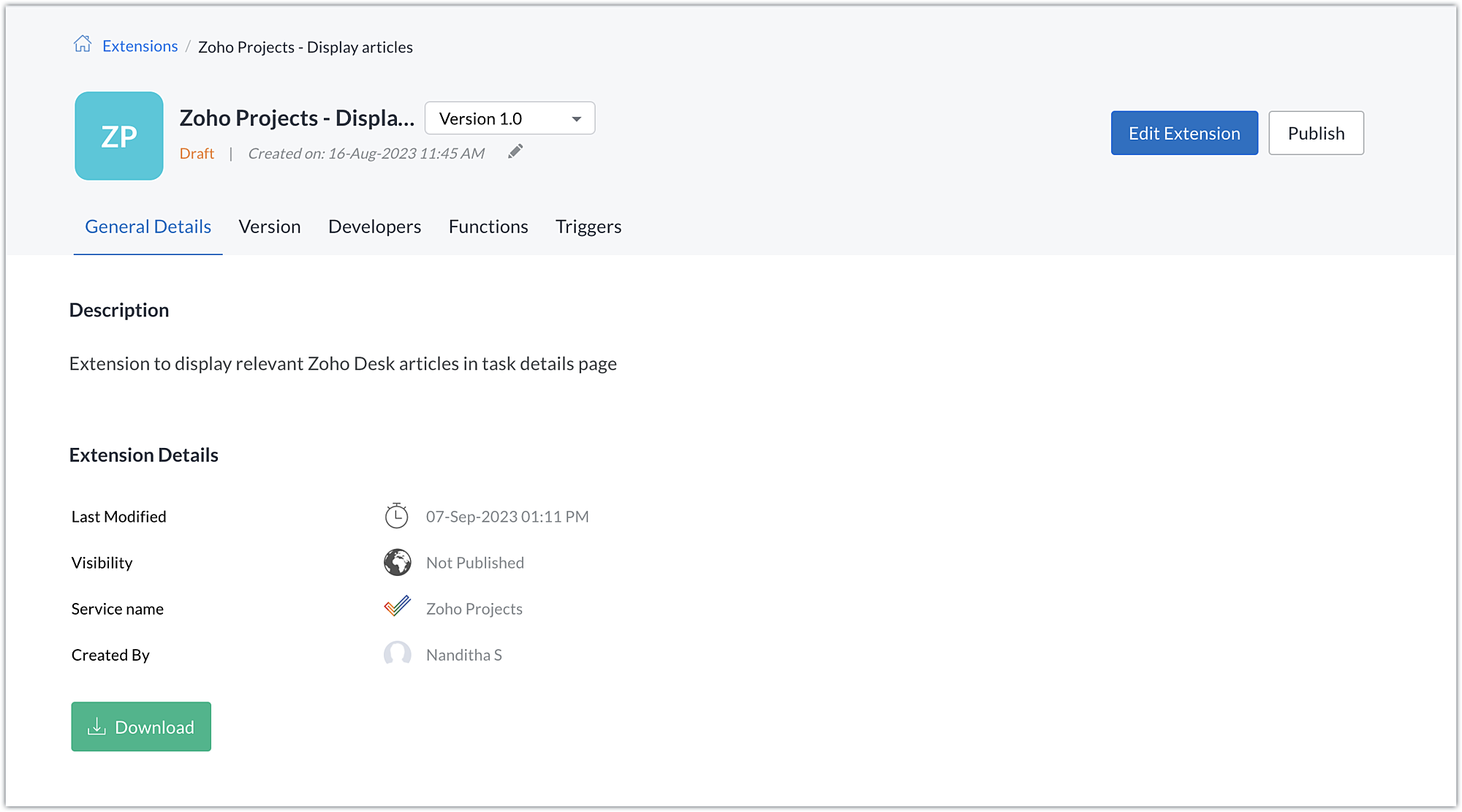
B. Plugin-manifest.json configuration: Once the extension is created, we next configure the plugin-manifest.json file to include the created connection and a widget.
For our extension use case, the plugin-manifest.json file is configured as shown in the below screenshot.
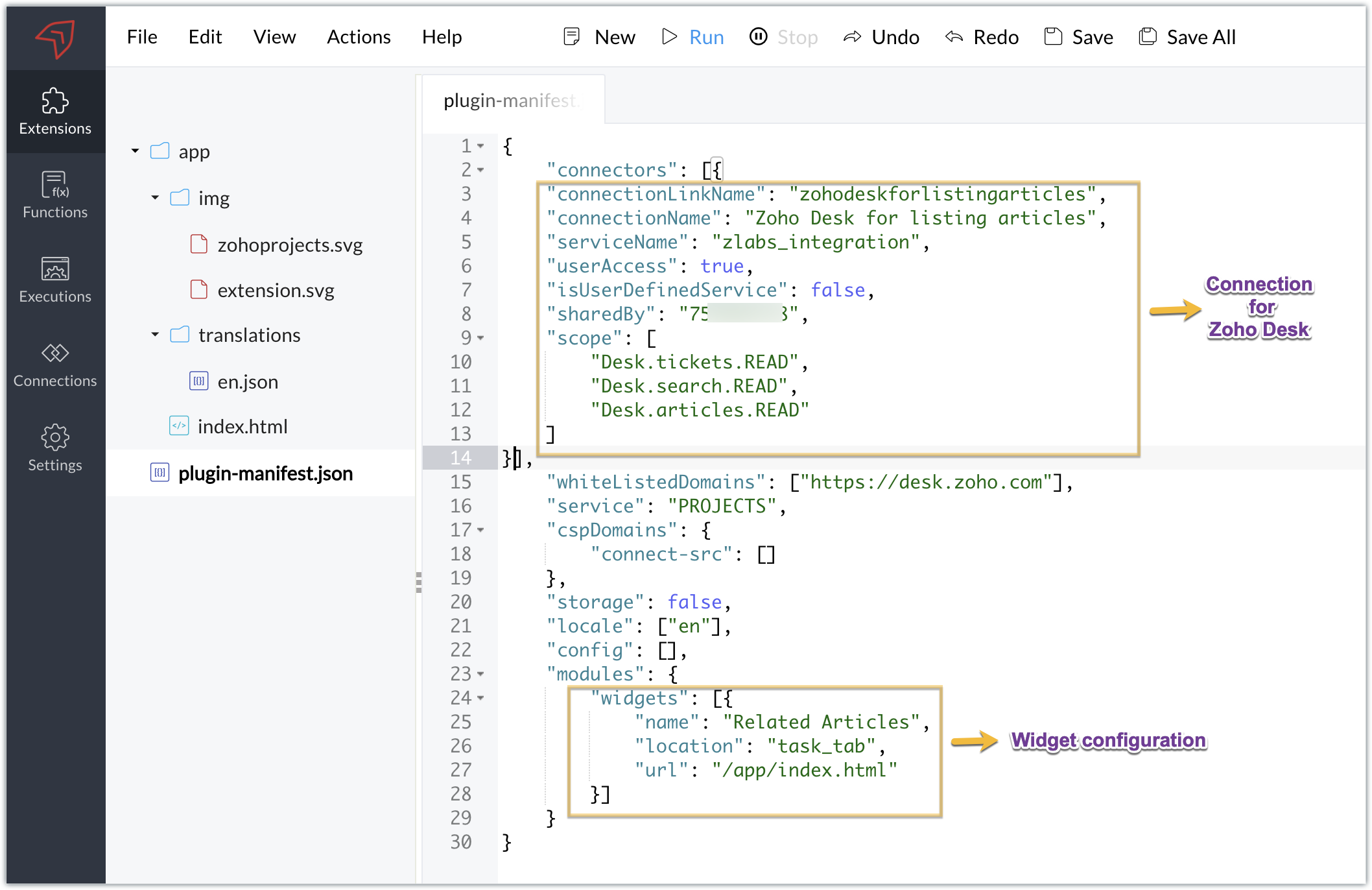
C. Setting up the widget code:
Now that we have the connection established, the extension created, and the plugin-manifest.json configured, let's go ahead and set up the custom widget code to achieve our goal.
Index.html - Widget code
<!DOCTYPE html> <html> <head> <title>App Default Screen</title> <script src="" target="_blank">https://js.zohocdn.com/projects/js/client_sdk.min.js"></script> <script src="" target="_blank">https://code.jquery.com/jquery-1.12.4.min.js"></script> <style> div.a { line-height: 200%; } </style> </head> <body> <div class="a"> <ul id="demo" style="font-size:20px"> <b>Article Details</b></ul> </div> </body> <script> var subject = ""; Util = {}; zohoprojects.init().then(function() { //Fetching the task subject using the Zoho Projects JS SDK method zohoprojects.get("task.name").then(function(response) { subject = response.data; var articledetails = { type: "GET", headers: { "orgId": "xxxxxxx", "Content-Type": "application/json" } }; var url = "https://desk.zoho.com/api/v1/articles/search?title=" + subject + "*"; //Using the request JS SDK method to invoke and get the Desk articles matching the task subject using the connection zohoprojects.request(url, articledetails, "zohodeskforlistingarticles").then(function(response) { var list = document.getElementById('demo'); var a = document.createElement("a"); var result = response.result; var data = result.data; //Looping through the articles for (i = 0; i < data.length; i++) { var title = data[i].title; var author = data[i].author; var authorname = author.name; var weburl = data[i].webUrl; var entry = document.createElement('li'); entry.innerHTML = title.link(weburl) + " by " + authorname; list.appendChild(entry); } }); }); }); </script> </html> |
- Here, we utilized the Zoho Projects JS SDK method to extract the task name, which is the task subject.
- We then used the Zoho Projects Request method to invoke the Zoho Desk API to search for articles.
- The Request method is used to make requests to third-party applications. It must be invoked with the belowparameters:
- Third-party API URL: This is the URL of the third-party application's API that needs to be invoked. In our case, we need to fetch articles from Zoho Desk based on a search value, so we used the Zoho Desk Articles Search API. We've included a search query parameter in the API as the title of the help article (wildcard search), and we've set the value of the search query parameter (title) as the task's subject. As a result, the API will look for any Zoho Desk help articles that satisfy a wildcard match with the task subject.
- Data object: Depending on the type of action being performed, each API requires a method type, body, header, and/or parameters to be invoked. To invoke the third-party application API, a data object with the necessary API details must be created. In our scenario, a header providing the Zoho Desk org ID is required to call the Zoho Desk article search API, which we have hardcoded.
- Connection: To work on the data of a third-party application safely, we would need to connect to that application. The link name of the connection created for the third-party application is the value of the connection parameter. This value will be available in the JSON code generated when the third-party application connection is established. This connection allows you to invoke the Zoho Desk API securely.
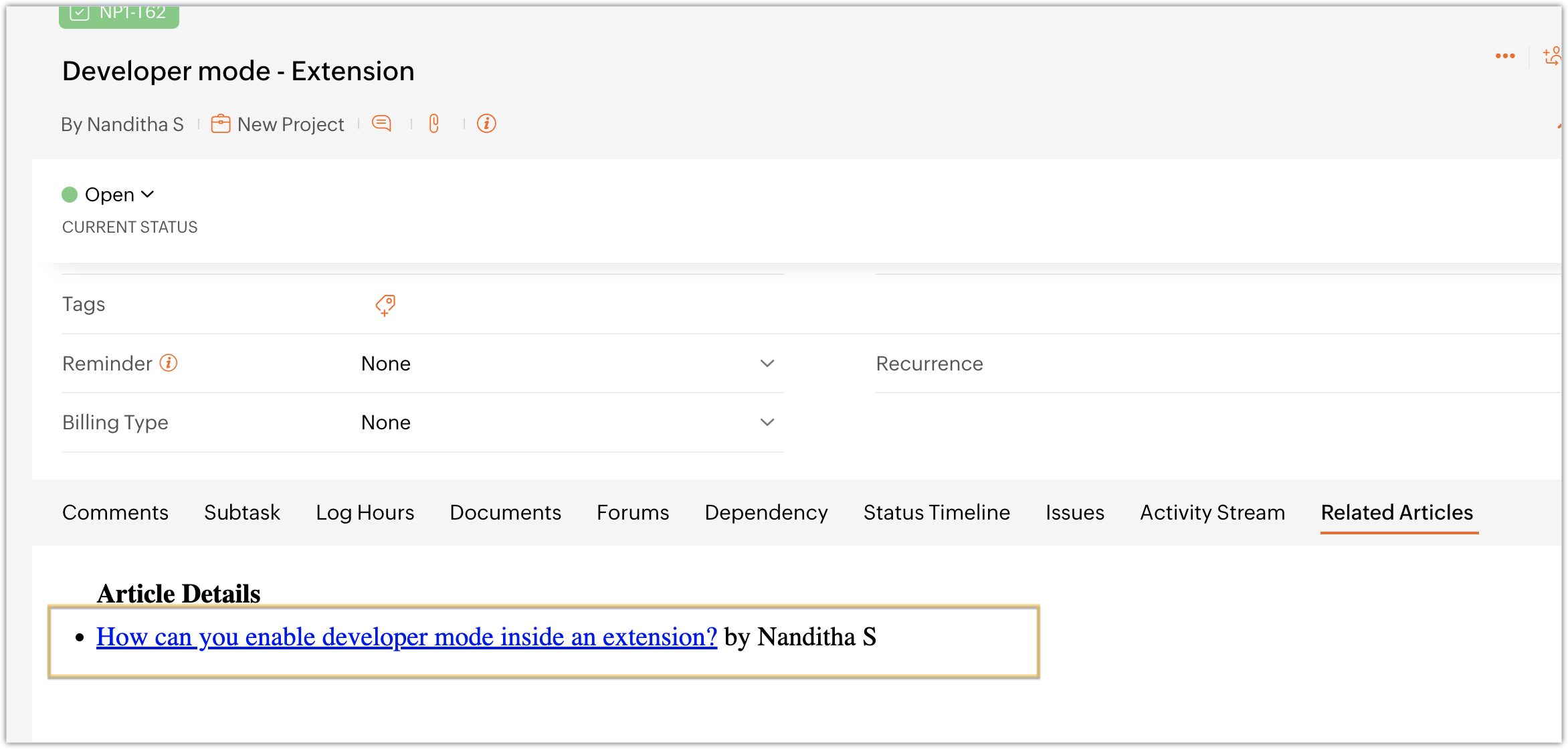
- Once the API is invoked by providing the necessary parameters for the Request method, the response for the invoked Zoho Desk search articles API is returned. We extract the information we require from the response, like the title, author name, and web URL. We then list and display this data in the Zoho Projects task details widget, Related Articles.
Sample output
- Access your Zoho Projects portal and enter into a task.
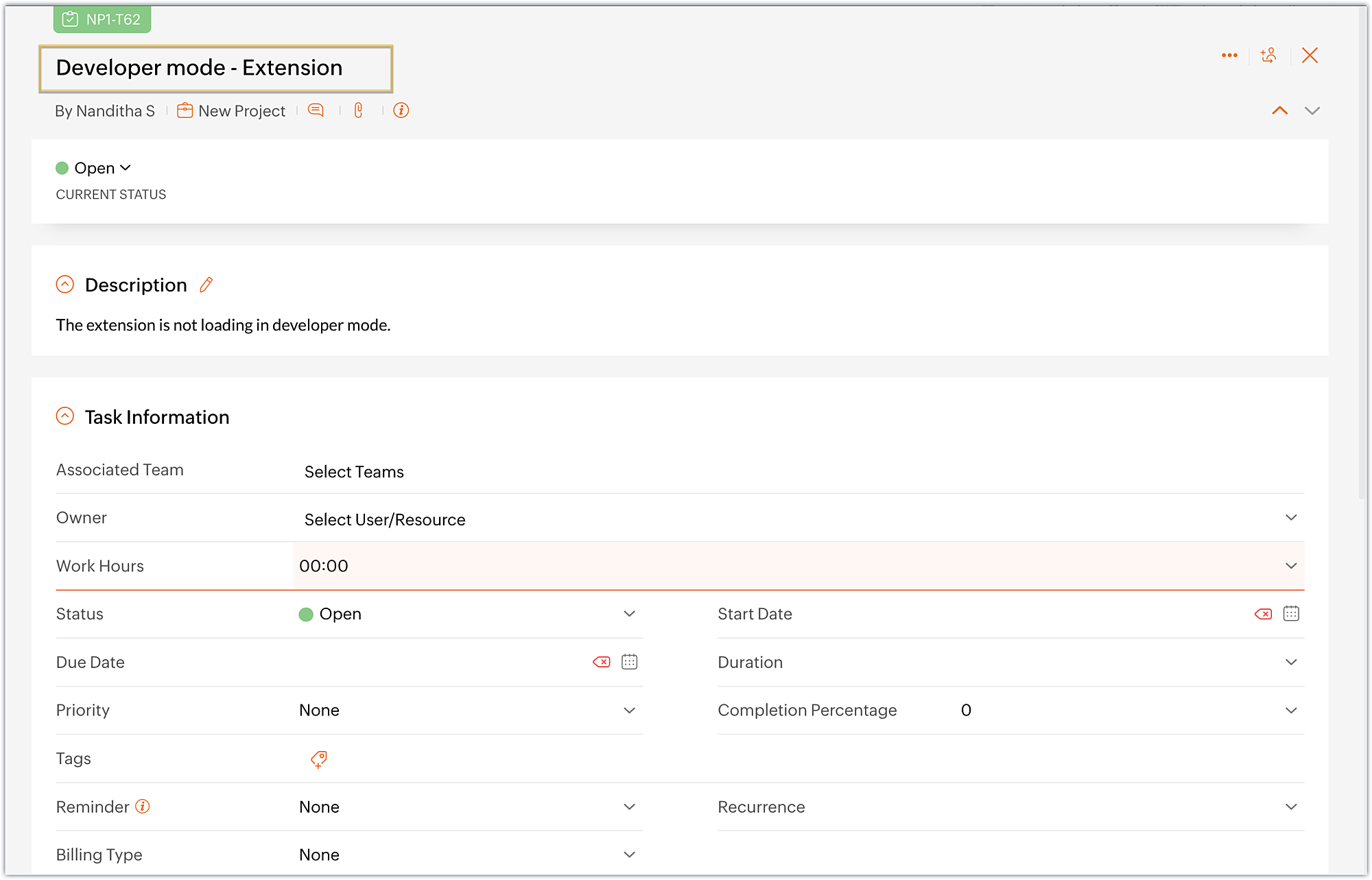
- Choose the Related Articles task tab, which is the widget we created.
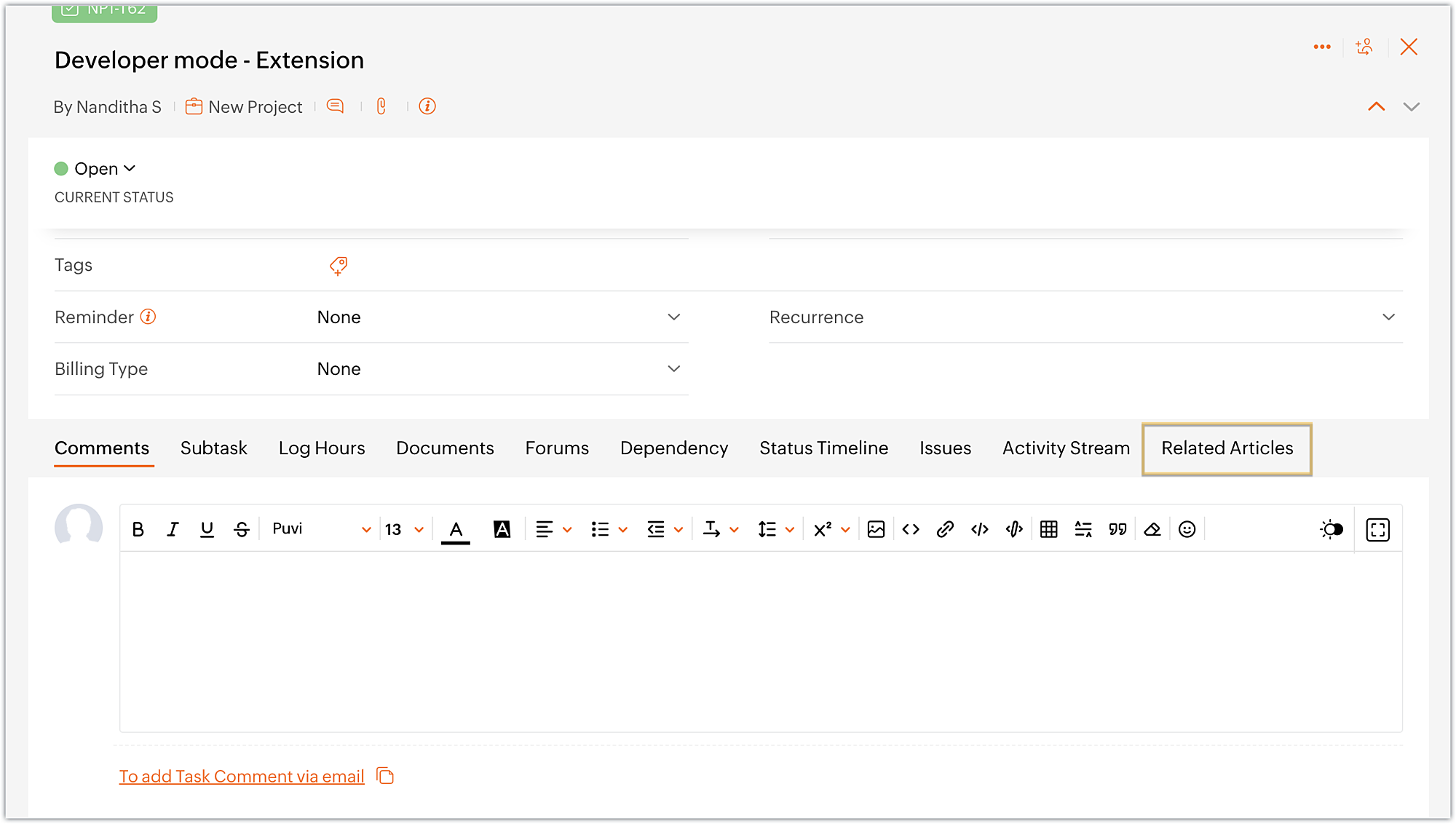
- The widget displays the available Zoho Desk articles that are related to the task at hand.
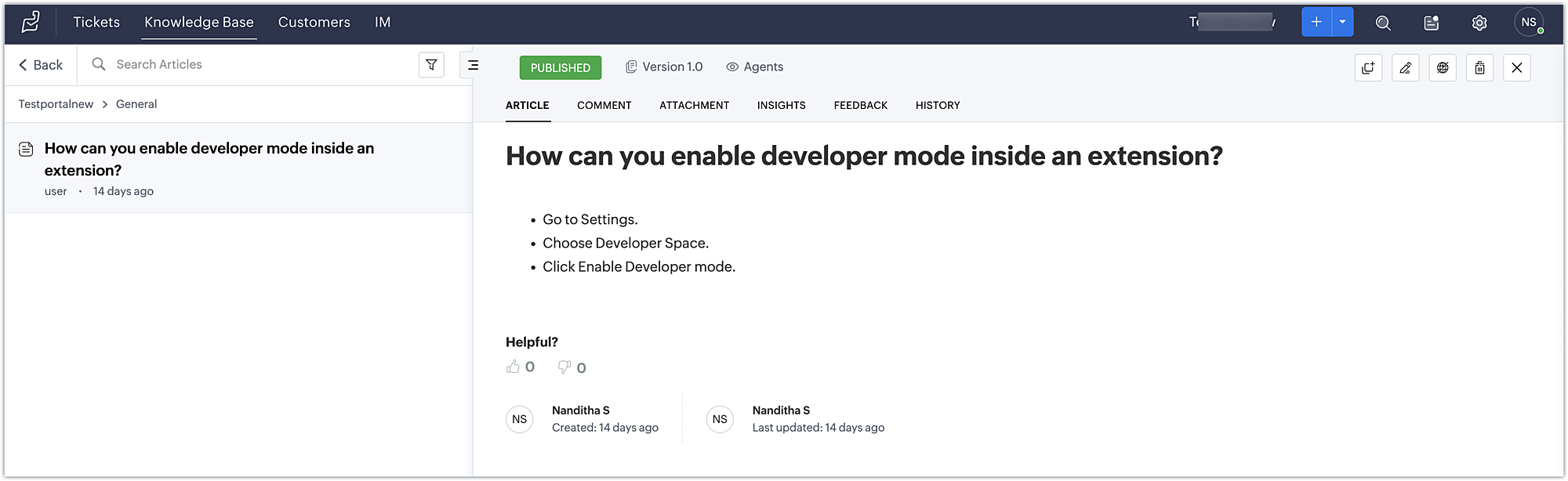
- Finally, click on an article to view its detailed information in Zoho Desk.
Using this method, developers working on Zoho Projects tasks can discover relevant articles and get helpful information to troubleshoot problems.
You can further enhance this use case by including a text box in the widget that allows the developer to enter a keyword and search for related articles using the Zoho Desk search articles API.
You can also accomplish use cases such as creating a task tab widget to associate data with a task. Every time the task loads, task-specific data can be displayed on the Task tab. To accomplish these kind of use cases, the data storage feature is available in Zoho Projects. We look forward to exploring the data storage feature,, and other use cases for custom widgets, in future posts.
We hope you found this information useful. Follow this space for further updates!
 Sign up for a Zoho Developer account and start developing extensions for Zoho products using Sigma.
SEE ALSO
Topic Participants
Nanditha Somasundaram Somasundaram
Sticky Posts
Building extensions #10: Fetch customized user inputs, store them globally at the app level, and access them across entities
This data storage concept enables you to store data related to your extension for both entity properties and extension properties. In our previous piece, we looked at how to store data for entities using entity properties. In this post, we'll look atBuilding extensions #9: Store, retrieve, and access entity-specific data in widgets using data storage
Data storage - Overview Storing data related to the extension you are working on is essential. It can be saved as key-value pairs for an entity or extension, known as entity and extension properties, respectively. Data can be saved for the following entitiesBuilding extensions #7: Create custom widgets for a simplified end-user experience
Discover the benefits of using widgets! We explored the significance of widgets, prerequisites, and the availability of JS SDK methods as part of our previous post. In this post, let's go over a detailed example of using widgets along with certain ZohoBuilding extensions #6: Custom user interfaces with Widgets
Welcome to our post on Widgets for Zoho Projects! In our last post, we explored the significance of the connections feature, showed how to use it, and provided an example use case. In this article, we'll look at the importance of widgets, another featureBuilding extensions #5: Integrating applications with Zoho Projects through Connections
In our last post, we discussed the essential features that a Zoho Projects extension can provide. Starting with this post andin every subsequent post going forward, we'll go through each of those features in depth, one by one, with an example use case.
Recent Topics
Connecting Zoho Inventory to ShipStation
we are looking for someone to help connect via API shipStation with Zoho inventory. Any ideas? Thanks. UriSubform edits don't appear in parent record timeline?
Is it possible to have subform edits (like add row/delete row) appear in the Timeline for parent records? A user can edit a record, only edit the subform, and it doesn't appear in the timeline. Is there a workaround or way that we can show when a userNew in Cadences: Option to Resume or Restart follow-ups when re-enrolling records into a Cadence, and specify custom un-enrollment criteria
Managing follow-ups effectively involves understanding the appropriate timing for reaching out, as well as knowing when to take a break and resume later, or deciding if it's necessary to start the follow-up process anew. With two significant enhancementsIm Stuck in an EDIT ONLY WITH WIZARD issue
So I found Wizards to be a really helpful tool in minimizing the exposure of redundant, superfluous fields to staff that would never otherwise have to edit those fields. My issue is, that when the record (in this case a lead) is created with a wizard,Account upgrade
Good evening, I upgraded my account and paid for it. From standard to professional. Unfortunately after the paiment my account was not upgraded. Please your advise. Best Regards Erik van StaverdenHow to set ALL default dates of my organization to DD-MM-YYYY format?
All replies to this question comes from a time where the UI was different. It's extremely frustrating not being able to find how to do this simple setting change. I want everything and everyone in my organizations to have DD-MM-YYYY date format by default.How can I sync from Zoho Projects into an existing Zoho Sprints project?
Hi I have managed to integrate Zoho Projects with Zoho Sprints and I can see that the integration works as a project was created in Zoho Sprints. But, what I would like to do is to sync into an existing Zoho Sprints project. Is there a way to make thatCan we generate APK and IOS app?
Dears, I want to know the availability to develop the app on zoho and after that .. generate the APK or IOS app and after that I added them to play store or IOS store.. Is it possible to do this .. I want not to use zoho app or let my customers use it. thanksZoho Subform Workflows onAdd of Row
Suppose I have a form with attached workflows onLoad. If I use the form as a subform, will it inherit the workflows or do I need to create new ones onAdd of row?Super Admin removal
I brought a sub, and I gave the Super admin rights to a person who is no longer with us, so I need to change, and I need to make myself the Super adminBetter Notes Commenting
Hi, I'd like to suggest better collaboration tools for NOTES. The current notes section for Accounts, Contacts and Deals is not ideally suitable for any degree of communication or collaboration. When responding to a note, there is no ability to leaveExporting Templates
I have just spent 2 hours creating a project template for a Netsuite configuration, and want to share it with other Zoho Projects users - who have a different account. Is there any way to do this?Power of Automation:: Streamline Associated Teams based on the Task Owner update.
Hello Everyone, A Custom function is a user-written set of code to achieve a specific requirement. Set the required conditions needed as when to trigger using the Workflow rules (be it Tasks / Project) and associate the custom function to it. Requirement:No Response from Zoho Support in 8 Days - Typical?
I have a couple of issues I'm trying to work through. Initially, I was getting support from support@zohofsm.com, but I have not received a response in 8 days (11 on another question). Is this typical? Can I pay for support? For context, I am not spammingAdd QUOTE OWNER profile image to a Quote Template
I can add their email address.. phone number, DOB. I need to add a users profile picture so when they assign a template to a quote they own it adds their picture to the cover page. I've tried hacking a solution together but there has to be an easier way.Zoho Connections Desk API relative URL PATTERN_NOT_MATCHED
While i am trying to do this: async function fetchTicketsFromDesk(timeFilter = 'current_month') { try { const response = await ZOHO.CRM.CONNECTION.invoke("desk_connection", { url: "/api/v1/tickets", method: "GET", }); const data = response.details ? JSON.parse(response.details)Zoho CRM - Custom Views for Portal Users
I'm looking for an option to customise custom views for portal users in CRM. It would be great if "portal user" was a permission on custom views.【参加無料】10/17(金) 東京 ユーザ交流会 Vol.3 参加登録 受付開始!
ユーザーの皆さま、こんにちは。コミュニティチームの藤澤です。 10/17(金)に、東京・新橋で「東京 ユーザー交流会 Vol.3」を開催します! 今回のユーザー事例セッションのテーマは、「Zoho Flowを活用した他社の決済サービスとの連携事例」です。 さらに、Zoho Flowに限らず、Analytics や Campaigns などの多彩なZohoサービスの活用方法について、豊富なご経験をもとにご紹介いただきます。 また、Zoho社員セッションでは、Zoho CRMを活用して日々の営業業務を効率化する具体的な事例をお話しします。業界を問わず、幅広い方にご参考いただける内容となっています!Zoho Meeting Plug compatibility with newer versions of Outlook
Documentation states that the zoho meeting plug in for outlook is only compatible with versions up to Outlook 2019 What is available to users of more up to date versions of outlook/office 365?Getting Attachments in Zoho Desk via API
Is there a way to get attachments into Zoho Desk via an API? We have a process by which a zoho survey gets sent to the user as a link in a notification. The survey has several upload fields where they can upload pdf documents. I've createdIntroducing Zoho's own SMS gateway
We're thrilled to announce the launch of our own SMS gateway feature within Zoho Marketing Automation! This new feature enables seamless SMS campaign management alongside your email marketing initiatives, providing a more integrated and efficient wayEmbedding in Desk articles
We would like to embed documents in our Desk articles. When we use an iframe for the embed, we get scrollbars and a frame border. Neither of those is acceptable. I've spoken with the Desk Support team about what we want and they tell me that it cannotZoho CRM button to download images from image upload field
Hello, I am trying to create a button in Zoho CRM that I can place in my record details view for each record and use it to download all images in the image upload fields. I tried deluge, client scripts and even with a widget, but feel lost, could notMass Update Contacts In Zoho Campaigns
Is there a way to mass update contacts in zoho campaigns? I want to be able to change the content of a field for a few hundred contacts, and can't go through all of them individually.report showing assignment type
Hi, We've created a number of workflows to allow us to auto assign tickets to agents based on keywords and other criteria. I'm struggling to create a report that would show me what is the percentage of tickets that are assigned automatically via workflowsOption to Disable Knowledge Base Section in Feedback Widget Popup Hello Zoho Desk Team
Hello Zoho Desk Team, How are you? We are actively using Zoho Desk and would like to make more use of the Feedback Widget. One of the ways we implement it is through the popup option. At the moment, the popup always displays the Knowledge Base section,Placeholders in Ticket Templates
We should be able to use placeholders in ticket templates. When we create a new ticket, our description field is shown to the client in the email they receive. It would be very handy to be able to personalize that description field in our ticket templates to pull in the name of the client that the ticket is for. Using them in the subject field as well, so we can auto populate Account Names, etc.when the record is created the tag want to Show as Opportunity how i achive this using Deluge Script
In the quotation i have the work flow schedule for create opportunity record in the module , on that time the quotation tag select as opportunity created. How i achive this using Deluge Script . this like i want to Do tag1 = Map(); tag1.put("name","NurturingDelete a channel
I need delete a channel in tickets.Copy / Duplicate Workflow
I have workflows setup that are very similar to each other. We have a monitoring system watching servers, and all notifications - no matter what client it is about - will come from a noreply@ address which is not very helpful in having it auto assigned to the right account. I have setup a workflow that will change the contact name of the ticket (currently it would say noreply@) to the correct customer which is based on the subject line, as that mentions which server the alert it is about. I needSubtasks don't update parent task's times
Hi there: I've recently upgraded to premium and check that subtasks completion % don't update the proportional completion of the parent tasks related to it. We've been challenging with the problem of having to update twice or sometimes 3 times the completion of the related tasks. I've seen posts similar to this, of 3 years old. Is there any roadmap for making this happen in a future release? Thanx César Ratto Lima, Perú.Should I Use DMARC?
When I configure Zoho Mail's DMARC settings, it's mandatory to fill in the RUA and RUF (Aggregate notification email address*, Forensic notification email address*) addresses. When we enter an email address in these fields, we receive reports from theIMAP Server not responding.
Trying to connect a phone via IMAP and getting "imap.zoho.com not responding." Is the server down, for maintenance or otherwise? I've tried this on two different devices and got the same error on both.Tip #44 – Get Deeper Insights with Zoho Assist’s Custom Reports – ‘Insider Insights’
In today’s fast-paced IT environment, having a clear view of your remote support activities is more important than ever. Zoho Assist’s Custom Reports feature gives IT teams the ability to generate tailored reports that provide actionable insights andMessage "...does not support more than 100 distinct values..." WHY????
I get this message on one of my reports: Sorry, Zoho Reports currently does not support more than 100 distinct values in columns. 'Account Name * Sum(Amount),Count(Amount Tier)' contains more than 100 distinct values. Possibly, you can apply filter to reduce the number of distinct values in 'Account Name' or drop the 'Account Name' field in Rows. I want to list all ACCOUNT NAMES (about 500) with SALES BY ACCOUNT. What is blocking this?Let's Talk Recruit: Super-charge hiring with Zoho Recruit add-ons
Welcome back to our Let’s Talk Recruit series! This time, we’re diving into something that might seem like a small upgrade but has a huge impact on recruiter productivity: Zoho Recruit add-ons. Think about how much of your day is spent in your inbox orVendor Signatures Needed for Purchase Orders
Hello everyone, We have a unique requirement that necessitates that Vendors & Suppliers formally acknowledge our Purchase Orders upon receipt. I was hoping that there would be an option to do so in Zoho Books, but that does not appear to be the case.Is there an API to "File a Ticket" in Desk
Hi, Is there an API to "File a Ticket" in Desk to zoho projects?Store "Sign in with Google/Microsoft/GitHub etc." details
Quite often now, users are using a sign-in provider like Google or Microsoft to sign into various apps and services. It would be great if Vault could remember which providers you use for each website and sign you in with that provider instead of a usernameTip of the Week #72– Assign thread ownership to avoid confusion.
When teams handle a large volume of emails, managing threads becomes important to stay organized. Without a clear system, duplicate replies, missed follow-ups, or confusion over responsibilities can happen. Thread assignment solves this by designatingNext Page