2025 Ask the Experts sessions wrap-up : Key highlights from the experts

Here is a rewind journey of our Ask the Experts (ATE) Sessions, where we brought you expert insights and practical best practices together in one place. This recap highlights the key takeaways, learnings, and best practices from all these sessions so you have everything in one place.
Insights from Zoho Desk: A year of listening, learning, and connecting
In every Ask the Expert (ATE) session, we received a diverse mix of questions. We addressed a variety of requests, ranging from tailored business solutions to customized feature requests and tips to support their businesses better.
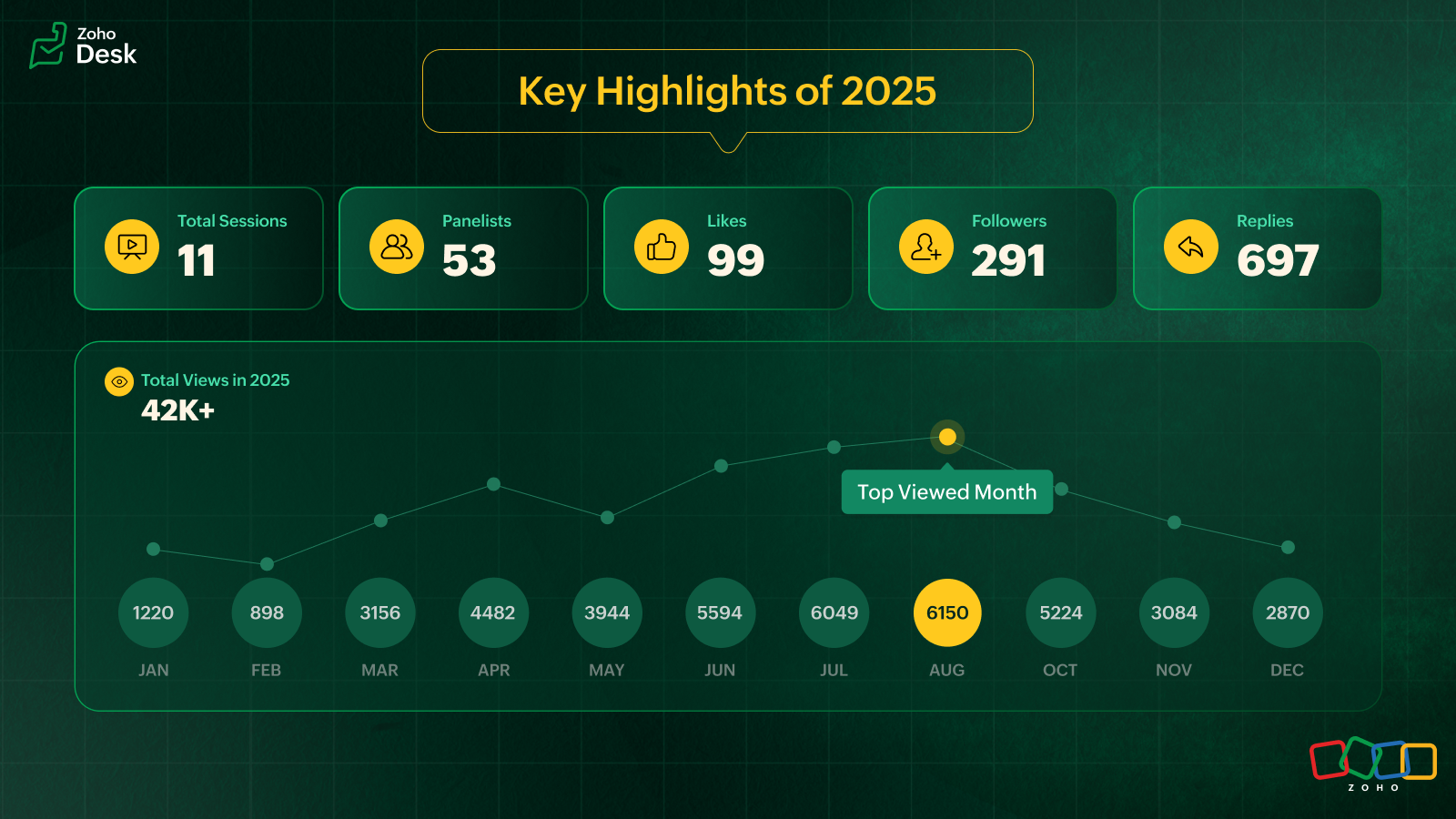
In 2025, we hosted 11 ATE sessions covering a wide range of Zoho Desk features and modules, designed to help teams get the most out of the platform. We brought together panelists from across Zoho Desk to share real-world expertise for every business.
Live video ATE
ATE 19 focused on the 2025 Spring release. We hosted live sessions in a webinar style. This session was eventful as users got to interact with and listen to our panelists live. After the session, the panelists followed up with all the users over tickets and offered sessions to help users with customized solutions.
In an attempt to cater to as many of our users across the globe as possible, we hosted two live sessions: one serving users in Australia, Asia, and the Middle East, and the other to connect with users across the US and Europe. Here's a walkthrough of the sessions: Inside Zoho Desk Spring Release 2025 and Zia in Focus.
Ask the Experts, 2025, addressed various topics covering all the modules within Zoho Desk
- Onboarding and getting started with Zoho Desk
- Multichannel support and self-service portals
- Automation and AI with Zia
- Integration, accessibility, and personalization
- Analytics, data administration, and mobile apps
- Spring and Autumn releases for 2025
We wrapped up the ATE series in December with The Merry Metrics Edition = Best of Zoho Desk [Best Practices + Holiday Automation + Year-End Insights]
Guest panelists
In the ATE themed around integrations and extensions, we partnered with RingCentral. Luis Vargas and Matthew Ludwig from RingCentral shared the panel with Zoho Desk experts to discuss best practices for integrating RingCentral's telephony system with Zoho Desk.
ATE 2025 highlights: Best practices you should know
I. Migrating to Zoho Desk? Here's what you shouldn't miss
For simple and straightforward CSV imports, try the UI import feature to import data into your Zoho Desk account. Zoho Desk is equipped with dedicated templates to process and accept data from known help desk services like Freshdesk, Zendesk, Salesforce, Kayako, Help Scout, HappyFox, and others. For unsupported services, a CSV file is accepted.
To export data from the source service, submit a Zwitch form for migration. Share the required details relating to department mapping, agent mapping, and more in the Zwitch note section of the form.
Once the data is evaluated, the migration will be initiated. The migration engineer will follow up with you regarding the import and if there are cases of invalid files, source portal inaccessibility, or destination OAuth issues.
The migration time depends on the queue length and the volume of data being handled. On completion, a migration report will be shared.
You can also share the residual/delta backup via Zwitch. Residual requests are normally expected within two weeks of the full data import. The migration process for the residual import happens like the Zwitch migration.
Points to remember
- The migration data and information will be retained for 30 days and then wiped off from our import engine. This is in compliance with GDPR and its regional counterparts across the globe.
- Upon migration completion, a report will be shared with a module-wise list of all completed and failed entities with reasons for failure. Data availability and integrity are assured by the end of data transit.
Precaution
Please ensure imported entities aren't deleted/trashed from your help desk service until the completion of the last import batch.
From @Gopalavasan G G Ask the Experts 16: A 5-hour Live Q&A - Tackling Zoho Desk's Onboarding Challenges

II. Optimizing customer support across messaging platforms with Zoho Desk
Automate first-level support with Zia Answer Bots to reduce response times.
- Utilize chatbots to address frequently asked questions (FAQs), provide troubleshooting steps, and handle simple queries.
- Use preset replies and guided responses to help customers find quick solutions.
- Automate ticket creation and status updates to keep customers informed without human intervention.
Enable seamless hand-offs to human agents
- Design workflows where chatbots can connect to live agents based on the complexity of the queries.
- Provide agents with customer history from prior conversations across different platforms to avoid repetition.
Optimize response time with structured workflows
- Implement prioritization rules in IM tickets for priority cases (for example, billing issues or service disruptions).
- Set up automated notifications via custom notification for customers when their issue is being processed.
Utilize rich media for effective communication
- Allow customers to send screenshots, videos, or PDFs to clarify issues faster.
- Use videos to serve as engaging and quick troubleshooting guides.
Ensure channel-specific compliance
- WhatsApp: Requires approved message templates if beyond 24 hours.
- Facebook Messenger: Allows direct messaging for up to 7 days.
- Telegram: No restriction; allows an agent to message anytime.
- WeChat: Allows direct messaging within 48 hours.
- Line: Allows an agent to messages without restrictions.
- Instagram: Enables direct messaging within a 24-hour window.
Provide proactive support and notifications
- Send order updates, payment reminders, and appointment confirmations via automated messages.
- Implement triggered proactive chats based on customer behavior via WhatsApp (for example, abandoned cart reminders).
- Use push notifications on WhatsApp messaging apps to alert customers about service changes or outages.
Create a unified customer experience
- Ensure conversations remain consistent across platforms even if customers switch between apps and resume conversations from another app.
- Provide multi-language support via answer bots with automated translation where necessary.
@Ralph Martin from Ask the Experts 17: Elevate Customer Communication With Multichannel & Instant Messaging
III. Best practices for setting up an email channel
Setting up your email channel in Zoho Desk is key to streamlining your customer support process. The following approaches protect your brand and build trust with your customers.
- Default setup & branded forwarding: Use the default Zoho Desk support email (support@yourcompany.zohodesk.com) and configure email forwarding to your company's email (support@yourcompany.com) to auto-create a ticket for every customer's email.
- Email aliases for departments: Create specific email aliases like sales@yourcompany.zohodesk.com or billing@yourcompany.zohodesk.com for each department, and set up a forwarding rule from your from addresses (like sales@yourcompany.com or billing@yourcompany.com). This will automatically route emails to the appropriate departments, ensuring efficient query management.
- Forwarding verification: After setting up email forwarding, verify the process by checking for the confirmation ticket in Zoho Desk to complete the configuration.
- Secure email with SPF & DKIM: Update your domain’s DNS settings with SPF and DKIM records to prevent spam and spoofing. To bolster email security, DKIM is mandatory for all business-owned domains used in your "From Address" configuration. DKIM cannot be configured for "From" addresses hosted on public domains like Google, Outlook, or AOL; in such cases, you must use your own SMTP servers.
- Custom “From Address": Add and verify your custom "From Address" in Zoho Desk, and update your DNS with the necessary SPF and DKIM values. Verify your domain using the DKIM keys.
- Default domain name: In Zoho Desk, you cannot change the domain name in the default support email address. This domain name is set automatically based on your portal name when you sign up (for example, support@<mycompany>.zohodesk.com). Update it with a unique portal name by reaching out to support@zohodesk.com.
@Sumaya Howth from Ask the Experts 17: Elevate Customer Communication With Multichannel & Instant Messaging
IV. How does a telephony system enhance customer support in Zoho Desk?
Instantly identify your caller
- When a call comes in, the telephony system in Zoho Desk pulls up the caller’s name, phone number, and recent tickets.
- Agents can view contact details and related tickets before picking up the call.
Track every call automatically
- Every call, answered and missed, is logged as a Call Activity in Zoho Desk.
- Answered calls update in real time, while missed calls get recorded at the end of the ring.
- Call duration and status update automatically, keeping your records accurate.
Convert missed calls into actionable tickets
Configure Zoho Desk to create tickets for missed calls: inbound, outbound, or both. This ensures no customer inquiry falls through the cracks.
Handle unknown callers effortlessly
Zoho Desk automatically creates a new contact using the caller’s phone number for new contacts. Agents can edit and update details instantly.
Link calls to tickets for seamless tracking
- Agents can create a new ticket and associate the call activity with it or associate the call activity with an existing ticket.
- Zoho Desk automatically logs a call thread inside the ticket, keeping everything in one place.
- Call activity will be automatically associated with the ticket when you use click-to-call from the Ticket Detailed View.
Record call duration & summarize conversations
- A call timer runs in the background, helping agents track time spent on each call.
- Agents can add notes during the call and after the call.
- This call summary will be added to the call activity and to the ticket, if associated.
Never miss a voicemail or call recording
- If the PBX provider supports it, call recordings and voicemails appear in the call thread, complete with an audio player for easy access.
- Ensure fail-proof call handling
- If the system doesn’t detect an answered or ended call, agents can manually mark the call as answered or ended, ensuring accurate records despite vendor failures.
Keep calls organized with multiple tickets
Agents can create multiple tickets from a call while keeping the call linked to a single ticket.
Note: Creating a ticket automatically for every answered call is possible in Zoho Desk's enterprise edition via a custom function.
@Srini | Zoho Desk from Ask the Experts 17: Elevate Customer Communication With Multichannel & Instant Messaging

V. Enhancing self-service through Guided Conversations (GC) in Zoho Desk
Guided Conversations (GC) empowers businesses with structured, intuitive self-service through conversational flows. GC provides around-the-clock support and ensures a smooth transition from the bot to the support rep. It reduces agents' workload, minimizes response times by automating dynamic responses, and personalizes interactions based on user inputs. GC functions across the web, instant messaging, and mobile apps.
Tips to get the best out of GC
Structuring your flow
To prevent exceeding the 500-block limit, optimize your flow using the action blocks:
- Jump to flow – Redirect users to another flow instead of adding more blocks. It aids transition between different conversation sections.
- Fork – Split the conversation or branches logically into multiple paths efficiently.
- Button Block – Use buttons for seamless navigation across flows.
- Operation block – Executes predefined actions in a flow.
- Webhook – Connects with external services for data transfer
Maintain consistency in cards
Ensure uniform formatting on all cards. If the first card includes a title, image, and description, make sure all subsequent cards follow the same structure.
Ensure uniform formatting on all cards. If the first card includes a title, image, and description, make sure all subsequent cards follow the same structure.
GC uses different types of variables to store and retrieve user information, enabling personalized interactions across IM channels, web, and mobile apps.
- Block Variables – Store responses within a specific block (for example, a user’s name after input).
- Local Variables – Available only within the flow where they are defined (for example, a discount percentage used within the same flow).
- Global Variables – Shared across all departments and flows (for example, company name or logo).
- Session Variables – Specific to a user’s session and accessible across all flows (for example, country-based redirection using the Fork block).
- IM-specific variables – IM variables can retrieve user details and automate tasks. These help identify users by name and unique ID, associate contact details from IM channels, customize experience based on the IM channels, and perform automated actions like creating and updating existing tickets.
Transfer to Agent Block (IM-Specific)
To enable agent transfer in GC on ASAP, GC must be linked to a business messaging channel, that should be connected to the ASAP widget.
You can use Integration Blocks to connect Zoho Desk with Zoho Cliq instead of webhooks, which require manual setup and coding.
Track performance with GC flow metrics
GC flow metrics track performance at each block level, identify areas for optimization, and improve flow performance based on real user interactions.
Get the best out of your Guided Conversations (GC) flows, ensuring a smooth, efficient, and user-friendly experience across instant messaging (IM) channels, web, and mobile apps.
@Chaya Jayasankar from Ask the Experts 22: Scale up your customer support with integrations & extensibility
VI.I Key insights on the RingCentral and Zoho Desk integration
Seamless user experience: RingCentral call recordings play natively within Zoho, and the WebRTC integration ensures calls are logged from any endpoint, including mobile. This means no app switching and a complete view of the communication history within Zoho Desk.
Boost team efficiency: Agents can save time with click-to-call and instant screen pop-ups, providing customer context. Automated call logging reduces manual work, leading to faster resolutions and a better customer experience.
Enhanced collaboration & coaching: Easy access to call recordings within Zoho Desk helps with training and quality assurance. A unified view of all interactions fosters better teamwork.
Luis Vargas with RingCentral from Ask the Experts 22: Scale up your customer support with integrations & extensibility
VI.II Mistakes to avoid while using RingCentral
Poor setup & training: Don't skip defining workflows or training users; it's crucial for adoption.
Ignoring mobile logging: Ensure calls from the RingCentral mobile app are logged in Zoho Desk for full visibility.
Underutilization: Don't just use basic features; leverage custom dispositions and analytics for maximum benefit.
Expert insight: The core value is unified, accurate customer data. The native recording, playback, and universal call logging (even from mobile) are game-changers for seamless, efficient customer interactions.
Matthew Ludwig with RingCentral from Ask the Experts 22: scale up your customer support with integrations & extensibility
VII. Handling the Instant Messaging module in Zoho Desk
The Instant Messaging (IM) module in Zoho Desk provides a unified interface to manage customer conversations across multiple messaging channels.
Messaging channels
Zoho Desk supports the following instant messaging (IM) channels: WhatsApp, Facebook Messenger, Instagram, Telegram, WeChat (primarily used in China and its regions) and Line (commonly used in Japan and its regions).
Business Messaging
Zoho Desk supports its native-live chat application: Business Messaging (BM). Add the Business Messaging widget to your website to connect your customers with your support reps.
Tips for IM configuration (Across all channels)
- Channel integration: Integrate your official IM apps' business accounts with Zoho Desk's IM module to handle conversations from a single platform.
- Agent association: Associate agents with specific messaging channels to ensure a dedicated point of contact for the agents to improve response time and service quality.
- Embed channel options: Each channel provides embeddable options such as links, QR codes, or buttons to place on your website to make it easy for customers to reach out.
- Canned messages: Canned messages save time by responding to common questions with standard message formats. They can be used across all IM channels, and associated with specific departments for better control and consistency.
- Welcome messages: Configure a Welcome Message to greet customers automatically when they initiate their first conversation through IM.
- Offline notifications & business hours: Set business hours for each IM channel to manage availability effectively. When agents are offline or on a holiday, an offline message can notify customers about the availability of support.
IM offerings for 24/7 support
- Answer bot: Use the Answer Bot to handle Level 1 (L1) queries during out-of-business hours and holidays.
- Guided conversations: For structured customer interactions, configure Guided Conversations based on your business flow and associate them with IM to guide the customers.
- Automate notifications via workflows: Zoho Desk workflows support IM-based notifications using Reply via Instant Messaging and Notify via Instant Messaging. Define the criteria in workflows and select the appropriate channel and use templates for custom messages.
Note: WhatsApp supports template-based messages, and other channels support custom templates.
Tracking IM conversations as tickets: IM conversations → Tickets
You can configure IM preferences to automatically convert conversations into tickets. Under Preferences in the Instant Messaging modules, if you select None, IM conversations will not be converted into tickets. If you select Always, all conversations for a contact will be tracked in a single ticket. Configure a time interval to track ticket creation based on your business requirements.
- Auto-closing conversations: Use Auto-Close to automatically close conversations when agents or bots remain idle beyond a configured timeout period.
- Automatic agent assignment (chat routing): Enable Chat Routing in IM to automate agent assignment where online agents are assigned conversations sequentially, while offline agents are excluded from assignment.
Leverage Instant Messaging in Zoho Desk to collaborate effectively with your customers.
@Hareesh P from Ask the Experts 26: Brighten every customer interaction with Zoho Desk all year long
From feature walkthroughs within Zoho Desk to personalized follow-ups via tickets, emails, and one-on-one meetings, every session reflected how Zoho Desk helps businesses grow and benefit customers worldwide. The ideas, questions, and feature requests shared during these sessions continue to guide us in crafting Zoho Desk into a more intuitive, accessible, and human-centered platform.
We thank everyone who participated and contributed to the 2025 ATE series. We look forward to continuing our conversations in the upcoming sessions.
Happy New Year, everyone!

Cheers,
Lydia | Zoho Desk
Lydia | Zoho Desk
Topic Participants
Lydia | Zoho Desk
Sticky Posts
Ask the Experts 10: A 5-hour online Q&A on Zoho Desk Best Practices
Welcome to Zoho Desk's Ask the Experts session! This is a monthly discussion on our forums; wherein a panel of experts will take on questions specific to topics related to Zoho Desk. The panel will be available for a 5-hour period and will answer anyAsk the Experts 7: A 5-hour online Q&A on Telephony and Call Module
Welcome to Ask the Experts session! This is a monthly discussion in forums; each session, a panel of experts will take questions on specific topics related to Zoho Desk. The panel will be available for a 5-hour period and answer any questions posted here.Ask the Experts 5: Online Q&A on Zoho Desk Extensibility
Welcome to Ask the Experts session! This is a monthly discussion in forums; each session, a panel of experts will take questions on specific topics related to Zoho Desk. The panel will be available for a 5-hour period and answer any questions posted here.Ask the Experts 4: A 5 hour online Q&A on agent productivity
Welcome to Ask the expert session! This is a monthly discussion in forums; each session, a panel of experts will take questions on specific topics related to Zoho Desk. The panel will be available for a 5-hour period and answer any questions posted here.Ask the Experts 3: A 5 hour online Q&A on reports and dashboards
Welcome to Ask the expert session! This is a monthly discussion in forums; each session, a panel of experts will take questions on specific topics related to Zoho Desk. The panel will be available for a 5-hour period and answer any questions posted here.
Recent Topics
Add a 'Log a Call' link to three dot icon in Canvas
Hi, There's a three dot element when creating a canvas called 'More'. I would like to modify this to add a link that says 'Log a Call' in order to quickly record the details of a cellphone call. I'd also like this to be a simple 'contact' selection andSyncing Zoho Forms with Bigin - Embedding issue?
Hello everyone, I created a Zoho Form for a page on my GoDaddy website to collect leads, which then transfers the data to Bigin. However, I'm facing an issue where it doesn't seem to work properly. I've integrated Zoho Forms with Bigin and tried embeddingCan not add fields to a Section
I feel like I'm missing something obvious: I can add new Sections to my form but I can not add fields to the Sections. I've tried fields already on the form as well as dragging and dropping new fields into the Section but nothing will go into it. WhatRecord Logged in User while using CRM lookup field
Is it possible, while using the Zoho CRM lookup field, to automatically use the user account logged into Zoho CRM in a hidden field? I was hoping to add employee accounts to my current plan. But would like a record on the Form submission of who submittedForm Rules for Suburb Categories to alternate landing pages or Making a Fields Contents ALL CAPS
I need to send differentform submissions to two to three different thank-you URLs (for Meta/Google pixels) depending on which suburb a user selects in a form. I have ~400 suburbs split into two categories (A and B, based on business value). Current challenges:Collaps Notes
There are times when long/large notes are added to a record i.e. Accounts or Deals etc. Currently, the full note is displayed in the notes related list section. It would be great if by default only 5 to 10 rows of the note are displayed when the noteZoho Down
I have a drop in my Zoho One services.Runing RPA Agents on Headless Windows 11 Machines
Has anyone tried this? Anything to be aware of regarding screen resolution?Problem for EU users connecting Zoho CRM through Google Ads for Enhanced conversions
Has anyone else experienced this problem when trying to connect Zoho CRM through Google Ads interface to setup enhanced conversions? Did you guys get it fixed somehow? The Problem: The current Google Ads integration is hardcoded to use Zoho's US authenticationWhy am I getting event Pop-up Notification for events that have been cancelled?
Why is Calendar Notification still popping up for events that have been cancelled or changed? Each time events are cancelled or changed, I have observed that I am still getting notifications for them. Below is a sample pop-up notification for one of theCreate a draft in reply to an email via Emails API
Hi, I’d like to use the outgoing webhook to automatically create a draft reply to incoming mail. How can I use the Emails API to create a draft reply that is linked to an existing email thread? I couldn’t find the relevant method in the documentation.India Tech Support
Is there no phone tech support number for India? And no chat facility either?Billing Management: #1 Billing a Universal Business Routine
Hello, As the saying goes, "Do the hardest job first." We started with the complex subject of finance and revenue management, which is considered the backbone of any business. Now, let's shift our focus and take a deep dive into this Billing Management,What is a a valid JavaScript Domain URI when creating a client-based application using the Zoho API console?
No idea what this is. Can't see what it is explained anywhere.5名限定 課題解決型ワークショップイベント Zoho ワークアウト開催のお知らせ (9/25)
ユーザーの皆さま、こんにちは。Zoho ユーザーコミュニティチームの藤澤です。 9月開催のZoho ワークアウトについてお知らせします。 今回はZoomにて、オンライン開催します。 諸事情につき、今月の開催回は中止となりました。 次回は10/31(金)14時からの開催を予定しています。 ━━━━━━━━━━━━━━━━━━━━━━━━ Zoho ワークアウトとは? Zoho ユーザー同士で交流しながら、サービスに関する疑問や不明点の解消を目的とした「Zoho ワークアウト」を開催します。 ZohoWorkdrive 5.0 / API Documentation Workflows
Hi Zoho, When will the API documentation of the workflows be published? We are interested in using it to trigger manual workflows from an external application. Greetings, JustinHow many ZOHO-Sites does the ZOHO-One Suite allow for?
The free version of ZOHO-Sites allows for two sites, but it seems that the professional version (which is included in the ZOHO-One Suite) only allows for two websites. Is that correct? How many sites can I have within one ZOHO-One account?Webhook from Zobot to Zoho Flow fails
I'm trying to connect from zobot to zoho flow. When testing in zflow, I am receiving all entered data from the connector correctly. The SalesIQ connector's "outputreaction" is {} (is this normal or is there a problem?). But as soon as I try my chat botTransition from Sole Proprietorship to GmbH (Limited Liability Company) – Best Approach in Zoho Books / Zoho One
Hello everyone, I am currently operating under a Zoho One plan with a sole proprietorship in Switzerland. As of January 1st, 2026, I will be incorporating a new legal entity – a GmbH (Swiss equivalent of a Limited Liability Company). While the businessIssue Connecting My Domain to Zoho Sites Despite Purchasing It from Zoho
Hello, I am facing an issue connecting my domain to my website on Zoho Sites. Details of the issue: I purchased the domain directly from Zoho. I am already using the same domain successfully with Zoho Mail. However, when I try to assign this domain toInsert auto number from main form into subform rows
Hello. I'm trying to take from my main form "order number" which i have setup as an auto generated number into every line created in my subform. So when a row is created in my subform i want the "order number " from the main form to be inserted automatically.Dark Mode - Font Colors Don't Work
When editing a document in Dark Mode and selecting font colors, they don't show up on screen. Viewing/editing the same document in Light Mode shows them just fine.Integrate Bunq with ZOHO Bookes
We are new users of ZOHO Books, and our bank (BUNQ, in the Netherlands) isn't listed on the bank integrations. Is there a way to handle this?Access Denied
I am iOS Developer and updating our clients project and shifted ZohoDeskPortalCore SDKs from cocoapods to SPM and changed few lines of code but now i am get access denied, the help center app is unavailable. please contact administrator.Using Zoho Desk to support ISMS process
Hi, I am evaluating using Zoho Desk for security incident management. This seems to be aligned with Zoho Desk purpose as its just another type of incident. However in security incident management, ideally I can link incidents (tickets) with a risk fromTaxJar vs Avalara
Hi, I'm evaluating adoption of a sales-tax service for US based business. Anyone else have experience with TaxJar and Zoho Books? I am a Zoho One subscriber so anticipate needing to use Flow to make this work. It seems like Avalara are simply too expensiveHow to check Leads with no Task (open activity)
Hi everyone, I was wondering if there’s a way to view leads that don’t have any tasks assigned or open activities linked to them.What can we do on our end to improve the Answer bot answers?
Hi, I'm using the Answer bot card in the Codeless bot builder. I've input several questions and their answers in the FAQ section to feed the Answer bot. The text is all in French, as this is the language our customers communicate in. I've tried testingHow to upload file to Connect using API?
Hi there. I looked at the API documentation and nowhere did it mention how to use the API method to upload a file even though it is mentioned that it is possible to be done so. Please help.Group Tax in Service Line Items
Hi FSM Team! I noticed that when you update a tax in the service line item the group tax is not showing up as an option. Let me know what can be done thank you!OAUTH_SCOPE_MISMATCH Error for Marketing Automation APIs with CRM Plus Account
I'm trying to integrate Marketing Automation journey triggering via API but getting OAUTH_SCOPE_MISMATCH errors. I need clarification on API access for CRM Plus users.Function #4: Schedule Customer Statements
Regularly sending statements to customers is an imperative part of many business processes as it helps foster strong customer relationships and provides timely guidance on payments. While you can generate the statement of accounts and have it sent overLimiting search or dependencies with an asterisk "*".
I have a form with several dependency fields with options still developing for each field. Since these options were developing and not yet ready to be a selection in the field, I placed a filter for the dropdown field. In this filter, I selected fieldsCross Data Center Support for 1:1 Chats with External Users
Hello Zoho Cliq Team, We hope you're doing well. We appreciate the recent enhancement that enables cross data center collaboration in external channels, which has already improved communication across distributed teams. However, we’ve noticed that thisHandling Greetings/Small Talk at the Beginning of a Zobot Conversation
Hello everyone, I’m currently configuring a **Zobot** in Zoho SalesIQ and everything is working as expected, except for one specific scenario at the very beginning of the conversation. My target audience has the habit of starting with a **greeting orRegex in Zoho Mail custom filters is not supported - but it works!
I recently asked Zoho for help using regex in Zoho Mail custom filters and was told it was NOT supported. This was surprising (and frustrating) as regex in Zoho Mail certainly works, although it does have some quirks* To encourage others, here are 3 regexImporting a new list into campaigns
I'm in the middle of switching my email platform to campaigns. I have a list that I want to import, and it overlaps with my existing Zoho CRM list. The fields in my Zoho CTM are more robust. Will this new list that I upload into my campaigns overwritewhen I email a invoice how can i see it was sent and also were i can go to see all emails sent
when I email a invoice how can i see it was sent and also were i can go to see all emails sent?How can I see content of system generated mails from zBooks?
System generated mails for offers or invices appear in the mail tab of the designated customer. How can I view the content? It also doesn't appear in zMail sent folder.CRM Blueprint Notification by Cliq
Dear Zoho team, In Workflow, there is nofication by cliq, but in blueprint, there is no option as cliq notification. I think it is very convenient to get notified by Cliq , as there are multi modules in apps, but we will always check CliqsNext Page