Enhancements to finance suite integrations

Update on the migration (October 28, 2025):
Starting this week (October 29 tentatively), we’ll begin migrating Zoho CRM users to Zoho Books as integration users. This means actions will now run under each user’s own Zoho Books access, instead of the admin’s.
As an admin, you can also choose to migrate users early from the Integration Settings page in Zoho CRM.

(Refer to the announcement for details).

Update:
Based on your feedback, we’ve updated the capabilities for integration users. In addition to the Estimates module, they can now create, view, and edit records in all the finance modules including Sales Order, Invoices, Purchase Order.
We're also running a migration and all existing users who have migrated already will receive an email once this change goes live.
Last modified on: May 15, 2025
Last modified on: May 15, 2025

Please note that Zoho Subscriptions is now Zoho Billing.
Hello everyone!
We're delighted to announce some enhancements we've recently made to the finance suite integration with Zoho CRM. These improvements focus primarily on two major integrations:
- Zoho Books
- Zoho Subscriptions
We've implemented these updates carefully based on the valuable feedback we've received to ensure that the user experience is smoother. So without further ado, let's dive into the details!
Enhancements to the Zoho Books integration
We've refined some of the integrated features between Zoho CRM and Zoho Books to address previous challenges and enhance user interactions.
What were the challenges?
- Users were unable to send emails using their email addresses.
- Zoho Books sometimes generated inaccurate reports during audits because records created from Zoho CRM weren't being updated with the correct user names in Zoho Books.
- User-level permissions, field-level permissions and processes such as the Approval process in Zoho Books weren't being properly handled in Zoho CRM.
- Users who did not have proper authorization to use Zoho Books were able to create transactions from CRM by using admin's permissions.
All of these challenges arose because the integration operated exclusively via the integration owner/admin's authentication (only the admin-level permissions in Zoho Books are handled, while other user-level permissions are not accounted for), which meant that any actions performed in CRM were recorded under the name of the admin in Books.
What have we enhanced?
1. Introducing Integration users
Sales personnel typically manage tasks up to the estimates stage in a sales process. Therefore, CRM users who have primarily worked on estimates modules and have not engaged in subsequent activities like invoices can now be added as Integration Users from CRM to Zoho Books without the need for new licenses in Books. In other words, integration users in Zoho CRM are standard CRM users whose admins can grant specific permissions to carry out certain tasks within the Estimates module, as required.
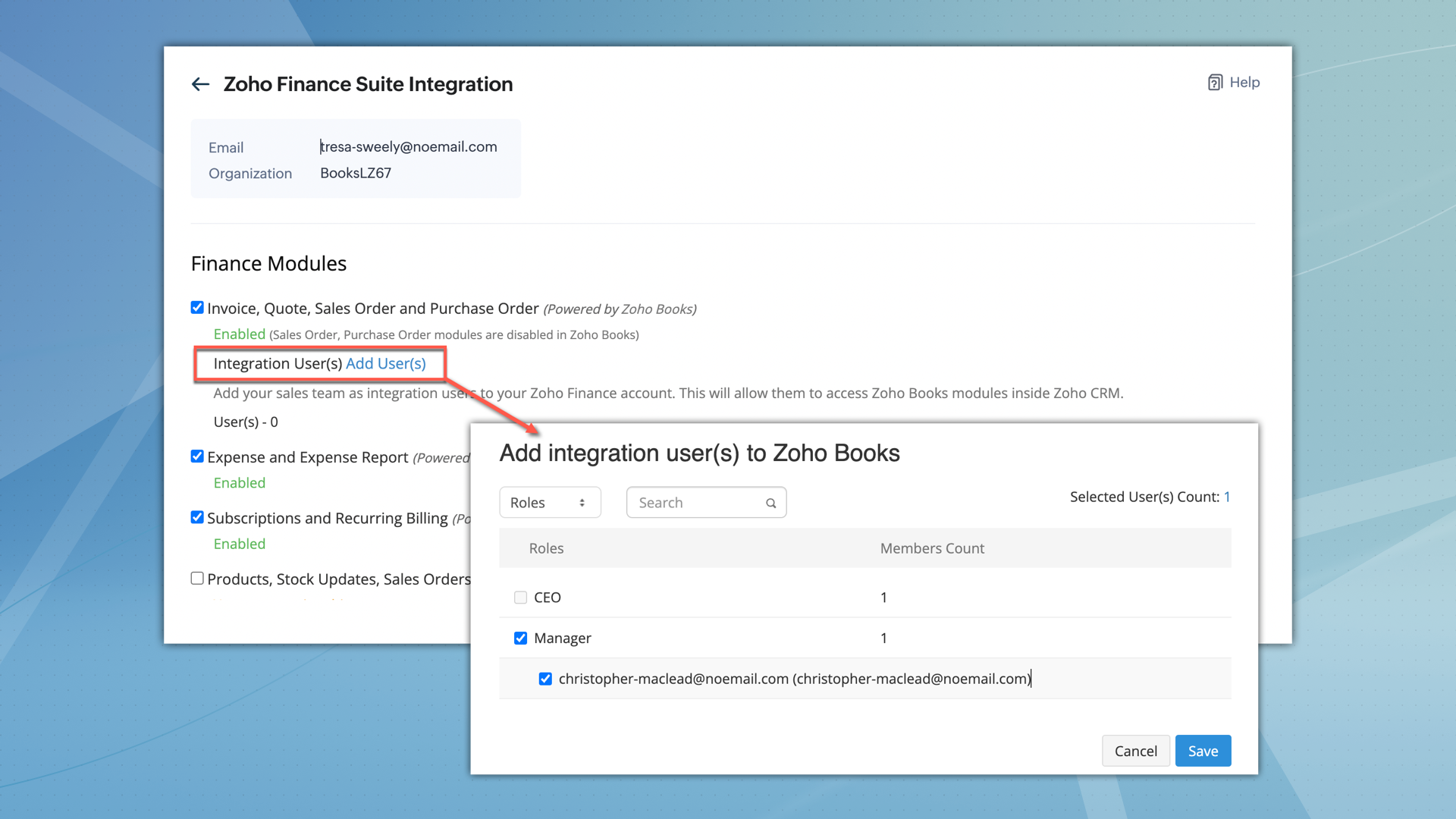

What permissions do integration users have?
- After being added, integration users can perform all operations, including creating, viewing, and editing records within the Estimates module.
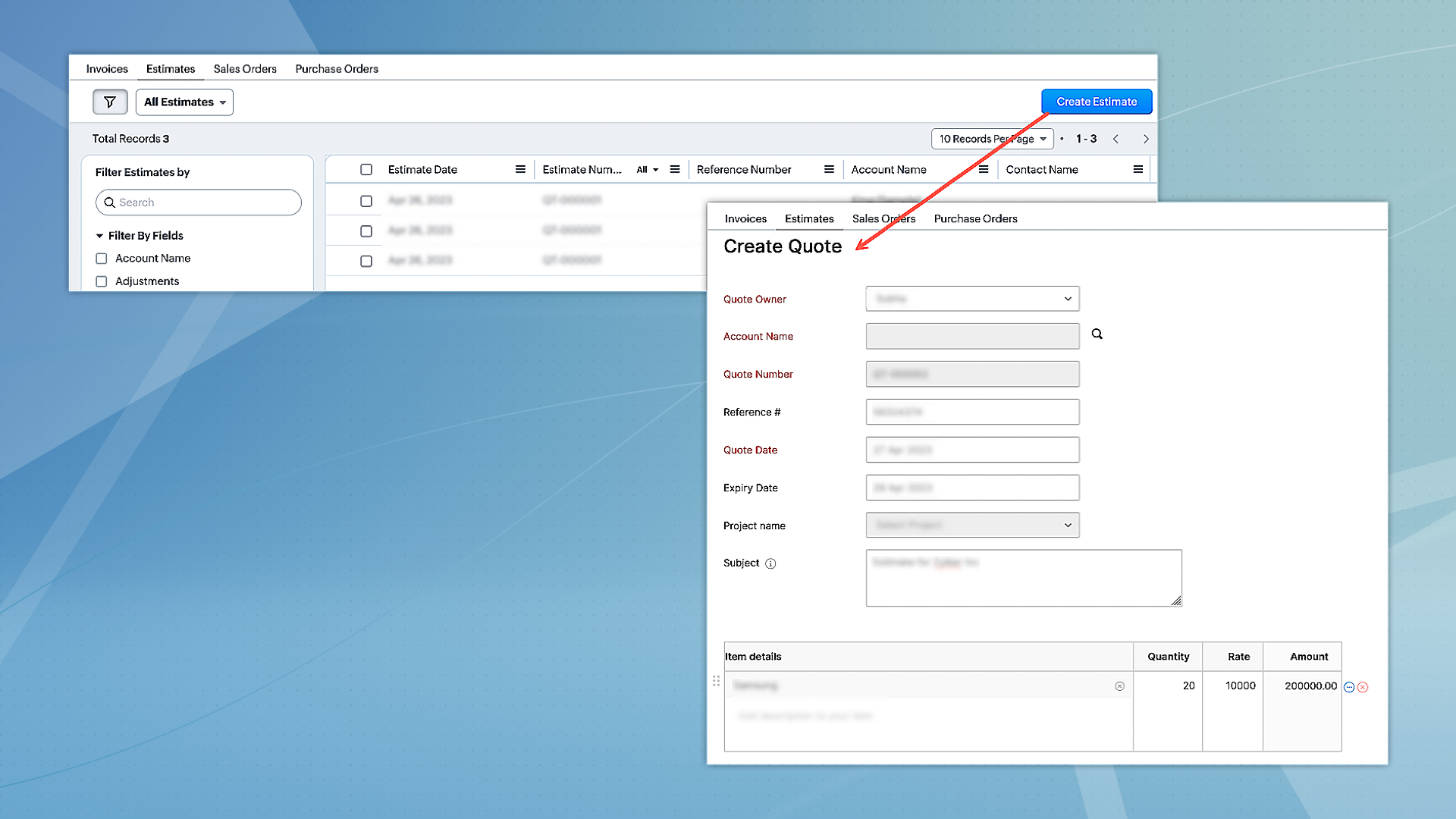
- However, they can only access other modules, such as Invoices, Sales Orders, and Purchase Orders in view mode.
- Integration users will not have direct access to Zoho Books.
- When integration users are part of multiple finance suite products, their permissions are collectively applied within CRM.
2. Unified permissions between Zoho CRM and Zoho Books
For users with access to both Zoho CRM and Books, the integration will now ensure proper management of permissions, covering all aspects. This means if a user is restricted from certain actions or features in Zoho Books, these restrictions will be consistently applied in CRM as well. Previously, users could access and interact with features in CRM that they were not authorized for in Zoho Books, leading to discrepancies. This enhancement will eliminate such inconsistencies, ensuring uniform permission management and preventing unauthorized access or actions across both platforms.
Migration for existing users
- For the integration between Zoho CRM and Zoho Books to function seamlessly, and to maintain uniform user permissions,existing users have the option to migrate immediately.
- Alternatively, they have a three-month window to complete the migration. After this period, users will be automatically added as 'Integration Users' based on their utilization of the finance module.
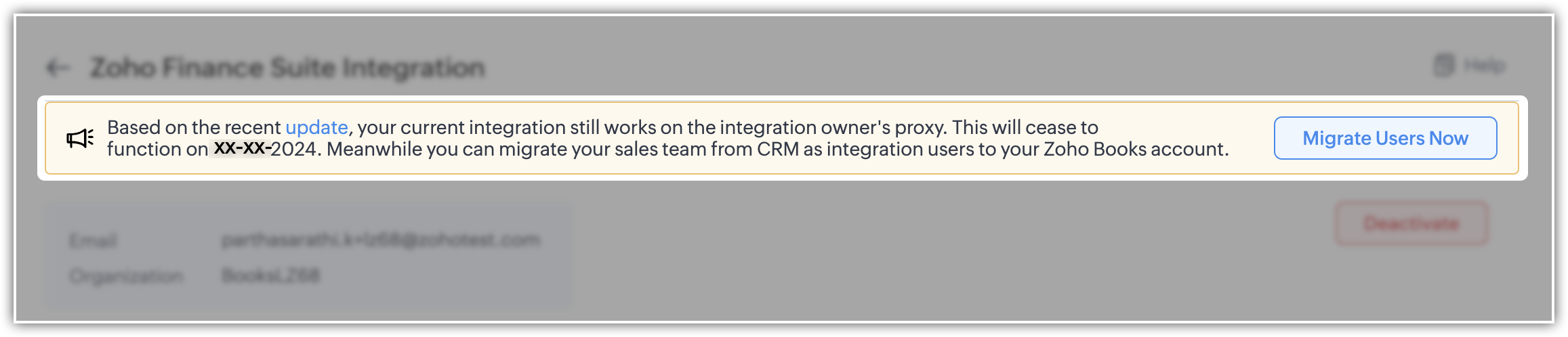
- To facilitate this, select the "Migrate Users" option to view and manage users common to both systems. Upon clicking "Save," the backend migration initiates. Following this, the integration adheres to each user's designated scope and permissions.
- Users can migrate up to 1,000 integration users initially. If they need to migrate more, they can contact the support team for additional help.
- Users who are already part of Zoho Books can't be added as integration users.
Please note that for new sign-ups, 'Integration users' will be available by default and they can set it up during the initial integration setup process.
Enhancement to the Zoho Subscription integration
Currently, when Zoho Subscription is integrated with CRM, it automatically adds Zoho Subscription as a related list in the Contacts and Accounts modules. You can view subscription details in a pop-up (iframe). Although users can create new subscriptions, there is a limitation on creating subscription-based reports and dashboards.
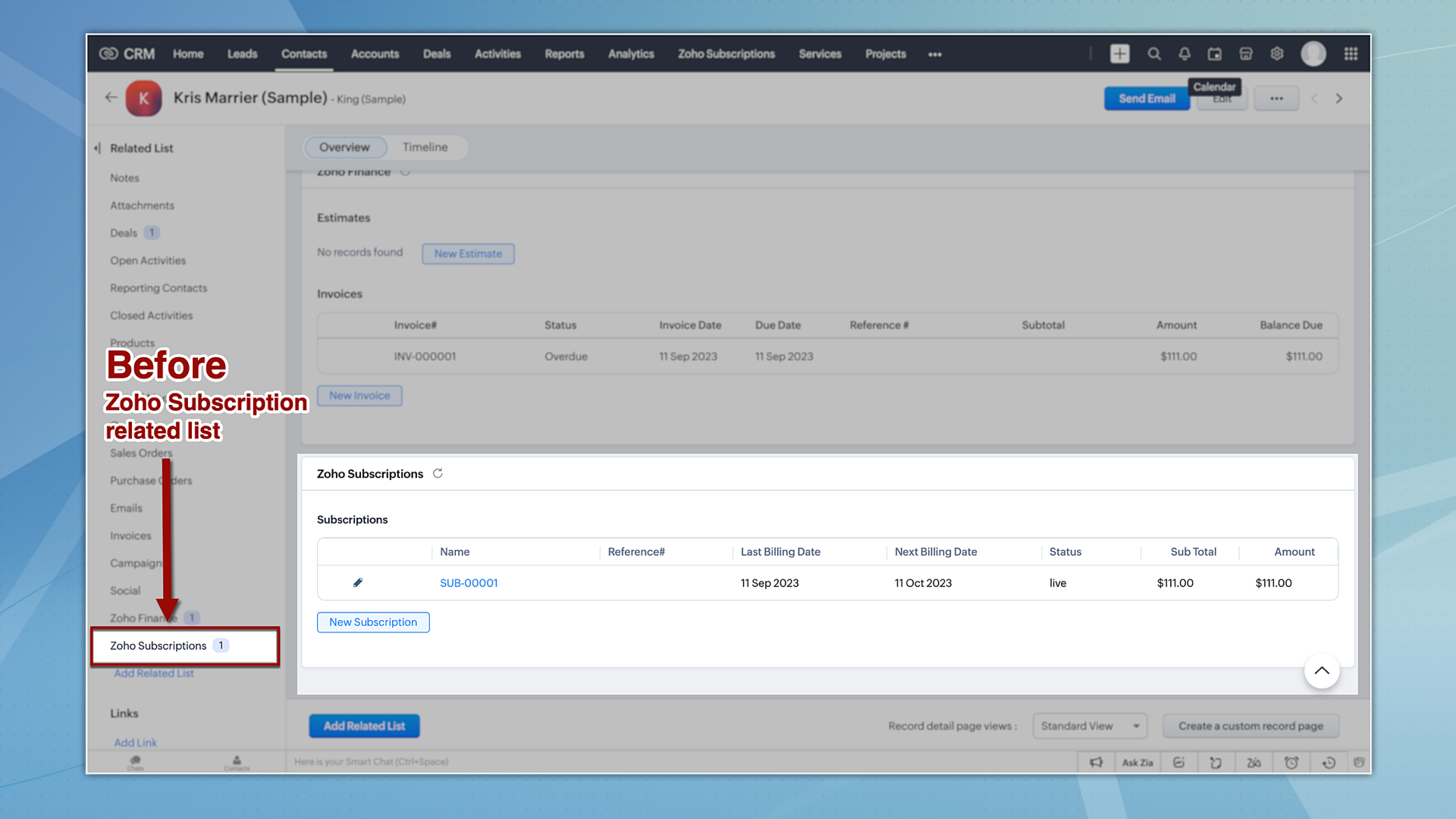
Now let's take a quick look at the enhancements made to the Zoho Subscription integration.
1. Introducing the Zoho Subscription Module
Zoho Subscriptions will now be available as a module in CRM, accessible to users with appropriate permissions. With this update, users now can generate reports based on Zoho Subscriptions data.
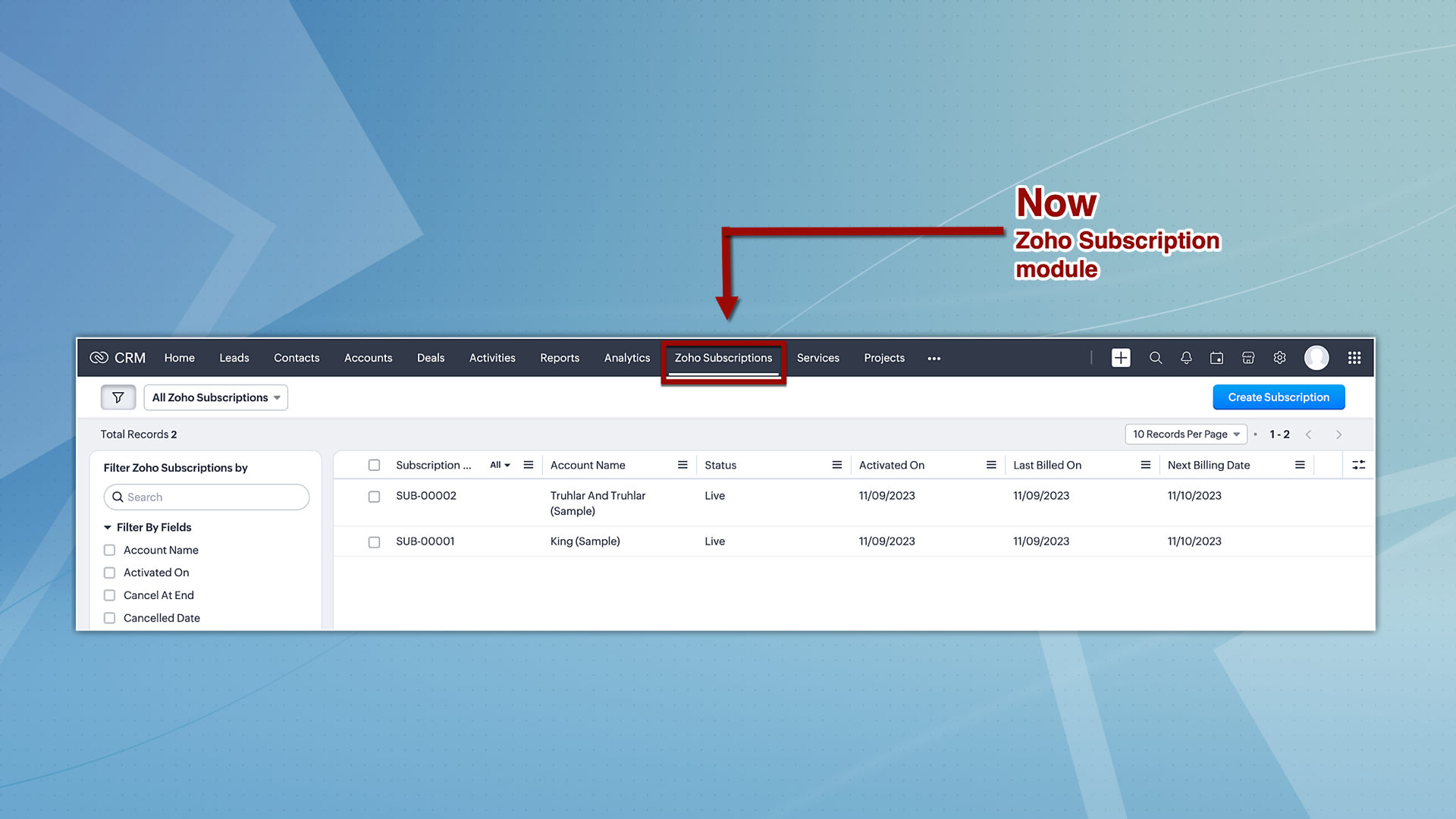
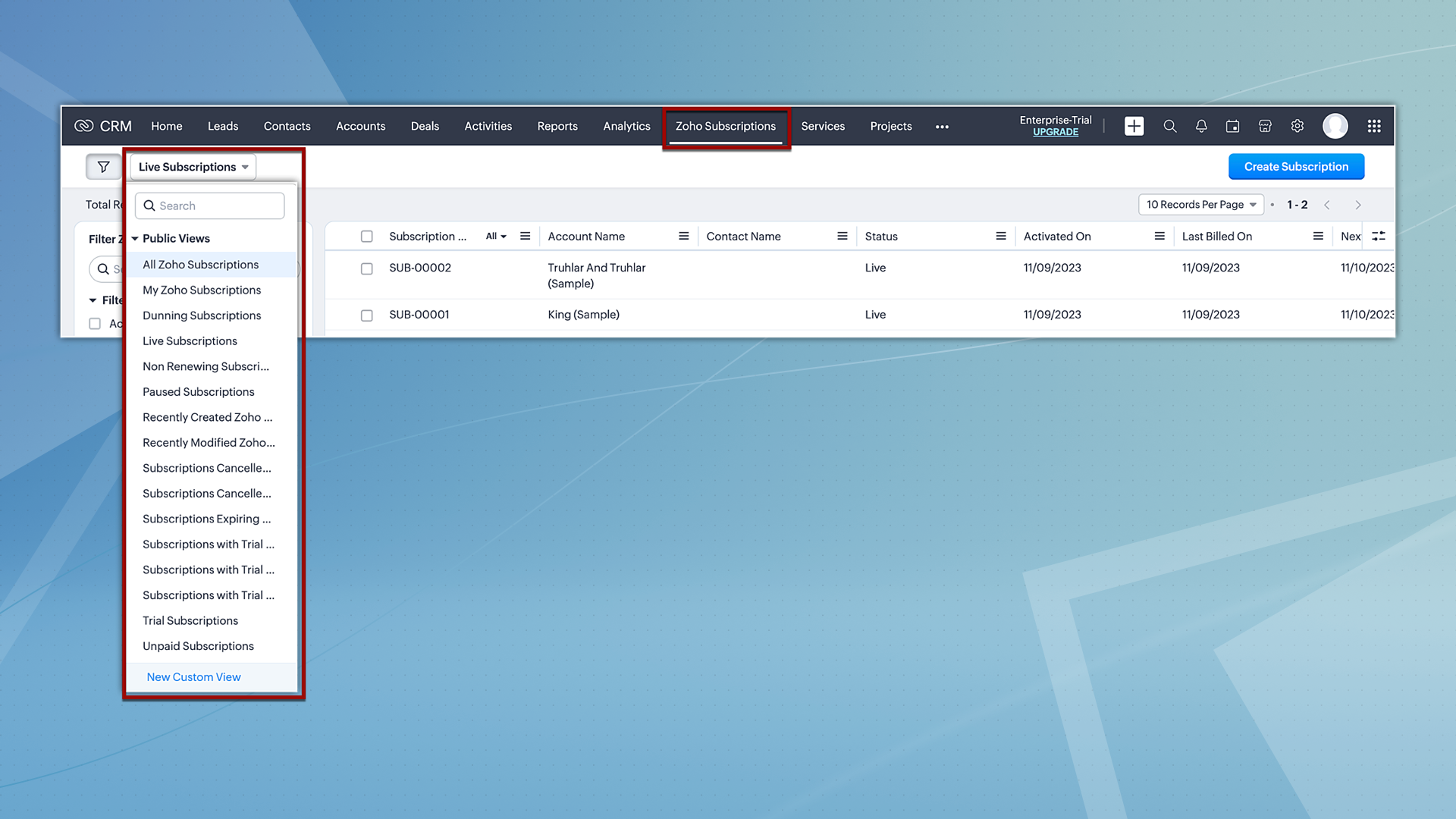
Hereafter, Zoho Subscriptions will be displayed both as a related list and as a module. Users with subscription permissions can currently create and view records in related lists; however, moving forward, they will be able to view and create records from the subscription module as well. Additionally, users will also have the option to view subscription records based on the pre-defined custom views.
2. Reports and analytics for subscriptions
Zoho CRM offers report and analytical dashboard presets that users can adjust as needed to create personalized reports. In turn, this allows users to gain a better understanding of their customers and track key performance metrics, enabling them to make more informed decisions.
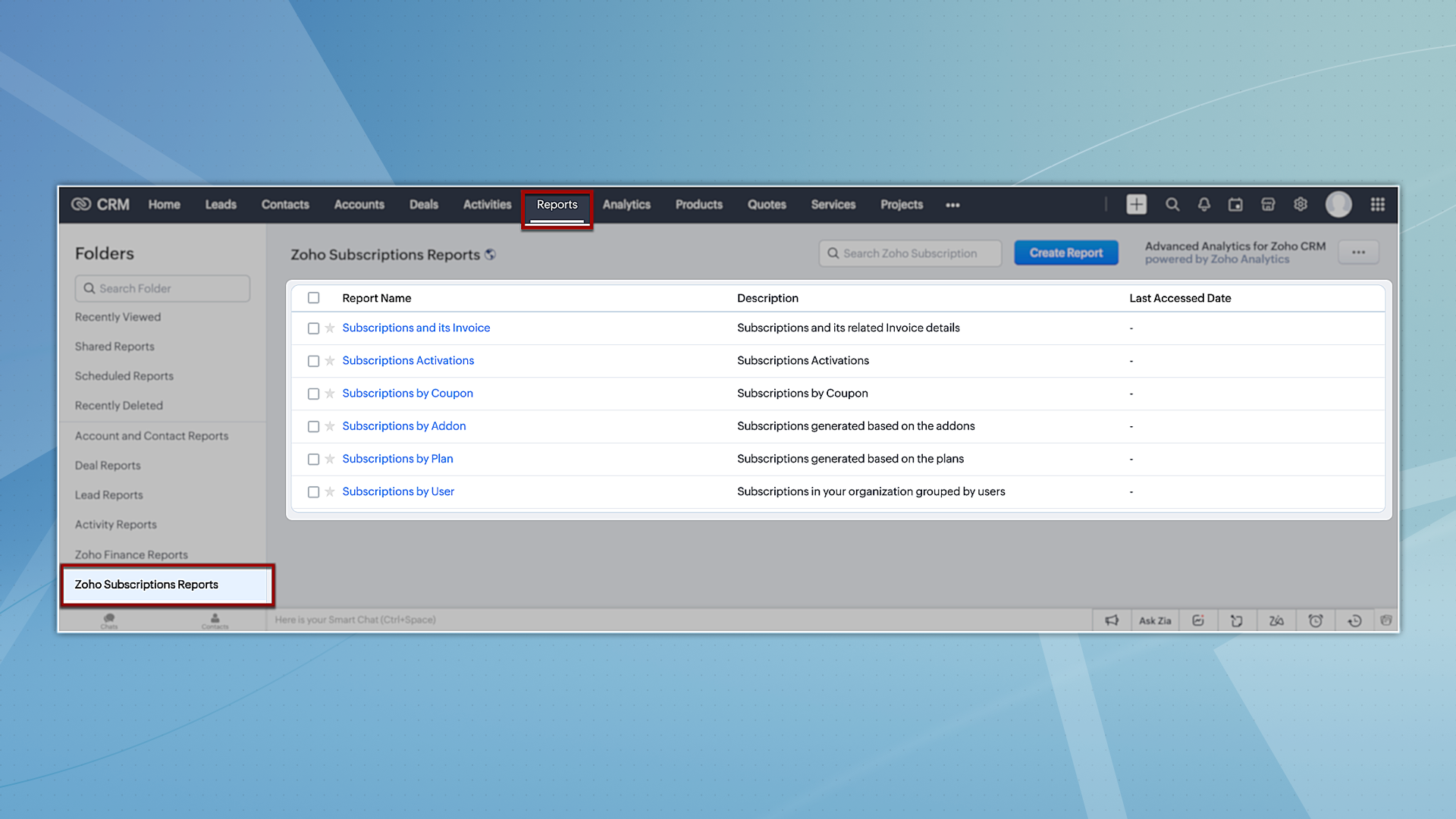
To try out system-defined reports based on Zoho Subscriptions, you can navigate to the Reports module and select any of the reports available under the Zoho Subscription Reports folder.
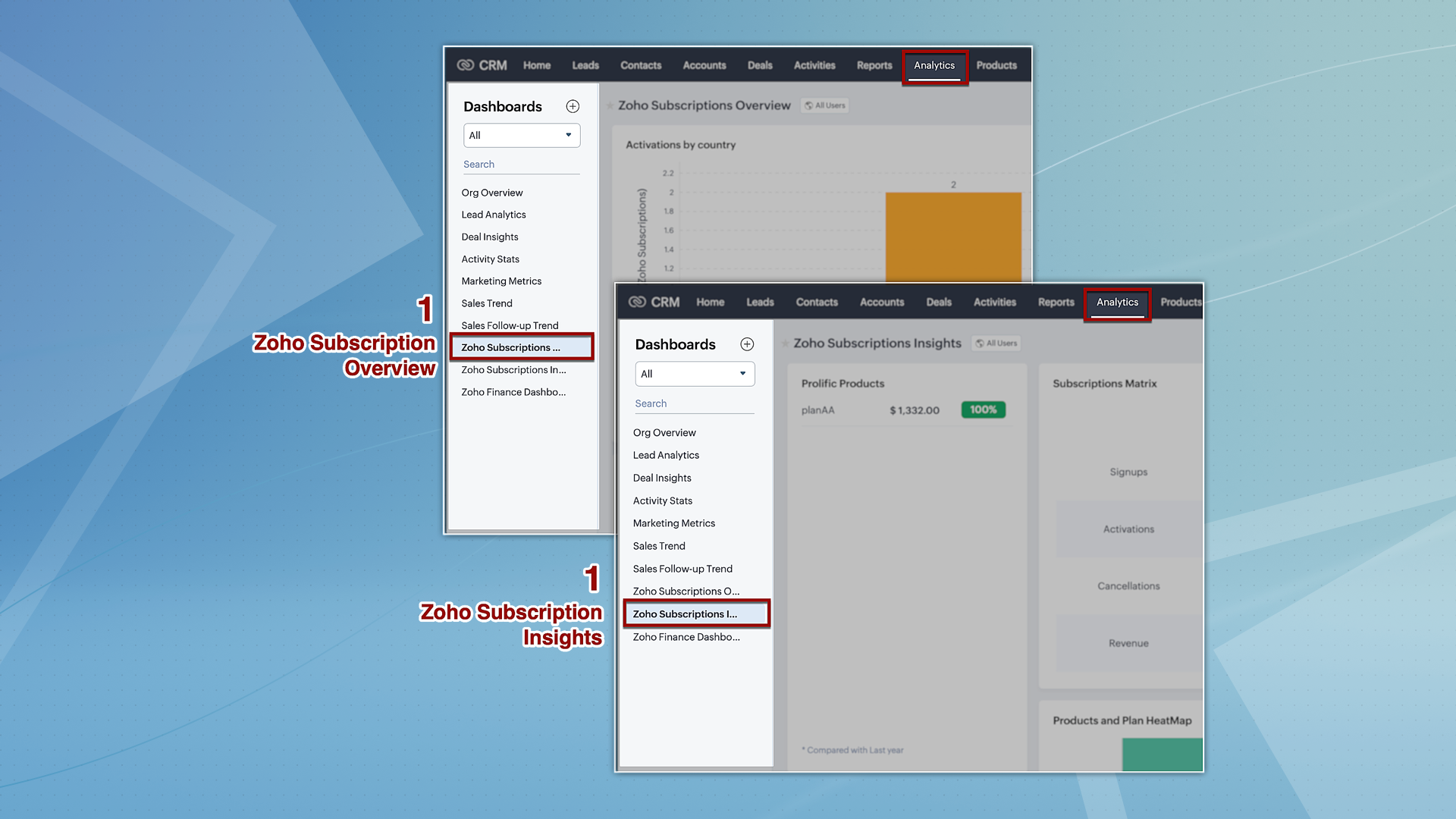
However, for analytics, we're providing two dashboards: Zoho Subscription Overview and Zoho Subscription Insights. You can navigate to the Analytics module and find these dashboards by default on the left panel.
3. Streamlined user permissions
The integration between Zoho CRM and Zoho Subscriptions, which used to be controlled by integration owner/admin permissions, will now operate based on the current users' scope. This guarantees uniformity in user permissions across both platforms, preventing users from accessing CRM features that they do not have authorization for in Zoho Subscriptions.
That's all we have for the enhancements in this edition. We'll keep you posted on further updates. Please feel free to share your thoughts and feedback in the comments below.
Resources: Zoho Finance Suite Knowledge Base
Release Plan:
- These enhancements are being rolled out in phases and are now available to all users across all data centres, with the exception of the US DC, where they are currently available only to organizations on editions below Enterprise.
Thanks!
Nizamuddin
 P.S. We would like to acknowledge the significant contributions and ongoing recommendations provided by our MVP, @Kevin Flynn. His insights – shared in the community forum – have been instrumental in addressing challenges related to users experiencing difficulties in sending emails with their addresses, as well as issues concerning user and field-level permissions.
Topic Participants
Nizamuddin Sohel SK
Nick
Robert
Mikhail Koval
Sunderjan Siddharth
Sticky Posts
Good news! Calendar in Zoho CRM gets a face lift
Dear Customers, We are delighted to unveil the revamped calendar UI in Zoho CRM. With a complete visual overhaul aligned with CRM for Everyone, the calendar now offers a more intuitive and flexible scheduling experience. What’s new? Distinguish activitiesVoC in Zoho CRM is now data savvy: Explore response drilldown, summary components and participation in CRM criteria
VoC has all the goods when it comes to customer intelligence—which is why we're constantly enhancing it. We recently added the following: A customer drilldown component that shows you the list of prospects and customers behind a chart's attribute ExpandedWrapping up 2025 on a high note: CRM Release Highlights of the year
Dear Customers, 2025 was an eventful year for us at Zoho CRM. We’ve had releases of all sizes and impact, and we are excited to look back, break it down, and rediscover them with you! Before we rewind—we’d like to take a minute and sincerely thank youPresenting ABM for Zoho CRM: Expand and retain your customers with precision
Picture this scenario: You're a growing SaaS company ready to launch a powerful business suite, and are looking to gain traction and momentum. But as a business with a tight budget, you know acquiring new customers is slow, expensive, and often deliversCreate and populate a record in an instant: Introducing zero-shot field prompting to Zia's ICR
A couple of months ago, we upgraded our in-house AI image detection and validation tool, Zia Vision, with intelligent character recognition (ICR). By training Zia with sample images, you could create and enrich CRM records with data extracted from standard
Recent Topics
Can I hide empty Contact fields from view?
Some contacts have a lot of empty fields, others are mostly filled. Is there a way I can hide/show empty fields without changing the actual Layout? I would like to de-clutter my view, and also be able to add information later as I am able. I would be willing to learn to code a button, but I am highly confused about it and thus worried it would be beyond me. I've looked at a lot of the developer documents and I'm not able to make a lot of sense of them. Thank you in advance to anyone who knows theSuggestions for showing subscribed Topics in CRM (contact record)
We have several Topics set up in ZMA. We also have a sync set up between ZMA and CRM. I'd like to display the subscribed topics on the CRM Contact record. This will allow the Sales team (who uses CRM) to see at a glance what topics a Contact is subscribedReplies sometimes creating separate ticket
Sometimes when a customer responds to an email coming from Zoho Desk, instead of adding a reply to the original ticket, a separate ticket is created. This happens even though the response subject line contained the ticket number, and the person respondingRe-hide fields when option is unselected
Hi all Can anyone help me with this - when I create a 'show' field rule for when a dropdown option is selected, how to I make it so the 'show' option re-hides if that option is no longer selected?Allow Attaching Quartz Recordings to Existing Zoho Support Tickets
Hi Zoho Team, We would like to request an enhancement to how Zoho Quartz recordings integrate with Zoho Support tickets. Current Behavior: At the moment, each Quartz recording automatically creates a new support ticket. However, in many real-world scenarios:I'm getting this error when I try to link an email to a deal inside the Zohomail Zoho CRM extension.
When I click "Yes, associate," the system displays an "Oops!! Something went wrong" error message. I have attached a screenshot of the issue for reference.Custom Fields
There is no way to add a custom field in the "Timesheet" module. Honestly, the ability to add a custom field should be available in every module.Remove the “One Migration Per User” Limitation in Zoho WorkDrive
Hi Zoho WorkDrive Team, Hope you are doing well. We would like to raise a critical feature request regarding the Google Drive → Zoho WorkDrive migration process. Current Limitation: Zoho WorkDrive currently enforces a hard limitation: A Zoho WorkDriveTranslation from Chinese (Simplified) to Chinese (Traditional) is not working. It randomly translated. Google Translate accurately but zoho translate is not working at all
Hi friends, The newly added language for translation. https://www.zoho.com/deluge/help/ai-tasks/translate.html "zh" - Chinese "zh-CN" - Chinese (Simplified) "zh-TW" - Chinese (Traditional) my original text: 郑这钻 (and it is zh-CN) translated traditionalConsultant-Only Booking Page
Zoho Bookings does not allow for Meeting Type OR Workspace-Wide booking pages to be turned off. This is detrimental to organizations that have territory-based or assigned accounts, because if prospects can go to these booking pages and either select theAll new Address Field in Zoho CRM: maintain structured and accurate address inputs
The address field will be available exclusively for IN DC users. We'll keep you updated on the DC-specific rollout soon. It's currently available for all new sign-ups and for existing Zoho CRM orgs which are in the Professional edition. Latest updateCall result pop up on call when call ends
I’d like to be able to create a pop up that appears after a call has finished that allows me to select the Call Result. I'm using RingCentral. I have seen from a previous, now locked, thread on Zoho Cares that this capability has been implemented, butCustom Sorting based on other columns in table
I need the ability to apply custom sorting to a text-based dimension in the X axis where the sorting is based on another column in the table. For example, I have a chart report where the X axis is a text label. I would like to be able to sort those textFeature Request: Enable Custom PDF Layout Editor for All Modules (Including Package Slips)
Hello Zoho Community and Product Team, I am writing to share a suggestion that would significantly enhance the customization capabilities within Zoho Books. We all appreciate the power of the Custom PDF Layouts (the "New" template engine) that allowsIs there a way to invoke deluge function from within a widget?
Hi! I have custom functions in deluge and I was wondering whether there is any way to call this function through a widget? Something like on click of a button inside a widget, run the deluge custom function. Would this be possible?Can a default task Priority be set?
The "Priority" field in the Task layout does not allow a default to be set. Is there another way of doing it? Because the current default is "None" and the Zoho Kanban board design has selected this field as critical information to surface by includingAdding a threshold to a line chart based on date range
I have a line chart that is tracking a percentage over time. It also has a filter for 50 different clients. I would like to create a threshold that is based on a portion of the date range. As I understand it, this would be done by adding a column to theResize Signature field dynamically
On the tablet, it is perfect. But on smaller mobile devices and PCs, both web and application, it is too small for people to sign. Is there any plan to make the signature field size dynamically in the future update?Super Admin Logging in as another User
How can a Super Admin login as another user. For example, I have a sales rep that is having issues with their Accounts and I want to view their Zoho Account with out having to do a GTM and sharing screens. Moderation Update (8th Aug 2025): We are workingZoho Creator Application - New User Not able to access the application
In Zoho Creator, The newly added user not able to access the " Added Application" - User has received the Invitation Email, but while clicking "confirm Account" in the invitation Email, the following error message has appeared. "Sorry! you cannot acceptDeleting Salutation Field
We have updated our lead input screen and 'Salutation' has appeared. This is not visible in the 'Edit Pgae Layout' screen so cannot be moved to 'List of Removed Fields' Salutation is visible in the list in 'Customization - Fields' however I can only 'Edit' or 'Replace' I cannot delete and I do not need this field on my lead input screen. Please can you advise how to get rid of this. Screen shots can be provided if needed. Thank you TashaAuto-Generate & Update Asset Serial Numbers using a custom function (Assets Module)
Hello Team, I’ve been working on a script to automate one of our processes in Zoho FSM, and the core functionality has been successfully implemented. However, I’m encountering an issue related to serial number allocation, which is not working as expected.Partner with HDFC And Sbi Bank.
Hdfc and sbi both are very popular bank if zoho books become partner with this banks then many of the zoho books users will benefit premium features of partnered banks.Zoho Mail iOS app update: Access Delegated Mailbox.
Hello everyone! You can now access the delegated mailbox from within the iOS version of the Zoho Mail app. To access the delegated mailbox: Open the Zoho Mail app. Go on to the 'Email' module. Tap the profile picture. Choose the delegated mailbox PleaseHow to convert Lead's country field from Text to Pick List
Hi, I would like to change the default country field in ZCRM from text to pick list. It looks like not I can't delete default country field and recreate it as pick list nor can i create an new custom field country because such a label belong to default field. So what do I have to do? Any ideas? LHow create a draft via workflow?
I wish to create a workflow rule for specific emails that creates a draft response - not an automatic email reply, but just a draft with a set response ready to be verified by an agent who can then manually select recipients. Alternatively, the workflowNew feature: Invite additional guests for your bookings
Hello everyone, Greetings from Zoho Bookings! We are happy to announce the much-awaited feature Guest Invite, which enhances your booking experience like never before. This feature allows additional participants to be invited for the bookings to makeImproved Contact Sync flow in Google Integration with Zoho CRM
Hello Everyone, Your contact sync in Google integration just got revamped! We have redesigned the sync process to give users more control over what data flows into Google and ensure that this data flows effortlessly between Zoho CRM and Google. With thisImage field in custom module
Hi guy, Is there any hope of adding a custom image field in the custom module? We created a custom module to keep track of assets, and it would be helpful if we could attach an image to the record. Thanks Rudyالخصم على مستوى فاتورة المبيعات
السلام عليكم ورحمة الله وبركاته مطلوب في إنشاء خصم على مستوى فاتورة المبيعات وليس على مستوى البند أريد معرفة الطريقة؟VAT and Taxes option not available
Dear ZOHO Team , The VAT and Taxes options in my ZOHO books account not available,I tried to find how to enable or check the way to use this option but unfortunately couldn't find it anywhere ,I'm in UAE ,kindly let me know what to do to solve this issueDefault Tagging on API-generated Transactions
If one assigns tags to an Item or Customer, those tags get auto-populated in each line item of an Invoice or Sales Order when one creates those documents. However, if one creates the Sales Order or Invoice via the API (either directly coding or usingDirect Feed (Bank)
Is Direct feed integration for AlRajhi and ADCB bank supported by Zoho Books in GCC/SaudiSales Order, Invoice and Payment numbers
Hi zoho friends, it is me again, the slow learner. I'm wondering if there is a way to have it so the Sales order, invoice and payment numbers are all the same? It would be easier for me if they were the same number so there is not so many reference numbersMS Teams for daily call operations
Hello all, Our most anticipated and crucial update is finally here! Organizations using Microsoft Teams phone system can now integrate it effectively with Zoho CRM for tasks like dialling numbers and logging calls. We are enhancing our MS Teams functionalityCustomer Satisfaction (CSAT) Report
From data to decisions: A deep dive into ticketing system reports The customer satisfaction (CSAT) report helps teams understand how customers feel about their support experience, identify service gaps, and continuously improve the help desk. It turnsTimeline Tracking Support for records updates via module import and bulk write api
Note: This update is currently available in Early Access and will soon be rolled out across all data centers (DCs) and for all editions of Zoho CRM. The update will be available to all users within your organization, regardless of their profiles or roles.Shifts in Zoho People vs Zoho Shifts?
Hello Zoho People Team, We hope you are doing well. We are evaluating the Shifts functionality within Zoho People and comparing it to the standalone Zoho Shifts product. We’ve encountered comments and discussions suggesting that the Shifts feature insideDisable fields in During action in Blueprint?
Hi there. I've tried field disable (setReadOnly(true)) using client script and the event is onMandatoryFormLoad on detail page, assuming it'll work on blueprint fields, but it bears no result. Is this the expected behaviour? That we can't do this yet?Develop and publish a Zoho Recruit extension on the marketplace
Hi, I'd like to develop a new extension for Zoho Recruit. I've started to use Zoho Developers creating a Zoho CRM extension. But when I try to create a new extension here https://sigma.zoho.com/workspace/testtesttestest/apps/new I d'ont see the option of Zoho Recruit (only CRM, Desk, Projects...). I do see extensions for Zoho Recruit in the marketplace. How would I go about to create one if the option is not available in sigma ? Cheers, Rémi.Next Page