Let’s Talk Recruit: Forms that think before you do!
Welcome back to our Let's Talk Recruit series. In our previous post, we shared highlights from our community meetups held across India.
This time, we’re talking about something that often gets overlooked but makes a huge difference once you set it up right: Webforms and Form Rules.
Let’s say you're rolling out a hiring drive or posting jobs on multiple channels. Candidates start pouring in—but half of them forget to attach their resumes, a few skip critical questions, and some apply to the wrong roles altogether. And that’s before you’ve even started shortlisting.
That’s exactly the kind of cleanup Webforms and Form Rules are built to prevent. They help you collect the right details, personalize the experience for candidates, and automate the little things that usually slow you down. And once you get the hang of them, you'll wonder why you didn’t start sooner.
The Problem
If your team still relies on email attachments or inconsistent spreadsheets to gather applicant info, chances are you’re wasting time fixing errors that shouldn’t exist in the first place.
Candidates entering outdated contact details
Missing info on key fields like skill set, location, or availability
Manually categorizing candidates for different roles or hiring pipelines
Without a structure in place, things slip through the cracks. And when you're hiring at scale, that’s a problem.
Why Webforms matter
A webform is often the first step a candidate takes to engage with your company. Whether it’s embedded on your careers page, linked on a social post, or shared during campus drives — it sets the tone.
But a lot of recruiters still use basic forms. Candidates fill them out, and then it’s a game of manual edits, sorting, and follow-ups.
What if the form did more? What if it already knew:
Which fields to show and when?
Whom to assign the record to?
Whether the candidate should be redirected after submission?
That’s where form rules come in.
What are Form Rules?
Form rules let you customize the candidate’s experience while they’re filling out the form by triggering actions based on their input.
Actions include: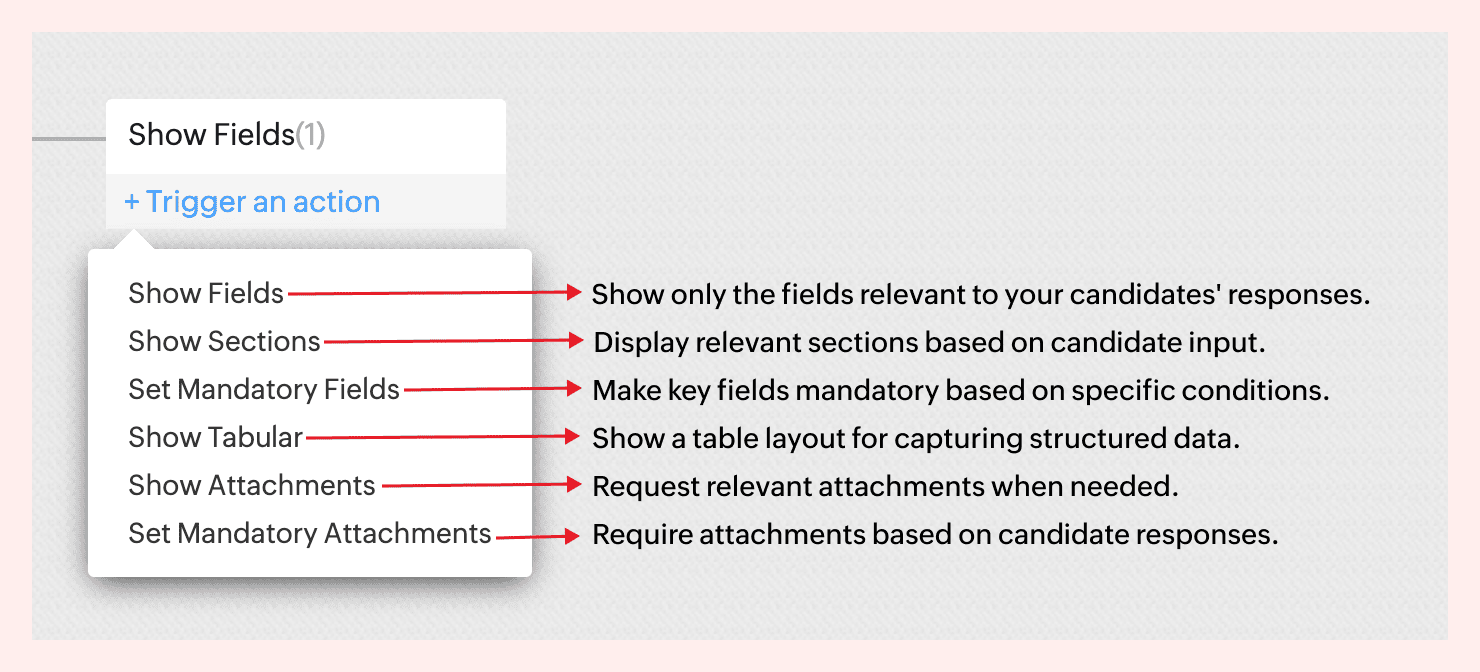
For instance, not all candidates come with the same background—and your forms shouldn’t treat them like they do.
If a candidate indicates they’re a fresher, there’s no need to show fields like Work History or Current Salary. But if they’re experienced, you might want to ask about key projects, past employers, or management experience.
With form rules, you can create this branching logic in just a few clicks—keeping the form clean for early talent and detailed where it matters.
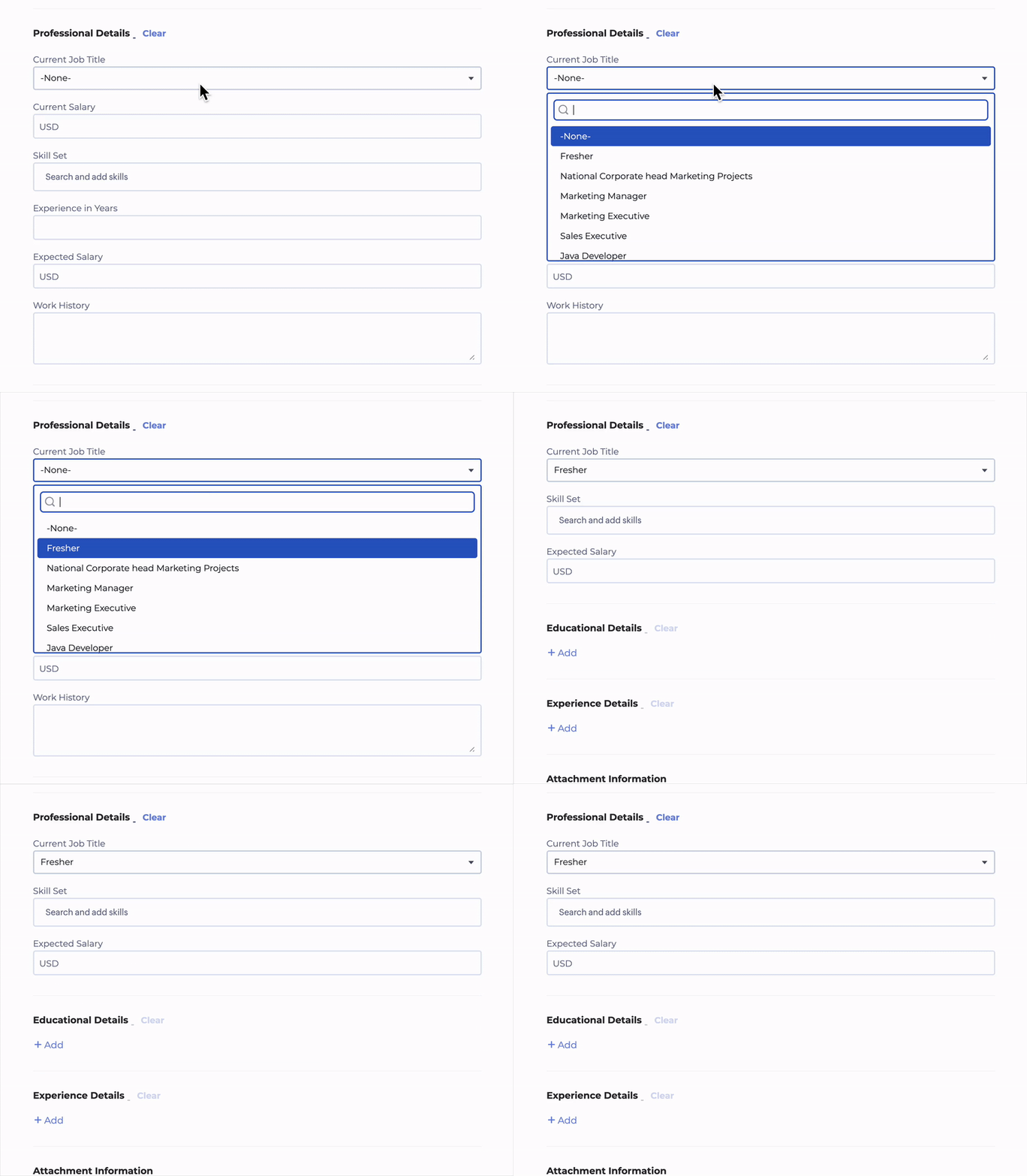
No code required. Just simple logic-based conditions.
→ Learn more
A few use cases to consider
Client Intake to Job Requisition
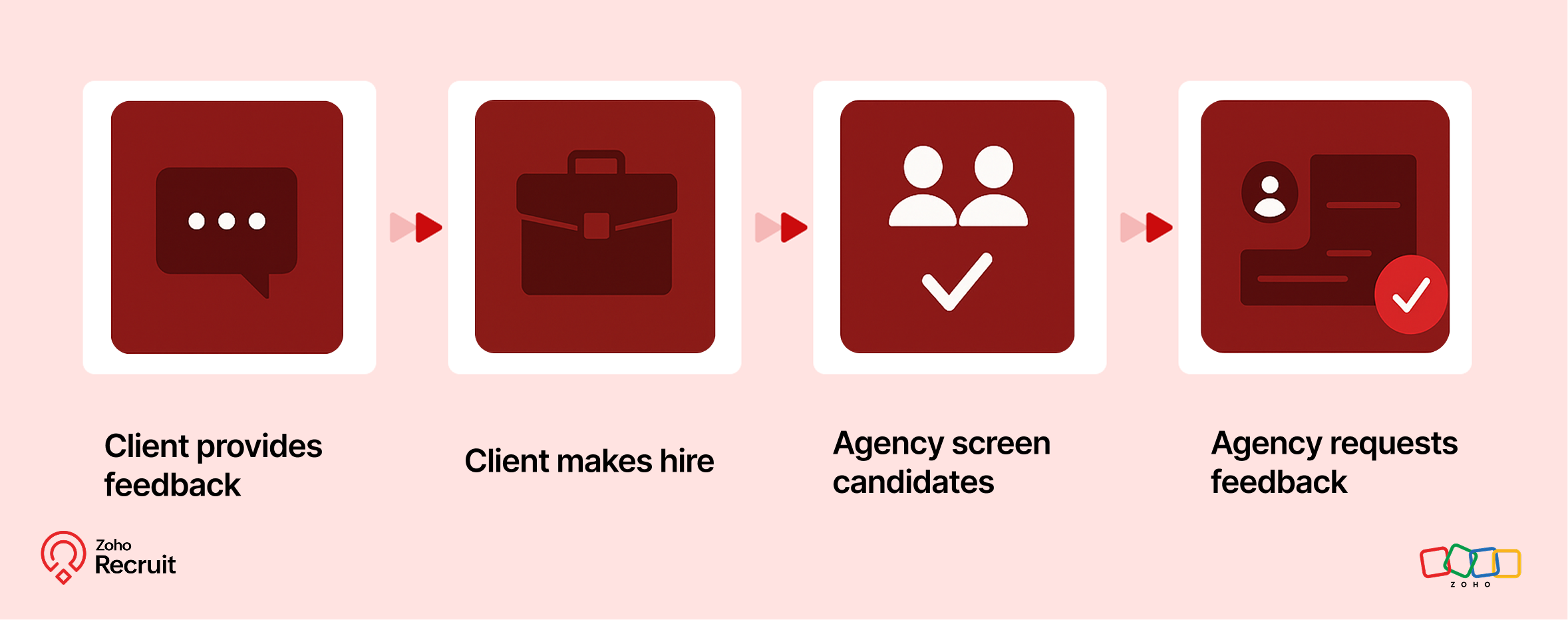
Step 1: Client submits contact form
Embed a Contact webform on your website to capture leads—clients who want to work with your staffing agency.
Step 2: Client shares job details
Once onboarded, clients can submit job requirements through a Job Requisition form. These details feed directly into your system.
Step 3: Agency hires candidates
Use the shared job details to source, match, and hire candidates for the role.
Step 4: Agency requests feedback
After successfully filling positions, request feedback from clients using a Feedback webform.
Candidate Onboarding & Documentation
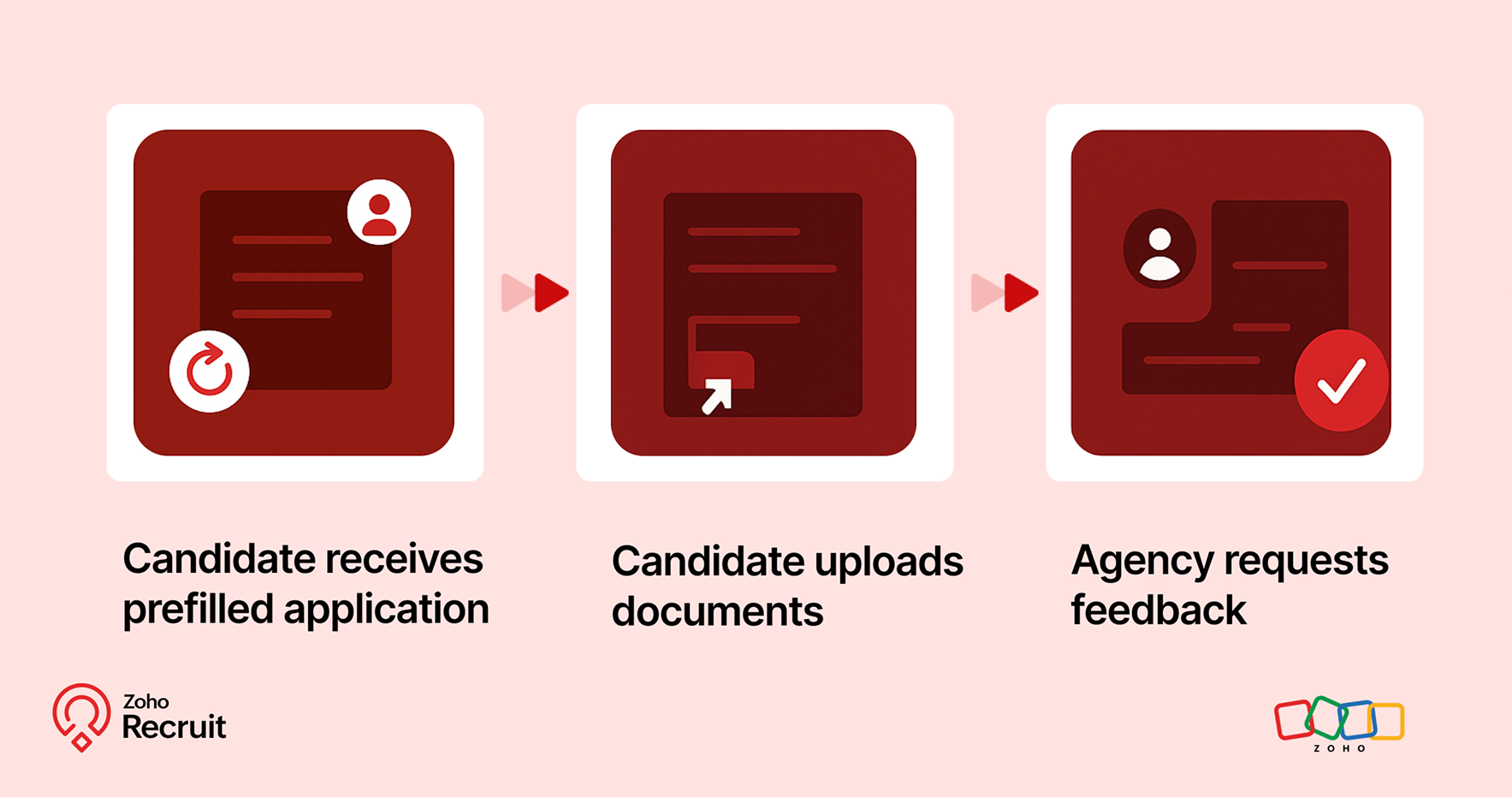
Step 1: Candidate receives prefilled application
Once candidates are selected, use known data to prefill details into a Background Check form.
Step 2: Candidate uploads documents
Share the form with candidates to collect necessary documents—ensuring accuracy and reducing redundant data entry.
Step 3: Agency requests feedback
After onboarding is complete, send a Feedback webform to capture the candidate’s experience.

A quick look at the numbers
Webforms and Form Rules aren’t just about convenience — they actually influence how well candidates interact with your hiring process.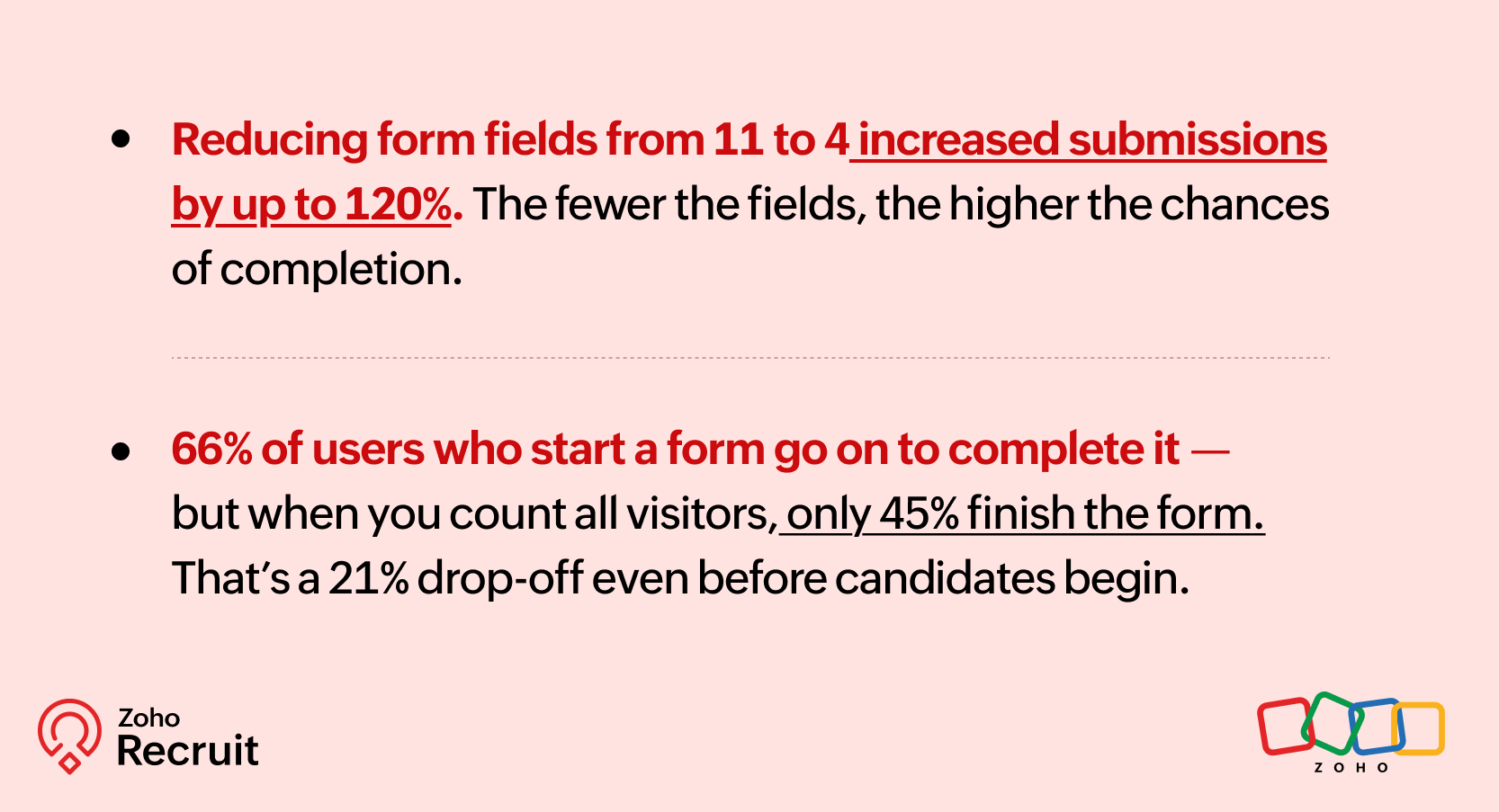
These numbers reinforce what we already know — clearer, shorter, and smarter forms can keep more candidates moving forward.
Getting started: A few setup tips
If you’re new to webforms or haven’t reviewed your setup in a while, here are three things to check:
Do you have job-specific forms?
A generic form might be easier to maintain — but it might also be collecting unnecessary or missing important info.Have you mapped fields correctly?
Ensure that all form fields map directly to your Recruit modules (Candidate, Job Opening, etc.) to avoid duplicates or errors.Are you using rules to simplify things?
Even one simple rule — like showing a “Notice Period” field only for full-time roles — can improve form quality.
Need help setting this up? Here’s how to build a webform and how to configure Form Rules.
Let’s Talk Recruit!
Do you already use Webforms in your hiring flow? Have you explored conditional form rules yet—or is that still on your to-do list?
Drop your experience below or tell us what kind of form use case you'd love to automate—we're all ears (and maybe one of our product folks will drop in with a tip or two!).
Topic Participants
Akshaya P
Sticky Posts
Zoho Recruit Community Meet-up - India (Venues Finalised)
Zoho Recruit Community Meet-up - India (Venues Finalised) Namaste, India. 🙏🏼 The Zoho Recruit team is hitting the road—and we're absolutely excited behind the scenes. Join us for the Zoho Recruit India Meet-up 2026, a morning designed to make your recruitingZoho Recruit Community Meetup - London 🇬🇧 (Venue Finalised)
Hello Recruiters! We’re excited to announce that the Zoho Recruit team is coming to the UK for an in-person Zoho User Group (ZUG) Meetup in London! This is your chance to connect with fellow Zoho users, learn from experts, and walk away with actionableAn update to improve email delivery | Email Authentication & Relay
Update Rollout Latest Update: Enterprise users (8th July, 2025) This update is now live for Enterprise plan users in all regions. This includes People Plus, but not Zoho One, which will be covered in an upcoming update. Professional users (31st May 2025)Zoho Recruit User Group Meet-up | INDIA 2025 (Venue Finalised)
Hello Zoho Recruit users from India, We’re pleased and excited to announce our 2025 edition of Zoho user group meet-up in India in five cities! In this meet-up, our team of experts will help you understand the intricate nuances to use Zoho Recruit better,Zoho Recruit is coming to the UK | Zoho Community Learning Series
Customers from the United Kingdom, Exciting news: We will be in London for the Zoho Recruit user meet up. Our team will help you better understand the intricate nuances of Zoho Recruit to help you hire faster, inform about new and upcoming features, and
Recent Topics
Super Admin Logging in as another User
How can a Super Admin login as another user. For example, I have a sales rep that is having issues with their Accounts and I want to view their Zoho Account with out having to do a GTM and sharing screens. Moderation Update (8th Aug 2025): We are workingEs posible cambiar el lenguaje de los modulos del ASAP?
Es posible cambiar el lenguaje de estos textos? Tengo Zoho configurado en español pero aun así me muestra estos textos en ingles:Option to Automatically Publish Job Openings to the Career Website via API or Workflow
Currently, when creating Job Openings using the Zoho Recruit API, the records are successfully inserted into the system. However, there is no way to automatically publish these Job Openings to the Career Website. In the Job Opening field data, there areEvaluate applicants faster: Profile Summary and Skill Sets now in Applications
Evaluating applicants often requires switching between modules to understand their skills and background. With this update, we’ve extended two capabilities directly to the Applications module: Skill Sets and Profile Summary. You can now review applicantsFree webinar: How to use passkeys with Zoho Vault
Hi everyone! Passkeys are transforming the way we sign in—making authentication safer, faster, and completely passwordless. No more memorizing complex passwords or worrying about credential theft. With Zoho Vault, you can securely manage both passwordsAdding Markdown text using Zoho Desk API into the Knowledge Base
Hi Zoho Community members, We currently maintain the documentation of out company in its website. This documentation is written in markdown text format and we would like to add it in Zoho Knowledge Base. Do you know if there is REST API functionalityIs it possible to embed Zoho Bookmarks in the Cliq sidebar?
Is there any way that each Zoho user can access their bookmarks (that live in https://bookmarks.zoho.eu/ which is technically a part of Zoho Mail) directly within Cliq? As a widget, or an item in the sidebar? My team does not use Mail, it uses Cliq allEnhancing Zia's service with better contextual responses and article generation
Hello everyone, We are enhancing Zia's Generative AI service to make your support experience smarter. Here's how: Increased accuracy with Qwen One of the key challenges in AI is delivering responses that are both contextually accurate and empathetic whileLet us add Lookup fields in the Blueprint Transitions
We are unable to add Lookup Fields in the blueprint transitions in Zoho Desk, we wanted to make it a requirement for our workflow but since it's not available in the transition we cannot. The lookup field exists in the Layout: But it cannot be added/selectedHow can we clear a signature field with deluge?
I would like to clear a signature field in the Edit -> On Load. I have tried input.signature = ""; input.signature = null; clear input.signature; None of the above is working. is there any other way I am missing?Online PDF Editor
Hello Team, There is a small glitch i found when i was using your online software called "PDF Editor", There is a menu bar on right side comes when we click on 3 dots for any pdf, but that entire menu has no options to choose, that is totally blank, pleaseHow do I disconnect my Salesforce integration?
I need to integrate a different Salesforce sandbox with my Zoho form.Zoho Recruit - Email Relay
Good day, Has anyone succeeded in setting up an email relay for Office 365? If I add the details from https://support.microsoft.com/en-us/office/pop-imap-and-smtp-settings-8361e398-8af4-4e97-b147-6c6c4ac95353, I get the connection error. Regards, EkaZoho Recruit -> Exchange Online Relay
HI! I have tried to connect Recruit to our MS 365 Exchange Online without any luck. I use this guide https://help.zoho.com/portal/en/kb/recruit/outreach/email-relay/articles/email-relay-zoho-recruit#Configuring_Email_Relay_Settings Do anyone have theError AS101 when adding new email alias
Hi, I am trying to add apple@(mydomain).com The error AS101 is shown while I try to add the alias.an issue in Zoho CRM where the workflow rule is not triggering
H I’m currently facing an issue in Zoho CRM where the workflow rule is not triggering when a new lead is created through a webform. I’ve double-checked the criteria and field updates, everything seems fine but it still doesn’t fire. Has anyone faced this401 Unauthenticated Error – Zoho CRM to Google Sheets Integration
Hi I'm building an Automation Function in Zoho CRM using Deluge that appends contact data from Zoho CRM into a Google Sheet whenever a new contact is created. WHAT I'VE DONE: I created a connection in Zoho CRM (Developer Hub → Connections) with the followingPower up your Kiosk Studio with Real-Time Data Capture, Client Scripts & More!
Hello Everyone, We’re thrilled to announce a powerful set of enhancements to Kiosk Studio in Zoho CRM. These new updates give you more flexibility, faster record handling, and real-time data capture, making your Kiosk flows smarter and more efficientIncome not showing in direct bank feed
Hi, I am trying to enter income without knowing or mentioning customer, as i am told, my client wants single or cash basis accounting but i seriously struggling......................I am not able to check in and checkout in zoho people even location access allowed
This issue i am facing in mackbook air m1, I allowed location in chrome browser and i also tried in safari but getting similar issue. Please have a look ASAP.Preview future shift rotation in Shift Schedule
Hi, What if, instead of the current behavior, the Shift Rotation feature in Zoho People allowed users to preview future shift schedules before the scheduler execution? Currently, when a shift rotation is configured (for example, monthly rotation), theAutomatically Update Ticket Status in Zoho Desk Based on Actions in Zoho Projects
Hi Zoho Desk Team, Hope you’re doing well. We’re using the Zoho Desk–Zoho Projects integration to manage tasks related to customer tickets, and it works well for linking and tracking progress. However, there are a few important automation capabilitiesSign Out
Hello, I have a doubt with Permalink. I have a view created with critera to show only the records belonging to the user who has sign in. The problem is that the different users use the same computer and some times the user login keep signed, and when I send the permalink (by email) of the view, the users enter with other login signed. Moreover the permalink view doesn�t allow to do a log out. May I add something in the permalink to request always sign in? Sorry for my English. Many thanks! RegardsAnnouncing new features in Trident for Windows (v.1.39.4.0)
Hello Community! Trident for Windows just received a major update, with a range of capabilities that focuses on strengthening communication and simplifying workflows. Let’s dive into what’s new! Upload email attachments to WorkDrive. Until now, you couldIntroducing Automatic Field Addition (Text Tags) in Zoho Sign
Hello, Today we are excited to announce the general availability of automatic field addition (text tags) feature in Zoho Sign. Now, you can now add text tags in the content of your documents and Zoho Sign will automatically add the corresponding fields when they are uploaded for the signing process. For example: when you add text tags to your sales orders, new employee contracts, and NDAs, Zoho Sign will add the corresponding fields when these documents are uploaded for the signing process. If youIntroducing Built-in Telephony in Zoho Recruit
We’re excited to introduce Built-in Telephony in Zoho Recruit, designed to make recruiter–candidate communication faster, simpler, and fully traceable. These capabilities help you reduce app switching, handle inbound calls efficiently, and keep everyWrite-Off multiple invoices and tax calculation
Good evening, I have many invoices which are long overdue and I do not expect them to be paid. I believe I should write them off. I did some tests and I have some questions: - I cannot find a way to write off several invoices together. How can I do that,Splitting Transactions in Zoho Books
I have read in past forum posts that the ability to split bank transactions would likely be implemented - it's definitely a typical accounting program feature. I'm new to Zoho and thought I'd found nirvana until I realized this feature doesn't seem toStatement Aging On Cutomer Statement
Hello, Is it possible to put aging on customer statements? Current 1-30days 31-60days 61-90days 91-120days Over 120 days. See attached image from another accounting package. Many customers pay off a statement and clear older invoices.Unveiling the next iteration of Ask Zia in Zoho CRM: An all-new chat interface, conversation history, actions, and much more
Your CRM assistant just leveled up. Zoho CRM's Ask Zia functionality now offers a more conversational and context-aware experience to help you not just understand your data, but act on it—all from one chat window. With its redesigned interface and expandedResponse rate and time on social media
Hello, I just want to know if it's possible to manage the response rate and response time from my social media on zoho social ? I don't see any statistical reports on the online scoreboard ? Thank you in advance for your response and sorry if the question has already been postedWhatsapp BOT with CRM
Hello, how do you use Whatsapp integrations in zoho CRM?Ability to translate Zoho CRM Kiosks
Hi team, Is support for translating kiosk text and screen names in the Zoho CRM translation tool planned on the roadmap? Thanks,Whatsapp Limitation Questions
Good day, I would like to find out about the functionality or possibility of all the below points within the Zoho/WhatsApp integration. Will WhatsApp buttons ever be possible in the future? Will WhatsApp Re-directs to different users be possible basedEditing the list of Categories in the Categorize Manually section of Banking in Zoho Books
Hi, I need to create two new Categories called Withdrawals and Deposits to categorize payments in a bank account. How do I edit the Categories list?Can I write a check in Zoho Books with no associated bill?
This currently does not seem possible, and I have a client that desperately needs this function if I am able to convert them with Quickbooks. Thank you in advance for your reply.Internal Fillable Contract with Zoho Writer (Before Sending to Client)
Hi everyone, I’m trying to automate the following process in Zoho CRM and would appreciate some guidance. Process: When a Deal moves to a specific stage, CRM triggers an automation. CRM sends a contract template to an internal team member so they can[Free Webinar] Intelligent document processing with Zoho RPA
Hello everyone! Greetings from the Zoho RPA team! We're excited to invite you to our upcoming webinar on intelligent document processing with Zoho RPA, where we'll introduce powerful new capabilities designed to make your automation journey smarter, faster,Enhancements for Currencies in Zoho CRM: Automatic exchange rate updates, options to update record exchange rates, and more
The multi-currency feature helps you track currencies region-wise. This can apply to Sales, CTC, or any other currency-related data. You can record amounts in a customer’s local currency, while the CRM automatically converts them to your home currencyWhen I schedule calendar appointments in zoho and invite external emails, they do not receive invites
Hello, We have recently transitioned to zoho and are having a problem with the calendar feature. When we schedule new calendar appointments in zoho the invite emails aren't being sent to the external users that we list in participants. However, this worksNext Page