Zoho Creator Upcoming Updates - November 2025
Hello everyone,
Welcome to your monthly roundup of new features and enhancements! We hope you've already taken a look at Release Projection 2—it details the features coming your way for the rest of the year. And this month, we're excited to start rolling out some of those key updates.
Without further ado, let's dive in!
- Theme builder
- Sync to external calendars
- Record comments for portal users
- Refreshed UI for mobile apps
- Add and remove dependency apps to environments
- Data sync in integration fields
- New built-in connectors
--------
Theme builder
The upcoming all-new theme builder is designed to help you create a professional and vibrant appearance for your apps. With an intuitive, easy-to-use interface, you can now pick modern themes to align with your brand identity and deliver a polished user experience.
The theme builder allows you to customize:
- Layout: Choose from predefined theme layouts.
- Logo: Decide whether to display your organization logo, app icon, or no logo at all.
- Color: Select preferred colors from preset color palettes.
- Font: Choose from 12 available fonts.

How to access
Once the feature is released, you can navigate to the edit mode of your application and click Themes under the Design section.
Once the feature is released, you can navigate to the edit mode of your application and click Themes under the Design section.

Note: The themes feature is being rolled out in a phased manner. The first time you access it, you'll need to click the Try New Themes button to enable it for your account.
How can this help you?
The theme builder enables you to maintain brand consistency and create visually appealing apps effortlessly. It helps present users of your applications with a superior experience across devices.
The theme builder enables you to maintain brand consistency and create visually appealing apps effortlessly. It helps present users of your applications with a superior experience across devices.
Applicable for: C5, C6
Availability: All DCs
Availability: All DCs
Status: To be released
--------
Adding acyclic dependency apps to environments
Now, you can add applications with dependencies to environments, streamlining the lifecycle management of complex, interlinked apps that share logic through cross-app references (like lookups or page references).
Initially, acyclic dependencies (where apps follow a linear dependency structure without circular references) will be supported. Cyclic dependencies (where apps reference each other in a loop) will be introduced later in a phased rollout.
Additionally, when removing apps from environments, all acyclic dependent apps will now be removed together, ensuring more efficient and consistent dependency management without orphaned references.
Use case
Assume a company uses separate Creator apps for different functions, like employee management and payroll processing. Since the payroll depends on the employee data, one app references another in a linear manner. With this new update, you can add both apps together to environments. This ensures seamless ADLM flow without breaking app relationships.
Assume a company uses separate Creator apps for different functions, like employee management and payroll processing. Since the payroll depends on the employee data, one app references another in a linear manner. With this new update, you can add both apps together to environments. This ensures seamless ADLM flow without breaking app relationships.
How to access
When adding an app to an environment, dependent apps with acyclic references will automatically be included.

When removing from environments, the dependent apps will also be removed together.
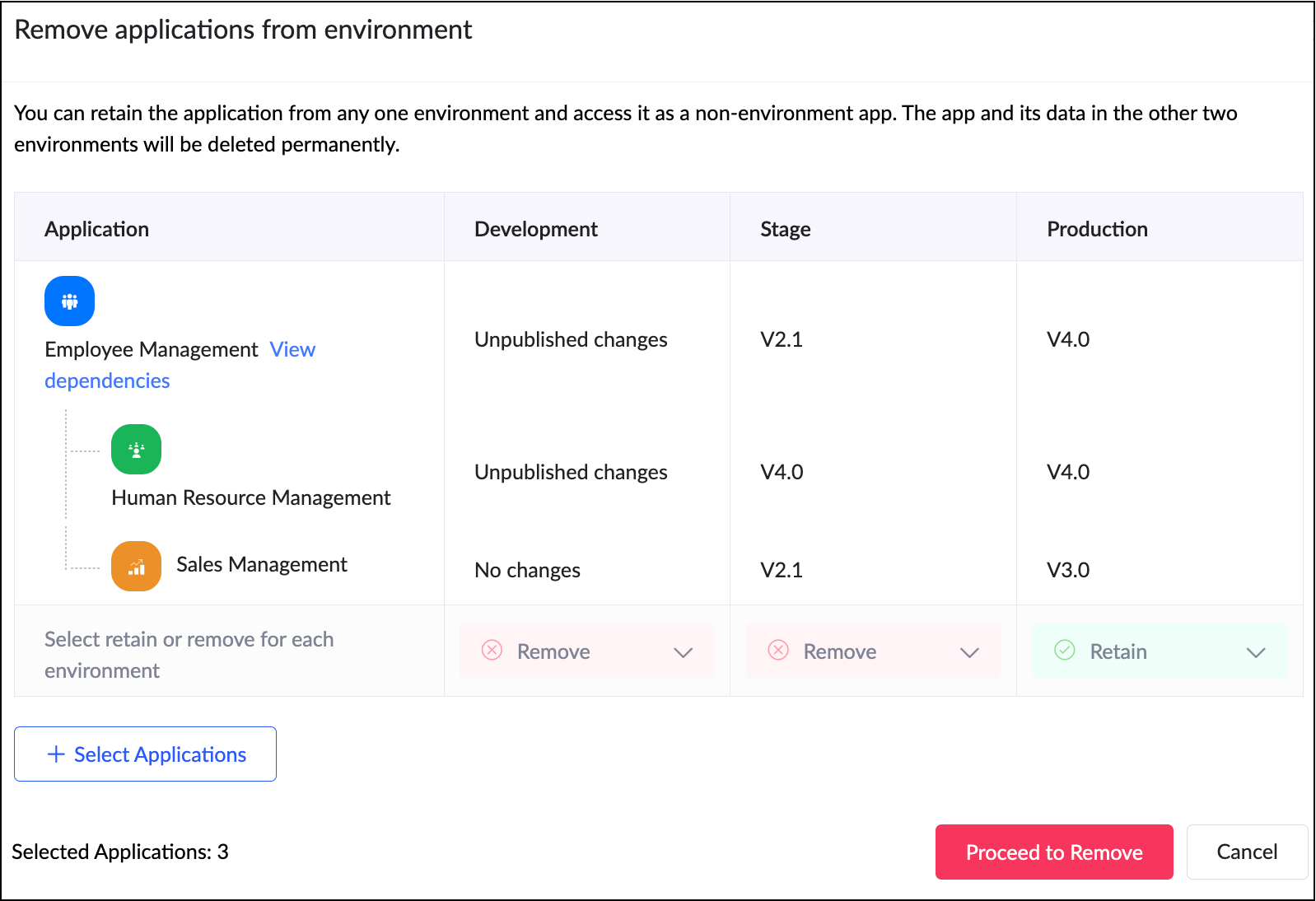
When adding an app to an environment, dependent apps with acyclic references will automatically be included.
When removing from environments, the dependent apps will also be removed together.
How can this help you?
This enhancement removes a long-standing limitation in Zoho Creator and unlocks true environment-level management for dependent applications. It streamlines the management and deployment of dependent applications,ensuring consistency and stability across environments.
Applicable for: C6
Availability: All DCs
Status: General Availability
Reference: Adding applications to environment
Availability: All DCs
Status: General Availability
Reference: Adding applications to environment
--------
Sync to external calendar
The Sync to External Calendar feature allows you to integrate published reports from your app with popular calendar tools like Zoho Calendar, Google Calendar, Outlook, Apple Calendar, and more. This feature works through an iCal feed URL and is helpful in ensuring that your events and schedules stay synchronized across platforms.
Use case
Let's say you use Zoho Creator to manage appointments for your business. With syncing to external calendars, you can automatically push these appointments to Google Calendar or Outlook. This provides your staff and clients with real-time updates directly on their personal calendars.
Let's say you use Zoho Creator to manage appointments for your business. With syncing to external calendars, you can automatically push these appointments to Google Calendar or Outlook. This provides your staff and clients with real-time updates directly on their personal calendars.
How to access
Navigate to the published report, click More Options (⋮), and select Sync to External Calendar. Generate the iCal feed URL and add it to the calendar application of your choice.
Navigate to the published report, click More Options (⋮), and select Sync to External Calendar. Generate the iCal feed URL and add it to the calendar application of your choice.
How can this help you?
This feature keeps your schedules automatically up to date by exporting data from published reports to external calendars, ensuring real-time updates and seamless synchronization across platforms.
This feature keeps your schedules automatically up to date by exporting data from published reports to external calendars, ensuring real-time updates and seamless synchronization across platforms.
Applicable for: C5, C6
Availability: All DCs
Status: General Availability
Reference: Understanding Sync to External Calendar
Availability: All DCs
Status: General Availability
Reference: Understanding Sync to External Calendar
--------
Record comments for portal users
We've brought in the capability for portal users to add comments to records. Previously, only internal users could add comments to records. With this enhancement, portal users can now join the conversation by adding comments as well. This update bridges the gap between internal and external stakeholders, allowing both user types to collaborate seamlessly within records.
Use case
Imagine a training management app where clients log in to a portal to track their sessions. With this feature, both the trainers (internal users) and clients (portal users) can discuss updates or clarify details directly within the record.
Imagine a training management app where clients log in to a portal to track their sessions. With this feature, both the trainers (internal users) and clients (portal users) can discuss updates or clarify details directly within the record.
How to access
Portal users can add comments directly within record details, just like internal users.
Portal users can add comments directly within record details, just like internal users.
How can this help you?
This feature fosters better collaboration and transparency by enabling direct communication between internal users and portal users.
This feature fosters better collaboration and transparency by enabling direct communication between internal users and portal users.
Applicable for: C5, C6
Availability: All DCs
Status: General availability
Reference: Understanding record comments
Availability: All DCs
Status: General availability
Reference: Understanding record comments
--------
Refreshed mobile UI
We're introducing a refreshed, modern UI that redefines the experience for users on Zoho Creator mobile apps. The new interface offers intuitive navigation, simplified data submission, and a clearer presentation of information across reports and dashboards.
Beyond core elements such as forms and reports, the new theme extends to other aspects of the mobile app, such as notifications, error responses, and more, with the aim of ensuring a consistent and polished experience throughout.
How can this help you?
The refreshed UI focuses on enhancing usability and accessibility. It ensures a unified and professional experience across every part of the mobile app.
The refreshed UI focuses on enhancing usability and accessibility. It ensures a unified and professional experience across every part of the mobile app.
Applicable for: iOS and Android
Availability: All DCs
Status: To be released
Status: To be released
--------
Data sync in integration fields
We've introduced the ability to manually sync data in integration fields, ensuring that Creator always reflects the latest information from your connected services. These integration fields in Creator forms serve as lookups to pull data from third-party services when a new record is created within Creator. Previously, once a record was saved, the corresponding data remained static and didn’t automatically reflect updates from the external service.
With this enhancement, admins and developers can now initiate a sync for integration fields from the Connections slider in live mode. This action updates existing Creator records with the most recent information from the connected service keeping both systems aligned.
Further, we've also added support for reconfiguring datasources without affecting your existing connections. If the datasource includes module-specific configuration fields, you can manage them from the Connection slider in Live mode. After the initial setup, these fields can be modified anytime using the Reconfigure option.
Use case
Let's say a Creator app pulls customer details from Zoho CRM via an integration field. Earlier, if a customer updated their phone number in CRM, it wouldn't reflect in those existing records mapped to it. Now, you can refresh the integration fields' data anytime and keep your records up to date, in line with the current value in CRM.
How to access
Navigate to the Connections slider in the live mode of your application and go to Datasource > [Required datasource name] > Integration Fields Sync.
Navigate to the Connections slider in the live mode of your application and go to Datasource > [Required datasource name] > Integration Fields Sync.
How can this help you?
This enhancement ensures the data in integration fields stay accurate, improving data reliability and decision-making.
This enhancement ensures the data in integration fields stay accurate, improving data reliability and decision-making.
Applicable for: C5, C6
Availability: All DCs
Status: General availability
Reference: Connections in Live and Edit mode
Availability: All DCs
Status: General availability
Reference: Connections in Live and Edit mode
--------
Expanded suite of built-in connectors
We've broadened our built-in connector line-up by introducing hundreds of new connectors. Some of the widely used services now supported include:
- AWS services(like Dynamo DB, Kinesis, EC2, Lambda, and more)
- LinkedIn
- Confluence
- Airtable
- Jira Service Management Alert
- Netsuite
- Xero
- Mailchimp
- ... and more!
With this update, Zoho Creator now offers over 1,200 built-in connectors, empowering you to integrate with most popular apps used in different industries.
--------
And that's all for this month! We'll keep this post updated as and when each feature is released.
We'd love to hear your feedback in the comments. Stay tuned for more enhancements coming your way!
Regards,
Zoho Creator Team
Topic Participants
Ashwin Vishal R
Sticky Posts
Introducing Zoho Creator's 2025 Release Projection 2
Hello Creators! I'm Prakash, from the Creator product management team, and today I'm delighted to unveil our next set of features as part of Release Projection 2 for 2025. With thoughtful analysis and planning, we've curated powerful new capabilitiesZoho Creator - 2023 Release Projection 1
Hello everyone! A very Happy New Year to you and your family. Hope you're all good and having a great time using Zoho Creator to make your lives easier and your businesses prosper. 2022 was an action-packed year for us at Creator, and we hope to continueZoho Creator User Group meetups in a city near you! - Oct - Nov, 2023
Greetings from the Zoho Creator team! We're hosting a series of Zoho Creator meetups in various cities across the globe, and we'd love to meet you there! Our meetups are a great opportunity to network with industry peers, exchange ideas and best practices,Zoho Creator - 2023 Release Projection 2
Hello everyone! Time truly flies when you're having an incredible journey, and today we mark the completion of an eventful and action-packed six months. It feels like just yesterday when we embarked on this adventure together with the launch of our newUpcoming Updates - August 2022
Hi all, Greetings from the Zoho Creator team! Today we've got news for you on some exciting updates. And rest assured— there’s more to come! In this post, we'll be going over the upcoming features and improvements for this month as mentioned below. A
Recent Topics
Confluence export to zoho learn
Hello Is there any known way to export Confluence spaces to zoho learn ?Zoho People API, Inactive users
Hi, I would like to export using the Zoho People API using Fetch Leave Records API V2 | Zoho People API. However it only pulls active user's leaves. I want all users, active and former employees records.Empty folders are now appearing in the sidebar...
...and the folder list is now auto-collapsed by default with no way to change. Neither of these recent updates are useful or user-friendly. ==================== Powered by Haiku https://www.haiku.co.uk ====================Client Script | Update - Client Script Support For Custom Buttons
Hello everyone! We are excited to announce one of the most requested features - Client Script support for Custom Buttons. This enhancement lets you run custom logic on button actions, giving you greater flexibility and control over your user interactions.Zoho CRM for Everyone's NextGen UI Gets an Upgrade
Hello Everyone We've made improvements to Zoho CRM for Everyone's Nextgen UI. These changes are the result of valuable feedback from you where we’ve focused on improving usability, providing wider screen space, and making navigation smoother so everythingCreate custom rollup summary fields in Zoho CRM
Hello everyone, In Zoho CRM, rollup summary fields have been essential tools for summarizing data across related records and enabling users to gain quick insights without having to jump across modules. Previously, only predefined summary functions wereMonthly Webinar - Getting Started with Zoho LandingPage
Are you building your first landing page and want a little guidance? Join our monthly Getting Started with Zoho LandingPage webinar and learn how landing pages fit into your marketing strategy, drive lead generation, and improve conversions. Here’s whatView all email threads directly from record's History and Interactions
Greetings all, We've introduced the ability to view complete email thread conversations directly from records' History and Interactions sections, along with email delivery status and sentiment insights on the Interactions page—which makes it easier forMarketing Tip #22: Check website and navigation for broken links
Do you inspect your online store frequently? If not, here's your reminder to do it now. Broken links frustrate customers and make your store feel unreliable. Whether it’s a missing product page, an outdated menu item, social media accounts, or a brokenIs there a way to show contact emails in the Account?
I know I can see the emails I have sent and received on a Contact detail view, but I want to be able to see all the emails that have been sent and received between all an Accounts Contacts on the Account Detail view. That way when I see the Account detailCustom function return type
Hi, How do I create a custom deluge function in Zoho CRM that returns a string? e.g. Setup->Workflow->Custom Functions->Configure->Write own During create or edit of the function I don't see a way to change the default 'void' to anything else. Addingpush notification to Cliq when user is @mentioned in CRM notes
push notification to Cliq when user is @mentioned in CRM notes. Currently users that is @mentioned gets an email to be notified. User/s that is @mentioned should get a Cliq notification.How to make entries for restaurant sales in Zoho Books?
Hello, I'm new to Zoho Books. I need to understand how to record our restaurant sales in Zoho Books. We can't raise invoices for each bill from the daily sales report generated by our POS (duplicated effort). We need a means of entering cumulative salesCreating Restaurant Inventory Management on Zoho
Hi, We run a small cloud kitchen and are interested to use Zoho for Inventory and Composite Item tracking for our food served and supplied procured to make food items. Our model is basically like subway where the customer can choose breads, veggies,Sending emails via Books
Anyone else getting similar problems recently ??..... Hi, Your message to the following recipient was not delivered. Please find the details below. Bounce Details: Bounced Address : someone@google.com Bounce Reason : other ; Status : 5.0.0 (undefined status) ; Daignostic-Code : smtp;542 someone@google.com Rejected ; Bounced Time : Sep 05, 2017 06:37 PM BST Regards, Zoho Team The email addresses were fine only a few days ago but are now being rejected ?Integrate with WooCommerce using Wordpress Plugin
We’re thrilled to announce a powerful update to the Zoho Marketing Automation WordPress plugin with WooCommerce integration! This enhancement enables new possibilities for businesses running online stores using WooCommerce, empowering them to merge seamlessHow do I sync multiple Google calendars?
I'm brand new to Zoho and I figured out how to sync my business Google calendar but I would also like to sync my personal Google calendar. How can I do this so that, at the very least, when I have personal engagements like doctor's appointments, I canZoho Subscriptions -- Zoho Commerce integration
Is there integration between Zoho Subscriptions and Zoho Commerce? I would like to create subscription plans in Zoho Subscritpions and list them for on my Zoho Commerce store.Domain already exists
Hi, I tried to add my domain creativecolumnist.com but its showing as Domain already exist. Please release if it has already been associated with Zoho, I am the real owner of that domain.Select forwarding
For Zoho mail online on PC in web browser: I had forwarding enabled in section "Mail accounts / Forwards", and I also have some filters that send emails from some unwanted senders to Archive. But it doesn't work as intended, it forwards everything (obviouslyCliq iOS can't see shared screen
Hello, I had this morning a video call with a colleague. She is using Cliq Desktop MacOS and wanted to share her screen with me. I'm on iPad. I noticed, while she shared her screen, I could only see her video, but not the shared screen... Does Cliq iOS is able to display shared screen, or is it somewhere else to be found ? Regardssystem not picking my default custom service report template
Can you tell me why when we create a service report always pick the (standard old) template? Even when I have a custom service report selected as Default.Restrict Appointment Booking to Approved Clients
Dear Zoho Bookings Support Team, We'd like to propose a feature enhancement for managing appointments within Zoho Bookings. This feature would ensure only pre-approved clients can schedule meetings. Desired Functionality: We propose the introduction ofAutomate Credit Card Surcharge
Is there a way to create an automation that will add a 3.0% credit card surcharge to a subscription whenever a customer pays via credit card?I have the item field and Quantity field in the sub form , on the submit of the form if the quantity is grater than inventory means show alert on submit validation only for item type goods ,
I have the item field and Quantity field in the sub form , on the submit of the form if the quantity is grater than inventory means show alert on submit validation . Stock Check Validation only for item type goods , not for item type service . For theDisappearance of all articles in the knowledge base
Hi there! It seems like all of our articles have disappeared from the knowledge base: However, the names still appear in the "sort articles" section:Logic for sending to a non-primary email address
Hi, I have a scenario where contacts are able to sign up for emails with 2 different email addresses (example: work, personal). I've mapped both to Campaigns from Zoho CRM, but when I go to target an email only the primary email addresses are pulling in. How can I update this to look at both of the email addresses - or specifically the secondary email address in Campaigns? Thanks, JennyAdd "Reset MFA" Option for Zoho Creator Client Portal Users
Hello Zoho Creator Team, We hope you are doing well. We would like to request an important enhancement related to Multi-Factor Authentication (MFA) for client portal users in Zoho Creator. Currently, Creator allows us to enforce MFA for portal users,Tables for Europe Datacenter customers?
It's been over a year now for the launch of Zoho Tables - and still not available für EU DC customers. When will it be available?NOTAS INVISIBLES
Siempre que abro mis notas salen invisibles, muchas no resaltan las *negritas* en la vista previa hasta que te metes en ellas y modificas algo. Pero omg con el equipo de Zoho. Les dije que las usaba mucho precisamente por la VISTA PREVIA y encontrar lasDoes Zoho has chatroom/chatbot url feature?
Hi Zoho community! I’m looking for a quick "Yes/No" answer for my dev team regarding Zoho’s capabilities. We currently use Zoho Desk for our Service Team and Zoho CRM for our Marketing Team to bring both functions under one platform. Our question: DoesOne Support Email Managed By Multiple Departments
Hello, We use one support email (support@company.com). Incoming emails come to the "Support Department" and based on what the customer is asking, we route that ticket to different departments (billing, technical support, etc.). When users in these differentWhat's New in Zoho Analytics - February 2026
Hello Users! We're back with another round of updates for Zoho Analytics. This month's release focuses on giving you greater flexibility in how you visualize, manage, and act on your data - with new features like custom visualizations, remote MCP server,Is it Possible to Modify Standard Report Urls
Is there a way to permanently modify standard report Urls? Use case: Suppose I have a Products report. Showing list as timeline, calendar, or kanban doesn't make sense. Want to hide that from users by adding #Report:Products?zc_ShowAs=false&zc_Print=falseUpdated font library: New font styles and custom font options in Zoho Sheet
Zoho Sheet's font library now supports 500+ font styles in 60+ languages! The updated font library is stacked with new font styles, and some of the previously available font styles have been replaced with equivalent options. There are two ways you canscope for phonebridge in CRM and phonebridge API documentation
Hi I cannot find the scope to be used for phonebridge in CRM API V2 calls. I am getting OAUTH_SCOPE_MISMATCH for scope group ZohoCRM.modules.ALL,ZohoCRM.setttings.ALL Also I am not able to locate the documentation for the same, All I have is phonebridgeDoes Zoho Mail Have Popout windows?
I recently switched my work email over to Zoho and everything I read said that you can popout the draft email as you're writing, however, all the pictures or info I've seen show the typical popout arrow in the top right, which I can not for the life ofThis domain is not allowed to add in Zoho. Please contact support-as@zohocorp.com for further details
Job Alerts for Candidates
hi All, I have 2 questions relating to sharing job details with candidates. 1. is there a way to notify candidates that meet certain criteria of current jobs available? eg. I run a candidate search, and identify 50 candidates that might be suitable. CanZoho Wiki or new Zoho Learn
We are currently evaluating if we should move off confluence. At present in Confluence we have multiple levels within our documentation but with learn it looks like you can only have Space - Manual - Chapter Is it possible to have levels below Chapter? Also the same question for the existing wiki, can I have more sub-levels?Next Page