Gain control over record sharing with portal users through our new enhancement: criteria-based data exposure
Dear Customers,
We hope you're well!
Portals is a self-service avenue through which your clients can access and manage their direct and related data in Zoho CRM. This empowers them to be more independent and enables them to experience a sense of transparency with your business.
Here, the key term to notice is direct and related data. The current portal setup serves clients only with their own primary and related data via a lookup field. Here's a pictorial representation of the current setup: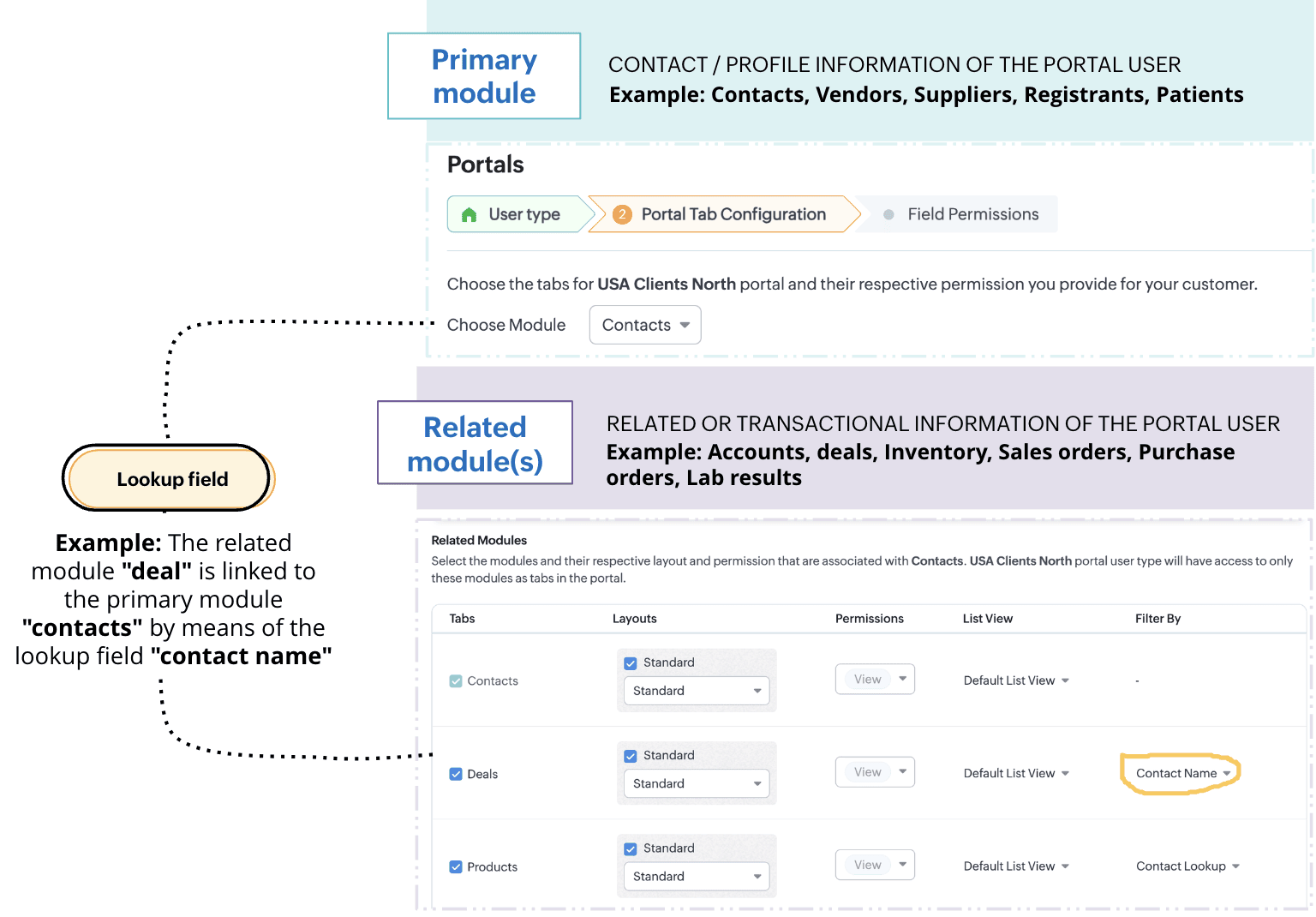
While having access only to their records gives customers authority over their information, it presents some notable challenges.
Challenge #1: Lack of control
A record undergoes two types of processes: customer-driven processes like conversion, negotiation, winning a deal, and more, and internal processes like approvals, discussions, and rejections. While the former keeps customers informed about the progress of their deals, the latter reveals the business' internal decision-making process. Administrative information isn't necessarily meant to be seen, but the current portal setup exposes each stage a record goes through, unconditionally. This poses a problem: The business lacks control over the kind of information that's shared.Imagine this scenario: Patricia is your customer. She has access to her profile, deals, and quotes. She can manage data all by herself and track records as they progress. While having access to her own records empower her with independence, witnessing all the process changes—including approvals and rejections of discounts that aren't yet final—might cause her some anxiety. It also violates the business's privacy policies.
Challenge #2: Lack of flexibility
The portals you have now only enable you to share clients' personal and transactional records. Clients can only see their own data. But what if they want to access information other than their own? Or what if they want to view records with a particular trait?
Say, for example, your business sells multiple products across Canada, and you want your portal users to see only the products available in their regions. This is a specific request that's based on the location of the customer. The current setup limits this requirement and fails to preserve context for the customer.Thus, to give the admins control over any exposed information and simultaneously provide portal users with both flexibility and independence, we've developed an exciting addition to portals' data-sharing functionality: criteria-based data exposure.
Introducing criteria-based data exposure
Criteria-based data exposure is the ability to expose modules and data based on conditions that you use to control what data should be exposed and when, or to render contextual results for portal users.Technically speaking, in addition to linking a primary module and a related module using lookup fields, admins can now define two types of criteria to expose other records with a particular trait in the module: match with fields and match with values.
Match with value: This criterion should be familiar to you as a seasoned Zoho CRM user. You can determine record eligibility by defining a field, operator, and qualifying value.
Example: Deal type is new business. All those deals that are new businesses will be displayed to the portal user.
Example: Implementation agent servicing area is the client's billing city.
Let's understand these criteria by addressing our initial challenges:
Solution for challenge #1 (lack of control)
By matching with value, we can allow Patricia to view her quote only after it reaches the approved stage. This way, your business's internal correspondence stays internal, and Patricia can track her quotes without any impact on her experience.
Below is how you can configure this feature. Again, let's suppose Patricia is your customer and that you want her to have access to her transactional data:
- Create a mutual lookup field called "Contact name" between the Contacts and Quotes modules.
- To control who can access this information, use the match by value criterion and add two conditions:
- Quote stage is approved
- Quote stage is not negotiating
This way, Patricia's quote is visible only when it reaches the approved stage.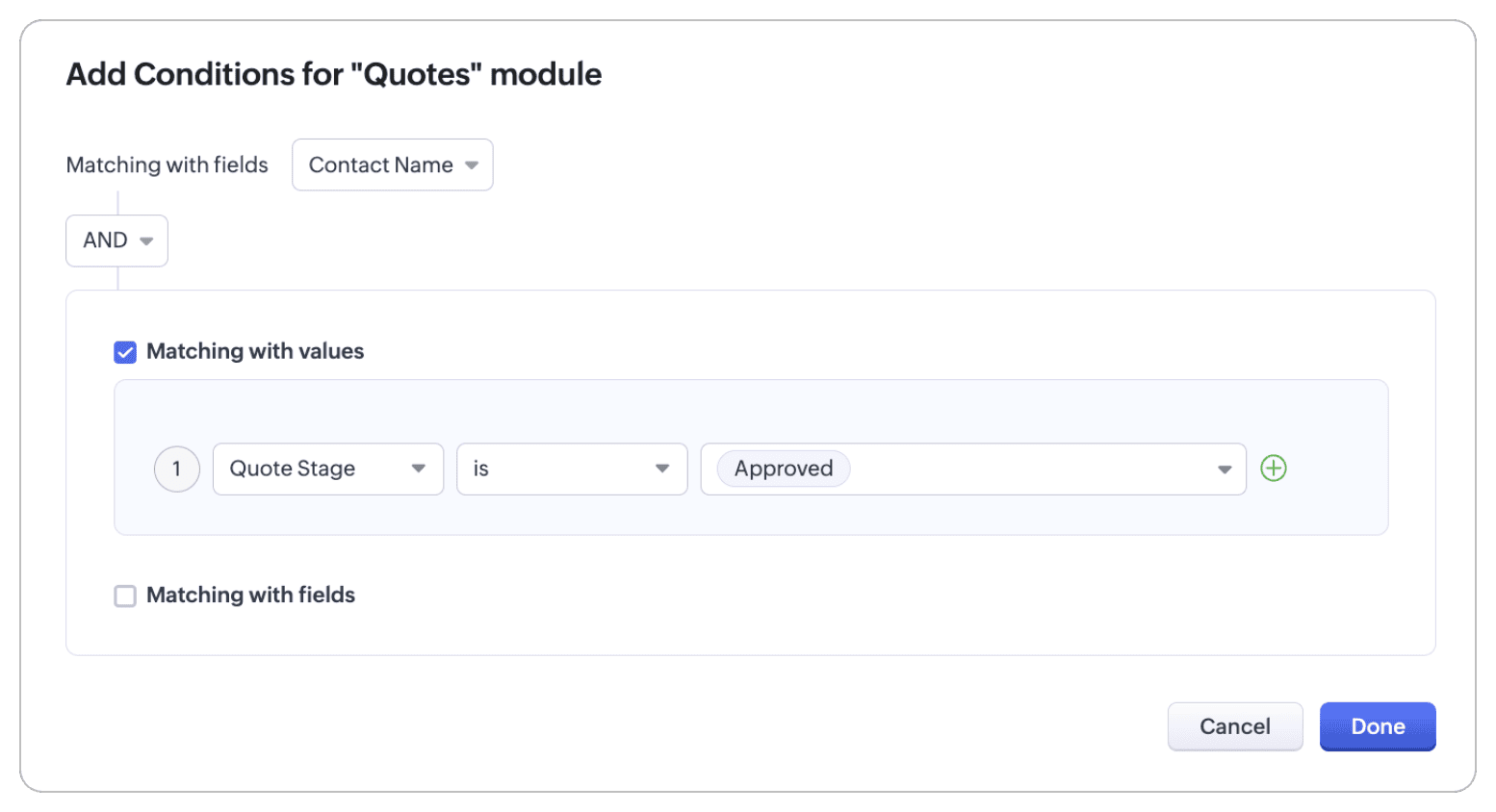
Solution for challenge #2 (lack of flexibility)
With the match with field criterion, your portal user can view all products that are available in Canada.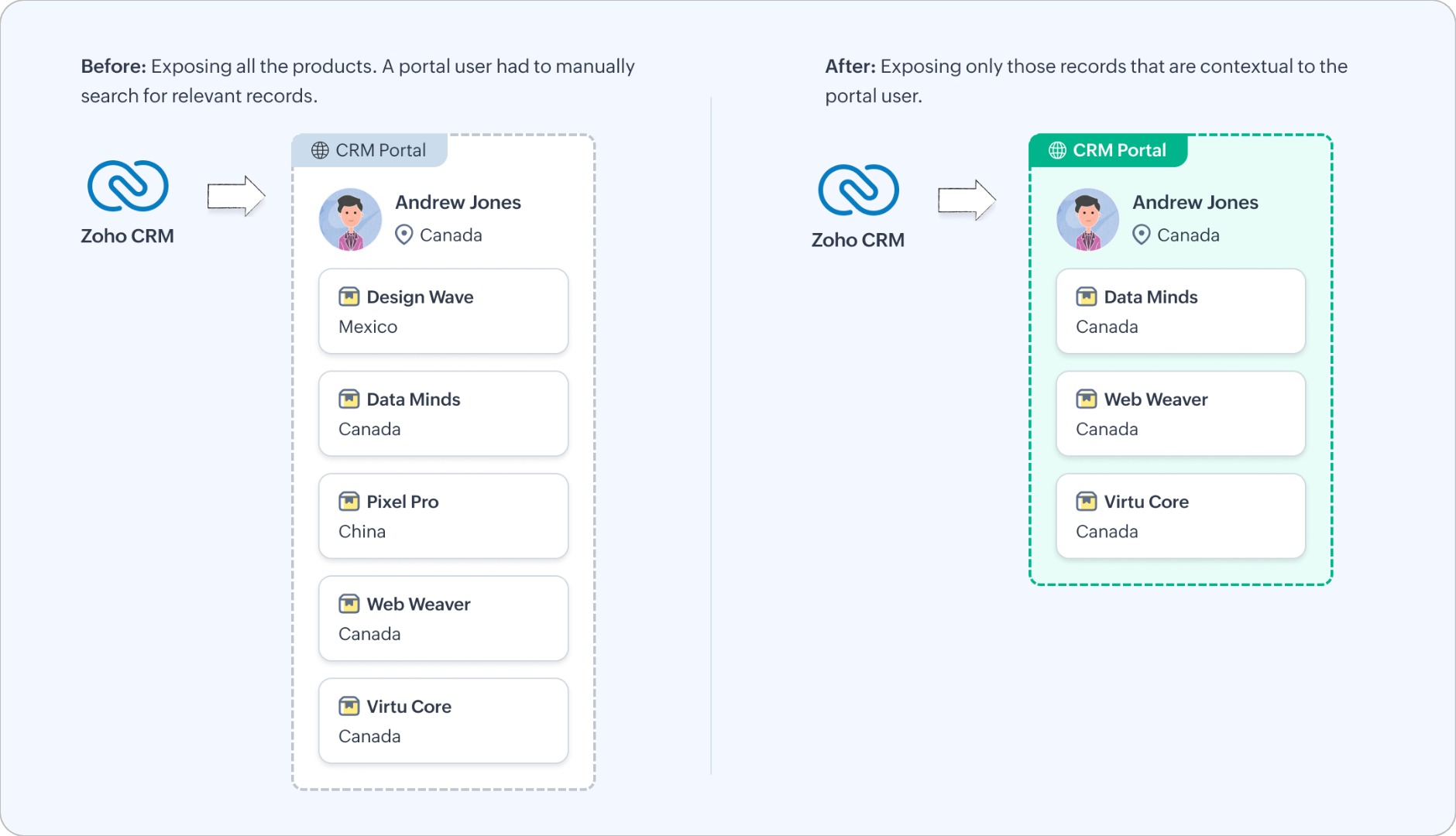
Let's look at how you can configure this functionality.
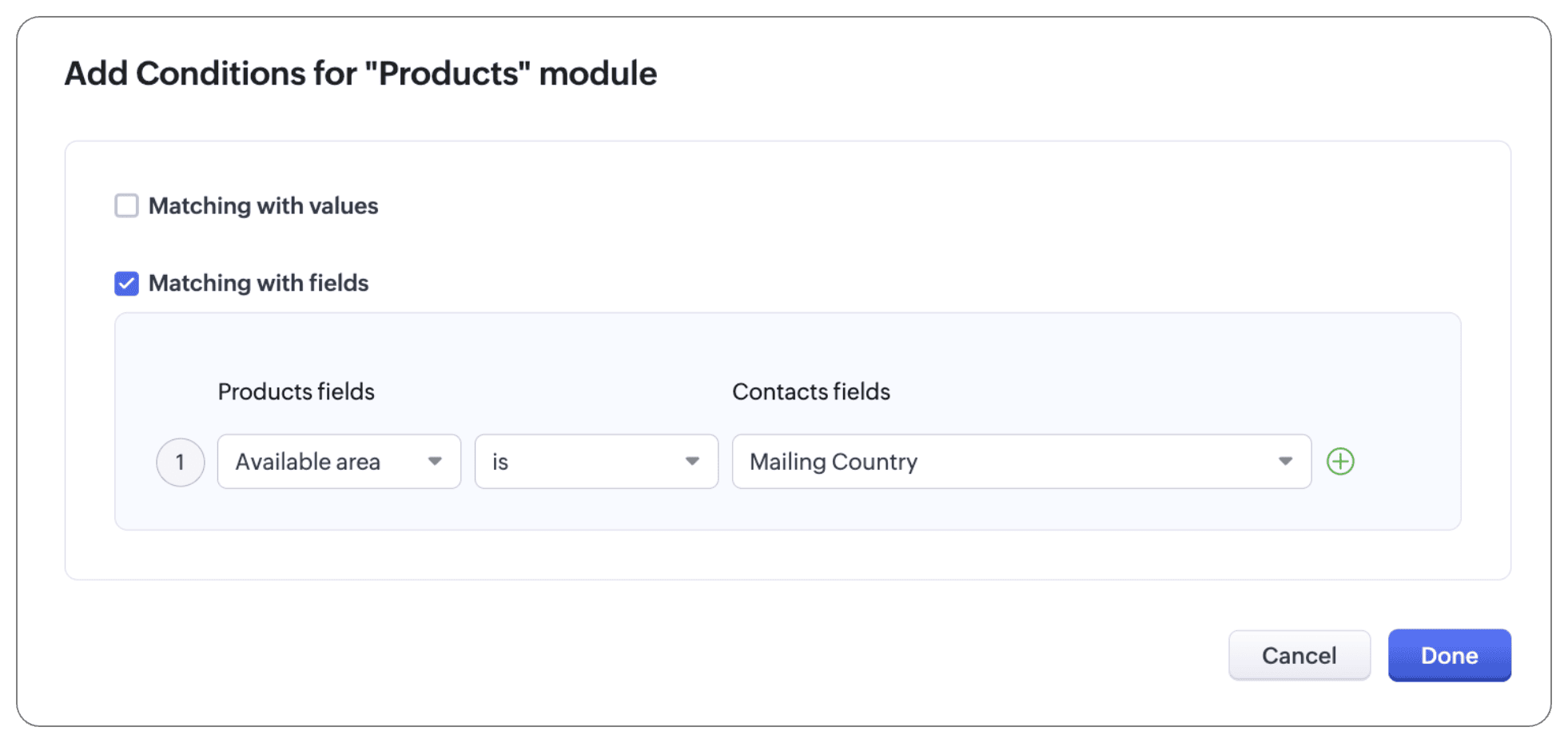
The Products module is a public module, accessible to all portal users, irrespective of their relationship to that module. To bring context to this setup, add a condition using the match by field criterion:
- Available area is mailing country
Note:
In addition to configuring criteria, you can also use an "and/or" conditional to follow these criteria. That is, you can use both criteria and lookup, or either of the three (criteria, or match with values, or match with fields), or one of the criteria and lookup.
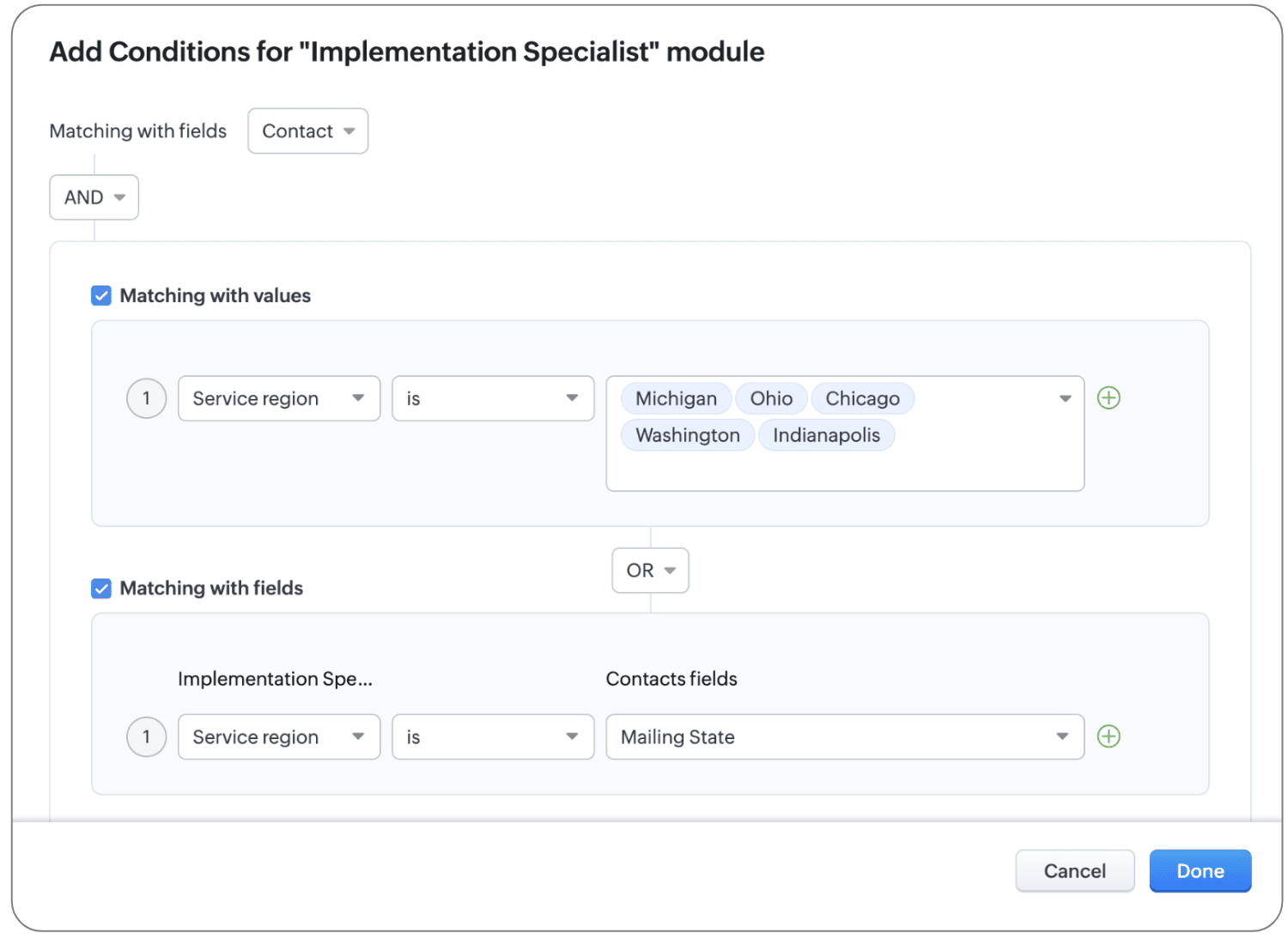
For example, let's say your Implementation Specialist module has an exhaustive list of agents that implement servers in different areas, with varying levels and types of expertise. To display the agents the user hired as well as other agents for reference, we can configure conditions, as shown below:
- The primary module and the related module can be linked using the native lookup field to bring up agent records that users have hired directly.
- To display other agents in the location, let's use conditions:
- If the record matches with values, the customer can see all agents who belong to Michigan, Ohio, Chicago, Washington, and Indianapolis will be displayed.
- If the record matches with fields, the customer can see all agents whose service region matches the contact's mailing state.
Thanks to these new criteria, we've updated the UI of the configuration page as well. What used to be called Filter by column (where the lookup value is selected) has been renamed to Linked as and conditions.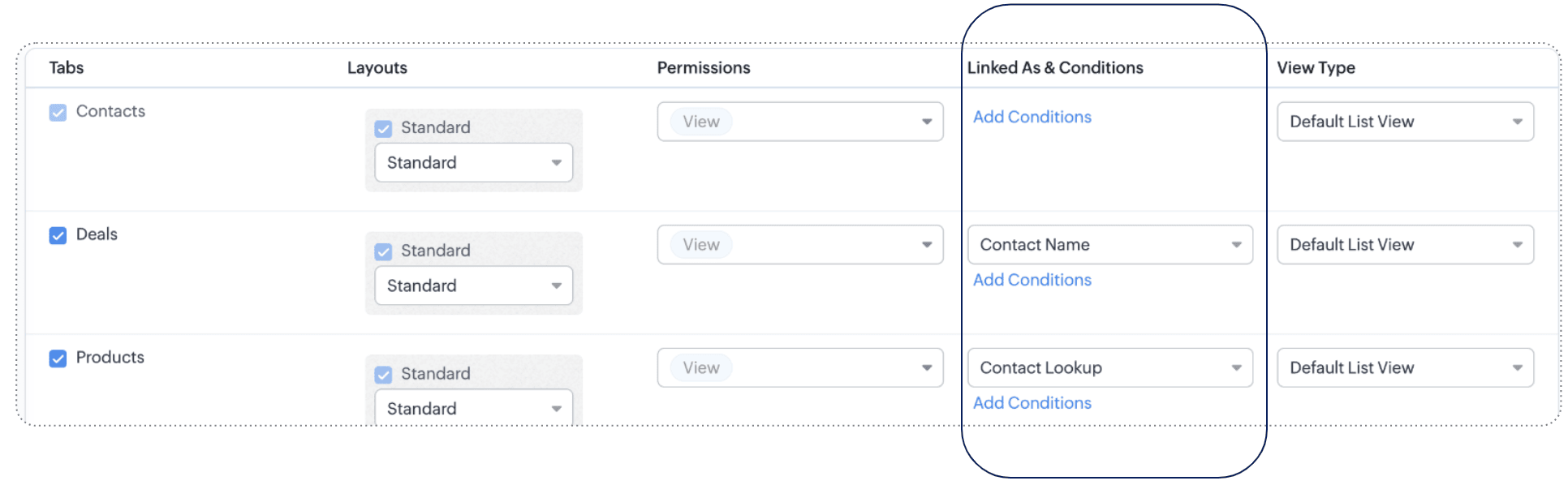
To understand the scope and impact of this enhancement, let's look at a couple more examples.
Example 1: Match with value
Let's say you sell electronics and accessories in bulk for large enterprise organizations. You've extended the following modules in portals for enterprise customers:
- Primary module: Contacts
- Related modules: Products, Invoices, Cases, Appointments
- Public module: Channel partners
So that customers can look at all the products applicable for enterprise customers, you've formulated some criteria: Lookup and Match by value. Customer type is Enterprise.
Now clients can see their contact records, their products (thanks to the lookup connection), and products for enterprise customers (thanks to the match by value criterion), as well as invoices, cases, and appointments related to them, and, finally, all channel partners.
Example 2: Match by field
Saint Laurent Hospital is a multi-specialty hospital in Iowa. They let their patients manage their profiles, view their prescriptions, order medicines from the pharmacy, view lab results, and book appointments with doctors using a dedicated portal.
This is their setup:
- Primary module: Patient's profile
- Related modules: The Prescriptions module, Lab Results module, and Appointments module are related with the primary module via lookup fields, and the Doctors module via the Match by field criterion.
- Public modules: Medicines
As you can see, records with personal data (prescriptions, lab results, appointments) are directly linked to the patient's profile using lookup fields, and to map the doctors to the patients' ailments, the complaint field from the patient's profile is linked to doctors whose specialization is also the same as the ailment. This means that the patient can see all the doctors whose specialization matches their complaint.
(i.e.) Specialization contains Complaint. IBS specialist contains IBS
That's all for this enhancement to the Portals configuration.
We hope these criteria will enhance your clients' experiences with your business. If you have any questions or concerns, please drop a comment. Let's connect!
Release plan: This enhancement is available for users in all DCs.
Resources: Portals in Zoho CRMThanks and kind regards,
Saranya Balasubramanian
Topic Participants
Saranya Balasubramanian
Yaali Bizappln Solutions
Jim Canto
Ishwarya SG
Andres
Sticky Posts
Introducing Multiple Sandbox Types and Support for Module's Data Population
Register here for the upcoming Focus Group webinar on Multiple Sandbox | Help documentation to learn more about the new enhancements Hello everyone, Sandbox in CRM is a testing environment for users to create and test new configurations like workflowGood news! Calendar in Zoho CRM gets a face lift
Dear Customers, We are delighted to unveil the revamped calendar UI in Zoho CRM. With a complete visual overhaul aligned with CRM for Everyone, the calendar now offers a more intuitive and flexible scheduling experience. What’s new? Distinguish activitiesVoC in Zoho CRM is now data savvy: Explore response drilldown, summary components and participation in CRM criteria
VoC has all the goods when it comes to customer intelligence—which is why we're constantly enhancing it. We recently added the following: A customer drilldown component that shows you the list of prospects and customers behind a chart's attribute ExpandedWrapping up 2025 on a high note: CRM Release Highlights of the year
Dear Customers, 2025 was an eventful year for us at Zoho CRM. We’ve had releases of all sizes and impact, and we are excited to look back, break it down, and rediscover them with you! Before we rewind—we’d like to take a minute and sincerely thank youPresenting ABM for Zoho CRM: Expand and retain your customers with precision
Picture this scenario: You're a growing SaaS company ready to launch a powerful business suite, and are looking to gain traction and momentum. But as a business with a tight budget, you know acquiring new customers is slow, expensive, and often delivers
Recent Topics
Canvas View bug
I would like to report a bug. When clone a canvas view from an existing canvas view, if the original canvas view have canvas button with client script. Then the new create canvas view will have canvas button, it is make sense. But when I try to deleteIntegrating Zoho Suite and apps more with Linux
I just got introduced with Zoho just couple of months ago, and I've already planned to contribute to it, even though it's not an open-source software. Still I have found it's potential to beat the tech giants and still being respective towards data privacyStore Submitted Forms as PDF
Hi there, Is there a method to store Form submissions as a PDF in workdrive for archival? I set the form to email the submission to the user and an internal inbox but I'd really love to store the final form as PDF in workdrive automatically. I can't seemSeparate Items & Services
Hi, please separate items and services into different categories. Thank youCRM->INVENTORY, sync products as composite items
We have a product team working in the CRM, as it’s more convenient than using Books or Inventory—especially with features like Blueprints being available. Once a product reaches a certain stage, it needs to become visible in Inventory. To achieve this,Add an option to disable ZIA suggestions
Currently, ZIA in Zoho Inventory automatically provides suggestions, such as sending order confirmation emails. However, there is no way to disable this feature. In our case, orders are automatically created by customers, and we’ve built a custom workflowWhat's new in Zoho Sheet: Simplify data entry and collaboration
Hello, Zoho Sheet community! Last year, our team was focused on research and development so we could deliver updates that enhance your spreadsheet experience. This year, we’re excited to deliver those enhancements—but we'll be rolling them out incrementallyZoho Creator Developer Console | Improved Distribution and Lifecycle Management for apps
Hello everyone, We're excited to introduce new enhancements now in the Zoho Creator Developer Console. These updates strengthen private app distribution through licensing controls and extend environment support across all installed apps, helping teams[Webinar] Solving business challenges- Handling the challenge of transitioning to Zoho Writer from legacy tools
Moving to Zoho Writer is a great way to consolidate your business tools and become more agile. With multiple accessibility modes, no-code automation, and extensive integration with business apps and content platforms, Zoho Writer helps solve your organization'sFeature Request - Gift Cards or Gift Voucher Capability in Zoho Commerce
Hi Zoho Commerce team, I'm comming accross more and more retail businesses who sell gift cards. As there is currently no way to manage this in Zoho Commerce, it is a blocker to addoption. This is particularly popular in Europe and North America. I recentlyHighlight a candidate who is "off limits"
Hello: Is there a way to highlight a candidate who is "off limits"? I would like to have the ability to make certain candidate and / or Client records highlighted in RED or something like that. This would be used for example when we may have placed a candidate somewhere and we want everyone in our company to quickly and easily see that they are off limits. The same would apply when we want to put a client or former client off limits so no one recruits out of there. How can this be done? Cheers,Closing off tasks automatically based on project status
Is there a way to close off all open tasks when a project is set as Cancelled?[Free webinar] Understanding connections and datasources in Zoho Creator - Creator Tech Connect
Hello everyone, We’re excited to invite you to another edition of the Creator Tech Connect webinar. About Creator Tech Connect The Creator Tech Connect series is a free monthly webinar featuring in-depth technical sessions designed for developers, administrators,Bridge the Gap Between your Service and Finance Teams
In field service, the most expensive distance isn’t the drive to a customer’s home—it’s the gap between a finished job and a paid invoice. Zoho FSM leverages the power of Zoho Invoice to handle and manage billing operations. It enables you to: InstantlyDirect URL to "View Record"
I would like to create a button (Deluge Script) to jump to the "view record" without passing by the record menu, but I can not aford to find the right url. I don't want the "view record" as a single page. I want the "view record" in the application like the picture below: Thanks in advance for your helpLive Chat for user
Hi everyone, I’m new to Zoho Creator and wanted to ask if it’s possible to add a live chat option for all logged-in portal users so they can chat internally. I’m trying to create a customer portal similar to a service desk, but for vehicle breakdowns,SalesIQ Chat Owner to CRM Lead Owner Mapping
There is no proper mapping between the SalesIQ chat owner and the CRM lead owner. When a chat is assigned to an agent, the lead created in CRM is often assigned to a different user, forcing admins to manually change ownership every time. This createsProduct line search in quotes
Is there a way to change the search setting when you add a product line to a quote. We have created a field in products called 'Part Number' and I would like when I'm adding a product line to the quote that I can search on that field. At the moment it only searches on product description. In products I can search on the 'Part Number' field Any help welcome.🚀 WorkDrive 6.0 (Phase 1): Empowering Teams with Content Intelligence, Automation, Accessibility, and Control
Hello, everyone! WorkDrive continues to evolve from a robust file management solution into an intelligent, secure, and connected content collaboration platform for modern businesses. Our goal remains unchanged: to simplify teamwork, strengthen data security,Storage Limits
Hello, What is the storage limitations for each user on professional edition? Thanks, MekkiZoho Recruit Community Meetup - London 🇬🇧
Hello Recruiters! We’re excited to announce that the Zoho Recruit team is coming to the UK for an in-person Zoho User Group (ZUG) Meetup in London! This is your chance to connect with fellow Zoho users, learn from experts, and walk away with actionablePower Pivot and Data Modeling functionality in Zoho Sheet
When will MS Excel functionalities like Power Pivot and Data Modeling functionalities be available in Zoho Sheet?Global Search placement in the new UI
Having a hard time with the global search placement in the UI redesign. Surely I can't be the only one. Previously global search placement was perfect. A bar at the top/center of the page. Exactly where you would expect it to be. Since the new UI hasWhat's New - January 2026 | Zoho Backstage
Welcome to 2026! If you thought last year was big, buckle up. We’re stepping into this year with a singular focus: unimaginable growth, elite scalability, and performance benchmarks that leave the old ways of event management in the rearview mirror. AsCliq on your mobile phone
Some of the employees in my company get their cliq on their mobile phones but it will not let them answer the call. The employee has to go to their laptop to access it.Bulk Delete Messages in Cliq
Isn't it possible to bulk delete messages in Cliq? I have them delivered to me as notifications from another service but most of them need to be deleted as not of value. I get dozens of them per day, and deleting them is already difficult is the "Delete"stock movement report by each transaction for each item
Dear Sir we are using zoho inventory for foodstuff and we lack the transaction report which clearly shows movement of an item from Opening balance of the month to Goods received in, Supplier return out, Invoice out, Sales return In, Transfer out and TransferSelect the task view on the board in the Zoho Connect iPhone app
Hello. How do I select the task view on the board in the Zoho Connect iPhone app? The Android app has this functionality.Unable to change Company Logo
Hi Guys, I have an issue where I've uploaded a Company image in Gif format and the logo has now got a black background whereas the logo is supposed to be black not the background. I didn't think it would be an issue so I created a PNG version to uploadMetadata API Access to Functions
I think it would be incredibly helpful to have api access to every function's code. Our team primarily uses deluge functions to update fields across modules according to business logic. I would like to create a visual dependancy model for our CRM, butHistorical Sales Info - Blend with Finance Invoice Line Items, Access in CRM and Desk
My company has been using Zoho One since 2021, with sales data going back through 2020. However, we have been in business much longer, and we have historical sales information that we want to have at our fingertips when talking with customers (usuallyIntroducing Record Category in CRM: Group options to see record status at a glance.
Release update: Currently available for CN, JP, and AU DCs (all paid editions). It will be made available to other DCs by mid-March. Hello everyone, We are pleased to introduce Record Category in Zoho CRM - a new capability where the user can get an overviewChange Last Name to not required in Leads
I would like to upload 500 target companies as leads but I don't yet have contact people for them. Can you enable the option for me to turn this requirement off to need a Second Name? Moderation update (10-Jun-23): As we explore potential solutions forService disruption in Zoho Cliq (EU Region) – February 9, 2026
Hello everyone, We’d like to inform you about a brief service disruption that affected Zoho Cliq users in the EU region earlier today. The issue has been resolved, and all services are now operating normally. Summary On February 9, 2026, Zoho Cliq experiencedSpotlight series #26 - Build slides with visual clarity using Diagram
Hello all! The feature in the spotlight this month is Diagram. Let's say you are a part of a project kickoff meeting and your teammate starts explaining the project life cycle like this: "First we ideate, then we create an initial prototype and shareClient scripts for Zoho Books ?
Good day everyone, I am looking for a way to be able to interact with the Quotes and Invoices as they are being created. Think of it like Zoho client script in Zoho CRM. But for the life of me I dont see a way to do this. The issue with having functionUplifted homepage experience
Editions: All editions. Release Note: Available in CA and SA DCs (Standard, Professional). Availability update (17th February 2026): The feature has been enabled for the following DCs: All editions in the CA and SA DC | Free, Standard and ProfessionalUnable to produce monthly P&L reports for previous years
My company just migrated to Books this year. We have 5+ years financial data and need to generate a monthly P&L for 2019 and a monthly P&L YTD for 2020. The latter is easy, but I'm VERY surprised to learn that default reports in Zoho Books cannot createCrossbeam
Does anyone use Crossbeam with their Zoho CRM? I'm looking for a way to import Crossbeam partner leads into Zoho CRM. If so: - What's your experience been like? - Are you able to automatically import Crossbeam leads > Zoho CRM? How? - What doesn't workAccess forms within a form
I have multiple forms that I would like to create access to for users within one form. Example: I have forms A, B, C, D. I would like to create a form with the links to forms A, B, C, & D. That way we can send one link and then the user can select theNext Page