Enhancements to finance suite integrations

Update on the migration (October 28, 2025):
Starting this week (October 29 tentatively), we’ll begin migrating Zoho CRM users to Zoho Books as integration users. This means actions will now run under each user’s own Zoho Books access, instead of the admin’s.
As an admin, you can also choose to migrate users early from the Integration Settings page in Zoho CRM.

(Refer to the announcement for details).

Update:
Based on your feedback, we’ve updated the capabilities for integration users. In addition to the Estimates module, they can now create, view, and edit records in all the finance modules including Sales Order, Invoices, Purchase Order.
We're also running a migration and all existing users who have migrated already will receive an email once this change goes live.
Last modified on: May 15, 2025
Last modified on: May 15, 2025

Please note that Zoho Subscriptions is now Zoho Billing.
Hello everyone!
We're delighted to announce some enhancements we've recently made to the finance suite integration with Zoho CRM. These improvements focus primarily on two major integrations:
- Zoho Books
- Zoho Subscriptions
We've implemented these updates carefully based on the valuable feedback we've received to ensure that the user experience is smoother. So without further ado, let's dive into the details!
Enhancements to the Zoho Books integration
We've refined some of the integrated features between Zoho CRM and Zoho Books to address previous challenges and enhance user interactions.
What were the challenges?
- Users were unable to send emails using their email addresses.
- Zoho Books sometimes generated inaccurate reports during audits because records created from Zoho CRM weren't being updated with the correct user names in Zoho Books.
- User-level permissions, field-level permissions and processes such as the Approval process in Zoho Books weren't being properly handled in Zoho CRM.
- Users who did not have proper authorization to use Zoho Books were able to create transactions from CRM by using admin's permissions.
All of these challenges arose because the integration operated exclusively via the integration owner/admin's authentication (only the admin-level permissions in Zoho Books are handled, while other user-level permissions are not accounted for), which meant that any actions performed in CRM were recorded under the name of the admin in Books.
What have we enhanced?
1. Introducing Integration users
Sales personnel typically manage tasks up to the estimates stage in a sales process. Therefore, CRM users who have primarily worked on estimates modules and have not engaged in subsequent activities like invoices can now be added as Integration Users from CRM to Zoho Books without the need for new licenses in Books. In other words, integration users in Zoho CRM are standard CRM users whose admins can grant specific permissions to carry out certain tasks within the Estimates module, as required.
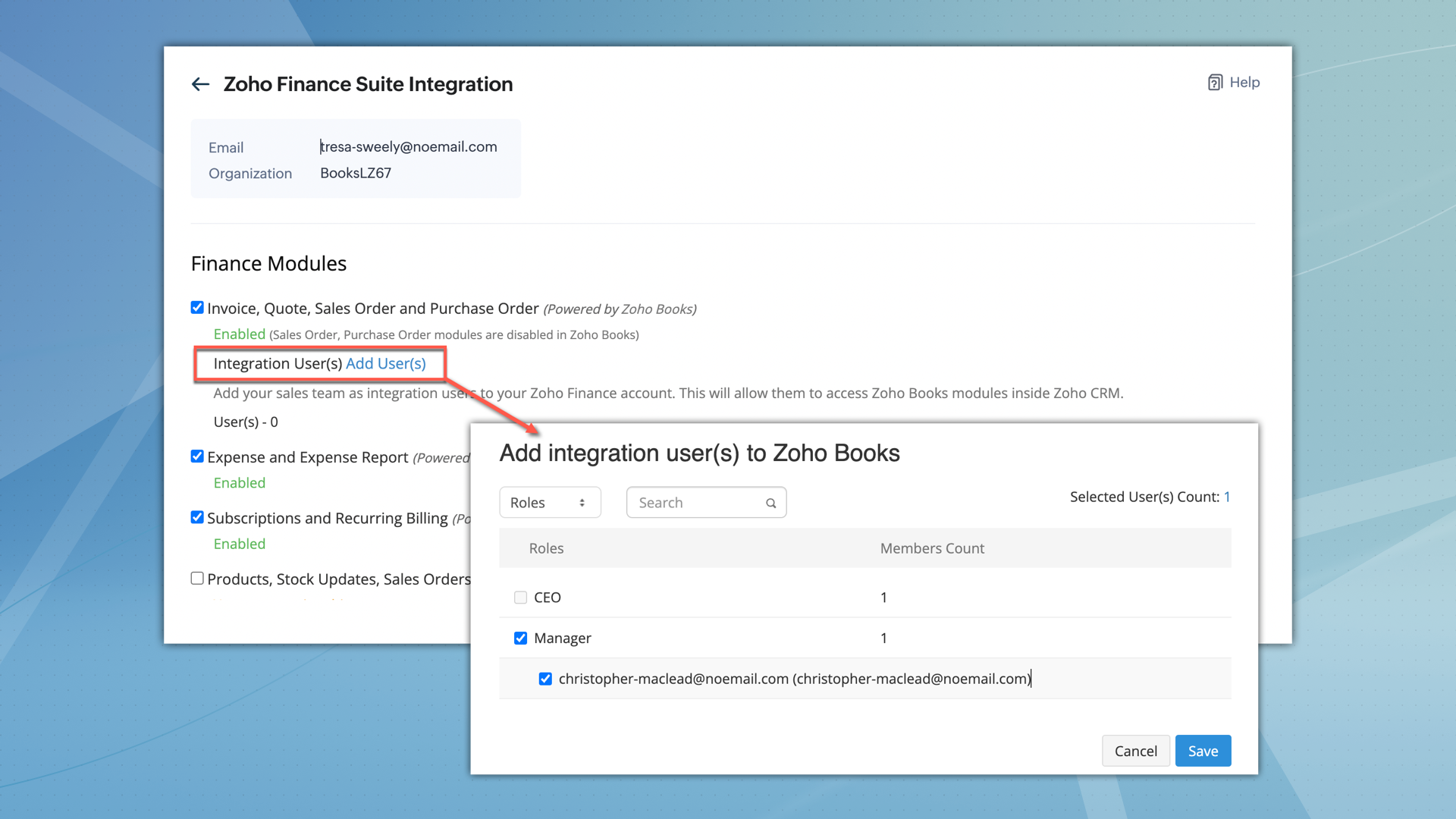

What permissions do integration users have?
- After being added, integration users can perform all operations, including creating, viewing, and editing records within the Estimates module.
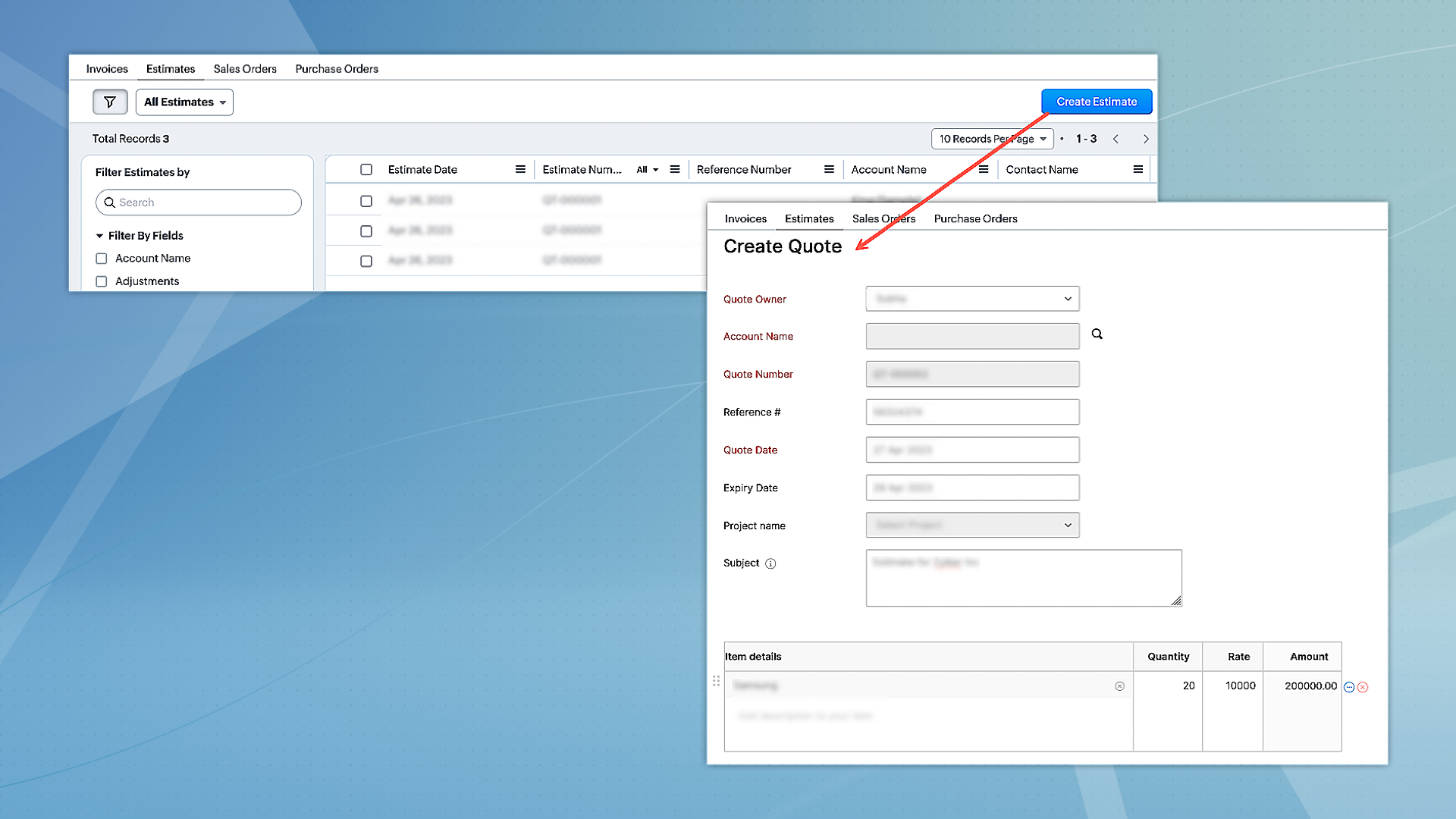
- However, they can only access other modules, such as Invoices, Sales Orders, and Purchase Orders in view mode.
- Integration users will not have direct access to Zoho Books.
- When integration users are part of multiple finance suite products, their permissions are collectively applied within CRM.
2. Unified permissions between Zoho CRM and Zoho Books
For users with access to both Zoho CRM and Books, the integration will now ensure proper management of permissions, covering all aspects. This means if a user is restricted from certain actions or features in Zoho Books, these restrictions will be consistently applied in CRM as well. Previously, users could access and interact with features in CRM that they were not authorized for in Zoho Books, leading to discrepancies. This enhancement will eliminate such inconsistencies, ensuring uniform permission management and preventing unauthorized access or actions across both platforms.
Migration for existing users
- For the integration between Zoho CRM and Zoho Books to function seamlessly, and to maintain uniform user permissions,existing users have the option to migrate immediately.
- Alternatively, they have a three-month window to complete the migration. After this period, users will be automatically added as 'Integration Users' based on their utilization of the finance module.
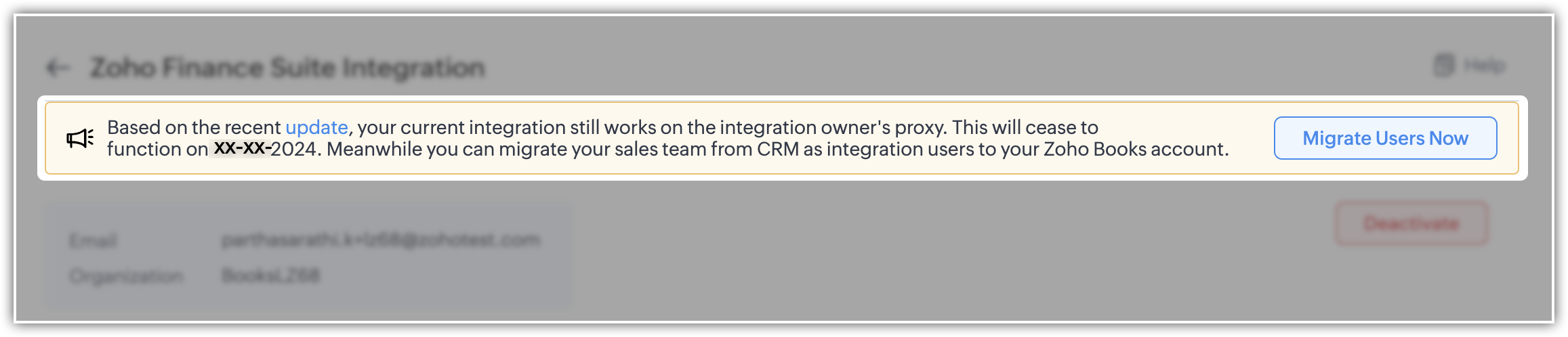
- To facilitate this, select the "Migrate Users" option to view and manage users common to both systems. Upon clicking "Save," the backend migration initiates. Following this, the integration adheres to each user's designated scope and permissions.
- Users can migrate up to 1,000 integration users initially. If they need to migrate more, they can contact the support team for additional help.
- Users who are already part of Zoho Books can't be added as integration users.
Please note that for new sign-ups, 'Integration users' will be available by default and they can set it up during the initial integration setup process.
Enhancement to the Zoho Subscription integration
Currently, when Zoho Subscription is integrated with CRM, it automatically adds Zoho Subscription as a related list in the Contacts and Accounts modules. You can view subscription details in a pop-up (iframe). Although users can create new subscriptions, there is a limitation on creating subscription-based reports and dashboards.
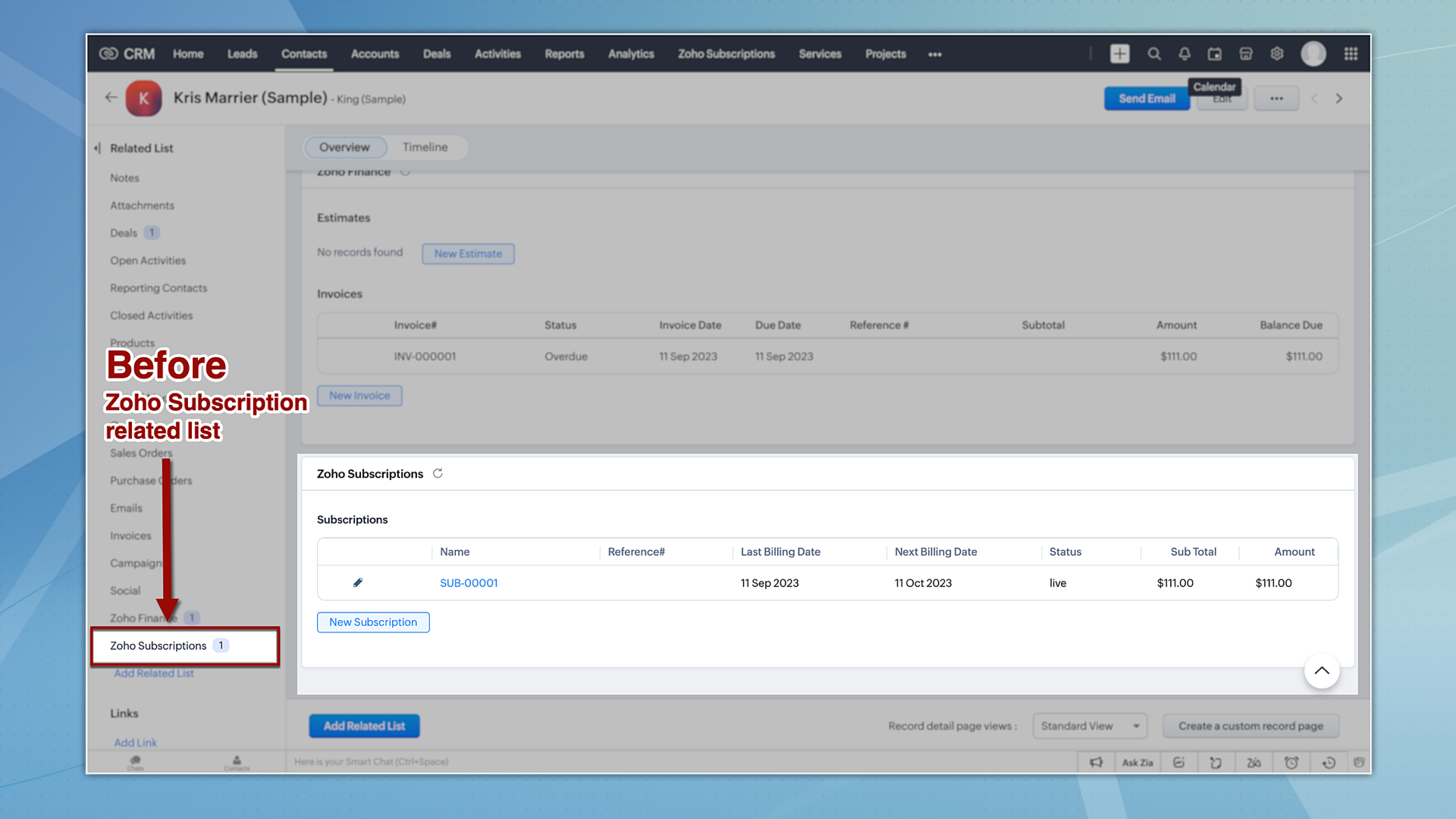
Now let's take a quick look at the enhancements made to the Zoho Subscription integration.
1. Introducing the Zoho Subscription Module
Zoho Subscriptions will now be available as a module in CRM, accessible to users with appropriate permissions. With this update, users now can generate reports based on Zoho Subscriptions data.
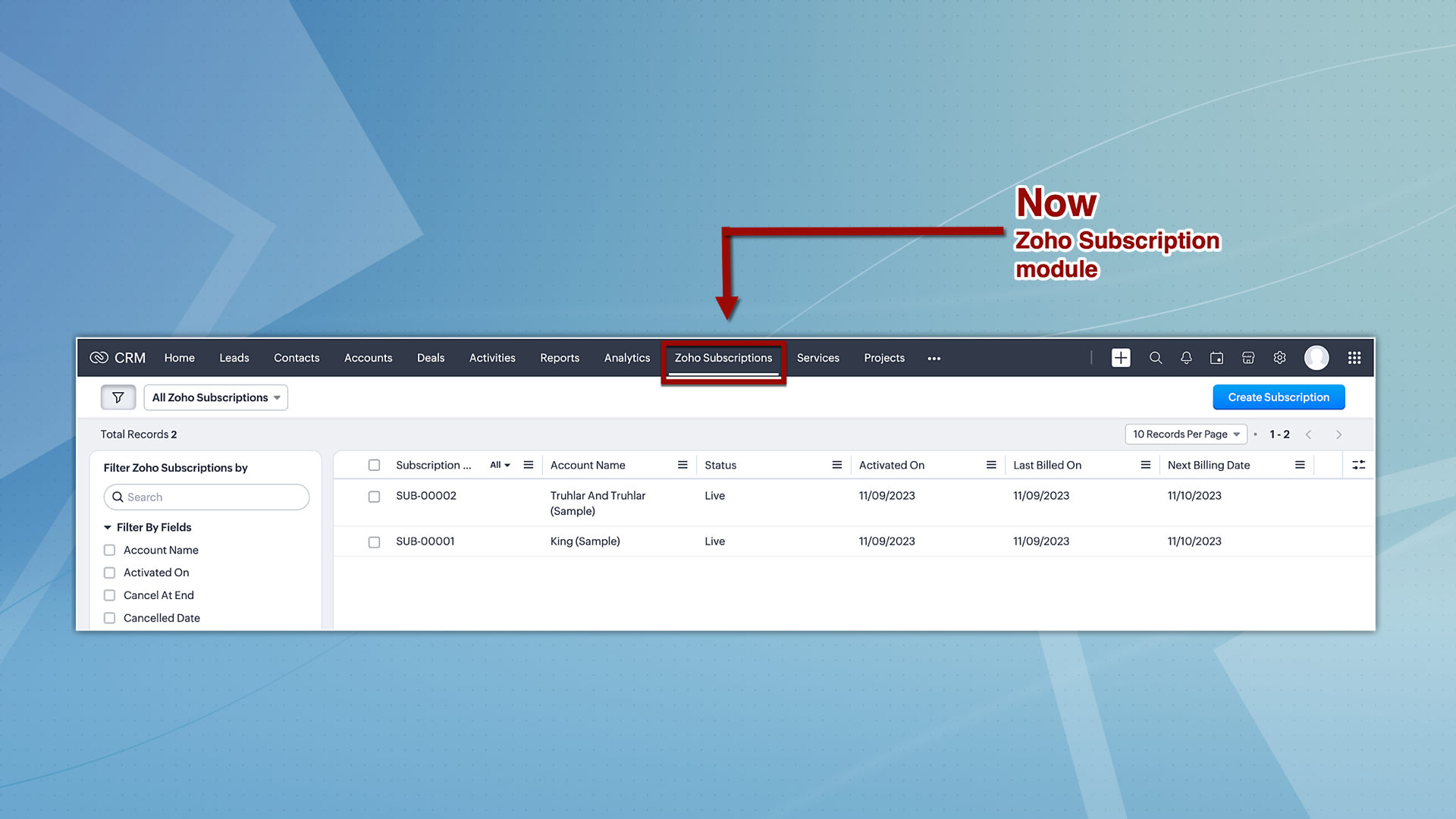
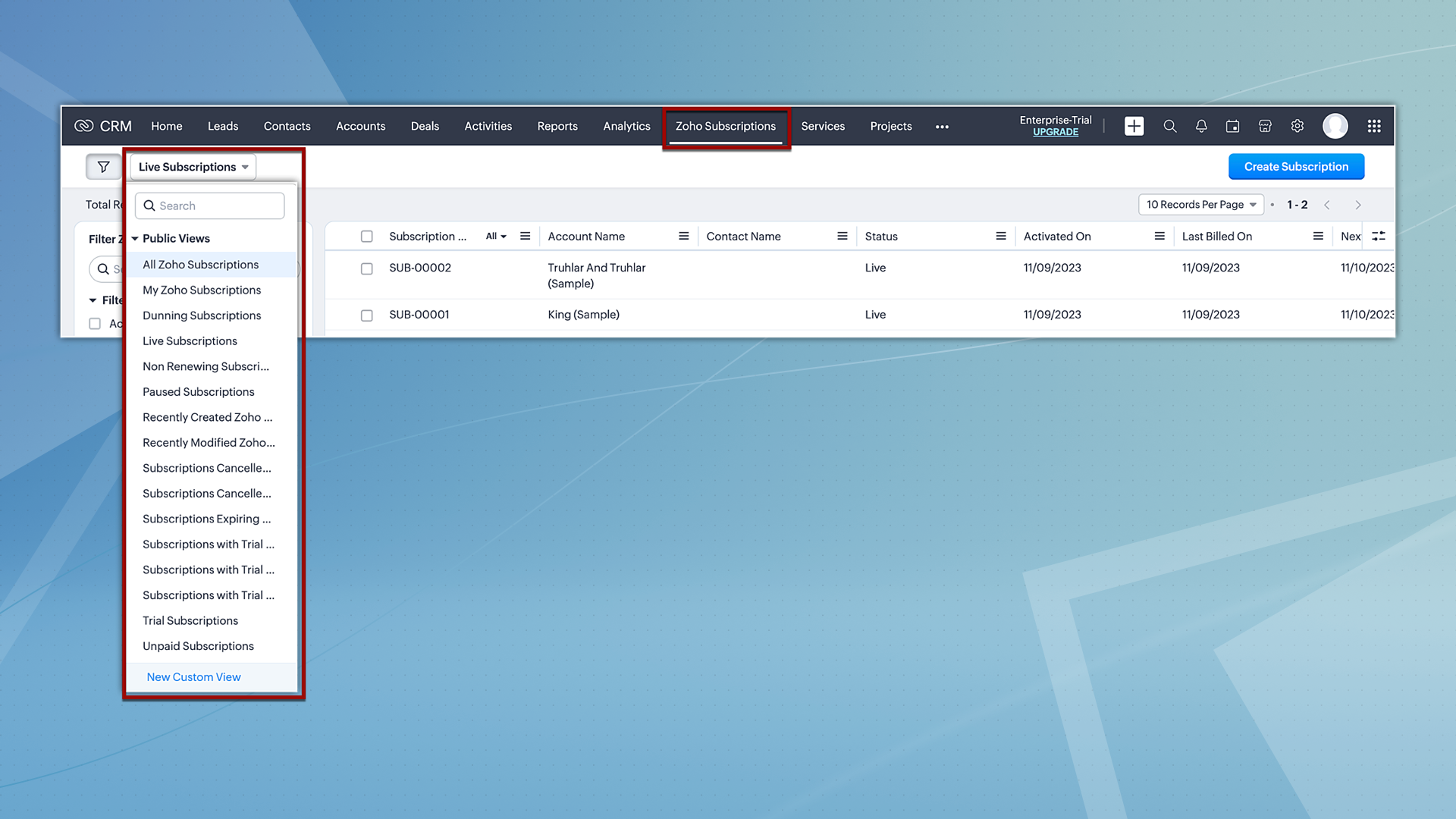
Hereafter, Zoho Subscriptions will be displayed both as a related list and as a module. Users with subscription permissions can currently create and view records in related lists; however, moving forward, they will be able to view and create records from the subscription module as well. Additionally, users will also have the option to view subscription records based on the pre-defined custom views.
2. Reports and analytics for subscriptions
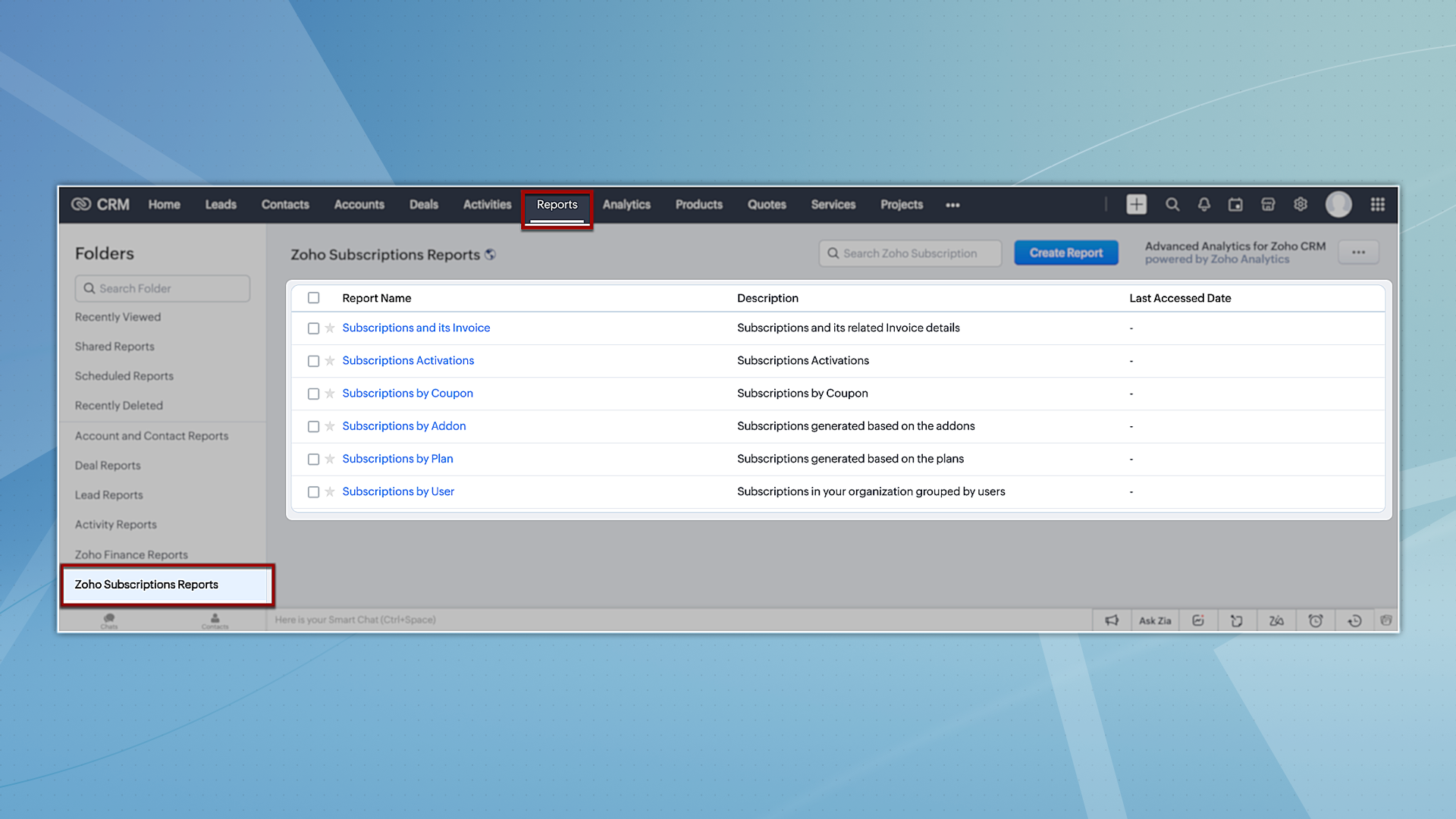
Zoho CRM offers report and analytical dashboard presets that users can adjust as needed to create personalized reports. In turn, this allows users to gain a better understanding of their customers and track key performance metrics, enabling them to make more informed decisions.
To try out system-defined reports based on Zoho Subscriptions, you can navigate to the Reports module and select any of the reports available under the Zoho Subscription Reports folder.
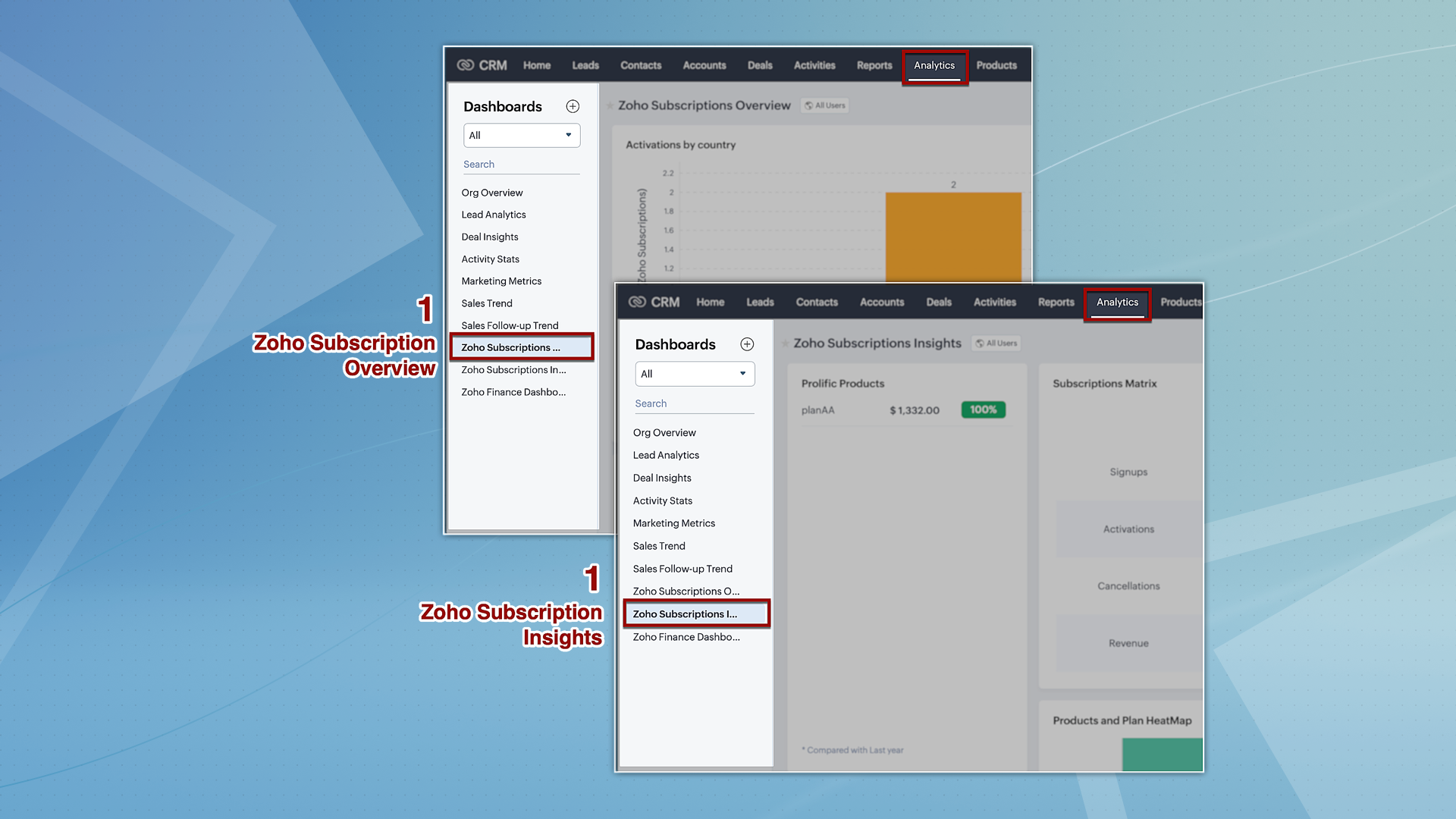
However, for analytics, we're providing two dashboards: Zoho Subscription Overview and Zoho Subscription Insights. You can navigate to the Analytics module and find these dashboards by default on the left panel.
3. Streamlined user permissions
The integration between Zoho CRM and Zoho Subscriptions, which used to be controlled by integration owner/admin permissions, will now operate based on the current users' scope. This guarantees uniformity in user permissions across both platforms, preventing users from accessing CRM features that they do not have authorization for in Zoho Subscriptions.
That's all we have for the enhancements in this edition. We'll keep you posted on further updates. Please feel free to share your thoughts and feedback in the comments below.
Resources: Zoho Finance Suite Knowledge Base
Release Plan:
- These enhancements are being rolled out in phases and are now available to all users across all data centres, with the exception of the US DC, where they are currently available only to organizations on editions below Enterprise.
Thanks!
Nizamuddin
 P.S. We would like to acknowledge the significant contributions and ongoing recommendations provided by our MVP, @Kevin Flynn. His insights – shared in the community forum – have been instrumental in addressing challenges related to users experiencing difficulties in sending emails with their addresses, as well as issues concerning user and field-level permissions.
Topic Participants
Nizamuddin Sohel SK
Nick
Robert
Mikhail Koval
Sunderjan Siddharth
Sticky Posts
Good news! Calendar in Zoho CRM gets a face lift
Dear Customers, We are delighted to unveil the revamped calendar UI in Zoho CRM. With a complete visual overhaul aligned with CRM for Everyone, the calendar now offers a more intuitive and flexible scheduling experience. What’s new? Distinguish activitiesVoC in Zoho CRM is now data savvy: Explore response drilldown, summary components and participation in CRM criteria
VoC has all the goods when it comes to customer intelligence—which is why we're constantly enhancing it. We recently added the following: A customer drilldown component that shows you the list of prospects and customers behind a chart's attribute ExpandedWrapping up 2025 on a high note: CRM Release Highlights of the year
Dear Customers, 2025 was an eventful year for us at Zoho CRM. We’ve had releases of all sizes and impact, and we are excited to look back, break it down, and rediscover them with you! Before we rewind—we’d like to take a minute and sincerely thank youPresenting ABM for Zoho CRM: Expand and retain your customers with precision
Picture this scenario: You're a growing SaaS company ready to launch a powerful business suite, and are looking to gain traction and momentum. But as a business with a tight budget, you know acquiring new customers is slow, expensive, and often deliversCreate and populate a record in an instant: Introducing zero-shot field prompting to Zia's ICR
A couple of months ago, we upgraded our in-house AI image detection and validation tool, Zia Vision, with intelligent character recognition (ICR). By training Zia with sample images, you could create and enrich CRM records with data extracted from standard
Recent Topics
Kaizen #217 - Actions APIs : Tasks
Welcome to another week of Kaizen! In last week's post we discussed Email Notifications APIs which act as the link between your Workflow automations and you. We have discussed how Zylker Cloud Services uses Email Notifications API in their custom dashboard.DKIM Verification Failed (Namecheap)
Hi! I have already set up the TXT records in Namecheap but I keep getting the "Verification Failed" pop up. Was wondering if I'm the only one who has this problem and can anyone help me with this? Thanks!Emails stuck in Queue
Hi there, Since yesterday I have a few out going emails stuck in a queue. It say it will auto retry sending however nothing is happening. It seems to be affecting roughly 50% of my outgoing emails. Please help ThanksSoft Bounce from transational emails from BREVO (Sendinblue)
I manage the website of a client who uses your EMAIL service for the domain floranativadobrasil.com. And I use the BREVO email service, previously called SendinBlue, to send transactional emails about events specific to the website. All emails sent toGetting an error Address not found Your message wasn't delivered
Hey, I'm trying to configure zoho mail for my website https://businessentity.org/ The email is meredith.karter@businessentity.org I'm able to successfully send the mails but when someone sends an email to above mail, this error shoots up: Address notSupport Uploading YouTube Videos Longer Than 60 Minutes
Hi Zoho Social Team, How are you? We would like to request support for uploading YouTube videos longer than 60 minutes directly through Zoho Social. Your support team informed us that Zoho Social currently cannot upload videos over 60 minutes due to “APINeed Faster Help? Try Live Chat Support
Hello there, We understand that sometimes, whether you’re facing an issue, exploring a feature, or need quick clarification, sending an email and waiting for a response just doesn’t cut it. You need answers, and you need them now. That’s exactly why weCan't deactivate Spell Check
Hi Community, right now I'm using the Zoho Mail Desktop-Software. So far, so good.. many possibilities. Overall very nice. What is extremely annoying right now, is that we are not able to deactivate the Spell Check feature. And we are barely able to focusZoho Toolkit Email Signature Generator
I'm having real issues with the email signature generator with no matter where I host the photo, Zoho doesn't seem to show the photo on the link provided?Company Policy Upload - Request All EE to review and sign
How can I upload policies into Zoho People and have the employees review them and sign off saying they agree, etc.? Also, if I make a revision to a policy, I would like that changed or updated policy to be distributed or have the employees notified thatZoho Sign Global Settings vs. Template and Document
Hello, We are running into an issue on a current use case. We already use Zoho Sign. Now that KBA is available, we want to begin using it in our tax delivery process, by allowing clients to sign electronically, but also download a copy of their returnZoho Mail Desktop Crashes on Linux - Ubuntu 24 LTS
Hi, I have been trying to run the desktop app on Ubuntu for the past few day with no luck. I have tried both the .deb package and the appImage. When I attempt to open the app. It just crashes immediately. The crash error dialog appeared once and I cantZoho IP blocked by SpamCop
Hi, Many of my emails are blocked and I receive this: INVALID_ADDRESS, ERROR_CODE :550, ERROR_CODE :spamcop.mimecast.org Blocked - see https://www.spamcop.net/bl.shtml?136.143.188.51. - https://community.mimecast.com/docs/DOC-1369#550 [DGwIYPPSOfWIServer error when trying to Data > Sort > Custom Sort
Been using Data > Sort > Custom Sort for a while, now it has suddenly stopped working. When selecting the same data range and trying to execute, I get "Sorry! There was a problem saving your last edit. Please try again."To Assign a genrated pdf to a file upload field using delug
content = "<html><body>HTML Content on page One <div style='page-break-after:always'></div> HTML Content on page Two </body></html>"; file = zoho.file.convertToPDF(content); file.setFileName("Name of the file"); <variableName> = <FormLinkName>[ID == input.ID];TArgets To Accounts (Modules)
How can i set sale target to Customers (Accounts Module)Breaking barriers with multilingual WhatsApp templates in IM
Ever wondered what it feels like to be greeted in your own language by a brand you love? A “Welcome!” feels nice, but a “¡Bienvenido!” or “स्वागत है!” feels personal. In today’s global world, conversations often need to cross both time zones and crossHow to share private Opportunities with whole org at an account level
Opportunities are currently set to private, so our sales team only sees their own opportunities, along with their manager and upper leadership. The need is the ability for the rest of the Org to see the opportunities at an account level, not within theProblema Verificacion con proveedor NIC.AR
No puedo realizar la verificación del correo, he seguido los pasos indicados y configurado los MX. Y no puedo verificar el correo. He leido en el foro que otros han tenido el mismo problema. Alguno pudo solucionarlo?How to remove some users in zoho accounts
How to remove some users in Zoho accounts.Unified Inbox for all, including fetched mails
I fetch mails from different third-parties mailboxes. But I need to switch mailbox too see fetched mails. It's strange. All mailboxes have one shared disk space for own mail and fetched mail, but why do we need to switch mailbox (on the left bottom) toWhatsapp Limitation Questions
Good day, I would like to find out about the functionality or possibility of all the below points within the Zoho/WhatsApp integration. Will WhatsApp buttons ever be possible in the future? Will WhatsApp Re-directs to different users be possible basedUsers Not Automatically Being Added To WorkDrive Team
I have already created a ticket for this issue, but the support team doesn't seem to understand what's happening. Our organization started with a trial of Zoho Workplace around November 10, 2025. I created 10 users, including myself. I sent out the invites,Synchronization between Gmail and Zoho Mail
Hello! I am using Zoho Mail within the Zoho One platform. I have completed the basic setup and added all the required DNS records with our domain provider. Our goal is to set up two-way synchronization between our current Gmail inbox and Zoho Mail, butIMAP login problem
I have my domain hosted with zoho @wilson.ie I have added a new user and have enabled IMAP access to this user account The user can login to zoho mail on the web. When we enter the server settings into Outlook as per below, Outlook cannot login to theChanges to subform in Zoho CRM Portal Timeline History Unavailable
Hi Support Team, We have noticed a feature limitation in the Zoho CRM portal. We created a portal for our vendors to edit records directly, but when vendors make updates, the Modified Time and Date fields are not being updated. Additionally, these updatesThis mobile number has been marked spam. Please contact support.
Hi Support, Can you tell me why number was marked as spam. I have having difficult to add my number as you keep requesting i must use it. My number is +63....163 Or is Zoho company excluding Philippines from their services?Function #11: Apply unused credits automatically to invoices
Today, we bring you a custom function that automatically applies unused credits from excess payments, credit notes, and retainer payments to an invoice when it is created. Prerequisites: Create a Connection named "zbooks" to successfully execute the function.Duplicating report but custom layout does not
Dear Zoho Creator, I need to duplicate a report into 10 copies, but unfortunately the custom layout (detail view) doesn’t copy along with it. I tried exporting and importing the custom layout, but the field mappings are incorrect. I believe everyone areCredit Card Readers?
We would like to use our commerce website at conferences (and eventually in store) to swipe credit cards to pay for orders. How would we accomplish this? Does Zoho have anything available for a developer write code to integrate something like Stripe TerminalStock count by bin location
Is there a configuration to make a stock count by bin or area and not by product. these is useful to manage count by area RegardsAdd Prebuilt "Partner Finder" Template with Native Zoho CRM Integration in Zoho Sites To: Zoho Sites Product Team
Hi Zoho Team, We hope you're doing well. We would like to request a prebuilt "Partner Finder" template for Zoho Sites, modeled after your excellent implementation here: 🔗 https://www.zoho.com/partners/find-partner-results.html ✅ Use Case: Our organizationHow Do I Refund a Customer Directly to Their Credit Card?
Hi, I use books to auto-charge my customers credit card. But when I create a credit note there doesn't seem to be a way to directly refund the amount back to their credit card. Is the only way to refund a credit note by doing it "offline" - or manually-Zoho Learn Course Completion Notifications/Triggers/API
Zoho Learn works great and will suit our course creation needs, but it appears to be lacking a bit when it comes to integration with other Zoho services (creator etc.) when it comes to course completion. 1) Is there an API or Zoho Flow trigger for whenEnhanced Recording Permission Controls for Zoho Cliq Meetings (Similar to Zoom)
Hello Zoho Cliq Team, We hope you are doing well. We would like to request an enhancement to the recording permission functionality in Zoho Cliq Meetings. Current Limitation: in Zoho Cliq Only hosts and co-hosts can record a meeting. Participants cannotPhone Connection
When on a call the person on the other end complains that there is static, I am cutting in and out or they can't hear me all. This happens on the cell connection as well.Can't add a sender adress from zoho campaigns
hi, I need to change the sender address for a campaign. When i try to add it i get a message to say 'duplicated email address found while adding your sender address'. This is the first campaign i'm sending so I don't understand why this message is displayed? Thanks JaneExport History timeline
Hi, I have an idea, bout zoho desk history of the ticket it would be great if the agent or admin of the zoho desk can export the timeline of the ticket history for agent report or on other matter.Desk fails to create a new ticket on Reply email
When I send a direct email to support@mysite.com, Desk will create a new ticket as expected. When I REPLY to an email sent from support@mysite.com, Desk will NOT generate a new ticket. This is very bad. How can I fix this? Use case: In a separate systemAsk the Experts 25: Experience the full spectrum of Zoho Desk’s autumn and spring releases for 2025
Hello Everyone, We’re on the 25th episode of our ATE series! It's a true milestone in our live community interactions! It’s been an amazing journey since we started in October 2018. Zoho Desk has come a long way, evolving with the support of a wonderfulNext Page