Introducing Zia Strategy Influencer for Zoho CRM
(Last Modified on 22/08/2023): The Strategy Influencer feature is now available to all customers.
Hello everyone,
We are glad to launch Zia Strategy Influencer, an AI-derived strategy prediction analytics in Zoho CRM, for administrators, which provides prescriptive and descriptive insights on your organization's business trends and patterns. Using Zia's AI capabilities, it helps you understand the different factors affecting your business positively and negatively to take necessary corrective actions. It provides these insights in the form of 5 exclusive components to plan strategies, find anomalies affecting the target, and identify top contributing fields towards your goals.
Why Zia Strategy Influencer?
Designing and implementing effective goals are key for your business to flourish. To set your goals, it is important to have a clear understanding of your organization and the respective metrics that impact its goals. Zia Strategy Influencer leverages the power of AI and provides a holistic picture of where your business stands with respect to your goals, as well as what you can do to achieve and exceed them.
The below gif provides you with a basic idea of how Zia Strategy Influencer can help you :

Let us now explore the feature in a detailed manner.
Zia Strategy Influencer
Let us consider that you want to set a target for the total revenue from your deals in your organization. You would need relevant insights about your organization to set and achieve the most suitable target. You can create a Zia Strategy Influencer analytics as shown on the screen below :
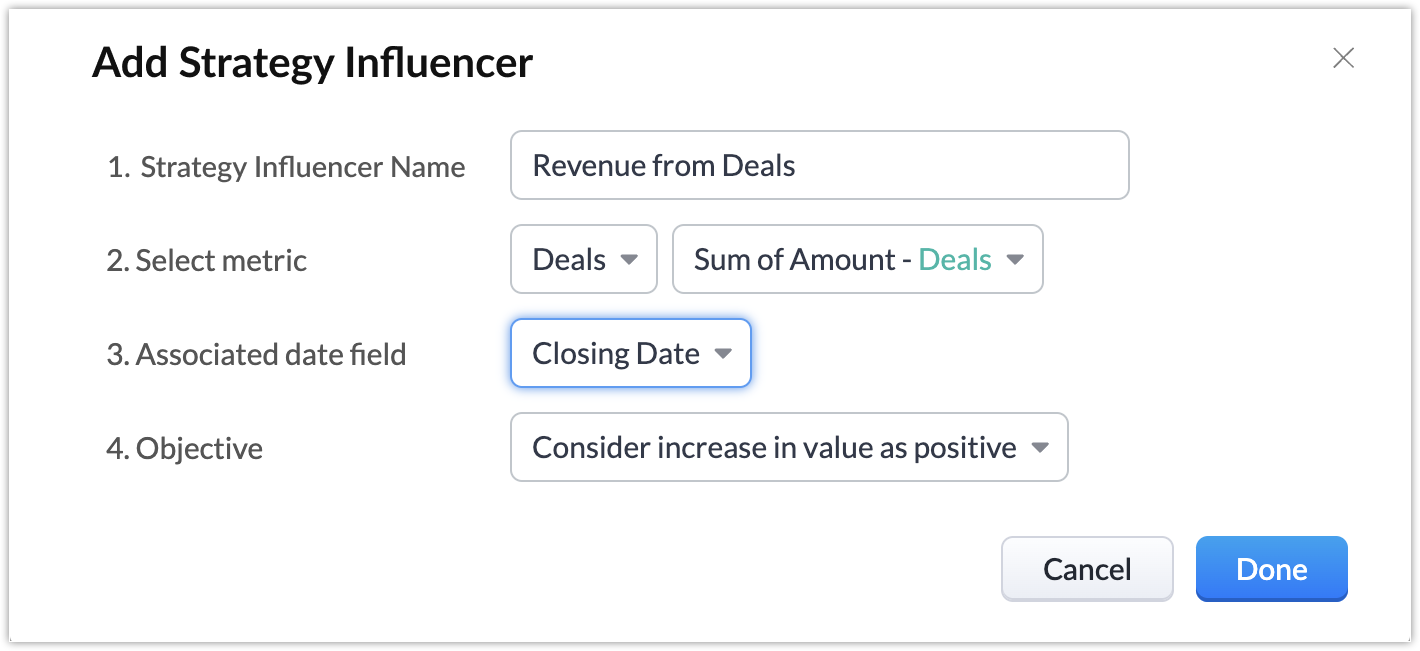
- Strategy Influencer Name - Define the name of the Zia Strategy Influencer
- Select metric - Select the module for which the Zia Strategy Influencer is to be created. Then select the criteria for which the prediction is to be done, in this case, the ''Sum of Amount''.
- Associated date field - Define the date field based on which the prediction is to be done for the intended time period, for example, this week. In this case, it is "Closing date'', and hence all the records having closing dates this week will be taken into consideration as part of the contributing factors.
- Objective - Select whether the increase in value should be considered as a positive or negative trend. For example, in this case, where the measure we have chosen is "Sum of Amount", you can select the increase in value to be positive, since an increase in value in this case would mean more revenue. Else, if we had another case, where the measure would have been "Sum of Lead Conversion Time", then an increase in value would mean the lead conversion consumed more time. In such a case, you can select the increase in value to be negative.
Once you create it, Zia will scan through your existing records in the Deals module and provide you with insights by predicting an overall target and the various contributing factors that impact it. Let us now dive into how your Zia Strategy Influencer insights are displayed.
Components of Zia Strategy Influencer
The insights in the Zia Strategy Influencer are provided across 3 major components namely :
- Target Contributors
- Anomaly Finder
- Gap Analyzer
- Predictor
- Prescriptor
Target Contributors
The target contributors component breaks down and lists the individual contributing factors that impact the overall target to be achieved. It provides you with details of the expected target that each individual contributing factor needs to achieve, in combination with the rest of the contributing factors, for you to hit your overall target.
It also displays how much has actually been achieved against the expected target value for each contributing factor. This helps you analyze your performance and incorporate necessary actions required to achieve your target.
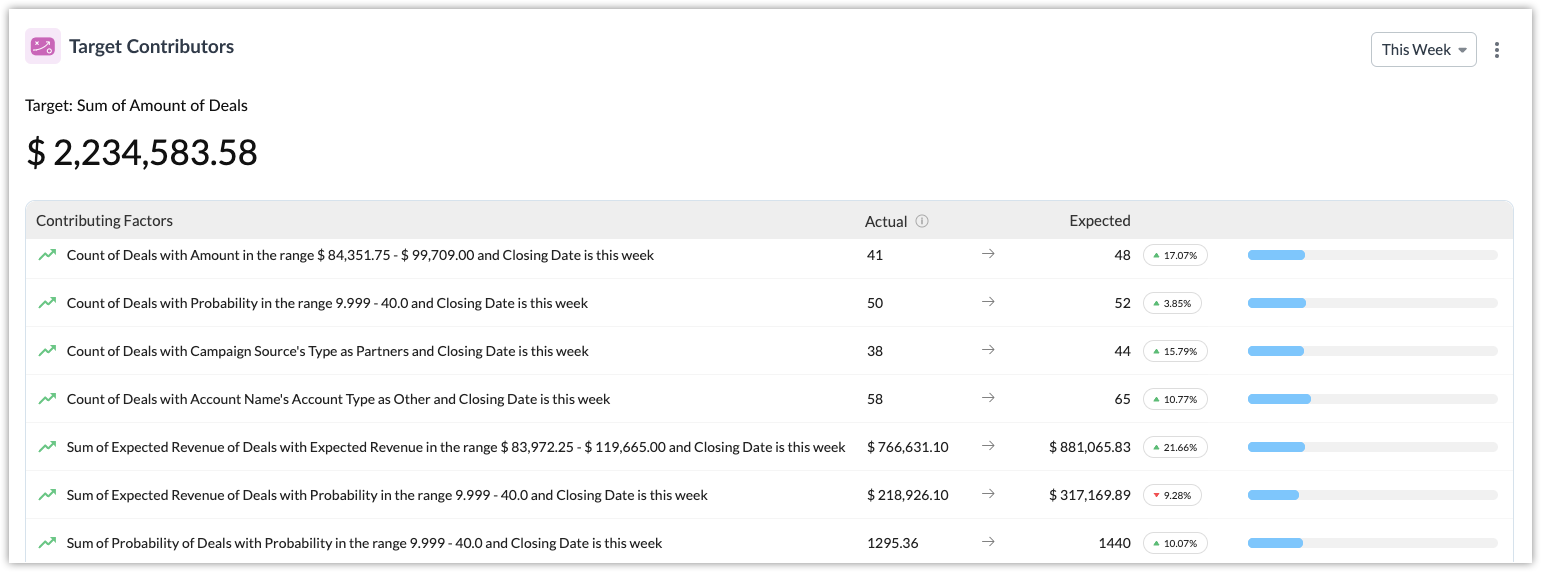
Apart from these, it also displays trend icons that represent the impact of those contributing factors on your overall target, either positive or negative. And in case you feel the predicted target or any of the contributing factors do not align with your actual business scenarios, you can manually adjust them in the target contributors component based on your requirements. Strategy influencer accordingly adjusts the main or contributing targets based on where you adjusted the value.
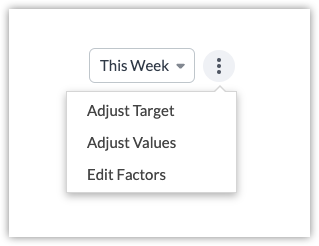
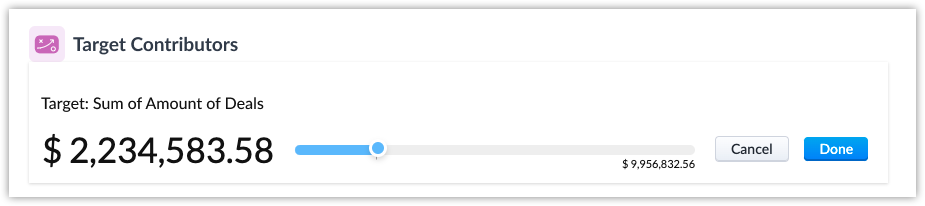
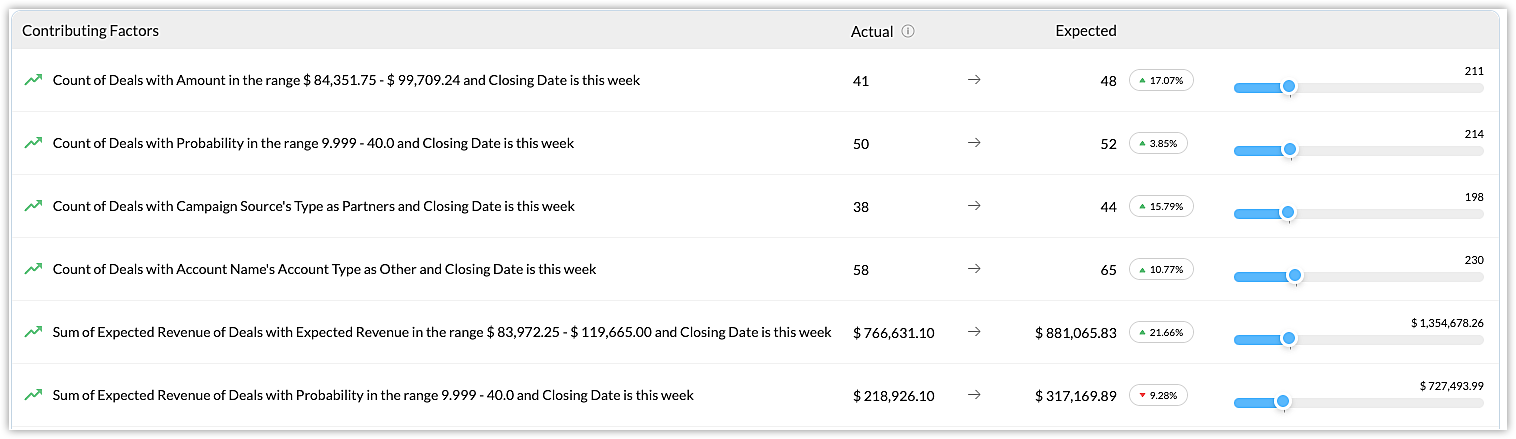
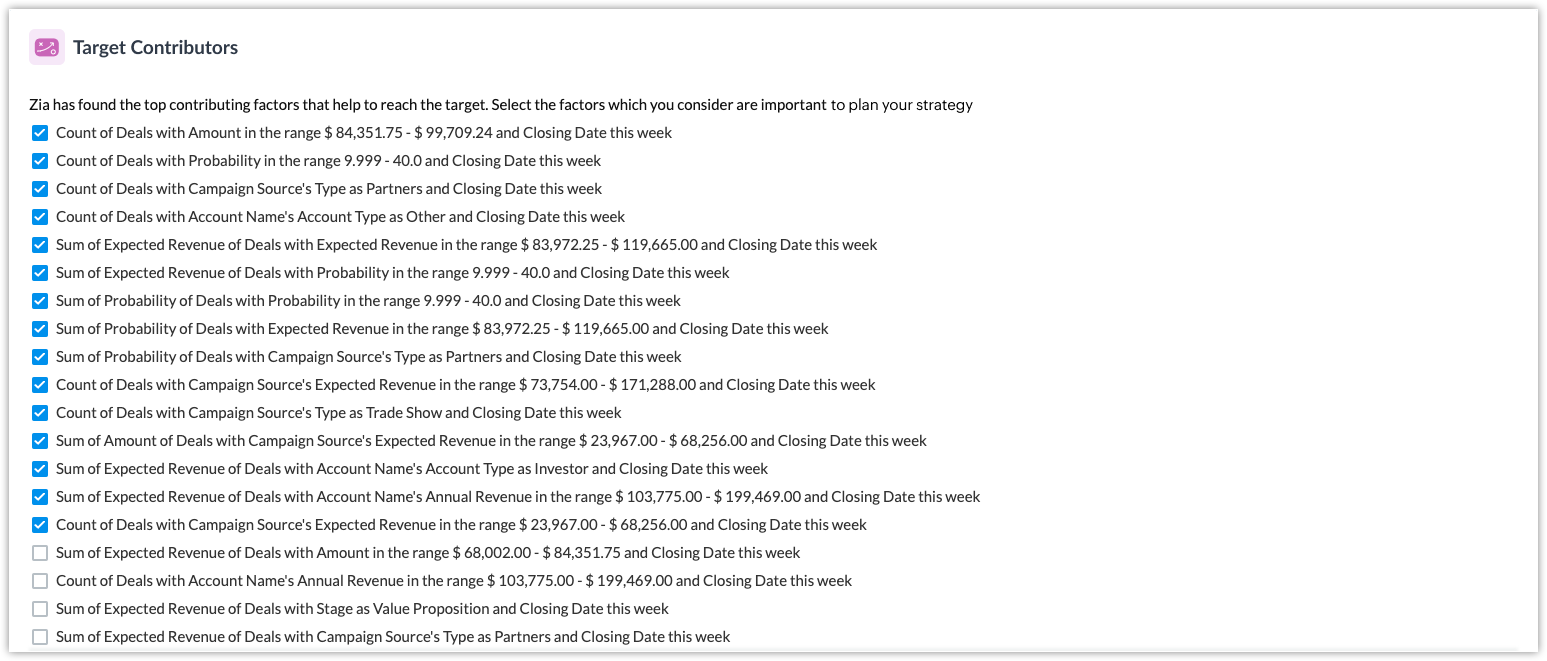
You can edit your overall target, any of the individual contributing factors, the expected values for each factor, and also select which contributing factors should be part of your target contributors component.
Note : You can select only up to 15 contributing factors in the target contributors component.
Anomaly Finder
There might be cases when you wouldn't have achieved your desired target and it might have a significant negative impact on your business. On the other hand, there might also be instances where you would have well exceeded your expected performances. In such cases, it becomes important that you know the factors that were mainly responsible for these positive or negative deviations.
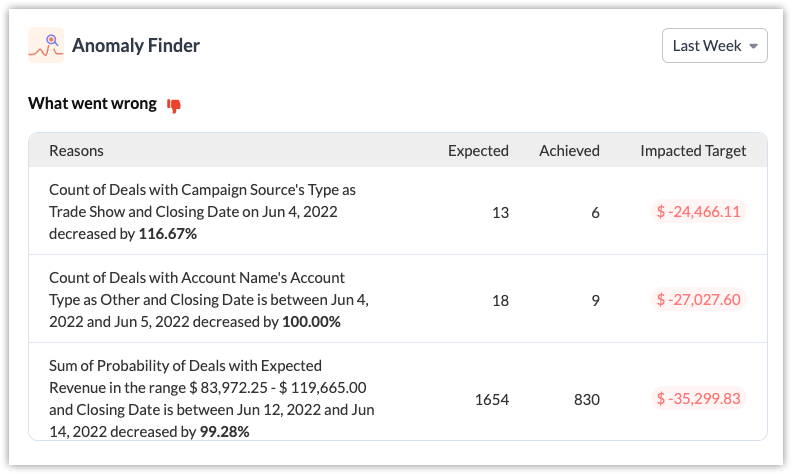
The anomaly finder component lists down the contributing factors from the target contributors component, that had caused a significant positive or negative trend relative to the predicted overall target. The anomaly finder provides details including the reasons for the anomaly, the expected and the achieved targets, and also the impact amount on the target, for the selected time period.
These insights help you in determining the reasons for the anomaly, analyzing the impacted aspects of your business, and implement suitable strategies to achieve your business targets.
Note : If all of your actual values met with the expected values of your target contributors component and your overall target is met for the duration, then the anomaly finder will report no anomalies for that duration.
Gap Analyzer
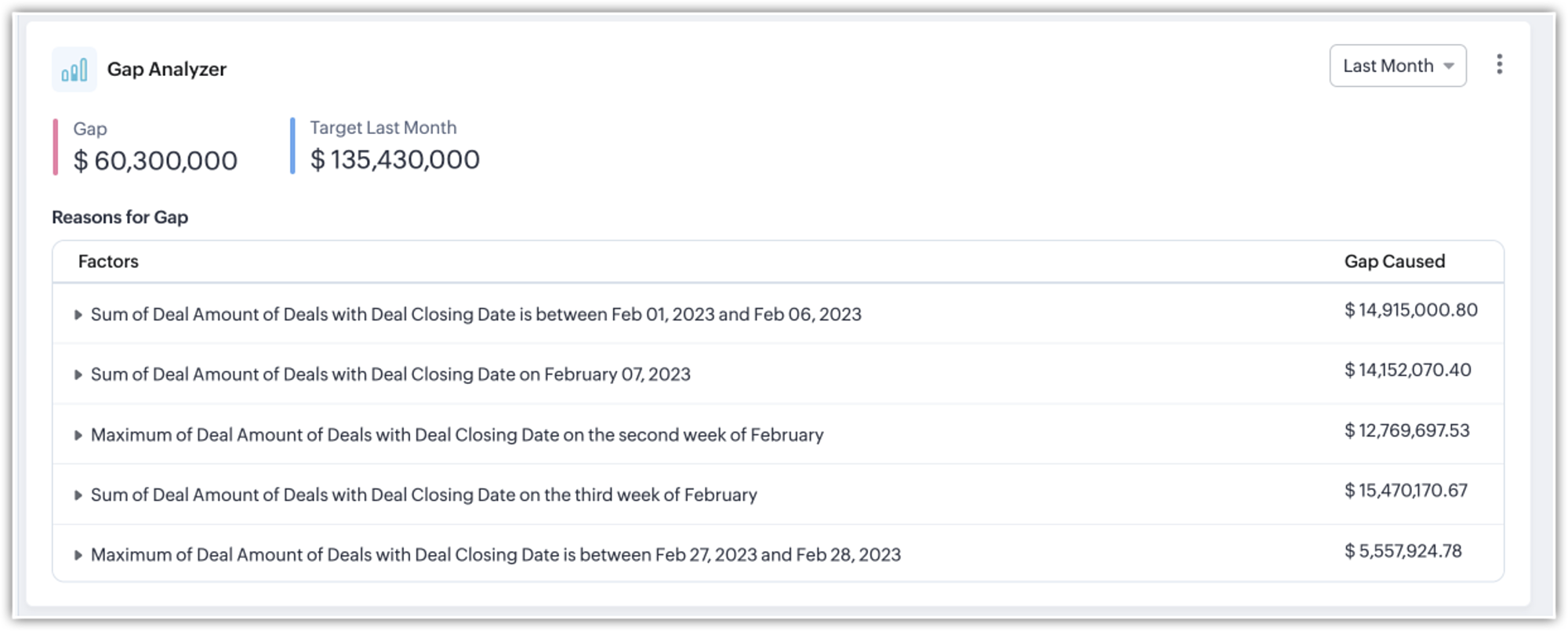
The Gap Analyzer component identifies disparities between the projected and the real target values for a specific date, week, or month. It elaborately displays the reasons for gaps during a particular period of time based on the value of the gap.
Predictor
The predictor provides you with the top picklist and lookup fields that contributed the most towards formulating the contributing factors that impact your overall target. This enables you to get a clear idea of the categories that impacted your target the most.
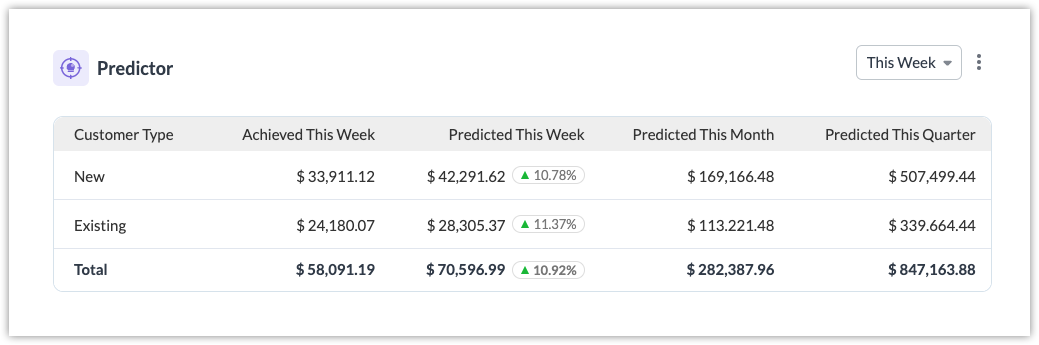
The predictor component displays the predicted and achieved targets for individual field values of the top-contributing picklist and lookup fields identified by Zia and its impact during different time duration. Similar to the target contributors component, you can edit individual contributing factors as per your needs. In this case, the "Customer Type" field is displayed.
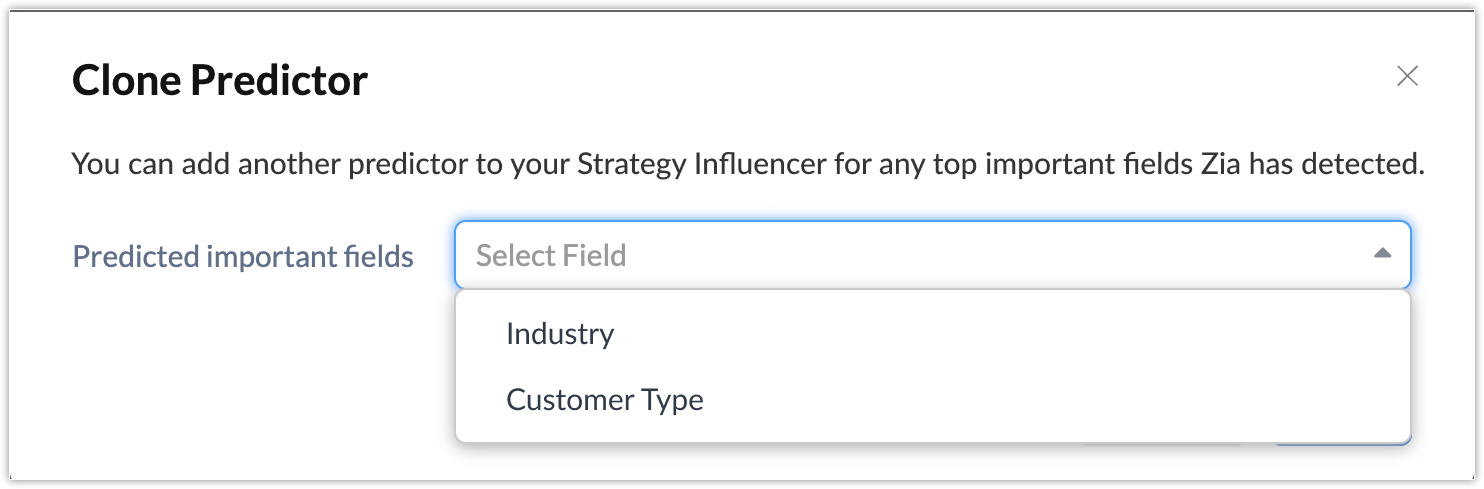
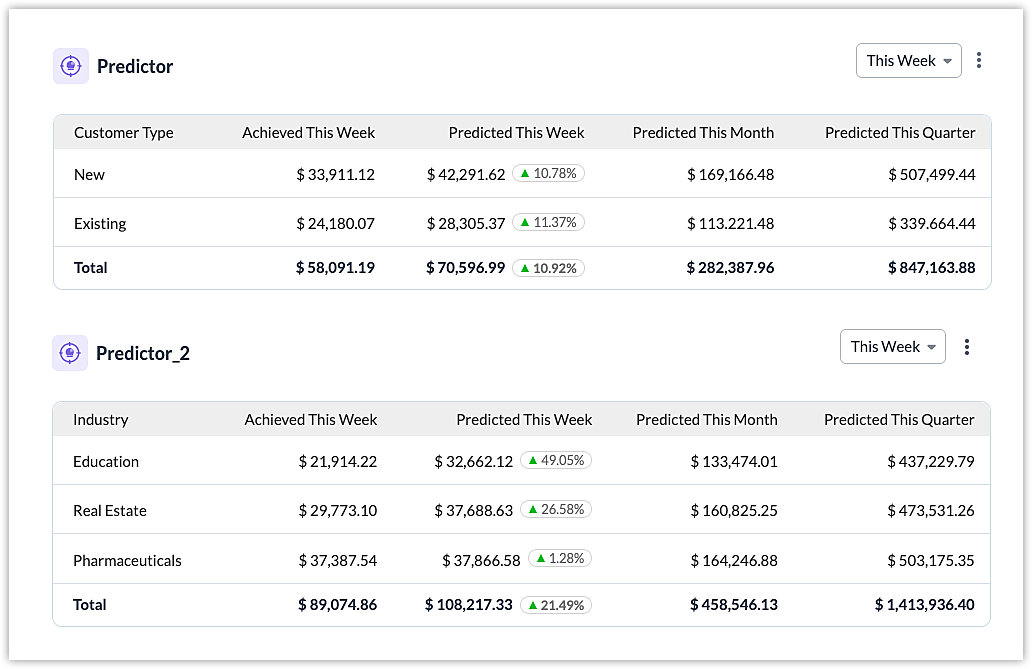
It is also possible to include another top picklist or lookup field identified by Zia, by cloning the predictor component. In this case, we can additionally include the "Industry" picklist as well.
Notes :
- The predictor component identifies up to 4 top picklist/lookup fields out of which you can use a maximum of 2 picklist/lookup fields for your predictions.
- There can be a maximum of 15 values for each picklist/lookup field.
- If there are no picklist/lookup fields that contribute to the target, the predictor component will not be generated.
Prescriptor
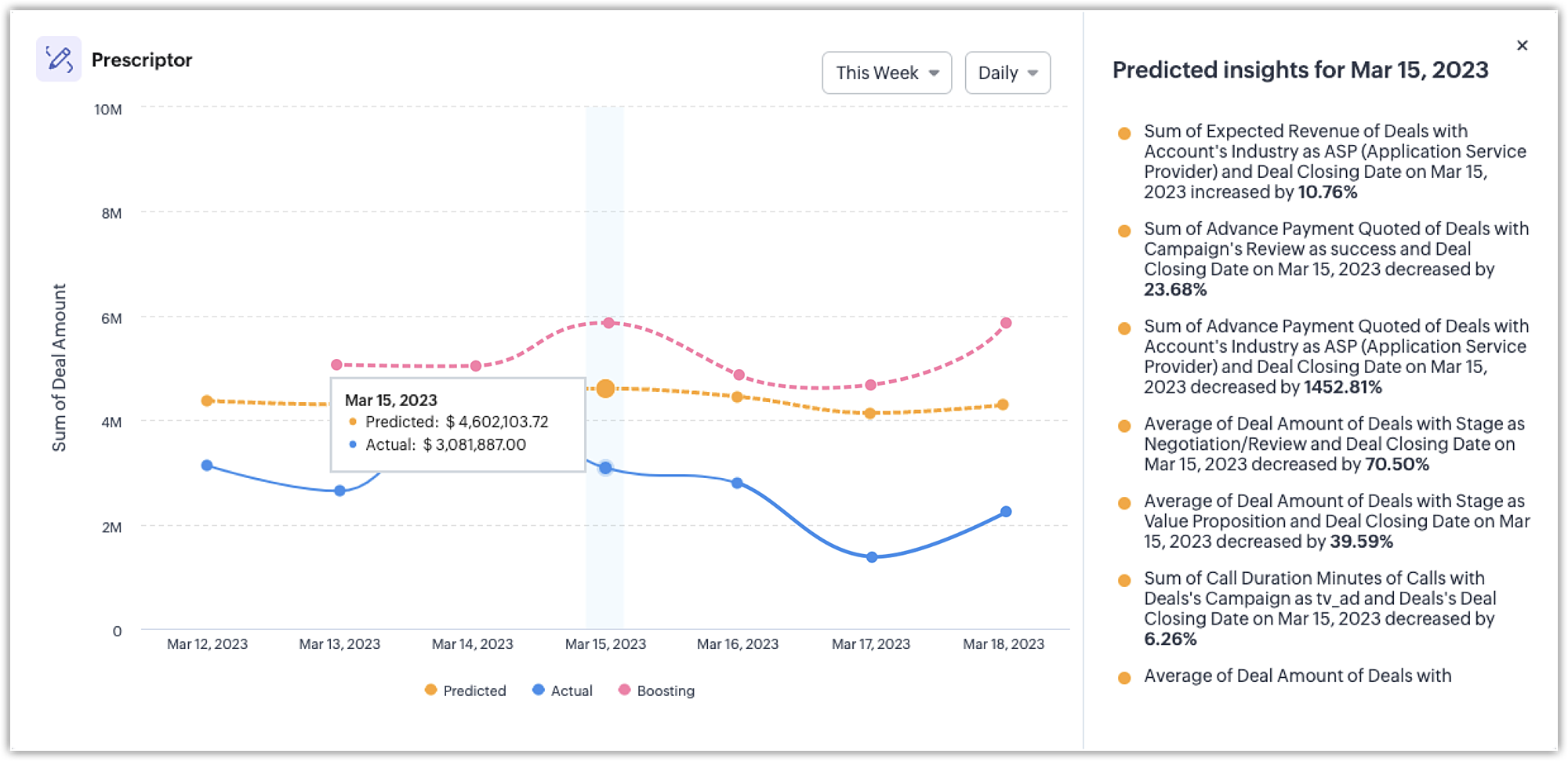
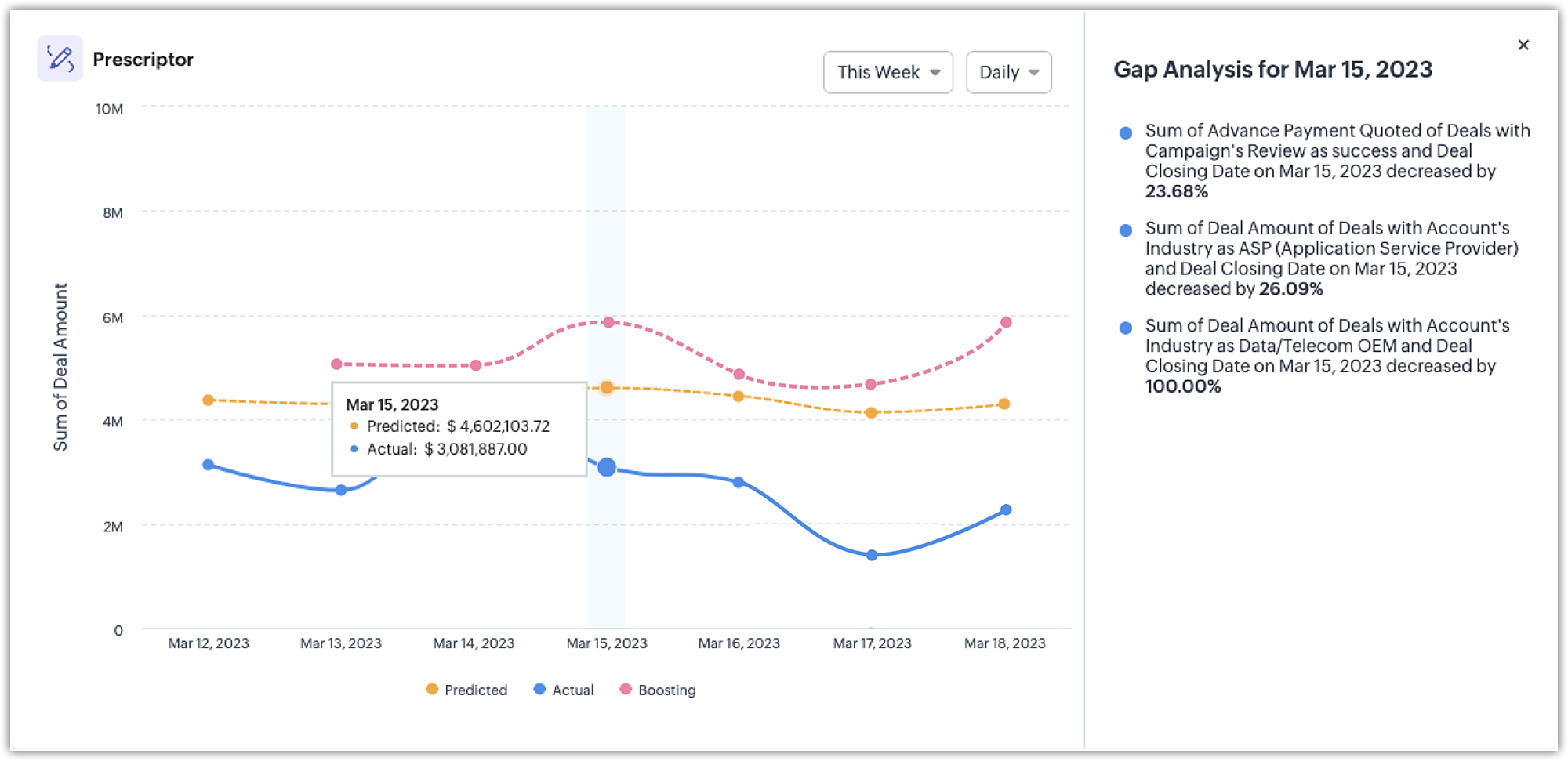
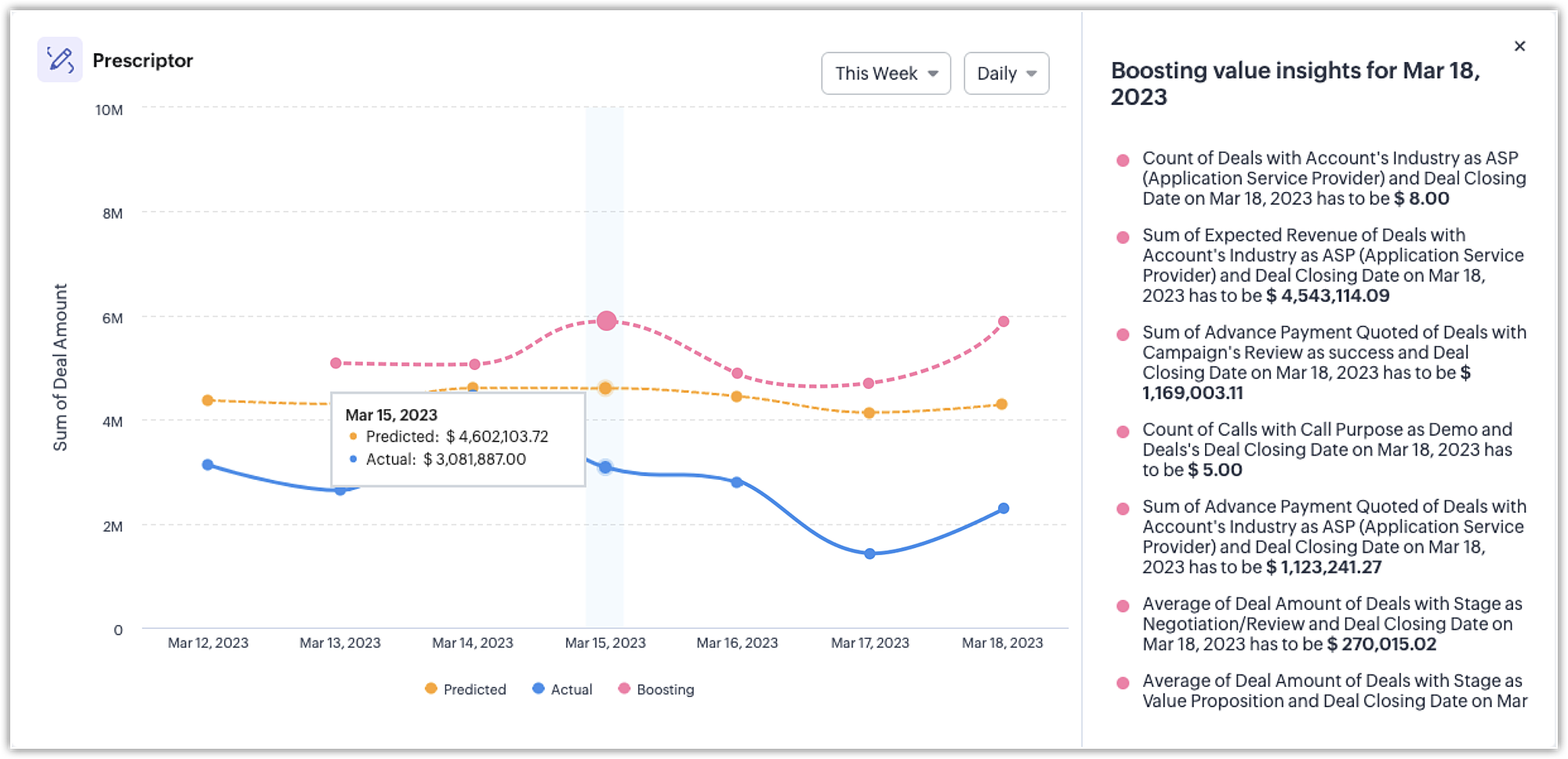
The prescriptor component combines predictive and descriptive analytics for a target. It covers three main areas:
what should be done each day to achieve a predicted target for a week/month/year
what went wrong in the previous data
what can be done to improvise in upcoming days if a daily target is missed.
Updating the Zia Strategy Influencer
The overall target, the contributing factors, and the values do not auto-update themselves based on everyday business performance. You will have to retrain Zia to update the Zia Strategy Influencer with the latest insights.
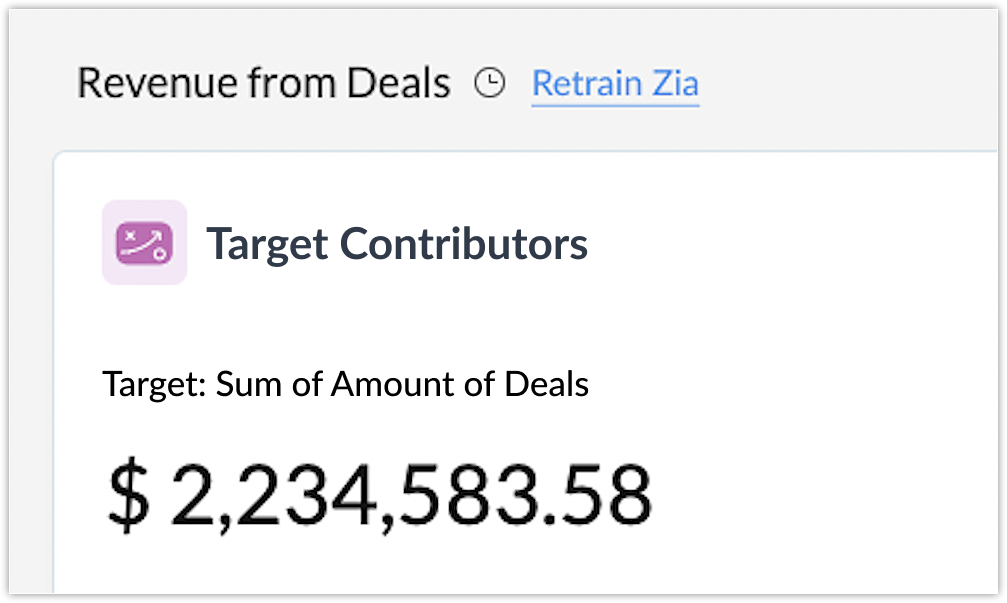
The Retrain Zia option recomputes your data and updates your analytics with the latest insights. The option to retrain will be available once in every 15 days.
How is Zia Strategy Influencer different from Forecasts?
Both forecasts and business projections are used for futuristic predictions and goals. For both forecasts and strategy influencer, Zia suggests targets. But in the case of forecasts, it lets you set your own or Zia suggested targets and the corresponding prediction criteria to track organization performance.
While in the case of strategy influencer, it rather provides you a predicted target and insights on the factors affecting the target for the metric in an organization selected by you. It also allows you to play around these influencing factors in combination with other factors and their effect on the target. The strategy influencer is more like a referential information for you to know how to achieve your targets.
You can, in fact, make use of the insights from the Zia Strategy Influencer analytics to design suitable forecasts for your organization's needs. To make this easier, we will also be enhancing forecasts by tightly integrating strategy influencer with it.
How is Zia Strategy Influencer different from Prediction Builder and Recommendation?
Zia's prediction builder lets you build custom predictions for your business. It provides predictions based on the field in any module specified by you. In the case of Zia's recommendation, it uses AI to study and analyze customer behaviors and trends to provide relevant product recommendations.
The difference lies in the fact that both the prediction builder and recommendation provide record-level insights, i.e. based on the module and field selected, the predictions and recommendations are provided with respect to each individual record that is part of the selected module. These predictions are used when you need record-specific predictions, for example, when you want to refer to predictions for a specific customer based on their unique behaviors and patterns.
While in case of Zia Strategy Influencer, it provides organization-level analytical insights to achieve the target based on the module and field selected. You can use Zia Strategy Influencer when you need predictions, and prescriptive and descriptive insights for your organization as a whole.
Feature Requirements
- You need a minimum of 5000 records spread across at least one year in your organization for Zia to assess your goals.
- This feature is available only for customer accounts in Enterprise and Ultimate edition accounts with more than 20 users.
- Only users with an Administrator profile can access this feature.
- This feature is available only for English language users. The super admin and other admin users need to be English users.
We look forward to your feedback on your Zia Strategy Influencer experience. To explore the feature in detail, please refer to this help documentation.
Topic Participants
Vinay Karthikk S
lee.lister
Sunderjan Siddharth
Sticky Posts
Wrapping up 2025 on a high note: CRM Release Highlights of the year
Dear Customers, 2025 was an eventful year for us at Zoho CRM. We’ve had releases of all sizes and impact, and we are excited to look back, break it down, and rediscover them with you! Before we rewind—we’d like to take a minute and sincerely thank youGood news! Calendar in Zoho CRM gets a face lift
Dear Customers, We are delighted to unveil the revamped calendar UI in Zoho CRM. With a complete visual overhaul aligned with CRM for Everyone, the calendar now offers a more intuitive and flexible scheduling experience. What’s new? Distinguish activitiesPresenting ABM for Zoho CRM: Expand and retain your customers with precision
Picture this scenario: You're a growing SaaS company ready to launch a powerful business suite, and are looking to gain traction and momentum. But as a business with a tight budget, you know acquiring new customers is slow, expensive, and often deliversCreate and populate a record in an instant: Introducing zero-shot field prompting to Zia's ICR
A couple of months ago, we upgraded our in-house AI image detection and validation tool, Zia Vision, with intelligent character recognition (ICR). By training Zia with sample images, you could create and enrich CRM records with data extracted from standardIn-person ZUG Meetups for Real Estate Professionals - US Q1 2026
The Real Estate Zoho User Group is going on a multi-city, in-person meetup tour across the US, and we’d love to see you there! These meetups are a great opportunity to: Connect with fellow real estate professionals using Zoho Share challenges and discover
Recent Topics
Custom AI solutions with QuickML for Zoho CRM
Hello everyone, Earlier, we introduced Custom AI Solutions in CRM that let you access QuickML for your custom AI needs. Building on that foundation, we’ve now enabled a deeper integration: QuickML models can be seamlessly integrated into CRM, and surfaceHelper Functions and DRY principle
Hello everyone, I believe Deluge should be able to use 'Helper functions' inside the main function. I know I can create different standalones, but this is not helpful and confusing. I don't want 10000 different standalones, and I dont want to have toAdd specific field value to URL
Hi Everyone. I have the following code which is set to run from a subform when the user selects a value from a lookup field "Plant_Key" the URL opens a report but i want the report to be filtered on the matching field/value. so in the report there isIntroducing workflow automation for the Products module
Greetings, I hope all of you are doing well. We're happy to announce a few recent enhancements we've made to Bigin's Products module. The Products module in Bigin now supports Workflows, enabling you to automate routine actions. Along with this update,Power up your Kiosk Studio with Real-Time Data Capture, Client Scripts & More!
Hello Everyone, We’re thrilled to announce a powerful set of enhancements to Kiosk Studio in Zoho CRM. These new updates give you more flexibility, faster record handling, and real-time data capture, making your Kiosk flows smarter and more efficientZia Formula Expression Generator for Formula fields
Hello everyone! Formula fields are super useful when you want your CRM to calculate things for you but writing the expression is where most people slow down. You know what you want, but you’re not fully sure which function to use, how the syntax shouldWhere is the settings option in zoho writer?
hi, my zoho writer on windows has menu fonts too large. where do i find the settings to change this option? my screen resolution is correct and other apps/softwares in windows have no issues. regardsCRM project association via deluge
I have created a workflow in my Zoho CRM for closing a deal. Part of this workflow leverages a deluge script to create a project for our delivery team. Creating the project works great however, after or during the project creation, I would like to associateIssue with Zoho Creator Form Full-Screen View in CRM Related List Integration
Hi Team, We have created a custom application in Zoho Creator and integrated it into Zoho CRM as a related list under the Vendor module, which we have renamed as Consignors. Within the Creator application, there is a form named “Pickup Request.” InsideWrapping up 2025 on a high note: CRM Release Highlights of the year
Dear Customers, 2025 was an eventful year for us at Zoho CRM. We’ve had releases of all sizes and impact, and we are excited to look back, break it down, and rediscover them with you! Before we rewind—we’d like to take a minute and sincerely thank youDirectly Edit, Filter, and Sort Subforms on the Details Page
Hello everyone, As you know, subforms allow you to associate multiple line items with a single record, greatly enhancing your data organization. For example, a sales order subform neatly lists all products, their quantities, amounts, and other relevantCustomer Parent Account or Sub-Customer Account
Some of clients as they have 50 to 300 branches, they required separate account statement with outlet name and number; which means we have to open new account for each branch individually. However, the main issue is that, when they make a payment, theyDrop Down Value
Hi, May I know why Zoho Flow treat this drop down as number and not as string. If so, how can I fetch the right value for filtering. This field is from Creator, in Creator upon checking by default it is a string since it's not a lookup field.Projects custom colors replaced by default orange
Since yesterday, projects uploaded to Zoho, to which I had assigned a custom color, have lost the customization and reverted to the default color (orange). Has anyone else had the same problem? If so, how did you resolve it?How to manage task lists in Zoho Desk?
Hello, I use Zoho Desk for IT customer support. I have a list of standard operating procedures (SOPs), including SOPs for onboarding new users, offboarding users, losing a device, etc. These are lists of tasks to be performed depending on the situation.Creating a Chart from a Report
In Zoho Analytics, is it possible to create a chart from a Pivot View report? We are looking to use Zoho Analytics to replace Excel for Sales reports and would like to be able to show both the table and the chart together.Restrict Users access to login into CRM?
I’m wanting my employees to be able to utilize the Zoho CRM Lookup field within Zoho Forms. For them to use lookup field in Zoho Forms it is my understanding that they need to be licensed for Forms and the CRM. However, I don’t want them to be able toHolidays - Cannot Enter Two Holidays on Same Day
I have a fairly common setup, where part-time employees receive 1/2 day's pay on a holiday and full-time employees receive a full day's pay. Historically, I've been able to accommodate this by entering two separate holidays, one that covers full-timeIntroducing Connected Records to bring business context to every aspect of your work in Zoho CRM for Everyone
Hello Everyone, We are excited to unveil phase one of a powerful enhancement to CRM for Everyone - Connected Records, available only in CRM's Nextgen UI. With CRM for Everyone, businesses can onboard all customer-facing teams onto the CRM platform toUnknown table or alias 'A1'
I would like to create a subquery but i am getting the following error: Unknown table or alias 'A1' used in select query. This is the sql statement: SELECT A1.active_paying_customers, A1.active_trial_customers, A1.new_paying_signup, date(A1.date_active_customers),in the Zoho creator i have address field based the customer lookup im selecting the addresss , some times the customer address getting as null i want to show as blank
in the Zoho creator i have address field based the customer lookup im selecting the addresss , some times the customer address getting as null ,i want to show as blank instead of showing null. input.Billing_Address.address_line_1 = ifNUll(input.Customers_Name.Address.address_line_1,"");Question about upgrade and storage space Zoho Notebook
After upgarding my Zoho Notebook plan, I am running into the following issue. I just upgraded from a free Zoho Notebook subscription to Pro Lite after I got a notification in my Window Zoho Notebook desktop app saying that I had run out of space. However,how to add email to existing organization i w
I am already registered my organization and i have an email id. I need one more email id but i can't find anywhere .i want the cheapest email id . how to add ?add zoho account
How to add a zoho mail to previous zoho account? I have twoName changed in settings for mailbox but still not changed when typed in To field
In the email account secretary@ i have updaetd the new staff members details but the old members name still appears when I type secretary@ in the To field. I cant work out where Zoho is finding the old name from. I have deleted the browser cache. If IPrinting to a brother label maker
I see allot of really old unanswered posts asking how to print to a label maker from a zoho creator app. Has their been any progress on providing the capability to create a customized height & width page or print template or whatever to print labels?Sync desktop folders instantly with WorkDrive TrueSync (Beta)
Keeping your important files backed up and accessible has never been easier! With WorkDrive desktop app (TrueSync), you can now automatically sync specific desktop folders to WorkDrive Web, ensuring seamless, real-time updates across devices. Important:Track online, in-office, and client location meetings separately with the new meeting venue option
Hello everyone! We’re excited to announce meeting enhancements in Zoho CRM that bring more clarity and structure to how meetings are categorized. You can now specify the meeting venue to clearly indicate whether a meeting is being held online, at theCalling the new 'Custom API' feature from within a Custom Widget
From what I've learned it is not possible to call an endpoint from the new "Custom API" feature within a Creator Widget. The SDK's doesn't support it yet, when calling it natively you end up with CORS issues or at least I couldn't get it working evenAnnouncing new features in Trident for Mac (1.32.0)
Hello everyone! We’re excited to introduce the latest updates to Trident, which are designed to reinforce email security and protect your inbox from evolving threats. Let’s take a quick look at what’s new. Deliver quarantined emails. Organization adminsMarketing Tip #5: Improve store speed with optimized images
Slow-loading websites can turn visitors away. One of the biggest culprits? Large, uncompressed images. By optimizing your images, your store loads faster and creates a smoother shopping experience leading to higher sales. It also indirectly improves SEO.PDF Attachment Option for Service Reports
Hello Team, I would like to check with you all if there is an option to attach PDF documents to the service reports. When I try to attach a file, the system only allows the following formats: JPEG, JPG, and PNG. Could you please confirm whether PDF attachmentsZOHO Work Drive Back Up
I am looking for a ZOHO Work Drive backup solution. Something that is cloud based. There's lots of these kinds of options for Google Drive and other providers, but I have not seen anything for WorkDrive. Any suggestions?Zoho Browser??
hai guys, this sounds awkward but can v get a ZOHO BROWSER same as zoho writer, etc. where i can browse websites @ home and continue browsing the same websites @ my office, as v have the option in Firefox, once i save and close the browser and again when i open it i will be getting the same sites. If u people r not clear with my explanation, plz let me know. Thanks, SandeepSMS to customers from within Bigin
Hi All, Is there anyone else crying out for Bigin SMS capability to send an SMS to customers directly from the Bigin interface? We have inbuilt telephony already with call recordings which works well. What's lacking is the ability to send and receiveNo OR Filter for Views with a Related Modules Criteria
We would like to create a Deal View where the User can see all their deals. For that, we would need an OR to connect the criteria. One of the Fields is a "multiselect User", these (Related Modules Criteria) can only be Filter with an AND. Even betweenAdmins cannot see each others' Scheduled Reports?!
Very frustrating that as an admin I cannot see what my reports my fellow admins have created and scheduled. After asking about this on the help chat, I was told the issue is trust and security. By giving someone Admin status, it means we trust them with those responsibilities. Please change this, it is not a good process to have to bother other users to change a report or change users within a report.Automatically CC an address using Zoho CRM Email Templates
Hi all - have searched but can't see a definitive answer. We have built multiple email templates in CRM. Every time we send this we want it to CC a particular address (the same address for every email sent) so that it populates the reply back into ourWriter update results in BitDefender blocking it as malware
After updating Writer to latest update, Bitdefender blocked the app and writer no longer runs.Is there a way to invoke deluge function from within a widget?
Hi! I have custom functions in deluge and I was wondering whether there is any way to call this function through a widget? Something like on click of a button inside a widget, run the deluge custom function. Would this be possible?Next Page