Kaizen #194 : Trigger Client Script via Custom buttons

Hello everyone!
Welcome back to another interesting and useful Kaizen post.
We know that Client Scripts can be triggered with Canvas buttons and we discussed this with a use case in Kaizen#180. Today, let us discuss how to trigger Client Script when a Custom Button is clicked. Using this, you can execute Client Script when a custom button is clicked.
In this post,
1. Event Details2. Supported Pages3. Use Case - Export Subform Rows to Zoho Sheet in a Single Click!4. Solution5. Summary6. Related Links
Client Script support for Custom Buttons opens up possibilities for automation, personalization, and enhanced user interactions in Zoho CRM when a custom button is clicked.
Here is a detailed walkthrough to help you understand it better.
1. Event Details
The Button event triggers the Client Script when a custom button is clicked. Each time this event is invoked, the context argument is passed to the Client Script. The context contains information about the page from which the button was clicked.
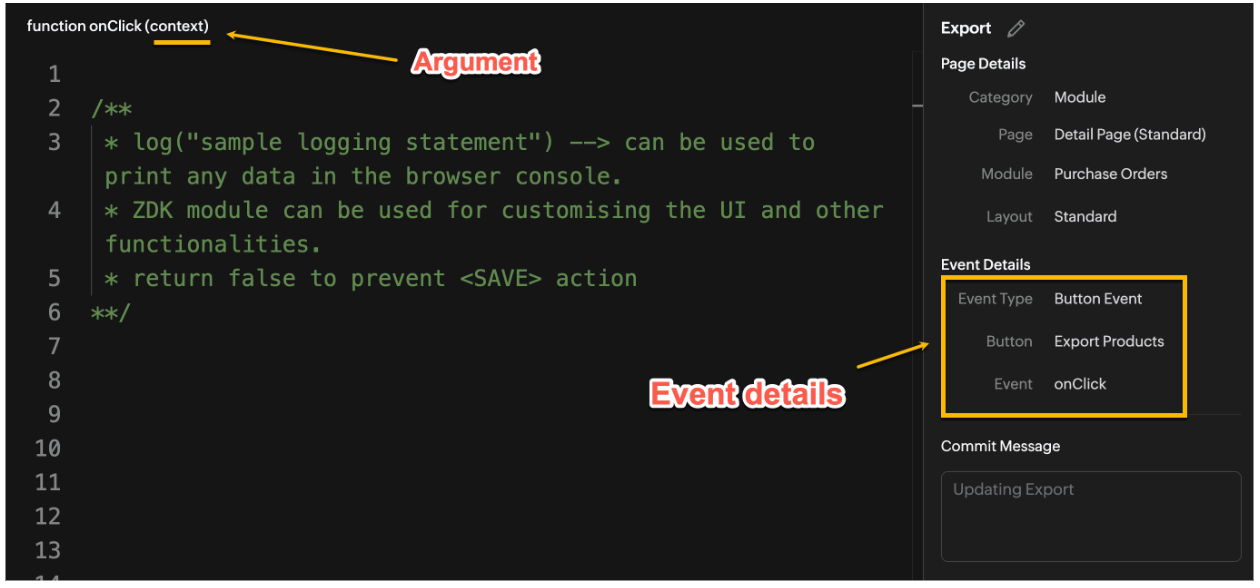
Click here to know more about Client Script Events.
2. Supported Pages
A Custom Button can be placed in different positions based on the Page.
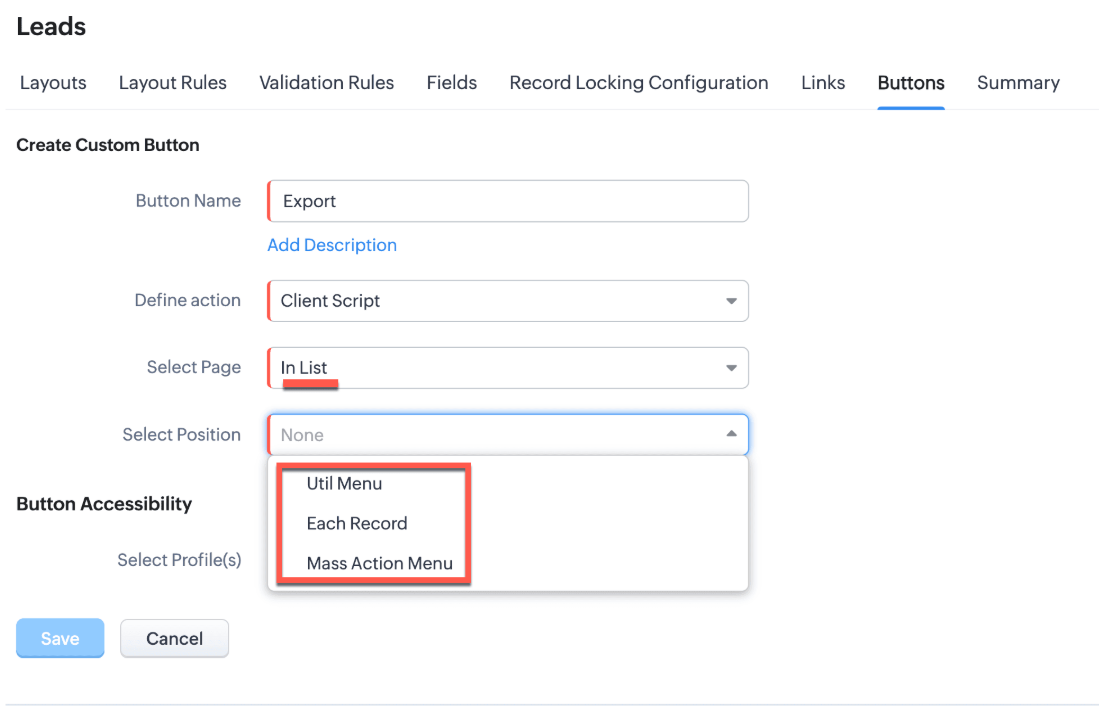
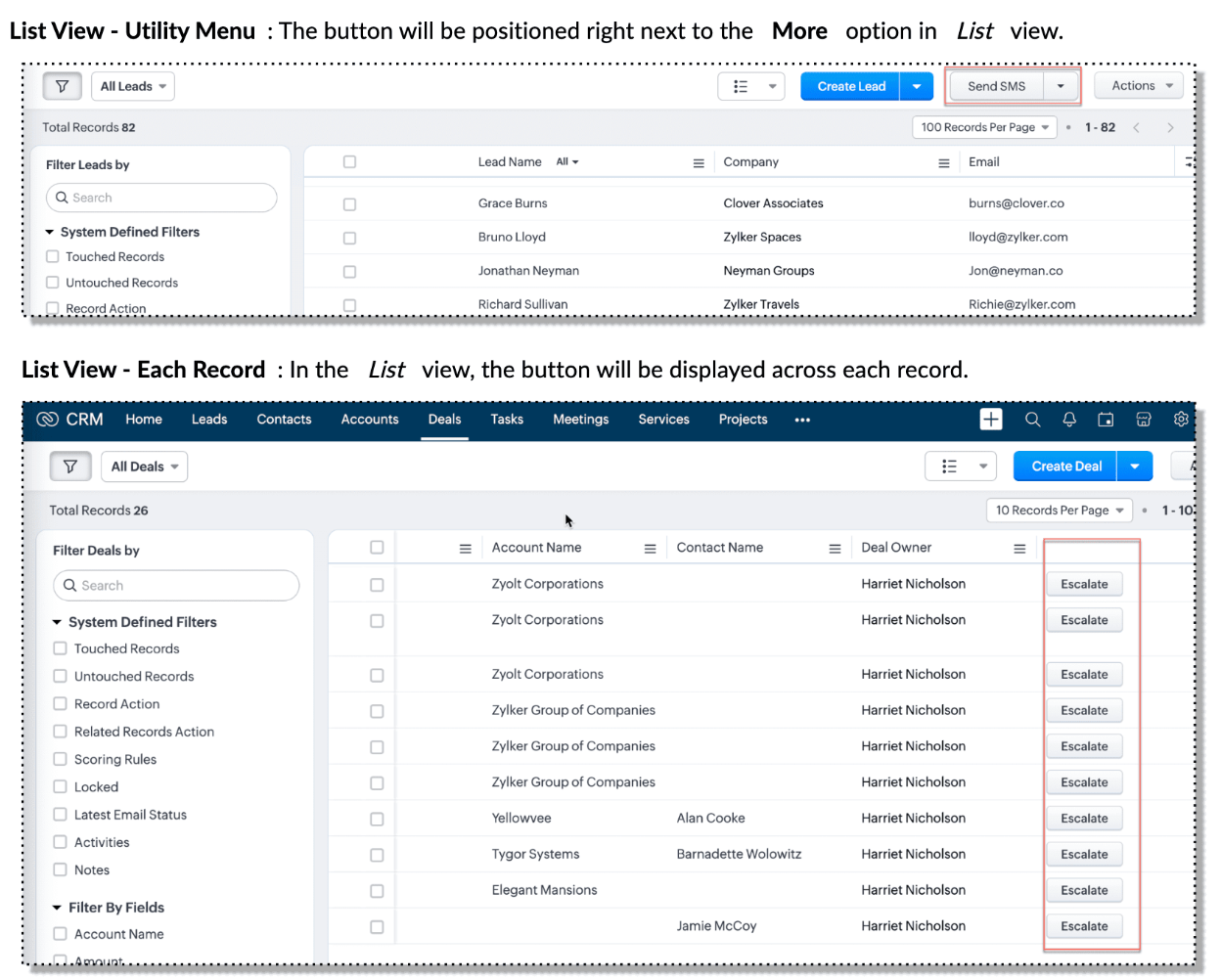
You can add a custom button in the Util Menu, in Each Record or in the Mass Action Menu of the List Page.

Also, a Detail Page can have a custom button either In Record or in the Related List. Click here for more details about the different possible positions of a custom button.
The following table lists the supported pages and the corresponding context argument, which provides different details based on the page type.

To create a Client Script and make it trigger when a custom button is clicked, first create a Custom button and associate it with a Client Script as shown in the following image.

Click here to view the steps to create a custom button and configure a Client Script.
Note:
You can configure the Client Script only from the Buttons page to trigger it when a user clicks a custom button, and not the usual way of Creating Client Script via setup page. Once a script is created, it can be edited and updated from the Client Script setup page
3. Use Case - Export Subform Rows to Zoho Sheet in a Single Click!
Zylker manufactures medical instruments, and its sales representatives frequently need to share bulk order details with distributors and hospital partners using Zoho Sheets. These details such as product names, quantities, and prices are captured in a Subform on the Purchase Order Detail(Standard) Page.
To simplify this, the admin wants to add a custom button called "Export Products" on the Purchase Order Detail Page. When clicked, it should export the Purchase Items from the Subform and move the content to the specified sheet.
4. Solution
To export subform rows to Zoho Sheet with a single click, you can add a custom button to the Detail Page of the record. When clicked, a Client Script will be triggered to fetch the subform data from the Detail Page and pass it to a Function that uses zoho.sheet.createRecords() to insert data into Zoho Sheet.
Here’s how to implement this:
- Add “Export Products” custom button on the Detail Page.
- Add the script to collect subform rows which invokes the Function.
- Write a Function to create entry in Zoho Sheets
A. Add “Export Products” custom button on the Detail Page.
- Go to Setup → Modules and Fields under Customization.
- Select a Module as Purchase Order.
- Click on Buttons → Then click + New Button.
- Enter Button Name and select Action Type as "Client Script"
- Choose Button Position and Layout details as shown in the following image.
- Click Create in Configured Client Script, enter the script, and click Add.
- Select the profiles for which these buttons should be visible.
- Click Save.

B. Add the Script to collect subform rows and invoke the Function
Use the following Client Script when you configure the custom button.
- var casesheetid = ZDK.Client.getInput([{ type: 'text', label: 'Enter the Sheet ID' }], 'Sheet details', 'OK', 'Cancel');
- if (casesheetid == null) {
- ZDK.Client.showAlert("Enter the *Case Sheet ID - Import* to import data");
- }
- var purchase_items = ZDK.Page.getField('Purchase_items).getValue();
- ZDK.Client.showLoader({type: 'page', template:'spinner', message: 'Export in progress, please wait'});
- var c=1;
- if (sheetid == null) {
- ZDK.Client.hideLoader();
- ZDK.Client.showAlert("Enter the *Case Sheet - Export* ID to export data");
- }
- purchase_items.forEach((r,i) => {
- try {
- resp = ZDK.Apps.CRM.Functions.execute("csvWrite", { "Product_Name": r.Product_Name.name, "List_Price": r.List_Price, "Discount": r.Discount, "Total": r.Total,"Sheetid":casesheetid }); }
- catch (error) {
- c = 0;
- ZDK.Client.hideLoader();
- ZDK.Client.showAlert("Unexpected issue occured while adding data in row number "); }
- });
- ZDK.Client.hideLoader();
- if (c) {
- ZDK.Client.showMessage("Export completed. Please check the Sheet");
- }
- else
- {
- ZDK.Client.showMessage("Unexpected error "); }}
In this code, several ZDKs are used for various purposes. Click on the ZDK hyperlinks to learn more.
- User Input: The code uses ZDK.Client.getInput() to fetch a "Sheet ID" from the user. This input is crucial for further operations.
- Input Validation: If the user cancels or doesn't enter a sheet ID, the code checks for null and prompts the user to enter the ID using ZDK.Client.showAlert().
- Function Invocation: The entries of Purchase Order subform are fetched using ZDK.Page.getField('Purchase_items).getValue() and written to Zoho Sheet using the Function csvWrite(), which internally calls zoho.sheet.createRecords().
- Loader Display: To indicate that a process is running, a loader is displayed using ZDK.Client.showLoader().
- Show Message: ZDK.Client.showMessage() displays that the Export is completed.
Note
The Client Script you intend to link with the button will be saved only after the custom button is saved.
C. Write a Function to create entry in Zoho Sheets
- Go to Setup > Developer Hub > Functions.
- In the Functions page, click + Create New Function.
- Choose the category as Button.
- Click Create.
- In the Create Function page, enter a name as csvWrite and description for your function.
- Enter the following function code and click Save.
- string standalone.csvWrite(String product,String qty,String up,String amt, String Sheetid){
- queryData = Map();
- writeData = Map();
- header = Map();
- writeData.put("Product",product);
- writeData.put("Quantity",qty);
- writeData.put("Unit_Price",up);
- writeData.put("Amount",amt);
- SheetData = zoho.sheet.createRecords("Sheetid","Sheet1",writeData,queryData,"sheetconnection");
- return SheetData;
- }
In the code above:
- sheetconnection refers to the name of the Zoho Sheet connection, which must have the scopes: ZohoSheet.dataAPI.UPDATE and ZohoSheet.dataAPI.READ.
- Click here to know how to create a Connection with the required scopes.
- sheetid is the unique identifier of the Zoho Sheet, available in the sheet’s URL.
- Sheet1 represents the name of the worksheet (i.e., the tab name shown at the bottom of the Zoho Sheet).
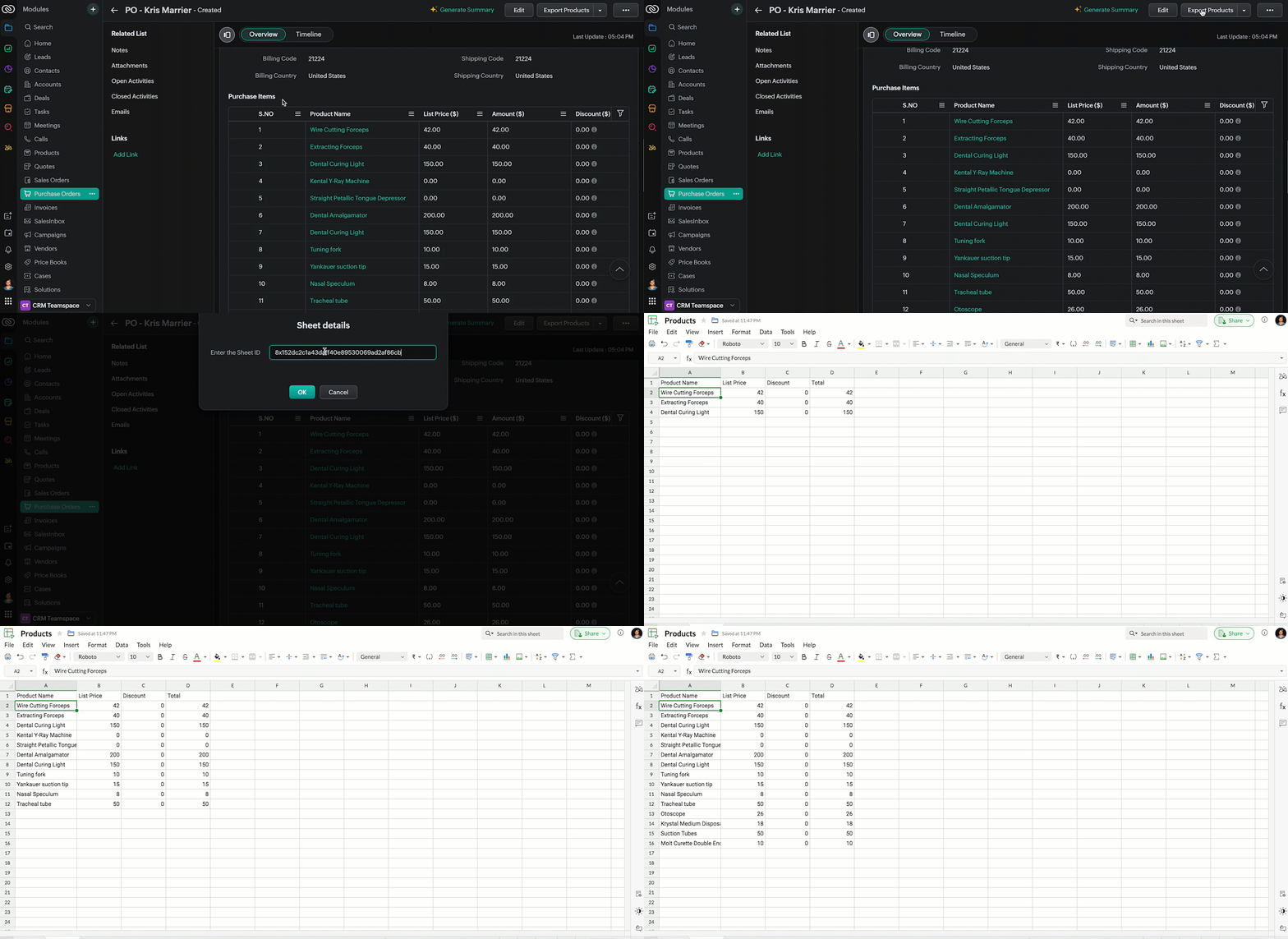
- Now, when the custom button is clicked, the Client Script is triggered. It prompts for the Sheet ID, fetches the contents of the Purchase Order subform, and invokes a function that writes the content to the Sheet.
Here's how the Client Script works.
5. Summary
In this post we have seen,
- What is a Button event?
- How to configure Client Script for a custom button
- How to write data into Zoho Sheets from Client Script
- How to create a Function and call it from Client Script
6. Related Links
- Customize Buttons using Client Script
- Automating Data Transfer from Zoho Sheets to Zoho CRM Subforms
- Update - Client Script Support For Custom Buttons
We are thrilled to be nearing the 200th post in our Kaizen series. As we approach this exciting milestone, we would love to hear from you. Do you have any questions, suggestions, or topics you would like us to cover in future posts? Your input helps us improve and shape the series to serve you better.
Previous Kaizen Post : Kaizen #193: Creating different fields in Zoho CRM through API | Kaizen Directory
We hope you found this post useful!
Happy Client Scripting! 😊
Topic Participants
Maadhari M
Rakesh Kumar
Gray
Ishwarya SG
Sticky Posts
Kaizen #198: Using Client Script for Custom Validation in Blueprint
Nearing 200th Kaizen Post – 1 More to the Big Two-Oh-Oh! Do you have any questions, suggestions, or topics you would like us to cover in future posts? Your insights and suggestions help us shape future content and make this series better for everyone.Kaizen #226: Using ZRC in Client Script
Hello everyone! Welcome to another week of Kaizen. In today's post, lets see what is ZRC (Zoho Request Client) and how we can use ZRC methods in Client Script to get inputs from a Salesperson and update the Lead status with a single button click. In thisKaizen #222 - Client Script Support for Notes Related List
Hello everyone! Welcome to another week of Kaizen. The final Kaizen post of the year 2025 is here! With the new Client Script support for the Notes Related List, you can validate, enrich, and manage notes across modules. In this post, we’ll explore howKaizen #217 - Actions APIs : Tasks
Welcome to another week of Kaizen! In last week's post we discussed Email Notifications APIs which act as the link between your Workflow automations and you. We have discussed how Zylker Cloud Services uses Email Notifications API in their custom dashboard.Kaizen #216 - Actions APIs : Email Notifications
Welcome to another week of Kaizen! For the last three weeks, we have been discussing Zylker's workflows. We successfully updated a dormant workflow, built a new one from the ground up and more. But our work is not finished—these automated processes are
Recent Topics
Showing the map along with mileage expense
When you use the GPS to track mileage, it shows you the map of the actual path travelled. It would be very useful and practical to save that map with the mileage expense, so that when the report is created, it provides a map of each mileage expense associatedID:2406331
Hello, I have sent the form (ID:2406331) but no answer after two days. This is a paid subscription, I am not allowed to use the eighth paid slot of 50GB email space anymore, only 7 are being used. Is anyone going to help me please so I can use the eighthE-Invoicing Automation
Do you have an API endpoint for pushing the invoice through the e-tims for KenyaTransaction Rule Matching
Q1. Is there a method to have the Transaction Rules applied across multiple Bank Accounts? Q2. To match "contains" text in Transaction Rules, is a wildcard or regular expression required? Is it case sensitive? Would searching for "issue" in the followingNotebook on Mac: Fuzzy fonts in list view
Hi, I am running Notebook on Mac OS 26. Generally it works fine, and the font display in the notes themselves is crisp. However, in the notes list (left of the open note) the font of the note titles as well as first lines is noticeable fuzzy. AttachedZoho CRM Email Templates 100% Width No Background How?
Hi, On the Zoho CRM Email Templates in setup > customization > templates > new templates > I choose blank template, but still it puts in a gray background and a max width for the email. I just want to make an email that looks like an email I would send from gmail that has no background or max width. How do you do this?ZOHO CRM Quote Export / Quote Report
How can I either Export my quote list, or create a Report that shows all quotes AND includes the NOTES field in a column. I attempted to Run a Report which includes ALL FIELDS, however it does not include the Notes Field (but oddly does include the fieldsIntroducing Radio Buttons and Numeric Range Sliders in Zoho CRM
Release update: 1. 2 March 2026: Currently out for CN, JP, AU and CA DCs (Free and standard editions). For other DCs, this will be released by mid-March. 2. 26 March 2026: CA, SA, AU, JP, CN DCs - Free, Standard, Professional, Enterprise, Ultimate, CRMAdding a Mark Up
Can you use the discount column to be a mar up column on estimates and invoices?Subscription Statuses - Dunning
How are other companies handling the scenario when customers don't pay and dunning takes over? Our issue is that in my situations, we want our customers to be able to catch up their late payments and continue their subscription after the dunning processLogo Doesnt appear on email
Hi, 1. PROBLEM: mails sent to customer from zoho invoice ( Estimates and incoices etc.) Logo doesnt appaer on email. 2. SUGGESTION: there must be an option to select from google fonts if we want specific font to the pdf templates. thanksHow to see Statement Details Shown in Unclassified Transactions in All Transactions?
All, The list of Unclassified Transactions show the Statement Details and Descriptions. What is the method to see that column in the All Transactions list? -Thanks!Non-Avalara Tax Automation wtih Zoho Books
We are paying a ridiculous amount for Avalara. Our team wants to make a change, but they're the only software fully integrated with Zoho. We also don't have the bandwidth to do this manually, so we do need some sort of automated software solution. WeMigrating to the new outgoing webhook model in Zoho Connect
Dear User, Outgoing webhooks configured in the Zoho Connect Integrations page, and used as triggers in Zoho Flow and Zapier will stop working after May 31, 2026. This is due to an upcoming upgrade to our outgoing webhook flow. This update is intendedCreate formula calculations in Assemblies for scaling quantities
Something we have been encountering with our composite items is dealing with scaling of quantity of one or more items within the composite assembly relative to the number of complete units being sold. I.e. running the equation 2(n-1) on one of the assemblyLastest update
The latest update to notepad has completely trashed all my notes. If I go to view it it just opens up a screen with a box with dotted lines around it for me to add something I can import saved nodes but you can't view them at all. Anybody else havingTip #67- Exploring technician console: Disable Input Devices- 'Insider Insights'
Hello Zoho Assist Community! Picture this: you are in the middle of a critical remote session, carefully configuring a system or running an important update, and the customer accidentally clicks somewhere or types something that undoes your progress.What matters more in Zoho implementations: tools or system architecture?
I recently worked on a full-stack migration for a catering equipment business using Zoho One with Shopify, and it raised a few interesting observations. The setup included migrating a large product catalog (around 9,700+ SKUs), integrating multiple supplier[Webinar] Solving business challenges: One tool for documents, forms, PDFs, e-signatures, and more
Hi Zoho Writer users, Most businesses rely on multiple tools, such as a word processor, form builder, e-signature provider, and PDF editor, for their document workflows. Managing multiple subscriptions, switching between tools, and moving data acrossDeposit on invoice
I'm trying to figure out how to customize an Estimate to include a Deposit/Retainer Invoice line within the Estimate. I tried creating my own custom field called "Deposit" where I manually inputted the deposit amount, which was nice. However, my employerZoho NOTEBOOK: What are file size restrictions?
I understand that Zoho NOTEBOOK is a free product, and what it offers is great. But I'm wondering what the file size restrictions are. When I record an audio note in Zoho Notebook, what is the maximum length of recording time/audio file size? When I wish to upload MP4 video, what is the maximum video size I can upload per Zoho Notebook restriction? Moreover, does Zoho Notebook use its own storage structure, or can I upgrade my storage for Zoho Notebook to add larger file attachments, videos and audioConcern Regarding Stock Validation in Inventory Management
Hi Zoho Team, We would like to highlight a concern regarding stock validation in the inventory system. As per standard inventory management practices, if the stock level is zero, the system should not allow users to create a shipment, packing slip, orAutomation Series #2: SLA vs Supervisor Rule in Zoho Desk
SLA vs Supervisor Rule: Keeping tickets on track in Zoho Desk This post is part of the "Desk Automation Series," Chapter 1. Through this series, we will help you choose the right automation type in Zoho Desk by comparing commonly confused automationsZoho Recruit - Email Relay
Good day, Has anyone succeeded in setting up an email relay for Office 365? If I add the details from https://support.microsoft.com/en-us/office/pop-imap-and-smtp-settings-8361e398-8af4-4e97-b147-6c6c4ac95353, I get the connection error. Regards, EkaBetter use of contacts
Zoho inventory has the ability to add multiple contacts to customers. However Zoho inventory doesn't currently provide a way to link a contact to objects like sales orders. This means that while you can tell what company has placed a sales order you can'tNotebook AI limits
Hi folks, Working with the AI transcription tools in Notebook, on the Mac App, which I find quite handy, but the one thing I am struggling with is the inability to either edit or copy the results of the transcript: I can't click in any of the boxes, andDisappointment with Zoho Payments
Dear Gowdhaman, I am writing to inform you that I am removing Zoho Payments from my website. I cannot continue to disappoint my customers due to the lack of UPI support, as has been the case with my experience so far. Please note that the 0.5% transactionZoho Commerce B2B
Hello, I have signed up for a Zoho Commerce B2B product demo but it's not clear to me how the B2B experience would look for my customers, in a couple of ways. 1) Some of my customers are on terms and some pay upfront with credit card. How do I hide/showRename system-defined labels in Zoho CRM
Renaming system-defined labels is now available across all DCs. Hello everyone, Zoho CRM includes predefined system fields across modules to support essential CRM operations. Until now, the labels of these fields were fixed and could not be edited fromIntroducing parent-child ticketing in Zoho Desk [Early access]
Hello Zoho Desk users! We have introduced the parent-child ticketing system to help customer service teams ensure efficient resolution of issues involving multiple, related tickets. You can now combine repetitive and interconnected tickets into parent-childSeparate Items & Services
Hi, please separate items and services into different categories. Thank youLog a call: Call Duration for Inbound is mandatory but inbound is optional
Hi Team Can you advise on why the call duration for the inbound call type is a mandatory field? We have a use case where we are manually logging a call but do not use the call duration field. The field does not have the option to make it non mandatoryZoho Sign 2025–2026: What's new and what's next
Hello! Every year at Zoho Sign, we work hard to make document signing and agreement execution easy for all users. This year we sat down with our head of product, Mr. Subramanian Thayumanasamy, to discuss what we delivered in 2025 and our goals for 2026.【開催報告】東京 Zoho ユーザー交流会 NEXUS vol.1 ~ データドリブン経営・少人数組織のCRM活用・AIエージェントの最前線 ~
ユーザーの皆さん、こんにちは。 コミュニティグループの中野です。 2026年3月27日(金)、東京・新橋にて「東京 Zoho ユーザー交流会 NEXUS vol.1」が開催されました。 今回は「マーケティング領域のZoho 活用法 × AI」をテーマに、ユーザーさん2名による事例セッション、Zoho 社員によるAIセッションなどを実施しました。 ご参加くださったユーザーの皆さま、ありがとうございました! この投稿では、当日のセッションの様子や使用した資料を紹介しています。残念ながら当日お越しいただけなかった方も、ぜひチェックしてみてください。Monthly Webinar : Getting Started with Zoho LandingPage
Our monthly Getting Started with Zoho LandingPage webinar is back! If you're building your first page and want a little guidance, this is where to start. Learn how landing pages fit into your strategy, generate leads, and improve conversions. Here’s whatMass emails - Allow preview of which emails will receive the email based on the criteria
Feature request. Please allow us to view and confirm the exact recipients of the mass emails based on the criteria we've chosen before sending. It can be quite sensitive if you send the mass email to some wrong accounts accidently, so it would be greatLimitation in Dynamic Constant Sum Based on Previous Question Selections in Zoho Survey
Zoho Survey supports the Constant Sum question type, allowing respondents to distribute a fixed total (such as 100) across a set of options. However, it does not support dynamically populating these options based on selections made in a previous question.SAP Business One(B1) integration is now live in Zoho Flow
We’re excited to share that SAP Business One (B1) is now available in Zoho Flow! This means you can now build workflows that connect SAP B1 with other apps and automate routine processes without relying on custom code. Note: SAP Business One integrationsync two zoho crm
Hello everyone. Is it possible to sync 2 zoho crm? what would be the easiest way? I am thinking of Flow. I have a Custom Module that I would like to share with my client. We both use zoho crm. Regards.CRM Client Script Buttons
Hello, Client Script ZDK list button functions, but I am not sure how to interact with them. I tried a few methods of getting the API name for a custom button, but no luck. Any ideas where the button API names are stored? Also, custom buttons must beNext Page