Tip #27: Keeping your notes private in Writer documents
Hello,
While creating a document, you would have often felt the need to add notes that you wished should be visible only to you. For example, you would have wanted to add a note to add more details to a section, to quote the source of a data, to verify a statement with your team, to use a table from the document in your presentation, and so on.
Many a time, while coauthoring or collaborating on a document with your team, you might have wanted to jot down a few points to add in your part of the document, add a note to remind you to ask the author to check a specific statement, etc.
Why private notes?
Notes are usually for personal consumption. So, when you are collaborating on a document or working on a document that you will share with your team, you generally don't want your notes to be visible to others. To keep them private, the only option that you had was to jot them down in a separate document that isn't shared with anyone. And, you might also have been wondering if there will be a way to create private notes, within a document.
Rest easy for you can now add private notes in any document, even if it is a shared one, with the Visibility option in Writer's Comments.
How to add a private note?
- In the document that you are working on, switch to REVIEW mode by clicking the COMPOSE option in the top right corner, and choosing REVIEW.
- Highlight the sentence or portion of the text for which you wish to add a private note.
- Click the Add Comment button.
- Enter your note in the comment box.
- Click the
 icon located at the bottom of the comment box and choose Only me.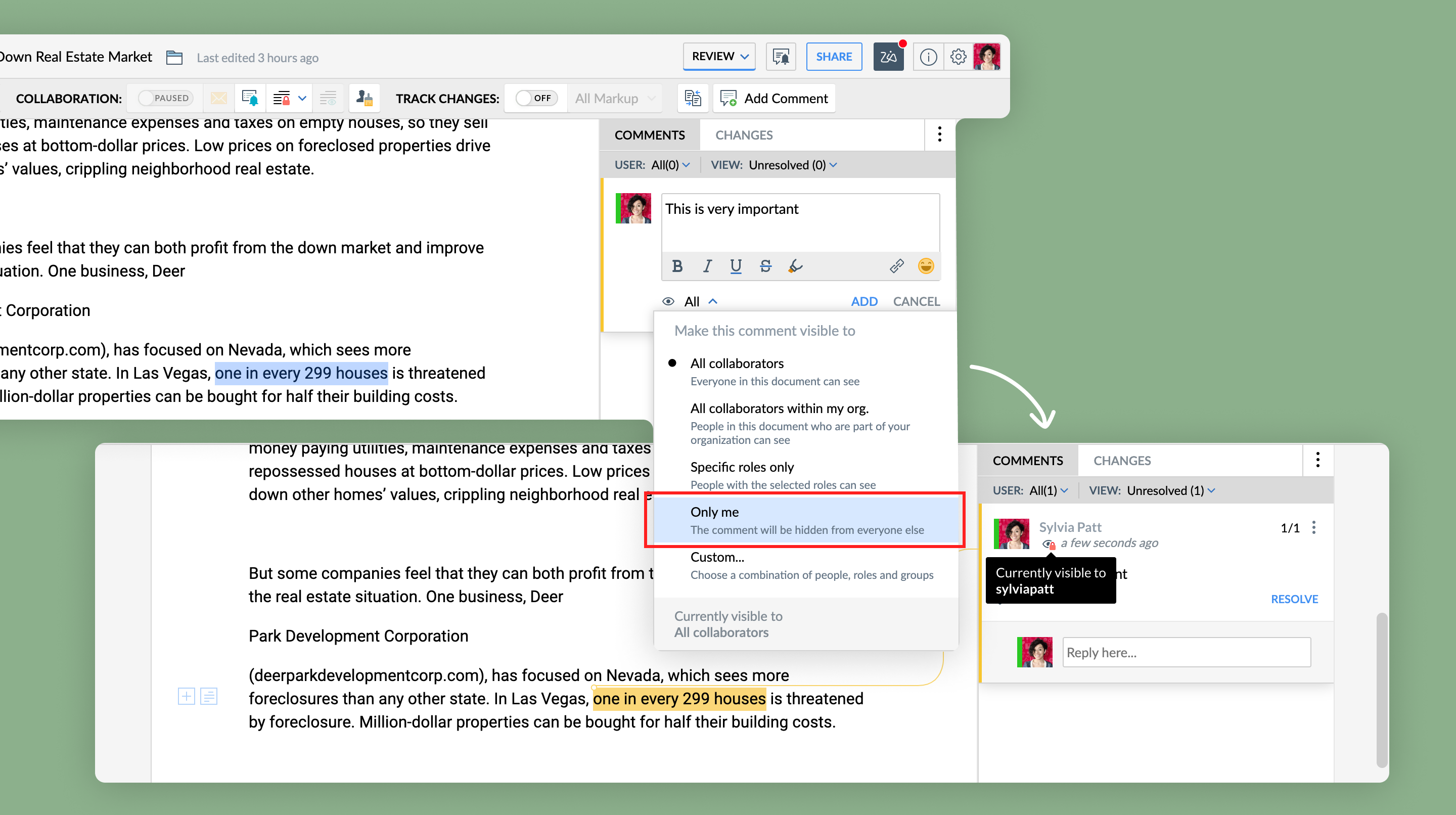
Note: In case you want to keep this note to be private or visible to not only you but also a few of your team members or peers, click the Custom option instead of Only me and add the required users. - Click Add. You will see the
 icon in your comment, indicating that it is private and will be visible only to you.
Keep following this space for more articles on the many hidden gems in Writer. Need any assistance or info, just drop an email to support@zohowriter.com
Happy Writing!
Topic Participants
Shri Rakkshaa Gk
Sticky Posts
8 Neat Tricks in Writer You Should Know About
Want to get the most out of Writer and speed up your work? You've come to the right place. We've compiled some productive shortcuts in Writer that can help you get work done more quickly: 1. Look up synonyms No more need for a bulky thesaurus! Use Writer's synonym suggestions to explore different word choices, and find the one that fits your style and tone the best. All you have to do is right-click on a word, and select Synonyms from the dropdown list. 2. Insert images, tables and more TypingTip #26: Filter your records before merging a document
Tom is an HR executive who has to send onboarding emails every month to newly joined employees. He has a master spreadsheet with all the employee details, and new employees are added to them as they join. It's the month of March and Tom has to send onboarding emails to employees who've joined this month. But, how is Tom going to go through a big spreadsheet with multiple new and past information, and send onboarding emails to the set of newly joined employees? Simple, by filtering and mergingTip: #11 Collaboratively fill documents with your colleagues and clients
Last week we talked about how Fillable Fields can help you create contracts and proposal templates you can repurpose across your processes. This week, we'll talk in detail about how to collaboratively fill those templates with your clients and team. Say you've entered into a contract with multiple clients but the final contract amount is still under negotiation. Using fillable fields, partners can quote their contract fee directly in the template document without affecting other areas of the document. YouTip #07: Five best defaults in Writer you can change to complement the way you work
Find yourself adjusting settings to the way you like every time you create a new document? Try tweaking the default settings instead. From font styles to auto correct options and more, here are the five best defaults settings you can control. 1. Default font style Use your favorite typography across all your documents. You can customize a font style by adding a color, adjusting its size and more, and then set it as default. To do this, go to More Options > Format > Font. Choose a font styleTip #06: Make the best use of Zia in Writer
About to share your work with your team? Looking to get a second opinion quickly before that? Let Zia do it. Zia, Zoho's AI-powered intelligent assistant is now part of Writer. She's trained to check and polish your work. She doesn't just read, she understands. So apart from grammar and spelling checks, she'll let you know when you've used a wrong adjective, or have missed out words based on the context of your piece. Every time you write, Zia makes a scorecard after carefully assessing your
Recent Topics
Separate Items & Services
Hi, please separate items and services into different categories. Thank youZoho mail to contacts and leads, but not to accounts?
We use the accounts tab a lot for our business because they can be linked to the sales orders. Now we want to use the mail add on to link communication of our emails to our accounts. However this is only possible for contacts and leads? It would be convenientZoho CRM || Unable to Bulk Assignment of Territories for Contacts
Dear Zoho CRM Support Team, I hope this email finds you well. We recently performed a bulk upload of Contacts into Zoho CRM using the official sample Excel template downloaded from the CRM. The upload itself was completed successfully; however, we encounteredPython - code studio
Hi, I see the code studio is "coming soon". We have some files that will require some more complex transformation, is this feature far off? It appears to have been released in Zoho Analytics alreadyMarketing Tip #19: Upsell on product page to increase order value
Upselling doesn’t have to feel pushy. It can actually feel helpful when done right. Think "people also bought", upgrades, add-ons, or complementary items. A smart upsell increases your average order value and improves the customer experience by makingCRM limit reached: only 2 subforms can be created
we recently stumbled upon a limit of 2 subforms per module. while we found a workaround on this occasion, only 2 subforms can be quite limiting in an enterprise setting. @Anonymous User I've read about imminent increase of other components (e.Kaizen #198: Using Client Script for Custom Validation in Blueprint
Nearing 200th Kaizen Post – 1 More to the Big Two-Oh-Oh! Do you have any questions, suggestions, or topics you would like us to cover in future posts? Your insights and suggestions help us shape future content and make this series better for everyone.オンライン勉強会のお知らせ Zoho ワークアウト (2/19 参加無料)
ユーザーの皆さま、こんにちは。コミュニティチームの中野です。 2月開催のZoho ワークアウトについてお知らせします。 今回はZoomにて、オンライン開催します。 ▶︎参加登録はこちら(無料) https://us02web.zoom.us/meeting/register/6AyVUxp6QDmMQiDGXGkxPA ━━━━━━━━━━━━━━━━━━━━━━━━ Zoho ワークアウトとは? Zoho ユーザー同士で交流しながら、サービスに関する疑問や不明点の解消を目指すイベント「ZohoRemoving Tables from HTML Inventory Templates - headers, footers and page number tags only?
I'm a bit confused by the update that is coming to HTML Inventory Templates https://help.zoho.com/portal/en/kb/crm-nextgen/customize-crm-account/customizing-templates/articles/nextgen-update-your-html-inventory-templates-for-pdf-generator-upgrade It saysAbility to Link Reported Issues from Zoho Desk to Specific Tasks or Subtasks in Zoho Projects
Hi Zoho Desk Team, Hope you're doing well. When reporting a bug from Zoho Desk to Zoho Projects, we’ve noticed that it’s currently not possible to select an existing task or subtask to associate the issue with. However, when working directly inside ZohoHow do i move multiple tickets to a different department?
Hello, i have several tickets that have been assigned to the wrong department. I am talking about hundreds of automatically generated ones that come from a separate system. How can i select them all at once to move them to another department in one go? I can select them in "unsassigned open tickets view" but i can't find a "move to another department" option. I also can't seem to assign multiple tickets to the same agent in that same view. Could somebody advice?Let us view and export the full price books data from CRM
I quote out of CRM, some of my clients have specialised pricing for specific products - therefore we use Price Books to manage these special prices. I can only see the breakdown of the products listed in the price book and the specialised pricing forSet Default Status of Assembly to "Assembled" When Entered in UI
I've just discovered the new "confirmed" status of Assemblies within Inventory. While I understand the intent of this (allowing for manufacturing planning and raw material stock allocation), it was initially confusing to me when manually entering someHow to apply customized Zoho Crm Home Page to all users?
I have tried to study manuals and play with Zoho CRM but haven't found a way how to apply customized Zoho CRM Home Page as a (default) home page for other CRM users.. How that can be done, if possible? - kipi Moderation Update: Currently, each user hasPlug Sample #14: Automate Invoice Queries with SalesIQ Chatbot
Hi everyone! We're back with a powerful plug to make your Zobot smarter and your support faster. This time, we're solving a common friction point for finance teams by giving customers quick access to their invoices. We are going to be automating invoiceEnrich your contact and company details automatically using the Data Enrichment topping
Greetings, I hope you're all doing well. We're happy to announce the latest topping we've added to Bigin: The Data Enrichment topping, powered by WebAmigo. This topping helps you automatically enhance your contact and company records in Bigin. By leveragingZoho Analytics + Facebook Ads: Performance Alerts for Active Campaigns
Is it possible with integration of Zoho Analytics with Facebook Ads and set up alerts or notifications for active campaigns when performance drops? For example, triggering a notification if CTR goes below a defined threshold or if other key metrics (likeSalesIQ Chat Owner to CRM Lead Owner Mapping
There is no proper mapping between the SalesIQ chat owner and the CRM lead owner. When a chat is assigned to an agent, the lead created in CRM is often assigned to a different user, forcing admins to manually change ownership every time. This createsZoho Billing Partial Proration...
Hi, In Zoho billing, we offer upgrades, downgrades, suspends, and resumes. We use online payment for most subscriptions, but have only a few that are offline, but we treat them the same either way.. We prorate only parts of these changes.. Right now zohoAny update on adding New Customer Payment Providers who support in store terminal devices?
Currently there is only one Customer payment provider listed for terminal devices in USA- Everyware. They charge a monthly fee of almost $149 minimum. Will you add other providers - like Zoho Payments or Stripe or Worldpay that would allow integratedGetting Subform Fields to Display Top to Bottom
I have a form where the fields are all in one column. I want to insert a subform where the fields are stacked in one column as well. I have built both the form and subform but the subform displays the fields from left to right instead of a stacked column. This will cause a problem displaying the subform correctly on mobile apps. How can I do this please?' Here is my form with subform now. As you can see the subform "Follow Up Activity" is displaying the fields left to right. I need them to go top[Feature Deprecated] Gamescope in Zoho Projects
This feature is no longer available. All work and no play makes Jack a dull boy. Well, yes. That's true! Tiring work, buzzing coffee makers, busy turnstiles , occupied meeting rooms, back-to-back status updates and what not. Your everyday routine need not have to be this hectic. It can be more rewarding. It can be more fun. Zoho Projects believes in this fact and hence has launched Gamescope - A module that turns every project into an exciting game and boosts the spirit of your team by leaps andCreating a task, i can not work out how to get ID for What_Id
hi From Module A function I map Module B record reference membershipid (ours). I need Module B Zoho ID to create the related to on task. All examples i've seen start with the Zoho ID. void automation.LTM_Assign_Dispute_Task(String membershipid) { tryHow to Convert NSF to PST Format Effortlessly? - SYSessential
It is highly recommended to obtain the error-free solution of the SYSessential NSF to PST converter to convert NSF files from Lotus Notes. Using this professional software, it becomes easier to convert all NSF database items, including emails, journals,Can't connect to POP and SMTP over VPN
I use Thunderbird to access Zoho Mail via POP and SMTP. I have configured an app-specific password for Thunderbird to use. Everything is properly configured and works correctly — until I enable my VPN. I'm using a paid commercial VPN service (Mullvad).my zoho mail is hacked
my email is sending my username and password to people i dont knowSuministrar accesos
Asunto: Enable UPLOAD_RULE for API Attachments Mensaje: Hola, Necesito habilitar la capacidad de subir attachments vía API en Zoho Mail. Actualmente recibo el error: "UPLOAD_RULE_NOT_CONFIGURED" al usar el endpoint: POST /api/accounts/{accountId}/messages/attachmentsIntroducing real-time document commenting and collaboration in Zoho Sign
Hi, there! We are delighted to introduce Document commenting, a feature that helps you communicate with your recipients more efficiently for a streamlined document signing process. Some key benefits include: Collaborate with your recipients easily withoutTicket Loop from Auto Responce
We’re seeing an issue where a client’s help desk triggers a ticket loop. When they email us, our system creates a ticket and sends the acknowledgement. Their system then creates a ticket from that acknowledgement and sends one back to us, which createsvalidation rules doesn't work in Blueprint when it is validated using function?
I have tried to create a validation rule in the deal module. it works if I try to create a deal manually or if I try to update the empty field inside a deal. but when I try to update the field via the blueprint mandatory field, it seems the validationHow to make rule to filter out some emails from receiving the notification "Receiving a new ticket"?
Good Morning, We are currently using the "Receiving a new ticket" notification rule to provide that auto reply template to a customer that emails us for support. However, there are some emails we don't want to receive this auto-reply. Where can I setZoho Signatures Missing
In the past after collecting signatures from two different PDFs I would merge them by calling an api and the signatures would appear in the combined PDF. Recently the signatures have disappeared whenever I combine the PDFs together. Why did this randomlyStop the Workarounds: We Need Native Multi-Step Forms
After over 17 years of community requests, I'm hoping the Zoho team can finally address the lack of native multi-page form support in Zoho Creator. This has been one of the longest-standing feature requests in the community, with threads spanning nearlyFilter button in the Zoho Sheet Android App doesn't toggle on
I am a new Zoho Sheets user and experiencing a specific issue with the filter functionality in the Android mobile application. Detailed Issue Description: The filter icon appears correctly in the toolbar. Upon tapping the filter icon/button, the toggleAutomate pushing Zoho CRM backups into Zoho WorkDrive
Through our Zoho One subscription we have both Zoho CRM and Zoho WorkDrive. We have regular backups setup in Zoho CRM. Once the backup is created, we are notified. Since we want to keep these backups for more than 7 days, we manually download them. TheyExciting Updates to the Kiosk Studio Feature in Zoho CRM!
Hello Everyone, We are here again with a series of new enhancements to Kiosk Studio, designed to elevate your experience and bring even greater efficiency to your business processes. These updates build upon our ongoing commitment to making Kiosk a powerfulUnable to change Company Logo
Hi Guys, I have an issue where I've uploaded a Company image in Gif format and the logo has now got a black background whereas the logo is supposed to be black not the background. I didn't think it would be an issue so I created a PNG version to upload instead but when clicking 'Change Image' it isn't giving me the option to upload a new one nor does it remove the existing one if I then save after clicking change. Any support greatly appreciated as It looks awful at the moment. Kind regards, PaulReply to Email for SO/PO
Hello, We are new to Zoho Books and running into an issue. Our support@ email is our integration user. When our team is sending out PO/SO's we are updating the sender email, but for some reason many of our responses are coming back to our support@ emailNew activity options for workflows
Greetings, We are excited to announce the addition of two new dynamic actions to our workflow functionality: Create Event and Schedule Call. These actions have been thoughtfully designed to enhance your workflow processes and bring more efficiency toRemove the “One Migration Per User” Limitation in Zoho WorkDrive
Hi Zoho WorkDrive Team, Hope you are doing well. We would like to raise a critical feature request regarding the Google Drive → Zoho WorkDrive migration process. Current Limitation: Zoho WorkDrive currently enforces a hard limitation: A Zoho WorkDriveNext Page