Building extensions #8: Improve and enhance user experience with modal boxes
Modal box - What is it and where can you use it?
A modal box is a user interface pop-up window or dialog box that appears over the currently active UI screen. When prompted, the modal box deactivates all other page content until the user closes it. The modal box feature is commonly used to display information based on user input or to engage the user in some activity, such as an attachment picker, where they can proceed only after selecting an attachment.
Support offered in Zoho Projects for modal boxes
Zoho Projects provides support for modal boxes through extension development, which includes methods for opening and closing modal boxes, passing and receiving data to and from modal boxes, and so on. You can view the various methods offered by Zoho Projects to use modal boxes in this document.
In this post, we'll go over an example scenario for using a modal box in depth.
Scenario
A Zoho Desk ticket agent handles issue/feature request tickets in Zoho Projects to work on development-related requests. When the development in Zoho Projects is completed, the Desk agent provides a solution to the customer. In this case, it would be beneficial for the Desk agent to have all open Desk tickets associated with them displayed in a single, dedicated tab within Zoho Projects.
Goal
Improve, enhance, and simplify an agent's work in Zoho Projects by:
➤ Showcasing all open Desk tickets within a single tab.➤ Providing them with ticket-specific details, allowing them to view ticket details and prioritize the Zoho Projects task associated with that ticket accordingly.
Solution
To accomplish this goal, use the modal box feature as part of the widgets concept discussed earlier. A Project tab widget labeled "Desk open tickets" can be created to display all open Desk tickets associated with an agent. When a specific ticket is selected, the agent can access all relevant information about the ticket, such as its status, priority, and so on. This will allow them to prioritize and work on the appropriate task in Zoho Projects that is associated with that ticket.
Now, let's go ahead and see the components that would be required to achieve this use case solution as part of an extension.
Required components
- In order to establish a secure integration between Zoho Projects and Zoho Desk for a seamless data transfer, a connection between Zoho Projects and Zoho Desk has to be established.
- An extension configuration process includes:
- Creating an extension.
- Configuring the plugin manifest.
- Setting up the widget code.
- Display all open Zoho Desk tickets associated with an agent in a tab called "Desk open tickets."
- Incorporate the modal box feature to display ticket-specific details while the agent chooses a ticket from the list of open desk tickets.
We have already explored the steps to establish a connection, create an extension, and configure the plugin-manifest.json file as part of our earlier posts. You can refer to those resources for detailed guidance. In this case, we have already completed most of these steps (screenshots below).
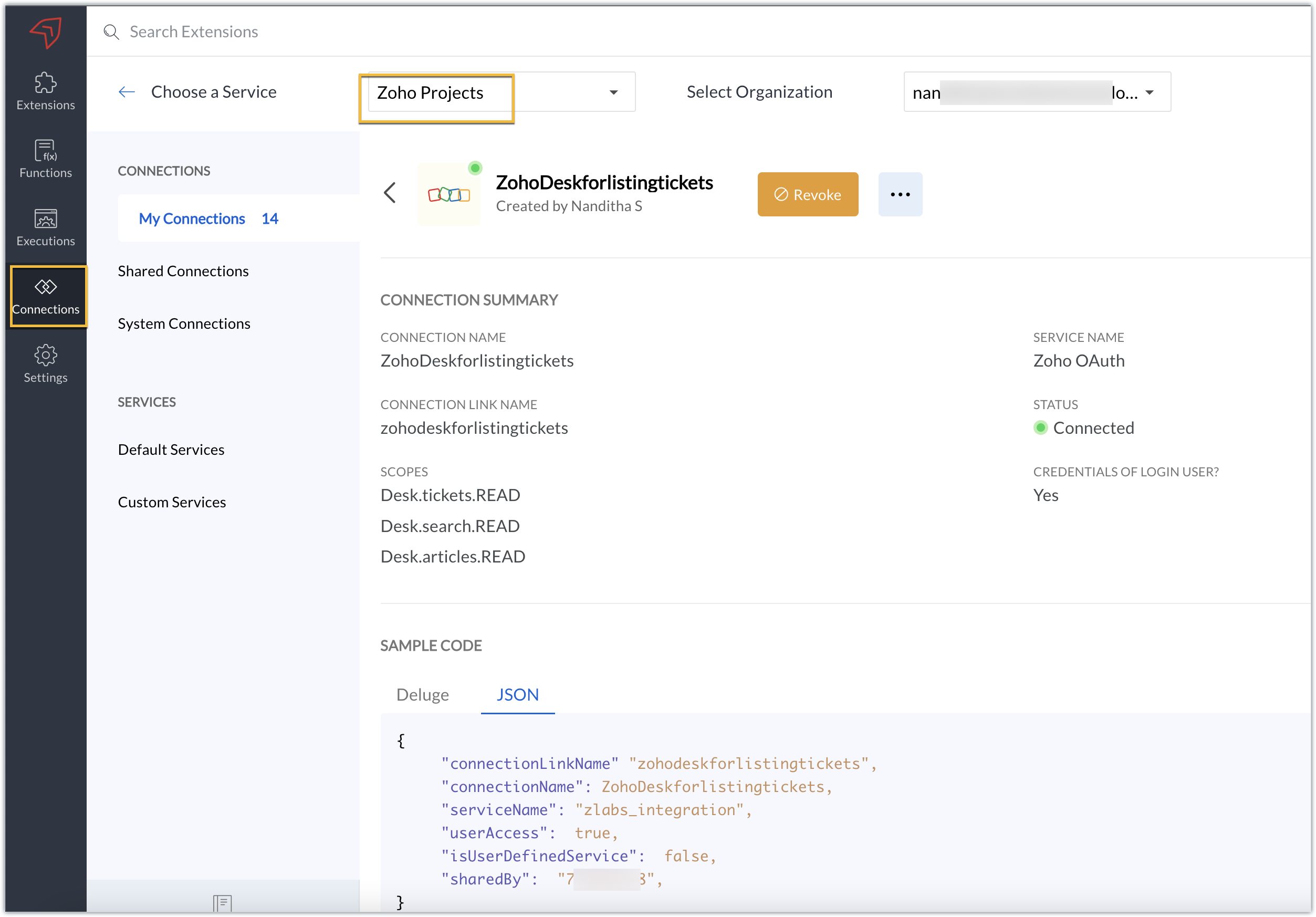
Connection
We have created a connection to establish a secure integration between Zoho Projects and Zoho Desk.
Extension configuration
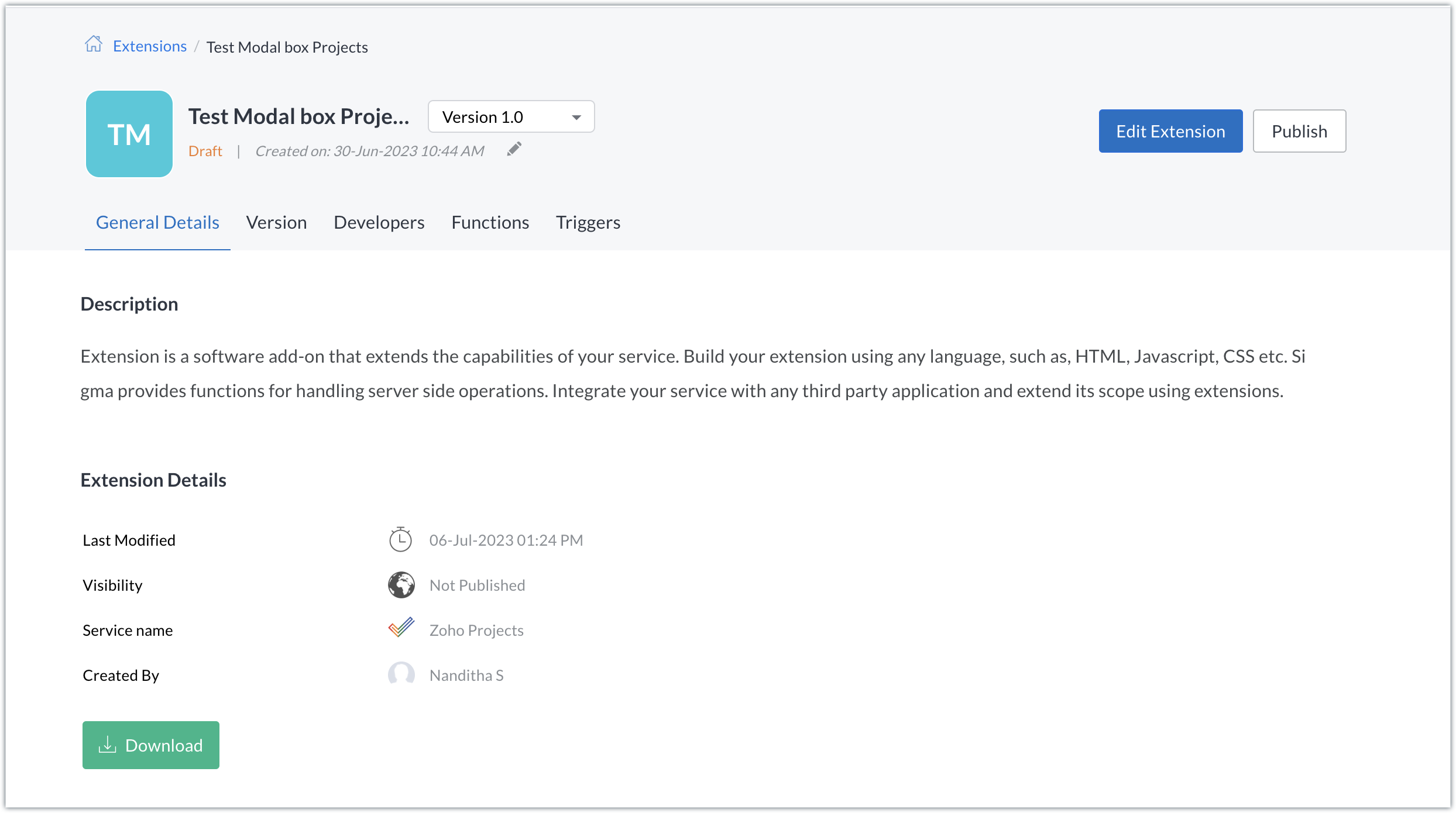
Extension creation: We have created a new extension for Zoho Projects.
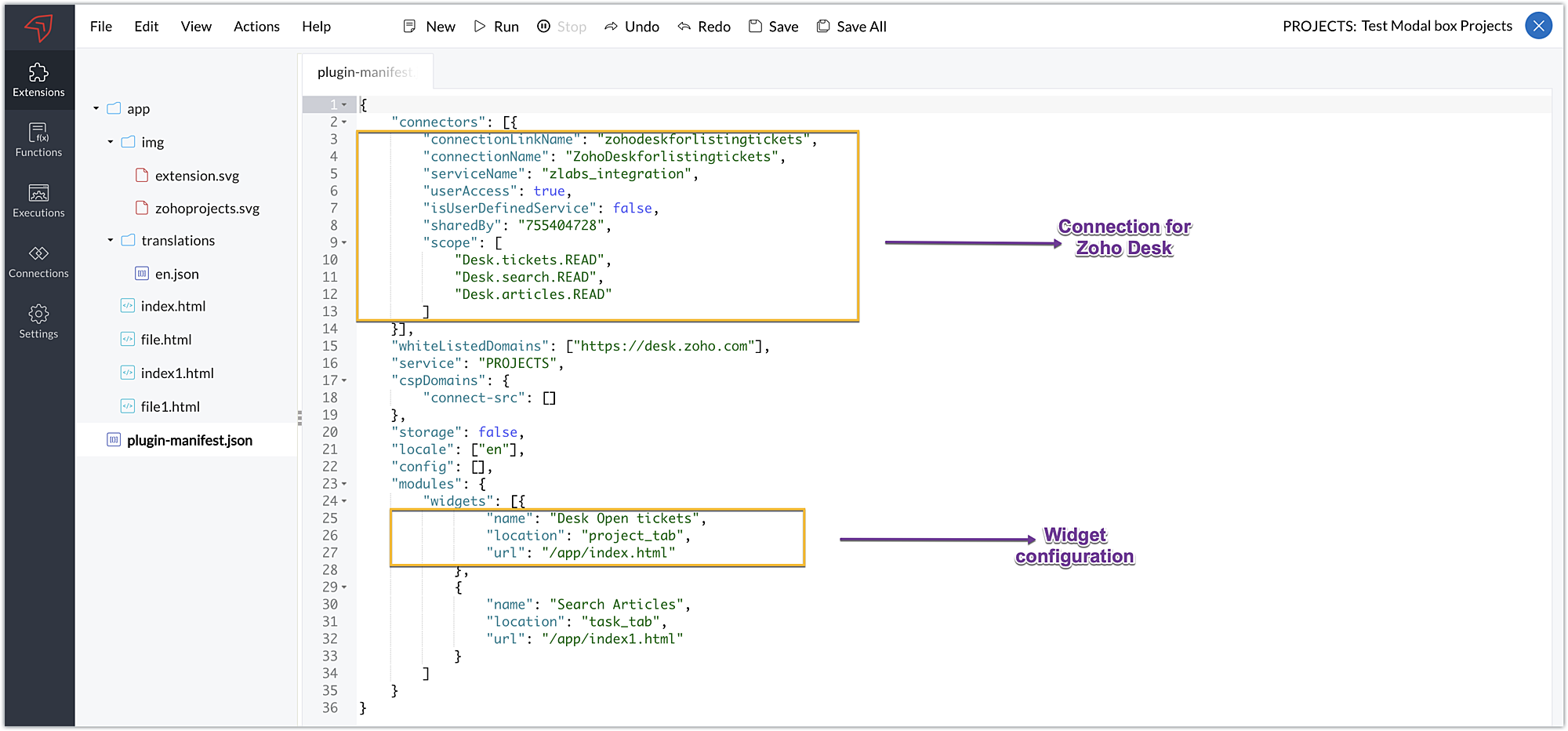
Plugin-manifest.json configuration: Once the extension was created, we configured the plugin-manifest.json file to include the created connection and a widget.
For our extension use case, the plugin-manifest.json file is configured as shown in the below screenshot.
Setting up the widget code
Now that we've set up the other components, let's move on to writing our widget code and incorporating the modal box feature.
Displaying open tickets in "Desk open Tickets" tab code snippet - index.html (find attachment in post)
- In the code snippet, the Zoho Desk API to list all associated tickets is invoked using the Zoho Projects request JS SDK method to get associated desk tickets.
- Certain mandatory parameters must be passed to the Zoho Projects Request Method, such as the third-party URL, data object, and connection. The details for the mentioned parameters in our use case are as follows:
➤ Data object - The data that must be constructed in order to invoke the third-party URL.➤ Connection - The name of the secure connection link created and configured in the plugin-mainfest.json file, as described in the previous section.
- A dropdown list displaying all open and associated desk tickets is created using the Zoho Desk API response.
- The dropdown list value selected by the end-user (i.e. the chosen ticket) is then fetched and stored in a variable called "selected ticket ID."
- Upon clicking Get Ticket Details, a modal box instance is created and opened using the modal.create and instance methods. The selected ticket ID value is emitted using the emit method with the keyword "stored-files" when the modal box is opened.
If you require further details on how the Zoho Projects Request method works, you can refer to our earlier post which explains the working and the required parameters for invoking this method in detail.
Modal box to display the details of the chosen ticket - file.html (find attachment in post)
- In the code snippet, the value emitted using the emit method for the keyword "stored-files" is received by the on method in the modal box UI. Using the received value, a hit is made to the Zoho Desk Get tickets API using the Zoho Projects Request Method again.
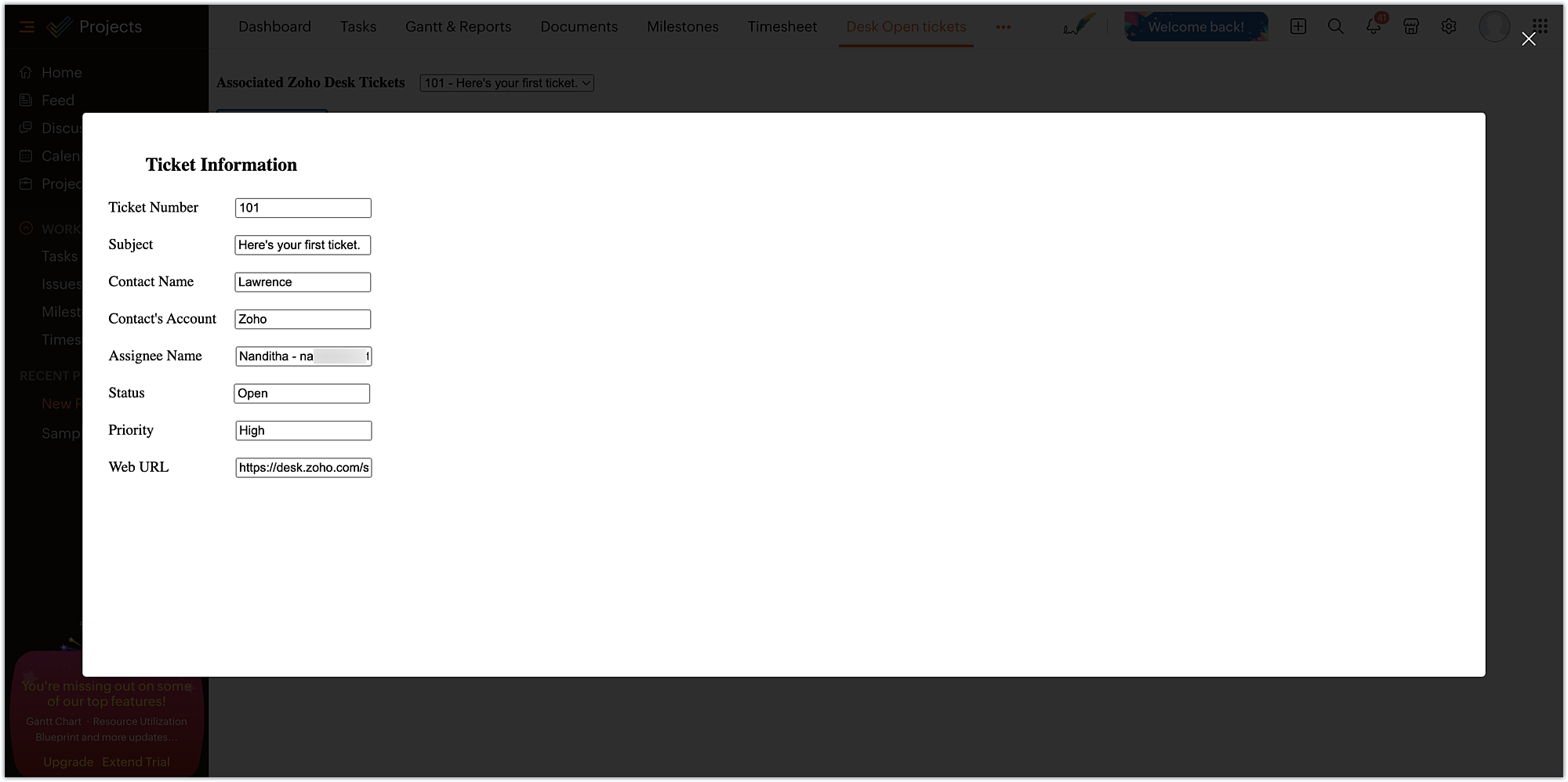
- From the ticket-specific details returned as the response of the Zoho Desk Get tickets API, the necessary details are fetched and then displayed to the agent for their reference. These details help them check on the status and prioritize the relevant Zoho Projects task related to that ticket.
Now, that we have completed the setup and have all the extension components ready, let's go ahead and see the output.
Sample output:
- Enter the Zoho Projects portal and select a project.
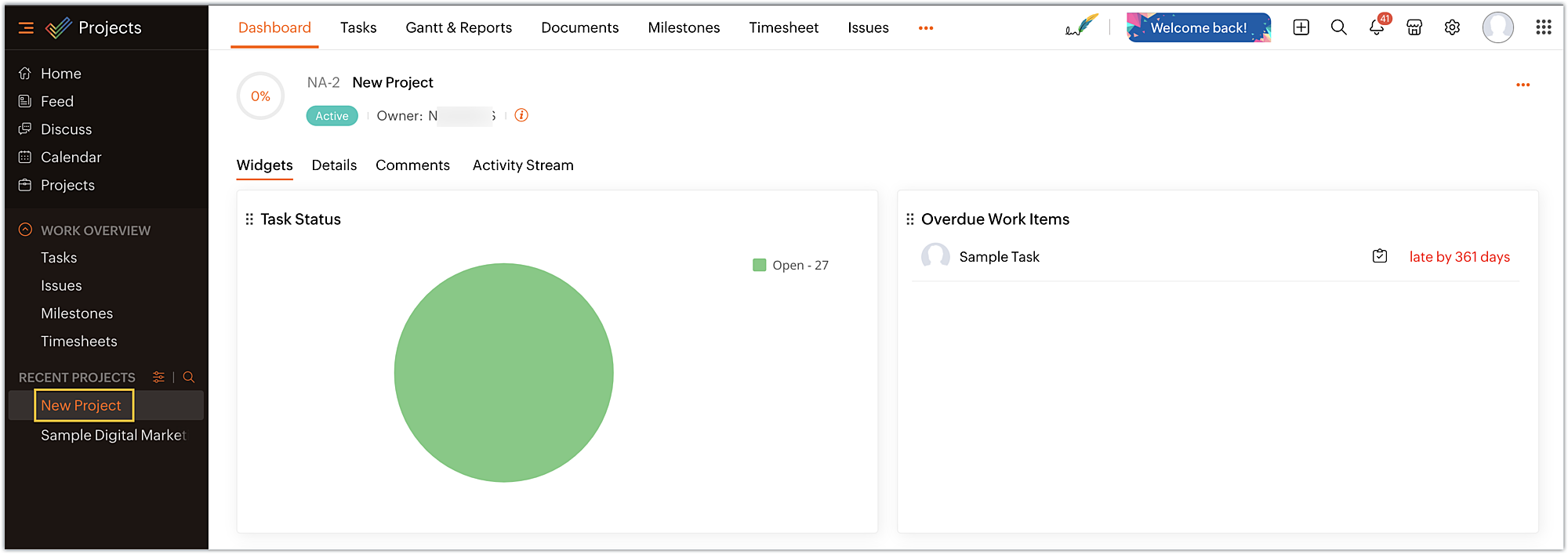
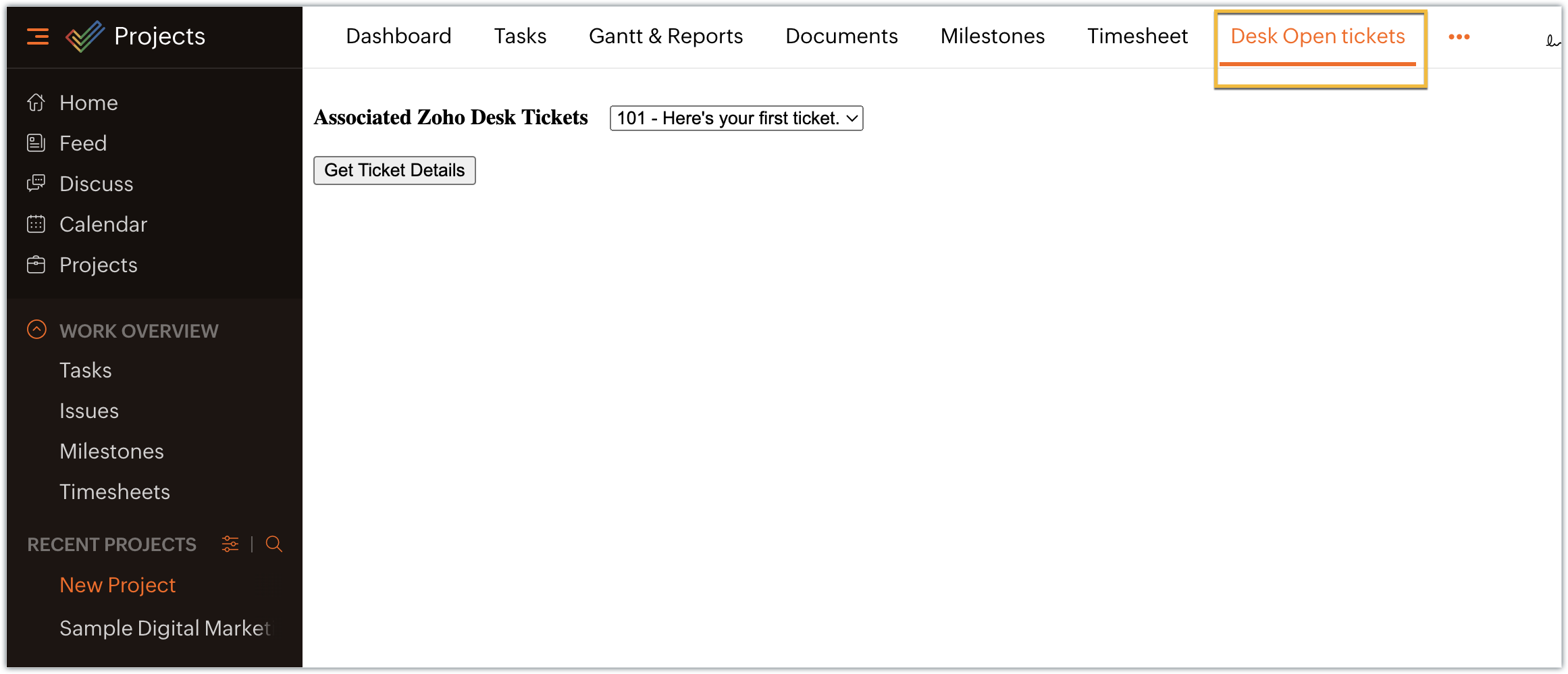
- Select the Desk open tickets option under the Projects tab. The dropdown menu appears, displaying a list of associated open tickets. Choose the ticket for which you want more details and click on Get Ticket Details.
- The selected ticket details are displayed in the modal box.
In this example, we have used the modal box feature to display some information based on user input. Similarly, a modal box can also be used to engage the user in performing some activity, like an attachment picker, wherein they can proceed further only after choosing an attachment. We hope you found this information useful. Keep following this space for more insights!
 Sign up for a Zoho Developer account and start developing extensions for Zoho products using Sigma.
SEE ALSO
Topic Participants
Nanditha Somasundaram Somasundaram
Sticky Posts
Building extensions #10: Fetch customized user inputs, store them globally at the app level, and access them across entities
This data storage concept enables you to store data related to your extension for both entity properties and extension properties. In our previous piece, we looked at how to store data for entities using entity properties. In this post, we'll look atBuilding extensions #9: Store, retrieve, and access entity-specific data in widgets using data storage
Data storage - Overview Storing data related to the extension you are working on is essential. It can be saved as key-value pairs for an entity or extension, known as entity and extension properties, respectively. Data can be saved for the following entitiesBuilding extensions #7: Create custom widgets for a simplified end-user experience
Discover the benefits of using widgets! We explored the significance of widgets, prerequisites, and the availability of JS SDK methods as part of our previous post. In this post, let's go over a detailed example of using widgets along with certain ZohoBuilding extensions #6: Custom user interfaces with Widgets
Welcome to our post on Widgets for Zoho Projects! In our last post, we explored the significance of the connections feature, showed how to use it, and provided an example use case. In this article, we'll look at the importance of widgets, another featureBuilding extensions #5: Integrating applications with Zoho Projects through Connections
In our last post, we discussed the essential features that a Zoho Projects extension can provide. Starting with this post andin every subsequent post going forward, we'll go through each of those features in depth, one by one, with an example use case.
Recent Topics
Dheeraj Sudan and Meenu Hinduja-How do I customize Zoho apps to suit my needs?
Hi Everyone, I'm Meenu Hinduja and my husband Dheeraj Sudan, run a business. I’m looking to tweak a few things to fit my needs, and I’d love to hear what customizations others have done. Any tips or examples would be super helpful! Regards Dheeraj SudanZoho Desk API - Send Reply to CUSTOMERPORTAL
Hello! I'll try to send a reply to Customer Portal, But the response is 500 (INTERNAL_SERVER_ERROR in service response). {"Error":"{\"errorCode\":\"INTERNAL_SERVER_ERROR\",\"message\":\"An internal server error occurred while performing this operation.\"}"}From Zoho CRM to Paper : Design & Print Data Directly using Canvas Print View
Hello Everyone, We are excited to announce a new addition to your Canvas in Zoho CRM - Print View. Canvas print view helps you transform your custom CRM layouts into print-ready documents, so you can bring your digital data to the physical world withPayroll and BAS ( Australian tax report format )
Hello , I am evaluating Zoho Books and I find the interface very intuitive and straight forward. My company is currently using Quickbooks Premier the Australian version. Before we can consider moving the service we would need to have the following addressed : 1.Payroll 2.BAS ( business activity statement ) for tax purposes 3.Some form of local backup and possible export of data to a widely accepted format. Regards Codrin MitinZoho Books Payroll
How am I supposed to do payroll and pay my employees with Zoho Books? I think it's pretty strange that an accounting software doesn't have the ability to perform one of the most common functions in business; paying your employees. Am I missing something,Layout Rules Don't Apply To Blueprints
Hi Zoho the conditional layout rules for fields and making fields required don't work well with with Blueprints if those same fields are called DURING a Blueprint. Example. I have field A that is used in layout rule. If value of field A is "1" it is supposed to show and make required field B. If the value to field A is "2" it is supposed to show and make required field C. Now I have a Blueprint that says when last stage moves to "Closed," during the transition, the agent must fill out field A. Nowvalidation rules doesn't work in Blueprint when it is validated using function?
I have tried to create a validation rule in the deal module. it works if I try to create a deal manually or if I try to update the empty field inside a deal. but when I try to update the field via the blueprint mandatory field, it seems the validationSort Legend & stacked bar chart by value
I'd love to see an option added to sort the legend of graphs by the value that is being represented. This way the items with the largest value in the graph are displayed top down in the legend. For example, let's say I have a large sales team and I createAnalytics : How to share to an external client ?
We have a use case where a client wants a portal so that several of his users can view dashboards that we have created for them in Zoho Analytics. They are not part of our company or Zoho One account. The clients want the ability to have user specific,Is It Possible to Convert a Custom Module to a Quote?
I recently created a custom module in our CRM environment for RFQs so that our sales team can submit quote requests directly in Zoho rather than by email/phone. This allows for a cleaner overall process, minimizing potential errors and potentially encouragingAll new Address Field in Zoho CRM: maintain structured and accurate address inputs
The address field will be available exclusively for IN DC users. We'll keep you updated on the DC-specific rollout soon. It's currently available for all new sign-ups and for existing Zoho CRM orgs which are in the Professional edition. Latest updateHow can Data Enrichment be automatically triggered when a new Lead is created in Zoho CRM?
Hi, I have a pipeline where a Lead is created automatically through the Zoho API and I've been trying to look for a way to automatically apply Data Enrichment on this created lead. 1) I did not find any way to do this through the Zoho API; it seems likeClient Side Scripts for Meetings Module
Will zoho please add client side scripting support to the meetings module? Our workflow requires most meeting details have a specific format to work with other software we have. So we rely on a custom function to auto fill certain things. We currentlyProposal: Actionable API Error Messages to Reduce Support Ticket Volume
I've encountered a long-standing frustration with how Zoho Creator's API communicates errors to developers, and I'm hoping the Zoho team can address this in a future update. This issue has persisted for over 9 years based on community discussions, andZoho CRM - Option to create Follow-Up Task
When completing a Zoho CRM Task, it would be very helpful if there was an option to "Complete and Create Follow-Up Task" in the pop-up which appears. It could clone the task you are closing and then show it on the screen in edit mode, all the user wouldDynamic Field Folders in OneDrive
Hi, With the 2 options today we have either a Dynamic Parent Folder and lots of attachments all in that one folder with only the ability to set the file name (Which is also not incremented so if I upload 5 photos to one field they are all named the sameDrag 'n' Drop Fields to a Sub-Form and "Move Field To" Option
Hi, I would like to be able to move fields from the Main Page to a Sub-Form or from a Sub-Form to either the Main Page or another Sub-Form. Today if you change the design you have to delete and recreate every field, not just move them. Would be nice toFile Conversion from PDF to JPG/PNG
Hi, I have a question did anyone every tried using custom function to convert a PDF file to JPG/PNG format? Any possibility by using the custom function to achieve this within zoho apps. I do know there are many third parties API provide this withAllocating inventory to specific SO's
Is there a way that allocate inventory to a specific sales order? For example, let's say we have 90 items in stock. Customer 1 orders 100 items. This allocates all 90 items to their order, and they have a back order for the remaining 10 items which couldCliq iOS can't see shared screen
Hello, I had this morning a video call with a colleague. She is using Cliq Desktop MacOS and wanted to share her screen with me. I'm on iPad. I noticed, while she shared her screen, I could only see her video, but not the shared screen... Does Cliq iOS is able to display shared screen, or is it somewhere else to be found ? RegardsClosing the Loop: Why Lookup Asymmetry is Harming Data Integrity in Creator
TL;DR: Lookup fields allow users to add new related records inline via the "+" icon, but there's no equivalent ability to edit an existing related record without navigating away and losing form context. Adding a native "Edit" icon—with automatic UserAdd the ability to Hide Pages in Page Rules
Hi, We have Field Rules to show and hide fields and we have page Rules, but we can't hide a page in Page Rules so it isn't completed before the previous page (And then have the Deny Rules to prevent submitting without both pages completed), we can onlyEnable Free External Collaboration on Notecards in Zoho Notebook
Hi Zoho Notebook Team, I would like to suggest a feature enhancement regarding external collaboration in Zoho Notebook. Currently, we can share notes with external users, and they are able to view the content without any issue. However, when these externalusing the Client script on the load of the form if service no is empty means then i want to make issue relate to is Service
using the Client script on the load of the form if service no is empty means then i want to make issue relate to field is Service if Purchae no is empty means then i want to make issue relate to is PurchaseChanges to the send mail Deluge task in Zoho CRM
Hello everyone, At Zoho, we continuously enhance our security measures to ensure a safer experience for all users. As part of our ongoing security enhancements, we're making an important update on using the send mail Deluge task in Zoho CRM. What's changing?Work Order wont mark as Completed
I have a couple of work orders that won't mark as completed even when I've marked the Service Appointments as completed fully.Item name special charaters <>
Im trying to input speical characters such as < and > into item name and item description but comes up with following error: Invalid value passed for Item Name and Invalid value passed for Item Description How do i allow speical characters?Zoho Analytics Dashboard - How to hide the user filter
I am using the same dashboard template across different external clients and applying a user filter to the data by site URL. How can I hide the user filter in View Mode so the external client won't see the list of other clients in the drop-down menu?Customer Parent Account or Sub-Customer Account
Some of clients as they have 50 to 300 branches, they required separate account statement with outlet name and number; which means we have to open new account for each branch individually. However, the main issue is that, when they make a payment, theyCannot get code to work with v2.mergeAndStore!
Please can someone help me pass subform items into a repeating mail merge table row using v2.mergeAndStore? I have a mail merge template created in Writer and stored in Workdrive. This template is referenced by a custom CRM function which merges all ofKaizen #229: Email-Deal Associations in Zoho CRM
Hi All, Welcome back to another week of Kaizen! Emails are a core channel for customer communication in any CRM system. In Zoho CRM, emails can be associated with records across multiple modules. In this post, we will focus on email associations withDeprecation of the Zoho OAuth connector
Hello everyone, At Zoho, we continuously evaluate our integrations to ensure they meet the highest standards of security, reliability, and compliance. As part of these ongoing efforts, we've made the decision to deprecate the Zoho OAuth default connectorAction Required: Update Microsoft SQL Server Security Settings Before February 2026
Dear Users, We recently deployed security updates in Zoho Analytics that inadvertently caused connection failures for a few customers using Microsoft (MS) SQL Server hosted on older Windows versions (Windows Server 2012, 2012 R2, and 2014). To restoreContacts limit in basic vs standard - what counts? Are customers contacts?
I’ve been using books for a number years for my small business. I only ever work with 20 clients at any given time. I do purchase services from a number of vendors to run my business, so there are some comtacts there too. I used to use the basic package,Saving issue
First problem I opened a MS word file in writer. after the work is done, it does not save instantly, I waited for like 10min and it still did not save. second problem When I save a file, then file gets saved as another copy. I just did save, not saveAutomating Employee Birthday Notifications in Zoho Cliq
Have you ever missed a birthday and felt like the office Grinch? Fear not, the Cliq Developer Platform has got your back! With Zoho Cliq's Schedulers, you can be the office party-cipant who never forgets a single cake, balloon, or awkward rendition ofCreate Tasklist with Tasklist Template using API v3
In the old API, we could mention the parameter 'task_template_id' when creating a tasklist via API to apply a tasklist template: https://www.zoho.com/projects/help/rest-api/tasklists-api.html#create-tasklist In API v3 there does not seem to be a way toHow to mix different types of inputs (such as dropdown list and textbox)
Hi, I'm creating a form called "Room Reservations" for a company. I created a "table" using "Matrix Choice". I created "Room 1", "Room 2" and "Room 3" with the "Questions". I would then like to create two columns with the "Answers", one called "Department"Ability to Set a Unified Tab Order/View for All Users in Zoho Projects
Hello Zoho Projects Team, We hope you are doing well. We would like to submit a feature request regarding tab/menu organization in Zoho Projects. Current Behavior: The tab (module) order in Zoho Projects is user-specific. Each user (internal or external)Task Order
Hello! I've recently switched to Zoho Projects and a long time user of MS Project, Asana and LiquidPlanner (which has recently been purchased) and I'm running into a frustration I'm hoping someone can assist with. It has to do with how tasks are orderedNext Page